103 posts tagged with "Helium"

View All Tags

Hotspotty Improved: Deep Research For A Better Way

· 9 min read
Nik
Site Owner

The Hotspotty team was gracious enough with their time to walk me through some significant improvements of their Helium tool.

Bottom Line Up Front: If you run a fleet of hotspots, using the newest version of Hotspotty will make managing payments FAR easier, will improve your deployments at scale, and will help you assess the impact of PoCv11.

Do you need this if you're not running a fleet? While it's still useful, the payments & assessment features won't have as much impact on you.

At the end of the day, no matter if you're got one hotspot or ten thousand, the winning formula is:

Do a good job, accurately report what you’ve done and you’re most likely to earn the most possible.

-zee Gristleking

Quick disclaimer: I randomly selected hotspot and wallet addresses for the examples in this blog post. With one exception, I have no idea who these people are. All of this is public information, but none of it is connected to any official Gristle King work or clients.

With that out of the way, let's dig in. I'd recommend signing up for an account at Hotspotty and having a separate window open with your Hotspotty account while we go through this.

You can watch the interview I did with them on this new version, here:

https://youtu.be/tD5UnpUakjI

We'll start with a few definitions, then go into the workflow recommended by Hotspotty

Hotspot - This is a physical hotspot that has been added to the blockchain and has a three word name (Rhythmic Red Rooster, etc)

Location - This is where your Hotspot physically is. That should be within 150m of where you've asserted it on the blockchain (using the Helium app). You may have "mis-asserted" for privacy reasons or to clear a hex. Locations can also be used as "proposed" locations where you're thinking of putting a hotspot.

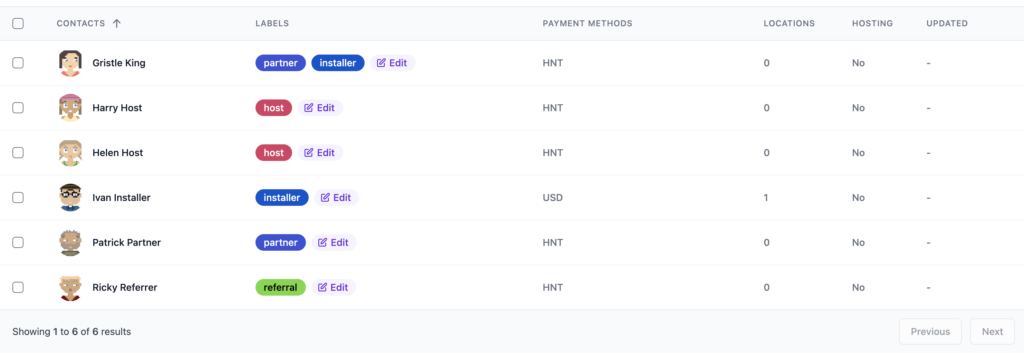
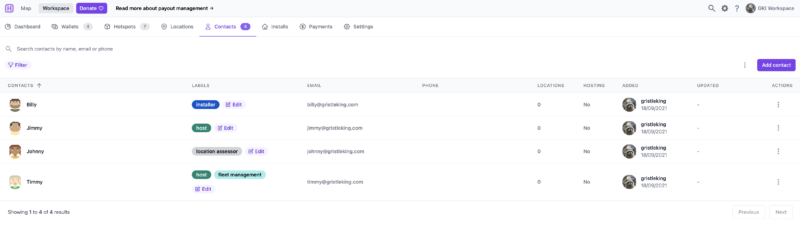
Contact - This is a person associated with the Install. They could be the installer, a host, a partner in your business, a referrer, or something else. Each Contact can have a different (or none at all) commission applied.

Install - This ties together the above three things: The Hotspot itself, its physical Location, and the Contacts associated with it.

I'll warn you up front; Hotspotty is NOT the simplest way to manage just a few hotspots, and can be overwhelming/overkill if you're not running a fleet of 'em. If, however, you ARE running a fleet, well, Hotspotty is an excellent tool.

So the workflow goes like this: Order Hotspot-->Create Payment Structure-->Assess Locations-->Identify Contacts-->Receive Hotspot-->Create an Install.

An Install connects the Hotspot, the Location, and the Contact. The order can jumble around a bit depending on what you're doing, as you'll see. Let's start at the beginning.

First, you order your Hotspots.

While you're waiting for the Hotspots to arrive, you've got a few things to do in Hotspotty. One is to create the structure for what you're doing, starting with your commission structure.

Are you going to pay a 20% commission or a 50% one? Is there a standard installer fee you're going to pay? Do you have partners you need to split this with? Each one of those splits is associated to a Label in Hotspotty.

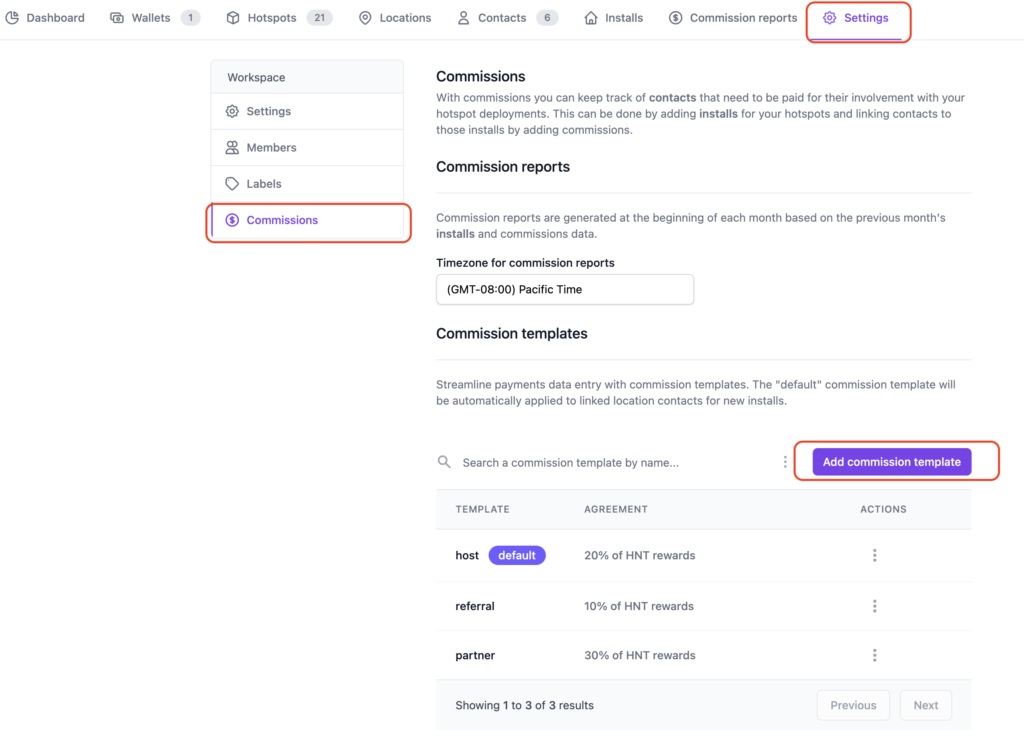
Let's go into Hotspotty's Settings and get this set up. Make sure you're in the Workspace (not the Map), then look for Settings on the top right.

Once in Settings, look for Commissions on the little menu on the left, then set up templates for what you'll pay out. I added Host, Referral, and Partner.

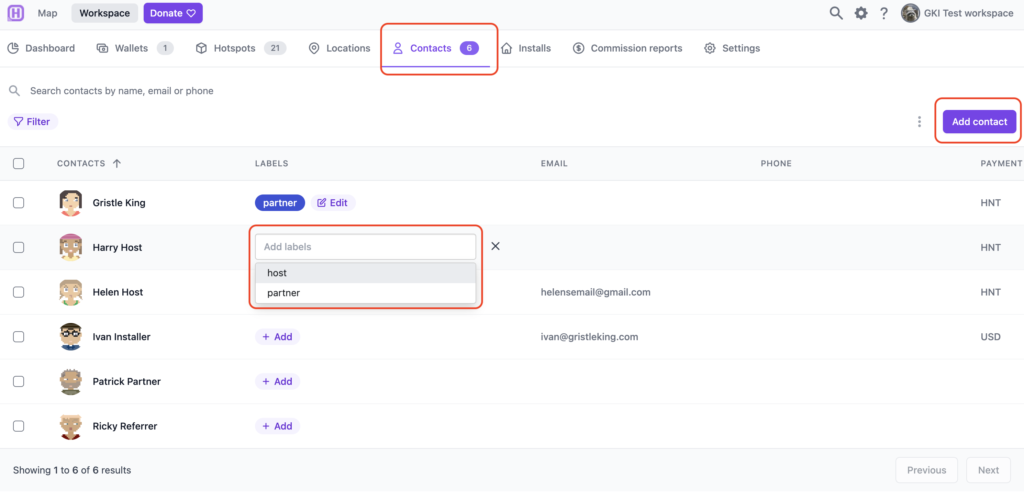
Now you know WHAT you're going to pay, you've got choices as to your next steps. You can add Contacts or you can add Locations. I'll start with Contacts, but what you do will depend on your scenario.

For each Contact you can add Labels. A Contact can have multiple Labels. The default labels come from the Commission setup you just did, but you can add custom labels; I added an "Installer" label for old Ivan, then used it for Gristle King as well. I mean, I'll get my hands dirty. :)

Cool, so now we know WHO we're working with. Let's find some Locations that we think might be good! Obviously the steps of what comes first, Locations or Contacts, is up to you and depends on your set up. With one fleet client I'm working with, we know who the main partners are and the installers, but the Hosts are added as we bring them into the system.

Check out Grandma's house, your office, the radio tower over yonder, the taller mountain overlooking the city, your locker mate's brother's friend who knows the maintenance guy over at the Empire State Building, etc. If you need help, I've got a blog post over here about how to do an assessment.

Once you've added your Locations into Hotspotty take a look at what they'll do to the transmit scale, whether or not they're too close to other Hotspots, and how they'll change the transmit reward scale where they're placed.

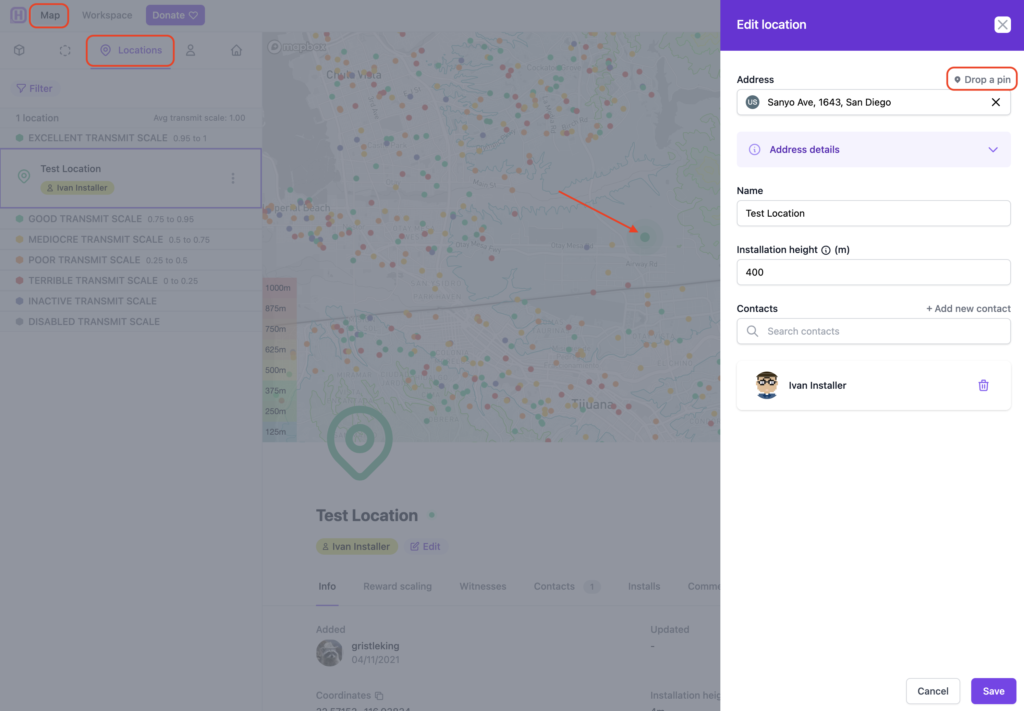
You add Locations over in the Map, up at the top left. Click on the Locations tab, drop a pin, drag the map, then add whatever information you'd like to the Location. Yep, Ivan be climbing on this one. ;)

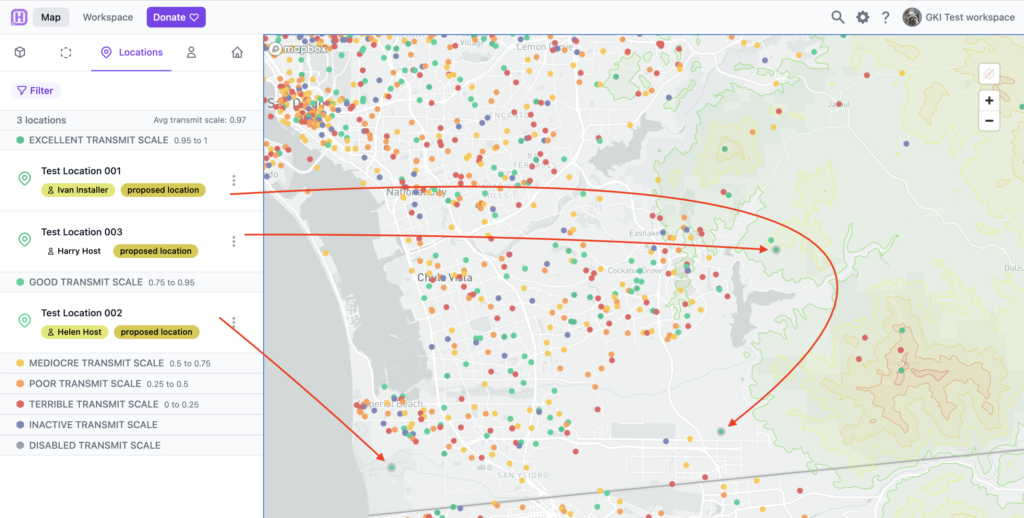
Once you've got a couple locations in, it'll look like this. The dot with a border around it signifies a Location (vs a Hotspot.)

Now we've got Labels, Contacts, and Locations, all we need is to receive our Hotspots, do an Install, then make Payments!

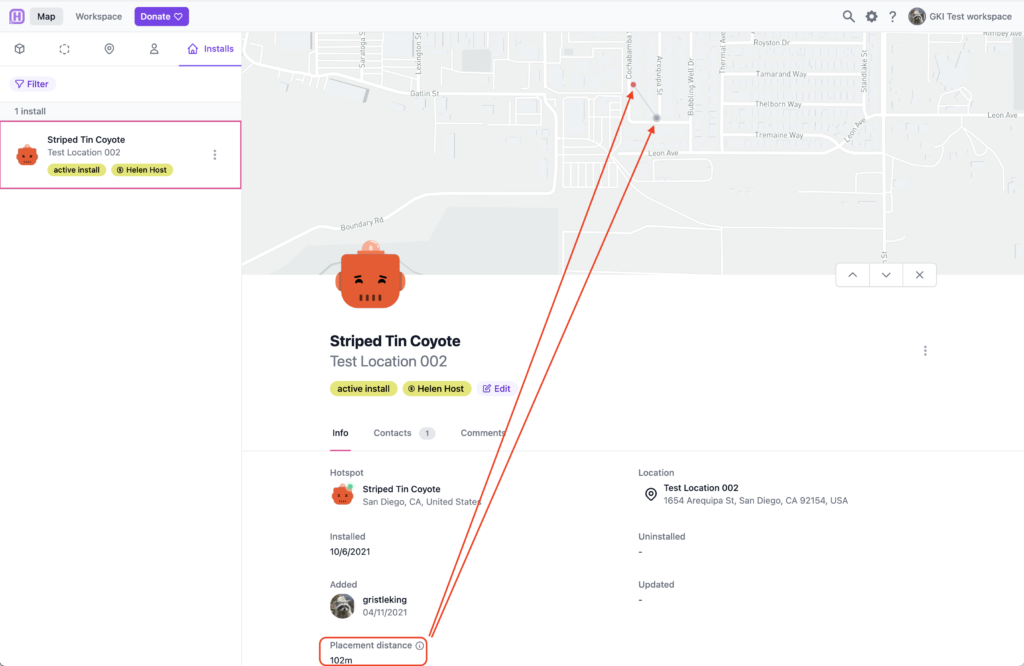
Let's say in Test Location 002, above, the Hotspot isn't actually going in that spot for privacy reasons. Again, for demonstration reasons, let's say this Hotspot is actually Striped Tin Coyote, but Helen Host doesn't want the world to know where she lives. We change the Location to be where it actually is, then on the Helium App we assert the Hotspot 102 meters away from where it actually is. Hotspotty helps us keep track of that difference with Placement Distance.

So now we've got a Hotspot connected to a Location and a Contact. Voila, an Install!

If you'd like to go deeper into how you'd use that on a fleet, I'm available for hire. Yes, if you're running a fleet, you can and should go WAY deeper; this was just an intro.

Ok, that was kind of complicated. What about Payments? This is way easier.

Payments With Hotspotty

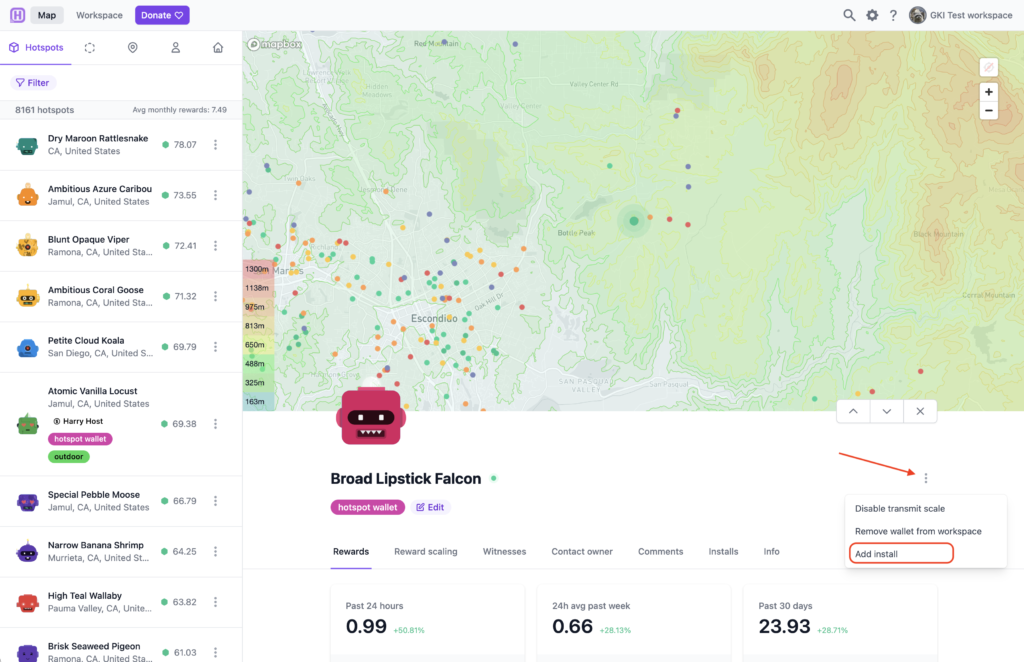
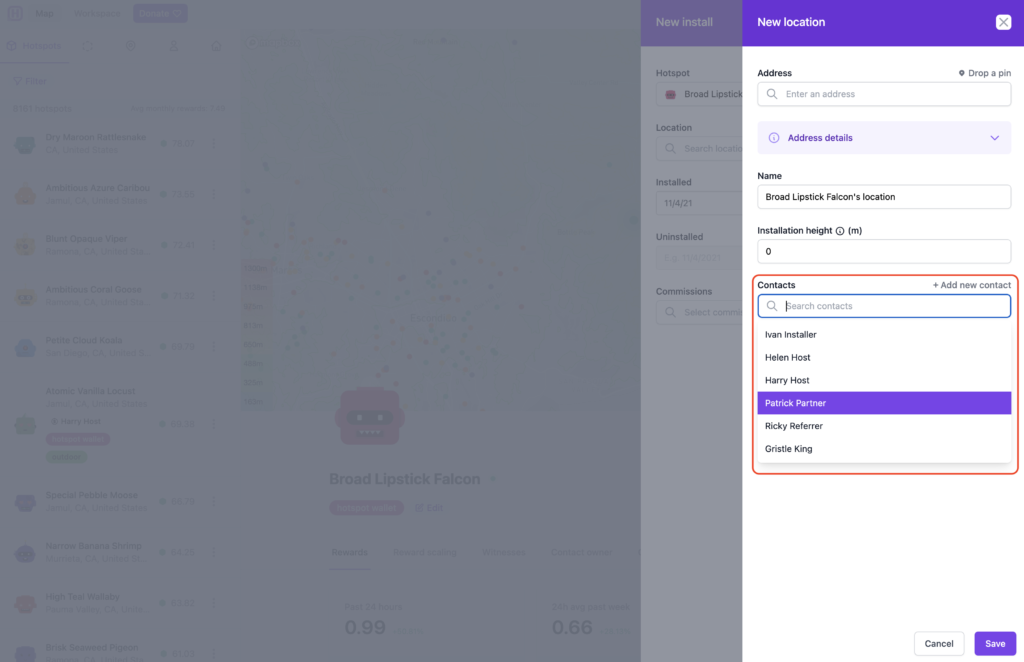
Pick a Hotspot; we'll use Broad Lipstick Falcon. In this case, Ricky Referrer told us about this spot, Ivan Installer did the install, and Patrick Partner manages it. We'll add all three of those Contacts by adding an Install to this Hotspot.

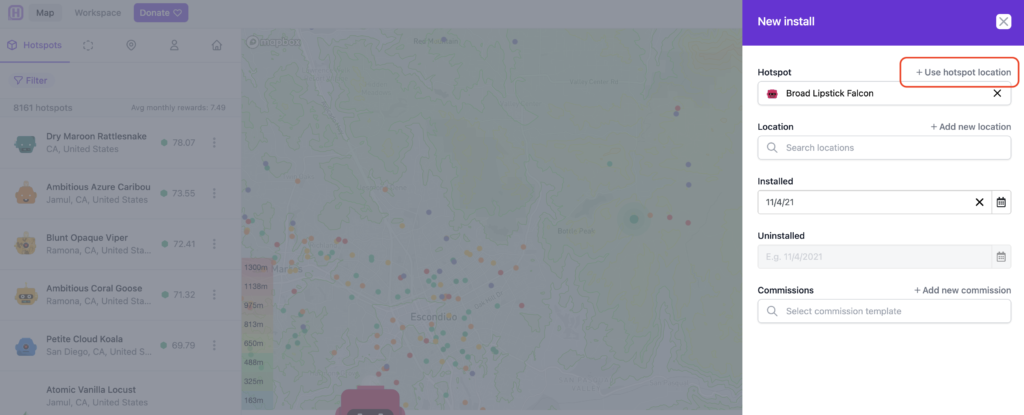
In this case, I'll use the asserted hotspot location, then I'll add the Contacts to this Hotspot.

Once you click "+ Use hotspot location" it'll bring up the next tab, where you start to add Contacts. Like this:

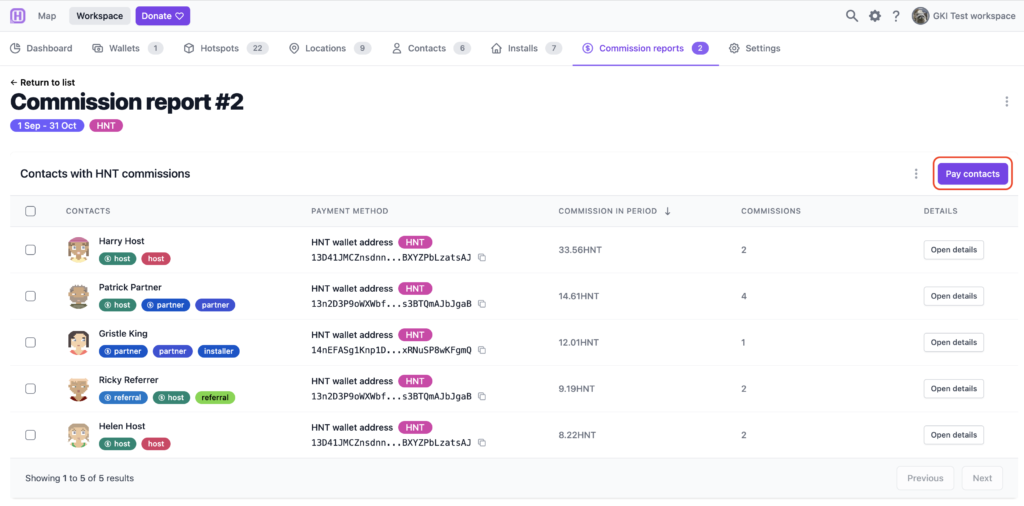
Once you've got everything properly labeled and the Commissions assigned, it starts to get way easier. Go to Workspace --> Commission Reports.

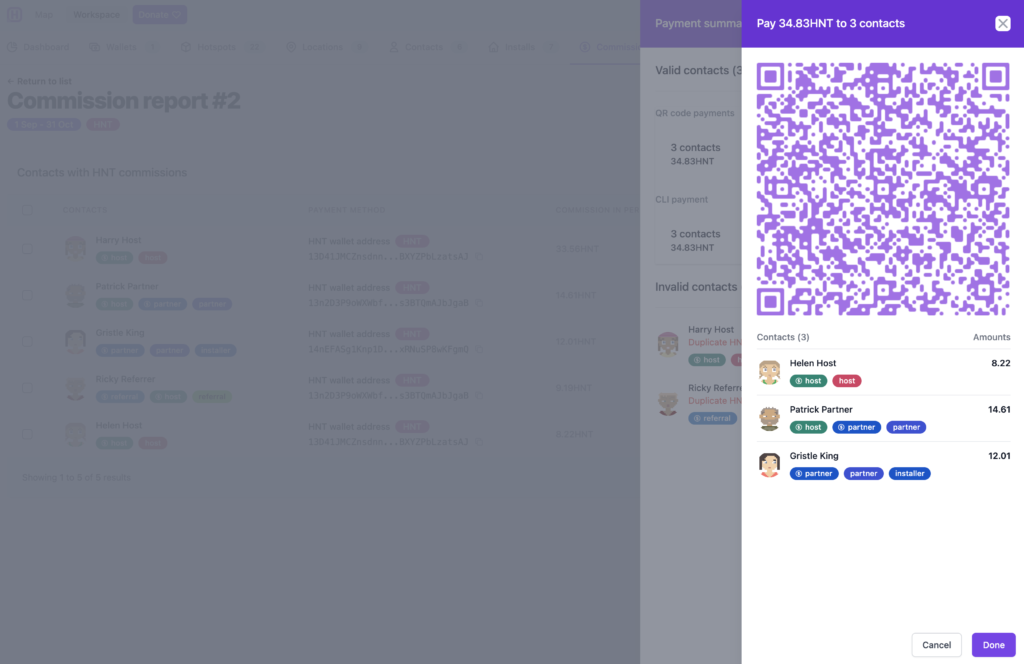
Then hit "Generate report", fill out the date range and run it. I think I set mine back to September of 2021. Wait a second or two, and then click on your newly generated report. It'll look something like this. The coolest part is the "Pay contacts" button at the top right. Hit that.

That will bring up a QR code allowing you to pay all of those contacts from your Helium app wallet. Yep, all at once. Up to 30 contacts at a time. Bam.

That's it, payments are done!

That should help you get started using Hotspotty's latest version. It IS complicated, and you'll spend some time just banging around various windows and tabs for a bit. Don't worry, within a few days you'll be whizzing around like Max and crushing all your Hotspot management tasks.

If you want to use Hotspotty, head on over to their site and fire up an account. If you just want someone to use and manage this complex & powerful tool for you, I have a few slots per month to help fleet-deployment clients get through the start up phase.

Rock on, and enjoy using this powerful tool!

Archived Comments

steve Stinders - 11/14/2021

Hi Nik Have you got an email address please?


Nik - 11/14/2021

I do, head over to the Contact page to reach out. https://gristleking.com/contact/


Reports From The Field: Tracking With Helium

· 9 min read
Nik
Site Owner

I recently drove up to participate in the USA Hike & Fly's Ojai race on October 31st, both as an athlete and a provider of tracking with Helium. The athlete side was fun, but expensive. I landed in the bushes and tore up my wing enough to warrant buying a new one. Not cheap. Still, rad to blast up the backside of the range then launch off the ridge in an attempt to fly the course instead of hike it.

The other reason I went up was to provide custom tracking for race participants. Having recently done the very first paragliding tracking event up in Utah, for the X Red Rocks race, I managed to avoid a few mistakes, repeat a few more, and learn a ton about how best to run tracking for people who move fluidly from earth to air.

As a quick recap, a "hike and fly" race is one where you attempt to complete a course by hiking on the ground or flying your paraglider. Typically these races start in a valley and you hike up to the top of a mountain or ridge, then launch off from the high point and tag other points, either in the air or on the ground. These "points" are usually cylinders of various sizes, from 10m radius to a 5 km radius.

Ok, so what does it take to track a paragliding race with Helium?

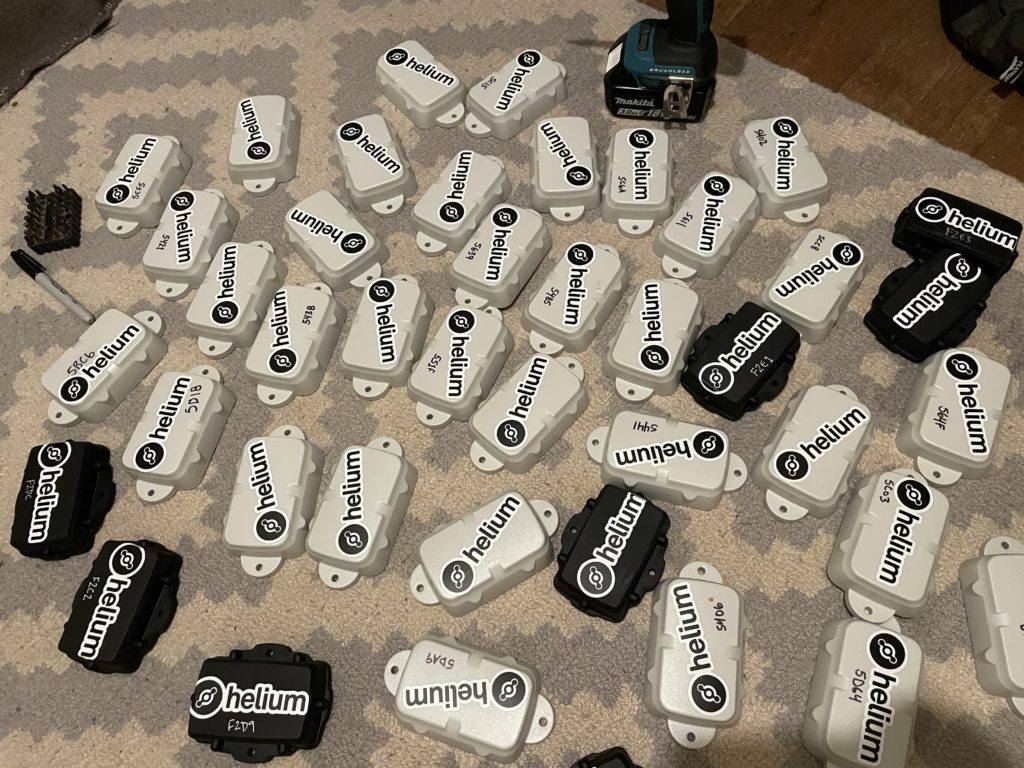
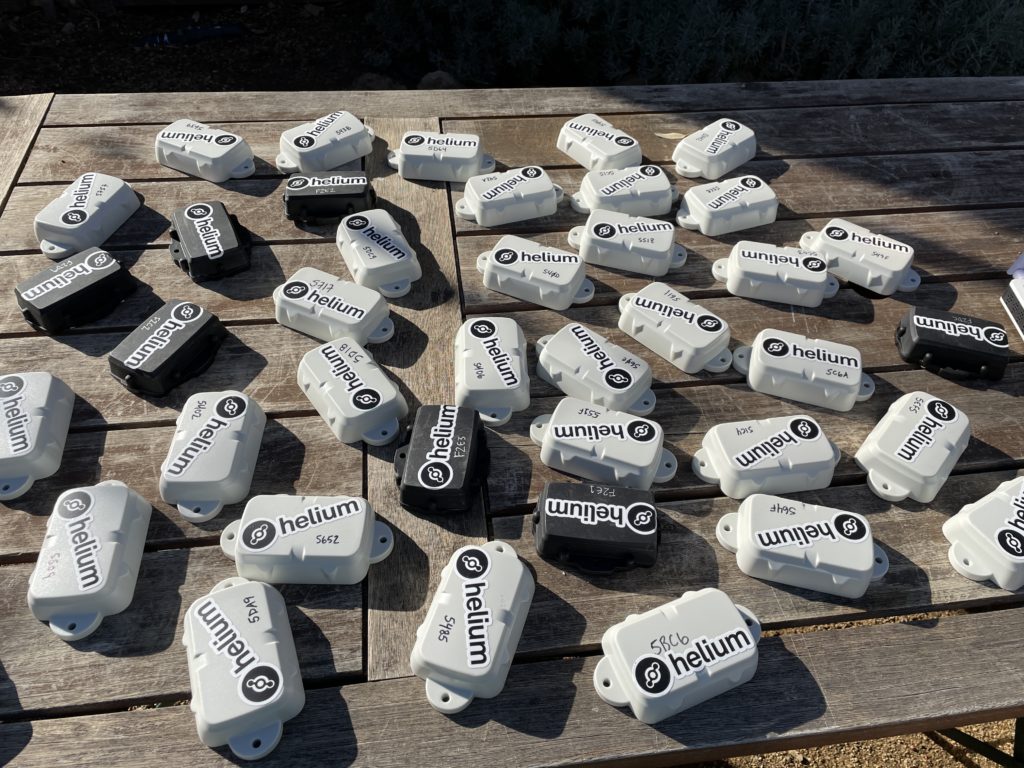
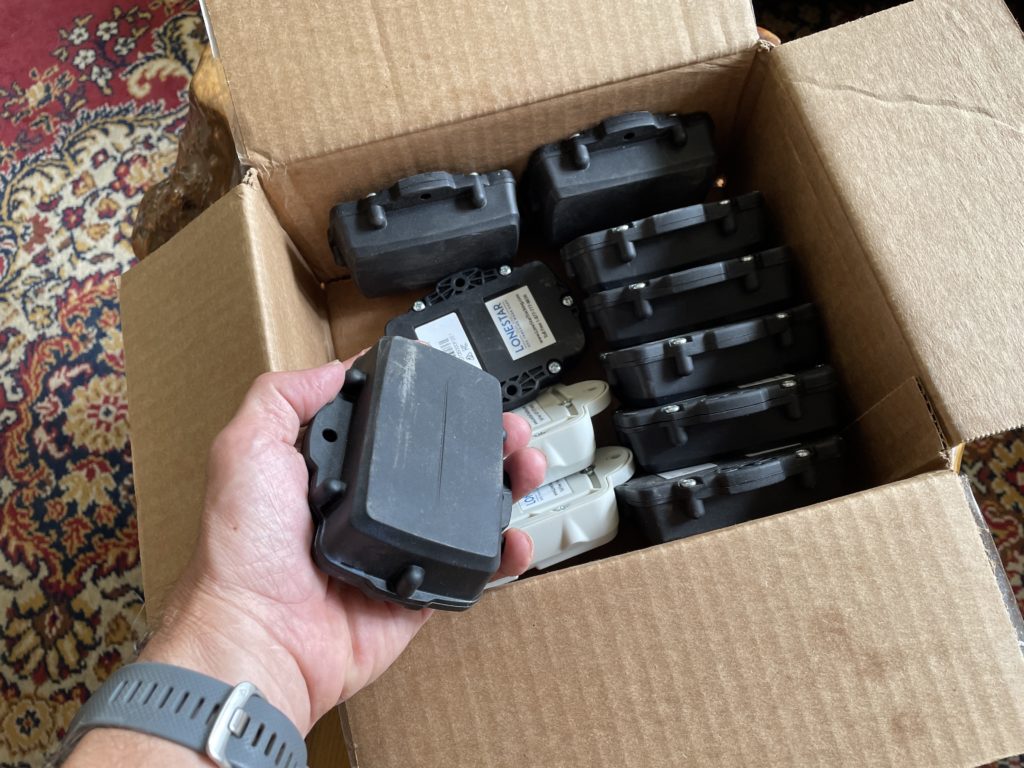
Let's start with the prep work. With 30 participants, I wanted to have more than enough trackers ready. My wife Lee & I prepped 40 Digital Matter Oysters, which were originally designed for vehicles but work well enough OTS (Off The Shelf) for paraglider tracking. Here they are after we'd gotten stickers on 'em, labeled 'em with a useful number, and put the GKI contact info on the back, in case anyone forgot to return theirs at the end of the day.

Yes, I used a driver to pull the back plates off all of 'em. At 6 screws each that would've taken forever manually.

The next step was getting up to Ojai, where the race would be held. Lee & I loaded up the truck and headed north, arriving in the evening at The Hummingbird Inn. The next morning I laid out all my gear for initial function checks. So far, so good.

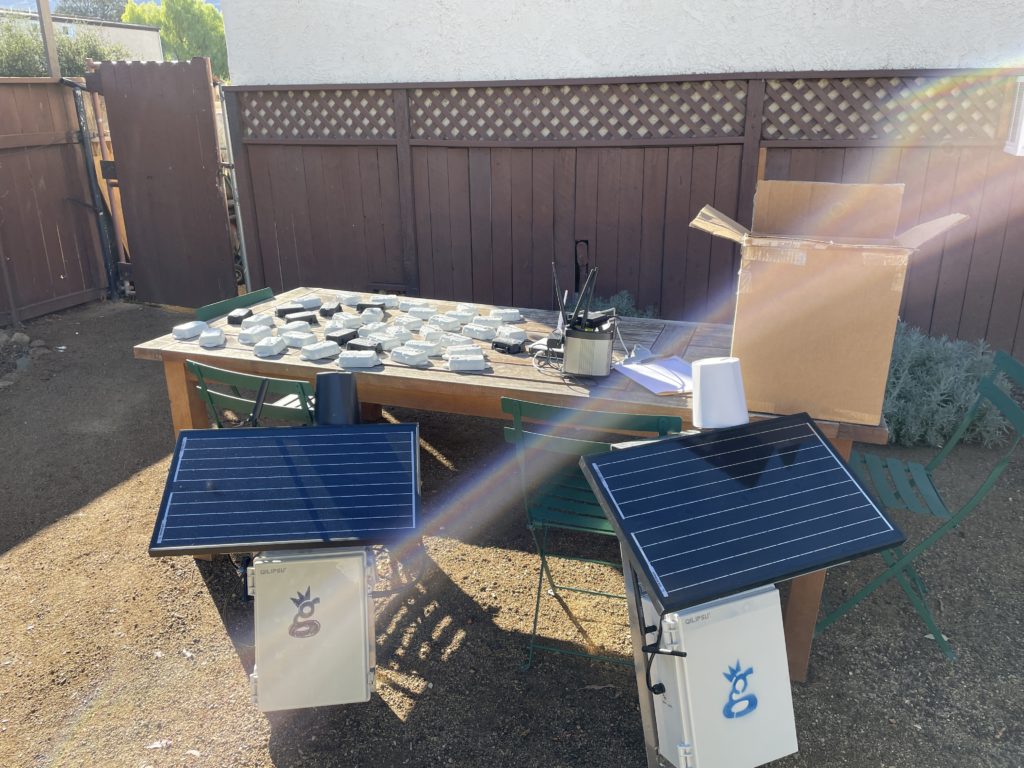
One thing I was doing as a test run this time was running a mobile hotspot, Late Rainbow Bee. I built a Data Only Hotspot using directions over on the Helium site and using a Dragino LPS8, a RUT240 cell modem, and small Goal Zero Yeti 200X battery I had laying around from another project. On this project I wasn't able to get it to pass data via the RUT240, so work remains to be done. Probably an issue with the RUT240 setup. Still, that in and of itself has been a fun little project. Ok, onward!

I rallied fellow San Diego pilot Kris Souther to head up with Lee & I to place the two GKI Hotspots, Atomic Blood Wolverine & Fierce Honey Badger. We bumped over a bunch of dirt roads together and got everything sorted out.

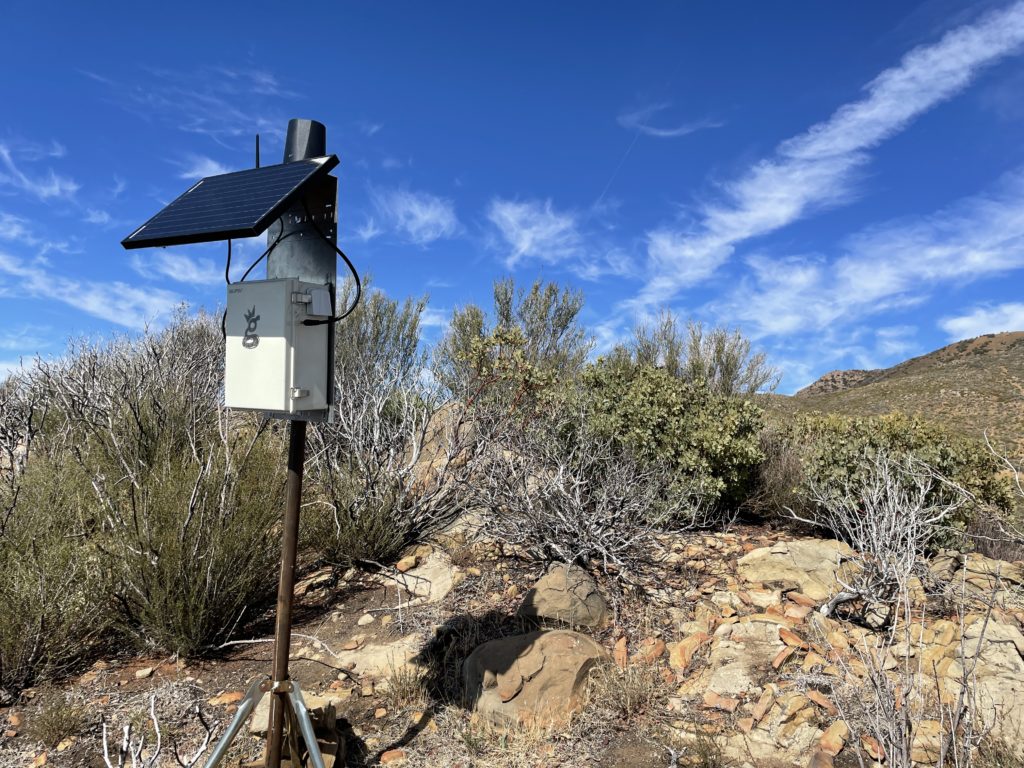
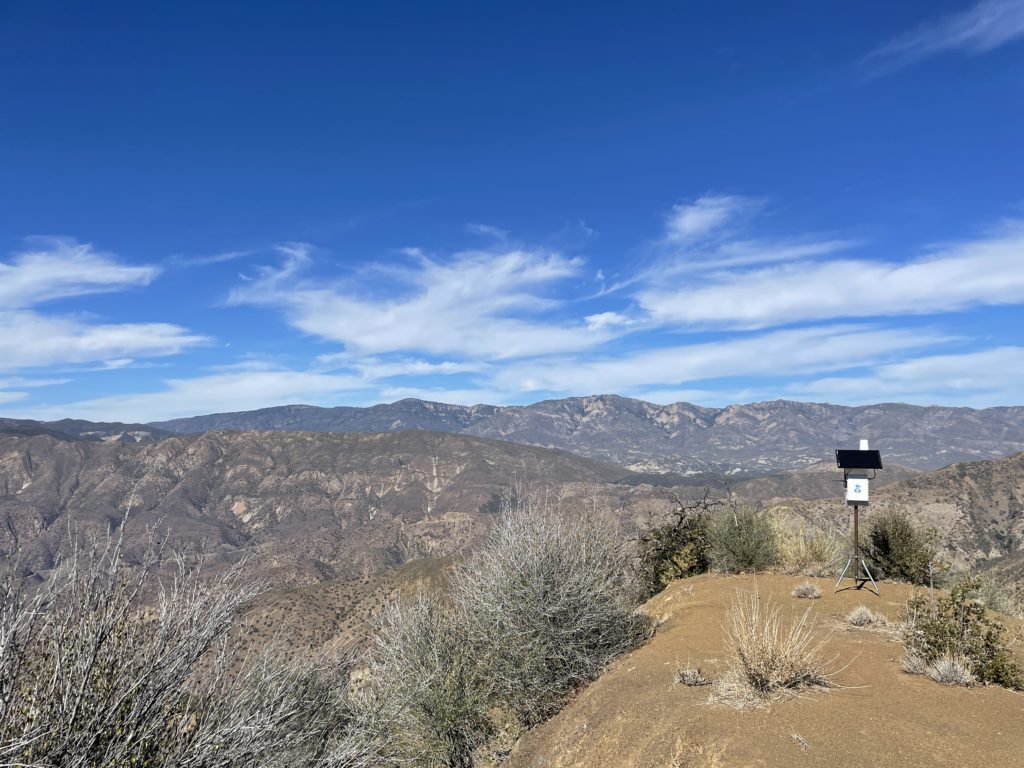
Here's the Badger over by Chief Peak. For those of you way into building these things, this is a slightly older build mode (directions here). Notice the RP-SMA connector (not an N-type) for the bulkhead connection. N-types are way sturdier. That's 3' of LMR400 cable, a 30 watt panel, and a 20 Ah battery. Oh, and of course, an HNTenna.

Once the Badger was up we drove the long and rough road over to Nordoff, which had stunning views, a fire observation tower, and a paragliding launch.

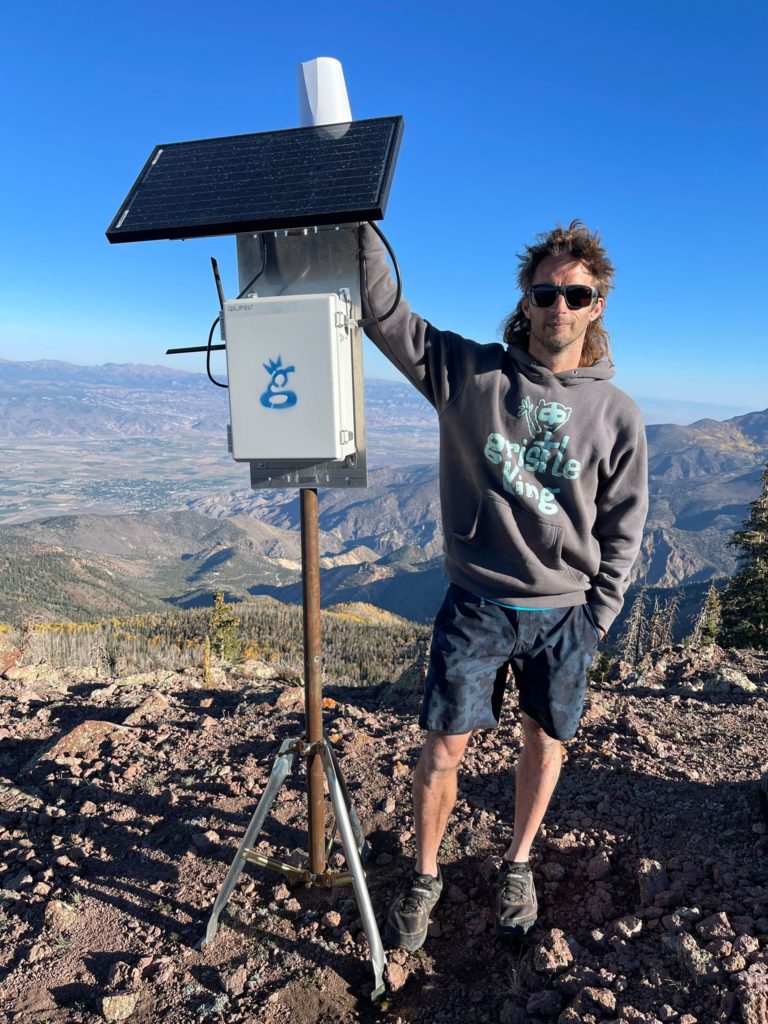
I set up Atomic Blood Wolverine on a flat spot with giant views, and our work was done.

Kris brought along his wing, and once ABW was up, laid out his wing and launched off Nordoff Peak.

Lee & I drove back down, and I checked in on my two hotspots to make sure they were running. One wasn't, most likely due to no cell signal. One of many lessons learned was to make sure I check the function of the cell modem and the hotspot BEFORE leaving the thing up and running.

I spent the rest of the afternoon checking and re-checking all my trackers, needing to shake a few of 'em to get them to connect (movement triggers a radio transmission). Tommy over at LoneStar Tracking was super helpful walking me through basic troubleshooting processes, and by the end of it I had all the units I needed for race day.

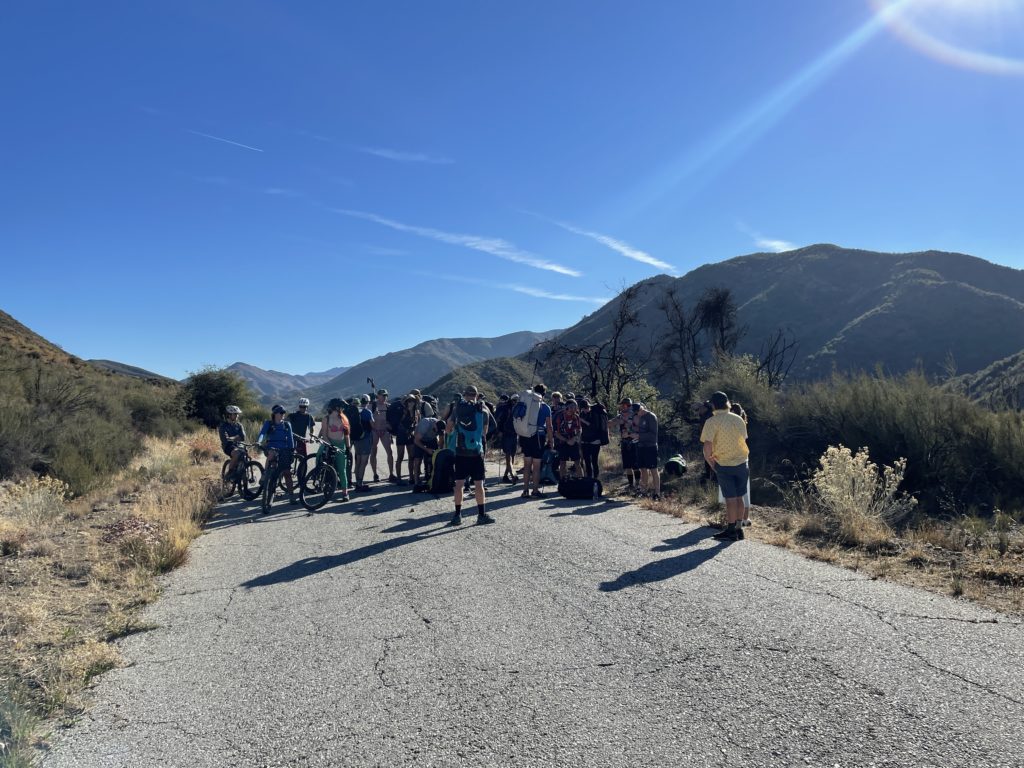
Lee & I got up early Sunday morning and drove over to the meeting point to hand out trackers. I gave a brief overview to the racers about what was happening, what Helium was, and the benefits & shortfalls of a custom deployed LoRa tracking system, then I turned off "Gristleking" mode and went into athlete mode. Here's the start line down on Rose Valley Road.

We had a couple of mountain bikers as part of it, they biked the whole thing, which was pretty cool. A few of 'em even carried trackers!

From there it was a straight grind fest to gain the ridge, including some off-piste action within minutes of the start when we missed our turn off. That's how adventures go, right?

https://youtu.be/BAPwteMjLkc

After managing to land in thick brush unscathed and yet tear up my wing so badly I needed to buy a new one, I packed it all up, hiked down 6 miles down Gridley Trail to meet Lee, and we drove around for almost 4 hours picking up the hotspots back in the mountains. Dirt roads are slow going! The sun was setting and the marine layer was rolling in fast as we came back down the mountain.

Lessons Learned

  • easier way to power cycle the trackers is needed, both to save battery & as a function check
  • always check a remote hotspot BEFORE walking away from it
  • the Data Only Hotspots are a neat idea but require a fair amount of geekery to get going
  • without cell signal (or some kind of internet connection) your hotspot won't be useful
  • simple method of having a written chart to keep track of (no pun intended) who got what tracker worked really well
  • it takes a ton of time to get to some of these places. You probably want to be on site at least 2 days early
  • prior map study and thinking about coverage is essential; need to shift out of "High Earning" mode and into "Best Coverage" mode

Hope that helps YOU as you deploy and use the Helium Network. Here's to all of us growing and crushing it together. Rock on!

Archived Comments

Joseph Campos - 11/15/2021

Nik, great post. In my mind it appears a major limiting factor is the deployment of the miners due to the time/energy required to get to each location. I have spent the last year learning the in's and out's of Digi's Xbee modules, specifically leveraging their ability to do mesh networking. It would mean pivoting away from the Helium side of things, but think if each user's tracker through the mesh network provided connectivity for other users. You can still use the same central gateway with a cellular backhaul (I actually was able to create a standalone xbee compatible solar cellular gateway that is about the size of a brick), but the differentiator is leveraging the whole team to achieve dynamic connectivity. Once people are up in the air, they become your best located "hotspot" because they have the elevation advantage. Current Digi's most user friendly programable module is the Xbee3 (https://www.digi.com/products/embedded-systems/digi-xbee/rf-modules/2-4-ghz-rf-modules/xbee3-zigbee-3), but it uses 2.4ghz. They are suppose to be launching a 915mhz version in the next few months (hopefully) which could be a game changer for this application. I have created custom modules for another application (mine measure something else so they don't have GPS) that fit in the palm of your hand, use mesh, and can last all day on a rechargeable battery so I think achieving a similar form factor to the oyster is possible. I'm happy to brainstorm if you are interested.


How To Troubleshoot Your Helium Hotspot

· 7 min read
Nik
Site Owner

Helium is a rapidly growing and wild ecosystem. Like any other new ecosystem, things are constantly changing, and the main sources of information most new users rely on (Explorer and the Helium app) can be up 48 hours behind.

That means when you check your Hotspot via Explorer on Tuesday, you could be looking at Sunday's information when it comes to whether or not you're relayed, or whether your Hotspot is online.

This isn't because Helium lnc likes to be slow, it's because the whole thing is so popular and grew so fast that the reporting side of things hasn't caught up yet. That, by the way, is a very non-technical explanation. The actual explanation is deeply technical. In any event...what do you do when your Hotspot stops working?

What I've found with hotspots over the course of consulting sessions with hundreds of clients and moderating the official Helium Discord since last spring is 2 main facts:

  1. If you have a problem, you're probably not alone. There IS a solution or at least an explanation, you just have to find it.
  2. If you haven't made any adjustments and your hotspot suddenly goes offline, the absolute best thing to do is wait, usually 48 hours.

With all that said, if you're absolutely driven to do SOMETHING because your hotspot is having problems, here are a few resources to use as you get it sorted out.

Helium Power User Superpower #1

First, and this isn't what you want to hear, but patience is a superpower when it comes to Helium. If you have your hotspot plugged into power and an ethernet cable (NOT on WiFi), your next best step to earn maximum HNT is probably to go fishing for a week. That's not the way most of us are used to solving problems, but if you've got a production hotspot and you haven't changed anything, there's not a whole lot to do.

If you DID change something (swapped the antenna, moved the hotspot, reasserted the location, etc), use Superpower #1.

Helium Power User Superpower #2

Second, about the only thing you CAN do is open up the port on your router that makes sure your hotspot can talk to the Helium Network. That port is 44158. There are a few thousand pages on the internet at this point devoted to telling you how to open port 44158 for your Hotspot.

Helium Power User Superpower #3

Third, the "Search" box on the Official Helium Discord is probably the single most useful thing you can use. Are you "unable to initiate a session" when you try to use Discovery? Copy/paste that phrase into Discord search; you'll find the latest on what's going on.

Helium Power User Superpower #4

Fourth, the second most useful thing after the Search box on Discord is probably @BFGNeil's HeliumStatus tool. It runs $2/month to use it, at least as of March 2022.

Helium Power User Superpower #5

As of mid-March 2022, we are starting to see an enormous growth in apps that help you understand the Helium Network. Here are some of my faves:

  • Watchium - Keep track of your Hotspot status and get basic info on what's gone wrong
  • Hotspotty - Track your fleet and get alerts when a Hotspot goes down
  • Helium Analytics - Keep an eye on where you are in the relation to the global average.

What About The Gamers?!

Finally, a word about gamers, cheaters, hackers and other of those ilk. In general, they're usually not worth it for the average Helium user to pay attention to. Sure, they're getting sexy daily HNT earnings or they have an obviously cheating deployment pattern, but for the most part the Helium team is shutting them down quickly or limiting what they earn. Gaming WAS a huge problem; the Modesto cluster back in late summer of 2020 was exhibit A. Now gaming is an annoyance and distraction, but not really a network problem.

Helium is made up of some of the smartest people I've met; they are NOT unaware that gaming exists, they're working hard to eliminate it, they're very capable, and they have plenty of other things to do that are equally important when it comes to the health of the network.

Rules For Helium Mining Success

At the end of the day, your "job" as a Helium deployer is to take care of what's in your control. Keep your Hotspot connected to power & internet by cables (do NOT use WiFi). Get the antenna high, use a thick enough antenna cable to limit loss, and make sure your antenna is providing WUPU (wide, unique, proveable, and useful) coverage. That's how you'll earn the most.

This shit ain't complicated, it's just hard.

If you need further help with optimizing your hotspot, read through the rest of this blog or join the Gristle Crüe!

We've helped some of the highest earners on the Helium Network go from zero to hero, and we'd love to walk you through how to maximize your Helium opportunity.

Rock on!

Archived Comments

Charles Davis - 11/22/2021

I'm waiting for my miner. From the manufacturer (being patient). Your overview was very stout with fundamental advice that I could grasp. I was about to over-supply on antenna use. Your zen about patience found a home with me, I will keep that in mind. Thanks for the steady hand.


Nik - 11/23/2021

Right on Charles. Patience is a superpower in the world of Helium.


Spencer - 11/25/2021

Brand new to this game. Day one my Nebra Outdoor was working great with decent earning. Day 2 and onward it’s not connected to network. If it connected via Ethernet port to the router and worked for a day , would the router just quit working? Eth ports work for other devices, just no longer my Nebra hotspot.


Nik - 11/25/2021

Hi Spencer, what is the Nebra diagnostic tool telling you? Have you checked out the interview I did on BFGNeil's HeliumStatus.io? Goes beyond the relay issue and into troubleshooting. Nebras in particular can be a PITA. Carefully check all the physical connections in the box; they can be loose. Also look up the Nebra light patterns and what they're telling you.


Spencer - 11/25/2021

Thank you. I will start with the video. Just perplexing as it was working and now not. Lights all good with exception of blue flashing 4x telling me no network connection. The real beauty of this is the hotspot is at a relatives and now quite a distance from me. I did try to run a diagnostic check but couldn’t connect to the unit via Bluetooth.


Nik - 11/25/2021

Just went through the same thing with a client (4x blue flash). Make sure that port is open on your network, then test with Neil's tool. Do not use Explorer or the App for up to date info.


Spencer - 11/27/2021

Hi Nik, I have tried to reach out through the contact link on this page. It keeps telling me that my message isn’t delivered. I would like to discuss your services for what I hope is basic but just not basic enough for me. Thank you


Nik - 11/27/2021

Hi Spencer, that's odd, I've received & replied to a bunch of your emails. You can email me directly at [my first name, spelled correctly (no "c")], then @ and this website. Maybe your email provider is blocking my replies? Alternately, you can just order the Hotspot Rescue Service here.


macbannai - 12/24/2021

So far all my deployments are using WiFi and it struck me when you suggested on your deliverance video that wifi is disastrous, perhaps you can elaborate on why WiFi is so disastrous other than an obvious low bandwidth scenario, for example what if wifi signal isn't an issue?


The Helium CLI Wallet - Not For The Faint Of Heart

· 11 min read
Nik
Site Owner

There's almost no good reason to use the CLI (Command Line Interface) wallet for a normal person, but...not everyone who gets into Helium is normal. If, like me, you're faced with having to use it, this series of instructions might help.

This is NOT written for experts who know what they're doing; they'll laugh at this. This is NOT written for most of the Helium community. Trust me, you don't need to use the CLI wallet for regular tasks. This IS written for someone like me; slightly curious, driven by the usual HNT incentives, and willing to futz around with things they don't understand. If that's you, enjoy!

It started off with a friend of mine creating a 24 word wallet. Yes, you can create those, just not on the Helium app.

We were testing a hotspot I'd sent him and wanted it to "live" in its own wallet during testing. Once testing wrapped up, I wanted to move the hotspot from the wallet where it was to another wallet where I have other hotspots. This was in part just to keep all HNT earnings in one place, and in part to have (MUCH) easier control over it for me, as a "generally-non-code-using" member of the Helium community.

Now, my friend is a security wizard and fluent in about a million coding languages, so for him managing anything via CLI is just standard stuff. For me, it was more like being thrown in the middle of a Russian street fair knowing I had to buy a very specific item; say a 17mm hex head bolt with a thread pitch of 1.6.

I don't speak Russian, but damn, I really wanted that hex head bolt!

This particular hotspot serves as one of my tracking units, so I re-assert the location every time I go to track an event, and then when I bring it back. Being able to easily move it (dragging a pin on the app) is important to me.

So, there I was, with an open Terminal window on my Mac and no real idea what to do. My friend had just taken a very time-demanding job, so he was mostly unavailable. We'd grab a few minutes here and there, but at the end of the day what you need for this kind of thing is about 3 hours of solid "Let me walk you through this". The reason you need 3 hours for an expert to help you is they have to deal with you making about 2 hours and 59 minutes worth of mistakes along the way. In this case, despite being extraordinarily generous, my friend just didn't have that time to give at this moment. So...

In 40+ years of zinging around the sun on this spaceship we call Earth, I've found that if you ask enough people for help, read as much as you can on Google, and just keep going, you figure things out.

The following is a condensation of the process, leaving out all the mistakes I made over the course of a few days, including missing key formats, entering the wrong information, entering information incorrectly, using the wrong commands, forgetting a vital letter, relaying what I was seeing incorrectly to experts, and yep, even missing a single syntax hiccup.

Working with code can be VERY frustrating. If you get just one tiny thing wrong, the computer, the program, and in general, the world, doesn't give a single shit. Still, when you get it right, it is extraordinarily satisfying.

Ok, here we go!

Step 1: Get the Helium Wallet onto your computer.

Start here and load Helium's CLI wallet onto your local computer. Look for the "Releases" link, click that, then download the appropriate tar.gz file. You'll need to unzip that, then you can run the full PATH or just use ./helium-wallet in front of your commands.

I like to start out by ls-ing, just so I have a record of what is where. I'm new at this, so the old hands may laugh at my constant ls habit, but it's very useful for me.

nik@my-computer downloads % ls
helium-wallet-v1.6.8-x86-64-macos helium-wallet-v1.6.8-x86-64-macos.tar.gz

Now that you've made sure you have what you need on your computer, the next step is to use it!

Before you go on, if you get stuck on any of these steps or want to know more, just type -h or --help at the end of your command. That'll give you the help menu for that particular command or subcommand, which *can* be useful. It does NOT always tell you what you're missing. Ask me how I know. :)

nik@my-computer Downloads % /Users/nik/Downloads/helium-wallet-v1.6.8-x86-64-macos/helium-wallet --help                                           
helium-wallet 1.6.8
Common options for most wallet commands

USAGE:
helium-wallet [OPTIONS] <SUBCOMMAND>

FLAGS:
-h, --help
Prints help information

-V, --version
Prints version information


OPTIONS:
-f, --file &lt; files>...
File(s) to use [default: wallet.key]

--format &lt; format>
Output format to use [default: table] [possible values: table, json]


SUBCOMMANDS:
balance Get the balance for a wallet. The balance is given in HNT and has a precision of 8 decimals
burn Burn HNT to Data Credits (DC) from this wallet to given payees wallet
commit Commit a transaction to the blockchain
create Create a new wallet
help Prints this message or the help of the given subcommand(s)
hotspots Display list of hotspots associated with wallet or transfer a hotspot to another wallet
htlc Create or Redeem from an HTLC address
info Get wallet information
multisig Commands multi signature transactions
oracle Report an oracle price to the blockchain
oui Create or update an OUI
pay Send one (or more) payments to given addresses
request Construct various request (like payment) in a QR code
securities Work with security tokens
upgrade Upgrade a wallet to the latest supported version of the given format. The same password is used to
decrypt the old and encrypt the new wallet
validators Commands for validators
vars Commands for chain variables
verify Verify an encypted wallet

Step 2: Load the selling wallet

This is the one with 24 words, so I needed to use "bip39" after the --seed command.

nik@my-computer ~ % /Users/nik/Downloads/helium-wallet-v1.6.8-x86-64-macos/helium-wallet create basic --seed bip39 --output adw-wallet.key
Space separated seed words:[this is where you enter your 24 word seed phrase]
Password: [enter the password you want to use for this wallet on this computer]

That will give you an output confirming you've loaded the correct wallet (it'd be hard to load the incorrect wallet, but it's nice to see confirmation). I'll show you what that looks like in the next step.

Step 3: Load the buying wallet

This is the 12 word "normal" wallet, so I used the "mobile" after the --seed command.

nik@my-computer downloads % /Users/nik/Downloads/helium-wallet-v1.6.8-x86-64-macos/helium-wallet create basic --seed mobile --output gki-wallet.key
Space separated seed words: [this is where you enter your 12 word seed phrase]
Password: [enter the password you want to use for this wallet on this computer]

That should give you an output that looks like this (you will have seen something similar when you loaded your selling wallet).

+---------+-----------------------------------------------------+
| Key | Value |
+---------+-----------------------------------------------------+
| Address | 14sT3TpAqxahjy6aGFvTHB4zqCX1mx31a1aYwNJ56TtzkM1DzQC |
+---------+-----------------------------------------------------+
| Sharded | false |
+---------+-----------------------------------------------------+
| Verify | true |
+---------+-----------------------------------------------------+
| PwHash | Argon2id13 |
+---------+-----------------------------------------------------+

The address in that table should match your buying wallet's address.

Step 4: Use the CLI "sell" command

This tells the blockchain what your selling wallet is doing ("transferring" a hotspot.)

nik@my-computer Downloads % /Users/nik/Downloads/helium-wallet-v1.6.8-x86-64-macos/helium-wallet -f adw-wallet.key hotspots transfer sell 11oXZSoRW7pLQppvbQfbipzPpe4DbuUzssKHvKHkvWjvvJ5FmyW 14sT3TpAqxahjy6aGFvTHB4zqCX1mx31a1aYwNJ56TtzkM1DzQC  
Password: [the password to the selling wallet's key file]

Funnily enough, you don't need to use the "commit" subcommand when you sell, only when you buy. Weird. Anyhoo...that Sell command will give you an output like this:

2gGvAQohAGmlHdiIljDi7IOvWS2+Cx8fVYwRumnnfw3rrz/cnCdWEiEBcUAYhbrCcB2pYOhl3osDLN9SSPP1WOmzB21uDUKLDB8aIQH9o5Dm6AUfxvGboCq4knzehnEZGWs4NN2MGNuPu1zMmCJAxsNIL0AHvrbUcYgXcRryKIYCTTR7wY0hBSqn50E9dhz9jwjCtH621HDFVNpCghnb/AonxlOWxE8GPsTVYpsFCEDYrQM=

You'll need that in the next step.

Step 5: Use the CLI "buy" command to receive the sold hotspot.

nik@my-computer Downloads % /Users/nik/Downloads/helium-wallet-v1.6.8-x86-64-macos/helium-wallet -f gki-wallet.key hotspots transfer buy --commit 2gGvAQohAGmlHdiIljDi7IOvWS2+Cx8fVYwRumnnfw3rrz/cnCdWEiEBcUAYhbrCcB2pYOhl3osDLN9SSPP1WOmzB21uDUKLDB8aIQH9o5Dm6AUfxvGboCq4knzehnEZGWs4NN2MGNuPu1zMmCJAxsNIL0AHvrbUcYgXcRryKIYCTTR7wY0hBSqn50E9dhz9jwjCtH621HDFVNpCghnb/AonxlOWxE8GPsTVYpsFCEDYrQM=
Password: [the password to the selling wallet's key file]

Hit "enter" after your password, and you should see something like this:

{
"hash": "AfPo-ulQVWAMQVNT8z309XvBVQGEDM5qxoo9a1wJ8kA",
"txn": "2gHxAQohAGmlHdiIljDi7IOvWS2+Cx8fVYwRumnnfw3rrz/cnCdWEiEBcUAYhbrCcB2pYOhl3osDLN9SSPP1WOmzB21uDUKLDB8aIQH9o5Dm6AUfxvGboCq4knzehnEZGWs4NN2MGNuPu1zMmCJAxsNIL0AHvrbUcYgXcRryKIYCTTR7wY0hBSqn50E9dhz9jwjCtH621HDFVNpCghnb/AonxlOWxE8GPsTVYpsFCCpARz7hD7AUaswLWe0H+99OtesPqKCyLuToqpTvlR6QezVx0I4bRtOdrGB7NoGtQXRFWVeOKS3Y2g6RB31gTEUGAUDYrQM="
}

Step 6: Check your work using the Helium API.

Copy and paste that "hash" from above into the Pending Transactions URL on the Helium API, like this:

https://api.helium.io/v1/pending_transactions/AfPo-ulQVWAMQVNT8z309XvBVQGEDM5qxoo9a1wJ8kA

At first it'll return something that says "pending", but after a few tense minutes of wondering whether you got it all right, something like this should come up. The key thing you're looking for is that the "status" changes to "cleared".

{"data":[{"updated_at":"2021-09-15T14:49:03.471321Z","type":"transfer_hotspot_v1","txn":{"type":"transfer_hotspot_v1","seller":"13od1JZtPrqJY8dAQoDVwGmDWYcPUGXqfXMyGsDGznPXDBUREd4","hash":"AfPo-ulQVWAMQVNT8z309XvBVQGEDM5qxoo9a1wJ8kA","gateway":"11oXZSoRW7pLQppvbQfbipzPpe4DbuUzssKHvKHkvWjvvJ5FmyW","fee":55000,"buyer_nonce":0,"buyer":"14sT3TpAqxahjy6aGFvTHB4zqCX1mx31a1aYwNJ56TtzkM1DzQC","amount_to_seller":0},"status":"cleared","hash":"AfPo-ulQVWAMQVNT8z309XvBVQGEDM5qxoo9a1wJ8kA","failed_reason":"","created_at":"2021-09-15T14:48:30.013020Z"}]}

Step 7: Relax. You're done.

My great hope is that this saves at least one person the few days it took me to bumble through this. An enormous thanks to @madninja, @tteague and @jerm at Helium for shining a light or holding my hand through the worst parts, and a generous thanks to the many anonymous or unnamed folks who left clues throughout the internet for me.

Rock on, Heliites!

Archived Comments

Brandon - 10/25/2021

I learned to used the CLI wallet a few weeks back, because I wanted to store my HNT with my Ledger wallet. Now I do not have to worry about "not my keys not my coin", I feel much better more secure keeping it stored there.


Gary - 10/30/2021

Nic, Thanks for writing this blog post. Can you shoot a screen capture video showing us how to do this on Windows 10. It's seems like 90% of the videos talking about creating a CLI wallet are made by people run Mac OS or Linux. All of the videos made by Helium, are by or are for developers. People like me and you, don't seem to exist. Or maybe there is an infinitesimal number of us that don't know how to do this. That video would be perfect for your YouTube Channel. @Brandon- Once I get one set up, I want to do the same thing.


Nik - 10/30/2021

Hi Gary, I'm actually on a Mac with no Windows around, sorry mate! I get your frustration though. Just keep going and looking into it, you'll get it!


Hampus - 12/3/2021

Hi Nik! I did this quite a few times in October without much problem. Now, however, it seems as if they have changed the commands and the workflow. It seems to me that I should do helium-wallet.exe -f wallet.key hotspots transfer --commit I get some output and a hash, but no base64 string. Do you know how to transfer hotspots now? Really happy for some help.


Nik - 12/3/2021

Hi Hampus, the best place to get help is over in the Discord in the official Helium Server, look for #cli-wallet-development


E. - 12/3/2021

Thank you. I just figured this out today with a Ledger. It took we a couple weeks of frustration before realizing that I could drag and drop the cli file to create a new directory..... Years of working with Adobe has shown me that the answer to every annoying issue is a couple simple key strokes away from success. It' just figuring it out.


Jeroen - 9/13/2022

Hi Nik, great explanation on how to transfer a hotspot. I accidently onboarded my helium hotspot to the Helium wallet app which is not for storing hotspots as it seems. So now i need to transfer it to the Helium Hotspot app. In step 4 you mention the adress? 11oXZSoRW7pLQppvbQfbipzPpe4DbuUzssKHvKHkvWjvvJ5FmyW CAn you tell me where this value comes from? Greetings Jeroen


Nik - 9/13/2022

It's just a filler address; we created a wallet specifically for the demo.


Mitch Koulouris - 10/30/2022

I’m quite a bit rusty on my programming skills. This appears to be a way to transfer a hotspot from a CLI (24 word) helium wallet to a Helium app (12-word) wallet. I mistakenly had a miner transferred to a CLI wallet and need to move it to the Helium app (12-word) wallet in order to assert its new position. Am I correct in understanding what you’ve show above accomplishes this?


What Does A Good Hotspot Cluster Look Like?

· 10 min read
Nik
Site Owner

40-60 Hotspots, all about 1,500m away from any other, with any one of 'em having clear line of sight to at least 30 others.

Wait, you want more, and you want to know how I came up with that (with help)? Start by reading my post on PoC cycles, otherwise you'll be missing some key points. Done? Great!

Let's start with the worst case for HNT earnings: You're a lone wolf Hotspot, with no Hotspots within tx/rx distance. You can't Witness, so you miss out on 75% of available earnings. Even with a few Hotspots around you, the odds that any of your Hotspots will Beacon and initiate the larger part of the earnings cycle is low. Short version: You're not going to earn very much.

The next worst case is the opposite. You're surrounded by thousands of other Hotspots who are overcrowding the hex density rules and no one is earning very much because all your earnings are scaled. Again, you're not going to earn very much.

Ok, so now we've established the "my porridge is too hot" and "my porridge is too cold" sides. Where's the happy medium?

For help with wading through the data, I turned to the #gigs-and-bounties channel on Discord, though Helium.Jobs is another great option for getting help with anything Helium related. In this case, the folks over at LongFi Solutions responded to my request and we started into it.

Let's start with my hypothesis (which was wrong, by the way). Here's a decent way of thinking about it, it was just missing enough data points.

https://youtu.be/GtwO3EoJzPY

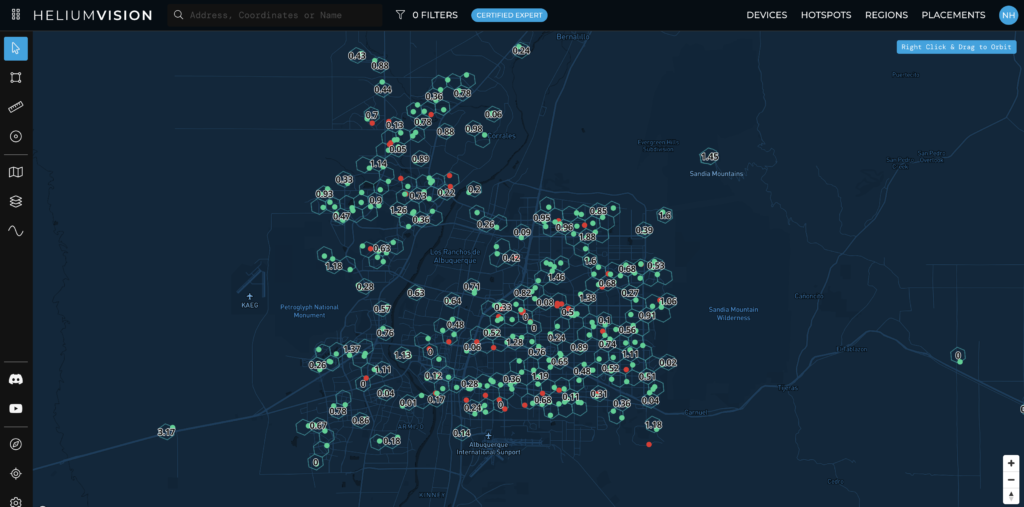
I thought the minimum number of hotspots you'd need in order to reliably witness beacons and therefore earn the majority of PoC rewards, would be around 300, just like Albuquerque. Here you can see the 24 average HNT earnings for any given res 8 hex using HeliumVision.

The average monthly HNT earnings of a Hotspot in Albuquerque is around 14 HNT. That may not sound much, but it's higher than anything else I could find, by a lot. I spent some time centering the map in Hotspotty on cities and seeing how many hotspots were there as well as average earnings.

It's a fast (well, slow because you're asking the map for a TON of info) and dirty way to get a "broad strokes" overview, although as you'll see, it allows you to miss some important points. Here's what I jotted down.

[ninja_tables id="2507"]

I figured that was a good start, but knew I should probably ask around for help with data that was a little more carefully assessed and parsed. Plus, where was the gold?

Where were the best spots in the country to deploy, and how many Hotspots do you REALLY need? Teling me that San Francisco is not a good place to deploy a Hotspot really isn't that helpful.

So, here's what the folks LongFi Solutions found when they dug in to my question.

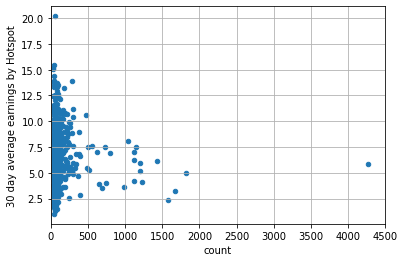
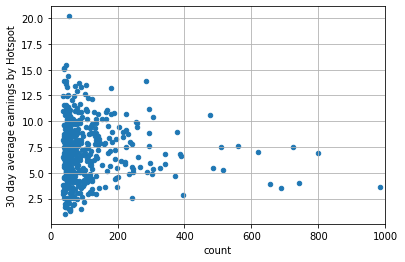
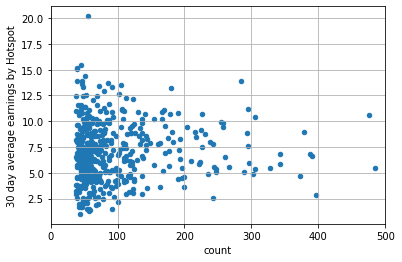
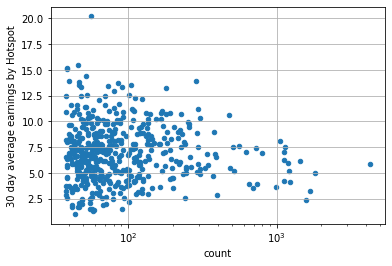
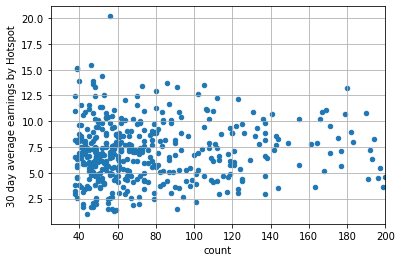
What is that saying? What the heck is it? On the Y axis is the 30 day average of HNT earnings per Hotpots. On the X axis is the number of Hotspots in the city. We're zooming in progressively on each graph.

Caveats: I asked for the data on the top 500 US cities. I know, I know, I'm not a statistician. There are probably a ton of things you could get wrong by misinterpreting the data, and among the things not accounted for (off the top of my head) we're missing topography and signal strength/data size (spreading factor) changes around the world. Still, a few interesting points popped out.

Wait, you want to play with this data yourself? Cool, please share what you find here so we can all learn more! Download the data here, it's a 32 MB file, just FYI.

Here are my takeaways:

  • You probably need at least 40 hotspots to be earning well.
  • 40 hotspots isn't a guarantee, it's just a reasonable target.
  • Once you get beyond 300 hotspots, it's not that you can't earn, it's that avg earnings are low, which is important for fleet deployers.

Here are additional takeaways from the LongFi Solutions crew (specifically, @the-wildcard on Discord)

  • It's interesting to see how things converge as you move to the right, I guess it's to be expected though
  • With the pace of new hotspots coming online, a lot of these numbers include hotspots that haven't earned yet. Will revisit in a week or 2 to see what's changed.
  • Most interesting to me was that the cities with the highest average earnings per hotspot have 40-60 deployed, a little lower than what I'd expected would be needed to maximize

A few additional points are worth mentioning. Remember, I was looking for best areas, not necessarily the best locations. Locations are straightforward: Get the thing high with clear line of sight and view to lots of Hotspots. Area is harder; how many Hotspots do you really need?

Now we're all one step closer to finding out. If YOU are a data geek and would like to contribute, please let me know what you're thinking in the comments, I'd love to include you in the collective wisdom!

If you'd like to join a group of like-minded individuals when it comes to learning about and optimizing Helium deployments, check out the Gristle Crüe!

Until next time, rock on!

Archived Comments

KH - 10/13/2021

Thanks for this.. But did you forget about the reward witness scale and HIP 15 in your throughts?


Nik - 10/13/2021

Not so much forgot as "didn't include". Working with fleet deployments lately, they need to start "big picture" and once they find a likely place, explore further.


Brad - 10/13/2021

Hi Nik, Can you clarify: "You probably need at least 40 hotspots to be earning well, and by earning well I mean as of Oct 12th an avg monthly HNT earning of 14 or above." Does that mean you need to be WITNESSING at least 40 hotspots to be earning well? If so, is that measured by the number of "recently witnessed" hotspots in Helium Vision? Some of my stats: HS 1: 15 recently witnessed. Earning .39 HNT per day HS 2: 25 recently witnessed. Earning .53 HNT per day HS 3: 28 recently witnessed. Earning .28 HNT per day HS 4: 15 recently witnessed. Earning .25 HNT per day Those are all in a metro area with around 150 other hotspots. There are no other hotspots in the same hex as mine at resolution 8. All have other hotspots in some of the adjoining hexes. All are at rewards scale 1. HS 1 & 4 witness the same number of hotspots but their earnings are significantly different. HS 3 witnesses more that HS 2 but makes significantly fewer HNT. I know it's more complicated that just witnessing hotspots, but what would be causing these differences if the number of witnessed hotspots is 75% of the rewards and what can I do to improve rewards? These are all Bobcats with the stock antenna inside a single pane of glass. I'm planning on changing to outdoor antennas 15-20 feet higher than they all are now. I assume this should increase rewards significantly, or is there more I should do? Thanks!


Nik - 10/13/2021

Hi Brad, 40-60 is just a starting point. Take a look at the scatter plot graphs to get an idea of where the avg earnings in a cluster of 150-ish is. Getting your antenna outside and higher almost always increases rewards. Rock on!


Shaggy - 11/30/2021

HEY so thanks for all the great info. good pictures. And answering so many questions all the time. My biggest hang up right now is what cellular modem to use I see the rut used a lot which I read it has option to use VPN on it. Are you guys using them? Because without having a static ip address which not all cell providers have them... so does VPN keep it from being relayed? Then what type of sim are u using what brand and is it unlimited or special iot m2m type or just a cheap 20 or 30 dollar unlimited data talk text with or without static and what brand? Anyone with a handful of set up on cell modems using a family plan let me know please.


Nik - 11/30/2021

No worries Shaggy, check over here for the latest on the 240 setup.


Bronson - 2/22/2022

Question? ... 40-60 in what size of an area? In the article, you did it by cities, but what does that mean area or hex-wise?


Nik - 2/22/2022

Depends on local topography. 40-60 that can *generally* see each other seems to work well, although lately I've seen clusters as small as 20 where at least one Hotspot was up in the .2 HNT/day (double the global avg).


Gábor - 4/1/2022

Hi Nik! I live in a quite hilly area and I found a good spot which isn’t scaled and the nearest hotspot is 30km away with no line of sight. I was thinking about placing 5-6 hotspots in that hilly area among villages which have line of sight of each other. Do you think like 5-10 hotspots will be enough to earn very well if they all see each other? Thank you for your help!


Nik - 4/1/2022

Hi Gábor, that's along the lines of what the Network is looking for (correctly placed proveable coverage) but with 5-10 you may not have as many beacons issued as you'd need to earn maximally. I'd think about how you use the Network as part of the ROI plans.


What Does PoCv11 Mean For Me?

· 26 min read
Nik
Site Owner

Short version: Use a low gain antenna, report your location and antenna gain accurately. If you're in the US, this isn't a big deal, as our radios pump out enough power to get excellent range even with a low gain antenna. If you're in a region (UK, EU, etc) where your radio output is low, PoCv11 will probably decrease your range significantly.

Updated Deep Dive over here.

Want to read on for posterity? Cool!

PoCv11 is designed to help the Network more accurately assess location from radio frequency strength signals and to keep Hotspots in RF regulatory compliance. It cleans up a few mistakes Helium made early on in trying to assess radio signal strength in an attempt to combat gaming.

That's it. If you are accurately reporting your antenna gain and your location, there's no penalty and nothing else you need to do.

Normally I love to explain complicated things, but this one is so damn simple it's hard to do better than Amir Haleem, CEO at Helium:

i'll try and summarize what PoC V11 does:

adds regional support for PoC - today the network treats all PoC activity as if it's operating in the US. this is a problem as different regions run on different radio frequencies and at different power levels (by law), so what is considered valid or invalid varies substantially. V11 adds regional awareness based on the asserted location of the Hotspot

removes SNR from the validity checks - today both the signal-to-noise ratio and free space path loss calculation (FSPL) is used to determine whether PoC packets are valid or not. this was an attempt to make it more difficult for gamers to lie about their location. it hasn't worked well and is being removed. SNR proved to be fairly useless as a mechanism, so now only an FSPL calculation is used to determine whether Hotspots are where they say they are in relation to each other

adds a regional frequency check - V11 introduces a check to make sure that PoC packets are being sent at the correct frequency for the region the Hotspots are located in. for example if a Hotspot is transmitting packets in the US frequency bands but based in South Korea, those packets would now be invalid

complies with local power output regulations - different regions have different maximum power output laws for unlicensed radios. in the US, for example, the max EIRP is 36dBm. in the EU this is 16.5dBm. currently in PoC v10 the power output is hardcoded to 27dBm for the US and rest of the world, and 14dBm for the EU. V11 will reduce the power output if the combination of the maximum output power + antenna gain exceeds the local laws - for example, a Hotspot operating in the US with a 5.8dBi antenna would have a total EIRP of the Hotspot power output (27dBm) + the 5.8dBi antenna = 32.8dBm total EIRP, which is below the 36dBm allowed. nothing would change in this case. if instead the antenna was changed to a 10dBi antenna bringing the total EIRP to 27dBm + 10dBi = 37dBm, the miner software will reduce the power output of the Hotspot by 1dBm so that the total is less than equal to the 36dBm allowed by law. in the EU a 5.8dBi antenna would cause the Hotspot power output to be reduced to 10.7dBm so that the total EIRP is 16.5dBm

PoC V11 does not have anything to do with the 10 witness maximum, or the witness randomization changes that were added recently. we're hoping to activate PoC V11 in early October. it is currently not active.

But, but, but, it COSTS MONEY to state my antenna gain! Relax, dawg. It costs 55,000 DC. That sounds like a lot. It's not.

1 DC = $. 00001. So, 55,000 x .00001 = $.55. You can afford that.

I know you want to get all worked up about PoCv11 and how it will change things. Relax, it's not a big deal as long as you're playing by the rules. It's part of Helium's efforts to improve the network. Color within the lines (report your location, antenna gain, and elevation accurately) and PoCv11 will only make things better.

Archived Comments

David - 10/15/2021

Without sounding critical, it's important that people understand that the above relates a lot more to the US, in the UK where a good set up, LMR400 cable, roof mounted several metres above your house with good line of sight will still see a RAK 5.8 reach 4-5 hexes if you're lucky due to the already reduced power (I have 24 hotspots in a variety of environments running and have tried multiple antenna in multiple locations for weeks at a time so have a little experience) spending money on a decent 8 DBI makes a huge difference in HNT earnings here, and there's a strong feeling that those in the EU are getting hit hard for spending hundreds on a good set up, whilst most US users aren't bothered so the "don't worry" comments are from those likely to be based in the US and therefore unaffected - an "I'm alright Jack" attitude and I'd suggest an emphasis in the your writing that it's a US focus only. There's also a lot of confusion on Discord as to whether the reduction in power is only temporarily applied at the point of broadcasting a beacon and the full strength of the antenna is still available the rest of the time, or if its applied for both broadcast and receive.


Nik - 10/15/2021

Great points David, thanks for bringing 'em up!


Jonathan Pampers - 10/18/2021

Correct me if I am wrong, but surely those in the EU (or other countries with a lower EIRP level) can't really grumble about Helium lowering power outputs so that they are within legal levels? If the long-term growth of the network is what people want, surely hundreds/thousands of hotspots operating over legal levels in a country is a good way to go about getting it banned?


David - 10/20/2021

Hi Jonathan While I agree its got to be legal, the main issue is commercial viability- if no matter what you did your hotspot could only reach 2 RES 8 hexes, and required a good roof mount to get even that, would the current reward structure justify its long term viability and would that provide effective coverage to build the network that is envisioned? If you're looking at a European population nearly 2.5X that of the USA, then it's vital for global growth that it works effectively here, and if it is reduced, then compensation has to be increased per hotspot for people to continue to invest in the boxes and grow the network - if after POC11 a US box with a 5.8 can reach 6 miles and a European box with the same antenna can reach only 2 after it's power is reduced (which is what you currently might see with a standard 1.2 DBI here if very lucky) then assuming circular coverage you're looking at a massive difference in coverage per hotspot - 13 square miles vs 113 square miles and a massive difference in rewards earned. For HNT to work and increase in value over time you need to see continued increased global coverage, people just won't continue to invest in boxes in Europe if it isn't financially beneficial to the buyer here, destroying the HNT value for US owners.


Jonathan Pampers - 10/21/2021

I agree with you there David. From the southeast asian perspective, we have similar EIRP limits to the EU, and whilst the economic disparity between SEA and the USA might still be enough incentive in the short term, there does need to be an effective long-term incentive for people to establish good coverage.


Mario - 10/21/2021

@David, thx so much for your thoughts! You're completely right. Got my bobcats on September 7th (2 months late) to Croatia (EU) and been struggling ever since to catch up. 8 bobcats, extra taxes, LMR-400, outdoor rooftop setups, poe, splitters, solar panel, LifeP04 batteries etc. for one off-grid, >300 hours of work & troubleshooting. Not too cheap, especially cuz 75% of the stuff I needed to order from outside of Croatia... If I count in the hours spent, well, the ROI is... lets just say underwhelming. Averaging 0.3 HNT per miner with shifting to WUPU mindset isn't what I expected but still pushing through and struggling. At least for now (honestly). Or maybe I'm doing something wrong but still haven't figured out what... For example, Slow Hotpink Camel has >90 witnesses. Discovery >110. Not relayed, port open, ping-ok. rooftop, RAK antenna, 2 feet LMR400 cable... Yet, in the last days it's made 1.426 HNT TOTAL. Thats 0.2 average a day. I mean seriously wtf, some on first floors or indoors make that much. I just don't think its fair because in comparison to others with (worse or same no. of witnesses etc.) its way less. If only someone can point me in the right direction. @gristleking? :) Anyway, enjoy the rest of your days people and good luck to us on this endeavour.


Nikko - 10/22/2021

Does your general rule of thumb to place your miner location within 150m of its actual location still apply?


Nik - 10/22/2021

Yep. The closer the better, but 150m will probably continue to be fine. I mean, we won't know until after PoCv11 actually hits, but I'm guessing it'll be fine.


Vapaaherra - 11/7/2021

Hi Nik! Thanks for all the great content regarding Helium mining! A question from a European reader concerning PoC v11: is 3 dbi & more power from the hotspot equal to, say, 5.8 dbi & reduced power from the hotspot in the EU, or is there going to be a benefit in the future to use a higher gain antenna in the EU? Is it still going to provide longer range and/or different shape of the radio “donut”?


Nik - 11/8/2021

Vapaaherra, as I understand it, all hotspots in a region will be transmitting at equal power once PoCv11 goes into effect, as long as the hotspot owners accurately enter their gain into the app. Now, I'm sure that a bunch of people will either forget to update or will try entering various other numbers outside of what they're doing in an attempt to connect with more local hotspots. I'm not sure how that will work out, other than accuracy within a dB or 2 is probably close enough. That's just a guess though. We're all pretty darn curious about how it'll pan out. Here in the US I'm just going to use a low gain antenna (3 dBi), report it accurately and see what happens.


Volkan - 11/9/2021

What is the implication for the UK then? If I have understood this correctly - we are currently, even with stock antennas, broadcasting over the legal limit. With PoC v11 we will see the overall signal strength reduced to be just under the 16.5dbmi that is allowed (as I understand it the changes will hard code attenuation to deliberately NOT equal but just undershoot the legal limits) Will this mean we see reduced network coverage due to signal throttling? Will this result in a different outcome / rebalancing of transmit scales in hex's due to reduced signal strength? From the outside it seems like a change that will barely affect the US but will have quite big implications in the UK / EU


Nik - 11/9/2021

That appears to be an accurate assessment. I don't think we'll see a rebalancing of transmit scales, although that's a very interesting idea to apply regionally. Write a HIP up!


Dizzy - 11/10/2021

I dont know how it is in the Europe and other countries but US citizens have a lot of power and control on our governments rules. Perhaps there is method to voice the antenna power limit so low?


Mark - 11/13/2021

Thanks King for sharing your experience. When setting antenna gain, should the dbi losses via antenna cable length and connections be factored in for accuracy?


Nik - 11/13/2021

Yep. Remember, they're trying to measure what will be received, which will include your gain & loss from antenna, cables, connectors. Prolly not a huge deal to be off by 1 dBm, so if you're not engineer-accurate no big deal.


Why My Helium Mining Profitability WENT DOWN?! - 11/21/2021

[…] Gristle King POCV11 review – https://gristleking.com/what-does-pocv11-mean-for-me/ Check the current status of the Helium network – […]


Ethan - 11/30/2021

Hey Nik, As of today (11/30/2021), with SNR being removed from the calculation and leaving only RSSI, do you have the RSSI limits that would make a witness event 'invalid' or 'valid'. See the following link for the previous POcv10 SNR vs RSSI limits graph. Let me know if the link doesn't work. https://ibb.co/8PZ7gk4


Nik - 11/30/2021

I don't think we've moved to PoCv11 yet Ethan, so the old chart is still in play.


Jay - 12/11/2021

I have a 6dbi with 30' feet of lmr400. I input it at 5.8 because I know there is some loss with 30' of cable. Not sure if I did it right but I guess will see on Monday.


Nik - 12/11/2021

Technically that amount of cable loss will be 1.4 plus your connectors, so you're closer to 4.6, maybe 4.5.


Renas - 12/13/2021

Hey Nik, great post. Will pocV11 regulate power in both transmit and receive or just transmit? Are the power limitations only dependant on what antenna gain you input in the app or can Helium detect your actual power? If it is merely dependant on what you input in the app, could you not in theory still use a 8 dBi and input 3 dBi in the app in an attempt to not get your power limited? Thanks in advance!


Nik - 12/13/2021

Hi Renas, PoCv11 evaluates signals on both sides, transmit and receive. If you put in an inaccurate number, the further that number away is from reality, the more likely you'll have an invalid witness event. Remember, power DOUBLES every 3 dB. If you use an 8 dBi and input 3, your antenna will both sending and receiving an additional 5 dB, which is almost quadruple (2 x 2) what it "should" be. As long as you accurately report your setup, there's no further action required. As far as I know, there's no way to detect if you're accurately reporting or not other than the submitted reports. Helium can't detect what your actual power is, just what's being reported by your miner.


Stan - 12/13/2021

I am in UK. Following Niks advice I got HNtenna's for my 2 hotspots and I reach hotspots 60km away. That is a lot more than 4 hexes. I also get far better rewards than most around me and a noticeably better at receiving transmissions than many who appear to have higher gain antenna up higher than mine and reaching 80 to 100kms on transmit. Just get an HNtenna !!


Nik - 12/13/2021

Thanks for the report Stan, glad it's working well for ya!


Dennis - 12/15/2021

Hello, Love your content, thank you! Quick question... do we need to reset our location and pay the fee also or do we just resubmit the Antenna and dbi gain using the wallet app?


Nik - 12/15/2021

Shouldn't need to reassert your location (unless you actually move your hotspot). Just make sure your gain is reported accurately and you should be fine. :)


anders - 12/17/2021

What is the benefit of having a higher gain antenna in EU when the power signal is getting limited so much? If I compare using a 8 dbi antenna and the power gets reduced to match the power of a 3 dbi antenna, wouldn't it always be better to use a 3 dbi antenna in all cases since the power signal would be the same anyway? Also, the 3 dbi antenna would cover a bigger beam path than the 8 dBi. So using a 8 dBi you would lose coverage AND signal strength with pocv11. Is this correct or am i misunderstanding this? Thanks Nik.


Nik - 12/17/2021

I think you're accurately assessing the situation. I don't see a benefit to a higher gain antenna in the EU (or almost anywhere). There are exceptions, for sure, but in general a low gain antenna up high & outside will earn the most for any given location.


Rob Irwin - 12/18/2021

Thank you so much for all the advice you put out here and on Youtube Nik, my knowledge of helium mining has accelerated so quickly since discovering your site. Could you help me with a specific bit of advice regarding POCv11 and the UK/EU please? I have an indoor nebra currently with an 8dbi nebra antenna, 6 meters of LMR-400 cable and a lightning arrestor. Now that POCv11 has kicked in does this mean my Nebra is throttling the output to a full 4.1dbi and taking into account the loss for the cable and arrestor or would the antenna now be something like 3dbi due to cable and fitting losses? Secondly, does this throttling effectively change the signal pattern of the 8dbi antenna to look more like a 3dbi antenna or would it stay narrow and long, just weaker? I'd like to know if its worth the effort to change to a 5.8dbi or even lower dbi antenna. I'm in a remote location you see and there aren't many other hotspots around which is why I have been using the 8dbi.


Nik - 12/18/2021

Hi Rob, the Nebra won't throttle anything, but Helium will depending on what you enter into the app. Take the antenna gain, subtract the cable/connector loss, and enter that into the app. Cable loss won't change the pattern, it'll just weaken the signal throughout that pattern.


Mario - 12/19/2021

Hi Nik. You said it’s not a big deal as long as I'm playing by the rules... but in my case it's a huge deal. PoCv11 did the opposite for me (getting 20 invalids that I didn't have before) and earnings down "clipped" by 60% (round vanilla dragonfly). Everything asserted correctly, 3dbi McGill antenna gain - 3m(10ft) LMR-400 Times Microwave cable (0,384 loss) - Times Microwave arrestor (0,2 loss) - 0,1 for connectors = 2,316 dbi asserted. High up overlooking the city. Was making 0.7 HNT before PoCv11, now down to 0.25. Any suggestions what to do, please...? (EU located, Bobcat 2GB, RUT240)


Nik - 12/19/2021

Hi Mario, interesting that you're doing everything "right" and your earnings went down. My *guess* is that your invalids are coming from nearby hotspots who haven't updated their antenna gain, which will change the reported values into the involid zone. That's just my guess. It's an off grid?


Stefan - 12/20/2021

Nothing actually changed since POCV11, my hotspot is 150m away from the real location and my antenne dbi is 5 instead of 4. So POCV11 isn't a big deal....


Nik - 12/20/2021

100%, thank you Stefan!


Hi - 12/23/2021

Hi everyone :) one question. Where did 16,5 dbm came from when in Europe MAX EIPR = 25mw and this is 14 dbm. In that case we cannot use any antenna or I missing someting?


DimmiD - 12/28/2021

Hi Nik! I understand, that PoCv11 reduces the power of the transmitted signal. But what does mean " PoCv11 evaluates signals on both sides, transmit and receive" for the receiving side? Is the receiving (the witnessing) miner applying its antenna gain mathematically to the physically measured RSSI? Best Regards! Dimmi


Nik - 12/28/2021

The final "number" used to assess antenna signal strength takes into account both the gain on the tx side and the sensitivity (gain) on the rx side.


Matthew Yim - 12/30/2021

I bought the RAK 8dbi antenna from them direct and it comes with a 3ft cable but they don’t specify the type of cable it is. I recently just switched from a 5.8 dbi and I noticed my earnings decreased by about half, that is after a day of increasing by 15%. What should I put in for the antenna gain in my settings? Lastly, I’m in the suburbs (ASHBURN, Va, USA) and my miner is 9 meters up on the second floor window with a decent view outside. Do you think 5.8dbi would be better? Regardless both antennas came with cables that were no specified so I don’t know what to put for the gain?!? What’s a ballpark I should put because I have just been putting the antenna gain.


Nik - 12/30/2021

A day isn't long enough to make a good decision. You're fine to just put 5.8 in the app, though if you want, you can account for cable loss. I don't think it'll make a huge difference.


Matthew Yim - 12/30/2021

Thanks nick but from what I have specified do you think 5.8dbi or 8dbi is better?


Matthew Yim - 12/30/2021

Also when I compare the same hotspot that I witness, I am trying to compare the RSSI and SNR values. Is a better signal a lower negative number for RSSI and a higher more positive number for SNR?


Nik - 12/30/2021

Best to test it, but for now, read this.


Matthew Yim - 12/30/2021

Will do thanks! But could you address my final question? I have been comparing the witness transactions between the same beaconer (5.8dbi antenna vs 8dbi antenna). I noticed that while the RSSI values are LESS NEGATIVE for the 8dbi, for the most part, and the SNR is MORE NEGATIVE (these are in comparison to the 5.8dbi). Does a LESS NEGATIVE RSSI such as -101 vs -103 mean a stronger signal? Also, in terms of SNR, is a MORE NEGATIVE SNR better, such as -5 vs 5? Thank you!


Nik - 12/30/2021

Yes, -101 is stronger than -103. Totally worth reading this article on RSSI & SNR as it relates to Helium.


Why My Helium Mining Profitability WENT DOWN?! – PennsylvaniaDigitalNews.com - 1/9/2022

[…] Gristle King POCV11 review – https://gristleking.com/what-does-pocv11-mean-for-me/ Check the current status of the Helium network – […]


Mark Hallworth - 1/22/2022

Hello Nik, thanks for the great posts as usual always very informative, not sure if you remember me i was getting the RAK 5.8dbi antenna on a 10ft pole, its been doing really well, just to let everyone know it witnessed a beacon 189km away which is approx 116miles i was gobsmacked, so pocv11 doesnt seem to reduce or limit the receiving side of the antenna, ive also sent a beacon myself 109km so pretty good stats, it can also witness local hotspots to me, this is on 9metres of lmr400 mcgill microwave cable, i havent added the loss yet but i will be doing, i do have a question, would i benefit from trying an 8dbi, as some hotspots im witnessing are also being witnessed in red areas which affets rewards, so was looking to go even farther away to green areas so they are less prone to send a beacon to those red ones. Cheers.


Nik - 1/22/2022

Right on! No need to go to an 8 dBi, you typically won't see a huge difference in range when you go up in dBi with LoRa. Higher gain is used more to punch through known obstacles. PoCv11 won't effect your gain at all on the receiving side (as far as I know), it'll just take it into account. It will, however, dial you back on the tx side if you're over the legal limit.


Terry - 2/4/2022

Hi.. from the UK here and i have been putting 3.5 for my 4db antenna with 5mtr LMR400 cable... is that correct or should i just leave at 4? Reading up through the thread it seems to suggest that helium will throttle the power and rx dependant on what is sees set, is this the correct assumption?


Nik - 2/4/2022

Hi Terry, Helium will only throttle power if your gain takes you over the legal limit.


Steve - 2/8/2022

I know someone asked above, but surely people arent going to update their antenna (EU) UNLESS they get invalid warnings. Its not a guarantee leaving a lower dbi in the app and using a higher dbi antenna will result in this, until tried. So surely people are going to try to keep a higher transmit power


Nik - 2/8/2022

That's a reasonable assumption, though I bet people will be driven more by earnings than invalid warnings. ;)


Drei - 2/9/2022

In the UK and I just got my miners. Looking around me the reward has dropped drastically. I also have 2 bobcats which I may not get to use. Is there any point getting any better antennas? I was thinking to use a 12dbi inside the loft and another 4 to 6 dbi outside mounted on the chimney, this would be with 2 different hotspots, or maybe one in the back garden, but won't be doing much for distance, maybe 50 meters max. Or just stick to 1 hotspot. if so which way? In the loft with a stronger antenna and removing around 5dbi from it? Or the external one of 6dbi or 4dbi and reporting it like you suggested at -1.4dbi.


Nik - 2/9/2022

One hotspot per location is best practice. External antennas almost always outperform ones indoors. Remember to report the EIRP, not actual cable loss. So, ANTENNA GAIN minus CABLE LOSS is what you enter into the app. If you had a 6 dBi antenna with 1.2 dB of cable loss, you'd report an antenna with a 4.8 gain. Does that make sense?


Patrick - 2/12/2022

Hi Nik, Thank you for all your great support to the Helium community! I think I read somewhere that you used to like patch/directional antenna but not after the inroduction of PoCv11. Is that true and if so why is that? Thanks a lot! Patrick


Nik - 2/12/2022

Actually, the other way around. Prior to PoCv11 they were very difficult to get to work well because you had to offset the gain. With PoCv11 in place you no longer get penalized by the additional gain. Still, you're almost always better off with an omni anyway, so there's not a huge point in using directionals.


Jacobus - 2/13/2022

As far as TRANSMITTING is concerned: In Dutch regulations I see 25 mW ERP which is 14 dBm ERP, which corresponds to 16.15 (not 16.5) dBm EIRP. EU CE certificate for Bobcat miner 300 2 GB EU version says LoRa RF power is 9.90 dBm ERP. So I would argue 14 - 9.90 = 4.1 dBm is the maximum nett antenna gain, including losses caused by cable, connectors and lightning arrestor, if I dont want my TX power to be reduced by PoCv11. As for RECEIVING: For RX a high gain could still be interesting, right? If the majority of your earnings come from witnessing (and not from beaconing) than you might consider using a higher antenna gain and accepting the possible reduction of beaconing, as long as you maximize your earnings by witnessing more other hotspots. And then of course there will be people specifying lower antenna gain then they use in reality, as long as they don't get invalid witnesses. To have "best of both TX and RX worlds". Since I try to really clear this up for myself, I was curious where you found the 16.5 dBm EIRP for Europe. Thanks!


Nik - 2/13/2022

Hi Jacobus Great question & observation, sounds like you know about this than I do. :) I'll have to dig around for the 16.5 number, that came from Amir Haleem's quote. I found the EIRP on page 27 of the LoRa-Alliance LoRaWAN Regional Parameters document. "By default, the Max EIRP is considered to be +16 dBm". If you find anything else I can improve, please let me know. Thanks for bringing this up!


John - 2/14/2022

Hello Nik! Quick question or your opinion: if our current HEX is already occupied will it be worth it to place (on the app not actually) the miner on the next HEX which is empty!? The distance is 250m from the actual location.. Thanks in advance :)


Nik - 2/14/2022

Hi John, The official line is that you should assert the location where it is. My take is that mis-asserting your Hotspot is fine within, say, 150 meters for privacy reasons. You can certainly test it out beyond that. Make sure you're checking all res and not just 8.


Hey - 3/6/2022

Hey, for example if I have 7.5 antenna and my tottal los brings me to 5.8 dbi, should I add 5.8 into application or put 3dbi in order to avoid limiting my power output? I live in EU.


Nik - 3/6/2022

If you put it lower than it is you may end up broadcasting outside of legal limits. I'd just keep it accurate and use your calculated 5.8.


Ben - 4/9/2022

Hi Nik, I am in the U.K. and installing a 6dbi mcGill optimised antenna with 32 feet of lmr600. Should I input it at 5 because I know there is some loss with 32 feet of cable. I am now thinking the LMR600 was a bad investment due to new POC rules and I should have stuck to the RG58. Do you know the DBI output of the EU Bobcat 300 miner?


Ben - 4/9/2022

Hi Nik, I have been doing some research and I don’t think the 16.5DBM for the EU is correct. Everything I have read it’s coming back at 20DBM? Can you confirm, maybe it’s recently changed in 2022. If I google what is the eirp limit Europe, I get a global list, even if I search for U.K. all comes back at 20DBM can you confirm your findings. Thanks Ben


omarov - 12/23/2022

hi man. how could I know what the best (RX/ TX DBI) is according to my installation.. any calculations or advise antenna 10dbi . lmr400 30 meter antenna 10 dbi. lmr400 5meters antenna 8,5 dbi. lmr400 20 meters. and specific calculation can assume what should I adjust my flarm booster,,,>>>??? thank you

Helium Deployed: The Network In Action

· 12 min read
Nik
Site Owner

Our pilot project is complete, and boy have we learned a ton from this one! While many are still focusing on earning HNT for Helium Hotspot deployments, the obvious move for those of us interested in longevity is actually USING the Network.

Over the course of a week, supported by Tommy and Ryan at Lonestar Tracking, Matthew at Digital Matter, Travis at Helium, and Jeremy C (@jerm on Discord), I deployed 2 off-grid Helium Hotspots high in the mountains of Utah (one at over 8,000' and one above 11,000') to track 30+ paragliders as they flew during the annual Red Rocks Fly In as well as raced during the inaugural X Red Rocks Hike & Fly race.

I've written about the prep for that here, as well as how paragliding got me into Helium. For now, let's follow along with what it looks like when you actually deploy Helium Hotspots for real world usage.
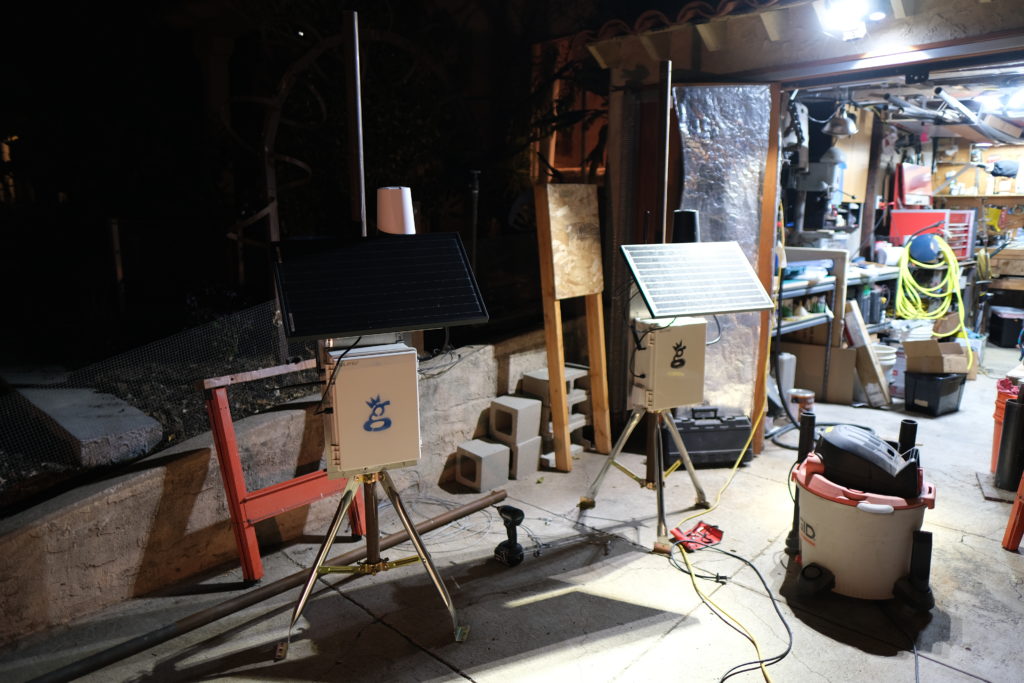
It started with the usual last minute scramble to get everything ready for a big project. The night before I was out in the shop cutting masts and prepping enclosures to make sure I had everything ready for a big week! During the past year, I've learned a bunch about getting these things out in the wild. The latest improvement I learned from a client (thanks Dave H!) was using these little tripods for a "plant it anywhere" setup that's easy to carry.

When you get where you're going, just fasten the tripods into the ground with long lag bolts and you're set!

The trackers I used were Digital Matter Oyster trackers, about 160 grams and the size of a few phones stacked on top of each other. The advantages these trackers have is that there aren't any buttons to turn off or on, the battery life is measured from weeks to years, and they're pretty rugged. Originally designed to track vehicles, they were an excellent step in the direction of tracking far less predictable things. A paraglider has the entire sky within which to move.

I arrived late Friday night into Monroe, Utah, then met up the next morning with Stacy Whitmore, president of the local flying club, CUASA. We jumped in my truck (which is pretty easy to pick out in a crowd) and headed up to place the two Helium Hotspots, one at Cove Launch, and one on top of Monroe Peak.

Cove was first up, and after a 40 minute drive up a rough road, we arrived at a truly glorious place to put a hotspot. With a view of the Sevier Valley to the north and south, it was an excellent first step.

https://youtu.be/qsoJ-\_zuxrU

As you can see in the video above, these 2 hotspots weren't the only ones providing coverage. Since pilots can get up to 18,000' (the legal limit) the trackers have a clear line of sight..everywhere. We were seeing 80+ mile sensor communication to the gateways, which is impressive!
With the gateways set up, it was time to start flying!

https://youtu.be/ijnTEm6Mrf8

As I handed out trackers to paragliders and watched their progress through the sky, a few things became clear.

First, the Network works. While the tech can be complicated and the whole thing is not yet push-a-button easy, it does work. That's rad.

Second, the deployment pattern of Hotspots becomes far more important when you start to optimize for Network coverage and not just earnings. I jumped at the first two locations because both were high and had great views. It worked, but there were plenty of coverage holes that I could've filled in with a different pattern. When I cover this event next year, I'll use 2 or 3 more hotspots and place them in a ring around the valley rather than on just one side. I'll also use Kudzu to estimate coverage, which was something I'd wanted to do but ran out of time.
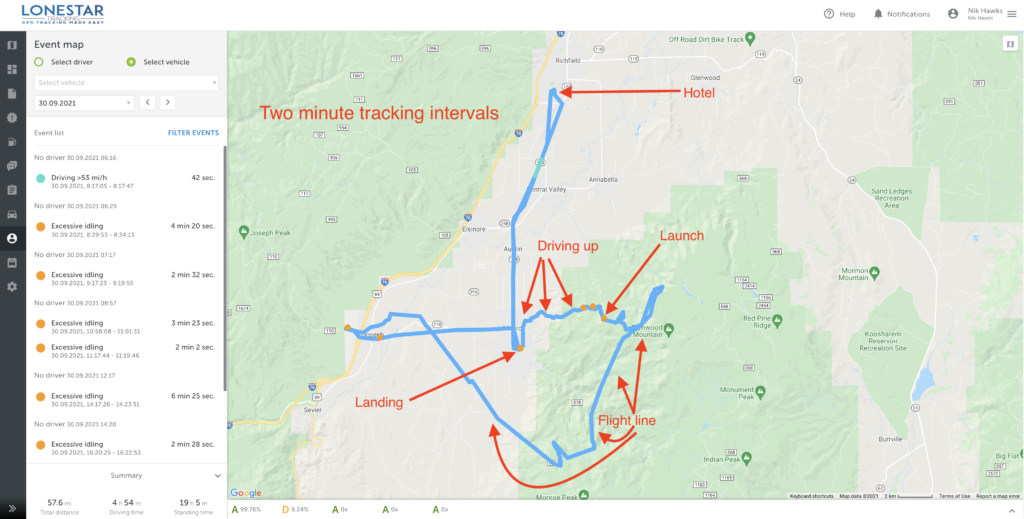
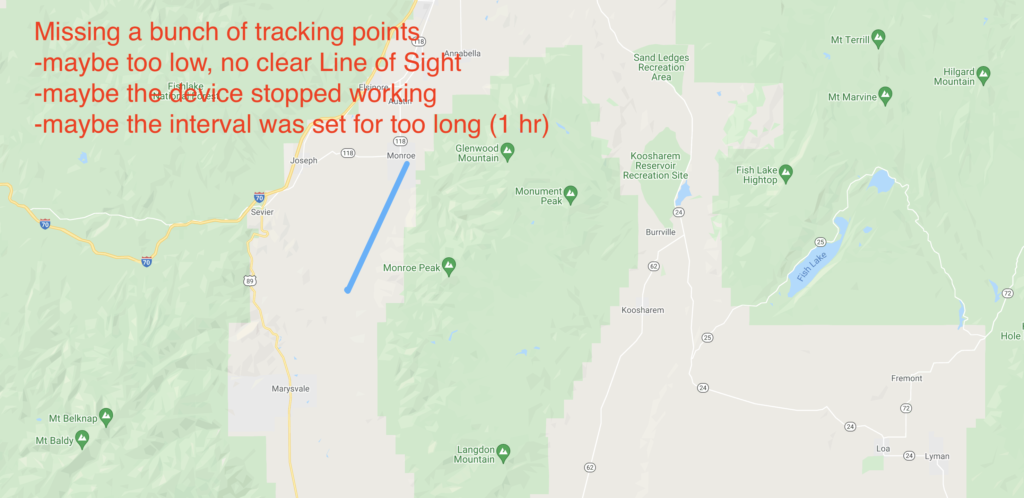
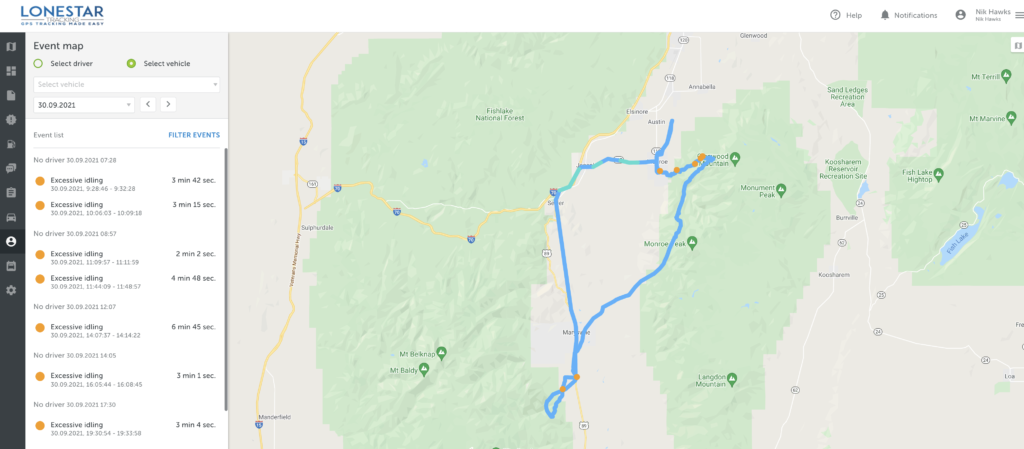
Third, using vehicle trackers to track paragliders is an excellent start, but free flight pilots in general (paraglider and hang gliders) need a few options that we hadn't configured in the trackers. Here's an example of the day in the life of a tracker, from the time I handed it out in the LZ (landing zone, which is where pilots in Monroe usually meet to start the day) all the way to the end of the day when the pilot went back to their hotel.

Before going further, I want to make it clear that this was a pilot program. This is NOT what the end product of a free flight tracker will look like. The goal of this project was to see what was possible and where we needed to improve.

Most of the improvements can come from better Hotspot placement and configuration settings within the tracker. Some improvements specific to free flight will come from hardware modifications. We started off with 2 minute intervals and eventually got 'em down to 30 second intervals by the end of the week. While that pushes out more *potential* data points, if you don't have coverage from a Hotspot it doesn't matter how much data your sensor is pushing out; it won't get seen.

A bunch of things can go wrong. The interval is important; if you set it for an hour you'll have a battery life measured in years, but for a 2 hour flight you'll only get 2 data points, like this:

Here's another pilot who did that same flight but had a tracker with much shorter intervals. You can see the difference it makes!

The configuration settings presented an additional set of challenges. For paragliding, I wanted a tracker that could be found if the pilot either had an emergency and landed conscious (and able to push a button), or landed and was unconscious. These trackers were set up for long battery life, so once they stopped moving for a period of time they went to sleep. That's very useful for tracking vehicles on land, but not very useful for paragliders flying in adventure country.

Keep in mind that these trackers only report their positions if they can communicate with a Hotspot. No Hotspot, no comms.

Going to sleep once movement has stopped presents the issue of not being able to be found if a pilot crashes and is unconscious or just not able to move. The solutions for solving that could be creating an on/off button for the tracker so that you can conserve battery at home, when you don't need to be tracked, but push out signals every 2 minutes when you go flying.

The rad aspect of creating off grid Helium Hotspots is that you could put a Hotspot in a helicopter and fly a search pattern with a very wide "bubble" of coverage. As long as trackers are on and pinging, you're very likely to find them. This creates another potential solution for "crash detection" in trackers where they'd continue to ping at 1 or 2 minute intervals if they detected a sudden stopping of movement.

Finally, this project brought to light the usefulness of an "emergency" button, just like you have on an inReach mini.

You might ask, "What's the point of having another device that does the same thing?" Well, there are three good reasons. First, when working in high consequence environments, a basic rule of safety is "Two is one and one is none." Having a backup can be the difference between being found within hours of a crash and not being found for days.

Second, because these two devices work using different technologies, they offer a wider spectrum of "findability." While an inReach can be found by communicating with satellites, if it's deep in a canyon and doesn't have a clear "view" of a satellite, it becomes less useful. A LoRa tracker, on the other hand, puts out an omnidirectional beacon at a minimum range of 60 meters in dense brush and a max range of 80+ miles with clear line of sight. A helo carrying a mobile Helium-compatible Hotspot can fly around and provide a bubble of fairly focused coverage, greatly speeding up the tracking possibilities.

Third, as gruesome as it sounds, if you auger in and hit hard, the impact is likely to break not only your bones but also the electronic tracking devices you're carrying. If those electronic devices are on opposite sides of your body, it is more likely that at least one of them will not bear the full force of the impact and will remain trackable. I know, ugly and terrible, but also practical.

Practicality is the watchword here. The long term health of the Network is based upon the usability of it. Projects like these, where we put sensors and gateways (Hotspots) out into the wild and see how they do, go a long way towards all of us leaning how to use this fantastically cool technology to improve our lives.

If you'd like to see the presentation I gave at the 2021 Red Rocks Fly In about Helium for paragliders, here it is:

https://www.youtube.com/watch?v=MsNQa0fL0WI

My entire involvement with Helium started with a lost paraglider, but finding lost paragliders is just a beginning. I am super pumped to be on this journey and to share as much as I can with you, so that together we can build a superbly useful tool for whatever problem you want to solve. Here's to safe flying, to useful Networks, and to advancing our knowledge and understanding that this giant new realm of IoT opportunity available to us all.

To life!

Resources

Feel free to reach out to any of these companies for help with your projects, and of course, tell 'em the Gristle King sent ya! :)

Lonestar Tracking - Based out of Texas, Lonestar makes it super easy to buy devices and start tracking whatever you'd like.

Digital Matter devices

Helium Network

CUASA - Central Utah Air Sports Association - If you have hotspots you want to place off grid, this crew is way open to having you put them up on high sites around the Sevier Valley. Reach out to Stacy or Jeff to see if you can work with them.

If you're looking for work in the Helium ecosystem, please check out this rad project I'm a part of called Helium Jobs. You can post and find jobs there, help support the ecosystem by making it easier to connect professionally, and let the world know that YOU exist and want to help contribute within the Network. Rock on!

Archived Comments

Mario - 10/10/2021

Inspiring. Dreaming of the day when I finish setting up my helium miners (for good) and start to think off, how can I, using Helium network, make other people's life easier/better. :)


Joseph Campos - 10/12/2021

Great job Nik! Your passion shows and it is awesome that it is aligned with helping keep people safe. Good job in the presentation video, you do a good job of explaining what can be a complicated subject sticking to the "why" the group would care.


Nik - 10/12/2021

Thanks Joseph, much appreciated!


Reports From The Field: Tracking With Helium - Gristle King - A Guide to Helium - 11/2/2021

[…] up was to pro­vide cus­tom track­ing for race par­tic­i­pants. Hav­ing recent­ly done the very first paraglid­ing track­ing event up in Utah, for the X Red Rocks race, I man­aged to avoid a few mis­takes, repeat a few more, and learn a […]


Precios Louzado - 11/8/2021

great job. Is it possible to integrate 3rd party appliances on helium devices as a hub for transacting on the blockchain.


Nik - 11/8/2021

You should be able to use just about any sensor. Helium maintains a list of "Helium ready" ones here.


Cody - 5/5/2022

You are doing incredible work Nik. Appreciate you sharing.


Nik - 5/6/2022

Thanks Cody!


Is Helium A Better "Last Chance"?

· 12 min read
Nik
Site Owner

I got into Helium accidentally. I was looking for a way to find and communicate with other paragliders out back of beyond. I had participated in a Search and Rescue for a well known paraglider out in remote Nevada at the end of summer 2020.

The missing paraglider pilot (James Johnston, aka Kiwi) had GPS and a cell phone, and it still took hundreds of people, including hunters, hikers, bike riders, ATV mounted search parties, planes, helicopters, drones, and satellite imagery 30 days to find him. Here's a 20 minute presentation on just the crowd-source satellite imagery side.

https://www.youtube.com/watch?v=2UgtrcyWreE

I flew up with my friend David Hunt in his small plane to help with the aerial search. We left early in the morning on the third day after Kiwi was reported missing and it became clear that the more people searching, the better.

We got bumped around in turbulent Nevada desert air for a few days before flying back to San Diego without having found the missing pilot. For almost the entire journey, David and I talked about better options for being found. Should we have a backup GPS, or was there another device or technology that could be useful? We found Recco Reflectors, which are useful if a local SAR crew has a helicopter with the technology, but...not many crews in the US have that.

Then another paraglider pilot and buddy of mine, Zach Armstrong, stumbled across this thing called LoRa. LoRa stands for LOng RAnge, and is the radio protocol used by Helium. As we searched around the internet for more on LoRa, we found two cool options. One was Meshtastic, a system designed by a paraglider that used LoRa to form mesh groups of communications nets. You and your buddies can all talk to each other across long distances using devices you build.

We built a couple devices and tested 'em out, thinking of them as a good option, but to be honest, pretty fiddly.

I found a way to 3D print cases locally, made a couple more devices and handed out my extras to local pilots to test while we flew in the mountains. They weren't easy to use unless you really like to tinker. Not everyone does.

Then I stumbled on Helium. It came up when you looked for "LoRa" back in August 2020 on the Googs. I'd been involved with crypto before, so I wasn't afraid of it and didn't think it was a scam. I saw a Helium "Hotspot" down the street from my house earning a tremendous amount of HNT, or Helium Network Tokens. That caught my attention. I got onto the Helium Discord back when you could read through every thread from the start in about a week and a half, and did just that.

Serendipitously, Helium opened up a DIY program at about the same time, where you could buy the parts to make your own Helium Hotspot and onboard it onto the Network. Along with my buddy TJ Ferrara, we applied for and received "alpha codes", then dug into how to actually use the things.

Here's TJ getting our first one online.

Here's TJ up on my roof, putting the finishing cable management touches on that first miner. We were so pumped to have one up and running!

Of course, I had to constantly tinker with it (it was all new and exciting), and the pole was too much for me to manage safely by myself, so I hooked my wife Lee up to the pole with a climbing harness and rope, and she patiently belayed the pole as I tilted it up and down to dial in the hotspot and antenna at the top. She's seen my many phases of crazy, and she gamely went along with this one.

Ok, so that got us into Helium, but how does that relate to paragliding?

Well, with our first hotspot done, I set my sights on getting an antenna way out in the mountains near my favorite paragliding spot. It'd provide us a way to test Helium Network coverage and see if we could use trackers to, well, track paragliders.

We started with Helium Tabs, but those left something to be desired. Form factor = cool, Performance = Not so much. I put one on my new bike and it managed to stop tracking within about a day.

I started ordering parts to build a giant off grid setup. I was so excited about the whole thing I'd send blow-by-blow videos to my Dad.

https://youtu.be/whRloJZ\_9RE

Guided by Paul over at Tourmaline Wireless, who drilled the holes and walked me through the layout, I got the first hotspot put together and ready to hike in. Here's Paul sussing out the best interior setup in his shop.

I got permission to place the thing on a mountain the backcountry of San Diego, then TJ & I hiked in 60+ lb backpacks filled with gear and set the thing up. Fun, and unfun. It was a giant antenna that I didn't need, plus more solar panel and battery than was necessary, but it was my first one. I ended up having to dial the antenna gain down with software, a project that introduced to some really cool and competent people (looking at you, @jerm on Discord), and it taught me a lot about what you actually want in an antenna vs what looks cool.

With the off grid hotspot in place and providing coverage from the Mexican border up to north of Los Angeles, I figured we could start testing tracking, but I needed more rugged tracking devices. I turned to Lonestar Tracking and bought a few Digital Matter Oysters from them along with a tracking subscription plan.

I handed out the devices to local paragliders, and we tested them. They worked (I've written about these tests over here.)

So that brings us now, October 2021, a year after the Kiwi SAR, to the Red Rocks Fly In and the XRed Rocks. The Fly In is an annual gathering of paragliding and hang gliding pilots, over 300 of us! It happens up in Monroe, Utah, and is a week of sharing the skies with other free flight enthusiasts. This year, there's something new: The X Red Rocks.

X Red Rocks (XRR) is a paragliding "hike and fly" race organized by one of my free flight heroes, Gavin McClurg. Gavin has participated in the super gnarly hike and fly race called the The Red Bull X Alps, held in (you guessed it) the Alps. He wanted to share that joy (and the joy of type 2 and 3 fun) with the rest of us back here in the US, so he put together the XRR.

In fact, it was Gavin's movie, The Rocky Mountains Traverse, that got me into paragliding back in 2016.

Unlike the month long journey that Gavin went on, the XRR is a 3 day event where, each day you hike up into the mountains to a launch with your paraglider, unpack, unfold, and launch off the mountain, fly as far as you can and land, then pack up, hike up, unpack, unfold, and launch again until you've finished whatever the day's task is.

Of course, I registered for it. :)

I wanted to participate, but I also wanted to combine business and pleasure, and to give back to both my free flight (paraglider and hang glider) community as well as showcase what Helium could do.

The way this event is set up is basically the reason I got into Helium; flying in remote to semi-remote areas without perfect cell coverage.

I wanted a way for my paragliding community to have a third option, maybe a last chance, after GPS & cell phones, to be tracked in case we got lost. I know that LoRa isn't a magic pill, and that it won't replace a Garmin inReach Mini with a global constellation of satellites, or telcos with their giant cell tower sites everywhere.

Still, it's a way for regular people, just like you and me, to deploy a wireless network that provides actual use. That is (pardon my language) fucking radical. I love radical things.

So, with this in mind, I rallied the troops. I called Tommy at Lonestar, Matthew at Digital Matter, talked with the Helium crew about what I wanted to do and why, and all of them very generously volunteered to donate time, materials, and expertise to the project.

I'll be bringing up 2 of my off grid hotspots, Helium is sending me a few of the off grid setups that Paul built for them as well as a bunch of trackers, Lonestar is covering tracking, and Digital Matter is providing enough trackers to cover all the rest of the pilots. If YOU want to be involved in some way, reach out!

I'll be driving up Friday the 24th of September and will spend the weekend setting up Helium Hotspots in the mountains around Monroe. On Tuesday the 28th I'll be giving a presentation on Helium to my paragliding community up in Richfield, UT (8 pm, swing on by!) and on Thursday the XRR kicks off. Ryan from Lonestar and Travis from Helium are coming up to help everything run smoothly and to answer questions, and hopefully to help convince free flight clubs that wherever we have a launch, we should probably add a Helium compatible hotspot to it.

I would love for you to follow along on the journey as we hike, fly, race, and use the Helium Network to demonstrate what a small, committed group of people can actually do. If you're in Utah and want to come help out with setup, troubleshooting, lending us a Helium Hotspot, or just participating in a joyous effort, please reach out or just post to comments.

Come along for the ride!

Archived Comments

Richard Ogden - 9/24/2021

Life is for living ! Well done fella.


Derek Clair - 9/24/2021

I am in Riverton (Salt Lake), and would actually be very interested in hearing/talking all the Helium things; willing to make the drive too if you’ll have me. What is the venue? Or an address, I’m there!


Nik - 9/24/2021

Hi Derek, 8:00 PM. Tuesday, Monroe City Park (Across from Bullies) Main St. Monroe.


FRED GARNER - 9/25/2021

Hi Guys I am in I have been trying to do just what you are going with Helium I am an aircraft and anything that flies on the airstreams I have track aircraft use ADS-b Sillite Radar in and out of airports and I and also a stock that misses with Crypto and that is how I got into Helium hots I am interested in helping people that are doing what they love and I want to help them stay safe would love to help that is all I do is track planes and would to help there is more to this whole thing. use my email I would love to talk. You every here of Mike Patty, Steve Fosit he died doing what he loved and they never found Him. I will do what I can do I have 3 gigs of bandwidth Please get back to me. FRED GARNER


Darin Johnson - 9/27/2021

I'm kinda like you. I found Helium by accident. I was watching videos on mining cryptocurrency, and one came up along the lines of "plug this box in and make money." Another one said before you get into mining something, do your research. What's the usage, is it covered by something already established, etc? So I watch more videos, and while some are talking about "optimum antenna placement" and the like, NONE are talking about what Helium can DO!!! So I keep looking around and when I finally found it, IT BLEW MY (language) FUCKING MIND!!!!!!!!!!!!!!!!!!!!!!!!!! Apple's AirTag just came out a few months ago and it's claim to fame is that other user's phones can help you locate your lost things. Imagine if Google, or Tile, or another company came out with a platform agnostic tracker that uses the Helium Network. All Helium needs is a little push, the right company making something that shows off the power of the network and it will absolutely EXPLODE!!!! I want to be there, I want to be part of this!!!!!!!


G - 10/6/2021

Hi Nik, Can you please give a reasonable explanation to the best of your knowledge how is this possible. And if so can your expertise replicate it? Thanks! G https://explorer.helium.com/hotspots/11ZMRjPTazmb9Gf2s4qpZCW5yEd9Bb1gbSUhGGiobxjDAfxTjve


Nik - 10/6/2021

Probably cheating. I can't/won't replicate cheating. :)


How To Use Hotspotty To Crush

· 9 min read
Nik
Site Owner

Hotspotty started as a way for Daniel Andrade (@spillere on Discord) to manage the growing fleet of Helium Hotspots he was rolling out together with Maxime Goossens and Alexis Argent.

In the beginning we had a tiny script that would send our daily rewards to a Telegram group.

It's, uh, grown from that. :)

Let's start with a little background on the Hotspotty team. Daniel is a Brazilian born itinerant consultant trained as an electrical engineer with an interest in web design & coding. He has contributed heavily to the Helium community.

Maxime is their engineering wizard, combining a drive to solve complex problems with an ability to show you, very quickly, the useful parts of the data.

Alexis has a strong interest in open source communications and blockchain technology. He's founded 2 companies in VoIP and Wireless distribution.

They recently walked me through the latest incarnation of Hotspotty in the accompanying video (vid link at the bottom).

What is Hotspotty, and how can you use it to help you within the Helium ecosystem?

Hotspotty is designed to be an all-encompassing tool for Helium users, from owners of single hotspots out to groups running a fleet of thousands. What does all-encompassing...encompass? Let's go through the high points.

Understand the Network

First, Hotspotty helps you visualize the complex math, equations, and rules that govern the growth of a healthy Helium network. If you've ever been confounded trying to wrap your head around HIP 17 with its density target, or number of siblings, or density max rules, Hotspotty makes the whole simple to understand from the perspective of any hotspot on the planet.

screenshot of Hotspotty app showing where the edges of hexes are as well as showing where overcrowded, or problem, hexes are.

Now you can see what the edge of any hex looks like (NOT a straight line), and also very quickly see where the "problem" hexes are so you can work to clear them. If you want to dive a bit deeper into HIP 17, I've got a post written up on it over here.

Collaborate with your team

Now, let's say you work with other people to manage your Network. You might have Installers, or Hosts, or a Fleet Manager, or even a Region Manager. You can separate out all those roles into Contacts or Members, assign them labels, and give them appropriate access.

Contacts may not be internal members; they could be an installer you just want to use occasionally, or a host who doesn't need to see your whole network but does need to get paid out monthly (or however you do it, this is NOT tax advice!)

Hotspotty allows you to also have Workspace Members who DO get access to the inside track. You can add these to your Members list, invite 'em in, and let them collaborate with you.

Optimize your deployment

Ok, so once you've started building your team, how do you optimize your Helium Network deployments? By diving into the Map section of the Hotspotty app and taking a look at the various tools available. As of Sep 18th, 2021, most of the tools focus on *avoiding* bad places rather than finding the best places, but that second part is coming, and soon.

What is a "bad" place in the land of Helium? I'd define it generally in three ways:

  • Density - Local and Regional
  • Topography - Signals blocked by earth
  • Volume - Enough Hotspots to reliably connect & initiate the earning sequence

I've talked a bunch about optimizing your hotspot placement (see my Rough Guide for a deep dive), but it can be complicated to run all the numbers hotspot by hotspot.

Seeing a "bad" place on Hotspotty is as easy as opening the app, clicking on the Map section, then clicking on the Hexes tab, and if you want to see specific resolutions, clicking on the Filter button.

There's another cool feature you can use just for quick checks, and that's seeing where hotspots are too close together to have a *valid* witness (the "300 meter" rule.) Here's what it looks like when you turn on the layer in the settings cog, at the top right.

See all those line between hotspots? Every one of those indicates that those hotspots are too close to each other to be a valid witness. Neat, eh?

Collaborate with the Helium community

Now comes one of the coolest parts of Hotspotty, though it'll take all of us working together to make useful: Collaboration. Of course, you can collaborate with your internal team, and that's cool, but as Max from Hotspotty says after looking through reams of data:

What we discovered is actually quite interesting; most of the optimization is beyond your control.  Your earnings are defined by your environment.

-Max @ Hotspotty

Managing the Environment - Contacting Hotspot Owners

How do you manage your environment? By talking to other people! Hotspotty allows you to do this in a reasonably anonymous way. You can send a message to any hotspot, and if that hotspot owner ever looks at Hotspotty, they'll see someone has messaged them. They can choose to ignore it, or they can "claim" the wallet associated the hotspot the received the message and start a conversation with you.

What does it look like? Let's walk through the 4 step process.

Step 1: Identify the problem. In this case, I filtered America's Finest City (San Diego) by res 7's, then just randomly selected one to see if there was an easy fix. I mean, Hotspotty is telling me we only have to move 1 of 'em!

Step 2: Dig in and look for easy wins. In this case, there's a hotspot that right on the edge of the res 7 AND is also super-crowding another hotspot. Easy fix!

Step 3: Identify the exact Hotspot.

Step 4: Initiate contact. Be cool, offer help. Do NOT be a jackwagon! Only showing them how THEY can move to benefit YOU is NOT helping the community. :)

Managing the environment: Spawning a Discord Channel

Another rad way to invite your local crew to participate is by "spawning" a Discord channel based on a specific hex. You choose your problem hex, spawn the Discord (which will open up a new channel in the Hotspotty Discord), then rally folks into it. I've done the "rally" side by working in the much larger regional channels over on the Helium official discord and saying, "Hey, if you're in [San Diego] and want to improve our reward scale, jump on into the discussion and let's crank up earnings together, [here]!"

As an example, here's the San Diego res 4 Discord channel.

Manage payouts

Finally, you can manage payouts. The Hotspotty v1 is still alive and well for this. On v2 (which is what I've covered in this post) as of today, you can just get the correct numbers for what you need to pay out, but can't automagically make it so your wallet pays another wallet on some certain date/time, but that's coming.

Ready to dive in? Cruise over to Hotspotty and sign up to get started. Enjoy, and let's make the Helium Network radical together!

VISIT THE HOTSPOTTY WEBSITE

The full interview is over on the Toobz, or you can watch it right here.

https://youtu.be/7v19oWawO1Q

Until next time, rock on!

If you’re looking for work in the Helium ecosystem, please check out this rad project I’m a part of called Helium Jobs. You can post and find jobs there, help support the ecosystem by making it easier to connect professionally, and let the world know that YOU exist and want to help contribute within the Network. Rock on!

Archived Comments

AndyCA - 9/20/2021

Thank you. Such a useful tool.


Victory With Helium: Power Moves For New People

· 26 min read
Nik
Site Owner

Ok, so you just found Helium and are wondering what to do next? Let's walk through the whole system so you'll know what to do and what NOT to do. We'll go through the ecosytem of Helium, the incentive of HNT, explain Helium Wallets as well as the Burn and Mint equilibrium, and make sure you get started the right way the first time.

The Ecosystem

Helium is a blockchain that encourages you to provide provable wireless coverage for the Internet of Things (IoT).

This wireless coverage is NOT WiFi, and it won't give you internet*.

Helium allows a wide variety of devices, called sensors (door open/close, parking lot sensor, temperature & humidity, etc), to transfer their data onto the internet. Ultimately, Helium aims to be a ubiquitous network that allows anyone to easily install a wireless sensor that connects to the internet. For examples of how Helium is being used today, you can see examples ranging from CO2 monitoring to tracking vehicles to activity monitoring, and even a better mousetrap.

In order to provide coverage, anyone can order and deploy a Helium-compatible Hotspot. Hotspots are a combination of computer and radio and are made by many different manufacturers, from RAK to Bobcat to Syncrobit, Seeed, Kerlink, and more.

Inside the Hotspot, the computer runs the blockchain mining operations and tells the radio what and when to broadcast. The radio does what the computer tells it, and it reports to the computer what it "hears".

In return for mining, broadcasting, and receiving, each Hotspot earns some portion of the 2,500,000 HNT (Helium Network Token) currently distributed every month.

Helium is run by VERY smart engineers who have built an incredible system. If you see something that doesn't make sense, it may take some time to understand it. Know that Helium explains everything as if you're an engineer who already understands what they're explaining. It always makes sense, but it can take a long time and some effort to understand. That's one of the things I try to help you with on this site. :)

If you'd like to understand as part of a group, consider joining the Gristle Crüe, where we meet weekly on Zoom and have a private Discord to bring you up to speed and keep you at the bleeding edge of what's going on.

Cool, I think I get it. So...why is everyone I talk to about Helium so bonkers about it?

The Incentive: HNT

Helium Network Tokens, or HNT, are what drive this whole train. The better the coverage you provide (pages and pages have been written on how to provide excellent coverage), the more HNT you earn. HNT is a cryptocurrency and can be traded for many other currencies, including US dollars. That's mostly why people are going so bonkers for Helium. That, and the fact that it's the leading edge of a wave of technology that's about to change our entire society, but...let's leave that for now and focus on the fundamentals.

Hotspots earn HNT for 4 different actions:

  • Creating a Challenge
  • Beaconing a Challenge (you're acting as a "Challengee" in this case)
  • Witnessing a Challenge
  • Passing Data on the Network

Need more info on the PoC cycle of Challenges, Beacons and Witnesses? Go deep here.

For turning HNT into USD I mostly use Binance.us, but I've also used Bilaxy. In general, crypto exchanges can be unreliable. If you do trade HNT for anything, I suggest getting it on the exchange, making your trade, and pulling your earnings off the exchange in as short a time as possible.

For buying Hotspots, check out Helium Deploy, here.

At the time of this writing, you could buy 1 HNT for about US$20.

Let's Talk Helium Economics

As a casual user, you can basically bookmark this whole Economics section with: The price of HNT will be speculative until we hit mass network adoption, then the price will de-couple from crypto and reflect an actual market value. IF that happens, it will probably be a major source of wealth creation for holders of HNT.

Helium manages the supply of HNT in a few ways. The longer version is here, in HIP 20. The shorter version is below.

First, there's a maximum supply; no more than 223 million HNT will ever come into existence. Every 2 years, the amount of HNT made available for distribution is cut in half, a process called (wait for it...) Halving.

Until Aug 2023, the Helium Network has a target production rate of 2,500,000 HNT/month. That HNT gets distributed amongst investors, Hotspot owners, Validators, and Network Data Transfer. More on those in a minute.

The second way Helium manages the supply is with a Burn & Mint Equilibrium. What the heck is that? We'll have to backtrack a bit here. Remember when I said you could use a sensor to transfer data on the Helium network? Well, you pay for the data not with HNT, but with Data Credits (DC). The only way to get Data Credits is by "burning" HNT.

When you "burn" and HNT, you "mint" a Data Credit.

The value of a Data Credit doesn't change (it'll always cost $0.00001 per DC), but the value of HNT can swing wildly.

As the Network starts getting more use, more HNT will be burned to create DC. With less HNT on the market, the price of HNT will (probably) go up. As the price of HNT allows you to buy more Data Credits to use the Network, you need less and less HNT to do the same amount of work.

Of course, at some point, you run out of HNT, right? I mean, there IS a cap to how much will be mined.

Nope. There's one more management tool when it comes to HNT, and it's called Net Emissions. Net Emissions is one of those economic tools that flummoxes most of us and fascinates economists.

For the geekier types...Net Emissions means that every time Data Credits are used (and HNT is burned), an equal number of HNT will be minted to replace that. The catch? There's a cap to the total HNT that can be minted per epoch. What's an "epoch"? Short version: About 30 minutes. Long version here. With a cap to Net Emissions, Burn & Mint can still be a useful deflationary force.

Technically, we could still run out of HNT, but it'll take 50 years and my guess is that within 20 years the idea of Helium will be as antiquated to us now as pagers currently (2022) seem.

Ummm, enough about economics...where do I keep my HNT? I heard something about a wallet?

A "Wallet" is really just access to an address on the blockchain. It's not a physical thing. Most people use the Helium app to create and manage their wallet. When you first download the Helium app on your phone and create a wallet, you'll be instructed to write down 12 words. Those 12 words are the ONLY way to access your wallet. If you lose those words, you lose access to that wallet, and any HNT or Hotspots attached to that wallet. The 12 words are a big deal.

You can sign out of one wallet and sign into another wallet on the same phone; the wallet is NOT locked to your phone. You can't have both wallets open simultaneously on one phone.

For ease of use, the app also creates a PIN for your wallet. Once you've signed in to your wallet on the app, you'll just need the PIN to access it again, instead of typing in the 12 words each time. Every time you sign out and then sign in again, you have the option to change your PIN. Your 12 words never change.

A Wallet is the controller for a Hotspot; every Hotspot that is earning is attached to just one Wallet. You can have multiple Hotspots in your Wallet, but you can't have multiple Wallets that split a Hotspot.

Wallets are public; anyone can see your wallet address, how many HNT are in that wallet, and how many Hotspots are attached to your wallet. Since you can have more than one wallet, it's not a bad idea to have multiple wallets just for a little bit of privacy. Use one to manage your hotspots, and another wallet with no hotspots attached to it as a "savings" account where you routinely transfer your HNT to. It's not a foolproof system, but it does make it a little more difficult for anyone to see just how much HNT you've earned.

Ok, cool, so I've got a wallet and a hotspot. What do I do now?

Managing Your Hotspots

You manage your hotspots from your wallet. When you're signed into your wallet on the Helium app, you can change, or "re-assert" their location. You can change the stated elevation of the antenna. You can change the stated gain of the antenna. As of early Sept 2021, none of those reported stats matter, but they all eventually will feed into the earnings algorithm, so it's a good idea to accurately state your elevation and antenna gain.

Speaking of changing location, I think it's reasonable to "assert", or place your hotspot within about 150 meters of where it actually is. You don't have to be any more accurate than that. This will give you (or your hosts, if you've placed your hotspot at someone else's location) privacy.

Currently and for the foreseeable future, while the Helium App and Explorer will only show you the location of a hotspot down to a res 8 hexagon (a res 8 hex is about 1,000 meters across). Still, the Helium API allows anyone with an understanding of the code to see more or less exactly where you've asserted your hotspot. For my clients, I usually suggest asserting it at the closest street intersection within 150 meters.

Wait, did you say "antennas"? Aren't those the single most important thing ever in Helium?

Antennas

Antennas are one of those things that seem like they're really important, but they're not. They're kind of similar to how you looked in high school; zero relation to what you ended up doing in real life. I've written a bunch about antennas to help dispel the notion that they have a huge impact on earnings. They don't.

If you want the best antenna out there for most situations it'll cost $150 plus shipping. It usually won't make more than a 15% difference over a cheap piece of sh*t. I like nice things, so that's what I use, but most of the time it won't be magic. If you just want an antenna that works very well but doesn't cost as much, try anything from McGill.

The single biggest mistake people make when buying an antenna that can have a negative impact on earnings is to think that higher gain = better antenna. It doesn't. A higher gain doesn't get you anything except a narrower radiation pattern. Occasionally, if you're trying to punch through one or two dense strips of trees, a higher gain can help. Mostly, they just hurt.

But, but, but, Witnessing makes me the majority of my HNT, and I have to have a great antenna to Witness, right?

Nope. I wrote about that in Can I Get A Witness?

Ok Nik, so what actually makes a difference?

Location

The location of your hotspot is the number one determiner of your HNT earnings. If you're in a place with optimal density and volume of hotspots you'll earn more. If you're in a place with too few hotspots that your hotspot can "see" you won't have the opportunity to Witness Beacons. If you're in a place where it's too dense you'll Witness plenty of Beacons, but they'll be low value.

The density limits are covered by HIP 15 and 17, which is described in the "optimal density and volume" link, above.

I've got a HIP 17 explainer video, as does Helium, and just about every YouTuber on the planet. It's complex, but not impossible. You got this!

A good rule of thumb for minimum volume (number of hotspots your hotspot can "see") to earn maximally is around .005% of the network.

[Number of Hotspots on the Network] x [.00005] = Minimum number of hotspots your Hotspot should be able to reliably see in order to routinely witness beacons.

That's neat, although I don't do math. Is there another way to think about earning more?

Optimizing your Helium Hotspot consists of picking the best location, getting up to the minimum elevation required for that location, and then using the right gear. Each one of those steps is progressively less important. If you want a rough guide for this, start here.

The right gear has very little to do with your earnings, whereas location & elevation are critical. If you'd like help with understanding how to optimize your Hotspot (and make sure you know how and where to move it if needed), I'm available for hire. For about the price of one extra hotspot you'll know everything you need to know in order to earn the most out of your deployments. You can also join the Gristle Crüe and be part of a community all learning together and helping each other. I built it for you!

Thanks Nik! Just a few more things. WTF is a relay? Is it bad? Can I fix it?

Relay

Having a hotspot be "relayed" means, in short, that instead of your hotspot reporting directly to the blockchain, all of its reporting information gets passed through, or relayed, by another hotspot. This happens because your firewall blocks your hotspots from talking to the interwebz. Your hotspot then has to "relay" all its information through nearby hotspots.

This means the information flow is slower and less reliable, and you're less likely to earn HNT. Being relayed does not always mean you'll earn less, although it usually does. If you're relayed, it's a good idea to go through @Jason from Discord's fantastic "Solving the Relay Problem" flow.

Hey, I bought a [insert Hotspot manufacter here] is it the best one?

Miners

Miners, (also called "Hotspots" or "Gateways") are made by many different manufacturers. They're all about the same, though in the rush to meet the demand some manufacturers have had more problems than others. You can buy Hotspots here.

In general, I've found the RAK V2s to be the best of the lot, mostly because they've had the most time to work on their product. Bobcats and Sensecaps are also good, though the Bobcats will need a heat sink if you put 'em outside or in the attic. Nebras are considered the worst of the bunch, though there were high hopes for them early on. With a little fiddling, all hotspots can be improved upon as far as being stable and performing well in the heat.

No hotspot is faster or higher earning than any other hotspot as far as comparing brand/model to another brand/model. When choosing what hotspot to buy, make sure you follow the link above or from Helium's Approved Manufacturer page as a ton of scammers have popped up to take advantage of your desire for a Hotspot.

One very important thing to note when it comes to Helium Hotspots is that Helium itself doesn't have any control over the manufacturer.

In general, the process is that a manufacturer applies to the DeWi alliance (a neutral third party entity with no dogs in the fight) for a license to make hotspots. The manufacturer provides a sample product to the DeWi Alliance and makes a bunch of promises about how great its product will be.

Helium is NOT the entity that assess Helium-compatible Hotspots. The DeWi Alliance considers each application and does its best to assess whether or not a manufacturer can do what it claims it can do.

If a manufacturer makes a mistake, or doesn't do something well, there isn't a reasonable for Helium to somehow punish that manufacturer; that's left up to the market. It's the fairest way possible to administer a decentralized network, though it can be bloody frustrating if you're the one who bought a unit that never arrives.

Can you tell me about any other weird little details I might need to know?

Connections

Connections between hotspots and antennas can be confusing. There are RP-SMA, and sometimes SMA, and sometimes N-type connectors. The best way to figure out what you need is to figure out what the connector is on whatever you're connecting, then get a cable with the opposite gender connector. Yes, it's that simple. Yes, it also feels risky and frustrating. You got this! If you'd like a table of what connector your hotspot probably needs along with pictures of what it all looks like, go here.

That's it, most of Helium in a nutshell. Now you know enough to get started on deploying your Helium Hotpots, using your wallet, and contributing to the Network. Let's do this!

*Technically, the coverage is called LongFi. You don't need a SIM card to access LongFi, there's no minimum fee to use the network, and ranges are up to 100 times that of WiFi. It's very different than WiFi, even though they both transfer information wirelessly.

Archived Comments

Alex Haiek - 9/13/2021

Hi Nik ~ Need your 4 digit code on Discord so I can send an invite, I reside in So California and have an issue my RT240 registration port forwarding. Thank you! Alex


Nik - 9/13/2021

Hi Alex, Start here. I'm 0634, though I try not to do any troubleshooting over DM in Discord; that way everybody can learn together rather than just 1 at a time.


David - 9/21/2021

I just spent an hour or so looking at a selection of 50 hotspots including mine, and manually counted up the amount of "Sent Beacon" signals shown in explorer over the last 30 days - came back with some interesting reading! for the relayed hotspots, in my totally unscientific study the average sent beacon figure was 0.66 a day, for non-relayed the average was 1.7 a day, nearly 3 times more! just shows how important relaying is to earnings, (and worth mentioning DHCP binding in there as part of the port forward process too, as people dont understand that part) and shows how much less HNT you're earning if you're mainly witnessing relayed hotspots - people missing out on a fortune in HNT because others don't bother to set up port forwarding. I wish Helium would give out and official figure for beacons sent for relayed vs non relayed, as people on discord not realising this and still thinking being relayed isn't really a problem.


Matthew Marcus - 10/2/2021

Nik! The OG himself. Mr. Gristle King. This is without a doubt the best, most simple and most effective explanation of Helium I’ve yet to come across. You, sir, have a gift of explaining the complex to a fifth grader. Bravo. I’ve been doing the Helium thing for about a year now, and have learned a lot. But I continue to learn more and share the Helium opportunity with friends and family. I’ll be sharing this post with them, just as I tweeted it out to the world. BTW, why aren’t you on Twitter…??? https://twitter.com/themarcus/status/1444326905021358086 Thanks for all of your great content and willingness to educate, inform and lead the community. Appreciate you!


Lessons Learned From A Year Of Helium Deployments - Gristle King - A Guide to Helium - 11/15/2021

[…] things dif­fi­cult to under­stand for those of us who are not tech­no­log­i­cal­ly savvy. Know­ing the dif­fer­ence between a pack­et for­warder and a min­er, a gate­way and a sen­sor, a serv­er, a router, and […]


Nick - 1/12/2022

Do you think theres any benefit in having 1 wallet per hotspot? I have this weird thought that the network would penalise people with lots of hotspots, especially if they were in the same neighbourhood. I have 6 and I am sure the 3 close together at mine and my neighbours are being 'throttled' as theyre the same setup as the others in a very similar area and used to earn more than the others until I added all 3...


Nik - 1/12/2022

Hi Nick, that doesn't make sense. I wonder what else is going on?


William - 6/7/2022

Hi there I want to send a second miner to a friend in a better place…. It’s a bit too far to travel and I want the hotspot in my wallet how do I add a miner and then send to friends, what app will they then use thanks this is a great site


Nik - 6/7/2022

Hi William, you can add the miner to your wallet, then "assert the location" at your friend's place. Send the device to him, and he can use the Helium app to get your Hotspot added to his local WiFi. Does that make sense?


William - 6/9/2022

Hi Nik thanks for your reply, just to clarify… to add the second miner to my wallet do I need to plug it in and sync…. If so do I need to unplug my first miner that I am keeping here? Will my friend need to download a Helium app to pair it… sorry for all questions but I am still a bit confused and thanks again


Nik - 6/9/2022

No worries. Plug in the second miner, connect to it via Bluetooth, add it to your wallet, assert the location at your friend's house, wait an hour or so, then unplug and send it off. No need to sync or unplug your first miner.Yes, your friend will need to download the Helium app to pair to it.


William - 6/9/2022

That’s great … one last thing just to be safe… does he need my app pin as it’s my miner or does he need to get a full new wallet with his own 12 seed numbers… sorry I don’t want him to get confused… I heard there is a utility app for this process… thanks again


Nik - 6/9/2022

He should use his own credentials. Never share your app PIN or your 12 words with anyone! Cost me $50k to learn that one.


William - 6/10/2022

I wasn’t going to share the words…. Sorry to hear you got burned….. i take it that my friend gets the app and will be able to pair the miner to his Wi-Fi ( that’s why I asked about giving him the pin as I would have thought that as the miner is registered to me that no one else could access it)…. Anyway thanks I added it to my own wallet and it is registered now and I’m sending it today… thanks William


William - 6/11/2022

Ok thanks…. I presume he will be able to pair the miner with his own Helium app even though it’s registered to me….and I can send tokens to his app….. Thanks for all your help


Nik - 6/12/2022

Yes, he'll be able to pair through his own Helium app.


Bill - 6/29/2022

Hi there, thanks for all your help and patience… that miner is up and running. I hope you don’t me asking for information… this is the most useful and helpful site… I wish I had come across it earlier. Anyway I am in London and really it’s not worth it for me and it’s adding value to Helium. I’m going to visit friends west of London and I am going to relocate my miner with some friends. I have a choice of about 4 places I can set it up but I am not sure what is the process ( I am aware of the $10 fee to assert) but if I want to try and find the best location as l will be there for 10 days do I need to pay €10 each time I try a new location… thanks and also if I am posting in the wrong section please let me know


Nik - 6/29/2022

Hi Bill, I don't think you'll have time to gather enough information at each spot; you really want 7 days of data to make a decision. I'd recommend just using a rough guesstimate based on what the probable line of sight is to other miners that DON'T have connections to lots of other miners. Does that make sense?


Bill - 6/29/2022

Hi thanks for your reply. I’m actually just going to host it at a friends place. I’m not going to be. moving as much as originally planned. I was wondering can you connect the miner and not reassert till it looks at least an improvement on London. Or will it not work in another location without a new assert. Thanks again


Nik - 6/29/2022

Hi Bill, technically you could move it without reasserting its location, but that may appear to the Network to be gaming (if all the RSSI values are off) and you could get on the denylist for that. I'd just "rule of thumb" it with regards to whether or not you think the new location will be better or worse, then move it accordingly.


Bill - 7/2/2022

Hey thanks again…. I actually am at my friends house and I am trying to do the right thing and change location but now I’m up against another problem …. A couple of weeks ago I moved the few coins from the app to Binance and now I don’t have the $ 10 hnt to pay…. I logged into Binance as the coins are there and when I tried to withdraw back to my helium wallet they have suspended HNT withdrawal…. Also the brand new one I sent to my mate up the north of UK is online but the remote assert to his place failed though I still have 1 free assert left…not having any luck


Nik - 7/3/2022

I'd try the remote assert (with the free assert) again in a day. Outside of that, you're stuck waiting to earn more HNT or have Binance open back up. Sorry mate!


Bill - 7/7/2022

Hi Nik......thanks for all your help......managed to assert the miner and it's fully online today....I bought HNT on 3 exchanges but none allowed transfer of HNT ( for my other one I am moving out of London...........I'm hopeful that the asserted one may earn a HNT so I can pay the assert fee....( the alternative was to send it back here and it would take 2 to 3 months to earn on HNT.....anyway I am really glad I stumbled on here as you explain the whole process and the background of the network...my 2 friends have found thus blog really interesting as I couldn't have given them such an in depth overview and more about Helium.....I am very positive about the Network even though I havent had much luck so far but the searching for info pays off in the end......big thanks BILL