103 posts tagged with "Helium"

View All Tags

The Essential Tools You Need For Excellent Helium Deployments

· 18 min read
Nik
Site Owner

What tools will you need to install Helium Hotspots? After putting up Hotspots on houses, buildings, mountains, and poles, and spending more money than I'd like to admit on all kinds of tools, I thought I'd put together a list for you to find all of 'em in one place. No matter how basic or advanced you want to get, the tool you need to find for an excellent Helium deployment is somewhere on this list. Let's get started!

I'll break it down into 3 main sections: Software Tools, Install Tools, and Coverage & RF Tools.

Software Tools

First, the software side. Obviously you've used Helium Explorer to poke around and see how much your neighbors are making, or what the local scale is. That's a good(free) start, but there are at least three more great options that'll let you dive way deeper into finding great locations (HeliumVision), seeing where you're getting scaled and managing your fleet (Hotspotty), and keeping track of what all your Hotspots are doing (HeliumTracker.)

If you'd like to keep it super simple, check out HotspotRF. It's probably the most popular tool for assessing locations and very simple to use. I find the other tools allow you to dive way deeper, but not everyone has the time to dive deep.

If you'd like to make sure you've got a good fundamental understanding of Helium, I'd recommend taking the Helium Basic Course.

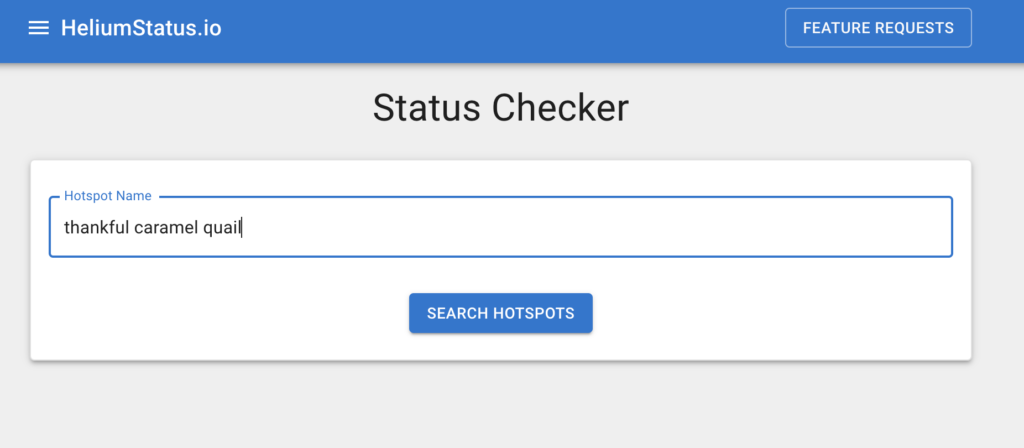
One thing to know about Helium's Explorer is that both the app and the site can be behind by a few days, and it's hard to tell how far behind it is. If you want up to date info, use HeliumStatus.io to ping, connect, and otherwise diagnose troublesome Hotspots in more or less real time.

Ok, so that's the software side.

Install Tools

Let's break this down into 3 categories: Basic Installer, Enthusiast Installer, and Professional Installer. I would place myself firmly in the last category, but there's no need to get that deep into it, and in general it's not the most profitable way to mine Helium; I just like to geek out on tools. How do I define the other two? I think of this in terms of effort.

A Basic Installer is probably going to do mostly indoor, easier installations. They'll run ethernet cable, set up an antenna indoors, and keep their cost, effort (and HNT earnings) relatively low.

An Enthusiast Installer understands the value of getting outside and up high. They plan on getting aftermarket antennas, putting them outside, and being handy enough to install an antenna on, say, a 20' mast attached to a building. They'll do a little DIY but it's typically not worth it for an Enthusiast to make their own antenna cables. Most people in the Helium space who read this probably fall into this category; it's probably the best balance of effort & HNT returns. Typically, Enthusiasts *won't* build an off-grid miner.

Finally, there's the Professional Installer. I think of 'em (myself included) as the batshit crazy version of the enthusiast. These are the people who will climb cell towers, mountains, trees, and pretty much anything in order to get their antenna as high as possible. They'll measure twice, cut once, double check the output, test the power draw, go off grid, and love the game of installing just as much as they love the stream of income.

These people usually don't need my help to build a toolkit, but I'll include what I've picked up just as a reference point for your tool-hoarding obsession.

Ok, let's start with what you need at a basic level.

Basic Installer Tool Kit

  • Drill - standard cordless drill, for drilling holes in order to mount the enclosure, antennas, cable management, etc.
  • Drill bit set - A general set off Amazon is totally fine, there's no need to get fancy drill bits. Yet.
  • Driver - optional for the Basic kit, but a Driver is one of those things that every serious builder should have. It is NOT a drill, though a drill can be used as a driver and is totally fine for most one-off around-the-house jobs. I lived for years without a Driver. Then I bought one and I'll never use a drill to drive again.
  • Driver bit set - Again, a standard set is fine, you don't need the million optional bits.
  • Fasteners (this is what normal people would call screws and nails)
  • Screwdriver set with Phillips & flat head. Yes, you can use the Driver above with bits, but sometimes you need to do more delicate work.
  • Pliers - You can get 'em one at a time, or just pick up a kit on Amazon.
  • Ethernet cable terminator tool kit (this cheap one is fine for small jobs). The ability to make custom Ethernet cables makes your installs much cleaner.
  • Box Cutter - These are useful for damn near everything.

Enthusiast Installer Tool Kit

As an Enthusiast, the main difference will probably be that you're going outside, so you'll need a different set of consumables. The tools are generally the same.

  • Hacksaw -For trimming poles to the correct length
  • Hose clamps - For attaching enclosures and antenna mounts to poles. Make SURE you get the right size for your pole.
  • Electrical tape - For generally cleaning up wire and minor sealing.
  • Silicone sealant - For sealing small holes in the enclosure. Methods vary on enclosure penetrations, use what works for you.
  • Cable glands - For going through your enclosure.
  • Copper ground wire - Size to your local regs
  • Socket set - Super nice when you're tightening up a bunch of hose clamps with a driver.
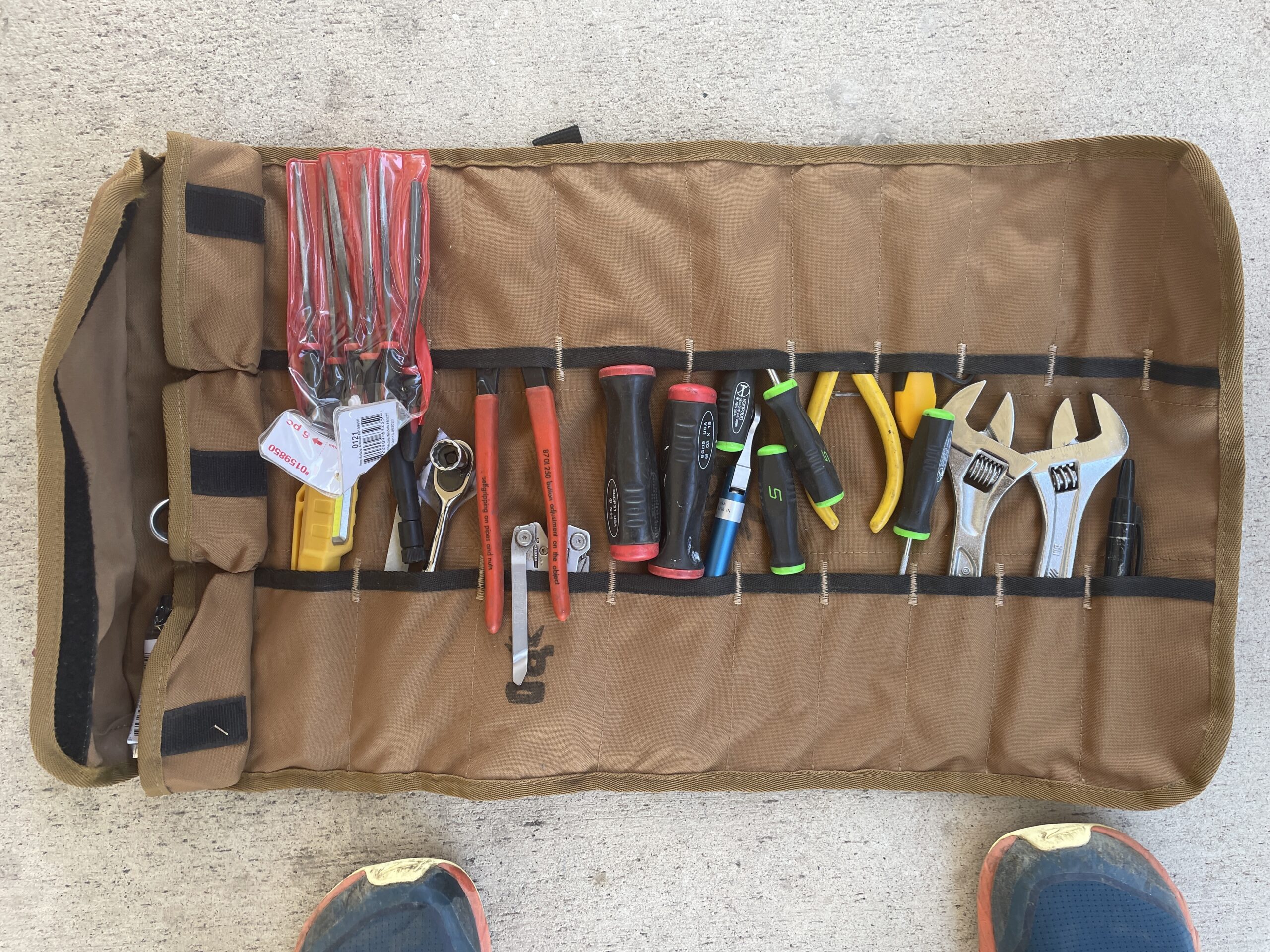
  • Tool Roll - A great way to carry the essential tools around.

Professional Installer

At this level you probably already have a fairly well stocked shop. Your Dad, like mine, may have instilled in you the "Right tool for the job" mentality. Here's a short list of what I've got in my shop that I've used during various Helium installs or for preparation. Some of this is far more expensive than it needs to be. Some of it is a little cheaper than a true professional would want, but it gets the job done well. None of this is needed to do a fine job, though it does make many jobs much easier to do. I'd break this down into 2 main categories: Cable Prep, and Everything Else.

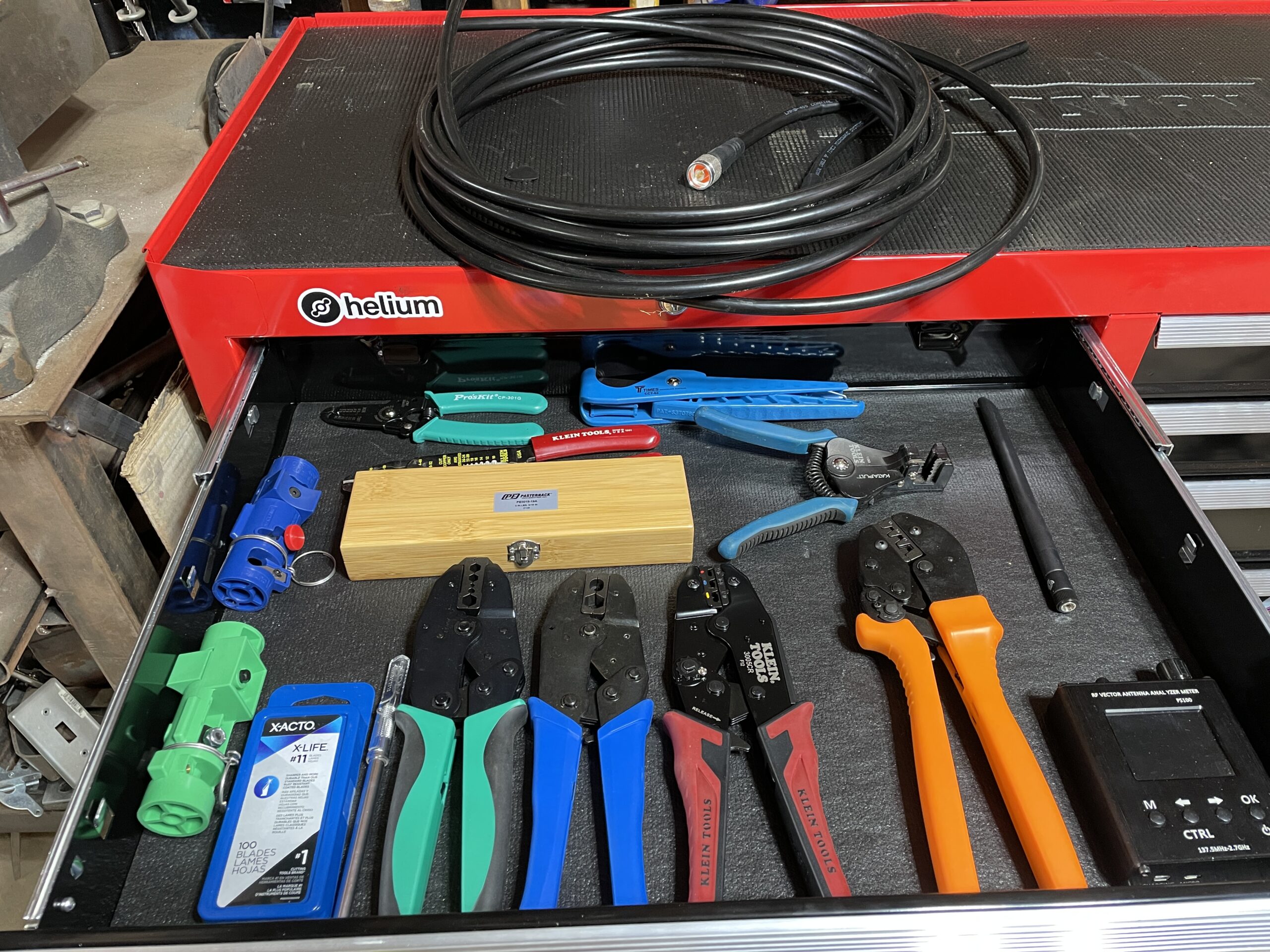
Making your own coax (antenna) cables is a sign you're getting serious. It's almost never worth it cost-wise, but for time and efficiency (I need a 22" section of LMR400 today!") you can't beat it.

Cable Prep

Everything Else

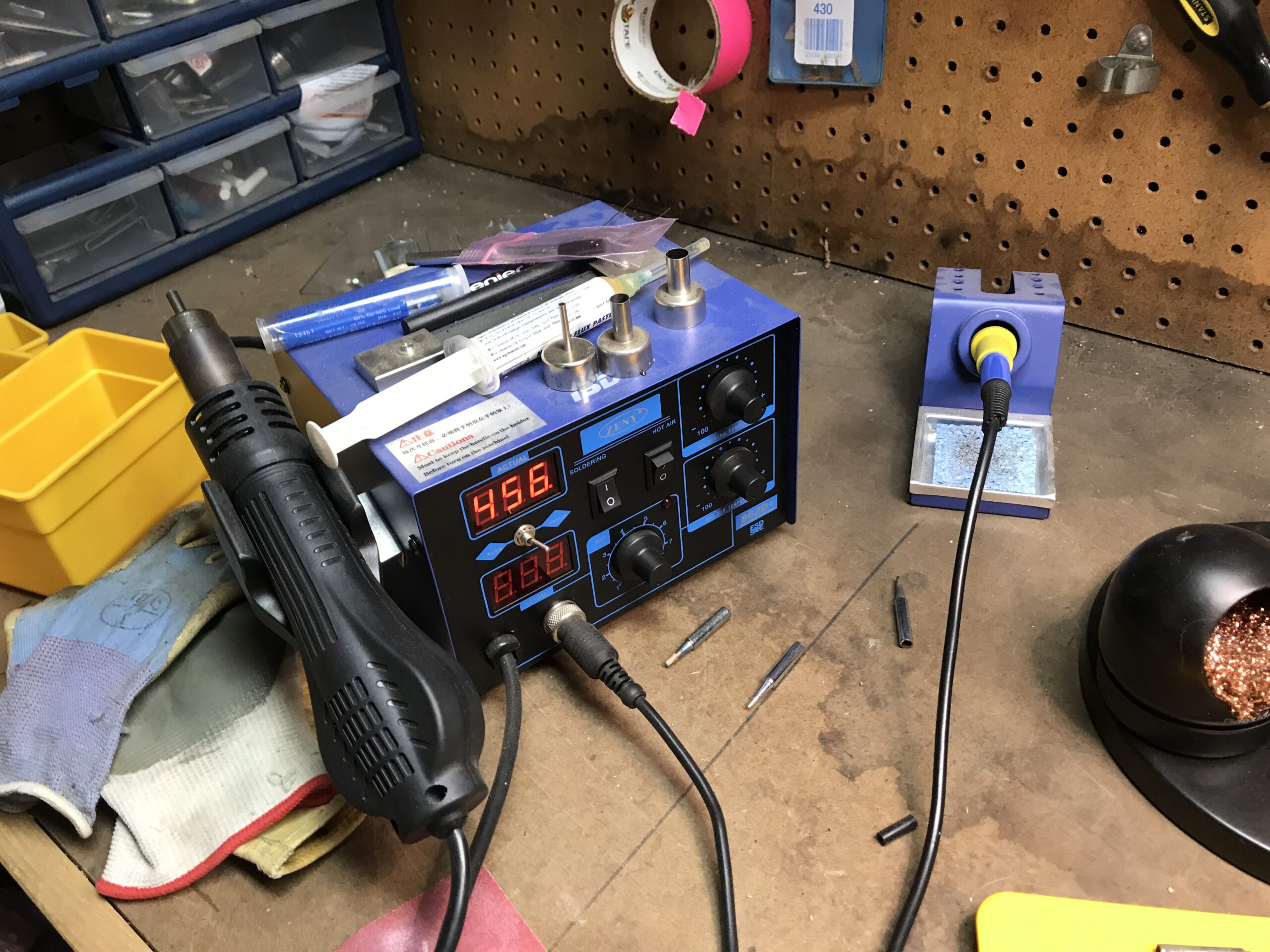
  • Soldering station
  • Extra hands for soldering work - I use Quad Hands.
  • 14 ga wire for in box wiring - Your local regs may vary.
  • Wire strippers - These are the fancy ones, any options will do.
  • Bench mounted magnifying glass with light - For the little repair stuff these are super useful.
  • Power supply - For powering and checking power draw and voltage on items for off grid builds.
  • Horizontal bandsaw - I picked up a super cheap version of this on Craigslist years ago. Still working.
  • Rivnut tool set - For clean pole installs.
  • Vise - Invaluable for bending, holding, banging on, and otherwise manipulating metal & wood.
  • Anvil - Unnecessary, but I LOVE my Nimba, and I've used it to flatten out mounting brackets.
  • Drill press - Mine was given to me for free by a fellow who watched the band snatch and take off his grandfather's finger.
  • Tool Bags - Veto Pro Pacs are my go-to bags. They are not by a long shot the cheapest option.
  • Hammer Drill - Want to attach your mast, enclosure, or solar panel to a rock face? This is what I roll with.
  • Digital Calipers - I am forever drilling and measuring holes and bolts and assorted...things.
  • USB digital tester - Faster and easier than the Power Supply above, though not as accurate.
  • Heat gun - For heat shrink tubing. You can get very cheap versions of these (or use a lighter)
  • Heat shrink tubing - Get the size you need, this kit is just an example.
  • Prusa 3D printer - This thing helps make all the little holders for inside the enclosure. Not required, but very clean.

Coverage & RF Tools

Coverage & RF tools are ones that help you test, map out, and prove coverage beyond the frequency that a Hotspot will. In general, they break down into being used to test the function of antennas and then location testing. On the RF side, any serious RF engineer will laugh at what we use in Helium, but they work for us. Just for comparison, you can get a VNA for use in Helium for under $200. A "cheap" VNA in radio engineer land will push $5k.

Here's what's in my kit:

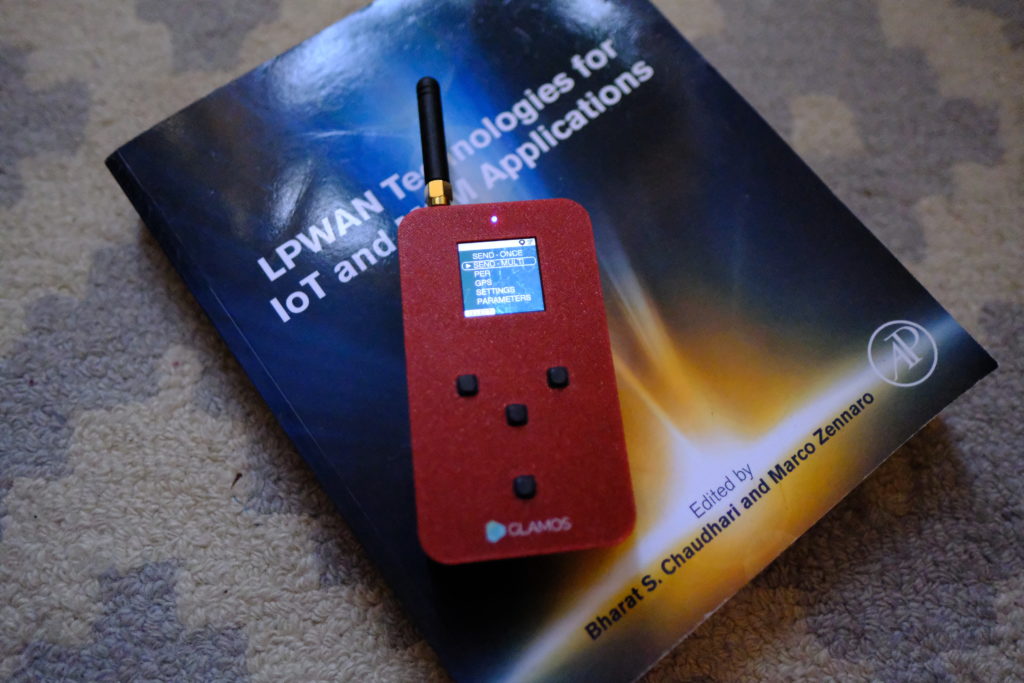
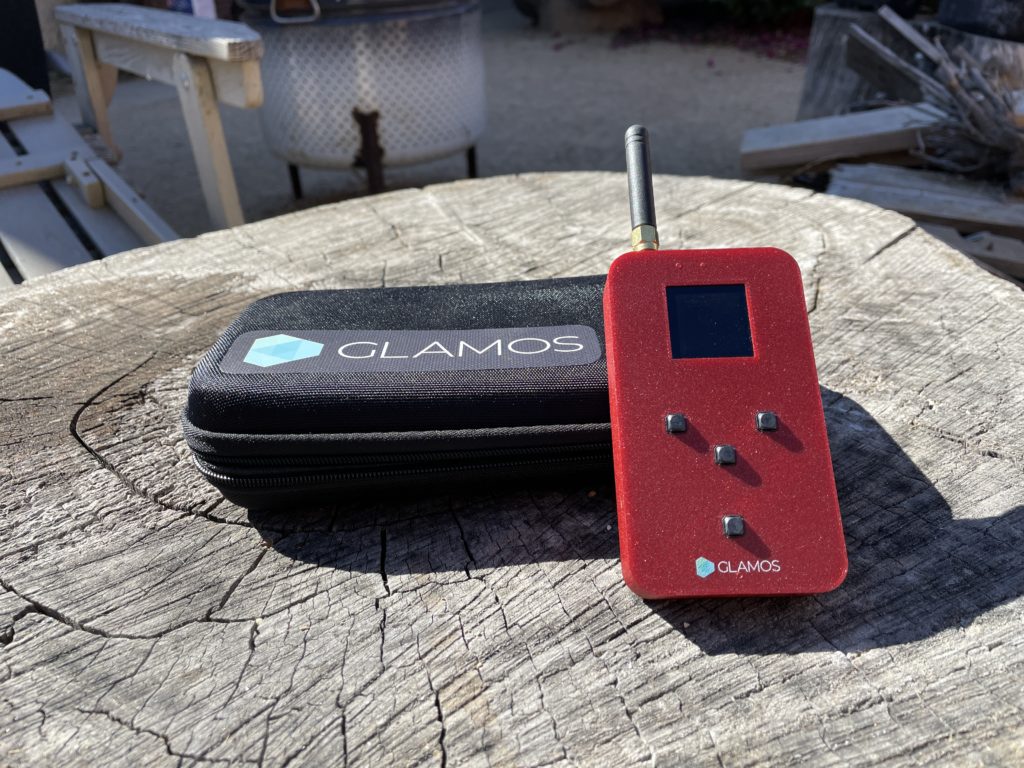
  • GLAMOS - Use the GLAMOS to compare antennas and locations. More on how to do that here.
  • Adeunis FTD - I bought one of these early on and use it as a Mapper (which is what it is), but I don't recommend it. Other options are far better.
  • Mapper - Build or buy your own
  • WioField Tester - Seeed sent me one of these, I used it just a bit then passed it on locally for others to try. Easy to use, this is a great piece of kit.
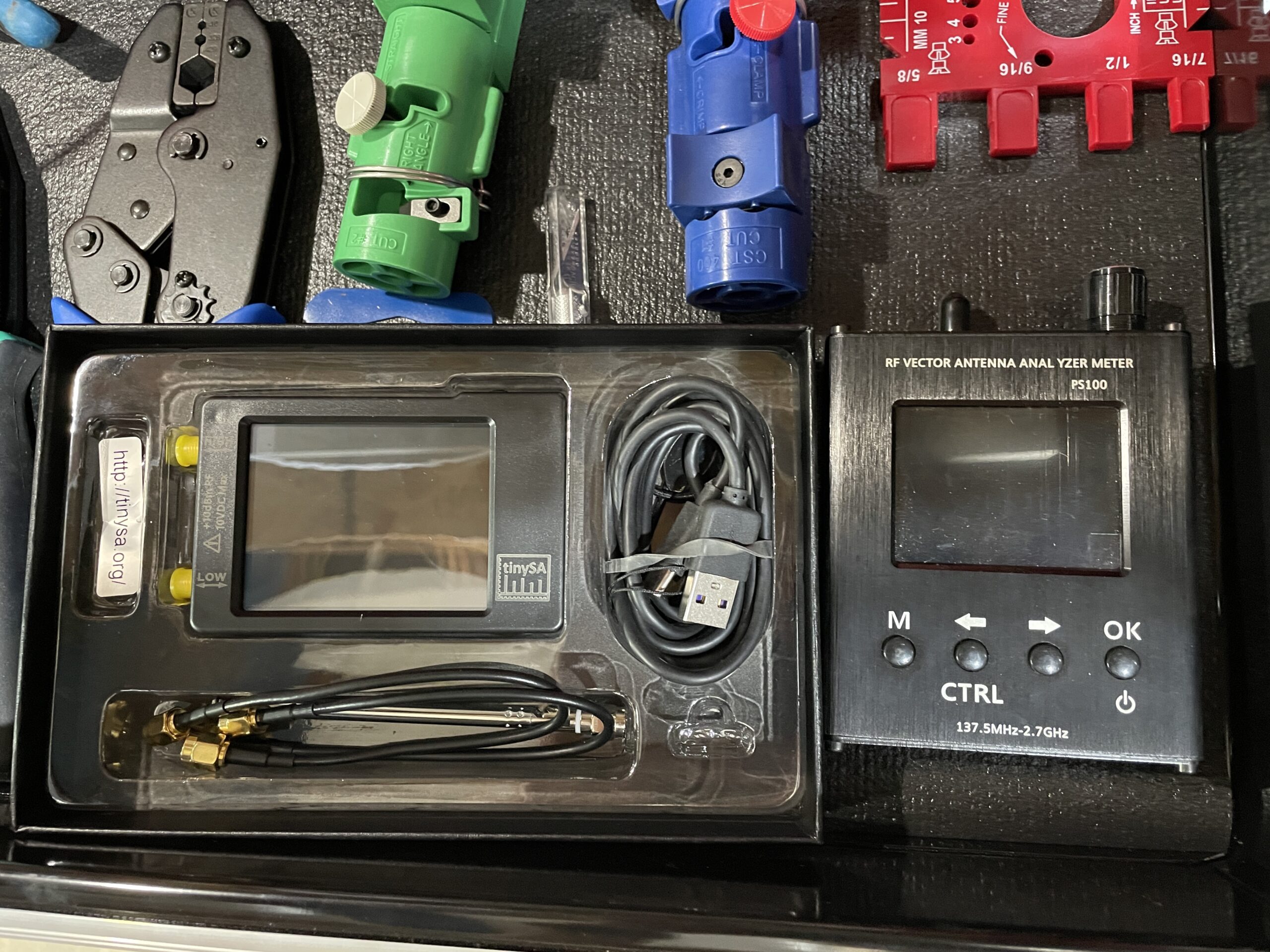
  • NanoVNA - Vector Network Analyzer, use to test antennas and cables.
  • TinySA - Small spectrum analyzer se to test radio environment (are you getting blasted by nearby RF energy from cell towers?)
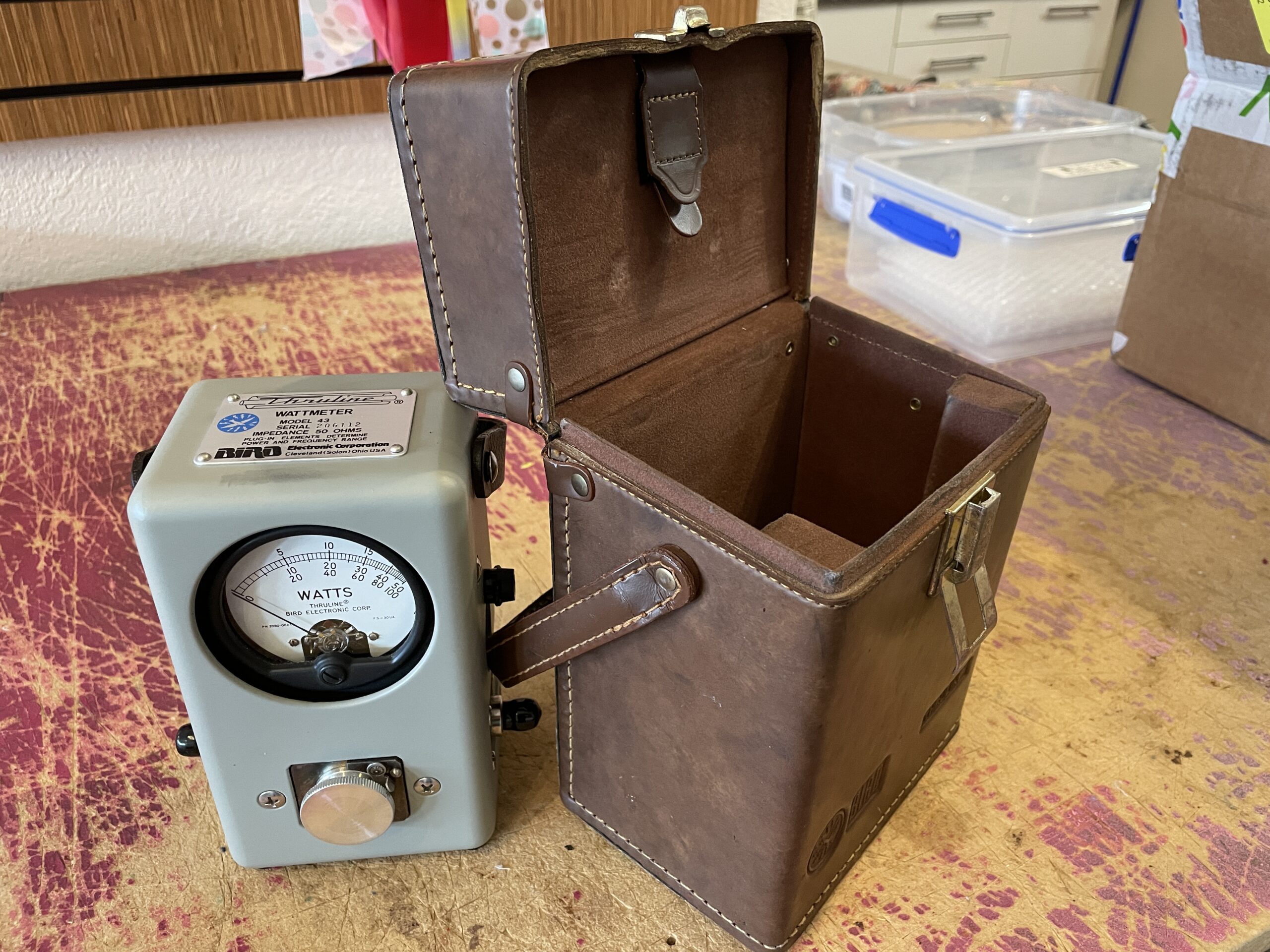
  • Bird 43 Wattmeter - You do NOT need one of these, but when I saw a model in Ohio I fell in love and ordered it. You can use this to test an antenna's energy output.

If you've found other useful tools, please drop 'em in the comments and I'll add them to this list.

I should also note that almost every link here is an affiliate link. If you'd like to support the Gristle King mission to help people understand the world of Helium, please use 'em!

How To Secure The Best Location For Your Hotspot

· 11 min read
Nik
Site Owner

You can secure a great location, but it does take work. Here's the way I approach securing great locations using a step by step method to radically improve my chances of success. I've done this wrong, and I've done this right. I've watched other people make mistakes and I've also watched other people absolutely nail this. Want to learn from my mistakes and drastically improve your chances for getting a great earning Helium location? Here we go!

https://youtu.be/uoyvOj91dLw

Step 1: Find The Right Spot or Area

It starts with finding the right spot, or at least the right general area. Securing a high earning location can be a lot of work, so you want to make sure all that effort will be rewarded. I've talked a bunch in other posts about what makes for a great location, and how to find one. If you want to REALLY improve your skills on this, take my HeliumVision Masterclass to level up your game when it comes to finding great locations.

In general, great spots are up high, with clear lines of sight, and witness other hotspots with healthy transmit reward scale, preferable higher than .8.

Ok, so you've found a great spot (or area), now what?

Step 2: Identify the Property Owner

You might think, "Duh!", but you'd be surprised at how many people just look at a spot, especially off grid, and decide to blast in without permission and place their Hotspot wherever they please. Yes, that can be a temporarily high earning strategy. It's also selfish, foolish, and generally against local laws. I've found that most property owners are way more open than you might expect to having a Hotspot on their land, BUT you've got to have a plan for approaching them.

First, is it a residential or commercial spot? If it's residential, one of the best ways is to drop off pre-printed flyers to multiple homes in the area with a "pre-qualified" offer. Very generally, the message would be, "Are you looking for additional income/free internet just for using a few square feet of your roof? Your home has been pre-qualified and is eligible to receive these benefits. Call this number if you're interested in applying".

As you can see, the general position you want to take is have the homeowner eager to work with you. Printing up a few hundred cards is cheap, and you know everyone who calls that number is interested in learning more.

You can do the same thing with businesses, although I like to have a little more personalized approach there.

However you initiate the conversation, BEFORE you do that, think about the following:

  • What do they want?
  • What questions might they have?
  • What might be important to them?
  • Do you have any relationships in common?

That last one is ultra important. If you already know someone on site, having that relationship makes this whole thing way easier. Before you just call 'em up and ask "Hey, can I put a Helium Hotspot on your roof?", let's do a little further preparation.

Step 3: Prepare Your Pitch, Part 1 - Information

Do your homework, and remember the 7 P's: Proper Prior Planning Prevents Piss Poor Performance.

Now, this may sound a little dramatic, but prepare for a hostile conversation and blunt questions. "How much data will this use?" "Is this safe?" "Have you done this before?" "Do you have a license to install?" "Will this effect my internet?" "Will this damage my roof?" etc.

Think of every possible question under the sun you've heard asked, or read on Facebook, Reddit, or Discord. Practice your answers. There ARE good answers for each one of those. It's up to you know have 'em on the tip of your tongue and be able to explain each one.

When you go in, know what you’ll need and ask for it. For a high earning Hotspot, you'll need a cabled ethernet connection (NOT WiFi), access to power, and access to the property and roof for both installation and maintenance. Remember to ask for those thing. Don't just assume that the property owner knows what you need.

Finally, if this is a commercial building, know the local average rent per sq ft. That can be a major benefit you offer, as a Hotspot mounted on a non-penetrating roof mount only takes up about 6 square feet. That means even at $30/month you're paying well over market prices in most areas. Use that information to your advantage!

Step 4: Prepare Your Pitch, Part 2 - Framing

This gets a little bit into sales and human persuasion. When you meet to pitch them, whether that's on the phone at first or in person, you need to present yourself as competent, confident, enthusiastic, and the kind of person they want to work with. That SHOULD be the person you are already, you just need to let that shine through.

Confidence comes from competence. Practice your pitch. Practice answering questions about the deployment. Know your job, your equipment, and your line of work. You don't have to know everything, but you do have to know enough to appear worth doing business with.

Be enthusiastic. What you're doing is AWESOME! You are helping build sensor coverage using a network of gateways that are easy and safe to deploy and can provide valuable data to the world. How cool is that?! Know the big picture behind deploying a Helium Hotspot, and lean into that experience. We are changing the world together, and being part of that is REALLY cool!

Frame the conversation in terms of what's in it for them; they get an extra paycheck, they get to help provide coverage for an amazing sensor network, and if you're willing to learn about it and implement for them, they get to benefit from sensors that you deploy.

That last part can really cinch the deal, but it will take a lot of extra effort on your part to implement. If you go into a business knowing how Helium coverage can help them, you are FAR more likely to close a deal for Hotspot placement than if you're just proposing a straight money-for-roof-space agreement. Knowing how to find, buy, deploy, and visualize the data from sensors, whether you're counting parking lot usage, the number of people walking by, or the weight of ingredients on a scale is hard. It's also a GIANT advantage when it comes to persuading people to let you put a Hotspot on their property.

Step 5: Pitch them

I like to start off with what's awesome about them. It doesn't take a lot of looking to figure out where someone really shines, and starting a conversation with an earnest compliment is a great way to kick things off. Be truthful, don't just look for some bullshit thing. All you have to do is notice where they're awesome and mention it. People and places shine in so many ways, but that bright light of excellence often doesn't get noticed by the public. Notice it. It's easy, it's fun, and it makes the world a little bit better of a place. Go ahead, start the whole thing off by making someone's day.

Be friendly. It's so much easier to do business with people who are friendly. Remember, the relationship you build is what's going to determine how easy the whole process is. Build the relationship first, and put that front and center. Any asshole can make a dollar, but it's hard for an asshole to make friends. Put in the effort to make friends and the fiat will flow.

Be knowledgeable, and have fun demonstrating that knowledge. Humans are naturally curious about the world. We are genetically programmed to love learning, and being around someone who will help explain some small part of the world is a joyful experience. Share your knowledge in a joyful way and they'll appreciate it tremendously.

Be enthusiastic. Look, Helium is radical! For the first time ever, normal people can participate in wireless communications, and you and your potential client are a part of that. That is worth getting fired up about; you are changing the world together. Don't overlook that!

Be confident in your pitch. Confidence is easy when you know what you're talking about, and people love being around confident people. This doesn't mean you should be brash, or aggressive, or cocky. Just know your material, share as much of that knowledge as they're willing to learn, and demonstrate your competence. Speaking of which...

Be competent. Practice both your pitch AND your installation. If you're going to be setting up a non-penetrating roof mount, make sure you've done it a few times at home. Sure, it's extra work, but you'll learn an absolute TON by practicing, and you'll get much better both at the install and at explaining what you're going to be doing.

Focus on the benefit to them. They know you're going to benefit from this, otherwise why would you be there? Remember earlier, where I recommended you figure out what they want? Now is the time to demonstrate that you've thought about them and their needs. Focus on how they're going to win by working with you. People love to win and Helium makes that achievable. Focus on the win for them.

Take on all the burden of work. Don't put ANYTHING on them that you should be doing. Don't ask for a ladder, or a screwdriver, or someone to help you run cable. Be prepared, and when they come up with questions or objections, be ready to say, "I can take care of that." Now, don't just say it, be ready to execute on it. If you come in with a can-do competent attitude you'll be surprised at just how much people will want to work with you. Awesome is contagious. Be awesome!

Finally, I'd recommend talking about LoRa and IoT, at least to start the conversation. I do NOT recommend starting with cryptocurrency or Helium. You can introduce those things later if they want to know about them, but from my experience those can kill a deal before it gets going.

Ok, that wraps up the general idea for how to get permission to deploy your Helium Hotspot pretty much anywhere. It's not impossible, it just takes work. You can do it, and I can't wait to hear your success stories!

If you'd like to join up with a bunch of like-minded folks all working in pursuit of excellence, consider joining my community membership, the Gristle Crüe. We meet weekly on Zoom calls to go through the latest in Helium and to help each other solve problems. You also get access to the Crüe channel in my Discord so you don't have to wait for a Zoom call to learn. I'd love to have you join up and learn with us, Helium is a ton of fun when you're in good company. If you'd like to learn more, find us here.

Rock on!

Archived Comments

James Ferrell - 3/30/2022

Hey Nik, I’ve been reading a lot of your articles and I love how you present yourself, hard-working, friendly and knowledgeable. I’m thinking hard on signing up for your two classes. The HeliumVision master class really intrigues me as does the basic class. But I think the best part is joining in on your weekly community calls and being a part of the Grisley Crue. Not being a tech has been rough in understanding all of it, but I’ve been so intrigued that I cannot stop. I’ve studied you a lot , as well as Vosk and Jimmy is promo, but they do not keep up with the latest as you do. I look forward to subscribing soon. James Ferrell Upland, CA BTW, I’ve got a Hotspot that I just set up that is being relayed so my next reading is going to be Your two posts on how to fix a related Hotspot. Thank you for being real!


Nik - 3/30/2022

Right on James, come join the Crüe! :)


Othniel - 3/31/2022

What would a flyer look like? I have a bunch of good residential locations (I think) and I'm not quite sure how to pitch this...


Nik - 3/31/2022

Probably along the lines of, "Your house may qualify for a free placement with a XX monthly credit towards your internet bill" etc etc.


How Do You Cheat On The Helium Network?

· 12 min read
Nik
Site Owner

This is a general explanation of how gamers are stealing HNT on the network. This is not a "how to". Most of us putting up Helium Hotspots have no idea how the system works. It can feel frustrating to be cheated and not understand it. Let's go through a few of the more common methods. These methods are getting easier for Helium Inc (and the community at large) to detect, but are still very difficult to stop with a set of programmatic rules in the code.

Before you go howling that I'm "giving away the keys to the castle", please know I have run this by various experts. There's nothing in here that is top secret or will give gamers an advantage.

Let's start with what cheaters usually target, which is Witness rewards. A Hotspot earns HNT based mostly (~75%) on how often it Witnesses Beacons. This is documented over on Helium's blog, here.

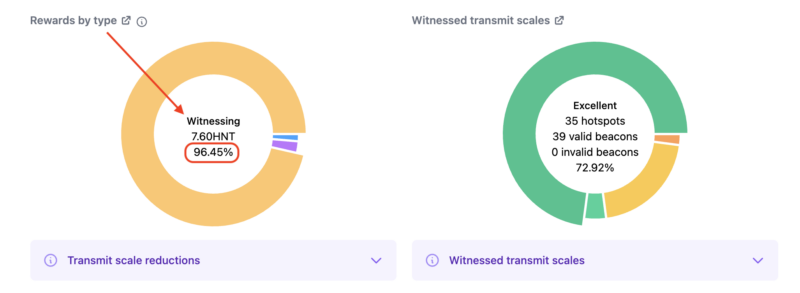
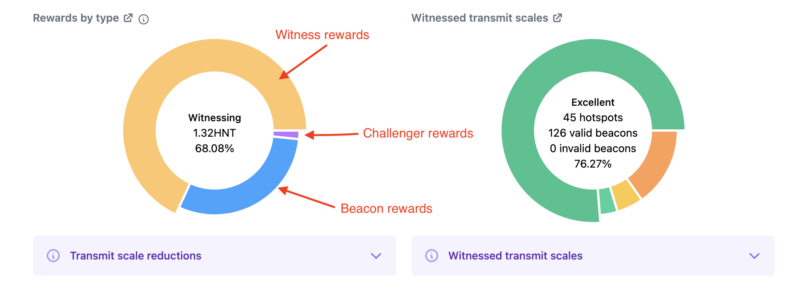
The obvious incentive is to Witness as much as you can. Most of us do that by getting our antennas in the right location and up high to provide awesome coverage, often at considerable expense and effort. Some members of the community cheat. Here's an example of a blacklisted Hotspot's witness reward breakdown (courtesy of the Hotspotty app for the visual).

Now, to be clear, just because a Hotspot is earning a huge amount of rewards from Witnessing doesn't automatically mean it's cheating. It's just one of a few warning signs.

In contrast, here's a more normal breakdown of what rewards look like.

Gamers cheat in 3 main ways: Attenuation, Witness Stuffing, and Supplementary Witnessing. Those can also be split into Hardware and Software hacks. Hardware hacks are ones using hardware, like an attenuator, or antenna trickery. Software hacks exploit changing the communication (manipulating the metadata) between the packet forwarder and the miner.

Yep, I'ma explain all this. Let's start with Attenuation, which is a hardware cheat.

The validity of a beacon is determined by comparing the strength of the beacon as received to what it should have been theoretically. If the output power of the radio is known, (the native radio power output minus the cable loss plus the antenna gain) it's a straightforward equation to calculate what the signal strength should be on the receiving end.

So, how do you cheat that? One of the most common ways is to use hardware. You put multiple hotspots in a room and attach "attenuators" to their antennas. Attenuators decrease the signal by some known amount; say 1 dB, or 5 dB, or 10 dB etc. Gamers will falsely assert where the hotspots are, calculate what the received signal strength should be at that distance, and attach an attenuator to the antenna to produce that result.

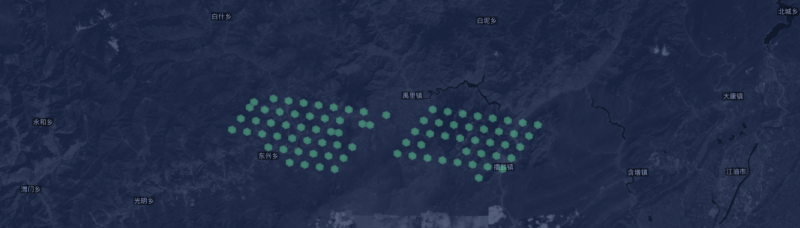
It's fairly simple to do at scale, and with a few technical bits of wizardry to cloak the location of the hotspot, difficult to stop. It's not, however, difficult to SEE. In order for all the hotspots in the room to receive the "correctly altered" signals, they need to be placed at unusually regular distances from each other on the map. You've seen that if you've ever looked at Helium Explorer maps and seen "too perfect" deployments.

This was the biggest problem Helium Inc (NOT the Helium Community at large) had to solve in late 2021, when they moved unilaterally and in secret in order to deny thousands of Hotspots HNT who were clearly gaming with this technique. Helium Inc could see it, but they felt the community couldn't move fast enough to stop it. The ethics of that decision were hotly debated. For now, let's just focus on the cheaters.

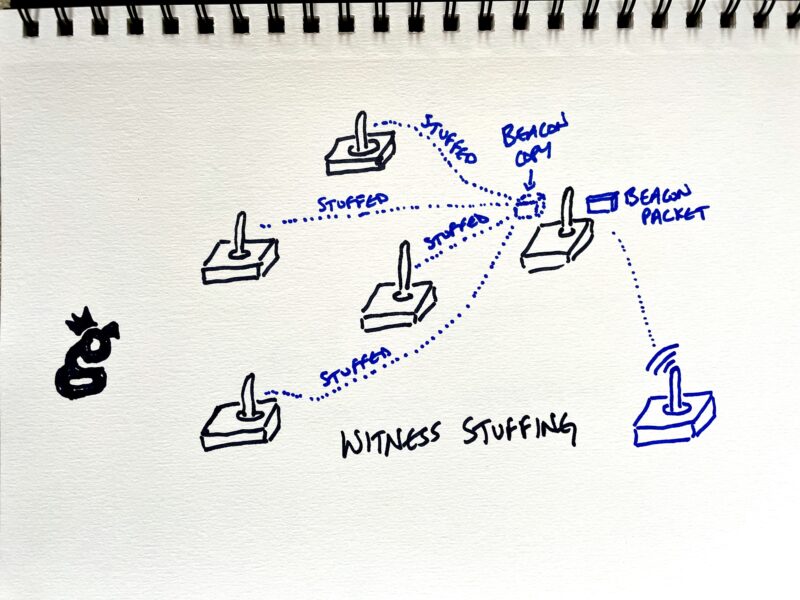
The second cheating method is known as Witness Stuffing. This is a software cheat. It's where you take a group of Hotspots that are all in the same general area and share all of the Beacons any of them Witness between them. In essence, when any one of them Witnesses a Beacon, it turns around and "stuffs" that same beacon into the rest of the group of Hotspots. The rest of the group doesn't have to actually Witness that beacon in order to earn from it.

That multiplies the power of one Witnessed Beacon.

Remember, if a Beacon is Witnessed by more than 14 hotspots, the rewards are randomly assigned to only 14 Hotspots out of that group. A Hotspot can only get rewarded one time per Beacon Witnessed. In this case, the cheater is increasing the chance that one of the Hotspots it's connected to will be in that group of 14 winners.

A cheater can "juice this up" by placing extra packet forwarders, not Hotspots, to report even more beacons. A packet forwarder is the radio part of the hotspot (as opposed to the computer, or miner part) of the Hotspot. By using packet forwarders to share duplicated Witnessed Beacons, the gamer is running a variation of witness stuffing. It's a very clever move, gives a clear advantage, and is completely dishonest.

As a point of clarification, just using multiple packet forwarders doesn't make you a cheater. For example, you might have multiple directional antennas on a building top, each with a packet forwarder, all sending their Witnesses to one miner. That's probably more effort and technological expertise than anyone should go to, but it wouldn't be cheating.

For now, I'd consider the following to be cheating:

  1. Using packet forwarders to stuff copies of packets into miners
  2. Using multiple hotspots per packet forwarder to stuff packets into miners.

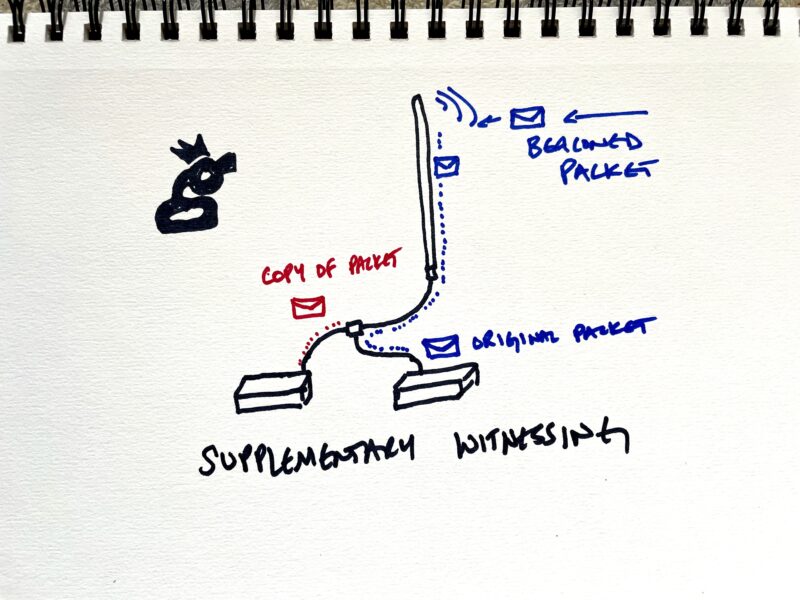
That brings us to a similar grift, which is Supplementary Witnessing. In this case, you have multiple Hotspots hooked up to one well placed antenna. Through the use of radio geekery to manipulate the signal strength, you take any signal received from that antenna and "report it twice", once to each Hotspot.

Remember that only 14 Hotspots can earn from a beaconed packet. If 50 hotspot Witness a packet, only 14 will get rewarded. If you can "supplement" your chances to witness that packet by adding an extra Hotspot into that potential winners group, you can cheat a true provider of coverage out of their rightful chance to earn HNT.

This method allows both (or all) Hotspots connected to the antenna the chance to earn rewards. This is sometimes referred to as "buying extra tickets to the raffle." In addition to stealing by adding unfair probability to earning more HNT for a given antenna placement, it's not useful to the Network. That's because two Hotspots hooked to one antenna provide duplicate coverage.

Keep in mind, "duplicate" is not the same as "redundant". Duplicate is an EXACT match. Redundancy is a backup. An example of redundancy is you and your neighbor a block away are both providing coverage. That coverage is slightly different, but overlapping. If one of you goes down, the other can cover, but you get rewarded for providing your own unique coverage.

Duplicate coverage is using two machines to do the job of one. It's a waste of resources and sucks HNT unfairly out of the reward pool.

So, those are the big 3 ways gamers have been cheating. None of them are difficult for experts to see, but they can be very difficult for the community to stop. This is, in part what HIP 40 is about; making up a list of cheaters that the community agrees on, and stopping those cheaters from earning. It won't be perfect, but it'll be an excellent step in the right direction of a robust Network, able to properly reward good actors and punish bad ones.

There are other HIPs being developed to stop gaming, check out HIP 42 and HIP 44. The DeWi Foundation is extremely interested in combatting gaming and has enough money to buy several small countries AND pay you to fix gaming. If you're an anti-gaming wizard, or a former crook who's ready to put your skills towards useful construction, consider applying for a grant.

If you'd like to watch a video of gaming experts discussing the HIPs mentioned above, we recorded a live session here. Keep in mind this was recorded right before the existence of a denylist was made public, and that denylist had NOT been shared with these experts. Helium Inc kept it top secret, probably to the detriment of the efforts to stop gaming.

The attempt to stop gaming is one of cat & mouse. We'll never hem 'em all up, but we can keep it to a tolerable level if we work together. If you'd like to report a suspected cheating hotspot, head over to suspots.com and keep the spotlight on 'em!

If you'd like to stay in the know when it comes to the latest in Helium, consider joining the Gristle Crüe, where we meet weekly to discuss what's going on and how to best build the Network. Rock on!

Archived Comments

Eric - 1/14/2022

Dude, Well Done. This is information we should all have available to us. Not for malicious intent, but for a better understanding of how the network, and mining works. You the Man.


Christophe Nix - 1/14/2022

This is longtime overdue. Now add a way to claim a removal of that list by proving you cleared the trickery or you never tricked in the first place an make it public and transparent and we might have a new deal with the community.


Matthew Van Eps - 1/21/2022

Great summary! Thanks for writing this out.


Mohamed Ghasoub - 1/24/2022

Wow man thanks for that, extremley informative. I was wondering what that was all about. Silly me thinking that placing your asserting your hotspot a few meters away from the actual location would do it... that or adding a few meteres to the antenna height! What are your thoughts on those two and how frowned upon they actually are? Thanks a ton!!


Nik - 1/24/2022

For now, the elevation doesn't appear to be taken into account. You can reasonably mis-assert by up to 150m for reasons of privacy.


Michael Pilkington - 1/28/2022

I'm just getting started and just got 15 of these hotspots. What matters at this point is that I not somehow get falsely viewed as cheating when I am not. From what I read here... any cheating done would be done intentionally. Nothing would be viewed as cheating when you really do not intend to. So I will view the details as to this article later....after deployment.


Robert Rose - 2/2/2022

Michael Pilkington doesn't have the right idea. The absence of specific intent to break a rule doesn't affect whether or not you have broken a rule. If the excuse ("I didn't know that wasn't permitted") is believable, then it only is relevant to punishment. You still broke the rule. Maybe you just get a warning, or are only banned for a short time, instead of being banned for all time. I think Nik has done us a service, and we should thank him.


Chris - 2/6/2022

Where I can find details about the 150m you're allowed to miss-assert location? Why are they so vague on this details? These to me are very important.


Nik - 2/6/2022

Hi Chris, there aren't any details on that. Technically, you should assert exactly where you are. I think mis-asserting within 150m for privacy reasons is fine and so far I haven't seen any negative repercussions from that.


Ss - 4/1/2022

Also, they can never perfectly guess your location from radio wizardry, because they can't take in account for trees and natural obstructions, nor whether your indoor or outdoor, etc.


Ss - 4/1/2022

Plus other radio interference, there is so many variables that they can not predict. Only if they were physically at the location with a much of very high tech radio equipment could they figure that out. However, mappers are closing this gap.


NT - 5/14/2022

Who the hell buys 15 miners when if you run them legitimately you will NEVER get your return on capital? I got into the project because I thought it had great merit and I could contribute to the community. However its only when you invest and go down the rabbit hole, you find its full of scams, rip-offs and unfairness. Such a shame and will lead to the blow-up of the project.


How To Turn Your Daily Drive Into Profit With Hivemapper

· 5 min read
Nik
Site Owner

Mapping is big business.  From 2016-2018, Uber paid Google $58 million for the use of Google's maps.  That's $53,00 per DAY.  Mapping, of course is a data flow technology, and where data flows, money goes.  You and I, as "normal people" are just beginning to be able to tap into these pervasive data flows around us.  From our personal data to the data we can generate just by interacting with the world around us, we are surrounded by a flood of data. 

Obviously, mapping is ripe for a blockchain + meatspace solution.  In December of 2021, I sat down with Ariel Siedman at Hivemapper for a walk through what they're doing to allow you to tap into one of the many large data flows swirling around us every day 

https://youtu.be/zsOPU-AlOww

Before we talk about how you can start to tap into the data flow of your mapping capabilities (or just go straight there if you're impatient), let's talk about who might buy mapping data.

One thing that's likely is that YOU don't.  You just open up your phone, choose your favorite mapping app, and get where you're going.  For the most part, you don't care what the route looks like, you just want the fastest route.

Unless, of course, you're a real estate developer.  In that case, you want to know everything you can about a piece of land before you put serious money into it.  Real estate developers pore over maps; they're obsessed with them.  They look at properties from every angle.  "Can we move this wall here?"  "How much space do we have to the property line?"  "How high is this?"  "Where are the exterior doors?" and a long list of other questions that they'll pay to have answered.

Real estate developers aren't the only ones interesting in mapping data.  Uber wants it, Lyft wants it, urban planners want it, and they're all willing to pay for fresh, accurate data.

That's where you, and Hivemapper, come in.  Hivemapper is one of a small group of companies hustling to share the wealth of data you have the potential to create, just by driving around.

In broad strokes:  You buy a dashcam for your car, connect it to your phone, and drive around.  As you map "tiles", or small sections of the earth (8' x 8' as example), you get paid for providing fresh mapping coverage.  

Hivemapper will start to value some tiles as higher than others; driving down Main St for the 500th time that day is less valuable than driving down that one alley that no one has driven down for months.

Hivemapper will also start to give you options for alternate routes as you drive, allowing you to scoop up the most valuable tiles that are close to where you're going.  I see that being a pretty fun game, and possibly an excellent additional revenue source for Uber, Lyft, and other professional drivers.  

The solution is still in its infancy.  For now, it's only available in certain markets, and you have to move the data from the dashcam to the cloud via an SD card.  Yep, no wireless automation yet, but that's coming.

Eventually, the dashcam will move data to the cloud via your phone, and your phone will upload it via WiFi.  Of course, I'm not going to wait for "eventually."  :)

I went ahead and bought the only currently approved dashcam for Hivermapper, even though San Diego isn't an "available" market yet.  Once I've got it mounted, I'll be firing it up and reporting back on this.

I'm expecting (since this is such a young project) the usual friction that comes from trying new things.  If YOU have a Hivemapper and any experience with 'em, please let me know in the comments.  I'm excited to be mapping our world together!

If you want to buy a dashcam and support my work, use code DEPINSTATE in the Hivemapper store to knock 5% off your order.

Archived Comments

Cody Paulsen - 1/27/2022

Hey Nik, I am a really big fan of your and I absolutely love EVERYTHING you do for Helium and everything your about. So I really want to figure out away to not have an extension cord ran from the roof down the side of my house. I was think a 100V solar energy. I’m trying to maximize my earnings, I have my antennas in pretty good locations (I believe). I’m witnessing about 30-35 witnesses on average every day for the two bobcat miners I have. I have 6 more bobcats on the way, I ordered them in the middle of Oct. now to try and figure out locations for my others is a situation I’m trying to manage right now. Do you have a suggestion on how I go about finding locations? I was considering offering people a % of what I make by letting me put one at there house (residential). Sorry so many questions, your probably a pretty busy guy so I’ll stop fan boying you lol. Thank you for taking the time to read this and I got my fingers crossed that I hear back from you.


Nik - 1/27/2022

Right on Cody, finding locations can be the biggest challenge. A split sounds good, let me know how it goes!


Michael Pilkington - 1/28/2022

If you had a narrow rectangular area where the road cuts through a ridge, could you use 2 directional antennas hidden under a bridge with 2 bobcats? There is room on the platform to hide solar panels? Let me know...


Stefan - 12/18/2023

I am confirming that this method still works. In the last time the rewards have increased for people who owns such cameras. Here is a code for 10% off if you want to buy one: WORKINGBEE


Does Your Helium Hotspot Need A Security Camera?

· 6 min read
Nik
Site Owner

"Do you worry about your off grid hotspot getting stolen?"  I get that question a lot.  My short answer is "No".  In general, I follow what I consider a few security best practices:

  • Make it hard to find.
  • Make it hard to get to.
  • Don't leave your valuables unprotected.

In the world of Helium off grids, however, you can't always meet those criteria.  For one, you've got to assert your location.  Anyone in the world can get pretty darn close to where you should be.  So, hiding your valuable thing, in this case a Helium Hotspot, is hard.

For my off grids, a love of the mountains and hard work combine naturally to make my installs hard to get to. They're not impossible; I mean, I'm not the only person on the planet who can carry a giant backpack 6 miles one way.  TJ Ferrara, for one, does that much better than I do.  Still, for most people, the juice is not worth the squeeze.

That brings us to an interesting aspect of a Helium miner:  They're not really worth anything to a thief.  Once the hotspot is attached to your wallet, it will faithfully deposit HNT into your wallet, no matter who has physical control over it. 

Still, an off grid isn't just a miner.  It's the antenna, and the solar panel, and the battery, and a long list of accessories you need for the whole thing to work.  I've heard of thieves taking everything BUT the miners.  In fact, they left the miners double bagged.  Yeah, weird.

In that particular instance, the thieves did something  incredibly stupid which led the original owner to find his stolen off grids and recover them, but you don't always get that lucky.

One of the obvious deterrents is a camera, so I started looking around for one I could use.  I wanted a camera that was rugged enough to be outside, would communicate over LTE so I wouldn't have to hike out to check it, and would keep a running "memory" that it uploaded to the cloud, so if someone did get their grubby little dickbeaters on my gear, I'd be able to download their picture without having access to the memory card.  I also wanted the thing to give me more than just one view; I wanted some of that pan & tilt action.

Trail cams are the obvious fit here.  Surprisingly, a bunch of 'em are missing some critical element.  Either they don't have connection to solar so the batteries run out, or no ability to upload to the cloud, or no ability to move around and give me a wider view and scope.  

I settled on a ReoLink Go PT.  It met my criteria, although I made a few modifications when it arrived.

First, I painted it tan.  The thing arrives in a blinding white, and just on general principle I wanted it to blend in at least a little bit.

Second, I replaced the fabric strap for pole (or tree) mounting with a hose clamp.  Way more stable, and I'm guessing will last far longer.

Third, I mounted the solar panel arm with a bolt and a zip tie.  It ain't the prettiest install you've ever seen, but the folks at ReoLink seem to only account for people mounting this thing to flat surfaces, and the pole diameter I had wasn't enough to get all 3 recommended screws in.

With my prep work done, it was out to one of my favorite places to test this out on an off grid Helium Hotspot install.

https://youtu.be/S0-kBL4VcHk

Now, one of the most frequent questions I get asked is, "How do you get permission to put it out there?"   It's pretty simple; you just ask. For the record, yes, I have permission to put this hotspot here.  This is the result of a multi-year relationship that has involved spending blood and treasure on all sides.  We flew a helicopter out here for the initial install of a weather station years ago where we custom fabricated the pole, drilled and mounted it to the rock, and have maintained the site for years now.  There's no real secret to it:  Find the owners of the property, figure out what (if anything) they want, and provide it to them.  

With that out of the way, there's only one question left:  Does the camera work to stop thieves?

I think of it this way.  A security camera is like a reserve parachute:  You hope they're a complete waste of money and you never need to use 'em, but if you do, they're worth every penny. 

As far as the mounting & use of it, it's dead simple.  If you can put together an Ikea kitchen sink, you're about 4 intelligence levels above what it takes to get this camera to work.  Plug in, sign up, and play. 

With that said, I have had a few instances where the camera doesn't immediately connect when I pull up the app.  So far, just quitting the app and re-loading it seems to work.

The big downside is the monthly data cost for the cloud imagery.  Still, it's less than running a miner; I bought a 10 GB/month plan for $35 on Mint.  Mint is super easy, and for the price of 30 rolled tacos and a few high priced coffees every month I'll get high def pictures of someone's bald spot as they're stealing my hotspot setup.  Worth it. 

That brings me to the last high point of the ReoLink PT: you can pan and tilt the thing. If I want to catch a rad sunset out there, or see my buddies paragliding while I hammer away on the keyboard, or even watch as the coyotes howl up at a gibbous moon on a summer's eve, I can dial in and check 'em out.  That, my friends, is worth every penny.

Archived Comments

Sam Andrews - 1/15/2023

Wow, what an interesting article. You did a great job sharing with us that setting up security cameras close to our off-grid hotspots could possibly deter thieves from stealing them. I know a friend who's been living in a remote area near South Carolina for almost a year now and always loses his hotspot once in a while. Never mind, I'm just gonna make sure he considers this option so the perfect installation can be made in the end.


Understanding Helium 5G: The Challenge and Expert Advice

· 19 min read
Nik
Site Owner

Over the course of the past year, we've all learned how to maximize the deployment of a LoRa Helium miner. It's been a fun run as we sorted through the vital parts of a high earning deployment:

  • Location (Local Density)
  • cLoS (Clear Line of Sight)
  • Antenna Elevation
  • Antenna Type
  • Cables & Install Details

Now we're faced with a new challenge:  How do you deploy a 5G Hotspot?   I asked a couple of experts to walk me through what 5G is (NOT 5 GHz, by the way) as well as how they're thinking about finding the very best locations to deploy a Helium 5G miner.  Some of you learn best by video, so here it is.  For the rest of ya, I've written it all out below.  No matter how you learn, let's dive in!

https://youtu.be/wFLXZ85lfb4

I'll start with who I talked to, Dennis and Jeremy, with Travis Teague from Helium just listening in an unofficial capacity.

For the past 6 years, Dennis (@Rhyyo_IOT on the Helium Discord) has been running an IoT company, mostly based around LoRa.  On the path to growing his LoRa network he stumbled into 5G and began building and deploying 5G network coverage. 

Jeremy (@rollinson on the Helium Discord) has been working in wireless for 20 years.  From the very beginning, when WiFi went into enterprise solutions, he's been fascinated with moving information without wires.

He's run companies providing antennas and cables, been hired to set up the networks for wireless cameras at big events (Lollapalooza, the NFL draft), and made WiFi do all kinds of things it was never intended to do.  Eventually he jumped into CBRS (Citizens Broadband Radio Service) because he wanted to use it at events for point of sale and access control.  

Yeah, those are geek terms. Don't worry too much about 'em now, just focus on the fact that these guys have a collective TON of applied experience in the 5G space.

When Helium announced 5G and FreedomFi, both Jeremy & Dennis jumped in, and have been extraordinarily helpful on the Helium Discord #5g-cbrs channel.

Ok, now that you know who these guys are, let's dig in to the questions.

What Is 5G?

Is it 5 Ghz?  Nope.

5G is a standard, not a frequency.   The G stands for Generation, so 5G = the Fifth Generation of wireless standards.

The 5G standard covers all kinds of frequencies, from 900 MHz up to 80 GHz.  The common thread is how all these frequencies "talk" to each other.  Yes, I'll use some non-radio-geek approved jargon here.  :)

The idea of multiple frequencies on one plan isn't new. 4G (what we all have had on our phones) doesn't come on one frequency.  It's spread across a bunch of 'em.  This is a common mistake for those of us not familiar with the technical aspects of radio frequency bands.  4G is not 4 GHz.  Relax, we're going to cure our ignorance together.  :)

Different frequencies "do" different things.  In general, the lower the frequency the longer the distance it'll cover but the less information it can carry.

What you're familiar with in the world of LoRa is (in the US) 915 MHz, which can go hundreds of kilometers but only carries a tiny amount of data; say, a 10 digit grid coordinate from a tracking device.

At higher frequencies, way up in the 60 GHz range, you can blast full huge-data high-def video about 1,000' with a clear line of sight.  Building, trees, rain, even a person in the way can block that signal.

Ok, so with the 5G standard a little more clear, let's talk about the FreedomFi Hotspot, which will allow you to participate in a few bands of the 5G standard.

What Is CBRS?

CBRS is a USA-only "thing".  CBRS is a dedicated frequency band from 3.55 - 3.7 GHz that's open to anyone in the US as long as they have compliant equipment. Yes, it's not fair that other countries don't have access to the HNT earned from 5G data flow.  I'm pretty sure they'll figure it out soon.  As of December 2021, America has the drop on this. No, I don't make the rules.  Vote the bums out!  Ok, off my soapbox and back to 5G.

Why is CBRS special?  It's not like WiFi, where anyone can just blast out a signal.  On CBRS, the radio gets on the network, "phones in" and says "Here I am.  This is what I can do.  Tell me what frequency I can have, tell me what transmit power I can have."  The network responds with a set of guidelines that say, "Stay in this lane, at this power", and the radio is off to the races in it's own little space, uninterrupted by other CBRS radios. 

All of that happens with very little to no human involvement.  You don't have to buy dedicated spectrum.  You don't have to bid billions of dollars at an FCC auction just so you can get on the radio. Everybody gets to play in that space, because everyone is forced to play by the rules automatically.  

CBRS is also recent; it just became available in January 2020.  So, dedicated spectrum, no human interaction to argue over bandwidth, and brand spankin' new.  That's what's special.

The FreedomFi CBRS offering will carry a lot of data a very short distance, and almost anything solid will block the signal.

The FreedomFi will also (probably) eventually allow you to connect in to other frequencies.  For now we'll stick with the CBRS frequency band.

Where does that leave you, the Hotspot deployer?  Well, before we get to identifying the perfect 5G deployment, let's talk about one more important thing, which is the 3 part split of a 5G Helium setup. 

What Are The Parts Of A Helium 5G Hotspot?

  • Hotspot / Miner
  • Radio
  • Antenna

Let's start with the miner, or Hotspot.  This is the thing that mines HNT.

For most of us in the Helium Network, the other Hotspots we've bought (Nebra, RAK, SenseCap, Bobcat, etc) have included a radio and an antenna to provide LoRa coverage.  This is where the FreedomFi is different.

The FreedomFi allows you to split out the miner, radio, and antenna in order to "future proof" your participation in Helium.  

Ok, so you've got your Hotspot.  Next, you have the radio.  In the case of the FreedomFi miner, a radio will allow you provide coverage in the 3.5 - 3.7 GHz spectrum (as well as others in the future.) Confusingly, the radio can come with an antenna, or it can be separate from an antenna. 

Last, you have the antenna, which you can upgrade.  I know, I know, I can already hear you gear-geeks salivating at the thought of upgrading your antennas.  I'll warn ya, this time it ain't going to be cheap.  For a high end badass 3.5 - 3.7 GHz antenna you're looking at north of $10k.

Still, you don't HAVE to have that antenna.  You can spend $1,000 and probably be good.  The priority with FreedomFi miner is the same as with the current LoRa miners:

  • Location is where you make your money.
  • Installation is where you spend your effort.
  • Antennas and gear are where you play with toys.

Now, with the FreedomFi it's a little confusing, because the FreedomFi miner includes a LoRa radio but not the CBRS radio.  You'll have to add a CBRS radio and an antenna.  In some cases the antenna is included with the radio.  Confusing if you don't know about the split.  Easy when you know how.

How Much Will A Helium 5G Deployment Cost?

So, what's it going to cost?  At a (reasonable) guess:

Gateway (Hotspot): $1,000

Indoor Radio (with antenna): $1,500

Upgraded Radios: $2,500 - 5,000

Fancy Antennas: Pencil in $7,000 as your start point

Cable, Connectors, Bits & Bobs: Plan on another $100-300

Now, it'll get interesting (and expensive) fast, because you can buy multiple radios, each with their own antenna, that can report to one Hotspot. 

What Is The Ideal Location For A Helium 5G Hotspot?

We are not in LoRa land anymore. We're in a very different space, with a different set of requirements.  You're not going to compete with the TelCos (Telephone Companies like AT&T, Verizon, etc) outside.  They have better equipment, bigger budgets, and better locations.  

No more lonely mountains with the wind whipping past and the city laid out at your feet.  We're doing down, dawg.  We're going underground.

Under ground is where you can edge in with very specific deployments that meet exactly what you need in order to funnel a ton of radio traffic through YOUR radio.

Step 1: You want to find a place with poor wireless coverage.  An underground bar, a large indoor space, anywhere where the bars on your phone just don't pop up because signal is blocked.  

Step 2:  Find a place with a lot of people.  You need high traffic.  You need people using their phones like crazy in order to pass enough data through your radio to earn.

Step 3: Find the owner of that space and work a deal where you provide high speed wireless internet access.  Maybe you pay for their internet.  Maybe you just buy them a beer.  Or 900.  However you do it, the basic value prop is that you provide great phone coverage and their customers are happy with it.  Trust me, just try it.  Talk to people.

So, How Much Will My Helium 5G Miner Earn?

The absolute most you earn per radio will be in the neighborhood of US$60/hr.  That's the high end, at a great spot.  You probably won't earn that much.

5G data looks like it'll get paid out at $.50/GB processed.  

Just for perspective, current carriers that don't have their own towers pay up to $2 GB/wholesale.  So.  $.50/GB looks pretty darn tempting to Mint, or DISH Network.  Just FYI, you should probably be paying attention to DISH. 

What About Reward Scale?

Well, if you assert this FreedomFi Hotspot in a location, yes, it will affect the reward sale at that location.  That won't, as far asI know, affect your earnings; just PoC earnings.  Obviously that's under intense debate right now, but for the amount, assume that you putting a LoRa capable miner into a location will have an effect on PoC reward scale.   

What's the Range of a 5G FreedomFi Hotspot?

Indoor radio/antenna setups will be reaching about 1,000'.  I'd pencil in 500', but that's me being conservative.  Test it, yo.

Outdoor setups connecting to a phone are more like 2,000'.

What Kind of Internet Connection Do I Need To Provide?

People will use all the bandwidth you give 'em.  If you've got 10 GB fiber backbone, use it.  The better network you build, the more people will use it. The low point will probably be around a GB up & down, symmetrical.  Any location that provides business internet (vs residential) will be able to handle the full throughput of 1 CBRS radio.

The more upstream you can provide, the better.

QUICK CONNECTION TERMS:

Backhaul = Internet

Uplink/upstream - Traffic flowing from a user's phone into the radio.  Think of uploading a video.

Downlink/downstream - Traffic flowing from backhaul to a user's phone/device.

Usually, there is far more downstream traffic than upstream.

Array - Spreading bandwidth across different radios and antennas.

WISP - Wireless Internet Service Provider

Spectrum Access Service - The backend that runs the entire CBRS network so they don't step on each other.  This is the reason WISPs aren't going to overrun your Helium deployments.

Carrier Neutral - The entity who processes any signal from any carrier.  We (Helium community) are carrier neutral.

How Do I Test Wireless Signal?

The easy and cheap way is with an app on a newer Android phone. 

A Pixel 4 and above is fine, Samsung S10 and newer, or anything that has LTE band 48.

Use the app Network Cell Info Lite (the free version is fine), 

For throughput testing, use nperf.com

Where Can I Learn More?

The best place for the latest info is probably over on the Helium Discord 5g-cbrs channel.  If you have questions about 5G, please post to comments.  I'll find out the answers and either respond to the question or update this document.  

Here's to your 5G success!  

p.s. While you wait for your 5G miner, take a look at what you can learn about current LoRa setups and the tools to maximize your Hotspot deployments here.

Archived Comments

Alex - 5/6/2022

Most of these internal spaces can be served by WiFi (which also supports voice calls using VoWiFi). What's the point of putting a CBRS 5G system costing over $7000 when the end used can be served more effectively using a WiFi6 router that costs $200? As for unit economics, those are very off as well. Assuming 100 users in a bar using 5Gb data - how much can they realistically use if the monthly data usage is 5Gb? Maybe 1mb per person per hour (you don't go to a bar to watch Netflix). So in a day assuming 8 productive hours that's 8x100 = 0.8Gb which at $2.0/Gb s worth $1.60/day. It will. Take a long time to get a return in a $7000 equipment.


Juergen - 6/9/2022

Helium really should concentrate on their LoRaWAN and try to establish a market of consumers for this network. For 5G the challenge is too big. - Hardware too expensive - Antenna setup too complicated. Put it to your window and earn money -> NO - You can't provide that much up/downstream to earn money that is needed for 5G - You directly compete against global players. If you can't directly connect to the internet and need a provider like Telekom, 1&1, Vodafone, ... you can't win this battle


Patrick Buckley - 6/27/2022

Sure you can pay thousands and buy nice new equipment but what is not discussed is the cost of Backhaul (systems connection to the internet) which to get the bandwidth needed to provide a profitable 5G service will be thousands upfront and at least hundreds monthly. Have you noticed NO ONE HUSTLING 5G IS EVEN ADDRESSING THIS, guess why... AND currently no one can connect to the system you are paying thousands for. After the rug pull with the Helium IOT/Hotspot scam wonder if they will get to the middle of this project, lots of folks owning shiny new devices with high hopes, and then do another rug pull and move on to something else to sell new potentially useless equipment for vapor ware projects. If you believe in Helium and HNT BUY HNT, if the projects work you will earn much more from that and if it doesn't you will be able to convert HNT to $$ than the shiny boxes you wasted your money on.


Nik - 6/27/2022

Hi Patrick, those are reasonable points, although I disagree that "no one is addressing" the backhaul aspect of 5G. I've covered a few times on YouTube. I'd also disagree with the idea that there have been any "rug pulls" in Helium. Everything was in plain view for anyone who read the white paper and the announcements in Discord. Many didn't. I agree with your point to buy HNT; that's an excellent strategy at this point, as the future of 5G is uncertain as far as how soon it'll be worth it.


Cocky Rooster - 7/21/2022

5G! Have one antenna, just bought 2 More Antenna's. Do you know if you need a POE Switch for hooking up 3 antenna's or can I just plug them into the Freedom Fi Miner that I have since they have the ethernet plugs?


Nik - 7/21/2022

Hi CR, you'll need a switch. "Note that connecting more than one Small Cell Radio will require an additional networking switch. Refer to the 5G Hotspot Maker installation guides for specific instructions."


Rob - 7/24/2022

Looking at buying a freedomfi with a indoor cbrs small cell. What else would I need to buy? Also is this going to make my investment back and more? Sorry to be asking this I’m sure you have gone over this many times on utube. I just have been so busy I’ve not had much time lately to get on. I have 40 helium miners going . They have been good up until the 11 when they switch to light. I’m not giving up on this I believe in helium. I have also been buying a few more miner on eBay for under 150 bucks where people are giving them away. There lose my gain lol. Thanks for any info you can give me. Just don’t want to spend 3 grand and not make it back. Thanks for all you do


Nik - 7/24/2022

Rob, only deploy CBRS where you think the coverage will be useful and it's unlikely the telcos will provide it. Indoor/undergrond/mall type scenarios.


Noah - 7/26/2022

Talking about reward scale. Do the LoRa and 5G share the same reward scale? Say I place a 5G unit in a hex with other existing LoRa miners. Sure my LoRa reward scale takes a hit. But does the 5G side match that, or is it "1" in this scenario?


Nik - 7/26/2022

Since LoRa is so far built into all the 5G units, the placement of a 5G miner will effect the LoRa scale (because it has a LoRa miner). For standalone 5G, it won't effect reward scale, or if it does, it'll be in a very different way.


Eric - 7/31/2022

What if I set up 30 to 60 5G miners in a small town america? Assuming little competition from big telcos… would this be a good idea? Thanks


Nik - 8/1/2022

Hi Eric, It *could* be good eventually, if Helium signs deals with the providers in your area. Definitely NOT a low risk endeavor. Does that make sense? Nik


Eman - 9/3/2022

Side question I'm interested in converting a MNTD GoldSpot inti a Helium 5g hotspot miner. The MNTD has a YouTube video of this process but wondering if MNTD will sell the 5g Neutrino 430 or if one would have to buy it separately to convert a Goldspot IOT miner into a 5g miner.


Christian Cutrone - 1/18/2023

Here is what I totally don't understand Helium 5G and Pollen Mobile are pushing CBRE networks and they both have partnerships with Dish Network. Dish Network owns Boost Mobile and they have about 9 million cellular customers. Now Boost uses the old Nextel, Verizon and Sprint CDMA networks which are the old 2G and 3G networks. This is where Dish Network was suckered into a bad deal when they purchased the CDMA networks customer base that seamed like a great deal because the seller would continue providing coverage on their CDMA network. See legally they had to keep the older network because they were providing service to millions of individuals. When they sold all of the individual accounts they no longer had to maintain an old network full that was expensive to maintain and when the tower infrastructure was an easy 4G - 5G upgrade. So after the sale Dish Network was notified that the CDMA service that they needed was going to be phased out and were sorry but your going to have to build your own network or pay more for network service and get all of your customers to upgrade to 4G or 5G supported devices. So here is the current problem: 3G has a to data transmission rate of 3 megabits of download speed and 0.0 megabits of upload speed. 96 devices on the CBRE small cells at 3G download speeds would need 288 megabits. 4G download speeds are up to 12 megabits per second so 96 devices could use 1.2 gigabytes per second and 5G has 1 gigabyte to 10 Gigabits per second per device so 96 5G devices could use up to 960 gigabytes. The regular indoor and outdoor CBRE small cells only need 100 megabit internet connections and the gateway units support up to 3 small cells without a switch and with a switch up to 6 small cells. The maximum download speed is only 220 megabits which technically could support 96 3G devices at close to full speed and even if they offered more bandwidth they would be limited to the 1 Gigabit ethernet that multiple CBRE small cells use with up to 96 devices each. The only thing that even makes any sense would be that all 4G, LTE and 5G connections would only be operating at 2G speeds. So everyone connected could at least make phone calls but might need to turn of cellular data because it wasn't supported until 3G on high end devices. So phone calls should work but no streaming, video calls, social media, emails and text messages might work. Lets say phone calls actually are fine I still don't understand how 2G speeds make any money and the only way your going to get any devices to connect is if your the only available service provider in an area with no other service. If we get paid at a 5G rate for a 2G speed I think were going to need to call Mr. Robot to get custom frequency jammers and well all be in business. Can someone please explain why Helium 5G is a good idea after proof of coverage and MOBILE Genesis is over?

Testing Your Helium Antenna & Placement With A GLAMOS

· 16 min read
Nik
Site Owner

Do you have the best antenna for your location? What kind of coverage is your Helium Hotspot providing? Is the location you've identified as good on Helium.Vision actually that good?

https://youtu.be/beHpEHt0wQU

The way to answer these questions definitively is to test your setup. No amount of simulation, prediction, or just thinking (or even hoping) will replace the stone-cold facts of an actual test.

Testing Helium Antennas with the GLAMOS

I've covered a few ways to test various components, but this time we'll dig in to where the rubber meets the road:

QUESTION: How will a specific antenna at a specific proposed location actually perform?

Let's start by defining what kind of data you'd need to answer that question.

First, you're going to want to know if your ANTENNA is actually working, and how well it's working.

Second, you'll want to know HOW MANY Hotspots your proposed location can be witnessed by. Since beacons & witnesses are two sides of the same coin, it's pretty reasonable to assume that "if they can hear you, you can hear them." Yes, that's an assumption. Yes, I'm familiar with the assumption ASS-U-ME problem. This particular assumption is very likely to be useful, though it may not be as accurate as we'd like.

Third, if you plan on actually using the Helium Network (which is where all the long term profits are), a test should show you what kind of coverage your proposed location will provide beyond just being witnessed by other Hotspots.

I'm using a GLAMOS Walker, along with its companion app/site, to do my testing.

Here's how it works in broad strokes, then we'll dig into the details.

1. Set up the GLAMOS.

2. Take the GLAMOS to your proposed location, attach the antenna(s) you're going to use or test, and fire off a bunch of beacons.

3. Head back over to the GLAMOS app to see your results.

GLAMOS SET UP - PART 1

The set up is straightforward. Slaven, the creator of the GLAMOS, gives world class support, so if you get stuck when you're going through the directions, check in on the Discord #glamos channel for help from him or the GLAMOS community.

The first thing to do is create an account over on the GLAMOS app, then follow the instructions below. I've included both Slaven's demo video as well as a written out version.

https://youtu.be/KNUkJyHfcTE

  1. Go to the GLAMOS app, then create an account or sign in.
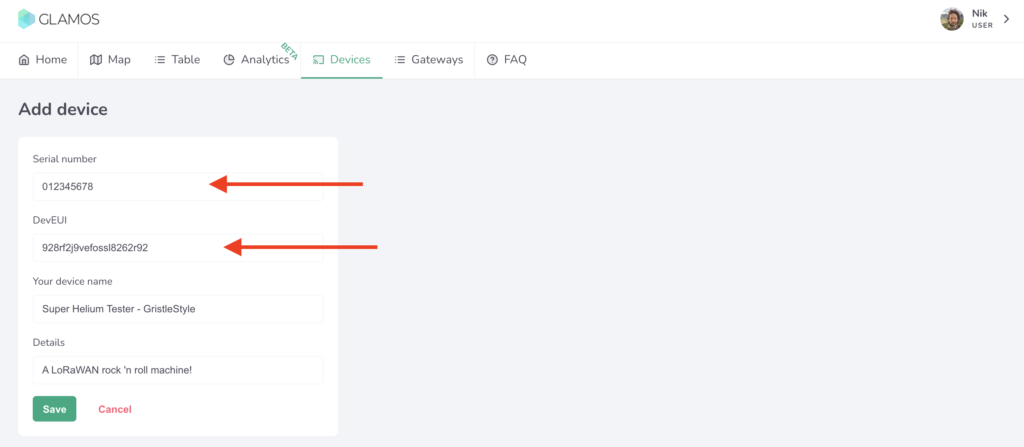
  2. Go to Devices on the top menu, and Add Device

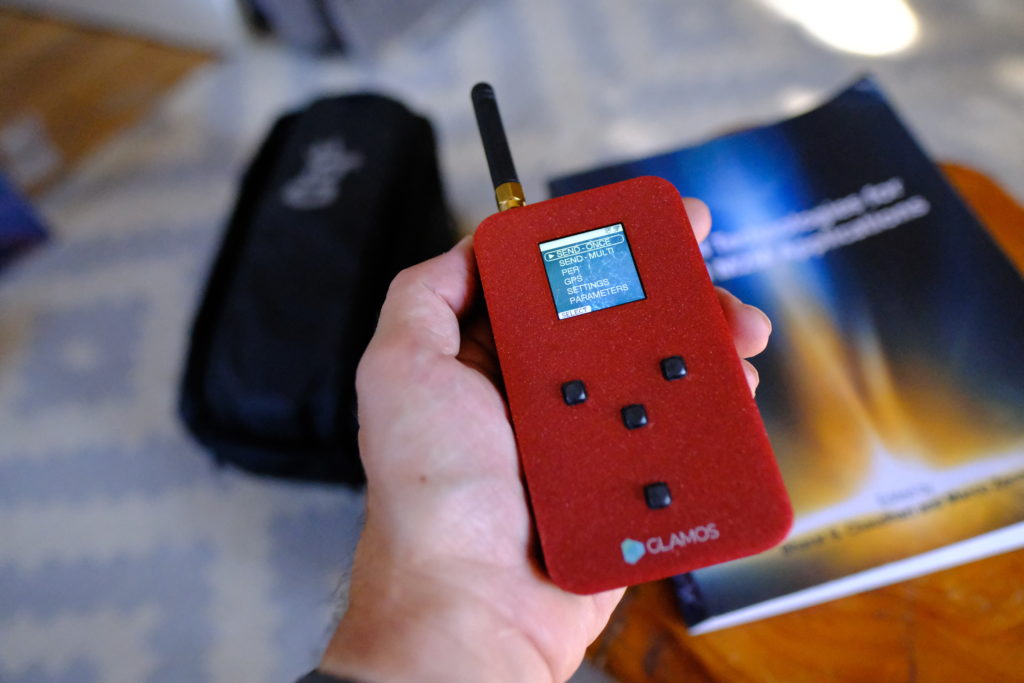
Now add in the Serial Number and DevEUI of your device. You should have received an email with these when you bought the GLAMOS, so you can just copy/paste 'em in. Or, like me, you can miss the email, turn the GLAMOS on and go to Settings --> Keys then manually type 'em in.

Trust me, you should use the copy/paste option. :)

Ok, so you might think now that all you've got to do is attach the antenna you want to test, head to your location, and mash that SEND - ONCE button.

Not so fast, turbo. You need to add in the gateways (aka Helium Hotspots) you want to test. That could be a large area, or it could just be the deployment net you're using. If you'd like to test all the gateways within a radius of a point, you'll need to set that up. Here's how:

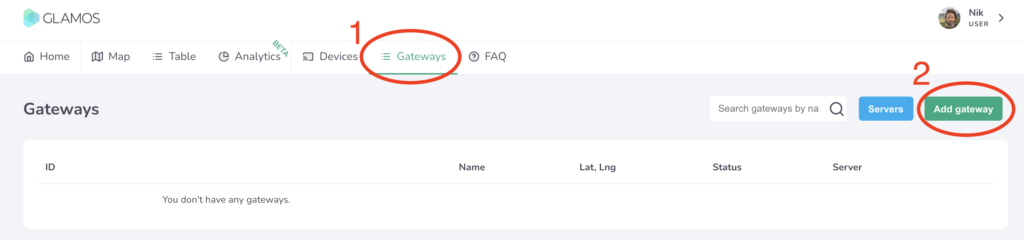
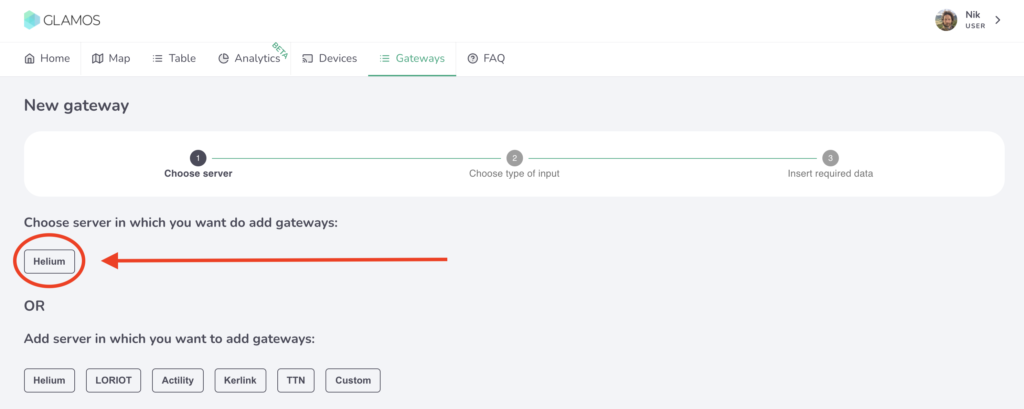
Go to the Menu bar at the top of the app and click on Gateways, then click on the Add Gateway button.

Every Gateway has to know what Server it's going to use. In this case, we're using Helium, but the GLAMOS can also be used for other protocols & projects.

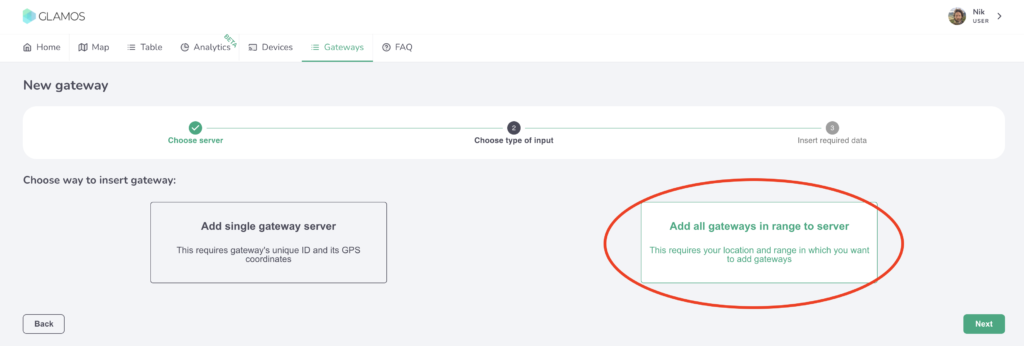
Now you've got a choice: Do you want to test a very specific part of the Network, say a few Helium Hotspots you've deployed to see if they can "see" each other, or do you want to do testing of all gateways over a wider area? I wanted to test a couple antennas over a wide area, so I chose "Add all gateways in range to server", like this:

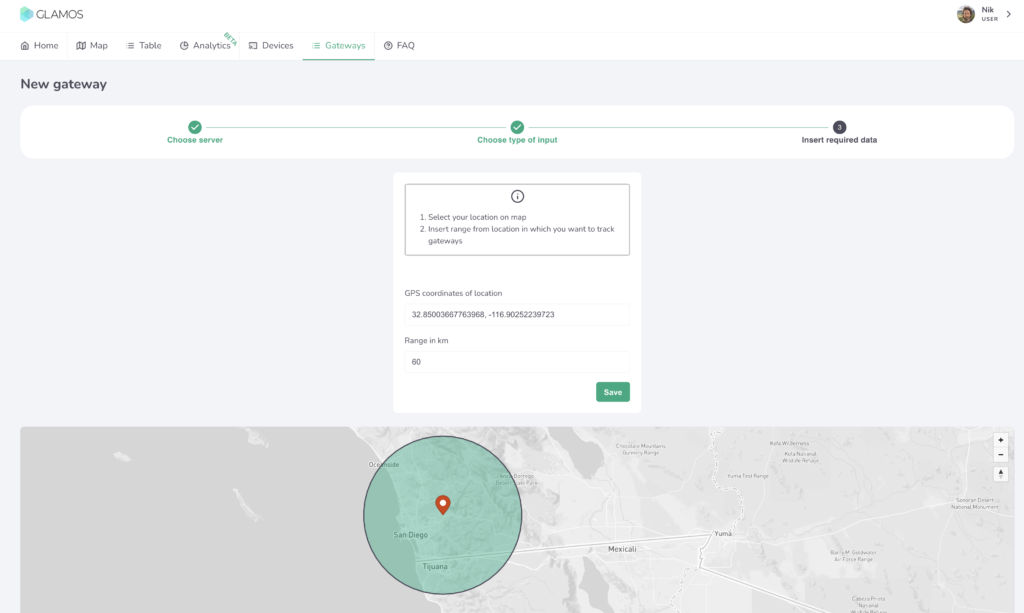
Select a center point and a radius, then let 'er rip.

Back in the Gateways menu you'll now see your new Server, woohoo! Cool, so now your GLAMOS knows what to do. Next up is telling it who to do it with. You'll need to get it connected to your Console account on the Helium Network. Yep, the data credits to run this thing will come from your account. Relax, it's pennies.

PART 2: PROVISION GLAMOS ON HELIUM CONSOLE

Slaven, the creator of the GLAMOS, has made a little vid for ya on how to navigate this.

https://youtu.be/pwa3mXbS3x8

Just in case you need that decoder script link from the video, here it is. The one I started with is below, but that's being updated all the time. Use the link for the latest version.

function Decoder(bytes, port) { 
// Decode an uplink message from a buffer (array) of bytes to an object of fields.
//Decoder for GLAMOS Walker device.

var decoded = {};

decoded.latitude = ((bytes[0]<<16)>>>0) + ((bytes[1]<<8)>>>0) + bytes[2];
decoded.latitude = (decoded.latitude / 16777215.0 * 180) - 90;
decoded.latitude = +decoded.latitude .toFixed(7);

decoded.longitude = ((bytes[3]<<16)>>>0) + ((bytes[4]<<8)>>>0) + bytes[5];
decoded.longitude = (decoded.longitude / 16777215.0 * 360) - 180;
decoded.longitude = +decoded.longitude .toFixed(7);

var altValue = ((bytes[6]<<8)>>>0) + bytes[7];
var sign = bytes[6] & (1 << 7);
if(sign)
{
decoded.altitude = 0xFFFF0000 | altValue;
}
else
{
decoded.altitude = altValue;
}

decoded.ant = bytes[8];

decoded.accuracy = 3;

decoded.position_num = bytes[9];


return decoded;
}

Ok, so now your GLAMOS Walker is set up, it's connected to the Helium Network and you're ready to start testing. Nice work!

TESTING ANTENNAS WITH THE GLAMOS

If you have antennas with N-type fittings (many of them do), you'll need an adaptor to go from the GLAMOS to the antenna. Current GLAMOS have a little connector-adaptor kit. I bought mine a while ago, so mine didn't. I mean, you know me: I would've made cables anyway.

You can order custom cables from McGill Microwave. I'd recommend 4-5' of LMR 240, and get SMA-Male and N-Male connectors. Obvi you can use the GLAMOS to test antenna cables as well, so if you want to get wild order different lengths and types, but for now we'll keep it simple.

Cables are generally a good idea because standing too close to the antenna when you test it can skew the results. I made one that was 4' long so I can sit at the base of my testing rig and work the GLAMOS away from the antenna.

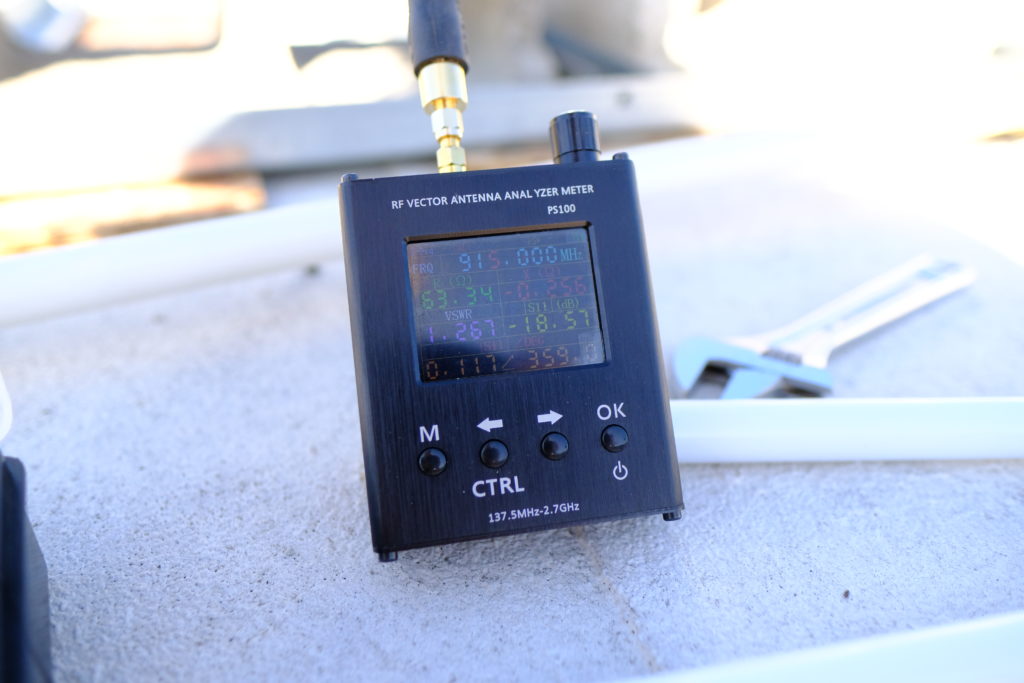
I start by checking to make sure the antenna is actually working and all my connections are good. For this, I use a little VNA I got off Banggood, though you can get 'em off Amazon as well. Here's a VSWR reading of 1.267 off the HNTenna, excellent as usual. For the purposes of this test we just want to make sure the VSWR is lower than 2. All of the antennas in this test were between 1.175 and 1.367. So far, so good.

Now to test with the GLAMOS! I followed Slaven's advice and set up the GLAMOS to send 10 messages each time. I did that 2 times for each antenna, so I had decent numbers to work with.

You can find this setting in the GLAMOS under SEND - MULTI --> SAME SF(loop) -- REPEAT (set that to 10x).

The readings off a single packet don't give you enough data to make a good decision. Data credits are cheap as chips, so burn 'em up. In this case I tested 5 antennas 20 times each, and with a few misfires I managed to spend 277 DC. Whoop de doo. You get 10,000 DC for $1 US.

I spent the next hour just mounting, connecting, testing, disconnecting, mounting, reconnecting, testing, disconnecting...

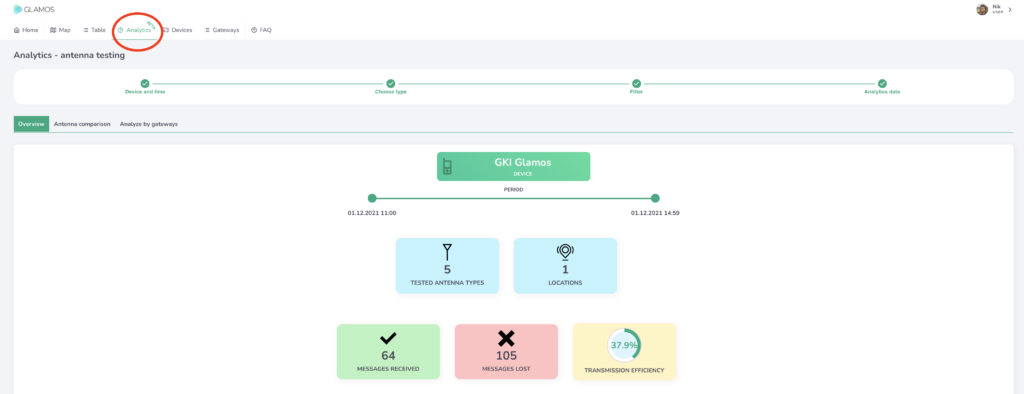
Once you're done testing, head back to a computer and pull up the GLAMOS app so you can dig into the data. You can look at the data on the GLAMOS in the field if you want, but I like big screens. On your desktop in the app, go to Analytics, select the Device, Date, Time, and Type of test, then filter and fidget and sort to your heart's delight.

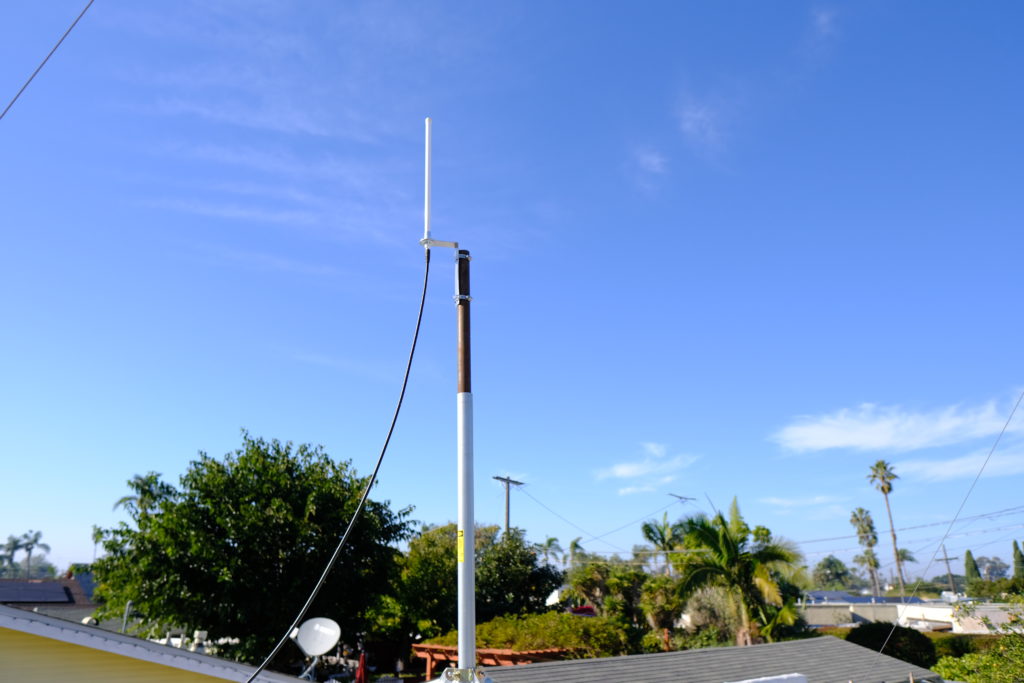
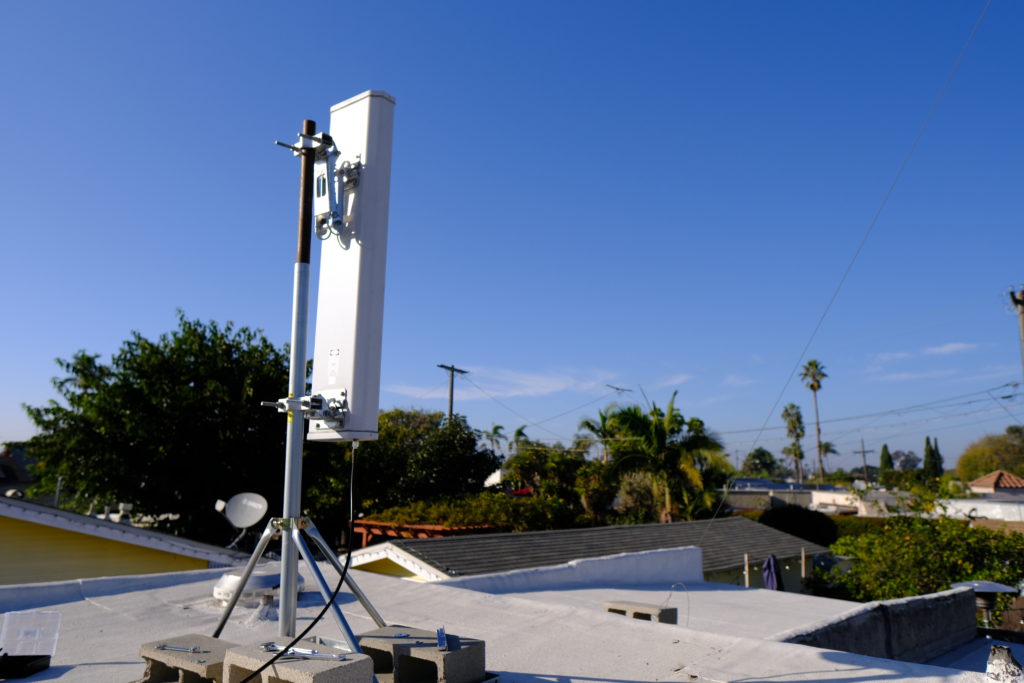
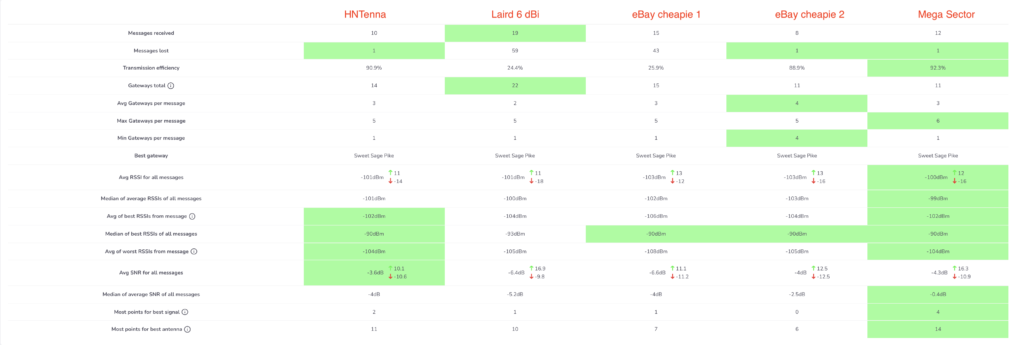
The results from this test of 5 antennas were pretty cool, at least for me. I tested the HNTenna, a Laird 6 dBi, 2 eBay cheapies, and the giant 13 dBi sector antenna I used before I knew what I was doing. Here are the results.

The obvious takeaway is wrong, just FYI. I threw that 13 dBi in there just to see what would happen, knowing it would have skewed results. Remember, every 3 dB is a doubling in power, so a 13 dBi is pushing out a focused signal more than octuple (what a word!) the power of a little 3 dBi. That means it'll "win" hands down in every measure of signal strength.

I was pleased to see the HNTenna did well, and I was surprised how good at least one of the eBay cheapies was. I would've expected the Laird to do a bit better, though it definitely had the most messages received. For reference, and so you don't go out and immediately replace your antenna with a ridiculously overpowered sector, I had that Mega Sector up for a MONTH with earnings in the bottom 10% of all Helium Hotspots before I managed to tweak the settings and dial down the power significantly so it'd fall within acceptable levels. Once I did that it performed well, although now that I have the HNTenna on it it's doing just as well or better at about a third of the price and a hundreth of the install hassle.

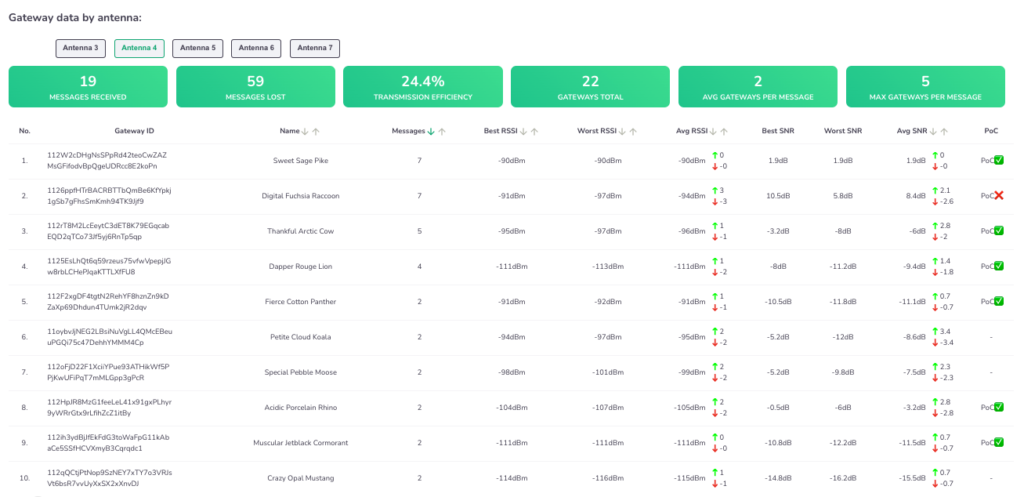
The GLAMOS app really lets you dig around in the data, listing out how each antenna for all the gateways that witnessed it. Here's the Laird, for example:

Check out that far right column where it tells you whether or not the signal would have fallen within the current (PoCv10) RSSI/SNR ratio. That will change with the update to PoCv11. Super useful!

You can use the GLAMOS to test more than antennas; you can test locations, whether indoor or outdoor will perform better, and by how much, and how a long cable might effect your actual reach. We haven't even gotten into using it for testing sensors yet, I'll leave that for another post.

So, what antenna should you buy? I'd start by picking up a GLAMOS testing unit before I went and bought any more antennas. Learn how to use it, then test your antennas, test your locations, and deploy a smarter, better, more efficient (and more profitable) Helium Network.

So...How Does This Help Me With Providing Coverage and Earning Profit?

Helium is a blockchain network that rewards users who provide WUPU (Wide, Unique, Proveable, and Useful) coverage. The better your WUPU coverage, the more you'll earn. Now, WUPU isn't a Helium metric, it's something I teach people about to help them understand at broad strokes how to assess a potential deployment.

If you want to have a high earning hotspot, testing the Wide and Proveable aspects of coverage is essential. Now, whether or not your coverage is Unique or Useful is something you'll need to assess in different ways. I'd start with my post on HIP 17 and scaling, then check out how to use the Network.

Rock on in your Helium glory, and best of luck to you in your deployments!

Archived Comments

Randy Armitage - 12/8/2021

Hey Nik I went to #mappers on the Helium Discord looking for info on how to use my Glamos to support the mapping project. Scrolled to the bottom of the pinned messages, which led to this article. While informative, the content doesn't seem to cover much of what the title hints at. Am I missing something or is the process of testing antennas very similar to generating coverage data? Thanx ?


Nik - 12/8/2021

Hi Randy, in general, good coverage is a proxy for good earnings. It's not precise, as earnings will depend on local density and scaling, but if you want to earn HNT on Helium one of the essential aspects is knowing what coverage your location/antenna combo will provide.


Nathan - 12/16/2021

Hey! Great article! Love all the data and very thankful for your amazing blog here! I just recently received my glamos walker (super exciting) and I am seemingly having the same issue as randy. I got it in order to contribute to the helium mapping project and after having set it up, find myself confused on whether I am actually contributing. Testing my own antennas is nice (which I'll try sometime in the future) but I can't seem to figure out A) If I'm actually providing coverage data for the network B) How to setup the glamos to automatically contribute once turned on. Any insight or hints in the right direction would be great.


Nik - 12/16/2021

Hi Nathan, I don't think there's an auto-fire Mapper style setting on the GLAMOS. It's designed built to test a bunch of different specific spots to make sure a sensor at that spot can reach a gateway, not to continuously beacon in order to provide coverage. I'll change the name of the post, as it seems to be misleading people.


Ben - 12/25/2021

Hey Nik, question about this assumption made in the article — “Second, you’ll want to know HOW MANY Hotspots your proposed location can be witnessed by. Since beacons & witnesses are two sides of the same coin, it’s pretty reasonable to assume that “if they can hear you, you can hear them.” I’ve just gotten and set up my miner recently, inside, stock antenna, 650 ft above the ground in a high rise overlooking the suburbs (for background). I’m actually finding that this assumption doesn’t seem to be true, in that I’m getting people witnessing my beacons for 55km+ but I don’t seem to be able to connect with anyone beyond a kilometer of me. Any ideas or thoughts? I’ve read about the principle of antenna reciprocity, and the only think I can think of is maybe the window that’s in front of the antenna is blocking really weak signals and making them impossible to distinguish from noise.


Nik - 12/26/2021

Hi Ben, it's not technically correct, it's just a useful model to use. It's likely that many hotspots around you are not as well placed. Think about this as well; you always get to know what hotspots witnessed your beacon, but you don't always win the lottery to witness the beacons of other hotspots.


Tom - 1/12/2022

Hey Nik, off topic here but I heard you on the Hotspot Podcast and you did a great job. My question is, you me mentioned T-Mo approaching a large hotspot fleet owner with a threat to cut them off. I could not find anything on this(articles, etc.). Is there a link you could share? Thanks as always and congrats on your Helium community Noble award. (you got my vote!) Tom


Nik - 1/12/2022

Hi Tom, thanks! Nothing I can share on that beyond the podcast convo; the fleet owner is pretty private.


Tom - 1/12/2022

Fully understand. Thanks.


The Ultimate Workflow For Fixing Your Relayed Helium Miner

· 10 min read
Nik
Site Owner

Ready to fix relayed status on your Helium Miner? @Jason (Jason#8116) over on Discord built a giant and truly glorious workflow for getting through it, but I'll be honest: It's intimidating to the first timer.

I went ahead and took Jason's workflow and with his permission, hired a Venezuelan programmer to make it easy for you to go through a step at a time. It's a series of questions & instructions that'll walk you through YOUR specific situation to get you off Relay. It's not perfect or guaranteed, but this workflow has helped thousands of Helium miners fix their relay status. It'll probably work for you.


If you want to see the full flow in all its glory, here ya go (or download the PDF here). Yeah, it's a lot. You are way better off using the tool above.

If you have questions for Jason, he's on Discord and over here on Twitter.

If you'd rather just buy a little device and pay for a service to keep you off relay, take a look at VirtualPrivatePi and use code gristleking at checkout for $10 off your order.


FAQ

Networking has its own terminology. Some of the words used are easy to skip over without understanding they mean something very specific (public vs local, clients, devices, hosts, etc).

Here are the most common questions us normal people have when it comes to networks. I've highlighted the words you might skip over. :)

What is an ISP? ISP stands for Internet Service Provider, like Cox, Verizon, Comcast, AT&T, etc.

What is an IP? An Internet Protocol (IP) address is a unique address that identifies a client device on the internet or a local network. Local networks usually have IPs that look like 192.168.x.x. A public IP is more random and could look like this: 221.194.255.240

What is a client? A client is any device that connects to a network. It could be your phone, a computer, a printer, or a Helium Hotspot.

What is a local network? A local network is the one at your house, office, or university. It's basically it's own little property, with addresses for where everything is internally.

How is a public network different than a local network? Think of a public network listing street addresses, say, 1313 Mockingbird Ln. Anyone can drive by and see there's a house there. The local address would be equivalent to the rooms in your house. Not everyone can (or should) be able to look willy-nilly through your rooms.

What is DHCP? Dynamic Host Configuration Protocol. This just means your device will request an IP address from your router, and that IP address can change.

What is NAT? Network Address Translation. It's a way to map multiple local private addresses to a public one before transferring the information. Long story short, your ISP gives you a public IP address and NAT (or your router) shares out your public IP to your internal clients behind your router.

What is CG NAT? It stands for Carrier Grade NAT. This is where your ISP is not providing you a public IP address on your router. They're doing this so they don't have to buy as many IPs, and because there simply aren't enough IPs for every house/business to have their own. The ISP is adding an additional layer of NAT on their end which is why your port forwards don't work with them. NAT does the filtering.

Portchecker.io reports open but it has been over the 48 hours? What is wrong? Due to the nature of the gossip network, in rare cases it can take longer for some relays to clear off. I suggest you try HeliumStatus.io.

Why did you remove the DMZ info? There are a lot of things you need to be mindful of when it comes to placing a device into a DMZ. Some routers will expose ALL listening ports on a device. This can have huge security ramifications depending on the miner you have.

Can I get off relay at my school/university network? Most IT admins are probably not going to up a port for you. You can ask, but don't be surprised if they say "No". Either move the miner to a new network or look at a VPN solution like this one.

Why don't I scan my miner's DHCP address in portchecker.co? The IP addresses your router passes out to your clients are NOT routable on the internet. You want to scan the public IP your ISP gives you.

I setup my port forward with TCP+UDP, is that okay? Yes, however, best practice security-wise is to only open the ports you need. So set it to TCP.

Why don't I forward to 22/443/1680? The Helium document says... The Helium document says OUTBOUND for port 22/443. That means your clients reach OUT to the internet. Your home routers allow 22/443/44158 outbound by default. Inbound means clients on the internet reaching INTO your network (clients behind your router.) That is potentially a security risk. Port forwarding 1680 is from some old DIY instructions which no longer apply.


Want more awesome Helium Knowledge?

Did this workflow work for you?

Please post your experience to comments, I'm always psyched to improve things!

Archived Comments

Jason - 12/2/2021

Thank you so much for doing this!


backtran - 12/6/2021

Almost as good as Jasons workflow in Discord :) :)


Nik - 12/6/2021

I mean, it IS Jason's workflow from Discord. ;)


Joe - 12/6/2021

I ran through this flow and continue to show relayed and listening on 44159 after several days. I did initially setup my hotspot on wifi and my router did have upnp enabled. I have disabled upnp, removed the wireless from the hotspot, blacklisted the wireless MAC address on my router, and forwarded external 44158 and 44159 to the internal ip of the hotspot using port 44158. I am still showing relayed after several days. Am I r later? My earnings seem to have halved since th Blockchain stoppage


Jeremy Chung - 12/6/2021

Hi Nik thank you so much for sharing your knowledge , you are amazing for doing this. I've been using the rak (MNTD) for a week, and I never port forwarded since I started using my rak. I have the "not relayed" status since the start, which is good news I think. I've been looking at videos saying port forwarding does give better performance, should I restart the process and port forward mine if I never had a issue from the start? if I should, how much performance gain am I actually going to get?


Nik - 12/7/2021

Happy to help. Don't fix something that ain't broke, my man. :)


Mike - 12/9/2021

For anyone looking for a turnkey solution to get around firewall or CGNAT issues check my company Helium Helper.


MrGroller - 12/17/2021

Nik, I went down the route of LTE router and the end result was Stay Relayed but I followed switz#1985's tutorial (GL.iNet router - Linode VPS - WireGuard VPN) and I managed to take my hotspot off Relay mode. :)


Don - 12/21/2021

The only thing to add to this is that my hotspot was relayed until I turned off UPNP on my Netgear router. It showed port open in all the tools but was still relayed by the Helium Network after a week. A couple hours after turning off UPNP it was no longer relayed


Nik - 12/21/2021

Right on. What was HeliumStatus.io saying?


Supergenius - 12/31/2021

Outstanding assistance. Thank you. I may hire you when my new antenna arrives.


federico scardovi - 1/8/2022

se ho symmetric nel nat type, come posso risovere? non sò dove sia upnp nel mio router!!!???


Aly - 1/13/2022

Hello, My ISP changed my static ip address yesterday, the Miner(5s) on the bobcat diagnostic page showing that the Nat type is symmetric and the listen addresses on this page are like hotspots address not my real ip address. i've restarted my router and the bobcat and I checked the port 44158 is already opened. so what I have to do? Thanks


Nik - 1/14/2022

Have you checked with HeliumStatus.io? That's usually the most up to date.


Augusto Ramoa - 1/18/2022

My hotspot lost the wireless connection 2 days ago. I setup a ethernet cable, but it's still offline. On heliumstatus.io the API Reported Listen Address has correct IP and port and I can ping, but the Observed Listem Address is the correct IP but port 56664. Why is that? How can I solve this? (btw when I pair with helium app I get 100% inbound and outbound and 99.53% blockchain sync)


David Bostons - 1/23/2022

AUGUSTO RAMOA Thanks for the actual question I have the same issue...


KeySmit - 2/16/2022

My miner has power and is showing it's connected via Ethernet however, in the diagnosis it has no inbound/outbound traffic and showing up offline on the explorer. For this POE setup would this flow map work or would the issue be with something else?


Nik - 2/16/2022

I'd probably replace the SD card with a new flashed one first. Then go through this workflow.


NESTOR - 4/15/2022

Nik my Sensecap miner shows NAT symetric and its suppouse to be None or Open. I have a BWG 320-500 Router for ATT. I already open port TCP 44158 and the miner is not relayed, network HEALTHY, inboud and outbound check green. My only issue its that this type of router dont allow to Manually set UPnP. so do you know how can I solver the NAT type for Sensecap minner from symetric to open or none? Thanks


Nik - 4/15/2022

Hmm, I'm not sure. Good news is you'll only have to deal with this for a few more weeks. When Light Hotspots activate this problem should disappear.


Jimbo - 4/19/2022

My helium app shows a green check mark for outbound and a X for inbound with the NAT type being unknown. I had issues with the wifi but when it was wifi it was green check marks for both outbound and inbound. I had to switch to Ethernet to correct an IP address issue and to move forward with the port forwarding. What do you think is preventing my inbound?


Nik - 4/19/2022

Hi Jimbo, have you opened up port 44158? I'd use HeliumStatus.io to check things; Explorer can be way behind.


Jimbo - 4/19/2022

Yeah, I opened port 44158 and checked it with a port checker site and it showed open. So maybe it was slow. I will Bluetooth back in and see if it shows green.


Foundations of Relayed Hotspots (and how to fix 'em!)

· 6 min read
Nik
Site Owner

I got a chance to sit down with the mighty @BFGNeil recently and boy did I learn a ton! Neil is one of my fellow Helium Discord moderators and one of the most helpful and knowledgeable members of the community.

Neil's built what I think is the single most useful tool for most Helium Hotspot owners at this point, which is HeliumStatus.io

https://youtu.be/xSbF-r-vjh4

The reason it's so useful is that it gives you LIVE feedback when you're fixing the relay issue. This is unlike Helium Explorer or the mobile app, which can be up to a week behind when it comes to reporting accurate information.

We go through what relay is, how to fix it at a high level, why it exists, and when it will be permanently solved. Neil's been fixing relay for folks on Discord pretty much since it was a problem. In fact, he was one of the first ones to see that it was and would be a problem, and you could make the case that he's the reason most of us know about relay; the status checker he originally built has been added to both Explorer and the app!

This latest version, HeliumStatus.io (you'll need to sign up for an account, it's free to use but it costs a small amount to monitor your hotspots) is the kind of simple, direct tool that makes troubleshooting a whole lot easier. It's not magic, and it won't fix it for you (most of the time), but it'll let you know if what you're doing is working.

This conversation isn't just about fixing relay; there are plenty of guides for that. We talk about some of the structure of the internet (public and local IPs), what it costs OTHER hotspots when yours is relayed, and the only reason you should ever turn off your hotspot.

We talk about why you should never use WiFi to connect your Hotspot to the Network, what seed nodes are, what gossip is, why you should fix relay (it's not just for your earnings, ya selfish bugger!), and the best thing you can do for the network once you've deployed a hotspot. Enjoy the convo!

Ready to dig in to HeliumStatus? Ok, here's what it looks like once you've signed in:

Enter in your hotspot and hit the Search Hotspots button. From there, choose your hotspot. Remember Thankful Caramel Quail? You can read about its setup over in the Anatomy of a Hotspot post. When you hit the Search button, it'll bring up a bunch of options. Choose yours, and this is the next page.

Off to the left is the menu. We go through all the options in the video, but it's pretty straightforward. When I checked TCQ, she was singing along fine (although the Monitoring is showing me a few things about the stability of the internet connection down there, and that's a wired ethernet connection!)

That's it! I encourage you to use the heck out of the tool and monitor your hotspots for at least a month just to see the enormous fluctuations in connection; you are not alone in the Helium rodeo! If you have more questions for Neil you can hit him on Discord or his website, here. For now, sit tight, keep your hotspot connected via Ethernet, and remember: (almost) Never unplug!

Rock on!

Archived Comments

Jordan Silvera - 11/17/2021

Hey Nik, quick question. When it comes to the different models of miners, are some more finicky when it comes to relayed status? Also, on your remote deployments, do you have issues with relayed status? How do you remote troubleshoot? I was considering buying some OG miners (the white square with the green) for cheap. I have not read any issues with them for a remote deployment. Any advice? Thanks


Nik - 11/17/2021

The OGs are good, the RAKs are probably the best miners as of 2021. Yep, off grids have issues with relay just like everyone else, it takes some work to sort out the network issues. You can mostly remote troubleshoot although you'll occasionally have to do site visits -- that's the nature of off grids.


Jaime - 11/17/2021

Hi Nik, Have you ever seen a Rak Goldspot miner (from MNTD) cause a router to keep rebooting itself when connected via an Ethernet cable? I've been using my miner successfully with Wifi for about three weeks now, but as soon as I try hard-wiring it with a cable, my Nighthawk R6400v2 router just shuts itself down and reboots, repeatedly. I've tried two different Cat 6 Ethernet cables and I've tried two different jacks in the back of the router. All signs are pointing to the fact the my router is just junk, but I was just wondering if there is anything else you can think of that I could try first.


Matt - 11/17/2021

Hi Nik, I'm a big fan of what you do. This tool is pretty awesome, thank you for sharing. I'm curious about what a typical ping latency range might be? Mine is showing about 170ms. I'm also really curious about being connected ethernet vs good wifi. Do you have anything you can link me covering specifics? Or is ethernet just preferred because it's generally more stable? Thanks for your time man, mucho appreciato


Nik - 11/17/2021

I think Neil was saying US hotspots can subtract 100ms or so. I'm guessing 170 is fine. Ethernet cable is just more stable than WiFi; Neil talks about it in the video. Rock on!


Dannyrough - 1/12/2022

I have to different ip Observed Listen ip different from api listen ip How to solve it


Lessons Learned From A Year Of Helium Deployments

· 11 min read
Nik
Site Owner

It's been a little over a year since I started deploying Helium Hotspots. In that year, after deploying Hotspots both on grid and off grid on homes, commercial buildings, and (my favorite) in the mountains, I've learned a ton about what to do, what not to do, and how to make the most of the Helium experience.

I've had the great privilege of helping hundreds of clients deploy their hotspots as well, whether it's a family in Oregon putting one up on their house or a fleet owner out of NYC deploying thousands. What I've learned from all this can be summed up in three main points below.

First, Helium is simple.

It can seem intimidating, and the details can get overwhelming, but at the end of the day, the deployments that earn the most provide 4 types of coverage. I call this WUPU coverage. Here's what WUPU stands for:

Wide - The coverage your Hotspots provides should have as great a range as possible. It should go from right where your hotspot is, and waaay out to the visible horizon. Your first job when deploying a Hotspot is to make sure you can get the antenna in a place where it has a ton of long, open views. Being blocked in by trees, mountains, or buildings can kill your wide coverage.

Unique - Any network benefits from a little redundancy, but not too much. The coverage your Hotspot provides (IF you want a high earning Hotspot) should ideally be something like a 75/25 split between unique and redundant. Now, that's more of a guideline and very difficult to assess, but as a general rule of thumb, if you want a high earning Hotspot, put it in a place that opens up new ground for the Helium Network whilst also providing a little redundancy for other Hotspots close by.

Proveable - We prove our location solely through the strength of radio signals as assessed by the laws of physics. We don't use GPS as it's too easy to spoof. I know, most of us don't know how to spoof GPS. That doesn't mean it's not possible, and the Helium Network has to protect itself against all attack vectors, one of which is GPS spoofing. Helium does that by relying on your Hotspot to transmit and receive precisely measured radio signals, and to compare those measurements against humanity's understanding of physics. It's not perfect, but it's the best we can do, and Helium is ALWAYS working to improve it.

You prove your location by correctly entering the details of your antenna and your locations so Helium knows what variables to enter in their distance/signal strength equation. If you enter incorrect variables, you can expect to miss out on rewards because your "proof" is not matching up with the expected outcome.

Useful - Finally, high earning coverage is useful. The Network has to be useful to provide value, and the highest earners generally process actual data on the Helium network. They may not process a lot of data right now, but a high earning placement will always be in a position to process a ton of data from a variety of sensors.

While the rewards for processing that data are small now, we can expect that to grow, and grow, and grow over time.

Second, Helium is complicated

Helium is more or less an ambitious engineer's dream. It's a system that grows itself through basic human incentives. Because these incentives are so powerful, there's a constant game of cat and mouse with the good guys (the majority of the Helium community) and "gamers", or people who are gaming the system to cheat and earn more HNT. As HNT gains in value, these incentives become more powerful, attracting smarter and more capable gamers to attempt to exploit the system.

https://youtu.be/\_kWCs3TH9GI

This ends up as a battle between many very smart competitors. The stack of talent at Helium Inc is gob-smackingly capable, but the array of skills that gamers bring to the table is equally impressive.

That's great for a robust network, but it can make things difficult to understand for those of us who are not technologically savvy. Knowing the difference between a packet forwarder and a miner, a gateway and a sensor, a server, a router, and a Validator and the languages they all speak can mean the difference between earning a ton of HNT or having to (frustratingly) sit on the sidelines wondering why your miner isn't working.

This complexity is both the shield that protects us and the obstacle that can temporarily slow or stop our earnings. In order to participate in the Helium Network at an above average level, you'll have to be ready to roll up your sleeves and learn a little more about radio signals, code, and the physical act of deploying Hotspots (and specifically, getting your antenna in the right location and up high.)

Third, Helium as an avenue for both personal growth and wealth creation is unlike anything I've ever experienced.

As you may have already experienced, just learning about the Helium ecosystem can expand your world in ways you never thought possible. Whether you decide to get geeky and build a test setup just to see how the whole thing works, or you wade through the complexities of HIP 15 & 17, Helium has a way of forcing you to expand your capabilities.

Take it from me; at the start of this thing, about all I knew was that *something* was going on. I didn't know about turning a Raspberry Pi into an HNT earning Helium Hotspot (which you can no longer do, though you can still build a non-earning one). I didn't know about code. I'd never used Docker, or Python (or BASH, or Shell, or anything).

I knew that I could work hard, use tools in a workshop, read and study just as well as anyone else on the planet, and I put in the work required for extraordinary placements. Everything else I learned on the job. You can do the same. I've done it and I've watched and helped hundreds of people do it; I know it's possible.

That leaves us with the final piece of Helium, which is wealth creation. When I saw a Hotspot down the street from me making the equivalent of US$3,000/month back in September of 2020, well, I thought the same thing you would: How do I get into this?

As it turns out with many cryptocurrency and blockchain projects where you find it early, that journey of discovery has turned out well for me so far. Crypto in general can create life-changing wealth, and Helium is no exception. I'm not talking about just me, although it's certainly changed my life from one where I struggled to pay off credit card debt to one where I don't check my bank account before buying groceries at the store.

Anyone who is involved at this early stage, who takes the time to learn about Helium and how best to participate in the eco-system in order to grow the Network in healthy ways, and takes action, well, they're going to change the course of their financial lives.

That's been one of the coolest parts for me; sharing this journey with YOU, and making sure you're along for the ride. Very early on (my very first Hotspot), I had a good friend step in and hold my hand as I walked through the steps of getting a Hotspot put together and online. It helped build an extraordinary friendship, and was such a positively charged example of how one person can help another achieve independence that I am driven to try and pass that experience on to you.

This blog is one of the results of that. All of the information on here is free, so you can follow my journey, learn from my mistakes and victories, and develop your own understanding of how you can best participate in Helium. If you'd like a guided tour, well, I offer that too.

About 5 months into this, after writing the first few articles (the Rough Guide and the one on choosing an antenna specifically), I started getting phone calls from people needing help. At first it was fun to get those, especially the one at 9 o'clock at night from the Ukranian guy out of Buffalo considering a 1,000 Hotspot purchase. It was like being in a spy-thriller movie. "Chello, I hav some qvuestions for you."

Still, my phone started ringing non-stop, so I had to manage my time somehow. I started charging for consulting time, walking people through a condensed version of all I'd learned about Helium. I found that conversation usually takes at least an hour, sometimes longer. At the end of the hour, you have a much better understanding of what to do, and almost invariably we've corrected a few misunderstandings about Helium. Like I said above, Helium is complicated.

After doing hundreds of those consults, I developed a standard flow that addressed 80-90% of all misunderstandings, and tailored the other 10-20% to individual questions for each unique situation.

I decided to record that standard flow and make it available for more people at a much lower price than my one-on-one consulting fee. This makes it more affordable for more people and gives you the ability to learn when you're ready and not on my schedule, which can be booked out further in the future than you want to wait.

That recorded presentation is here if you want to check it out. In just under an hour it'll take you through all the most important parts of the Helium Network, and cover most of the things I cover on this site. To be very clear, you can get the same information for free if you read every page on this site; this is just the faster, easier, more efficient way of getting information into your brain. Your choice, your time. Rock on, Helium peeps!

p.s. If you're wondering what happened to that 13 dBi antenna in the video, well, check it here. :)

Archived Comments

Kyle - 11/16/2021

Ordered in May. Delivered in September. 10x'd my exposure and have been enjoying the process to built a fleet of them. The installs are challenging and rewarding for a good setup. Thanks for your content. Glad I found you on youtube this evening


Alex Wildgoose - 11/24/2021

How do you get landowner permission to place these free standing hot spots out in the wild?


Nik - 11/24/2021

Hi Alex, just ask 'em. If you can figure out who owns it, what the restrictions are, and what might benefit them, that's a great start. For long term placements I'd connect with local WISPs.


How To Map The Helium Network for Coverage and Profit - Gristle King - A Guide to Helium - 12/1/2021

[…] Lessons Learned From A Year Of Helium Deployments November 15, 2021 […]


nick - 12/10/2021

I think we are neighbors. Amatuer Jade Hare. Im have long basil eel, falky gauz bird, tricky gunmetal bull which just got replaced by Curved brown baboon. Thats the new 5g. I have 6 more on the way. Blossom Valley will be done:)


Nik - 12/10/2021

Right on, love me some Blossom/El Monte Valley action!


Nick S - 12/11/2021

My buddy and I seen your miner on the map and we were trying to figure out how you got it out there. He lives on CreekHills. He has the highest house in Blossom Valley . We tried to find it with a drone with no luck. Once I seen that picture I knew that it had to be AJH. Very cool set up.


Nik - 12/11/2021

Right on Nick, Blossom/El Monte Valley is one of my favorite places to be, and good to know we have robust Helium coverage there. :)


Andy - 12/23/2021

Just a big Thank YOU. Using some of your knowledge along with some of my existing experience, I was able to put up a new hotspot at a great location that just jumped to #2 in the USA for daily rankings with nearly 2 HNT/day. I've got some additional good locations in mind, but I'm finding out that internet access is a pain. I wish I had tripped across you & Helium 6 months ago, but I'm glad I made it.