103 posts tagged with "Helium"

View All Tags

What Does A Great Helium Hotspot Look Like?

· 10 min read
Nik
Site Owner

Seeing other deployments is one of the fastest ways to get great ideas (and avoid costly mistakes!)

I thought it'd be useful to the community to share a little more detail about our Helium Hotspot deployments. Here's your chance to shine!

What hotspot are you using? What antenna? Are you happy with this deployment? What will you change next time? Any recommendations for others? The more info you can share, the more we'll all learn and the better the network will get.


Hotspot Mfr: RAK
Antenna Mfr: eBay supplier
Antenna Gain: 8 dBi
Elevation (meters above ground): 11
Cable type used: LMR400, 20'
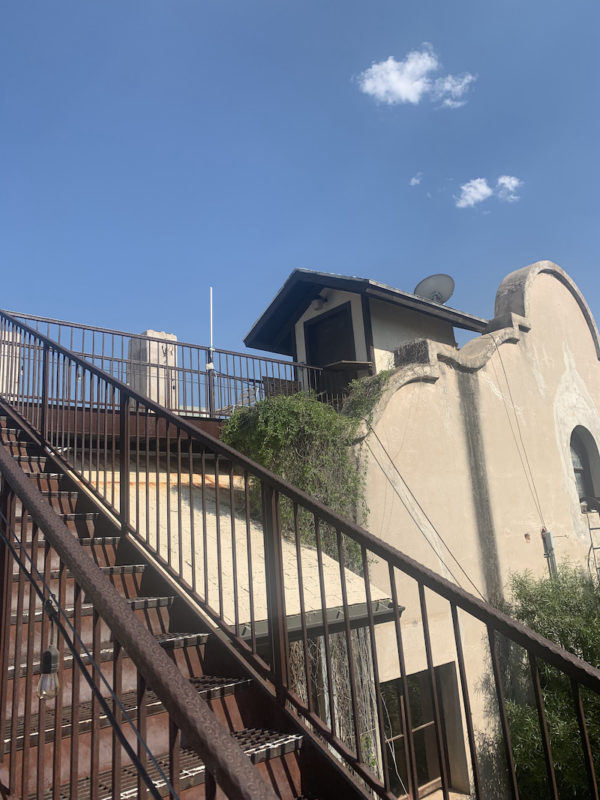
Mounting Deployment Notes: On top of commercial building, routinely goes offline & back on. Hotspot relayed but witnessing well. Locally overcrowded, need to move this one!


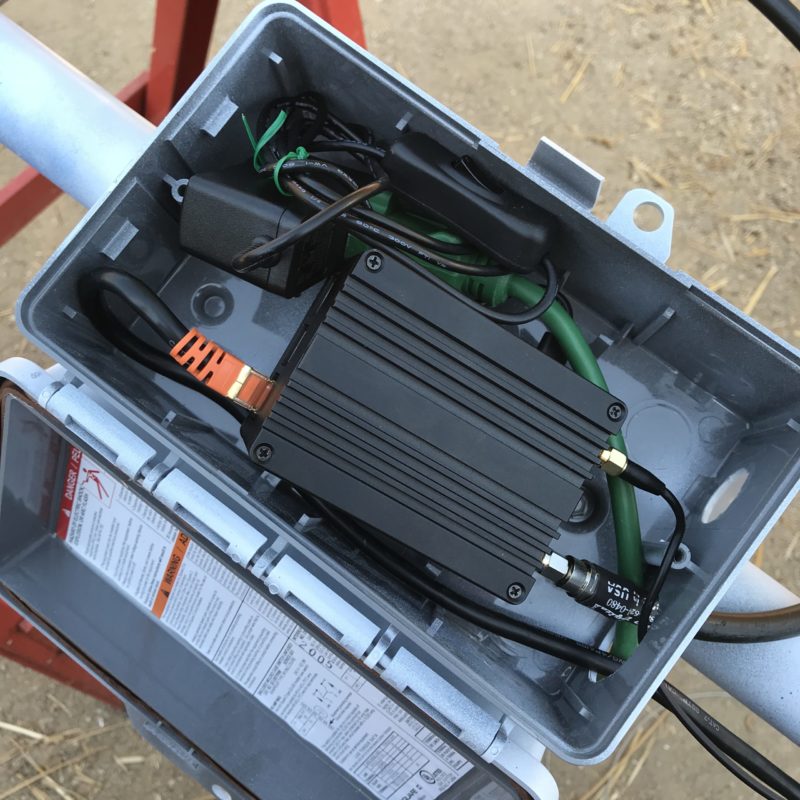
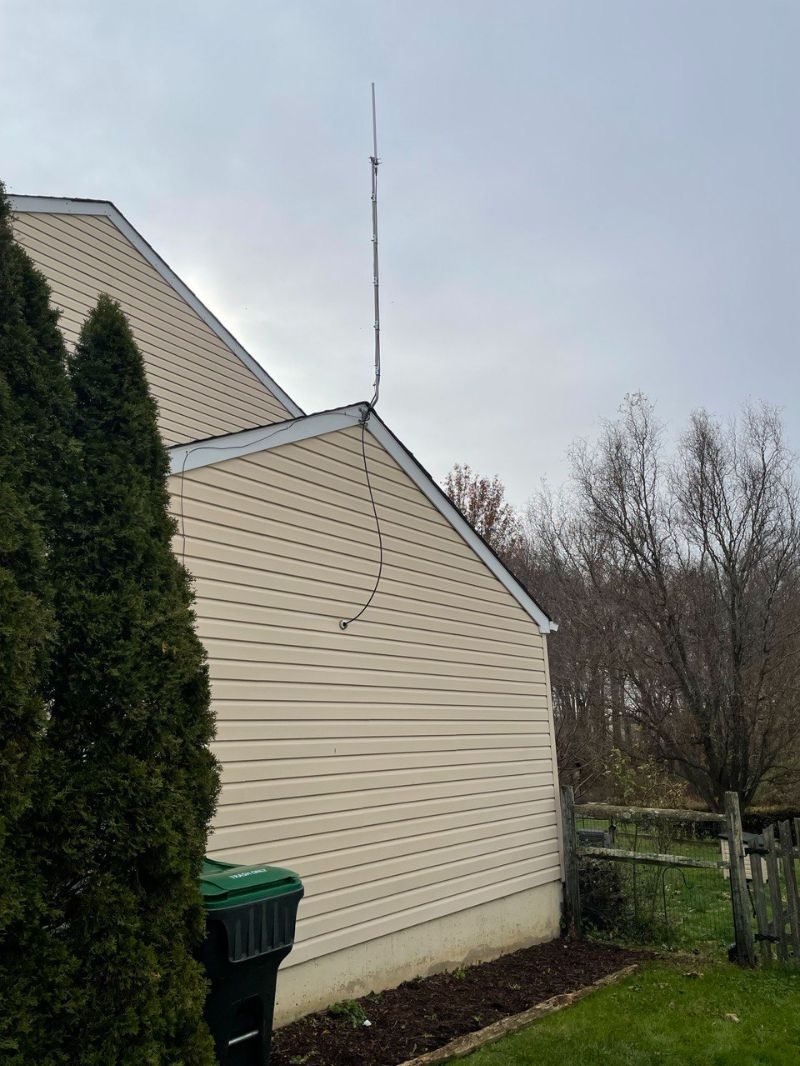
Hotspot: RAK
Antenna Mfr: Nearson
Antenna Gain: 9 dBi with an attenuator to remain within acceptable RSSI/SNR limits
Elevation (meters above ground): 10
Cable type used: LMR400
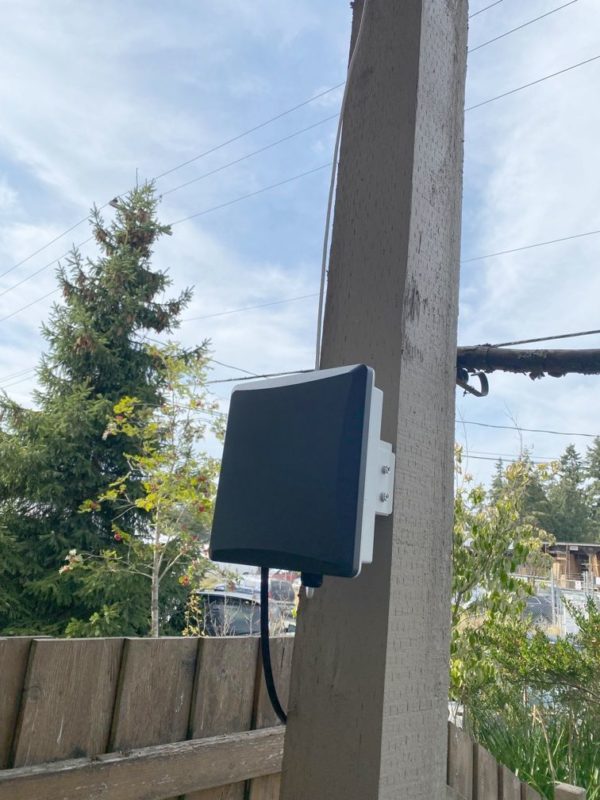
Mounting Deployment Notes: mounted on residential roof, in a now overcrowded area. First deployment, so used both a power cable (green) & and ethernet cable.


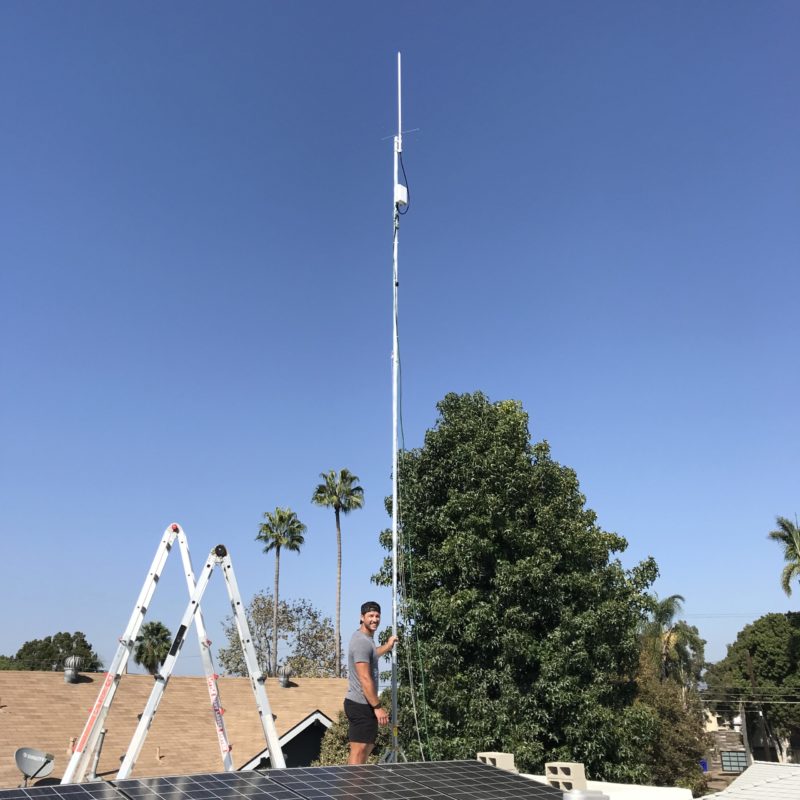
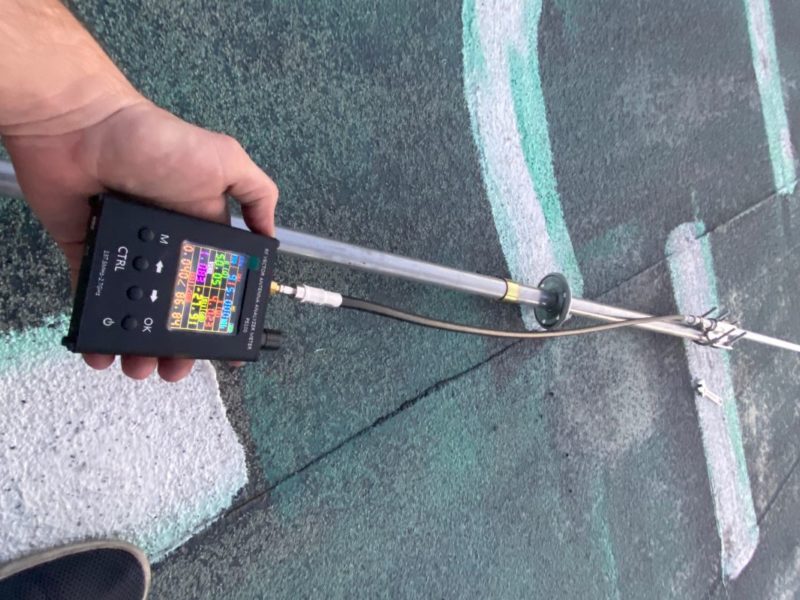
Hotspot Mfr: Helium Hotspot (The OG!)
Antenna Mfr: Nebra
Antenna Gain: 5.8 dBi
Elevation (meters above ground): 7
Cable type used: LMR400 UF
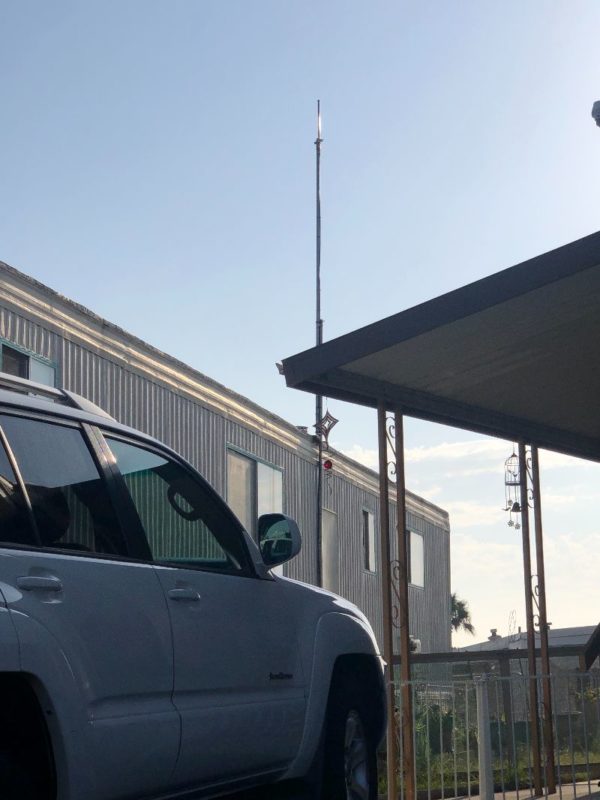
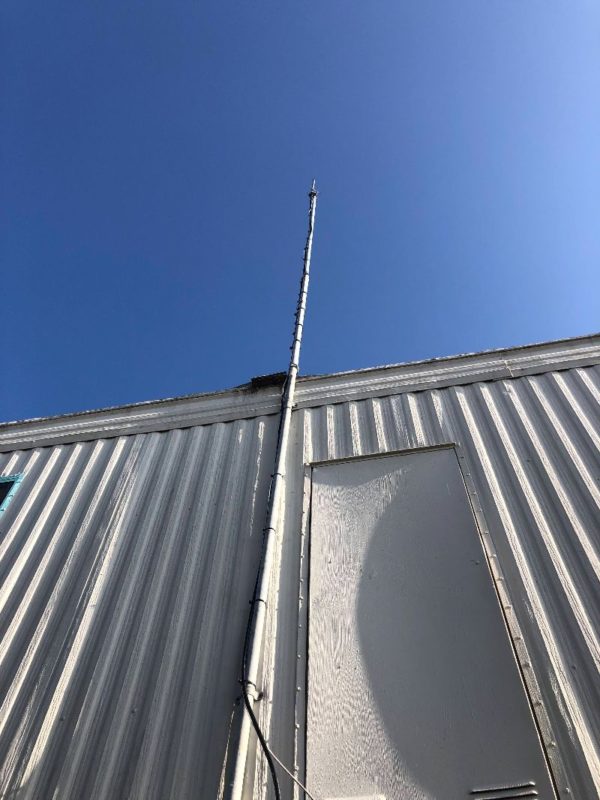
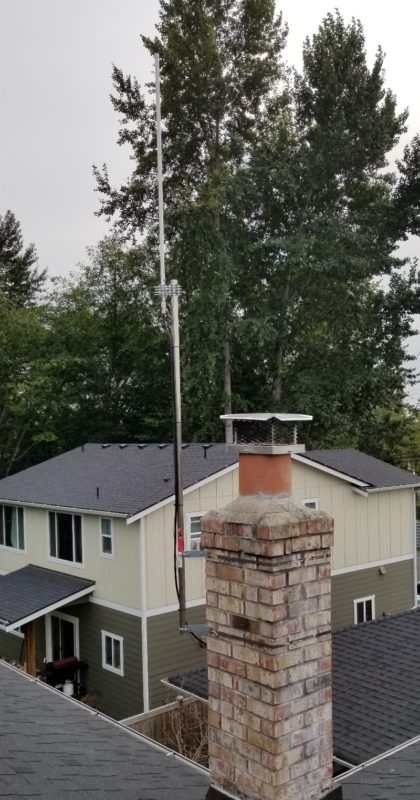
Mounting Deployment Notes: Lighting arrestor on antenna end, grounded to a water pipe. Home Depot 10.5 foot steel top rail attached to an old tv antenna pole with hose clamps and industrial zip ties(found on Amazon). If utilizing an old install, make sure to reinforce the old brackets or put new ones. The LMR400 I ran through the wall where the old coax cord went through into the living room. The white plastic coax cable cover I just made the hole a little bigger, put that putty drywall stuff in the wall and sealed the outside with a white all purpose sealant for roofs. Easiest install I've done.


Hotspot Mfr: RAK
Antenna Mfr: RAK Wireless
Antenna Gain: 8 dBi
Elevation (meters above ground): 21
Cable type used: direct connection
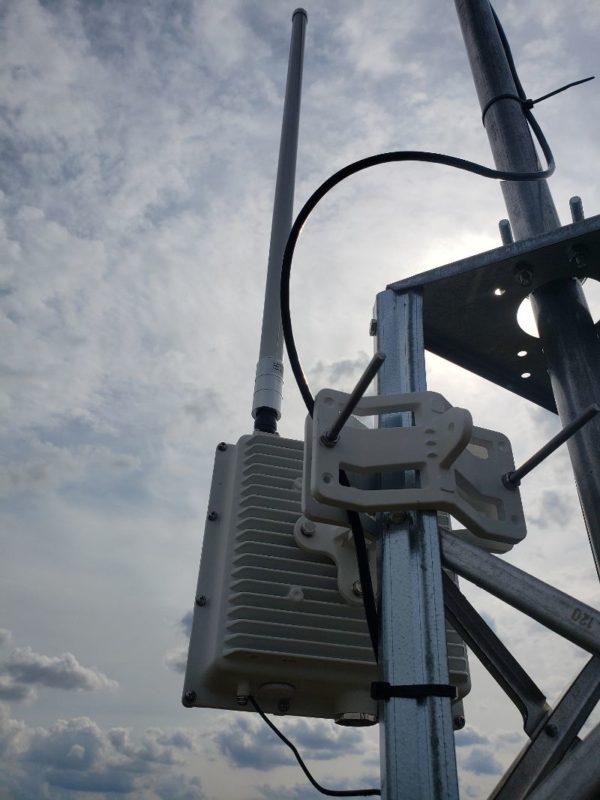
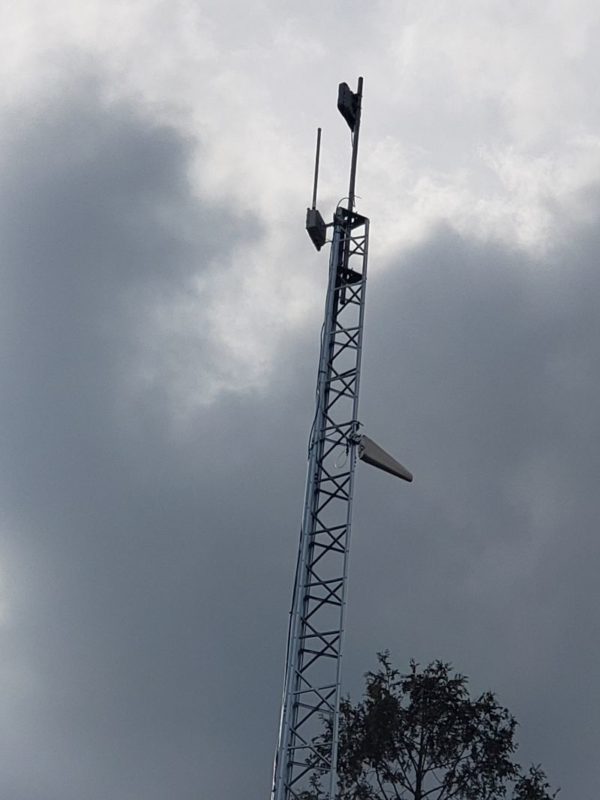
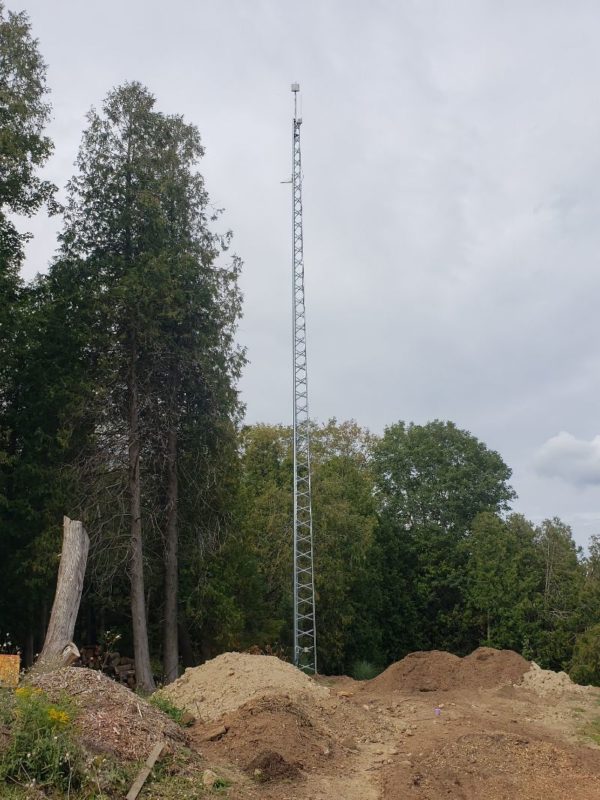
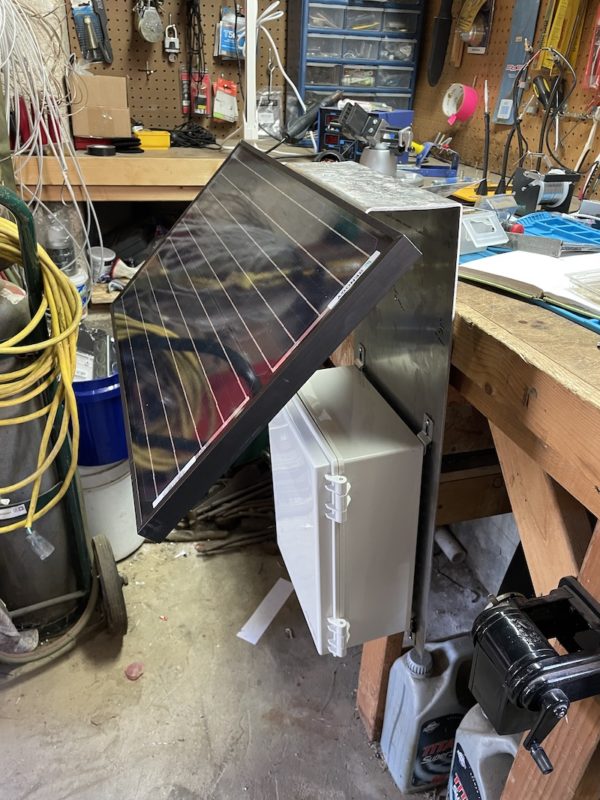
Mounting Deployment Notes: RAK miner installed in outdoor enclosure on 68ft self-supporting tower. I built this tower for my client last December in order to improve his wireless internet connection speed. I arranged to use his tower to test the location. Used 75ft premade CAT5 cable drop from miner to surge suppressor with messenger cable for grounding. Surge suppressor installed at the base of the tower and grounded to a copper grounding rod. 50ft CAT5 cable drop from surge suppressor to POE adapter. Installed on Sept 4th. Still under testing.
Hotspot Name: Quaint Ceramic Porcupine


Hotspot Mfr: Bobcat
Antenna Mfr: RAK Wireless
Antenna Gain: 5.8
Elevation (meters above ground): 21
Cable type used: 30' RG-214 silver plated wire
Mounting Deployment Notes: I used 30ft of RG-214 silver plated wire and I went ahead and got all the stripping and crimping tools along with connectors. I'm still being relayed. [The host] is worried about opening up port forwarding, so we are going to get our miner its own router to set up port forwarding. 
Hotspot Name: Old Zinc Elk


Hotspot Mfr: Bobcat Miner 300
Antenna Mfr: RAK Wireless
Antenna Gain: 5.8
Elevation (meters above ground): 7
Cable type used: 20' LMR400
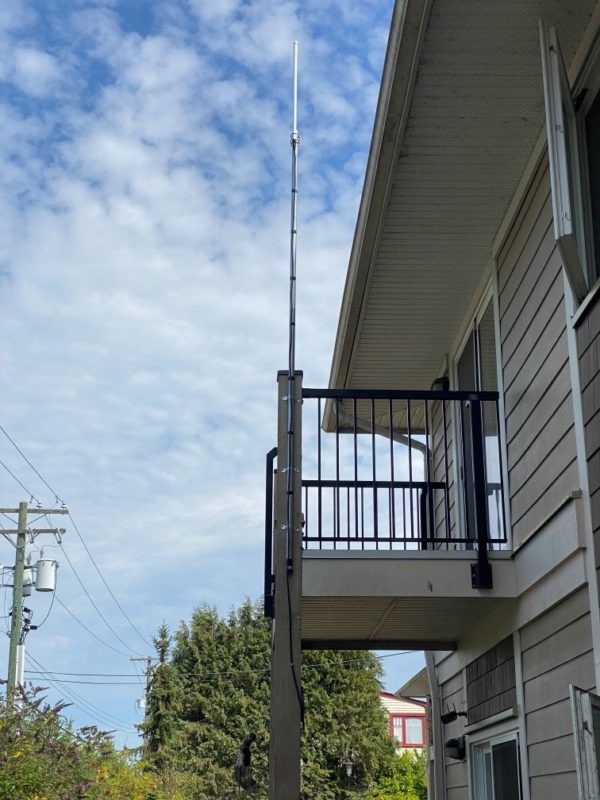
Mounting Deployment Notes: I used the Rakwireless bobcat outdoor enclosure kit. I spoke with my neighbor upstairs and asked for his permission to use the railing of his balcony for mounting. I drilled a hole through the exterior wall into my apartment for the CAT6 cable and mounted it neatly to the underside of the balcony, down the beam, and into the exterior enclosure.


Hotspot Mfr: Bobcat Miner 300
Antenna Mfr: Rokland
Antenna Gain: 10
Elevation (meters above ground): 11
Cable type used: 30' LMR400
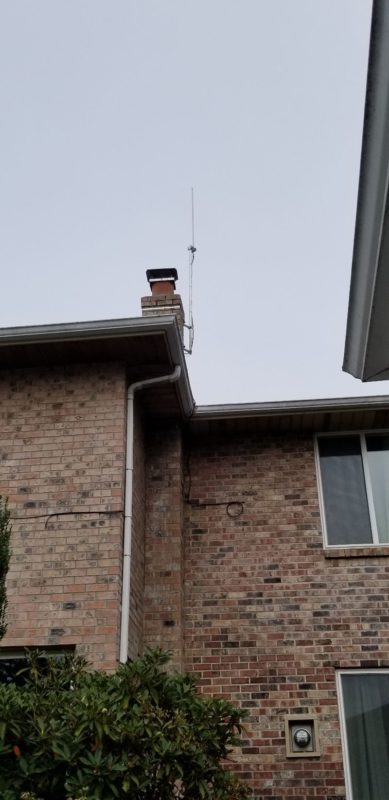
Mounting Deployment Notes: Bobcat is inside, the antenna is mounted to my chimney. It is 35 feet above my driveway surface. I used hotspotrf to determine the height and antenna gain so my setup should be getting about 19 witnesses, but I'm having ZERO luck and only earn .01 HNT most days (from initiating challenges only, I have 0 witnesses). I do have a 5.8 dBi and a 8 dBi antenna on the way from RAK right now. I'm hoping that I am just missing the witnesses with too much antenna gain and a different antenna will fix the issue.
Hotspot Name: Rich Cerulean Sparrow


Hotspot Mfr: SenseCAP M1
Antenna Mfr: HNTenna
Antenna Gain: 3
Elevation (meters above ground): 24
Cable type used: LMR600
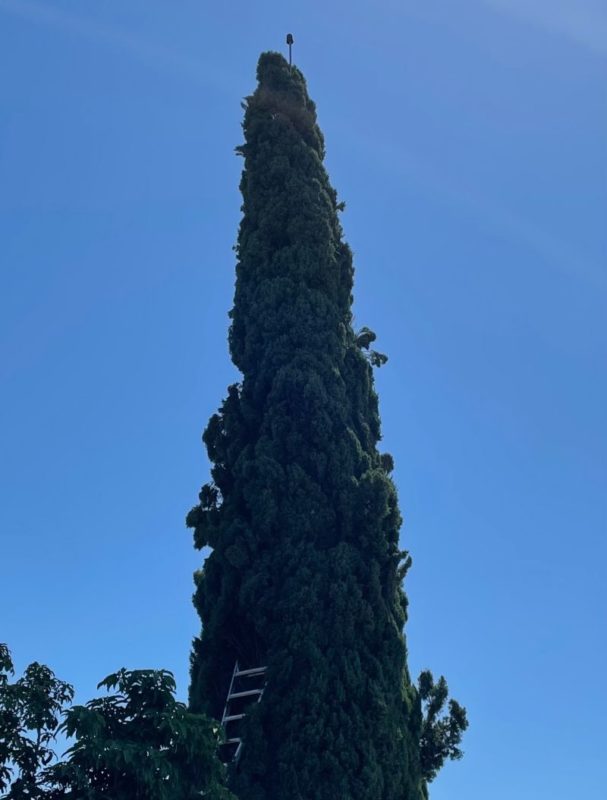
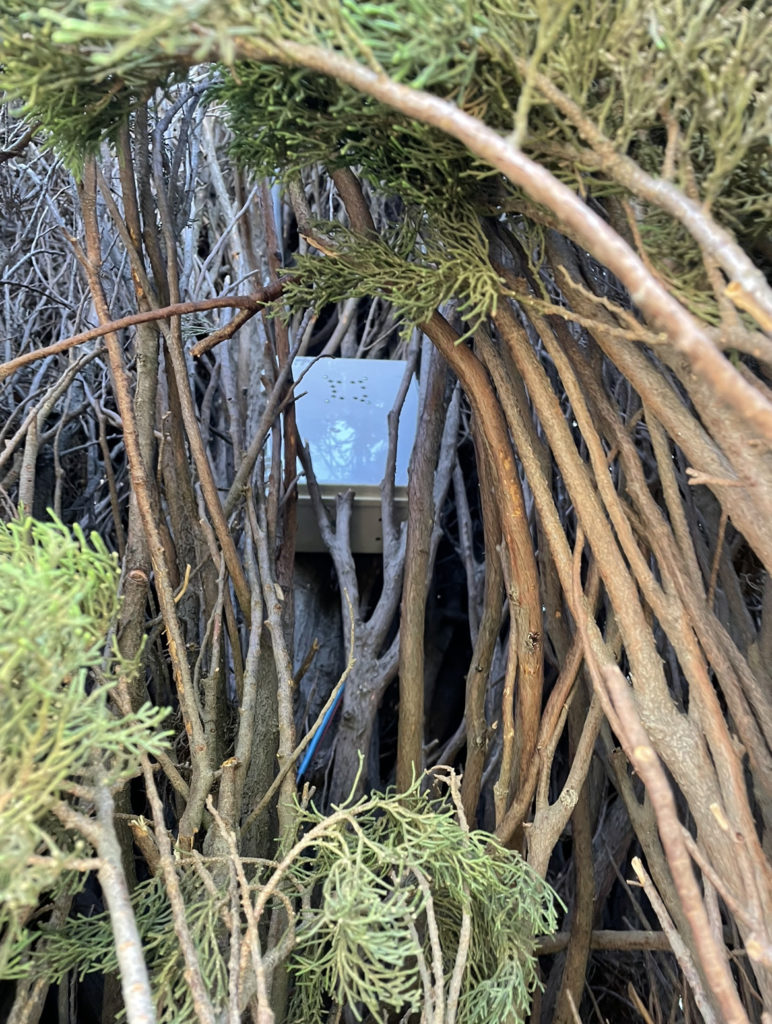
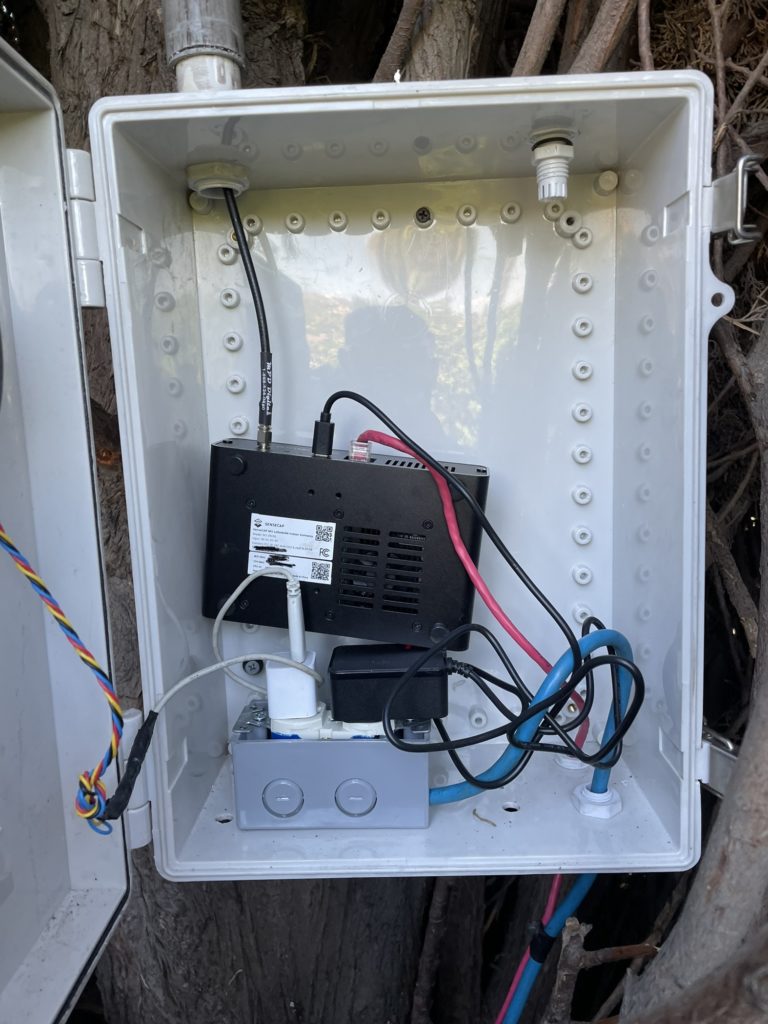
Mounting Deployment Notes: The biggest challenge was getting the antenna up in the 65ft tree. First, I used 50ft of 1 in conduit PVC, strung together, and shoved it up the tree. It probably took 300 times to get it in the position it is in now. It could be more to the left, but after 300 tries and one week later, it's good enough. Next, we need to get the antenna on top. Using the 50ft of LMR600, I strapped about 100ft of 550 (parachute) cord to an old N type connector, and using 1/2 underground watering plastic hose, pushed the LMR600 over the top, until it came down the side of the tree, to where I could reach it. I connected the antenna, and using the 550 cord, pulled the LMR600 back down through the conduit, until the antenna calmly rested at the top. This took about eight tries to accomplish. The conduit decided to come barreling down the side of the tree most times, or the 550 cord snapped because of the sharp edges on the connector. Once the cable was back through the tube and the antenna was secure to the top, I cut the conduit and cable to length, installed the box in the tree, and hooked everything up. I have a 12v fan mounted on the cover, running off a 5v iPhone charger. Using discovery, I am hitting about 550 hotspots. So far, I am up to 170 on the explorer.
Hotspot Name: Hot Orchid Okapi


Hotspot Mfr: SenseCAP M1
Antenna Mfr: HNTenna
Antenna Gain: 3
Elevation (meters above ground): 13
Cable type used: 70' LMR600
Mounting Deployment Notes: I just received a RAK outdoor enclosure and I will be mounting the hotspot on the mast. It was originally a Bobcat at this location and I didn't trust it outdoors. It's located on a commercial building using a non penetrating roof mount and a telescoping 28 ft. mast. It's located on the edge of 13 well spaced hotspots and doubles the rewards of the next best one in the group, well worth the effort of guying a tall mast!
Hotspot Name: not provided


Hotspot Mfr: RAK Hotspot
Antenna Mfr: L-Com
Antenna Gain: 8
Elevation (meters above ground): 15
Cable type used: LMR400
Mounting Deployment Notes: 31' Telescoping Mast on top of an industrial warehouse. Powered w/ PoE.
Hotspot Name: Fancy Orchid Pigeon


Hotspot Mfr: RAK Hotspot
Antenna Mfr: RAK Wireless
Antenna Gain: 8
Elevation (meters above ground): 7
Cable type used: LMR400 trim to 5.332m (36 1/2 wavelength @ 915MHz
Mounting Deployment Notes: Mounting used a cantilever beam eve mount about the garage. Added solid copper 6 AWG for suppressor drain to earth ground spike at electrical service entry. Used a pass through to garage for feeder cable typically with marine cabin antennas. Has an option to add an inline step attenuator 1-30 dBi to tune antenna gain. Sealed external N-Types connectors with teflon/silicone/PVC electrical tapes.


If you'd like to share your work, I'll give it a quick review to make sure it looks good & get yours posted up ASAP. Thank you for contributing!

[formidable id="15"]


Archived Comments

Jacob - 9/9/2021

Hey Nik, Thanks for sharing these. I recognize the second deployment listed aka your first deployment. I believe its listed as 14 meters high on the explorer, but here it's listed as 10 meters. Is it safe to assume it's 10 meters? Also, if you were setting up this deployment today, would you use a different antenna (3 dBi or 5.8 dBi) or would you stick with the 9 dBi with attenuator?


Nik - 9/9/2021

Hi Jacob, it's probably somewhere between the 2 elevations; the pole is 23' and the roof is, oh, maybe 13-15', maybe more above ground. If I were to set up again I'd use the 3 dBi HNTenna. That 9 dBi cost me HNT while I figured out what the problem was.


How Do You Find The Best Site For Your Hotspot?

· 7 min read
Nik
Site Owner

Well, the race is officially on. With at least two unofficial halvings coming in the near future, it's pretty darn important right now to:

A) Get your Helium hotspot up and earning and

B) Secure the best spot you possibly can.

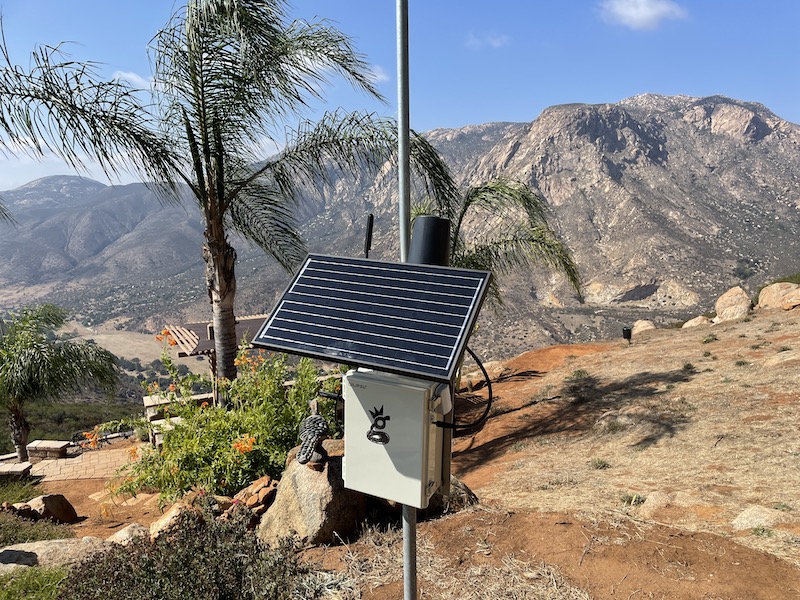
In the case below, this hotspot is on private property with an incredible view of both my favorite place to fly a paraglider in San Diego AND an excellent view of the southern half of San Diego county.

Wait, what? More halvings? Yep, you've got 2 coming. One from network growth (network size will probably double by the end of the year) close to 300k.

Doubling the network equals (for the AVERAGE hotspot) half the rewards. Now, that's the average hotspot, but it's best to be conservative with these calculations.

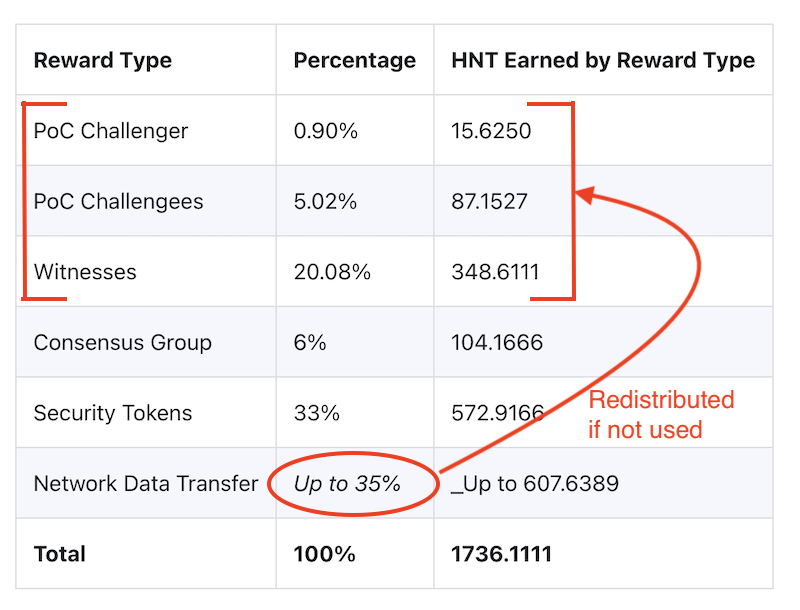
What's the second halving? 5G. IF 5G rolls anywhere near as fast as they rolled out the current hotspots, it'll chew through the "up to 35%" of HNT set aside for network data transfer.

Remember, 5G is the opposite of LoRa. LoRa is small packets/large distance. 5G is large data, small distance. 5G chews through data like I used to eat gallons of ice cream; it disappears.

The catch (and really the current "doubling") is that if the "up to 35% of" HNT for data transfer doesn't get used, it gets redistributed to PoC rewards. That's us, running regular hotspots, collecting HNT for challenging, beaconing, and witnessing. Mostly, for witnessing, but that's another story.

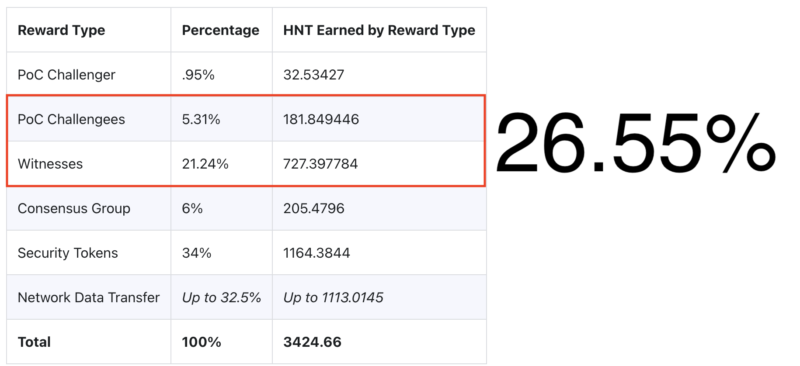
Since our current PoC (Proof of Coverage, more on that here) rewards account for 26% of all HNT (let's call that about a third) and the data across the network isn't anywhere near capacity of "up to 35%" (we'll call that another third) we're basically getting two thirds of all HNT distributed, which is double what we're technically earning.

So, when that data gets used up by 5G hotspots, our rewards will be halved again from today. That's the bad news.

The good news is that wherever there's challenge, there's opportunity. For you hard chargers who are willing to hustle for the love of crypto and fun new enterprises and high-risk/high-return livin', giant opportunities still abound. Let's talk about a few of 'em.

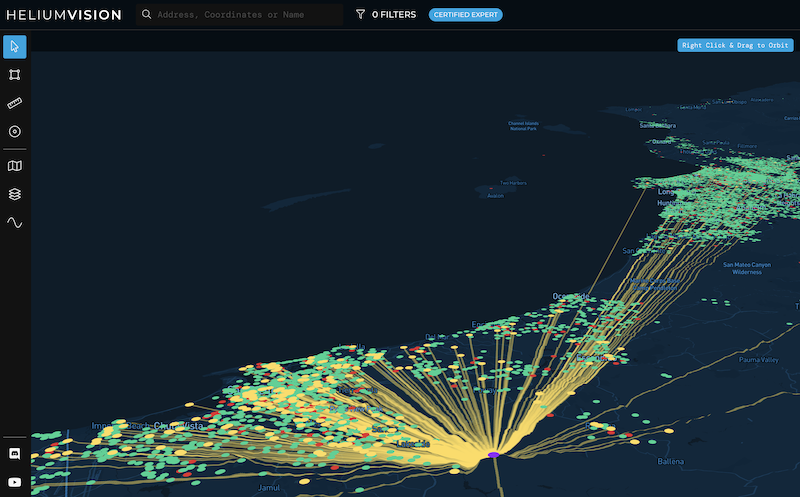
First, there's the stuff you do yourself. You can use Helium.Vision or Hotspotty or Kudzu to go deep or HotspotRF (or even Google Earth) to keep it simple. Find the high points and places where your hotspot can be placed for maximum earnings. Maybe you get fancy on Google Earth and run an altitude layer to make sure you're only looking at islands in the sky, or you re-watch the demo I did on Helium.Vision and make sure you know how to use all aspects of that super powerful tool.

A hotspot with a high volume / low density view is optimal, but even a high volume / high density view like the one below can be a high earner.

You find the spot, you figure out who owns the rights to it, you contact them, negotiate an agreement, install your hotspot, and, as my English uncle says, "Robert's your father's brother." Us Yanks are little more direct and just say "Bob's your uncle."

Hot tip? Look for land brokers. They represent empty lots of land that could use a little income. That tip came from one of my most successful clients who is also an absolute wizard marketer. He has built a marketing & sales system for Helium placements that gets a 50% callback rate on leads (unheard of!) and he cherry picks the best spots. Without giving away his location, out of the top 10 Helium hotspots in his area (a place with over a thousand hotspots), he's runs 3 of 'em. He sells that system, if you're interested in that just reach out.

Finding your own placements is one of those "most work equals most rewards" deals, but if you've got a lot of hotspots, that's a lot of work.

That brings us to your second option, a recent start-up called Sitenna.com. They connect you (the antenna/hotspot owner) with land owners. You don't look for spots, you just supply the hardware, pay the rent, and collect HNT. Obviously it's slightly more complicated, but that's the gist.

If "pay to play" is your game, Sitenna is looking to be a very promising option. Tell 'em Gristleking sent ya, it'll be good for a laugh. They're a couple of recent Y-combinator types on a trajectory to crush; we Helium peeps might as well go along for the ride.

Third, you can make your own placements. This is by far the hardest, as well as in the long run *probably* the most profitable. You go out and find a business that could actually benefit from LoRa. It'll need to meet very specific requirements: They'll want to cover a large area, they don't need a ton of data, there's a clear profit motive, and they're willing to see the world in a new way.

Whether that's a cattle rancher in Montana, a scooter operator in Cancun, a boat tour operator in Cabo San Lucas, or FedEx, well, there's a whole giant world of opportunity out there for ya, but it does wear overalls and look a lot like work.

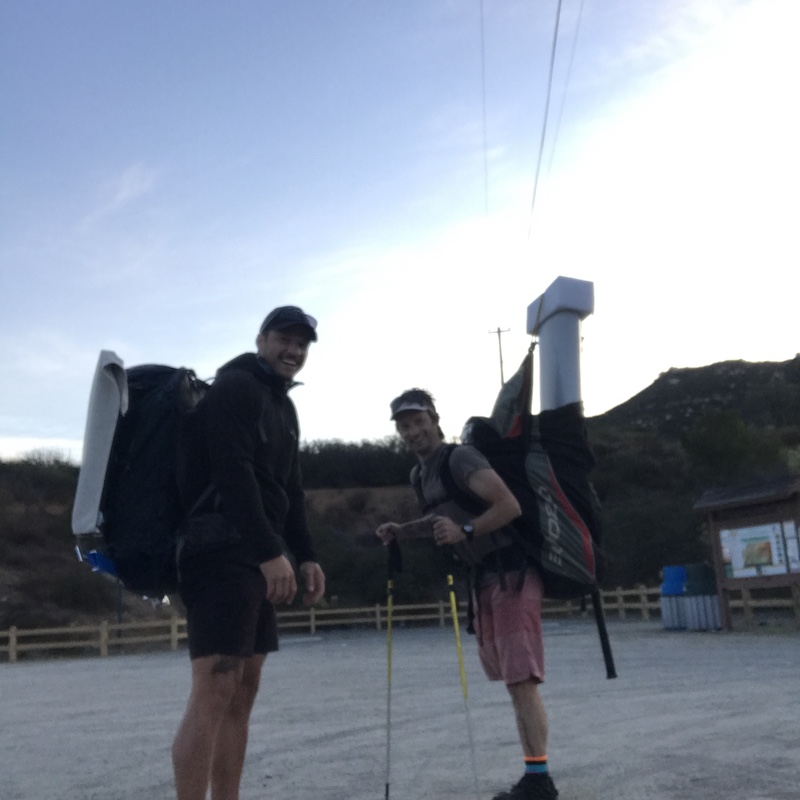
Here's me and a buddy at the beginning of my very first off grid placement (when I thought antennas mattered), about to do a 12 mile round trip hike in the mountains carrying 60 lbs each on the way out and running out of water on the way back. That was straight work, yo.

If you're looking for help to optimize YOUR hotspot placements, whether it's the one on Mom's house or the fleet you're rolling out in a far off land, consider hiring an expert for help.

In the meantime...get 'em!

Why Isn't Your Hotspot Earning More?

· 26 min read
Nik
Site Owner

So you've got your Helium Hotspot up and cranking and you're all proud of your new deployment. Well done you!

As you cruise around Explorer to see how much better your deployment is than everyone else's, you notice a neighbor who's earning more. What's the deal? Are they cheating? Do they have a magic antenna? How are they DOING that? Why aren't YOU the one earning the most?

Let's walk through what matters the most with Helium Hotspots, why others might be earning more than you, and how you can *potentially* increase your earnings. I'll give it to you straight up front: You may not be able to figure it out, but if you carefully go through what I suggest in this post, you'll be much more likely to understand what's going on.

First, the single most important aspect of a hotspot's earnings is its location relative to other hotspots. It's not the antenna. It's not the cables. It's almost never cheating. It's location. Even 100 meters can make an enormous difference. It's not that the others totally don't matter, it's just that location matters so much.

A hotspot will earn the most if it can Witness (has a clear Line of Sight to) many other high transmit reward scale (.8 or better) hotspots. This system of rewards is called Proof of Coverage, or PoC. It's important you understand Proof of Coverage and the earnings breakdown, as it's fundamental to why you earn more (or less) than your neighbors.

Earnings Breakdown

Out of all the Helium distributed per epoch (every 30 minutes or so), your Hotspot gets rewarded for 3 possible events:

  1. Creating a Challenge
  2. Beaconing that Challenge (being the "Challengee)
  3. Witnessing that Challenge

I've covered how that works in a separate post, here.

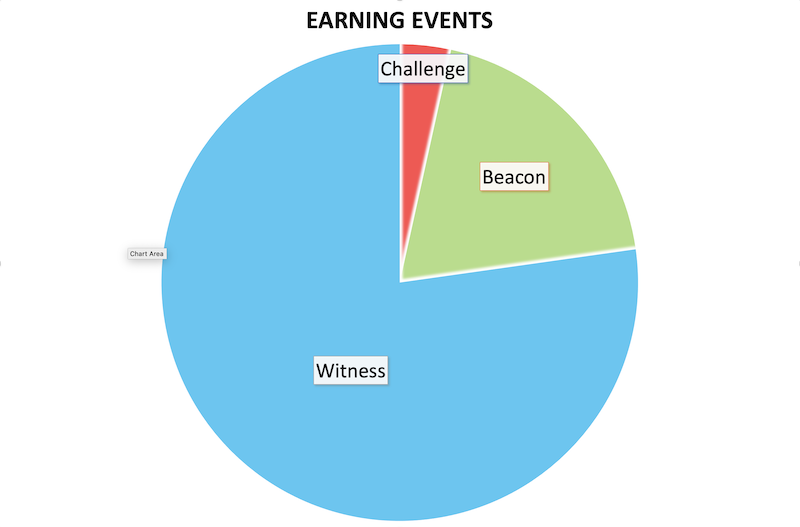
For now, let's separate the PoC (Proof of Coverage) piece from the other HNT distributed to investors, the Consensus Group (aka Validators) and Data Transfer, and take a look at just PoC as a pie chart:

In case you need numbers, in terms of available HNT for an earning event (NOT all HNT distributed per epoch) that's:

  • 4% for the Challenge
  • 19% for the Beacon
  • 77% for the Witness.

This should make it clear that your hotspot's earnings are most affected by the quality and quantity of your witnesses.

The Witness List: Quality & Quantity

If your and your neighbor's hotspot have even slight differences in elevation or geography that change the Line of Sight access to other hotspots, that can make a significant difference in the quantity and quality of your witnesses.

Quality and quantity of Witnesses are one of the biggest factors in earnings differences.

You'll need to carefully compare their list of witnesses to your list of witnesses to see what the differences are. Just looking at a picture of lots of sexy yellow lines radiating out from a hotspot is NOT a careful comparison; get deep into Excel.

Line of Sight: Slight Changes, Big Differences

The other thing to check carefully is the Line of Sight you have as well as the other hotspot. This can be difficult and sometimes downright misleading, as there's no guarantee a hotspot is *exactly* where they've asserted.

For privacy reasons, many hotspot owners assert their location at the nearest intersection of roads. Asserting your hotspot within about 150 meters doesn't appear to carry any penalty in HNT earnings, though that's NOT a guarantee.

That means you might think you're measuring the correct line of sight, even though you're not. Additionally, there's no requirement to accurately enter the elevation of a hotspot. The hotspot you're trying to assess could be 30 stories up a building but reporting as on the ground.

Even if you DO do careful research, you still may not have enough information to accurately assess why a neighbor's hotspot is earning more than yours.

Antenna Choice (The Dark Side of High Gain)

What's another factor in earnings? Well, it'll date this article a bit (this is good as long as PoCv10 applies), but under the PoCv10 rules, which I've written about here, if your antenna OR that of your witnesses is much higher than the Helium RSSI/SNR guidelines, that can invalidate your witness earnings, and witness earnings are what contribute the most.

Especially if you and many of your witnesses have higher gain antennas (anything above, say, 4 dBi), those gains add up, and can push you over the wrong side of the curve.

If you're on the wrong (invalid) side of the RSSI/SNR curve, you don't earn HNT. This is yet another reason to use the lowest dBi antenna possible; you've GOT to stay on the right (actually, left) side of that line.

Unlike the first factor, this doesn't have much to do with the quality and quantity of your witnesses, it's more to do with the strength and clarity of your radio signal.

So there it is: The most likely factors for a difference in earnings between you and your higher-earning neighbor are usually explainable, even if you don't like the explanation.

How to Win

I'll close out with some advice: Comparison is the thief of joy. If you get too wrapped around the axle trying to "beat" other hotspots, you'll miss a lot of the joy that goes into doing the best job YOU can do, given the constraints YOU have. Hotspots that follow the guidelines for providing WUPU coverage will consistently earn the most. That's the key. Contribute unique and useful value to the network and you'll be rewarded.

Best of luck with it all, I'm stoked to grow the network with you! If you need help with increasing your HNT flow and you're willing to have an open mind and work hard, I provide consulting for Helium Hotspot Optimization.

Rock on!

Archived Comments

Michael - 8/23/2021

Hey Nik, Insightful post, as always! I had a question about your part here, "many hotspot owners assert their location at the nearest intersection of roads. Asserting your hotspot within about 150 meters doesn’t appear to carry any penalty in HNT earnings, though that’s NOT a guarantee." How does someone assert their hotspot location in a different place than where the hotspot actually is, like an intersection of roads? Is that done in the Helium app or another way?


Nik - 8/23/2021

Hi Michael, you can assert/re-assert your location through the app. Costs about $10 each time.


Michael - 8/24/2021

That makes sense and I have seen the ability to change hotspot location there. What concerns me is not knowing if I can put in an exact address of where my hotspot is or if Helium is going to ping it with GPS or something and assert the location based on where it thinks it is.


Nik - 8/24/2021

Hi Michael, you can assert an exact location. Helium will center it in the res 12 for the API (so if you use Helium.Vision you can see it there), but for easy-access public facing info (Explorer) it'll show as centered in the res 8 it's in. No GPS pings.


Michael - 8/24/2021

Awesome, thanks so much Nik!!


SteveH - 8/24/2021

Does the distance from the hotspot you are witnessing have any effect on earnings? For example, am I better off putting a second hotspot at a friends house that is 1km away or 3 km away? Or does it make no difference?


Michael - 8/24/2021

Then, I'm assuming the only reason for asserting a location other than where the miner actually is would be for privacy? Are there no other added benefits? Or does reward scale also get affected?


Nik - 8/24/2021

Hi Steve, as long as they have line of sight there shouldn't be a huge difference between 1 and 3 km.


Nik - 8/24/2021

Well, privacy is the only reasonable justification for mis-asserting.


Michael - 8/24/2021

Got it, thanks!


Kelly - 8/27/2021

Hi Nik, I'd love to see you write a post about Relayed hotspots. I'm still waiting patiently on my Bobcats, but learning as much as I can in the meantime. Whenever I look at the Helium maps I see a LOT of hotspots that are relayed. I'd love to see one of your thoughtful posts that breaks down the reasons this happens, how it can be fixed, how/if it can be avoided ahead of time (would opening up the ports ahead of time prevent it, for example?), what effect it does/doesn't actually have on profits, etc etc. I've looked at a number of videos and posts, but end up more confused than when I started. I really appreciate your clear style of explaining things. Thanks very much! Kelly


Nik - 8/27/2021

Kelly, love the idea! I can already see the title: "Why TF am I Relayed?"


Kelly - 8/27/2021

Excellent, looking forward to it! Thanks for all your contributions. Kelly


David - 9/1/2021

Hi Nik I understand the concept that a higher DBi antenna shapes the signal meaning it can reach further, but I'm guessing that doesnt actually mean it can hear hotspots from any further away? or would a higher DBi antenna in theory allow you to witness more beacons? also does your own antenna affect the signal strength of a received beacon in RSSI or SNR? so if the beaconer has lets say an 8DBi antenna and you're getting invalid witnesses, does changing your own antenna to a lower powered one affect the result moving either the SNR or RSSI back to acceptable limits? On from this does a physically larger antenna actually help pick up more beacons in the surface area giving a better chance of picking up a relatively weak signal regardless of DBi? It seems like you'd want an antenna that had a relatively low Tx gain as theres no point in reaching more than 25 hotspots for the beacon reward, but a high ability to receive to pick up as many signals from as far away as possible, all without invalidating witnesses. finally I've never seen an answer to this final bit - do you know what decides which 25 hotspots are chosen to be witnesses when more than 25 actually pick up the signal? there have to be cities where there are 100+ witnessing a beacon, so there must be some code that defines this, is it simply first come first served or is there something that you can do other than fixing relaying to improve chances of being one of the ones selected? Thanks!


Nik - 9/1/2021

Higher gain applies to both transmit and receive. In the world of Helium, it doesn't really matter, as even a low gain can witness over 200km away routinely with clear Line of Sight. Higher gains put you at more risk of invaliding the RSSI/SNR curve. For your 25 witness question, it's a race to report. The first 25 to report get the prize.


Keswick - 9/2/2021

I have a neighbouring hot spot that is about 80 meters away from me is it possible to place my location near the edge of our shared hex to get 350 meters between us? Would there be there a penalty for doing this?


Nik - 9/3/2021

Hi Keswick, as long as you're not getting scaled, the only penalty for a hotspot within 300m is you can't earn off of it. If you have plenty of witnesses, that's not a big deal.


Keswick - 9/3/2021

Hi Nik thanks for your reply, We are both currently scaled @ 0.41 so would the only benefit would be that we could witness each other? We are in a pretty dense area so maybe it's not worth it to move I wasn't sure if there was some other penalty for being so close. Also great blog, I've learnt so much from you thanks!


Nik - 9/3/2021

Ah. Check the HIP 17 post for more on scaling, that might help you understand what's going on. Glad to hear this has helped you learn!


How Do You Find The Best Site For Your Hotspot? - Gristle King - A Guide to Helium - 9/5/2021

[…] our cur­rent PoC (Proof of Cov­er­age, more on that here) rewards account for 26% of all HNT (let’s call that about a third) and the data across the […]


Dick Headstrong - 9/6/2021

Hey Again, Sorry to keep asking you questions when you won't take my money, but not too sorry, obviously. First, my original question is similar to the witnessing one above. How is it determined who gets to send a beacon? Where I'm at, being the beacon is 5 times more profitable than being a witness. But some people are sending 4 times a day and lately I'm lucky to get 2 every 3 days. Regarding being the fastest to make the 25? Could long stretches of ethernet cable be responsible for slowing response time? I've got nothing over 300 ft, but currently that antenna is the longest run at my house and goes thru a switch which my ASIC miners are on. On the relay thing, It seems like some of the highest earners are relayed (Not a majority, but a few) so I don't understand what the concern is. Also it seems some of these relayed hotspots are responsible for what looks like me (and others) witnessing hotspots in St. George, or Seattle or other unlikely places 1000 miles away. How does that happen? Let me know if you change your mind on that donation thing. Thanks Again


Nik - 9/6/2021

Hi Dick, challenges are randomly assigned to challengees. A hotspot is eligible to submit a challenge roughly every 300 blocks. Beaconing should definitely not be 5x more profitable than witnessing; it should be the other way around. It'll sound silly, but are you sure you're reading those receipts correctly? Probably not ethernet length that's your problem. Could be the switch or your internet connection. More on relayed hotspots here. Witnesses over 150 miles away are usually just hotspots that have been moved but haven't changed their location yet.


Dick Headstrong - 9/6/2021

Hey Again, It's actually more like 10x. Typical 25 witness = 0.015 HNT Typical Sent Beacon = 0.15 HNT I'm not sure if I can paste a screenshot here so here's an example from my competing neighbor. Just go to "all activity", scroll down until you find the blue "Sent" and compare to a single "witness" with 25. (I tried to paste a screenshot, but couldn't) https://explorer.helium.com/hotspots/11WfakRNARmTR6G1HE65drJHPR65apwHTAQ8iSsuL3nWwXjWTpj/activity


Dick Headstrong - 9/6/2021

Of course it does work out eventually to your pic chart. You just get so few Send Beacons that they end up being a much smaller part of your revenue. Individually, they are quite significant.


Nik - 9/6/2021

Makes sense in an overcrowded area; you're splitting the Witness prize with so many.


SEAN O CONNELL - 9/20/2021

Hey Nik, I recently added Lora sensor data to my network and ran some tests on my hotspot. After 4 hours sending 8 bytes of data every minute, I end up with burning more HNT converted to DC than earning rewards ! It sounds counterintuitive but I thought rewards for data can now go up to 35% of total rewards. Perhaps you have an explanation or maybe you can do article some time on data rewards. Thanks, Sean.


Nik - 9/20/2021

Hi Sean, hmm, I think there's a basic misunderstanding here. You earn HNT for processing DC. As more data flows on the network, you'll earn more HNT. Up to 35% of HNT distributed per epoch is set aside to be distributed for miners processing DC, but if it isn't used, it gets re-allocated to the miner pool in general. 4 hours isn't enough time to have a good picture on how much your miner will earn. "Every 24 bytes sent in an uplink or downlink packet cost 1 DC = $.00001" -Helium's site 1 DC = 24 bytes. With your 8 byte packets you're probably not sending more than that even with the fcnt, fport, etc. So, 1 DC/minute for 4 hours = 240 DC. With HNT around $20 (just to make the math reasonable), each HNT = 20/.00001 DC, or 2 million DC. That works out to a cost of .00012 HNT for those 4 hours. Surely you're earning more than .00003 HNT per hour on average? How much did you miner make in that 4 hour period? Usually we like to see 7 day earnings for a miner to get an average, as rewards are spiky in the short term. More on DC over on Reddit, here. Let me know if that makes sense.


Amy - 9/29/2021

Am I right in assuming it's completely just luck of the draw w/ how often you see action? My BF and I both set up our bobcats last week. He's killing it compared to me, he's seems to get more action plus he has a witnesses and I can't get one :( The BF saw great results when he moved his miner/antenna into his garage attic. I have mine outside my 2nd story window which I guess has helped some. I'm Feisty Flaxen Robin. He's Puny Misty Worm. I'm debating if I should move my miner to my mom's house and hope it does better. I noticed that 1 miner near me is offline. And the other 2 closest are relayed.


Nik - 9/29/2021

Hi Amy, it has much more to do with how many hotspots you have a clear line of sight to. There is a random element to whether or not you earn as a Witness (10 hotspots randomly chosen out of every Witnessing hs), but that's it. Moving your hotspot is the most powerful thing you can do when it comes to changing earnings.


AMY - 9/30/2021

Well I finally got 1 witness, but there is still a lot more to be had, LOL. The witness I got seems to be getting witnesses in 360 degrees. The other witness close and online only seems to be getting them in the direction opposite me. So I'm going to guess he's not positioned to do 360 (he seems to be getting about 180 degree coverage). This seems to be a lovely game of finding what works the best. I'm going to assume if those miners closest to be (but "behind me") don't seem to be online, it's not worth focusing on connecting to them (They are relayed currently). It would seem I'm positioned to face best right now, but there are trees, houses, a radio tower, etc that all probably are messing things up somewhat, LOL.


Romano - 11/14/2021

Hey Nik, I have a bobcat miner and i have been using the small antenna that comes with it. 7 out of 7 in progress were complete on the app. I also opened the port for my bobcat and i had a few witnesses so i received rewards daily. I used this for a few weeks and i started losing witnesses so i did resync and fast sync but i still didnt gain more witnesses. 35 hours ago i disconnected everything and i connected a new mcgill antenna on my roof attached to a LMR 600 cable to the same bobcat. My bobcat light is green and im online in my Helium app too (0.83 because a second miner in my hexagon). 6 out of 7 in progress on the app are now complete except the witness list is still pending. When i try discovery mode there are 0 witnesses responding. Since 20 hours ago i receive about 0,25 cents each 7 hours as reward. Do i have to wait for the witness list to be complete or is there something wrong? Any ideas so i can get witnesses again and a higher reward? Regards, Romano


Nik - 11/14/2021

Hi Romano, just be patient. Leave everything connected, don't even bother with Discovery, and just wait. It'll sort itself out in a day or two.


Vladimir - 12/2/2021

Hi Nik, calling you all the way from Serbia. I am glad I've found your bog cause it is mi blowing. The more I read the more I conclude how much is there. Have I practical question and would be very grateful on your comment. I believe that I have good location, I'm 5.6 km clear view from the city and around 100m up. Very clear view. Which type of Antenna do you suggest, omni or directional, how strong, indoor or outdoor. Thank you very much on your answer and just keep on...


Ivan - 12/2/2021

Hi Nik, I’ve gotten around 110 witnesses in the past 5 days but this number is slowly dropping. It seems that I’m seeing less action day by day. Also I haven’t received any POC rewards in days and that’s where the biggest chunk of earning come from (around 0.04 hnt). Is there something I can do to improve it other than to move my antenna higher up? Could it be because it’s a 5.8 dbi antenna and sort of breaking the pocv10 rules? Many thanks, Ivan


Nik - 12/2/2021

5.8 shouldn't be a problem. General network inconsistencies are normal right now, and recent updates will continue to give a fair amount of noise vs signal. No PoC rewards in a few days is a little troubling. Double check things are functioning with HeliumStatus.io. Power cycle as a last resort.


Nik - 12/2/2021

Hi Vladimir, in the EU region I'd go with an an outdoor omni, 5.8 - 8 as a start.


Vladimir - 12/4/2021

Dear Nick, Thank you on fast reply. I forgot to mention that mountain is behind me and I do not have anything visible behind. That's why I'm thinking of maybe directional antenna. Or, maybe omni will also be good because of ricosheting if possible. Is it important that antena to be attached to some stick little away from the house or it is good enough to attach it near chimney? Thank you on advance. Vladimir


Nik - 12/4/2021

No prob. Chimney mount is fine. I'd still go with an omni, but at the end of the day you'll need to test to be absolutely sure.


Fish - 12/6/2021

Nik, thanks for all the info to help us all out. Quick question that keeps me scratching my head each day. I send out a beacon and am witnessed by location 2… Location 2 sends out a beacon but I don’t witness it back. Do you think this is more me or location 2? Getting HNTenna soon to see if it’s a polarization bounce gone wrong. Thanks! Matt


Nik - 12/6/2021

Well, I'll start off with the standard "RF is weird", but...the witness thing is a random selection from all the hotspots who witnessed it. So if you've got more than 10 hotspots witnessing a beacon, the witnesses & rewards are randomly chosen from that cohort, which can be large. Does that help?


Fish - 12/6/2021

It does but like you said it is weird and hard to predict. None of us exceed 10(usually 2-6 max one day and 0 the next) so I am not sure what is going on lately. I can go from .4 hnt one day to .02 the next. Nothing has been very consistent to try and build data sampling off of.


Vladimir - 12/7/2021

Dear Nick, I'm trying to define some rules regarding rewards.. Still have some doubts: Does total historical amount of witnesses imapct on a rewards and activity? I noticed that good hotspots has more than 30 activities per day and that I have 2 or 3. Similar conditions regarding topography, antenna, gain but the only difference is that he is on network for 3 months and I am 3 days. Does this data has any impact on number of activities regardless of challenger, challangee or witness? Thank you so much again. Vladimir.


Nik - 12/7/2021

Hi Vladimir, Total historical amount of witnesses isn't important. Give it another week or so before you really start working the data on your own hotspot; it takes a while to build up enough data to make a useful decision.


Tyler - 12/8/2021

Hi Nik, I've read through a few blogs, websites, forums, and watched a few YouTubes. My hotspot is Eager Punch Wolverine and its witnessing proportion appears very low. I purchased a 5.8 dBi antenna to see if this would help with this low performance. Is this due to the fact that I'm located around many townhomes and that the hotspots around me are 700+ meters away? I noticed other hotspots like my friend's (Furry Pewter Anteater) which is closer to other hotspots (400+ meters) and not surrounded by townhomes (he has a SFR) has a higher rate of witnessing. Hopefully, the antenna helps, but I'm just trying to understand why I'm not witnessing as many transactions and what I can do to resolve this. Tyler


Nik - 12/8/2021

What are the differences between you and your friend? Here's what matters: -Line of Sight from your antenna to other hotspot antennas -number of hotspots with cLoS (clear Line of Sight) that are within 30 km -without cLoS, range can be *drastically* reduced.


Bryan - 12/22/2021

I purchased a 4 dbi antenna for my miner and it is mounted just above the peak of my roof. Twenty feet of RG58 cable connects the antenna to the miner. The miner is connected to my network via ethernet and receives power from a wall adapter. I live in a flat suburban area with a lot of tall, mature oak trees and my antenna is at the same elevation as the surrounding tree canopy. Most nearby homes are single story, as is mine. I'm wondering what I can do to improve my earnings/rx/tx. My thoughts are to increase the height of my antenna or reduce the length of cable (ie reduce attenuation). Mounting the antenna higher will require putting the miner in an exterior rated enclosure and providing power via ethernet. Would either of these provide more than marginal improvement? Which of these do you think would provide most improvement? Thanks for any help you can provide.


Nik - 12/22/2021

Hi Bryan, increase antenna height is your best option. You can also think about entering in the "known attenuation" (dB loss) from the surrounding canopy into your gain calculations. You'd have to test that, but that might allow you to use some extra power to punch through those trees without getting dinged by the FSPL calcs Helium does on all received signals.


Bryan - 12/23/2021

Nik - thanks for the helpful feedback. I just finished raising the antenna 10'. Will give it a week and see if there's a noticeable difference. It has been online for about three weeks now so I'm hoping that will give me a decent basis for comparison. Thanks again.


Mark Hallworth - 12/28/2021

Hello Nik, thanks for the info and guides. I have a bobcat miner, my area doesn't have any hotspots within a 3mile radius, there farther out, approx 10-12 miles away to the north of me, theres more to the west but even farther maybe unreachable at 40 miles. I'm situated on a hill to the left of me is downhill to the right is uphill, i've purchased a RAK 5.8dbi antenna with lmr400 cable, at the moment im using the stock antenna i have witnessed but not many, will the RAK antenna enable me to beacon and be witnessed by others, would the signal strength be good enough, its going on a pole on my roof it will be approx 14meters above ground level. I have done line of sight tests to the hotspots from mine and most are showing green but that's assuming there 10m above ground level. Any info would be great. Thank you.


Nik - 12/29/2021

Hi Mark, once you're locked into a location then getting it up high is the best you can do. At US power output levels, LoRa generally goes 30 km clear line of sight no problem, and can easily go further. With your closest hotspots 10-12 miles away, that's out at the edge of reasonable. The RAK you have should be fine. If you want to get deep into find a better location, consider using HeliumVision. It's a paid tool that I've built a course for to help people understand how to max out earnings.


Mark Hallworth - 12/29/2021

Thanks for the reply Nik will look into helium vision im still waiting for my lmr400 cable to arrive so at the moment its in the attic, its done beacons which have been witnessed so its getting out there, ive witnessed the odd one too, i suppose it will depend on what antenna other hotspots are using to get to me if there only on stock theyll not be able to reach me, im hoping going even higher will improve things, all the best for new year. By the way im in the UK England.


Mark Hallworth - 12/29/2021

Thanks again Nik for the answers, is a very interesting subject im really into it now all the best for new year as well.


Jimmy - 1/1/2022

Hi Nik, Love the blog. I upgraded aerial for my bobcat from standard to 5.8dbi, at a decent height (8mtrs) and connected it to Ethernet. Previously, I had standard aerial, located at bedroom window (so only 180 degree view max) and connected via WiFi. Number of HNT has not increased which is a little annoying. Any thoughts on this? Also, I didn’t chance the aerial type on the app, as in I’ve left it as being 4dbi. Would that have any bearing on this? I’m earning max 3 hnt in 30 days. Other person in sand hex is earning 10-15. Only difference is that he is maybe 2mtrs higher. Thanks


Nik - 1/2/2022

I'd change the gain in the app. How long has it been up where you've been able to compare the earnings/witness change? Also, what is line of sight like from your bedroom window vs new location?


Why Are My Helium Hotspot Earnings So Spiky?

· 20 min read
Nik
Site Owner

Why will a Hotspot earn well on one day, then nothing the next?  Why isn’t there more consistency in earnings? 

There’s a clear reason for spiky earnings, and I’d love to walk you through it. 

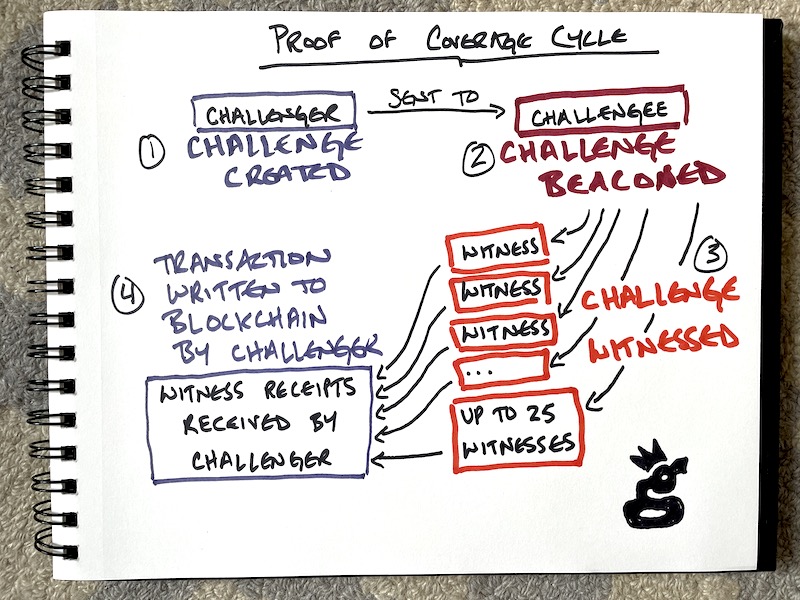
Let’s start at the beginning of the Proof of Coverage (PoC) cycle, with the construction of a Challenge.  

Every Hotspot on the Network is eligible to construct and issue a challenge every 300 blocks.  Let’s define “Blocks” and “Challenges”.

A “block” is a unit of time, usually around 60 seconds.  300 blocks *should* equal 300 minutes, which of course is 5 hours.  So, a Hotspot can issue a challenge every 5 hours.

Now, *issuing* a challenge is not the same as beaconing.  This’ll get a little confusing, so bear with me. Understanding how the PoC challenge cycle works (and doesn't work) will make the spiky earnings much more clear to you in about 3 minutes.  

For you uber-Helium geeks, I’m going to slightly over-simplify this in order to make it understandable. I don’t think we need to get into ephemeral public keys and SHA256 digests.  If you DO want to get into that, go here.

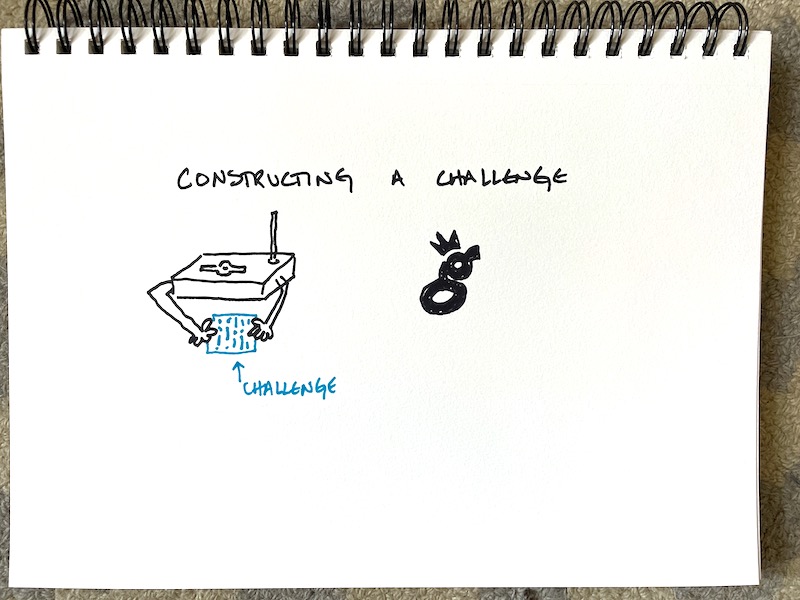
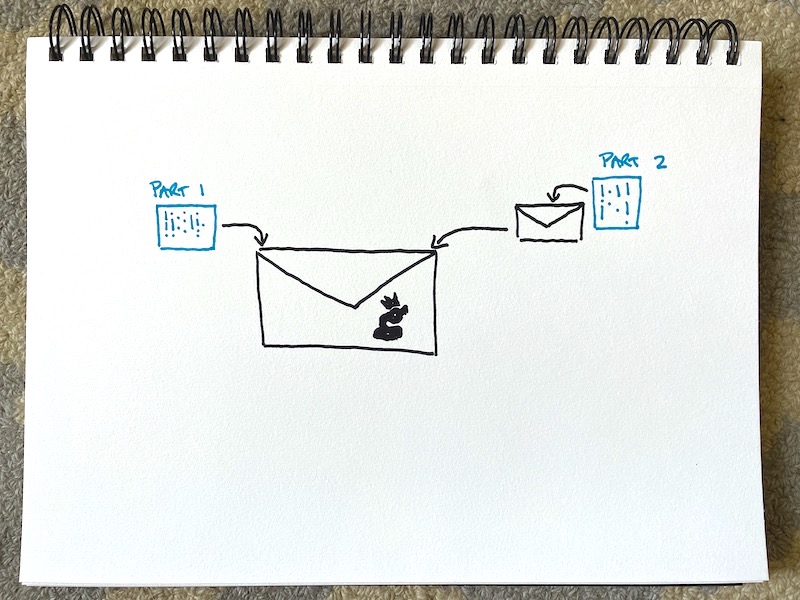
The “Challenge” is like a series of envelopes within envelopes.  When a Hotspot “issues” a challenge, that means they took 2 secret codes and put them in 2 envelopes so they're separated.

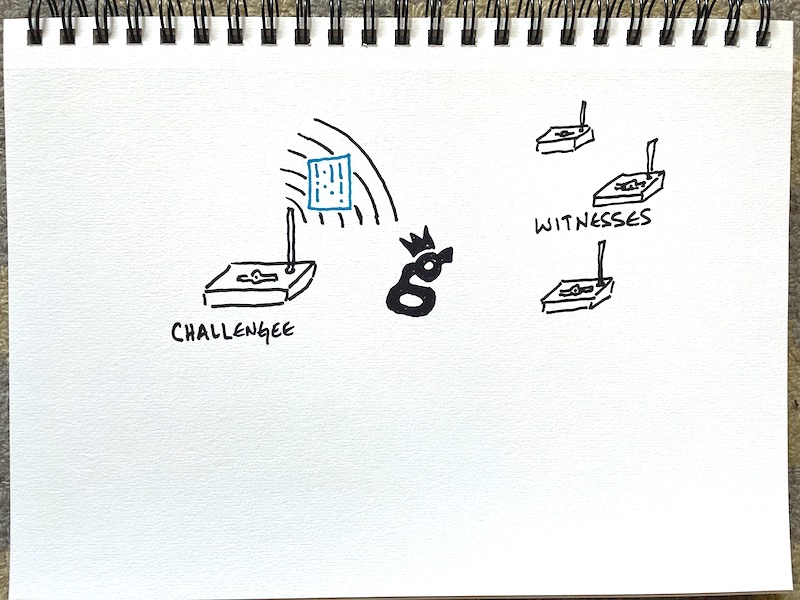
The Challenger then sends this “envelope within an envelope” to a randomly selected hotspot on the network.

That second Hotspot is called the Challengee.  The challengee (and I’ll skim over a bunch of technical stuff here) opens the first envelope and uses the code inside to prove that they got the Challenge.

Then they open the second envelope and Beacon out that code over the radio.  

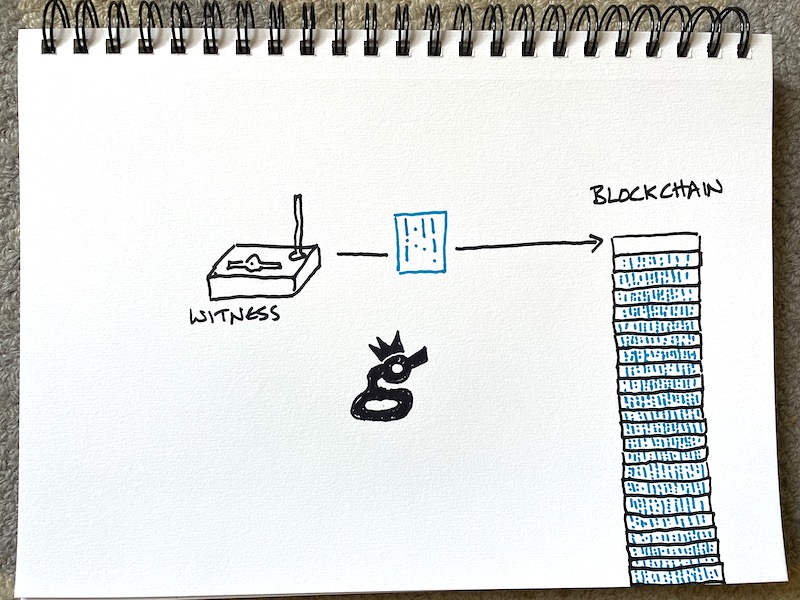
Any Hotspot who receives (Witnesses) that code then reports that code to the blockchain, effectively saying, “Hey, I heard code #2.”

The blockchain then checks with the Challenger to make sure all the codes match up and that they were all submitted in time. 

If everybody did their job correctly and on time (Challenger, Challengee, and Witness), the blockchain issues each participant a reward based on transmit reward scales.

By the way, if *anything* in that chain of events is wonky; if the codes don't match up, if the whole process takes too long because a Hotspot was relayed, of if anyone is trying to game it, the challenge is declared invalid, and nobody earns.

Ok, so how does this explain spiky rewards?

First, remember that any Hotspot can only earn a reward if it participates in a valid PoC cycle. Invalid cycles don't count.

Second, remember that WHERE the beacons are emitted is random.  Conceivably, all the beacons *could* be sent to the US state of North Dakota.  Remember, it’s random.

That randomness is at the core of why earnings are spiky.  Sometimes a bunch of Hotspots near yours all receive a challenge, all get to transmit, and you witness all of ‘em.  That’s a big earning day.

The next day, none of ‘em get a beacon, or maybe only a few.  Your Hotspot earns nothing, or maybe off only 1 beacon.  That’s a low earning day.

Since Hotspots are grouped in different densities and numbers around the world, you’re more likely (not guaranteed) to witness a beacon if you’re in a place where you can witness a bunch of other Hotspots.

A city with 1,000 Hotspots is more likely to receive more Challenges and therefore transmit more beacons than a small village with 4 hotspots. Even though the earnings per Hotspot is likely to be less in a city, you just have more opportunities to witness.

So, that should explain spiky earning.  Got questions?  Hit me up in the comments and I’ll do my best to answer ‘em.

Oh, and if you want help making sure you’re in the best position to earn the most HNT (not necessarily in the city, by the way), consider joining the Gristle Crüe, taking a Gristle King Course, or hiring me for a consult.

I’ve helped hundreds of hotspot owners improve their understanding and earnings on the Helium network, from folks with just one Hotspot all the way out to companies with thousands of Hotspots.  I’ve seen most of what you can do with Helium and I’d love to walk you through how to make YOUR contributions as valuable as possible.  Great value equals great reward.  Let’s do this!

Archived Comments

Michael - 8/12/2021

Your teaching style is awesome! Everything you post, even the stuff about complex topics, is really easy to understand.


Andrdor - 8/12/2021

Recently started diving into Helium, an interesting LongFi integration solution with LoraWAN. I hope the project will be the Global Developing even after this bull race. Thank you for your good work for the community!


Francois Lapierre - 8/12/2021

Thanks great to have more knowledge about the people network! I really enjoy your Blog always very clear! Now I only Hope my Frankenstein Rak V2 will arrive this year, and hope there will still be helium left ?. I did order in may seems like forever. Now ... Your post keep me interested in the project! Frank.


Andrdor - 8/12/2021

Thank you for your good work for the community!


Peter - 8/13/2021

Hey Nik, big fan! I have a question regarding the "lower rewards within a city compared to a small town with 4 Hotspots" at the end of your post. The reasoning behind this is, like you have linked, the lower reward scale. But this still doesn't necessarily mean that a Hotspot within a large city is earning less than in a small town, in fact that's very very rarely the case. And this is what I want to comment/want to talk about: Don't you think that's unfair? All that Helium is about is to provide coverage, ideally all around the world and in remote areas. With that in mind, 4-5 Hotspots in a small hometown should earn more, because they do exactly what helium originally wanted to achieve: Provide coverage, even in remote areas. And yet, you find up to 50 Hotspots within a single Hex that earn more than thrice as much as Hotspots in a low density area. In my opinion, high density Hotspots should be punished much more harshly, because they don't benefit the idea of helium at all. But of course, that probably won't happen. Why would helium anger hundreds of thousands of people in high density areas? Just to satisfy a couple hundreds living on the land? Surely not. What do you think about this? Excited to hear your opinion!


Nik - 8/13/2021

Hey Peter, Yeah, it's not fair right now, but I expect that'll change soon. The Helium team is small and has their hands full, but healthy network growth is vital; don't think this has gone unnoticed.


gio - 8/13/2021

i have a hotspot up on a cell tower but it has not beacon in over 2 months it does everything else but actaully generate a witness list. any hellp?


Nik - 8/13/2021

Hi Gio, Hmm, that doesn't sound right. Has it ever beaconed? Do you have access to the router it's using to connect to the internet? We could do a Hotspot Rescue on it.


gio - 8/13/2021

since its been on the tower no... its beaconed before but it was at a diff location. i do its using a cudy 1200 lte router with t mobile data plan


Thomas Pointer - 8/14/2021

Should all the hotspots have 8dbi antennas? I have locations in the city and suburbs that I’m preparing for.


Thomas - 8/14/2021

For those of us who want to help the coverage to grow, and profit from our miners, is there a profit benefit with the data credits?


Nik - 8/14/2021

Nope. Use the lowest dBi antenna you can to provide coverage for your area. More on that here.


Nik - 8/14/2021

Not really. Since you're paying for the data credits it turns out to be a net zero game. I still add a sensor to my deployments just to get data flowing and as a quick reference; if data is flowing, the hotspot is working. :)


Dimitri - 8/21/2021

Good day Nik, small question - is the "relayed" status still a segnificant factor affecting earnings after the validators went online?


Nik - 8/22/2021

Hi Dimitri, yep, it's still an issue. Once all current hotspots are moved over to being Light Hotspots (roadmap here), relaying will no longer be an issue.


Marcio - 9/1/2021

Translated by Google Excellent Nik, I've only just managed to understand the PoC cycle. Congratulations on the great work here.


Paul Kuchukian - 9/7/2021

One of my hotspots keeps switching from relayed to not relayed. We confirmed with the Internet provider that port 44158 is open. Nothing changes with the installation yet the relayed warning periodically comes on. Any suggestions?


Nik - 9/7/2021

Hi Paul, the network reporting on Explorer and the app can be delayed by 24-48 hours. If you've seen your hotspot be unrelayed and you're sure the port is open, it's best to just wait a day or two. Common problems with relayed miners include opening a port on a "mesh" network but not on the router, or running up against ISP rules.


Winning At Helium: The Right Way To Get Started - Gristle King - A Guide to Helium - 9/10/2021

[…] Need more info on the PoC cycle of Chal­lenges, Bea­cons and Wit­ness­es? Go deep here. […]


KP - 9/15/2021

Love your articles, so informative/helpful. So my OG helium hotspot about a day ago suddenly started to have zero activity (witness, PoC, beacon, etc) and thus no mining rewards. It’s in a great location optimally placed and was doing anywhere between 1.5-3 HNT/day before and then all of a sudden nothing. Talk about lumpy earnings! There’s been no extraordinary weather/electrical events and I didn’t disturb it in anyway. I tried to unplug and plug it back in but still nothing. Any ideas what’s going on and how to fix? Thanks, as always.


Nik - 9/15/2021

Hi KP, the network has been pretty funky lately, you're not the only one to see a full stop. If you've got an OG, Helium offers support for that, or you can check their articles on Troubleshooting, including replacing the SD card. Still, if it was me I'd just wait another 2 days before I started freaking out. Patience is a superpower in the land of Helium. :)


Why Isn't Your Hotspot Earning More? - Gristle King - A Guide to Helium - 9/15/2021

[…] I’ve cov­ered how that works in a sep­a­rate post, here. […]


Milen - 10/8/2021

Hi Nik, I installed the hotspot before 3 days and it sends beacons and have witnesses, create challenges and even have transfer. But there is no single witness which is strange because the city is full of hotspots. Whta you think is the problem, the interner or the location ? https://explorer.helium.com/hotspots/11AuSxJGRvk5qPbnTHWUtEQVj5s8nCoDnrifvsHQEa62ZKFc1mF/activity


What Does A Good Hotspot Cluster Look Like? - Gristle King - A Guide to Helium - 10/12/2021

[…] 75% of PoC earn­ings go to Wit­ness­ing, 20% to Bea­con­ers, and 5% to Chal­lengers. That whole cycle is ful­ly explained here. What does it mean […]


Greg - 10/21/2021

Hi Nik, great job and thanks. Couple of questions. (1) Curious if you know a reason why miners that consistently have witnesses (3-5 with 6-9 nearby) seem to have trouble (1-4 times / day) being witnessed when sending a beacon (sent beacon - 0 witnesses), and therefore "waste" those beacons? (2) Is there anything we can do to help reduce the number of invalid witnessing events? I've already double checked all the connections, cables, etc. Thanks. Greg


Nik - 10/21/2021

Beacon issue could be an issue with a relayed hotspot. Beyond what it sounds like you've done, not much you can do to reduce invalids; that relies on the far side (the other hotspot) to do their part as well.


Andrii - 10/26/2021

Hi Nik. Do you know how the Helium network choose from which hotspot to accept the witness? Let's say one hotspot received a challenge and beaconed that challenge. 100 hotspots "heard" that beacon and submitted a witness. But only 18 (until PoCv11 take place) has been chosen as witnesses. Is it based on the RSSI, time it took for hotspot to submit the witness, location etc.? How to make your hotspot to witness more? (besides improving elevation, line of sight, ant., cable). Thank you.


Nik - 10/26/2021

Hi Andrii, it's a randomly picked group of witnesses.


Tim Folor - 11/14/2021

hi, i love your page,very educative.please i notice something on my hotspot. Some of my reward was missing.This is how it happen:i checked my app,i saw $25 reward. And after 1hour, i checked again,it was $23.in addition,I checked hnt price it was the same as it was 1 hour ago. please do you have any ideal what was going on. Tim Folor


Nik - 11/14/2021

Hmm, that's odd. I bet if you wait a day or two it'll all sort itself out.


Mark - 11/20/2021

Hi, great post. I have jut got a new antenna in the last 4 days and have lots of people witnessing my hotspot, however I have witnessed only 60 hotspots, around half of what some folks near me have witnessed. Is there a reason I havent witnessed that many hotspots? Does it take after setting up a new antenna to start witnessing more hotspots? Basically I want to know how to witness more people, because other hotspots near me are witnessing more than me. Also my location is ideal as I am high up on a hill top.


Nik - 11/20/2021

Just wait a bit. Network is pretty chaotic right now. If you've got 60 hotspots witnessing you, you're doing fine.


Stan - 11/22/2021

Hi Nik, I try to find someone like you and hope that you can answer this. So why my 7day AVG beacons are low as 80. I'm on top of the city with 51 witnesses, 2,3 time sent beacons but the witnesses for my hotspot are low. Some guys on the other hex are making from 160 to 300 beacons. Please give me a hand.


Nik - 11/22/2021

Hi Stan, I wouldn't worry about beacons (or any metrics over the past 2 weeks). How is your antenna position? Up high, clear lines of sight to other hotspots? Use HeliumVision to check lines of sight.


Noux Tywe - 11/30/2021

Hi Nik, love your content, thank you again! I feel like it should be doable to have a rough estimate of HNT that would be "mined" for a potential future hotspot location, based on its parameters (height, antenna). I feel like Helium Vision is halfway there, helping envision signal coverage... in other words, how people/organizations investing in that network do their planning in order to get the best rate of return?


Nik - 11/30/2021

Happy to help out, Noux. As far as prediction, it'd be very difficult to do anything longer than a week or two (if that) because you just don't know how many other miners will come in to your area and crowd it out. As far as planning, I'd just look for a location that has power, internet, and excellent WUPU coverage.


Jamie - 12/3/2021

Can you recommend a sensor that I can deploy close to my hotspot ?


Nik - 12/3/2021

Sure, try an LHT65 temp & humidity sensor: https://grstl.ink/lht65-sensor


Jamie - 12/9/2021

Thanks so much !!!


Jack O - 12/13/2021

I have read your post with joy. Love the way how you simplify for people like me :-) What I was wondering I there would be a benefit to be able to have coverage at longer ranges. As this all seems connected, I feel that it is just as relevant for the further away hotspots to be able reach me as that it is important for them to reach me…


Nik - 12/13/2021

Hi Jack, yep, I think there's a benefit to wide coverage, and I optimize my setups for that.


banotah - 1/3/2022

the earning are too low from 2 days is anyone faces this? thanks


stu blair - 3/12/2022

hi there...just a quick question..my antenna is about a foot from my wireless cctv camera...can this affect the antenna? kind regards :P


Nik - 3/12/2022

Depends on the freq your cctv camera is running, but...probably not.


wkr - 3/15/2022

Hello Nik, thanks for the content. My HS only constructs challenge during most of the day. Once or twice witness/beacons. But when it does it seems to have a good signal and has 13-14 proper witnesses. (so i dont think the main problem ise antenna) I am a little bit frustrated with the lack of activity during the day considering i am not in a bad location and activity count of my neighbors. Any comment will be appreciated for where should i look for the problem and change. Thanks in advance. https://explorer.helium.com/hotspots/11PxhPcgcdBKHxKutBjLeybvhbUGbn7QHYf3BA9e17acFYksYnF/activity


Nik - 3/15/2022

I'd watch it over a 7 day period; 24 hours isn't enough time to really get a good signal:noise ratio.


Alex - 4/4/2022

hi my bobcat contructed a challenge but take more than 10 or 16 hours this is normal if not what can i do if i see it takes too long ?


Nik - 4/4/2022

Totally normal. You can check current blocks between challenges over on HeliumAnalytics.io.


Chris - 4/12/2022

Good early morning from my part of the world 05:00am here , I would loved to have an answer to troubling situation with my miner regarding the rewards ,miner is placed on roof top of a building with quite an open unobstructed view atleast 200 degrees in a city , problem is explorer would mention that in the last 24h your earnings were anywhere from xx-9$ max then upon checking the total amount of all rewards the miner has been making since activation final sum would be 40$ ,24h later explorer would show that daily earnings were on average 5-6$ but final sum instead of going up to 45$ would show 41$ or in a number cases even less and that is ongoing , would start the day with the final sum at x amount of money program would report daily earnings 5-6$ yet final sum would increase barely 1 1/2$ and following day it will be back at the sum of a day or two before,now we can't possibly loose 5$ or more on just ratio fluctuations between HNT and Dollars daily ,miner is fully synched ,Not Relayed, it gets both witness/sed and beacons daily it has 98% of valid PoC cycles one invalid maybe every 3 days ,So what the problem? , Are our earnings been syphoned somehow? , Wallet doesn't show any outgoing transactions so what gives? , This is an ongoing situation not something to wait a day or two and it's not happening just to me it happens to friends of mine as well, we all bought the same external expensive reputable miner , sorry for the long text and thanks if u can provide an answer.


Nik - 4/13/2022

Check your wallet transactions. You may just be seeing the last 24 hour earnings, which will be variable.


Ali - 4/16/2022

Hi Nik,thanks for the post. im having a very bad start with my hotspot. First i put in my office which is on the 12th floor of a tower (i calculated 70 m height) after a week it made several challenges but couldnt get a challengee . i asked for advises in reddit then i realized that double tainted glass in tower acts as a barrier for the signal . so i replace the hotspot to my home which is the 1st floor and i reasserted the location .during the first week it only found 3 challengee and broadcast beacon once successfully .then i guessed that because i didnt change the hotspot antenna setting from 70 meters to 8 meters it could not get any witnesses .yesterday i changed the antenna height to 7 meters and still waiting to be witness. whereas other new hotspots are poping around me (even relayed ones) and at the very first hours of their activation they get witnessed . please advise me im feeling very frustrated


Nik - 4/16/2022

Ali, elevation shouldn't be an issue. Network is very congested right now, expect lots of trouble until we transition to Light Hotspots.


Ali - 4/16/2022

thanks for the info Nik, when the light hotspots will lunch?


Nik - 4/16/2022

My guess is they'll be up and running mid-to-late May. More on the Light Hotspot roll out here.


Ali - 6/6/2022

hello Nik, after the network update my hotspot has been inactive for 28 days.its so frustrating . my model is Panther X2. i tried unplug and plug it several times and even i changed the operator router.should i do something else or i should wait it out?


Nik - 6/6/2022

Hey Ali, as long as it was active at one point it should go back to being active once the Network sorts through the current transition to Light Hotspots. Cheers, Nik


How To Set Up a RUT 240 for an Off Grid Helium Hotspot - Prepare for Challenge!

· 37 min read
Nik
Site Owner

With a generous assist from the folks over at HNTenna, here's a step by step method for setting up your RUT 240 (the cell modem that allows an off grid Helium Hotspot to connect to the internet.)

I'll start by saying that off grid set ups are not for the faint of heart, the easily discouraged, or folks who avoid challenges. You WILL run into challenges. Batteries will go bad. Miners will overheat. Your data plan will need to be far larger than normal (100 GB/month is what you want as of Nov 2021.) Don't do off grids unless you're willing to proactively solve those, usually on your own.


UPDATE -- OFF GRID DATA PLANS

The latest advice (25Nov2021) is to NOT do any of the below, but to get a standard SIM card plan (I know this doesn't sound right) of 2 GB @ 4G and unlimited at 3G $15/month T-mobile and let them be relayed.

If you're determined to still go forward with this, try Proslashers instructions for the 240, over here. If you buy a pre-built VPN from him, use gristleking at checkout for $10 off your order.


Off grid set ups ARE for folks who love rad projects, who are willing to problem solve, and who get more joy out of figuring shit out rather than having a plug 'n play solution handed to 'em. Nothing wrong with either one, but there's a definite success formula here that does not favor "Please do this for me" mindsets.

Before we dig in, let me make a semi-official disclaimer: This post is a set of guidelines that have been successfully used to set up a RUT 240. No one involved in this is offering any official support, though I'll help as best I can via the Comments section at the bottom of the post. If this setup doesn't work for you, please do NOT DM me. Post to comments so we can all learn from your challenges.

Teltonkia (makers of the RUT240) have recently posted a video on how to set it up. I'll leave our old guide in here for posterity, but here's how Teltonika recommends you do it:

https://www.youtube.com/watch?v=ek\_moDNr5Is


The "Old" Way (for Posterity only, we no longer recommend this)

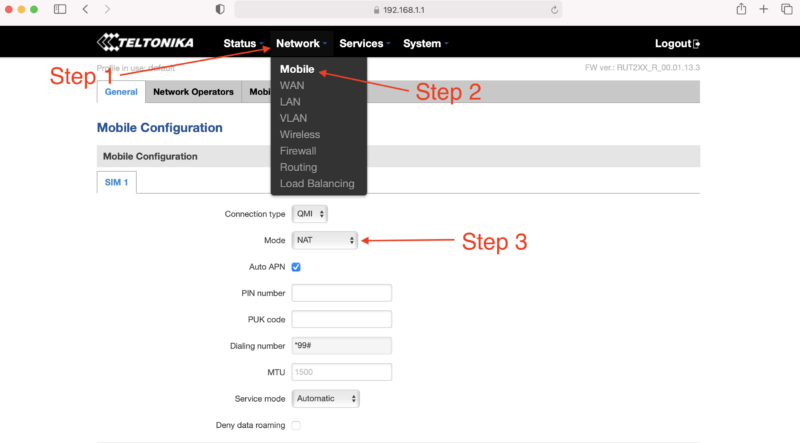
Start by turning off your computer WiFi, then connecting your computer via an ethernet cable to the RUT240's LAN port. I used an adaptor to get from Ethernet to USB-C; you can get those on Amazon.

Power up the RUT 240. Wait.

On your computer, navigate to 192.168.1.1 in your URL.

Enter admin01 for the password and click the LOGIN button.

You will be prompted to enter a new password. Do it, then click SAVE. Keep in mind that the modem can take a while to "think", so just be patient after you hit SAVE on this, and any other screen.

You now have 2 options, one simple, one complicated. They have both worked. Try the simple one and see if it works. If it doesn't, try the complicated one.

Option 1 - Setup Wizard

System —> Setup Wizard —> 

Step 1 

Set local time, enter password

Step 2

Uncheck Auto APN

APN —> Custom—> [enter your APN if you got a static IP]

Step 3 —> Skip

Step 4 Wifi —>

WiFi SSID: [Name it whatever you want]

Password: [your password]

Leave WiFi enabled for now, it’ll make setup easier later on when the system is installed, you’ll just need the laptop to access it.

Write down the Router Serial & MAC address, then log into to rms.teltonika.lt

Add Device using the MAC address & Serial number

Go to System Management and look for:

Reboot

Select auto-reboot every 24 hours by checking every day of the week.

Log out. You're done.

Option 2 - Let's Get Geeky: Not true static IP, but static DHCP lease

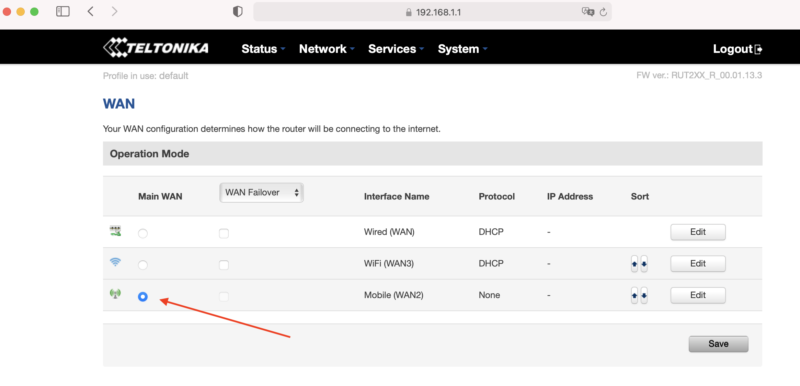
Start from just after you set the password on your RUT 240, above. Now, on the top menu bar, navigate to Network --> WAN. You'll see a screen like this, usually with Wired (WAN) selected.

Select Mobile as the Main WAN, then SAVE.

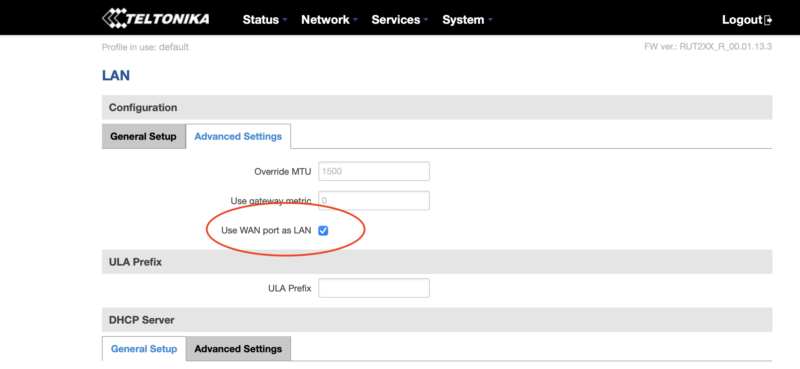
Next, in the top menu bar go to Network --> LAN and select the Advanced Settings tab.

Select Use WAN port as LAN, then SAVE.

Now navigate to Network --> Wireless, where you'll disable the WiFi. This'll disable the wireless access point and save you power, which is important for off-grid setups :)

You're crushing it. Just keep going. Ready for the next part? Read it carefully first, then execute.

Before continuing, do the following in order:

  • Unplug the ethernet cable that is connected to your computer from the LAN port on the RUT240
  • Plug the ethernet cable into the WAN port on the RUT240.
  • Connect the Helium Hotspot to the LAN port on the RUT240 with the ethernet cable supplied
  • Power on the Hotspot.

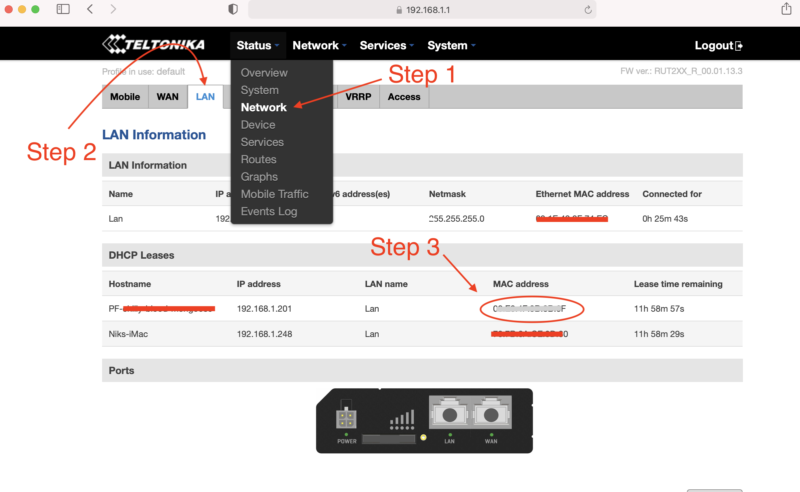
Nice work! Now, navigate to Status --> Network and click on the LAN tab. Find the MAC address of the Helium hotspot, highlight the MAC and copy it.

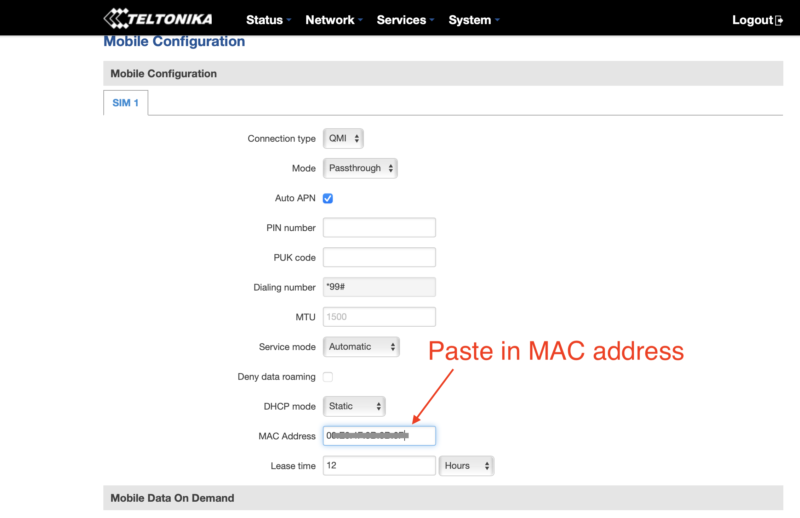
With the MAC address copied, navigate to Network --> Mobile. Look for Mode and select Passthrough.

New fields will appear. Locate the MAC Address field and paste the copied MAC address of the helium hotspot. Click SAVE.

One more thing...you have to enter your APN. I had to do this, but forgot to take screenshots of it. See where it says Auto APN on that screen, and the box is checked? Uncheck that, then follow what makes sense and enter in your APN (your SIM card provider will be where you get that.)

If that becomes a huge PITA and a sticking point, I'll update this tutorial.

How Much Data Will Your Off Grid Hotspot Need?

UPDATE: For an off grid miner as of November 2021, you're going to want 100 GB/month, and that still may not be enough. For a long time, the 50 GB/month plan called out below with T-mobile was enough, but with the blockchain size growing, it's no longer cutting it. I'll leave the rest of this in here for posterity, but any reference to plans lower than 100 GB/month is outdated and wrong.

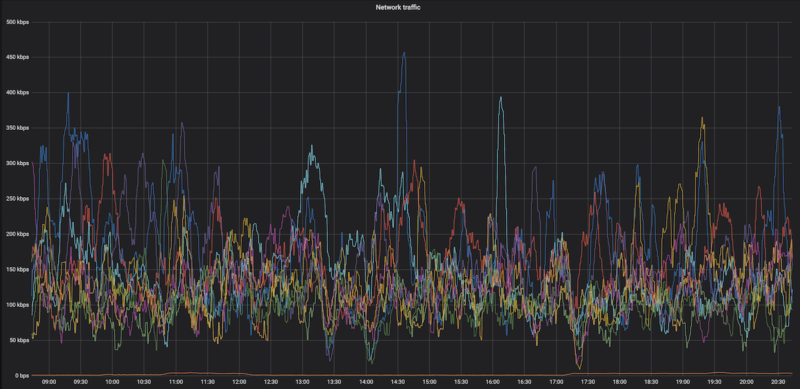
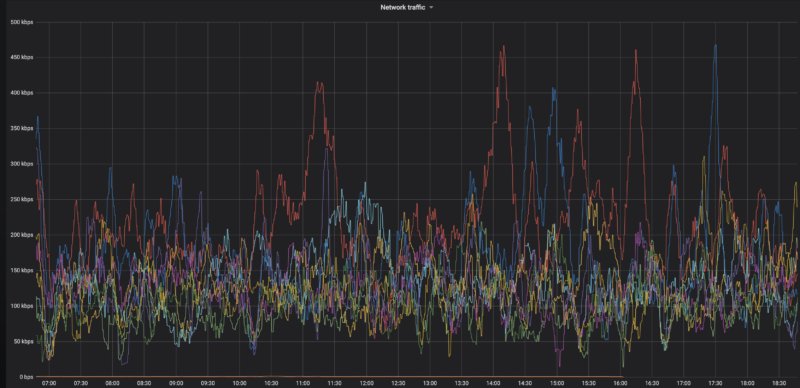
Here's a graph of the network data traffic for a group of hotspots on a 10 minute average:

Yep, that highest of high spikes is 450 kbps, and almost everything is below 300 kpbs. So, while data is important (you need a lot of it), speed is usually not. With that said, I'm getting reports in the field of 650 kbps and above spikes that temporarily shut down hotspots. Be ready with patience when that happens.

Recently I've heard from folks testing 4G speeds reporting that a 15 Mbit up/down (vs 10 down and .8 up) gave a 250% increase in HNT rewards, so speed may matter more than we thought. This is definitely worth further investigation, and the T-mobile planned called out below may not be fast enough or large enough for you, depending on the local speed of your 4G connection.

What SIM card should you use?

T-mobile has a BUSINESS (NOT personal) plan that's $50 for 50GB at 4G speed, then unlimited data at 3G speed, which is supposed to be 3 mbps minimum. That should work MOST of the time for us. If you have a plan that's working for you ALL the time, please add it to the Comments section below.

I've got a T-mobile rep who is clued into what we need, his details follow.

The plan is available nationwide in the US, and as far as the rep knows it's not going away any time soon.

T-Mobile doesn't guarantee the speed (apparently there are no speed guarantees in the world of telco wireless), but I've got clients who've been using this and it's working fine most of the time.

Here's the rep I talked to. We went through the whole Helium scenario, so when you call him he'll be prepped. Just tell him Nik from Gristleking sent ya, that should jog his memory.

Abu McLean
In order to protect his email from the bots: ABUBAKAR.MCLEAN17 then use the little @ symbol then put in T-Mobile.com
Direct: 615-445-4008
Hours: 9:15AM to 6:15PM CST (Mon – Fri)

  • You'll need a business account. You can't (as far as I know) run this off your social security number.
  • Ask for the 50 GB at $50/month plan with unlimited data at 3G after the 50.
  • You can get a Static IP for $5 more, ask for a “SOC Static Public IP”. UPDATE, MAR 21, 2022: You don't need a static IP for much longer, this may not be worth it.
  • SIM card price is the same: $20 + sales tax (~$2) per SIM card

If you email him, would you cc me (my first name, which is Nik, then @ and this website) so I can keep track of how it's going and any snags that come up?

Oh, you're in Canada? Here's what a client sent me:

FYI - I found a cell carrier with a static IP that doesn't get relayed in Canada. If you call Rogers, get a hold of their small biz department and ask for a static IP, they'll mail you a SIM card that works with the RUT240 instructions on your blog. The only problem is that because this is Canada, its $120/month for 50 GB + $20/month for every 10 GB after that, and it's $12/month for the static IP. Ouch!

-M in the great Canadia


This guide was almost entirely written by the crew at HNTenna and passed on to me. With their permission and with a few changes, I'm making it available to you. Rock on!

Archived Comments

Mike - 8/11/2021

Hey Nik, Fantastic site, man. I've probably read every article about Helium here at least twice. Regarding the RUT240 and a mobile plan, have you heard of Embedded Works/IoTDataWorks? It looks like they offer a 12-mo pre-paid unlimited data usage but only at 64K speed with an optional static IP for an extra $20. Looks like this would be perfect for Helium mining, but wondering if you had any thoughts on it. https://www.embeddedworks.net/wsim4827/


jim c - 8/12/2021

thanks i was just about to send mine back


Nik - 8/12/2021

Hi Mike, 64kb/s won't work for full fat miners, check out this link for more on that. Current miners (NOT Light Hotspots) need 300kb/s. This plan would work for Light Hotspots, which will likely need just 4kb/s.


Mike - 8/12/2021

Thanks for the reply, Nik. I had read your article about light vs full-fat miners and you mentioned monthly data usage but I didn't see anything about speed/bandwidth. I didn't realize the full miners needed so much bandwidth so I'm glad I asked.


jim c - 8/12/2021

attempt one ... fail... here's why... after switching wan port to lan port and attemptempting to swith off the wireless rut says unable to switch do to multiple access points if you then go to network , wireless and disable the extra AP it will refresh and give another AP automatically. I would keep working through this and see if it works right now i dont need to power off my bobcat when i do i will revisit and update


Rex - 8/17/2021

Hi Nik: It's great to finally have an excuse to write you! It sounds like finding a compatible SIM card for the RUT 240 is the problem statement here. I'm calling around and haven't found a solution yet. But... I may have found an alternative. Verizon offers a device called the jetpack 8800L. It costs about $200 and they offered me a monthly plan for $20. https://www.verizon.com/internet-devices/verizon-jetpack-mifi-8800l/ Is this a viable solution? Are there better options out there?


Nik - 8/17/2021

Hi Rex, right on! I wouldn't trust a Jetpack for off-in-the-mountains off grids, but a lot of people are successfully using 'em in the city.


Mauricio Curbelo - 8/18/2021

Anyone found a SIM card that works in Canada?


RG - 8/19/2021

Rex / Nik: I'm using this setup in a building where internet isn't available. Verizon and probably the other mobile carriers are using Carrier-grade NAT. Even after opening TCP port 44158 on the jetpack, my miner is still relayed. I'm hoping that I can get a static IP from Verizon, will contact them and report back. Nik: you say that a lot of people have been successful with this setup? how did they resolve the relayed issue?


Nik - 8/19/2021

Hey RG, I'm looking for a solution as well; the old T-mobile one was fine (and worked with this), but T-mobile no longer offers that program. I've been hearing that Mint is a good option, but I haven't used it yet.


Rex - 8/19/2021

RG and Nik: Oh man. I'm installing my first miner and after a day of toiling around with it got past the relay blues. I spoke with the Teltonika and CradlePoint folks yesterday. The CradlePoint IBR 600 series is mobile carrier agnostic but sells for $600 while the IBR 400 you have to pick your vendor up front for $400. The Teltonkia is $170 and I think is vendor agnostic. I'm purchasing one and going to run some tests with it. As a general rule, I'd rather pay a few more bucks upfront then be stuck in a perpetual big monthly expense tied to an uncertain revenue stream...


Nik - 8/19/2021

Yep, I've used Cradlepoint 650C and 200 and both work very well, just way more expensive.


Riley - 8/21/2021

Hello Nik. Aside from the instructions you've provided, I'm assuming that you still want to create a static IP for the miner and port forward 44158, right? I also saw on Discord that you recommend purchasing an "SOC Static Public IP". Would this purchased IP be for the RUT or for the miner?


Brandon - 8/21/2021

Thank you for all the great content on your page! After opening 44158, is purchasing a static IP from the carrier the only way to resolve relayed status? With Verizon is looks like $500 to purchase static and a business account is required. Can anyone confirm this or know of another option?


Nik - 8/21/2021

Hi Brandon, it *might* be the best way to resolve that. I'd look into T-mobile, they seem to have plans for businesses (not sole proprietors) that are $55/month for 100 GB. That seems to not be reliably there, depending on the sales associate you talk to. Sometimes they'll do it, sometimes you just have to hang up and call back to get another one. :)


Nik - 8/21/2021

Hey Riley, Yep, the static IP and port forward are recommended. The static IP would be for the RUT.


Marie - 8/23/2021

Great article thanks! Setting up my first remote setup :) Regarding the APN, can we leave it on auto APN? Or do we absolutely need to setup it up manually?


Nik - 8/23/2021

Hi Marie, Sometimes the auto APN seems to work, sometimes it doesn't. This whole business is tricky with lots of trial and error, please let us know what ends up working for you so we can share the success knowledge. :)


drew - 8/27/2021

Hey Nik, I followed this tutorial (thanks for that) and my speeds are grossly slow.. According to speedtest, the best i got download was 1.6mbps and upload was .01 (believe it or not). I did the business account with Tmobile so we should be good there.. I was thinking maybe the antennas that came with the RUT are lousy so I ordered the Quspot one. What minimum dl/ul speeds do you think are necessary for the hotspots? Also I may test out some QoS settings, that might help.. I noticed there are some existing ones there, any thoughts on changing those to normal?


Nik - 8/27/2021

Hi Drew, you'll need 300 kbps for the miner, that's mostly for download. Sounds like the upload side is a problem for that. Double check with T-mobile, it may just be the coverage in your area (though I'm not sure about that at all.)


RG - 8/30/2021

Using a mint sim in a MiFi card will work but isn't viable. Mint's unlimited data plan caps Mobile Hotspot use at 5GB. The next plan under unlimited has free mobile hotspot but is only 15GB a month. Hotspot data is drawn from the monthly allotment and speeds are slowed until the next cycle. I couldn't test port forwarding: The Alacatel Mifi card bought from Amazon doesn't have port forwarding on its dashboard, just Mac filter and some other basic stuff. If other Mint MiFi folks have a different setup, I'm all ears.


Nik - 8/31/2021

Hi RG, have you tried the T-mobile plan at the bottom of this post?


RG - 8/31/2021

Nik, I'll give it a whirl and report back.


Dave - 8/31/2021

I think I am purpose of this tutorial. Questions: 1. Why not run the miner off the LAN port without any configuration? 2. Why do you need to configure the WAN port as a LAN port? 3. Any guess as to how much battery power is be saved by turning off the WIFI on the router? -I was thinking I would want to leave it on so I can easily survey the internet speed and connectivity of my off-grid hotspot. *FYI- I am able to use my Google Fi sim on the Rut 240 (RUTRUT24001U000).


BCH - 9/5/2021

Thank you Nik for this nice article. I have read many on your website and am impressed by your work. I am using a RUT240 and RUT950 (240‘s were out of stock). The main challenge getting rid of relayed is that most mobile carriers run CGNAT which means you do not have a public IP address but get one which is already in their NAT. To receive such a card in Switzerland I only found one carrier (Sunrise) and they charge you 60$ and you need a business account. I see many relayed devices in my area which earn decent amount of HNT. Since Friday morning I am having the same issue as many others… my miners are fully synced since more than 8 hours. When I use the discovery mode I see many hotspots but I haven‘t issued a PoC or witnessed one in more than 3333 blocks…. Hope this gets sorted out by Helium soon.


Nik - 9/5/2021

Yeah, the network is still struggling to keep up. Glorious opportunity, but lots of chaos. Might check with Andreas Spiess for SIM card options; he's the only Swiss guy I can think of who's probably helpful with IoT stuff, though he's skeptical of Helium. :)


Mario - 10/6/2021

Hi Nik, just getting accustomed with the RUT240 remote management and need a bit of guidance. I just stumbled upon management-deviceaccess where "This function provides you with the possibility to set up remote HTTP access to devices that are connected to a device's LAN, provided that the device in question has been registered to RMS." There are four inputs needed: 1 Name (obviously whatever you want) 2 Destination IP (believe 192.xxx.xxx of the Bobcat) --> 3 Destination port? (hmm, tried putting 80 as that's the default on the Teltonika wiki and 44158, both did not work). 4 Protocol (HTTP or HTTPS?) Or is it not working because "provided that the device in question has been registered to RMS" means that I somehow would need to register the Bobcat to RMS for it to work? (sorry if this seems silly) PS after updating the RUT to the latest firmware I am now getting temperature updates, which is useful!


Nik - 10/6/2021

Hi Mario. I checked with the author of that guide, here's what he had to say: The default port for the HTTP protocol is 80 and the default port for the HTTPS protocol is 443, so a HTTP server waits for requests on those ports. Select the protocol you want to use and then have that port be open for it. So if HTTP then Port 80 or HTTPS then port 443 Registering the bobcat in the RMS most likely means entering its MAC and IP into a table whereever the RMS lives Hope this guy still has his on the bench and can easily test.


Mario - 10/10/2021

Hi Nik, thx for putting in the effort and reaching out to the author! Tried all the combinations - no use, not letting me into the Bobcat 300 remotely. Can get into RUT240 though through RMS and WEBUI proxy. Guess something extra needs to be done for it to work. So, for now, unfortunately no remote temperature checkup, no remote OTA & diagnostic, restarting the Bobcat etc. Btw looks like my RUT240s &/or bobcats keep changing the setup so having difficulty even setting them up and making them stable. It keeps going from NAT:none to NAT: symmetric. Port 44158 stays open, connected: yes, dialable: yes. Even the helium api in OTA says "listen_address": "/ip4/109.xxx.x.xx/tcp/44158" height: 1047354". So no p2p (relay) which should be right, yes? I followed your guide and added 2 things: (1) NETWORK-LAN-STATIC-LEASES Passthrough E8:XX:XX:XX:XX 109:XXX:X:XX (this was added automatically through the guide NETWORK-MOBILE-PASSTHROUGH-COPYMAC-SAVE) Bobcat E8:XX:XX:XX:XX (192.168.X.XXX) 192.168.X.XXX (this I added because I read I need to do through another source) (2) NETWORK-FIREWALL-PORTFORWARDING Bobcat TCP 44158 192.169.X.XXX 44158 Didn't work (longterm)... so even tried adding one more port forward (again, another source, ) NETWORK-FIREWALL-PORTFORWARDING Bobcat TCP 44158 192.169.X.XXX 44158 Passthrough TCP 44158 109:XXX:X:XX 44158 And that works (for now), on 1/3 RUT240s... So in light of all this craziness its causing me, do you have an option for remote RUT240 setup (#Croatia)? or, what does one after: 1 calling the ISP and asking them to remove CGNAT; 2 adding the APN they say & following 3 following "How To Set Up a RUT240 for an Off Grid Helium Hotspot - Prepare for Challenge!" have to do to set the RUT240 all the way? Apologies if I'm being a PITA. Just trying to join the Helium revolution from another country and doing my best.


Nik - 10/10/2021

Mario, Thanks for chiming in and adding your experiences & findings, super helpful! I don't think there's an easy way to monitor the hotspots themselves yet. I'd look for a networking expert to get help on the 240 side; they can probably walk you through custom settings as well as how to interpret the results. This blog post is mostly to get you started and to show one way that has worked.


Joe Hrdina - 10/20/2021

Hey Nik. Just wanted to say thanks for all the info you've shared. Since running the off-grid units, what have you averaged for actual data usage? I've seen some people claiming 100s of GB in a month.


Nik - 10/20/2021

Hi Joe, 100 GB/month is not unheard of right now, and it'll keep getting worse until Light Hotspots come. I haven't found a better plan than the T-mobile one, but it's getting to be "not enough".


Josh - 10/22/2021

has anyone had any success in port forwarding 44158 with a static ip? I have secured a static IP with my ISP but cannot get miner out of relay. ISP has no firewall with the APN they provided for my static IP and my Rut240 has the port open in both directions and I'm at a loss here.


Mario - 10/24/2021

Hi Josh, I have 4x RU240s and still struggling. Taking hours and hours and shouldn't be like that. After all, it's definitely not a cheap router. Dunno if it will help cuz I don't have a static IP from ISP, but here's how I do it without. After GristleKings tutorial you also need to do 4 things: 1) NETWORK-LAN-STATIC-LEASES Passthrough E8:XX:XX:XX:XX 109:XXX:X:XX (you will have this when you finish the MOBILE-PASSTHROUGH step). bobcatminer / E8:XX:XX:XX:XX (109:XXX:X:XX) / 192.168.X.XXX (you add this after it) Save & WAIT... (important!) until the little thing in the top right stops spinning. 2) NETWORK-FIREWALL-GENERAL: Input should be: accept. Output should be: accept. Forward: mine is reject by default but seems to work. (any network expert here?) 3) NETWORK-FIREWALL-PORTFORWARDING bobcatminer TCP 44158 192.168.X.XXX 44158 Save & WAIT... (important!) until the little thing in the top right stops spinning. 4) REBOOT THE MINER & wait. Is there is a network expert here and if I did something wrong or something can be done better or something should be done before something is done please tell me. Also, sometimes, when someone accidentally unplugs everythings (happens at some out-of-home locations) my BOBCATS become relayed. Hate that. So, if someone knows a workaround - please help! :)


Josh - 10/27/2021

Mario: I figured it out. First of all, you need to have your APN provisioned with a static ip. You will need to open a business account and pay extra monthly to maintain the static ip. You will also spend countless hours attempting to reach the right person/department that can get you in touch with the division that will handle the APN provisioning. Once you have a static ip RUT240 will not stay out of relayed. Even with the port opened correctly, you find the miner going in and out of relayed mode. I solved this problem by using a CraddlePoint device over the RUT.Unfortunately the Craddlepoint device is twice the cost of the RUT. Now the next issue. The Craddlepoint is a 12V vs the 5V RUT240, so you may need to use a different battery/solar panel to allow for the extra energy consumption. My miner is off-grid, non-relayed with a healthy connection now. However... My earnings did not increase nor decrease so ultimately the trouble I went through was all for nothing lol. To make sure that being out of relayed does not really make a difference with earnings I tried on another one of my locations, and guess what...? No change in earnings. I no longer bother with getting my off-grid units out of relay mode. It's a lot of trouble, time and costs that are simply unnecessary for hotspots that are setup on mountain tops with plenty of other hotspots connections that can easily be 'relayed' with little to no loss in earnings. Good luck!


Dillon - 10/29/2021

Hey Nik, So I just ordered a rut 240 for my remote miner setup and I was looking at data plans and I came across nolimitdata.net and they do 900gb plans for $90 a month. I know it’s a bit overkill but do you think it would be worth considering for a remote miner setup? Any other recommendations would be great as well.


Nik - 10/29/2021

Def. overkill, but probably better that than underkill. What speed is that data at? 4G seems to be the min.


Dillon - 10/29/2021

It’s 4g at 1.5 mbps


Warren - 10/29/2021

I looked at the offering for nolimitdata.net, and it advertises 10-50 Mbps download speed. No mention of upload speed. I am just beginning to to consider a remote setup. Am I correct on assuming that tethering to a cell phone is not feasible?


Nik - 10/29/2021

Feasible, just not recommended. :)


Andreas - 11/1/2021

Thanks a lot for the great content. I've bought all the parts for a nice offgrid setup, but am currently stuck on how to power the RUT240. I have a Victron 75/15 charge controller connected to a battery and a solar panel. How do I make sure I have exactly the right power supply for the RUT? Any tips?


Nik - 11/1/2021

Hi Andreas, the RUT240 takes 9-30v; you can just power it straight from the Victron.


stephen - 11/2/2021

Remote management system Remote HTTPS settings Name : Bob IP: 192.168.1.123 (obviously the miner IP) Port: 80 Protocol: HTTP and then we get access to the web UI for speed test etc. ?


Mario - 11/5/2021

@Stephen --> tried and tested, yes! :)


Reggie - 11/8/2021

Hi Nik, Do I need my own business account to get the sim card from T-mobile? Do you have any other carriers you can suggest that would not require a business account? I have a mobile hotspot from cricket wiereless. Could I possibly use the sim card from this and put it in a rut 240 and make it work?


Nik - 11/8/2021

Hi Reggie, you'll need a business account to get a SIM card from T-mobile. I guess it doesn't technically have to be yours. I don't have any other carriers right now. You can try the Cricket mobile hotspot, but I'd consider that a very temporary solution.


Blair Wells - 11/10/2021

Nik, im hesitant to hook the RUT240 up to to the wanderer. so if what i have read is right, i use pins 1 and 2 not 3 & 4 only? is there a link to a 4pin connector for just power and ground?


Nik - 11/10/2021

Not sure. I just cut the connector and hooked it directly in. The RUT will take 9-30v and the Wanderer puts out 12.


David Morefield - 11/12/2021

Nik, I recently have felt thee squeeze of death from T-mobile and their 50gb data plans. My remote sites (my top two earners) are on rooftops in the Houston area. I would hit the 50gb wall about 15-16 days into the month and boom, I was down until the next billing cycle. Given your affinity for the Teltonika RUT240, I decided to order a couple for the Verizon network and go with an unlimited plan through them. Figuring out the network configuration was not easy, but I was able to find my way. I have posted a link with a step by step for configuring a RUT240 for Verizon on my website - https://basicbitcoinstrategy.com/configuring-the-teltonika-rut240-for-verizon/ I also am really digging the RMS tool that allows you to remotely manage a device connected to your RUT240 via a webgui, this ought to allow me to connect to a hotspot like a SenseCap, Syncrobit or Bobcat for functions like fast sync or manually initiating updates. I am looking forward to getting these out in the field on Verizon :)


tony - 11/13/2021

nice writeup, but after clicking the WAN port as LAN and SAVE, I'm unable to log back to 192.168.1.1 Anyone having that issue? Wireless still works fine on laptop (haven't gone to the next step of disabling it). Any ideas if WAN port as LAN is really needed?


Blair - 11/27/2021

solar setup in the lab, Verizon 150gb plan prepaid - I spent a lot of time trying to configure my RUT240 i tried PPP and QMI as suggested here. I have had 0 success. The mobile data will connect, however my miner gets no data. i get data going through it i guess, but max of 5kbs and i have no idea what data is passing. RMS does not work when mobile connected. cannot connect my miner into the front of the device without sending the RUT into immediate, definite cause and effect slow blink of death on my RUT. Tried a syncrobit, Rak and sensecap. I have no idea how any of you guys have this thing working... at all, makes it more frustrating bc i know it can, but not for me. is there a link that has ALL of the correct settings? i tried what was here and also in all of the comments, and it still does not work. ANY help would be amazing! Thanks!


Nik - 11/28/2021

Hi Blair, you are not alone, I've had some frustrating experiences with the RUT240 as well. The Teltonika forums are pretty good for getting help, or you could factory reset and use Proslasher's instructions for a VPN, here.


Nik - 11/28/2021

Right on, let me know how it goes!


Blair - 11/28/2021

will do, thank you so much, how on Earth you figured this all out on your own baffles me. Truly a pillar-to-post member of our network. I am researching today while my battery charges, will work tonight and update later.


Nik - 11/28/2021

Lots of banging my head against a wall until the wall gave way. :)


Mat - 12/1/2021

I don't know if this helps anyone in terms of data usage but I am using a verizon hotspot (relayed) in a high altitude location with lots of traffic. (Southern California) For the first time I have reached over 100gb, I imagine if I wasn't relayed I might have hit over 100gb sooner.


Orr - 12/29/2021

My RUT240 went offline as soon as I saved after the Passthrough / pasting the miner's MAC address step. The host reported that wifi is still on so the modem is working, I just can't connect remotely. Did this happen to you as well?


Cody - 1/13/2022

The issues with this still a thing? I've finally pieced together everything I need for an off grid and came back for the instructions on the router and saw this. Just my luck ha!


Nik - 1/13/2022

Seems to be pretty variable; some folks having no problems, some are flatlined. May have connection to the recent uncovering of the denylist Helium was using to combat gaming. I'd expect any off grid right now to present challenges above and beyond a normal hotspot deployment. Proceed if you like solving problems! :)


Cody - 1/13/2022

Ah gotcha. I'll give it a go and see what happens! Thanks for the info


Sal - 1/23/2022

I'm having a similar issue. My RUT240 has internet access but I can't get the internet to the miner. It's extremely frustrating. Been working at it for over 3 days. I have followed step by step 50 times and still cant get the miner to connect. Any ideas?


klis10 - 1/26/2022

Have several RUT240s with Bobcat miners and T-mobile business static IP addresses. Results from first install in November have been lousy and am thinking of converting the other SIM cards back to regular non-static addresses and monthly low data consumer plans as Nik suggested in late Nov. Doesn't seem worth paying for $55 monthly plan at this point. Any other suggestion?


Doug - 2/1/2022

Hi Nik, just wondering why you've suggested nonstatic IP and the 2GB plan, then 3g unlimited. Will the miner still be using internet from the rut to stay synced? If it's relayed, I thought it would just borrow internet from other hotspots. If so, why have a router at all? For now I'm going to try your suggestion of the $15/month tmobile plan, but would appreciate any elaboration. Thanks!


Nik - 2/1/2022

Just reporting what I'm hearing for folks with full fat hotspots deployed in the field. Yes, the miner will still be using internet.


Ryan - 2/4/2022

@ BLAIR did you get through the RUT240 setup? I experienced the exact same challenge you described. Yesterday I believe I finally broke through. Yet I still don't know exactly what caused the issue. I just reconfigured again and again. Finally went with near default settings. I did learn that t-mobile just plain never configured the static IP they sold me and it took contacting the sales rep to get it done. Support was really bad but of course the sales rep was pretty sharp.


Ryan - 2/4/2022

@Blair, the RUT240 cord (at least mine) contains only 2 wires (red / black) despite the weird connection to the device. I've powered it direct into the wanderer. Also, I only succeeded getting the MINER to connect to the hotspot's internet upon plugging it directly into the Wanderer. I've had it running through a step down / resister usb-thing because I thought that was safer. At least in my case, the miner appeared to power OK but it would give weird errors regarding including "Too many DNS lookups" and others which caused about 1 week of madness on my end. Finally I theorized it was a power issue. Of course, it actually could have been something else I accidentally fixed in the process. But I'm finally online today. The crazy thing is I could have sworn the damn thing worked fine in testing.


Shukhrat - 2/21/2022

Hi. Thanks for the tutorial. I got rut240 and updated the firmware to the latest. I got verizon sim to work on it. It shows that is has data connection. However, I cannot get the internet to go to the sensecap miner. Can you help?


Nik - 2/21/2022

Hi Shukhrat, are you connecting directly via ethernet cable through the LAN port? That should solve it.


Shukhrat - 2/22/2022

Hi Nik, I am connecting the sensecap to rut via the lan port. I am connecting the laptop to rut via the wan port. I followed the steps to make wan port act as lan. The rut dashboard shows connection and even has up and down packets going thru. However, i cannot ping from it. 100% data loss. and i cannot get the miner up. yesterday the miner was up for a bit but then i still could not ping.


Nik - 2/22/2022

Hmm, I wonder if it's an issue with the IP address you've been assigned.


Shukhrat - 2/22/2022

Nik, so after chatting for over 2 hours with verzion i found out that I cannot use my plan with that device. I have to upgrade to a business plan. what plan/provider do u use?


Nik - 2/22/2022

Hmm, for a while it was T-mobile. Abu (the T-mobile rep) has his info at the bottom of the page, I'd start with calling him. Your other option is to check in on the Helium #enclosures-off-grid channel to see what the latest recs are.


Matthew - 3/16/2022

Are you suggesting putting the SIM card into the RUT240? I have finestra miner without a SIM card slot. Also, are there any other providers you know who can do this and still offer a static IP?


Nik - 3/16/2022

Yep, that's where it goes.


Patrick - 3/17/2022

Wanted to give my experience and see if anyone has any ideas. I’ve followed the set up directions over and over again from base factory settings. I currently am using an ATT prepaid card with a 100gigs with a sencap but will switch it unlimited through first net if I can get it working. I have good service when i connect via wifi but i can’t get the port 44158 to show as open using a port checker no matter what i do. I set a static IP and port forwarding rule but nothing works. This is what I’ve done over and over again. Please help ??


Matthew - 3/18/2022

I'd be curious to see the response for Patrick too. I'm about to purchase the same set-up. On a different note - What about the Cellular antenna and cable? What cable do you use to go from the cellular router to outside the enclosure? Also, what cellular antenna do you use outside the enclosure? Can you use the rut240 factory antenna outside, wrapped in silicone tape at base? If I need to run the cellular cable 40 feet, will that cause any problems?


Nik - 3/19/2022

In San Diego I've just run LMR195 or 240 from the cell modem inside the enclosure to the antennas mounted directly into the wall of the enclosure. No problems with that so far. I don't have a great answer on the port forwarding question.


Sam - 3/22/2022

Im also curious to see if anyone has any solutions or ideas for Patrick's setup.Ive invested a lot of time and money to have my remote setup up for it to be relayed. I have scoured the internet, but I'm sure I am missing something. The only difference for examples I see online is the firmware. I updated to the latest firmware the RUT240 had to offer, could this be affecting the relayed status?


Mario - 4/1/2022

Hi Nik. Quick question, I just noticed the part "select auto reboot every 24 hours" on the RUT240. I don't think it was always there (months ago). Any particular reason for that and won't it change the listen ip every 24 hours then..? (option 2 - lets get geeky, not true static ip but static dhcp lease). Thx!


Nik - 4/1/2022

I also forget when that got added in. I had heard from a number of off gridders they felt it helped them avoid relay. Thanks for the correction!


Scottie Davis - 4/15/2022

Hey Nik, if we ever actually make it to lite hotspots, what would you estimate the amount of data usage/data plan we would need?


Nik - 4/15/2022

Hi Scottie, we'll make it. ;) 75-100MB/month. More on 'em here. Rock on!


Can I Get A Witness?

· 57 min read
Nik
Site Owner

Having trouble understanding why your hotspot isn't getting a Witness? Are you seeing messages about being above or below the bounds of an RSSI metric? Let's dig in!

There is an UPDATE to this post over here. Feel free to read on, but the rest of this post talks about a system that is no longer being used by Helium (PoCv10). The charts below are no longer valid, but I'll leave 'em up for posterity.
We'll start with this, the infamous PoC V10 SNR limits graphic. This is NOT, by the way, the system Helium now uses, which is PoCv11. Still, it's useful to understand the concepts.
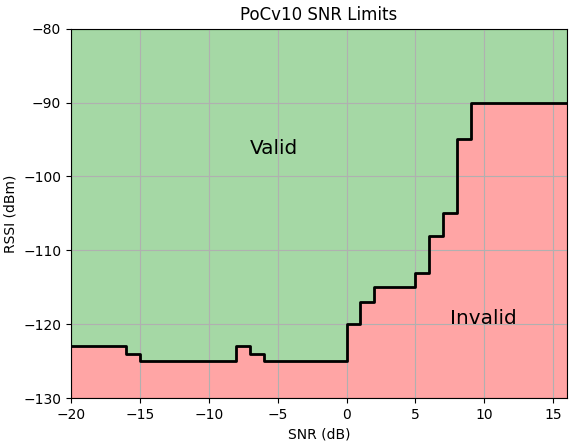
I'll explain the X and Y axis in a bit, but at first glace it's pretty basic.

Green = Good, Red (pink?) = Bad. Find the numbers reported for your specific Witness event, see where they intersect, and you'll know why you have an Invalid witness. Yes, yes, yes, if you're a "radio head" you instantly see something wrong, but for now let's keep it simple.

We'll go through two examples; 1 invalid, and 1 valid. Here's an invalid witness.
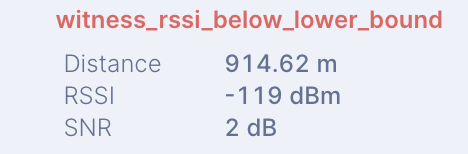
Three things are listed:

  • The distance in meters. This is used to calculate FSPL, or Free Space Path Loss. More on that in a sec.
  • The signal strength in dBm (RSSI)
  • The level of signal above the noise floor, in dB. (SNR)

Here's how that witness charts out:
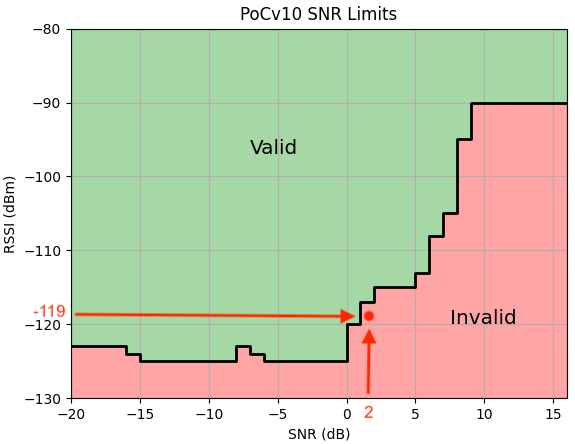
With a high SNR (anything above 0 is high for Helium), at only 914 meters this signal is basically too good for the distance.

Ok, so what does it look like if the witness is valid?
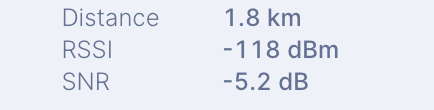
We're looking at the same three things, but now we're at about twice the distance, and if you remember your dB strength rules (every 3 doubles or halves), about a quarter of the SNR.
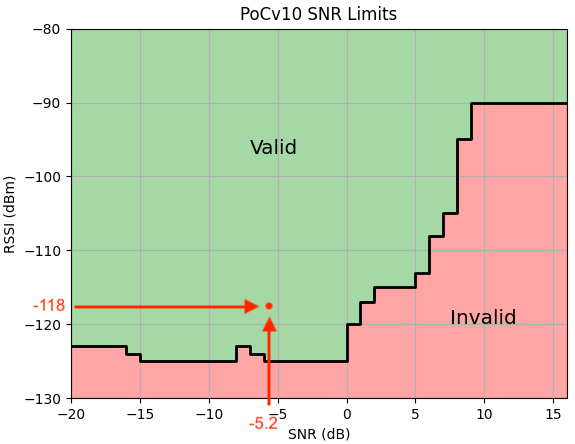
Easy enough to read a chart, right? But what does it mean, and how can you get more valid witnesses?

We'll start by defining two things first: RSSI and SNR.

RSSI = Received Signal Strength Indicator. In very simple terms, RSSI measures the strength of the radio signal you're receiving.

In RSSI measurements, the larger the negative number, the weaker the signal. -130 is weaker than -100. In general, in the land of Helium, you want your RSSI to be between -82 and -134.

SNR = Signal to Noise Ratio. This is a measure of the quality of a signal compared to the background radio "noise". It's expressed in terms of dB (decibels), and the bigger the number, the better. Except when it's not.

Wait, a signal can be too good? Yep.

When Helium started (and basically, up until the present, August 2021), Helium had a problem: They were selling radio devices. Why is that a problem? This'll get more complicated before it gets simple, so buckle up and pay attention.

Everyone (in the US, and in most countries) selling a radio device has to have it certified by some national body. In the US, that body is the FCC. One of the things they check during certification is that your device doesn't break any emission-strength rules (technically EIRP, more on that here.)

Helium is required to stay within the limits of the rules. To do that, they used a low gain antenna (1.8 dBi gain) and a reasonable amount of energy output (-27 dBm). That put them at -28.8 dBi for max EIRP, well within the limits for the US, which is a max EIRP of -36 dBi.

The FCC also requires a manufacturer to build units that "prevent" the consumer from changing the antenna. Helium accomplished this by using RP-SMA connections. Yep, that counts as prevention. It's an outdated system, for sure.

An additional measure taken to ensure there was no encouragement to "improve" your antenna (and even they acknowledge it isn't a great one) is to set fairly strict and sometimes unreasonable rules regarding what a received radio signal should be in terms of the signal strength and quality.

This is accomplished in part by measuring ALL antennas (even your high gain fancy wazoo antennas) AS IF THEY WERE THE HELIUM STOCK ANTENNA.

No, that doesn't make sense. Yes, it was reasonable at the time. Yes, it will be changed.

How did Helium come up with those rules, and why? I'll start with the Why: To stop cheaters, also known as "gamers" because they game the system without providing any actual benefit.

Cheaters used to be able to just plug in a bunch of hotspots stacked on top of each other. Those hotspots would witness each other from inches away while reporting falsely asserted locations that made them seem to be much further apart. It appeared they were providing great coverage. So they earned. Massively earned.

One of the most egregious examples happened in a little town called Modesto, in California. At the peak of the cheating, in late summer 2020, a group of hotspots (probably in a closet, and not even in Modesto) were earning thousands of HNT per day. Yes, per day.

Helium has since worked to combat gaming in more and more nuanced ways, but the way they approached Modesto was with a giant radio-signal measuring hammer: The RSSI/SNR chart. This was created by a Helium employee who analyzed almost half a million PoC receipts and looked for outlier results.

He was approaching this in classic Silicon Valley fashion: Look at the actual dataset, don't rely on "old" thought, and figure out a new way to do a better job. Admirable, but it turned out to penalize not only egregious gamers, but many of the rest of us who just wanted to do an above average job.

The Modesto cluster was gutted, but the RSSI/SNR chart stayed in place. Other changes (HIP 15 & 17) entered into the system and incentivized spreading out and being rewarded for providing better and better coverage, but the RSSI/SNR chart stayed.

It wasn't because the Helium team was ignoring it. They had much a bigger challenge to surmount: Getting Validators online so the blockchain could stop suffocating itself. With that mission-critical task accomplished, they can now (summer/late summer 2021) turn to making sure the blockchain improves in accurately rewarding superb coverage.

Which brings us, almost, to today, sometime in August of 2021. With PoCv11 (Proof of Coverage Version 11) on the horizon, we're about to take a strong step in the direction of rewarding strong & clear signal coverage over short and long distances.

As you're seeing in the app, Helium is offering you the chance to enter your antenna gain and elevation. This will help them more accurately assess whether or not your witnesses are valid. As of today (Aug 4th, 2021), those two metrics don't actually make a difference for you, the hotspot owner, but...they will.

In the future, when PoCv11 comes online, the details you enter will be applied to your witness receipts. In order to combat gaming (essentially to stop everyone from just saying they have a 50 dBi gain antenna so all of their witnesses are good), Helium will simultaneously apply your gain AND decrease your transmit strength. That's fair, by the way, and you should want that to happen.

I know, I know. Nobody likes decreased strength. Trust me on this one: LoRa already gives you TONS of range. Your goal is not long range, it's increased earnings, and earnings come from valid witness receipts.

What will that look like? Full details over here, but for those of you who aren't deep into radio geekery, the big picture is that Helium will drop SNR and just use RSSI and distance. Here's a proposed chart. Meters on the Y axis, RSSI on the X axis.
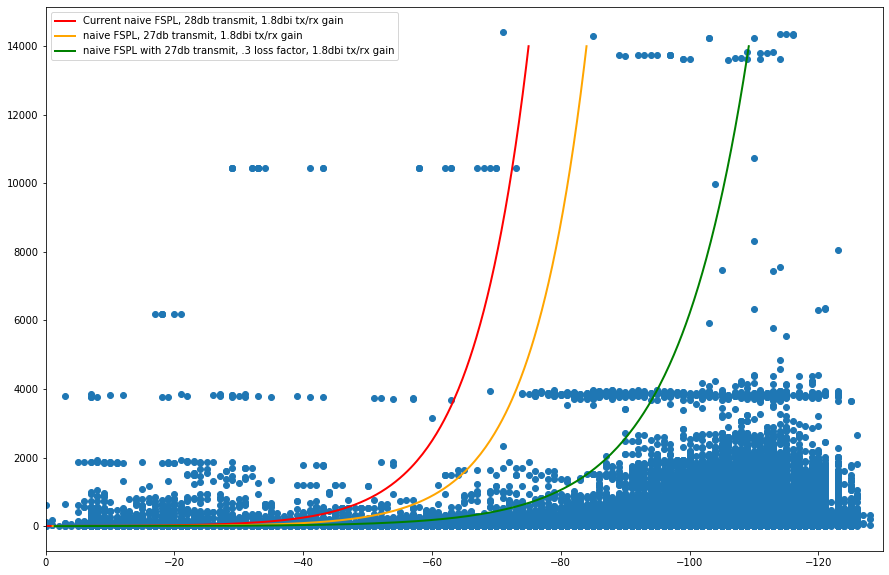
Ok, so you've got three lines on there: Red, Yellow, Green. The lines represent the current cutoff (Red) for a valid witness as well as proposed future cutoffs (Yellow and Green).

You're also seeing a bunch of blue dots. Those blue dots represent reported witness metrics of RSSI at some distance. The green line is the most restrictive, but is based on actual values of RSSI at some given distance, which is far more accurate than the current RSSI/SNR curve.

To keep it simple, this means that in the future, when PoCv11 replaces the current version, a hotspot using a non-stock antenna will not be penalized for it. Whether the yellow, or green, or some other line is used is still up for debate.

We'll wrap this up with one of the most important takeaways: What antenna will help you stay within the proposed limits? Easy: It's the LOWEST gain antenna you can use. See how the curves all shoot up at a fairly defined RSSI? That's the key. If your RSSI is even a few points "to the left", you can be on the wrong side of the line.

This helps explain why in many cases, when you get that fancy super high gain antenna, your valid witnesses disappear. So what antenna should you buy?

My recommendation is still the HNTenna, but any of the low gain (4 or less) antennas in your countries frequency, from a wide variety of sources like McGill, Parley Labs, L-com, or Laird will be fine.

If you're willing to explore your inner geek and you like to tinker, take a look at attenuators. They'll attenuate (or weaken) the signal (both tx & rx), but they'll also increase the SNR, so experiment cautiously. Here are a few options:

Expensive (~$400) and unnecessary, but hey, if you want a great unit - Fairview 0-11 dB Step Attenuator

Cheaper ($25), less precise without extra measuring equipment - ATM RF Variable Attenuator AF033-10 DC-1000 MHz 50 Ohm

An attenuator decreases your signal strength both ways. They're not a great long term option. The best option is to use a low gain antenna and get it up high in the right location. If you see that the Nearson 9 or RAK 8 that you bought when you were in "Bigger is better" mode gets more valid witnesses once you've taken a little sauce out of it, well, you'll have some useful data points (that I'd love to hear about.)

Want to go deeper? Consider hiring me to help you out; I love helping people crush with Helium.

Happy Witnessing!

**This post was written with technical oversight from @jerm on Discord. He is an absolute wizard with this. All righteous accuracy is his, any errors are mine. -Nik@GKI

Archived Comments

Mer Alcon - 8/7/2021

Its nice to read article like this both for non technical and technical people. Looking forward to it for some other articles especially in mining and antenna placement, etc...


Nik - 8/8/2021

Thanks Mer, check through the rest of the site, I've got a few on antennas. Start here.


Peter - 8/11/2021

Thanks Nik, I'm in a spot with only 3 hotspots and I keep getting an invalid witness to the closest one (900 meters away) due to high SNR. Since I can't find out who the owner is to work out the problem, should I just try downsizing my antenna? I'm on a 5.8 db on a residential roof, the hot spot in question is reported to be an 8db. This is very frustrating but your article helps put it into perspective.


Nik - 8/11/2021

Hi Peter, you could try swapping out for the stock antenna to see if that works, or you can add an attenuator to your antenna and see what that changes. Glad the article helped make sense of why this is happening.


Peter - 8/11/2021

Thanks Nik! Learning a lot from your blog!


Cristi - 8/15/2021

Hi Nik! Could you please provide some advice, my 2 bobcats since last 5 days suddey have NO witnesses. I have had lots of witnesses and earning for almost 2 months since I installed them, i am NOT relayed, always online and fully synced, have always used only the stock 4dbi antenna. Nothing changed to my internet connection or ISP, so it is really confusing why suddenly my beacons get 0 witnesses in BOTH of my 2 bobcats (2 different locations). I read a lot on this site and many other sitea and I couldnt find a solution? Thanks!


Nik - 8/15/2021

Hi Cristi, hmm, I'd start by checking the antennas, although if they both stopped witnessing at the same time that is confusing.


SenseCAP M1 Helium Miner Setup – Tea and Tech Time - 8/17/2021

[…] Can I Get A Witness? […]


GP-Colorado - 8/22/2021

Excellent explanation; thank you. A couple of questions came to me as I read it. Perhaps you might clarify for me. Last year, when coverage was sparce, I installed a 9dBi Nearson about 7 feet above the peak of my roof, intending to provide coverage over a wide area. I also placed some yagis aimed towards (then) under populated territories. Will these configurations put me at a disadvantage, under PoCv11, unless I put attenuators into the feed lines? Might it become advantageous to use lossy inexpensive cable rather than LMR-400, as a natural attenuator , when installing directional / high-gain antennas, or mounting any antennas at substantial elevation?


Nik - 8/23/2021

Hey GP, good question. I'd say the 9 dBi probably puts you close to the invalid edge anyway, and the yagis almost always push you over (depending on gain, of course). Did you successfully get all those antennas linked to one miner and working? You're probably better off installing a high quality low gain antenna with short antenna cable rather than fiddling with attenuation through cable loss.


What's The Best Antenna For Your Helium Hotspot? - Gristle King - A Guide to Helium - 9/5/2021

[…] the power/signal rules Heli­um uses to help com­bat spoof­ing. When you vio­late those rules, you get invalid wit­ness­es. Invalid wit­ness­es = […]


George - 9/10/2021

Hello , very informative article . I have a network of 10 miners with very clear LOS between them and distances between 400m and 5 km . I keep coming across the issue of invalid witnesses where my rssi is at -110 to -120 ans SNR is 2-8 positive . I am only using 4 dbi stock antennas. This leads me to believe i have to take action to reduce my signal strength ? Would this be a valid approach ?


Nik - 9/10/2021

Hi George, looks like the SNR is the culprit. You could decrease signal strength with attenuators (professional or otherwise) or just wait 'til PoCv11 comes out, which *should* be in the next week or so.


Winning At Helium: The Right Way To Get Started - Gristle King - A Guide to Helium - 9/10/2021

[…] Nope. I wrote about that in Can I Get A Witness? […]


Damian - 9/12/2021

Hello - I'm a newbie to electronics and Helium in general and had a question regarding attenuators. My witnesses from my neighbor hexagons are being mentioned as invalid based on that chart because are signals are too strong since I don't live in an area with large buildings or trees. I think an attenuator might help me get more of these witnesses based on what you wrote above. Can I buy any generic attenuator to reduce the db levels by 1 or 2? Do I need a specially made one that will fit the helium miner? Do i just put it on my miner right before my antenna? I don't want to purchase the wrong item but I'm willing to take a $10 bet to increase my hotspots connections with my neighbors. Amazon has quite a few but I just wanted to know if I needed anything else special. Im currently thinking my normal Sensecap Miner with an attenuator for just 1 or 2 db and then the normal antenna should be enough to solve my problem.


Nik - 9/13/2021

Hi Damian, Sure, you can try an attenuator, look for one with the right connections & an impedance of 50 ohms. Are you on the stock antenna? If not, try using that. One thing to keep in mind is that while an attenuator will dampen the signal, it'll also increase the SNR, which will increase the likelihood of an invalid witness. I'd approach this as a fun experiment rather than a guaranteed earning increase. : ) The other (cheap & fast, but not beautiful or really measurable) is to use metal screens around your antenna, or just put your antenna inside.


Damian - 9/13/2021

Thanks for the speedy response, Nik. I ordered a couple attenuators to try out from Amazon, hopefully they fit the miner. Honestly I'm not sure what the "right connections" are - I literally know little to nothing about electronics. I'm assuming these are all one size fits all. My problem isn't the RSSI measure but the SNR measure. My neighbors hex have low enough RSSIs (-90s) but the SNR is still too strong (10+) . I was hoping the attenuator would reduce the SNR just by 1-3 DB and make them valid witnesses. Am I interpreting this wrong? Interestingly enough I AM using the stock antenna haha. I think my neighbor hexes might have a stronger antenna though as they are connecting to a ton of other nodes based on their activity history. I witness them a lot in my activity each day, but its always just barely invalidated based on the chart for RSSI vs SNR. Is there anything I can use to decrease the SNR just a tad? I think the RSSI is fine to be honest, but SNR is too good as you mention in your article. Maybe this problem disappears after the update where strong antennas arent penalized by the algo..


Nik - 9/13/2021

Hi Damian, agree re. SNR being your problem, and the attenuators will probably not help that, although they may get the RSSI where you want/need it to be. Hell, they might help. RF is weird. PoCv11 should solve this for ya. :)


Ryan - 9/14/2021

Thanks for all the hints and tips man! Your doing the lords work for sure!


Chad - 9/15/2021

Thanks for all these details Nik. I was excited to upgrade my stock Bobcat 4dbi antenna to an 8dbi roof mounted antenna, but upon installing it this last week, I began getting quite a few of these invalid witnesses which has been really frustrating. Your post and explanation really helped. Have you seen any official target date for release of PoCv11? How will we know when it is officially released? I'm anxious to see if it fixes these problems, or if I need to take more drastic measures of moving the antenna into the attic or start exploring attenuator options. Thanks again for your help.


Nik - 9/15/2021

Hi Chad, as of Sept 15th 2021 it *looks like* PocV11 will be live within a week or so. Helium has just released the update over the air that enables it, so once they're satisfied that it's working they'll hit the switch and we'll be on the new system.


Ndu - 9/16/2021

Hi Nik, How might PoCv11 affect higher dbi antennas in the 5+ dbi ranges? Did I read you correctly when you said that the transmit power of the higher dbi antennas would be significantly reduced with v11? I read on Reddit that v11 will affect antennas that are above 1.2dbi. That's strange especially considering that some OEMs even supply 4dbi antennas.


Ndu - 9/16/2021

I guess the question I meant to ask was, "Would it be a waste of money to spend an extra $150 buying and setting up a 9dbi antenna if your transmit scale is 0.56, and you are trying to reach hotspots with healthy transmit scales of 1.0?" When v11 gets fully implemented, would a 9dbi antenna go only as far as a 1.2dbi or 3dbi antenna?


Nik - 9/16/2021

Hi Ndu, tx power will be reduced by the gain of the antenna. So a 9 dBi gain antenna will get a 9 dB reduction in power.


Nik - 9/16/2021

Yes, that would be a waste of money. Don't use gain for extra *range*, use gain to punch through light obstacles (rows of trees, from inside a building to outside, etc.)


Ndu - 9/17/2021

I see, thanks. They claim to have algorithms to measure antenna power and determine location through triangulation. Does that mean that my 6.8dBi antenna (entered as a 5.8dBi in the app) would be found out and treated as a 6.8dBi antenna?


Ndu - 9/17/2021

Considering that outdoor antennas have cable and connector losses that aren’t evident in directly connected antennas, might it make sense to account for those losses in the app data by entering an actual 5.8dBi antenna as an 6.8dBi - accounting for 1.0 in losses?


Nik - 9/17/2021

Yep, over time the calculations will get more and more accurate.


Nik - 9/17/2021

Hi Ndu, maybe. I don't think a 1 dBi difference will be huge, but it might make the occasional difference.


SporadicE - 9/17/2021

The People's Network should be re-named "The Urban and Suburban People's Network" if POCv11 is turned on. Distance has a real effect on RSSI and SNR, for that matter. If they are attempting to fix the "invalid data" problem the market or really the miners who repeatedly are invalid will learn to change their antennas so that they get paid. If you don't get paid for your product (valid contact) then you'll change your product so you will be valid. Rural miners will be hurt the most since their ability to contact the more densely hexes will be impacted. I do not understand how this will help populate the more sparsely inhabited areas. It appears the talk about spreading out the density of the miners was just talk as POCv11 as written will discourage rural participation. If your system has < -37 dB then you should be good to go without someone cutting your TX power. That is legal. The miner operator should be the one to decide if he/she wants to be paid by arranging their system for their area to produce valid contacts.


Nik - 9/17/2021

Possibly, although I don't think PocV11 is the only thing Helium is doing to improve RF assessment of the network. I think we'll see strong incentives for coverage of highways and transportation corridors in the coming months. PoCv11 is just one step in the process.


Ndu - 9/17/2021

SporadicE, "If your system has < ?37 dB then you should be good to go without someone cutting your TX power." <- Was this referenced somewhere we can read? Would that number be 27dB for the miner and 10dB for the antenna?


Nik - 9/18/2021

I'm not seeing where it says that. 27 dBm for the miner and *9 dBi* for the antenna is US standard. Varies by country.


Ayjay - 9/18/2021

Looks like I came to the right place. I just upgraded from the stock Sensecap 2.6 dbi antenna to an 8 dbi because I'm a newbie and figured "this will make more HNT." I'm on the third floor of a house on a hill in suburbia, higher than most others around and have this giant 8 dbi next to a bedroom window. Suddenly after 2 days of not much improvement, there are lots of invalid witnesses in the last 3 hours. Seems like the smartest thing to do is just plug back in the 2.6 dbi? Obvious question? Or maybe stick with 8 dbi and move it to the ground level? That seems irrational though. Any thoughts would be appreciated, thanks


Nik - 9/18/2021

Hi Ayjay, try going back to stock, that should help with the invalid witnesses.


Damian - 9/19/2021

Nik, I got 5-6 attenuators to test out but none of them fit my miner. I have a senscap m1. Do you have any advice on which attenuators I should take a look at buying? Still in the scientific experiment phase so I don't mind doing the testing for the community on this one haha.


Brandon - 9/19/2021

What are the specs when using an attenuator, as in just make sure it is an RF and same ohms? I have never heard of this but need to knock my antenna down a few dbs


Nik - 9/19/2021

Hi Damian, when you say they don't "fit", does that mean that connectors aren't matching up? You can buy connector kits to solve that (if that's the case.)


Nik - 9/19/2021

Hi Brandon, 50 ohms should do it. Most of the time you're better off just buying the right antenna. Attenuators can be fun to muck around with, but they carry additional hurdles like increasing SNR, and you need to pay attention to the correct connectors.


radicale - 9/20/2021

I'm not sure why you suggest the use of attenuators. This would affect your RX capabilities, and as far as I know TX power will be adjusted by the hotspot to remain within both regional regulations and PoVv11 limits. Hence in reality all you should do is update your correct antenna dbi (minus cable loss), and you should be fine - even with a high dbi antenna.


Nik - 9/20/2021

That's a good point, thank you! Attenuators aren't the best option; the best option is to buy and use a low gain antenna up high in the right place. :) But...many people want to tinker, so I suggest the attenuators for the tinkerers.


Ndu - 9/20/2021

NIk, I take it that with PoCv11 in view, Hntenna would probably halt their work on the 3+ dBi antenna you mentioned in a different post?


Nik - 9/20/2021

When you say halt "their" work, who do you mean? HNTenna or Helium or someone else?


Ndu - 9/20/2021

I meant that Hntenna might not develop 5.8dBi or higher dBi antennas now that PoCv11 plans to penalize higher gain setups. You mentioned somewhere in an earlier post that Hnntenna was working on higher gain version of the their the Hnntenna.


Nik - 9/20/2021

Ok, that makes sense. Yeah, they may not bring out a higher gain.


Todd - 9/21/2021

Nik, you still feeling confident that the HNTenna 3 dbi are great indoor and outdoor options even with the forth-coming PoCv11? Do you know or have you tested the difference between their indoor and outdoor 3 dbis?


Nik - 9/22/2021

Hi Todd, yep, they'll be excellent for PoCv11. I haven't tested indoor vs outdoor in a head-to-head, but in talking to the HNTenna folks they've seen both perform well, even seeing the indoor do well outdoors (just seal the connection point well.)


Damian - 9/24/2021

Nik - apologies for the late response, been busy with work. Yes, it seems the attenuators arent the right size for the SenseCap miners? They seem too large to attach every time I've tried. What type of connector should I be looking for?


Ayjay - 9/24/2021

Nik, thanks very much for taking the time to respond. I went back to the stock 2.6 antenna as you suggested instead of the 8db and invalid witnesses stopped. Nice! Thanks! I I was able to get the stock above my roof (using a super thin, long, and strong piece of fresh bamboo of all things attached to a nifty lightweight wood from out of a window:) It's up to a modest 0.8 HNT/day up from 0.3/day. I'm able to take in my contraption in seconds if there's a thunder storm so I'm kind of winging it right now. Fun stuff! There is one guy in my HEX that delivers me invalid witness from time to time, but I think I'm not going to worry about it. Maybe I'll take down the antenna about 5 feet. It's waaay up there. Also might be smart to get an actual outdoor antenna if I'm going to be leaving it outdoors through the winter haha - but I'm thinking 3db max :) Anyway cheers and thanks again for your invaluable blog!


Nik - 9/24/2021

No prob. Outdoor antenna sounds like a good plan; the HNTenna is excellent.


Nik - 9/24/2021

Probably an RP-SMA male, but check your connections to be sure.


Thomas - 9/29/2021

Hey Nik, I had a quick question, in my country the max dbm is 20 for the 868 band. What is the max transmit power for a Sensecap M1 EU868 hotspot - all I can find is "up to 26dbm". I have a 6dbi antenna and am running a 33 feet cable, would it be better to use LMR 195 (with a loss of 4dbi) or a LMR 400 cable (with a loss of 1.4dbi) to reduce the gain to an acceptable level? I am a bit confused as to how I will be impacted if my gain is too high as I don't have access to any low gain antennas here. Any help would be great! thanks so much


Nik - 9/29/2021

Hi Thomas, hmm, if it's an EU868 version it won't be pushing out 26 dBm; I think you're limited to 14 dBm for those. I'd use the LMR400 and just correctly input your calculated loss in the Helium app.


James - 9/29/2021

Hey Nik, Is there an effective way you can degrade the SNR value. In my neighborhood, a new miner has popped up and I'm getting invalid witnesses from them. I feel if i can lower the SNR value of the received signal just slightly, I'll be able to get a valid witness from them. I don't want to have to move my miner or anything, just looking for a way to lower the SNR a few points. Thoughts?


Nik - 9/29/2021

Hi James, there are technical ways you can degrade signal strength/quality, but you're best off focusing on witnessing lots of miners and not worrying about 1 close by. Helium is all about providing WUPU coverage; one nearby miner won't make any difference to that.


Chris willett - 10/4/2021

My rssi when I did discovery was -16. How do I dummy my signal strength On the other end I am getting too much noise -10 to -13 is this because of my strong signal strength picking everything up


Nik - 10/4/2021

Hi Chris, what antenna do you have, and what antenna do the hotspots on the other end have? I'd start with a low gain or stock antenna.


Adam Johnson - 10/6/2021

Hi Nik, thanks for the input as always! I keep checking out the HNTenna and am ready to pull the trigger .. but, even with my stock 2.6 db I'm getting Invalid Witnesses that are between 850m - 450m because for those the SNR is around 10 db. Basically anyone in the same Hex usually is invalid. I seem to blow them away probably because I have great placement way up over the roof. Before tinkering anymore - I wonder if I should wait to see how the pocv11 update affects this. Do you think the pocv11 update might solve the overblown SNR for close hotspots and cure the Invalid Witnesses? Thanks! (on a side note I'm stoked as my 2nd Sensecap comes today to be set up at my folks house)


Nik - 10/6/2021

Hi Adam, the PoCv11 update will solve the SNR issues because it won't rely on SNR. :) You could hold off on buying the HNTenna if you want. For close witnesses with high gain antennas, there's not much you can do.


Jasper van Berkel - 10/11/2021

Goodmorning, afternoon or evening Nik, Thanks for the article; it's pretty difficult to find clear info on this, especially for non savvy tech boys and girls like myself. I'll have to read through it a few extra times though to really understand all of it ;-) There are two situations I hope you can help me out with, and can provide me and other readers with some advice. I've got one SenseCap M1 in the middle of Amsterdam; the most miner-occupied hexagon/area's of The Netherlands probably, and set it up with a 6.5 dBi antenna (LMR400 5 meters) and 20 meters high up. I'm wondering if this is the right set up, or that I should go for let's say a 3 dBi antenne instead? On the other hand I have a Nebra miner at home (10dBi / 10 meters up / LMR400 5 meters) and this is in a rural area; I have the only miner in the nearby area. How would you set up this location, as this is a exact opposite situation as I have in Amsterdam? Am I good or should I probably change the antenna? Thanks in advance! Kind regards, Jasper


Nik - 10/11/2021

Hi Jasper, both of those sound reasonable, although the 10 dBi is definitely on the high end of things. Your earnings are far more affected by your location than your antenna setup. In both cases I'd opt for a lower gain antenna, but it probably won't make a big difference.


Jonathan - 10/14/2021

I rotated between a 1.2DBI Stock Sensecap antenna, 5.8dbi aftermarket and 8dbi aftermarket antenna and it really does not impact much in my area of NYC. 1.2dbi had 571 hotspots responded during discovery mode - Earnings were about .23 avg/day first 14 days 5.8 dbi had 645 hotspots responded during discovery mode - Earnings were about .21avg/day last 14 days 8dbi had 596 hotspots responded during discovery mode - Earnings were .18avg/day mid 14 days I know there are so many variables that impact earnings. Rollouts, updates, added hotspots, etc but it doesn't seem like it matters what type of antenna is being used where I am living in the heart of NYC. There are 50 hotspots in my Hex and I have a transmit score of .01. I did the same exercise in another Hex with a .2 transmit score and same results.. The antenna changes are sub-optimal. Location and positioning is key like NIK has been saying.. I do have one in a suburban area where it is on a pretty big Lake. Others around me have been getting 15-20 HNT per month where I am earning 7.5 per month. I have rotated between different antenna but not too successful. Not sure on that one.


Nik - 10/15/2021

Hi Jonathan, That sounds about right. NYC is pretty much the worst place to deploy a hotspot; just way too many of 'em there already. A main key to earnings is line of sight to other un-scaled hotspots.


Atanas - 10/19/2021

Hi Nik! I just put an 6.5dbi Mikrotik antenna on my roof, wired with 12m rg58 cable to the Bobcat miner. My question is - after the cable loss, is the antenna working like 1.5 low dbi with big angle of spreading or still spread like 30 degrees ,but low range. I'm asking, because in the discovery mode i catch just 20% of the hotspots compared with stock 4dbi indoor antenna. If you have any suggestions it will be great. This blog is one of the most useful ones , that i find out ! Best regards!


Nik - 10/19/2021

Hi Atanas, an antenna will radiate out at the same pattern no matter how much loss you have, just with different levels of power/range. While not totally technically accurate, that's close enough to be useful. :)


Johnny - 10/25/2021

I’m glad I found this article. There’s some good info. But I am still lost a little bit. I ran discover mode and rssi is -22 with SNR of .1199999999. No negative. I get random witnesses maybe once a day to my beacon from an explorer 1.5km away and one from 8km away. But there is a cluster of 7 miners jusy 2.0-2.5Km below me (active ones) but I can’t reach them. I have a stock antenna bobcat that I put by the window upstairs. I got some advice to put it next to a. Wall instead. But I was curious to try a new antenna weather inside. Or even try an outside antenna on the roof. I live in a culdesac with some pine trees around. Flat lands. Sorry for the essay. Been 3 weeks already and I’m tired of only gaining so little. But other people are getting more. Thx !!


Nik - 10/25/2021

Get your antenna higher and outside, and run a Line of Sight check on that cluster to the south.


Johnny - 10/26/2021

Thank you Nik do you have any recommendation of what antenna/combo to run. I was thinking do the rak wireless with an LmR 400 cable I gotta run about 20-25 FT. Unless I can use the stock bobcat one. But I don’t think it’s built for outdoors ! And if you can recommend a reputable site. Thx !! For the swift response


Nik - 10/26/2021

For 20-25' you can use an HNTenna if you're US based. If in Europe you might want to get lower loss cable or a higher gain antenna. Just did an interview with Ben @ MP Antenna (makers of the HNTenna), here: https://www.youtube.com/watch?v=WeGozZyLlIg&t=5s


Johnny - 10/27/2021

I saw those antenna! I was thinking of trying the indoor one before hand but il try the outdoor one when I get in stock. The 20-25 feet was gonna be the length of the wire ran! Some people say lmr-400 some people say the other one I forgot which one. How long have you been mining ?


Nik - 10/27/2021

Hi Johnny, right on. I've been mining since Sept 2020. You can compare loss over length on the chart here.


Pierre - 10/29/2021

Hi Nik, Keep getting those witness_rssi_below_lower_bound since yesterday. I installed a 6dbi antenna, with 25ft LMR 400, my antena is on my roof, around 18ft high. Distance ~940 m RSSI -95 dBm SNR 10.2 dB Frequency 903.9 MHz If I understood correctly, my SNR is hurting at 10.2 dB and I would have to lower my transmission power : ( When my antenna was inside (the 6 dbi), I had no invalids at all. I started mining 4 days ago, was all excited to put my antenna outside and high, but now I get invalids. Question: Do you think putting my antenna in my attic would help lower the signal? Asking before doing this because it involves some work lol. Thanks


Nik - 10/29/2021

Hi Pierre, yep, putting your antenna inside your attic will help lower the signal. When PoCv11 starts up, you may end up moving the antenna back up on the roof as the transmission power will be reduced according to the antenna gain you state on the app.


Pierre - 10/29/2021

Thanks Nik much appreciated! Do you know how long it takes to appear unrelayed? Changed to LAN yesterday and I think my setup is ok!? "ports": { "44158": "open" }, "p2p\_status": \[ "+---------+-------+", "| name |result |", "+---------+-------+", "|connected| yes |", "|dialable | yes |", "|nat\_type | none |", "| height |1075663|", "+---------+-------+", "listen\_addrs":\["/ip4/XX.XX.XX.XX/tcp/44158"\]


Nik - 10/29/2021

Usually takes a while for Explorer or the App to report, try Neil's Helium Status tool


Johnny - 10/29/2021

Thank you for all the direction and links ! It was very helpful NIK. I ordered 30feet of lmr cable to run from the top of my house to the miner inside my house. Looks like that’s the most promising from your guide . Hopefully it will reach past the couple pine trees I have outside. I’m aiming 2.5km-3.0km at least and maybe furtherwith the 3dbi dome one. Or do you think I may need the 6.0dbi rod looking one ? Thank you


Nik - 10/30/2021

You'll be fine going that distance with any antenna. Really depends on the local environment (what is blocking your line of sight to other antennas) and where you are. EU needs higher gain antennas because the radio output is so low.


Johnny - 10/30/2021

Okay that makes me feel super confident about the 3.0 hnteanna ! I have about 5-6 pine trees around my area. 2 next to my house unfortunately. But that’s why I’m gonna put it on my roof at about 25-30ft in elevation lol. Hopefully with the lower dbi antenna and the cable it will drop my high snr of 11.00. When I change the dbi on the helium app from my 4dbi stock bobcat antenna I put the antenna dbi subtracted by the loss in it Is that correct ?


Nik - 10/30/2021

Yep, that's what I'd do.


Johnny - 10/30/2021

Thank you I will give you updates on how things go ! Thank you very much for Helping out the community. Do you have a patreon or donation app I can donate to. I can’t afford paying the 2000 but I do appreciate you!


Nik - 10/31/2021

Don't sweat it dawg, happy to help out where I can. Thank you!


Dennis - 10/31/2021

Hi! I am in a big town and with 200miners all in town. Before 12days I reassert a hotspot a sensecap from my cousins house to a friends cafe at the center of the town at a cliff 250 meters high, that around are like 170hotspots (at a radius of 10 km) and I first Install a 6,5dbi Mikrotik with lmr 400 5meters long. But I didn’t saw any good signs..... (0,3-0,4 Per day and comparing with the 0,7-1 I had Privia in my cousins) Before 7days I installed a 5 dbi Alfa with a 3 meters lmr240. Also I didn’t see any special improvement. (0,2-0,3) Now again I am with the 6,5dbi mikrotik going like 0.4-0.45hnt I can send you if you want,the hotspots link and the google maps location. To help me... I believe it is a good location Can you please help me?? Also the internet latency is like300-500.. What to go a 3-4dbi Or An 8-9 dbi. As the main source of the earnings are from witnesses (receiving others when they transmitting) not from my hotspot sending beacon. So I want my antenna at that height to receive more witnesses.. (I am at the center at the higher place) Do you believe that a bigger dbi antenna (like 7,5-9) would be more sensitive in receiving or a 4dbi would be better. .... ??


JohnT - 11/1/2021

Nik. Thanks for all your great info on your blos. I have a 5.8dBi Nebra antenna on a pole that is about 10 ft above the roof line - approx. 11m. I am running 25 ft of LMR-600. Initially before complete install, I ran discovery mode and got responses across the lake (Lake Ontario). However, one we did the permanent install, I am getting like 1 witness and only witnessing on hotspot. Is it possible that I have the antenna too high? I have read and re-read your post on the different antenna power and I am starting to think the signal is just going over the tops of all surrounding hotspots. Is that a fair assessment?


Nik - 11/1/2021

Depends on the power output of your radio. US miners push out higher energy so we can use a lower dBi antenna. EU versions are much weaker, so they can benefit from a slightly higher gain. A 6-9 dBi up high seems to be the money-shot on the EU side of things. Let me know how it goes!


Nik - 11/1/2021

Hi John, you're probably fine. Unlikely the antenna is too high; even the 8 dBi signal hits the ground with a km or less from most reasonable elevation installments. Discovery is unreliable. Let the thing sit for a couple of days, it'll give you a much clearer signal of what's actually happening.


JohnT - 11/1/2021

Hi Nik. Thanks for your reply. The antenna install has been up for just over a week and its really not preformed any different. It is next to a HD TV antenna but above the TV antenna. Could this be causing interference? Additionally, there are not that many hotspots around me and I am wondering too if that is the issue. I am not a lone wolf but seems that way .. this is on near my location: https://explorer.helium.com/hotspots/11cvsfKtoh8CLW6Gf8CQoevvFuGocNgAEVgz56hSCgSzgHKjaj5


Nik - 11/1/2021

The issue is most likely not having enough hotspots relatively close. If you get way higher you'll probably start hitting the Toronto cluster. I bet the TV HD antenna has little to no impact.


Daniel - 11/7/2021

Hey Nik, I'm running a MNTD gold with with 10ft of 400 cable and a 5dbi antenna sitting at 24ft. It seemed to be doing better at first, almost 1HNT in 24hrs. I feel like it went down hill after I updated my antenna strength and hight. If you have any insight I'd appreciate it. Let me know how much $ for your help.


Nik - 11/7/2021

Give it a couple of days. Earnings can vary widely day to day. You can hire me here to go through a custom setup & consulting session with you.


Jeff - 11/8/2021

Nik, great article and information. A couple of questions. 1) My miner, an RAK with 2.3 dbi antenna, has been "operational" for almost a month and has earned a measly 0.35 HNT in that time. I know a lot depends on the hotspots around me, but this seems hopeless. 2) I tried a 12 dbi antenna and it got worse so I replaced that with the stock antenna. Would you suggest going to the 5.8 dbi antenna? I live in central Mississippi. No tall buildings, but lots of homes and trees. https://explorer.helium.com/hotspots/112vbfJ9nQkqgTSk8QinT2vka7LhoPJk31dryPftRnCt9NANna8z 3) Seems like my ability to challenge/send a beacon/ or witness is very small? Also, impressed that you actually answer all of these questions! Kudos to you.


Nik - 11/8/2021

Is your antenna higher than the surrounding obstacles (trees, houses, etc)? That should be where you put most of your efforts. A 5.8 will be fine if you feel the need to buy something, but if you can get the stock high you'll be fine. Mississippi is hard with all the trees.


Riccardo - 11/9/2021

Hello Nik, I read with interest this article and I compliment to you. It was really clear and straight to the point. I own a Nebra miner with a 5.8 dbi outdoor antenna. The antenna is installed on the rail of my balcony, and I live at 2nd floor of a small building (10 m above the ground). I live in a town with other buildings surroundings, but I am quite high above the ground so I get a pretty good line of sight on the rest of the hotspots near me. My question Is: why sometimes my hotspot can't witness a beacon sent by a near hotspot which I already witnessed in the past? Let's say I'm hotspot A. Hotspot B sends a beacon and hotspot A and hotspot C witness it. The next day hotspot B sends again a beacon, and hotspot C witness It, but not hotspot A. Why? I noticed this behaviour really often and I can't explain why. Thank you for your support, best regards. Riccardo


Nik - 11/9/2021

RF is weird; could be signals bouncing around, leaves moving from trees, changing antennas on the other end, etc.


Clark - 11/15/2021

Hi Nik Here is my result faithful-aqua-otter Packets Heard: 7 RSSI: -30 SNR: 11.199999809265137 After changing sense cap 2.8dbi (2m, 15 witness) to a 5.8dbi (4m, 0witness) antenna same location in attic. Ethernet cable plugged. I m getting no witness. Can you tell if the discovery mode result looks abnormal? Thanks a lot. A brand newbie in helium.


Nik - 11/15/2021

Just wait, dawg. Don't pay attention to Discovery, just watch your hotspot over the next few days. If it's getting power and it's connected via ethernet cable it'll sort itself out.


Tyler - 11/21/2021

First of all you're a champ for responding to all of these questions. Wish I had seen this article earlier. I've got a sense cap m1 coming in the mail. And an 8dbi antenna... I live in somewhat of a rural area with lots of tress. Did I make the wrong decision on antenna.. other hotpots are far and few between me by a few miles. Reading this makes me think I should have went with 5.8?? Maybe I'll just have to try both. Thanks


Nik - 11/22/2021

Hi Tyler, at the end of the day the only way to really know is to test 'em. The 5.8/8 decision should be made easier by PoCv11 in that it won't really matter; all antennas will emit the same power (as long as gain is reported correctly). I don't think you'll see a huge difference either day. The key is giving the antenna clear line of sight to other hotspot antennas.


fiveangle - 11/22/2021

If a bone stock miner like a brand new RAK MNTD Blackspot (2.3dbi sleeved dipole rubber duck) is getting routine witness_rssi_too_high, shouldn’t either the algorithm be retuned yet again, or RAK be required to deliver only compliant HW (assuming the rssi is in fact not physically possible with the asserted antenna gain w/PoC17 at the calculated distance) ? …Or is throwing ~6% of rewards away per day just the norm if you’ve highly optimized your placement (my placement is ideal with miner outside with line of sight from my high angle to nearly all “seeable” spots as I’m at top edge of a steep ~800’ mtn). …Or maybe I misunderstood, and PoCV11 is still not active yet (which would make more sense, that we just have to wait for PoCV11 to go live in in order to fix this problem) ? …Or is assured spec compliance not a feature of “official hardware” so I have to reduce my antenna gain from stock 2.3dbi rubber duck to even less, regardless ? Digging into helium explorer for all spots I’ve witnessed, anecdotally, the ones reporting highest rewards all seem to be asserting 5.8dbi antenna gain in my area (highly over-subscribed SF Bay Area, so <<1.0 transmit scale) yet these other spots are seeing near-zero instances of rssi_witness_too_high). Loved the informative article NIK, even though PoC doesn’t seem to be perfectly doing what was assumed (assuming it’s now live). Thanks a bunch for trying to help educate others ! AI4ME


Nik - 11/22/2021

Hi A14ME, PoCv11 isn't live yet. :)


Nikolaos Seitz - 11/28/2021

Hey Nik it's Nik, So will doing an input split (should reduce each leg 3.5dbi) between my 4dbi stock and the 5.8 dbi outdoor count as attenuation? I also have a 12dbi on standby.. and the outdoor unit has 10meters of cable I feel may be 240 which also introduces 1.4 to 2.3 dbi loss.. since I switched from the 4dbi I'm getting beacons like crazy but half are invalid..


Nik - 11/28/2021

Hi Nikolaos, I haven't heard of anyone successfully doing a split antenna set up. I'd pick one antenna, get it high, and call it good.


Jared Sherman - 11/29/2021

this is my dilemma getting whether I need to get my antenna high enough or getting a stronger one. (Cuddly Misty Otter) im at roughly 25ft/7.5M but the tree line maybe causing issues to my signal. I had the hntenna but never got witnessed I swapped to a 8dbi and I have witnessed others (still no witness to my beacons) and also now get the fun witness_rssi_below_lower_bound response. so I dont know what to do. I'm looking at maybe getting the Rohn H50 43' telescoping mast to try and clear some height. just not sure.


Nik - 11/29/2021

Get higher; that'll do way more than the antenna you have.


Jared Sherman - 11/30/2021

Thanks Nik I figured that would be the option I need to go with just not sure I need to keep the 8dbi or go back to the Hntenna 3dbi I guess I will have to test with each to see which would work best for my area being at that height and based on the other miners in my area


Jared Sherman - 11/30/2021

do you think having a network frequency analyzer is a good component to have on hand? been researching those to understand more and analyze the antenna signal.


Nik - 11/30/2021

They're fun if you're a geek, but not necessary. Remember, antennas are something like 5% of the earning equation. :)


Mhdmam - 12/8/2021

I have problem with sent beacon , just 2-3 get my sent beacon , so what's the problem in this case? I changed location , anntena , still same problem


Nik - 12/8/2021

How close are they? How many? What's line of sight like? What antenna are you using? How is it connected? Is your miner connected via WiFi or Ethernet? Lots of questions to answer there amigo. :)


Shien - 12/10/2021

So a month ago I set up my bobcaand well I wasn't witnessing or being witnessed, got a new antenna, and still nothing, and one update yesterday I am witnessing, but still no witnesses, where can I find something that tells me Ihave invalid RSSI?


Nik - 12/10/2021

Hi Shien, try checking Wishplorer's dashboard to dig into your data.


Mahmoud - 12/12/2021

Hello Nik My sent beacon always 0 Just 3 time have seen by 1 or 2 I changed location , antenna , tried everything but same problem


Mahmoud - 12/12/2021

And Im using 5.8 dbi , i tried 2 different 5.8 dbi , also i tried original 2.8 dbi , still sent beacon 0 witness (just 2 times i get 1 or 2 witnesses) , and im using real ip (Ethernet) all ports are open , and the hotspot in a verygood location and view. And I'm alone in me hex , scale 1.0 nearest hotspot to me is far by 800 m


Nik - 12/12/2021

Depends on other hotspots around you as well. If they have a poor setup they won't be able to witness you.


Mahmoud - 12/12/2021

Other hotspot around me have very good scal and witnessed perfect


Damiano - 12/17/2021

Hi guys I have one question. Since December 13th with the changes that have taken place, I find myself having 4 or 5 invalid transactions. Reading here and there, I think the problem is the too many db declared by my workstation. I really have 8 db and the antenna is at the right height (12 mt). The question is: I have an 8 db antenna and a 10 meter LMR 400 cable with one plug on the antenna and one on the bobcat. considering the dispersion, between the cable and the couplings, I lose about 1.8 db and therefore I should declare 6.4 db. Do you advise me to change the antenna value on the app? In your opinion, if I lower the db I solve this problem? Thanks for your availability and assistance. I accept any suggestions


Nik - 12/18/2021

Hi Damiano, def include cable loss in your declared antenna gain, you'll need to use the Custom option in the app.


Johnny - 12/19/2021

Hey gristle. Set up a miner at my sisters house at the hexagon next to me. From actual miner to miner. I use explorer to calculate the meters apart and it’s about 250 meters. When I set up my location for the miners at my sisters place I put it about 100 meters further away from the direction of my house. In the app where it says witnesses the distance between my miner and sisters miner is 800m. But it says it’s invalid due to miners being too close. Is there a way to make it work ? Do I have to relocate the location even a bit further ? Thank you


Nik - 12/20/2021

Hi Johnn, the app (once you've asserted) won't show you the actual location, just the center of the res 8 hex it's in. I'd use HeliumVision to determine correct placement for this. Sounds like you'll have to relocate a bit further.


Johnny - 12/20/2021

It looks like from the miner mine to my sisters house is about 250meters from the miner at my sisters house is asserted at. Which is 70 meters away from the actual miner. If I move it a bit further away. To 150metres. Will that be okay for poc 11?


Nik - 12/20/2021

Hi Johnny, Two things: First, you just have to test this stuff. Second, moving a miner 150m for privacy reasons is totally fine in my book. Moving it solely to clear a hex is technically gaming. The goal with the network is to provide WUPU coverage, and in general, 2 miners within even 500m of each other is usually too dense. I'd consider moving the miner to a totally different location where it'll help expand network coverage.


Johnny - 12/20/2021

Gotcha. I do have multiple miners definitely spread out in different cities. I guess I should rephrase what I was saying . The miner itself cleared a hex by itself without me taking the location in the first place. I was only moving it so it’s not too close to my own miner to which I didn’t wanna cause no witness, which is also in a hex of its own legitimately. I didn’t move it a hex just to get gains without actually being in that hex ! Just wanted to clarify so you didn’t think ima dick lol. Second. Thank you for referring that site. It was a huge help. I also got an enclosure and following your poe set up for my first try at at. Excited to let you know how I do !


Nik - 12/20/2021

Ah, right on! Happy to help mug, keep charging!


Baron Lopez - 12/28/2021

Hi Nik, One thing I didn't see addressed in your example was witness_too_close (same hex), where I live is completely flat (Houston, Texas) and have two hotspots in neighboring hexes, both have an 8dbi antennas mounted above the roof line and those two HS are working well together -- that's not my problem. The issue is one of those hexes I am 1 of 2 in the same hex where my other HS is all by itself in it's own hex. My HS that is not alone keeps getting invalid witnesses from the HS from it's own hex, which it says it's using a 1.2 dbi at 0 m, why do I get penalized for a HS that wouldn't be valid in the first place since we are in the same hex anyway?


Nik - 12/28/2021

Hi Baron, check out our Hotspot Deliverance series on YouTube, start over here.


Tim Van Geertruyen - 1/9/2022

Hi Nik, What is your opinion on using a bandpass filter? I'm breaking my head over why my 9dbi antenna's 130 ft high on a Church Tower don't earn as well as equal hight and antenna setups I know of. I'm in Europe (Old Seafoam Chinchilla)


Nik - 1/9/2022

Could be overshooting. Bandpass filters can sometimes help if you're right next to high output antennas (let's say less than 10m, though that's rough.) Better to get vertical standoff. The first thing I'd try is a lower gain antenna.


Tim Van Geertruyen - 1/10/2022

I see. I don't think that we're overshooting, because we're witnessing and being witnessed close by , if that's what you mean. However I forgot to mention that we installed 2 of them 4m apart from each other, with another 433Mhz antenna in the middle. Other antenna's are more than 100m away.


Nik - 1/10/2022

You installed 2 hotspots or 2 antennas 4m apart?


Tim Van Geertruyen - 1/11/2022

2 hotspots with 2 9dbi antennas 4m apart. Someone's 433mhz antenna right in the middle!


Nik - 1/11/2022

Hi Tim, I'd recommend getting those hotspots way further apart; 1,000m or more ideally. The antenna in the middle probably isn't causing problems unless it's pushing out a ton of power.


Alex - 1/12/2022

Hello Nik, very interesting and practical text. In my case, at 12 meters high outdoors with the internal RAK 2.8dBi antenna I was reaching other hotspots more than 200Km away (across the sea). I decided to raise it to 20 meters and change the antenna for a 5.8dBi antenna (also from RAK) to try to witness with them and now I only reach the closest ones, I get the message "2 x Witness rssi too high". Is this the same case you are dealing with here right? do you recommend me to go back with a 3dBi antenna?, I've tried to modify it in the configuration without success.


Nik - 1/12/2022

Hi Alex, yep, I'd go back to what works from a gain (3 dBi) perspective. I bet the extra elevation isn't the issue.


Dimitar - 1/21/2022

hi NIK, I started with bobcat with indoor 4dbi, i have metal roof and my house is in the low, have trees around me. after a week of doing nothing, i replaced my antenna with 5.8 rak outdoor and elevated 4m higher and i added 38ft of lmr 400, now i can witness one , but no1 can witness my beacons, should i try to switch to 3dbi ? Also im running of WIFI


Nik - 1/21/2022

Order of importance is probably: 1) Connect via ethernet 2) Check your line of sight to other hotspots, and if getting your antenna higher will provide more clear Lines of Sight, then 2) Get the antenna higher


Karl - 1/25/2022

Hello, Thank you for all the information up there. I have a Nebra hotspot, set up in my roof, which is 55m up from the ground, the building I am in sits on top of a hill, a bit like SF hills, which is in the middle of the city, there are almost no buildings higher than mine, fewer than 10/15. So basically my line of sight is endless. I set up a 5.8dbi antenna on the roof. The problem is I am getting invalid witnesses because of how good the signal is with far away hotspots. I came across a fix; change the dbi on the app without actual king changing it physically. Meaning, say my antenna is 9 dbi when it is actually 6. Does that work? Thank you for your help


Nik - 1/25/2022

Hmm, that might work but pretty close to gaming. You might try a lower gain antenna.


Ioannis - 2/23/2022

Hello Nik! My beacons (one per day?) get sometimes up to 14 witnesses and some even 23km away. But when it comes to me witnessing, I get maybe one per day and this is from hotspot from the same Hex, any idea what could be wrong? Unfortunately I am relayed, waiting for VPN setup..(router is still on transit). Setup: Sensecap M1, height 90m, 180degrees open view, 2.8db stock antenna. Thanks in advance for your time.


Nik - 2/23/2022

Hmm, sounds like your antenna may not be well placed, OR the antennas of Hotspots around you aren't well placed. 14 witnesses is the max per beacon, and 23 km is well within normal limits for LoRa. Get your antenna outside and up high. The Helium Basic Course is an excellent walk through of making sure you understand how the whole thing works (so you can optimize.)


David - 2/26/2022

I had a null witness that was 6 dBI RSSI, and -103 dBm. According to that chart it should have been valid. Is that plot a rough estimation? It was pretty close to the border but still clearly within the limit


Nik - 2/26/2022

The green & pink one is the old PoCv10 chart, not the new PoCv11, which is the current version.


Simon - 5/6/2022

Hi Nik Thanks for all the info you provide on your blog and in videos. One thing I see asked a lot on various discords is when entering your antenna gain in the app, do you put the actual gain of your antenna or do you take into account cable loss etc. so a 9db antenna with 2db cable loss, do you put 7db? Everyone seems to have their own different view on this Thanks Simon


Nik - 5/6/2022

Hi Simon, Take into account cable loss. The Network wants to know the signal strength to expect from your miner. The more accurate that is, the more likely you are to have valid witnesses.


Luis - 5/27/2022

This article is a bit misleading. Further distance is in fact ideal for those many miners in densely populated areas. Lower reward scales nearby being avoided and witnessing those further out higher reward scale equals greater earnings.


Rakman - 11/17/2023

I ran 2 hotspots 1 meter apart, asserted 1.1km apart. POC is VALID by keeping the RSSI values between -80dBm to -90dBm

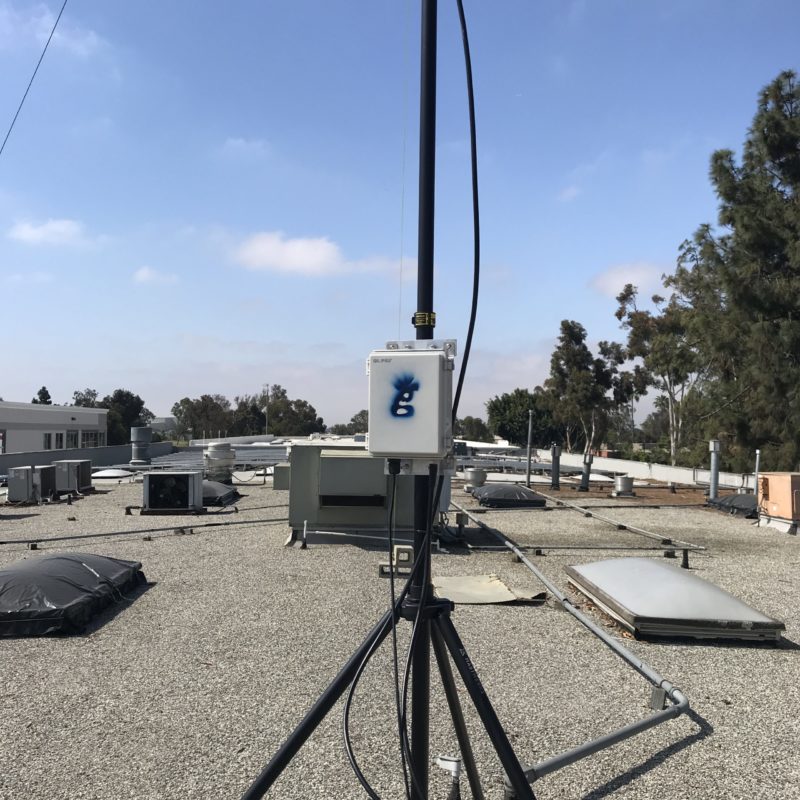
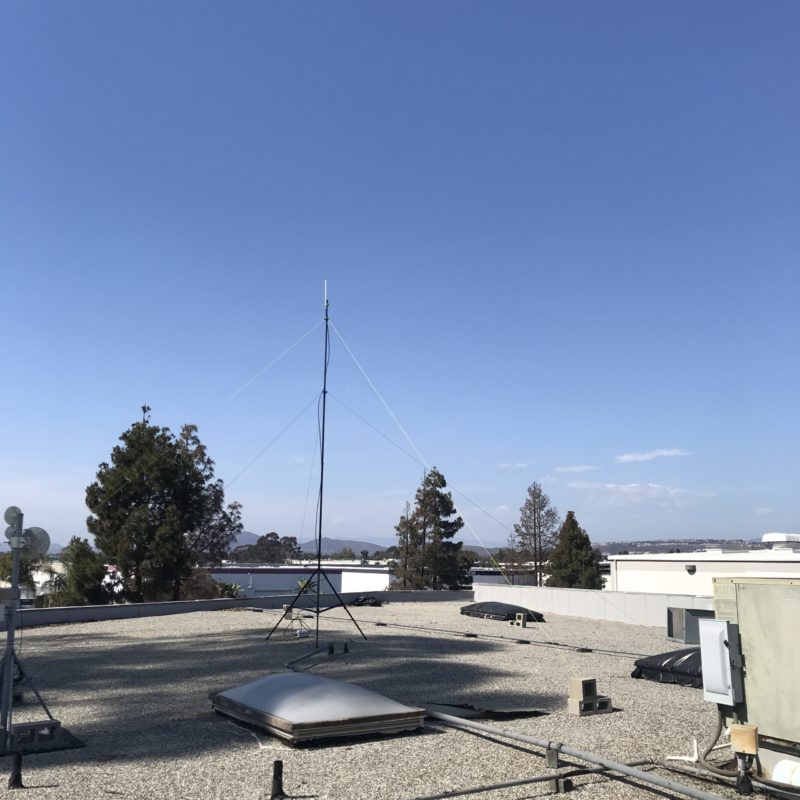
How To Use PoE To Power Your Helium Hotspot

· 8 min read
Nik
Site Owner

How do you use PoE? Do you need a splitter, an injector, or both? How does it all work?

Let's dive in! PoE is one of those things most of us never have to deal with and can seem like a mystery. It's not. It's super simple, let me show you how it works.

First, P-O-E stands for Power Over Ethernet. It's a way to combine BOTH the power AND the Ethernet connection into one cable. You're literally running power over an ethernet cable.

When deciding to use PoE, check to see if your hotspot supports it natively like the Nebra Outdoor (Option 1, below) or doesn't (Option 2.)

Here's a handy Hotspot Connection table to figure out what you have.

Note on the Syncrobits that they have "Passive PoE", which is non-standard. Make sure you get the right type of Injector for them. Ok, on to the diagram.

Ok, but what do injectors or splitters actually look like? We'll start with an Injector:

See how the power cord comes in on the right side, and then there are 2 ports on the left?

One of those ports, "Data In", is for the ethernet cord that comes FROM your router. That brings the data INTO the injector.

The other port, labeled "Power & Data Out", is what you'll use to take both power and data OUT, going up to 300' over an ethernet cable to your hotspot.

What about the Splitter? What do those look like, and when would you need one?

First, look up your hotspot specs. SOME hotspots (the outdoor Nebra, for example) support PoE natively; they don't need a Splitter on the far end.

However, if your hotspot has a port for a power plug (USB-C, barrel plug, etc) AND an Ethernet port you can use a PoE Splitter. Those look like this:

That blue cable coming in from the bottom represents the long cable run from the Injector to wherever your hotspot is. The Splitter than splits out the Power and the Ethernet, and you connect both to your hotspot.

The one tricky thing is being careful to not "double power" your hotspot. Don't run PoE AND a power cable to the hotspot. It sounds silly, I know, but I've heard stories about the "people who think more is better", so I figured I'd warn ya.

If you'd like to support the blog, pick up your PoE Injectors & Splitters via these links:

If you learn best by watching something, here's a video. Yeah, the cables are a little messy in the vid. If that part of it confuses you, well shit, you're probably having trouble tying your shoes and should stay away from putting up badass hotspot placements.

https://www.youtube.com/watch?v=oHzBNQOHqrY&t=7s

That's PoE explained. Get after it!

Wait, you want to see what it looks like in an actual enclosure, with a hotspot, and all fancy? Here ya go:

https://www.youtube.com/watch?v=pKCWOBQy22U

~Nik @ GK

Archived Comments

Stephen - 7/25/2021

Thanks Nik. I use these injector/splitters on my Bobcats, they work perfectly and a little less bulky: https://www.amazon.ae/gp/product/B08P8Z5PDQ/ref=ppx\_yo\_dt\_b\_asin\_title\_o04\_s00?ie=UTF8&psc=1 A few more benefits for users to think about when using PoE: a. by removing power adapters from your outdoor case you're also reducing the heat a little. b. by having easier access to the power source (lets say at ground level or at least indoors), it's much easier to power cycle the unit.


Marcus Makabenta - 8/4/2021

Why my ethernet port from my spectrum wifi router is not going when connected to poe injector (basically all cables are connected correctly). Thank you for the answer.


Nik - 8/4/2021

Hmm, I'm not sure mug. Sorry!


CaptMartini - 8/16/2021

Brilliant write-up. Much appreciated. This makes for a clean and tiddy install. I will pay it forward. Cheers.


Nik - 8/16/2021

Hell yeah, love hearing that. Rock on Cap!


Jake - 9/3/2021

For the Outdoor Nebra - does it matter if the injector you buy is 100mbps or 1000?


Nik - 9/3/2021

Probably not; data rate on the hotspots rarely exceed 300 kpbs.


Darren Warren - 9/13/2021

Since I have a Syncrobit I need to make sure I buy a passive injector? Example: TP-Link PoE Injector | PoE Adapter 24V DC Passive PoE Thanks!


Nik - 9/13/2021

Hi Darren, Syncrobit says "Support for Passive PoE" on their spec sheet. I'd double check with them just to be sure.


Dylan - 9/14/2021

My POE splitter is very hot. I bought a DSLRKIT Active PoE Splitter 48V to 5V 5.2V 2.4A USB TYPE A Female 802.3af for tablets and just used a short USB A Male to USB C cable to go into the Sensecap M1.


Andrew - 9/26/2021

Does bobcat run on 802.3at or 802.3af? Does it matter? Don't want to fry my rig.


Nik - 9/27/2021

Good question Andrew, I'd check with Bobcat to make sure. They don't say anything about it on their spec sheet.


Nelson - 10/22/2021

Thanks for the great post. I have a setup where its much easier to get my Ethernet cable from the bobcat to a wifi extender rather than the router. Do you know of any issues using this setup. Thus far, I haven't been able to get it online even after trying a port forward.


Nik - 10/22/2021

I've heard of other people having the same issues with WiFi extenders. Always best to go straight from the router into your Hotspot via ethernet, even when it's a lot harder to do. :)


Raf - 11/16/2021

Bobcat operates on 2.4Ghz Wi-Fi (802.11.b/g/n) Source: Joe P#0175 (discord channel) Joe Petrungaro 7/27/2021 Thanks a lot for your posts Nik \(^_^)/


Amos - 12/16/2021

Instead of a POE Injector splitter can I use a POE switch. I have a POE Switch powering other devices.


Nik - 12/16/2021

Hi Amos, sure, the PoE switch should be able to replace the injector. You'll still need a splitter on the Hotspot side if it's not PoE capable.


Richard - 12/17/2021

Hey KING, I was doing an upgrade to my RAK and installed a POE splitter to tidy up a hotspot and now my miner says its RELAYING, didn't before installing the POE splitter. Any thoughts or give it some time?


Nik - 12/17/2021

Shouldn't be the splitter that's the issue. Go through Jason's relay flow over here, that should get you sorted.


Light Hotspots Explained

· 27 min read
Nik
Site Owner

What the heck is a Helium Light Hotspot, and why does it matter? If you're not tech savvy, the whole thing can seem confusing. Let's clear it up.

We'll begin with the different types of Hotspots: Regular, Light, and Data Only.

Regular (I call 'em Full Fat) Hotspots are what Helium started out with. They create challenges, they beacon, they witness other hotspots, AND they store a copy of the blockchain on 'em. That last part began creating problems as the network and the blockchain grew.

As the blockchain grew, it took up more and more of the memory of those hotspots, causing the blockchain to bog down. With the blockchain bogged down, hotspots had trouble getting their witness and beacon receipts recorded, which caused spiky (and unsettling) earnings as well as blockchain stalls. Nobody likes it when your money stalls.

To solve this, the Helium community came up with, voted on, and passed the idea to create a new entity on the network called a Validator. Validators don't do anything except blockchain stuff. They neither beacon nor witness. They can *create* a challenge for Light Hotspots, but for now (March 2022) they just validate (hence the name) all the receipts for all the challenges and witnesses and beacons that hotspots submit. With those validated receipts they form a block and add it to the blockchain.

Having Validators allows us (all of the Helium network) to create and use what's called a "Light Hotspot". Light Hotspots don't have to keep a copy of the blockchain; Validators do that for them.

Validators can also create Challenges for Light Hotspots to Beacon. I know, I know, this is getting confusing.

To clear it up, here's a short diagram of how the Proof of Coverage Cycle works (the number of hotspots has now dropped from 25 to 14)

Light Hotspots will only be able to do steps 2 and 3, above. Those earn the lion's share of PoC HNT.

Light Hotspots won't do step 1 or 4. You may think that'll lose you a bunch, but it won't. A Light Hotspot misses out on earning HNT because it won't create Challenges (aka being a PoC Challenger.) Creating Challenges doesn't earn very much; less than 1% of all HNT distributed per epoch. An epoch is 30 blocks, and blocks are mined about one every minute.

Light Hotspots will still be able to earn for Beaconing (being a Challengee) and Witnessing. Here's how it breaks down:

Now, that leaves one more entity to deal with, a Data Only Hotspot. Data Only Hotspots will ONLY be rewarded for processing data. They won't be able to earn for challenges, witnesses or beacons. They won't need to. Data Only Hotspots are what the 5G version of a hotspot will be; Data Monsters, and almost nothing else. :)

So, that's the Proof Of Coverage Cycle, which you need in order to understand the next part.

Now, let's get into what makes a Light Hotspot different from a Regular (Full Fat) Hotspot in slightly more technical terms.

The flow starts with Sensors, because that's what Helium is built for.

This introduction of "Sensors" can be confusing, because most of what you've paid attention to and heard about so far is your hotspot (also known as a "gateway") getting rewarded solely for connecting (Challenging, Beaconing, & Witnessing) to other hotspots.

Still, sensors are the whole reason the network is being built, so I'm including them in their rightful position at the top of the line.

For now, let's see what it used to look like, before Validators. This was the case for all current production hotspots as of July 2021 (OG, RAK, Sensecap, Syncrobit, Nebra, etc.)

Both the Miner & the Packet Forwarder are on the same device. This way the Miner could keep a copy of the blockchain for itself as well as create, issue, and record Challenges, Beacons, and Witnessing.

The Sensor picks up data from the environment and passes it to the Sensor Node. The Sensor Node transmits it to the Gateway (Hotspot). The Hotspot spends most of its time listening for those data packets coming from Sensor Nodes. Occasionally, a Hotspot will Beacon out a message of its own for other Hotspots to hear that essentially says, "Here I am, check the strength and bearing of my signal just to be sure."

Other hotspots Witness that Beacon, record that transaction, and then a group of Hotspots (the Consensus Group) agrees on which transactions are valid and which are gaming, spoofs, or just mistakes. They all connect via some kind of internet connection; WiFi, Ethernet, Cell Backhaul, etc.

Any data that actually got passed from Sensors goes to the LoRa Router (in most cases Helium Console, although you can run your own.)

Finally, that data is turned into a form more readable by humans on an Integration Server, like MyDevices Cayenne, Datacake, or others.

So, that's how it worked BEFORE Light Hotspots. Can you see the problem? If a tiny little computer (basically a Raspberry Pi) has to do all of that AND keep a copy of the blockchain on it, eventually it gets overwhelmed. What's the solution? Don't make it do so much computing-heavy work.

Now let's look at a Light Hotspot, which keeps the radio element but removes the computing & data-heavy requirements of the miner from the device, and puts that onto the Validators.

Light Hotspots still do the "radio" things; Issue beacons and witness other beacons. They just don't have to do the resource intensive recording anymore; the Validators are doing that.

The flow after Validators is the same as before: Through a LoRa Router, then an Integration Server.

It's important to note that what's getting "validated" by validators is the passage of data; NOT the data itself. That data "lives" outside the blockchain and is heavily encrypted.

All of this is also laid out over on the Helium site, where you can see the milestones and dates for when all this gets completed.

Can you see the difference between Light Hotspots and Full Fat Miners?

Yep, a Light Hotspot is JUST a packet forwarder, which is basically just a radio connected to the internet. It can transmit (beacon) and receive (witness) other gateways, and it can do the same for sensor nodes. It leaves all the heavy lifting of mining and validating to the Validators.

A Regular "Full Fat" Hotspot (every current production miner as of July 2021) has both the Miner AND the Packet Forwarder on it. Here's what the network data traffic looks like for a group of hotspots. Looks like it mostly stays below 350 kpbs. You'll notice a little yellow/orange line at the bottom. That's the network data transfer for a packet forwarder (aka Light Hotspot.)

That group of Helium Hotspots have to send ALL of their mining work to other miners. That's anywhere from 20-90 GB month! It's also why the blockchain was bogging down before Validators came online. At any one time, only 16 full fat miners (running on little Raspberry Pi's!) were processing ALL of the transactions submitted to the entire blockchain from 90k other Hotspots. Whew!

In comparison, a Light Hotspot uses around 100 MB/month. Light Hotspots will still be able to Witness and Beacon and earn from doing that, along with earning data credits for the data they process. Here's the same graph with just a Light Hotspot on it (the host took it off at 1600 for maintenance and fiddling, so it stopped totally then.)

Since they're transferring so little data, this means that Light Hotspots can use tiny little computers (like a Pi Zero or smaller) that don't get bogged down trying to process the transactions of 90k+ full fat hotspots.

That should help with understanding Light Hotspots and why they're important. Hit me up with questions in the comments, and if you'd like to go deeper in the Helium network, consider hiring me to help with your next project.

Oh, and in case you want a quick vocab rehash:

Sensor - A device that collects environmental data. This could be temperature, wind speed, the number of cars parked in a parking lot, etc.

Sensor Node - This transmits the sensor data to the gateway. Many times a Sensor (like the LHT65) consists of both a Sensor and a Sensor Node.

Gateway - This is what you probably think of as a Helium Hotspot. A Gateway is the thing that receives data from a Sensor Node, then passes it on to the network. Gateways ALSO receive and transmit data with other gateways, a process called Witnessing and Beaconing. That's covered in depth, here.

Miner - A miner is what records the passage of information (NOT the information itself) and adds it to the blockchain, so anyone can see the information flow. Again, they CAN'T see the data (it's encrypted), but they can see that data was passed.

Packet Forwarder - This is the radio part of a current production hotspot. It transmits (beacons) out, mostly to prove it is where it says it is. It also listens for incoming packets of information from Sensor Nodes.

Validator - The Validators do what the Miners used to do, and they'll eventually take over all mining operations. Validators confirm, or validate, the transactions submitted by the miners (and in the future, packet forwarders) to the blockchain. Validators are what make the information on the blockchain trustworthy.

Network Connection - You need to connect your Hotspot or soon, Light Gateway, to the internet somehow. This can happen via WiFi, and Ethernet cord, by cell connection (also known as "cell backhaul") or satellite connection.

LoRa Router - Helium Console is an example of a this. A LoRa router is the thing that takes the information submitted from the miner through the blockchain and begins to get it into readable form.

Integration Server - This is what allows you to actually "see" the data and use it, as a normal human and not a machine or high wizard of tech. You can use MyDevices Cayenne, or Datacake, or any one of a number of services like those.

This post was written with technical help from @jerm on Discord. All mistakes are mine, all righteous accuracy is his.

Archived Comments

KUZYK - 8/2/2021

Thanks for the explanation. When the Helium cloud Validator will be available to support the light Hotspot or Gateways? Has it been tested ?


Nik - 8/2/2021

They're aiming for Q2 2021 according to their site.


Block 27: $HNT Halving, #HeliumBirthday, 112K+ Hotspots, Console 2.0, and More! – Helium 5G - 8/6/2021

[…] fewer components will be required. Catch up with Gristle King in his “Light Hotspots Explained” blog, and read more about the milestones for the transition on […]


Manuel - 8/6/2021

Hi Nik, Thanks for the great and very informative post! In reading the documentation from helium’ official page (link below) I found this paragraph a bit concerning for people (like myself) who are in process to procuring a regular helium gateway (aka “Full Fat”). How should this “INFO” be taken in the context of all the current helium gateways doing both data forwarding and HNT mining? Will they be eventually discontinued and physically replaced by light hotspots? or will the transition to light hotspots will simply require disabling the mining function of the standard hotspot? “INFO: Gateways running a Packet Forwarder and Miner is not considered a Light Hotspot and will never earn HNT.” https://docs.helium.com/use-the-network/light-hotspots/#what-is-a-light-hotspot


James Steortz - 8/6/2021

So at some point will there be a firmware update that will turn full fat hotspots into light hotspots? Or will this be a sperate product?


Stephen Refsnes - 8/7/2021

This is amazing! Also love that off-grid setups will need much less cellular data a month! 100mb is nothing!??


Nik - 8/7/2021

Yeah, the data requirement is significantly less. Excited for that!


Joe - 8/9/2021

Thanks Nik. One thing I’m sure many of us are wondering is “With this new information, what will be the best way to earn HNT going forward?” I have 8 more miners that are still delayed (was supposed to be August delivery; now looking at December or sometime in 2022) Will they be obsolete when they arrive?


Nik - 8/9/2021

It's a good question, and I don't know the answer. If I had 8 on order I *might* cancel 'em and put the money into getting one or two off of eBay so I can earn right now, BUT that's ONLY if I had 2 very good spots. Location is key for earning; only buy as many as you can place in excellent locations. Even then (as always), earnings are not a guarantee.


Graham - 8/10/2021

Nik, Absolutly brilliant Infomation, As a newbie to Helium this info has been invaluable. I'll refer to this again and again i'm sure. One thing i couldnt find an answer too, apologies if ive missed it, is when my syncrobit hotspot finally arrives, Can i place it in a different property / location linked to the router in that location rather than the router at my home address? and still earn and contribute of course. Thanks again Graham


Nik - 8/10/2021

Hi Graham, yep, you can "assert" your miner wherever you want. As long as your radio signals match up to where you say the miner is, you're fine. Does that make sense?


Gordon Shupe - 8/17/2021

Nik, first let me say your posts and resources have been awesome – thanks for sharing so much expertise and analysis! I am working with over a dozen miners in flat Florida. All except one are on 20'+ 5.6 dBi antenna's carefully placed. Most all of them are averaging 1.5 HNT / Day since the halving. Most of them are connecting to 6 or more witnesses. Except the one at my house... Curly Gingham Vulture https://explorer.helium.com/hotspots/112daaAvArU2gh8epH9uFrgBCs3ExiED6PmzE9Xu39EeybvLcT4h Curly is connected by ethernet (POE to base of antenna cable) I have specified port forwarding for inbound and outbound (although I didn't have rules set up to block it), and it has remained connected, synced, powered, and below 103? F in a weatherproof box underneath the eave. 25 foot low loss cable with lightning adapter. About a month ago it continued to witness other beacons and has earned decent Helium (as much or more than my others) but has gone 2 weeks at a time without being challenged or sending a beacon. Got any ideas what I could try next?


Ben - 8/18/2021

Hi Nik, great post and thank you for the information! id like to get your opinion on something. i have 11 miners coming, 3 ordered 16 June 2021 (bobcat), 7 ordered 24th June 2021 (bobcat), and 1 ordered 12th August 2021 (Linxdot). all of the miners have locations pre-arranged for installation. all indoor miner on ethernet cable, with 8 dbi outdoor antenna's average heights will be 6M-12M high. The area they are all going to be located where they will earn 1.00 rewards (that could change by the time my miners arrive). and there is a very good spread of other peoples miners about 50-100 within a 5-8 mile radius, uk based. so they should get some good coverage. with all of this in mind would you say that its still worth me doing/ going ahead? i have read your comment above mentioning about potentially cancelling orders and buying miners on ebay to start sooner? the way i have approached HNT mining is, if all miners i set up make 1 HNT per day each that's 11 HNT @ £10 per coin... lets say the price remains around £10 for 1 year (even though its going up quite nicely at the moment) that is £40k per year before fee's or sharing with the others.. would you say with that set up it's possible/realistic? am i missing anything i should need know about HNT? I've been researching pretty much every other day since I heard about helium but as I'm still new to all this it can be overwhelming at times. after reading your page here, it has me second guessing if there's a better way to make HNT rather than using the miners, or potentially soon the light hotspots will be better to use rather than the ones i've ordered. its been 8 and 9 weeks since i placed my bobcat miner orders and bobcat are only on on order #170k EU... my order numbers are #1.2M EU, that leaves them the next 12 weeks to follow through with their 12-20 week delivery guide.. with 1M+ EU orders to go before mine (not including US orders) they've managed to ship roughly 40k orders in the last 8 weeks? I don't think I'm getting my miners until 2030 at this rate lol. unsure on what to do next. thanks again!


Nik - 8/18/2021

Hi Ben, Bobcat's been pretty good so far about meeting their deadlines. I'd be careful betting on *anything* long term. The CEO at Helium has said miners will probably settle at 1 HNT/month eventually. As long as your miners have clear line of sight to each other, and you've got 11 total, you *should* earn more than that, at least as of mid-August 2021.


Gateways, Validators, Miner ... - Erklärung Helium Begriffe - Nodle, Helium und MXC Mining Deutschland [LoRa-Projekt.de] - 8/25/2021

[…] Bei der Recherche rund um Helium – The People’s Network findet man zahlreiche Beiträge mit englischen Fachbegriffen. Ein Versuch der Erklärung Helium Begrifflichkeiten basierend auf dem englischen Artikel von kyk13. […]


Glenn - 8/27/2021

So glad I stumble onto this. Thanks for this. The info on here is invaluable. Question: will the light Hotspots be significantly cheaper to purchase and will manafactures be able to keep up with orders if it contains less components and is easier to make?


Nik - 8/27/2021

Hi Glenn, they'll probably be significantly cheaper. As far as less components, they'll still need the radio components, which is part of the problem. I'd expect that'll be the bottleneck, if there is one.


LEO - 9/10/2021

Amazing content as ever, Nik, thanks! Any idea when we might see the light hotspots on sale? Debating putting in another order now with Kerlink, but if light hotspots will be available soon, and will be much cheaper, then could make sense to wait.....tough call!


Nik - 9/10/2021

Thanks Leo! Hmm, they were supposed to be shipping in Sept, so it's anyone's guess. Maybe end of year?


Chris - 9/19/2021

I’m confused. Are my bobcat and rak miners now obsolete? Can they be switched to light hot spots?


Nik - 9/19/2021

No, your miners are not obsolete. They work now and will continue to work when we make the switch to light hotspots.


Angel Ivan Castell Rovira - 10/9/2021

Thanks for the information provided, that was very useful! Here my question: I planning to buy a dragino LPS8. This is a data-only hotpot). I would like to convert it to a light-hotspot Do you think that's possible? This dragino LPS8 contains a Semtech CI SX1308 Lora concentrator, 2x1257 LoRa Transceivers and a Linux OS running on a 400Mhz AR9331 with 64MB of RAM and 16MB of flash. Do you know what hardware is missing in order to be able to perform the PoC? Thanks in advance!


Nik - 10/9/2021

Nope. Data-only and Light Hotspots are 2 different things with 2 different security requirements. You're missing the security element on the LPS8.


Nrose - 10/13/2021

Will the earnings drop when light hotspots are active?


Nik - 10/13/2021

Well, by the time light hotspots come online, earnings will be down from where they are. You'll miss out on earning for Challenges, but those are only about 5% of PoC earnings anyway.


Kelvin - 10/20/2021

Hi Nik, from the ROI point of view, which will make more sense? a Full Hotspot which cost $1k+ or a data only hotspot which cost around $150. Does it mean that the full hotspot will have to setup as a light hotspot in the future? Wouldn't the earning be reduced or lower that will affect the ROI? Similarly for data only hotspot, I was wonder would anyone even bother with will data only hotspot? Pardon me for all the questions.


Nik - 10/20/2021

Unless you have an area with an incredible amount of data, the Full Hotspot will make more sense for now. Remember, a "Data Only" hotspot is NOT the same as a Light Hotspot. Once Light Hotspots become available, they'll be the way to go.


A Rough Guide To Helium Hotspot Placement - Gristle King - A Guide to Helium - 11/4/2021

[…] watch­es 2 or 3 movies most nights (100–150 GB/month). This will con­tin­ue to increase until Light Hotspots come online some­time in […]


Didi Setiadi - 11/14/2021

Awesome explanation Nik. Two things that I did not seen are GPS and computation processor. If the case light hotspot like that then it does not require SBC, ST micro is one of MCU which is ready to utilize Semtech license I guess.. GPS data is required data when the hotspot is located alone or island hotspot. What do you think NIK?


Nik - 11/14/2021

Hi Didi, I'm not sure on the comp-processor side. GPS is so easy to spoof that Helium doesn't even bother with it.


Helium Light Hotspots & Data Only Hotspots? Transitie Helium Miners uitgelegd - Helium Miners Nederland - 11/27/2021

[…] https://gristleking.com/light-hotspots-explained/ […]


Helium Light Hotspots & Data Only Hotspots? Transitie Helium Miners uitgelegd - Helium Miner Venlo - 11/27/2021

[…] https://gristleking.com/light-hotspots-explained/ […]


Elena - 12/10/2021

Hello, thank you for detailed explanation.. Now i start to worry , i have ordered some hotspots and waiting in que.. Should i just as for refunds.. Because price is really high till 1000 euros with taxes.. Light hotspots will be around 100 eu.. So why should i pay 5-7 times more for stuff wich will be same as 100 eu value.. Please assist me, im confused now ...


Nik - 12/10/2021

Hi Elena, Tough question. No one knows what the price on Light Hotspots will be, or when they'll actually ship. There's not a downside to having a "full fat" hotspot, so keeping your place in line might be your best option. Sorry I couldn't help more!


Michail - 12/21/2021

I have a question. Will the existing non-light hotspots remain with the challenging functionality or will the be ported to light hotspots? Will there be any option or who is deciding for it?


Nik - 12/21/2021

Hi Michail, they'll lose the challenge ability but keep the Witness & Beacon rewards. We (the entire Helium community) decide that.


Helium Light Hotspots & Data Only Hotspots? Transition Helium Miners Explained - Welcome to HNT-Helium.com - 12/22/2021

[…] Source: https://gristleking.com/light-hotspots-explained/ […]


samuel law - 1/3/2022

hi Nik great bit of info, Can I have an data only and full fat at the same address?


Nik - 1/3/2022

I don't think so; they're both providing the same service, so you'd be duplicating coverage and not adding value to the Network.


Fraugdib - 2/4/2022

Does anyone have an actual number of earnings for a dragino lps8 over a month? I don't need another explanation of the differences in theory after the fine job this fellow did in the post above. I'm just looking for any verified number that equates toa month of ear ings on a dragino lps8


JackJack - 2/17/2022

Hello Will hip 54 and 55 greatly effect my earnings? I am running four Milesight UG65 hotspots. Thank you for the great info!


Nik - 2/18/2022

Nah, shouldn't be an issue.


Art Kutin - 3/6/2022

Hi Nick, thank you for this great info! Does the fact that full fat hotspots will be converted to light hotspots now that HIP 54 and 55 has passed mean that all the headaches with port forwarding will become a thing of the past since the won't be receiving inbound connections as challengers? Would it also become easier to set up off grids using cellular without having to have a static IP or setting up VPNs? That would be awesome.


Nik - 3/6/2022

Yep, Light Hotspots solve all those problems. They'll be a real step up for off-grid deployments.


Dennis - 4/12/2022

I missed the fact that fat hotspots will be converted to Light... makes more sense now. 1. From my understanding, Validators are already online and running. 2. Hip 54/55 passed, but not yet implemented as of today? Is the actual code already written, and tested? 3. I would assume this will be a update to current fat hotspots firmware. i.e. delete local copy of blockchain, and now point to a validator for this info. Also update to helium apps, to show what is relivant now. 4. Is there a firm date for this rollout? 5. Assume rollout would be staggered vs. 700k-800K fat hotspots attempting to update to Light all at the same time? Any ideas specifically how this will be rolled out globally? 6. Is there any estimate for how long it will take to be fully implemented? 7. Will light hotspots be allowed to get info from "any" validator? Assuming light hotspots would keep a copy of all current Validators to contact.


Nik - 4/12/2022

Great questions Dennis. Up to date info can be found on the Helium Discord. In general terms, I'd expect to have a transition to Light Hotspots complete with bugs worked out by the end of May. Official timelines predict sooner than that, and the Helium/Nova team is capable enough to nail it, but I'd guess on the conservative side. 1. yes 2. Yes 3. Yes 4. No 5. Staggered, not sure of details. 6. Probably an official one somewhere, see my comment above. 7. I believe so.


Sandor - 4/23/2022

Hi Nik, With the hip55, you will still need static IP for cell connection? Thank you


Nik - 4/23/2022

Nope, shouldn't need one.


Me - 5/12/2022

Since port forwarding is no longer required, does that mean hotspots can share same public IP?


Nik - 5/12/2022

Good question. Probably, but what would be the reason?


Williamus Prime - 5/16/2022

Hey Nik! So... we've made the switch to light hotspots, and therefore we don't expect gigabytes and gigabytes of data to be used every month. I just wanted to pick your brain for a minute if you have any ideas or feedback... I had a Bobcat running on a SIM card ("cell phone data plan") internet connection, and it would consume between 3.7 to 4.3 gigabytes per 24hr as a "full fat Bobcat", and this exceeded the limits of the monthly data, so this particular Bobcat got unplugged until the light hotspot update arrived. I updated it to be a light hotspot using my home internet, and got it synced and caught up. I confirmed that it's running the latest OTA version (1.0.2.91, released 2022-05-13), which means that it's currently running the "light hotspot" update. Then I tried running it yesterday (2022-05-15) using the SIM card internet connection again, and it chewed through more than a gigabyte of data in about 12 hours. You would think that it probably wouldn't even consume an entire gigabyte of data in an entire month. I'm just wondering if you heard anything about this ongoing "full fat data" usage following the light hotspot update, and if maybe the developers are still working the kinks out of the light hotspot data usage? I can't imagine why I would be using this amount of data unless I'm keeping a local copy of the blockchain instead of pointing to a validator. I saw in the comments that you mentioned the transition to light hotspots might stretch into end of May, but yeah, any ideas/comments greatly appreciated. And for the above post dated May 12, maybe this person was asking about multiple hotspots sharing the same public IP so that their (multiple) hotspot traffic could be hidden from cellular/internet providers by routing multiple hotspots through a single VPN. Like, multiple hotspots using cellular connections can now share the same single VPN connection, which could decrease costs for a fleet of helium hotspots. To clarify/summarize for anyone wandering through these comments, you may or may not know that BEFORE the light hotspot update, you wanted to create port forwarding to avoid "relayed" status and maximize earnings. This is pretty easy to do on your home's internet, however, creating successful port forwarding BEFORE the light hotspot update meant that any installation involving a SIM card ("cell phone data plan") was forced to battle technology limitations to avoid being "relayed", and this involved using VPN-to-VPS in order to get around CGNAT, which then allowed creating a static IP and port forwarding. Long story short with technical terms aside, the light hotspot update eliminates the need for something called port forwarding, and so this technical battle is no longer necessary with the light hotspot update, because we no longer need port forwarding with the light hotspot update. And this is great news if your intended location has power but no internet, because for a "cell phone data plan" style internet connection (or any internet connection for that matter), you don't need a static IP, and you don't need port forwarding for port 44158.


Nik - 5/16/2022

Hi Williamus, we ain't through the transition yet. Once we get through it you'll see it settle down and the data requirements will be as expected. Might take longer than we all want.


Brian - 5/16/2022

Any updates on the data usage of hotspots now? How much data and what rate?


Nik - 5/16/2022

Nothing yet, the Network is still in flux.


Stan - 5/18/2022

Who makes light hotspots ?


Nik - 5/18/2022

Most of the current manufacturers eventually will.


John - 6/13/2022

Is a fixed IP still required?


Nik - 6/13/2022

Shouldn't be.


Mike - 8/25/2022

Since the transition period to light Hotspots in regard to the blockchain syncing is finally done have you already performed a final analysis of the data usage?


Nik - 8/25/2022

I haven't performed a final analysis. Any specific questions?


Joe - 12/19/2023

I'm not earning anything anymore since the switch. I guess it's time to unplug.


Lucas McNea - 12/23/2024

super helpful with the diuagrams, much appreciated. Just getting into LoRa and helium for agriculture sensors and smart ag.


Does A Helium Hotspot Actually Expose You To Powerful Radiation?

· 13 min read
Nik
Site Owner

Are Helium Hotspots dangerous to be around? How much RF energy do they emit? Should you or your hosts be worried about the exposure levels? Let's run through the facts, then you can make your own decision.

We'll start with this: In general, Helium Hotspots rarely emit any RF. They're built to receive signals far better than transmit them. That's because the whole point of the network is to "listen" for really faint signals from sensors at long range.

Still, Helium Hotspots DO occasionally transmit out power in the form of a "beacon". Beaconing usually happens less than 3 times per day. Sometimes you'll have a banner day and it'll beacon 5 times. That's unusual, so I'll use 3 or less when making the calculations below. Just to be clear:

A beacon is a single transmission witnessed by any Hotspot.

https://docs.helium.com/blockchain/proof-of-coverage/

In this case you can ignore the "witnessed by a hotspot" aspect. For now we're focusing solely on the power in a beacon, not whether or not it was received.

You can see how often your hotspot beacons just by checking on Helium Explorer. Here's an example from one of mine on an unusually active day:

Yep, 2 beacons inside of 5 hours. We are bangin'! By the way, for those of you concerned with earning HNT, your "slice of the pie" for beaconing is relatively low, so don't worry about "not beaconing enough". Once a day is fine.

Back to RF exposure and power! Helium uses LoRa as a radio protocol, and what we call a "beacon" is technically a "chirp". Let's dig a little deeper on that. From Helium's blog:

LoRa uses what is known as a “chirp” protocol and spreading factors (SF) are the duration of the “chirp”. Typically you’re looking at a range of SF7 to SF12 where the 7 is the shortest time on air. Each step up doubles the time on air to transmit the same amount of data and increases the range. Due to local restrictions, we are limited by max payload sizes to certain spreading factors, usually SF8 and SF9 for most packets.

https://engineering.helium.com/2020/10/02/spreading-factor-changes-poc.html

How long does an SF8 or SF9 (or even an SF 12) chirp last? Let's take a look at this table from Semtech (the owner of LoRa technology). Here's a screenshot:

There are 1,000 milliseconds (ms) in a second, so for all chirps, we're looking at under a second of time that RF is being emitted.

Cool, so now we have a time established: Less than one second per beacon.

The next (obvious) question is: How strong are these beacons?

For those of you who've read the Cable Loss & EIRP post, you'll remember that the most powerful hotspots (American hotspots) blast out a massive 27 dBm. I'm joking about the massive part. dBm stands for Decibel MilliWatts, and 27 is about half a watt. You can do this calculation yourself over at DigiKey's website. I'll make it easy and just paste it in here:
I can hear you say it: "Ok Nik, but what about when someone uses a MAXIMUM GAIN! (said in my best monster truck voice) antenna? In the US, the legal max antenna gain we can use is 9 dBi.

27 dBm + 9 dBi = 36 dBm. So, how many watts is that? Let's cruise back to DigiKey's calculator and see.
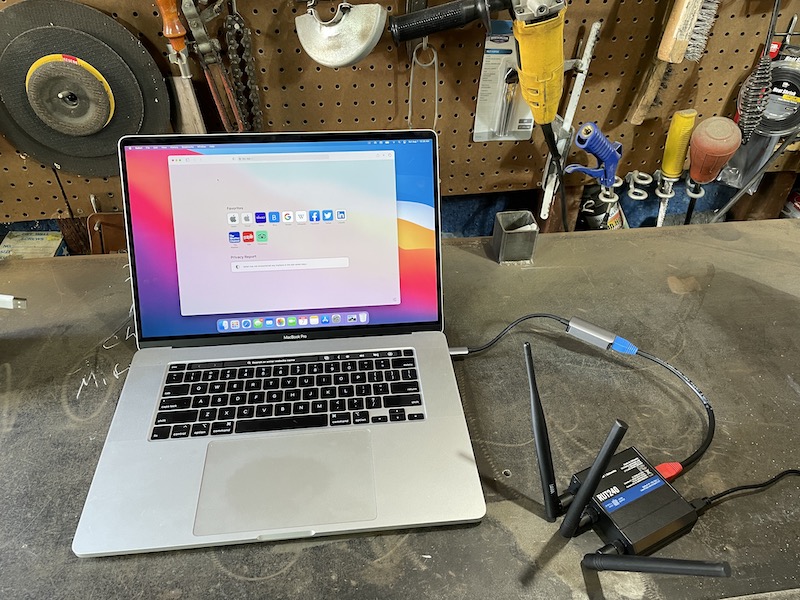
Holy smokes, almost 4 watts! That's enough to fry a... Wait a second. How much power is 4 watts? Is there anything else we might possibly use for comparison?

Yep, you guessed it. Cell phones. Cell phones in general have 2 "levels" of power they emit: .6 watts, and 3 watts. Typically, most people use their cell phones while holding them within 2 feet of their face. If you have long-ass gibbon arms, maybe you can get it 3 feet away from your face. You can reduce your exposure by growing your arms or just following common sense guidelines.

When you are talking on a phone is when it emits the most power; it has to transmit your voice. At that point, you are holding a device to your head for more than a second (if watching people in public is any indication, it's more like non-stop) that is emitting up to 3 watts.

Let's go back to the Helium Hotspot one last time and just think about where it's placed. While I recommend always placing it outside (NOT for RF exposure reasons, but to provide the best coverage), some people can' t do that due to HOA or other building restrictions. So let's assume worst case: In your house.

If it's in your house, it's unlikely that you hold your Helium Hotspot to your head. It's probably on a table or by a window. Let's say it's reasonable to be at least 3 feet away from the antenna at all times. We'll do a quick calculation check on that distance with the MAXIMUM POWER antenna to see what you're being exposed to, using HintLink's RF Exposure Calculator. By the way, a 9 dBi omni antenna (the maximum gain you can legally use) is about 4 feet long. Most people don't like the way a 4' long fiberglass pole looks inside the house.

Since I'll assume that you're not working in a Controlled Environment (think RF labs, or near super high RF emitters like a cell tower site), we'll calculate the exposure based on the max limits you'd encounter in your ordinary life. In that case, (ah, fuck it, I'll make this huge because this is my final answer.)

A Helium Hotspot emits .07% of the Maximum Permissible Exposure to RF devices. It does that for less than a second, less than 4 times per day.

I do know that some people are super sensitive to RF. If that's you, it may not be the best idea to participate in the building the world's largest wireless network. For the rest of ya, go deeper if you want, but after looking into it, this seems like enough for me to say that the RF being emitted from a Helium Hotspot is not something I'm going to worry about.

If you need more help with understanding Helium, whether you have antenna questions, want help with optimization, or just want to talk through the Helium ecosystem and how you can fit in, take a look at joining the Gristle Crüe.

Rock on!

Archived Comments

John Hickmott - 7/13/2021

Hi Nik, This confirms my speculation on this matter, especially as regards beaconing, power and listening time. I do wonder about p2p and OTA comms, though, mostly as related to all these updates that come from Helium and the vendors. It sounds like gobs of data going over air rather than the internet. A comment on that and maybe a link would be appreciated. Thank You! John


G - 7/15/2021

Thanks Gristle, you have been granted PhD level cert in Quantum Splaining. Toxic RF effects from HS is FUD fodder and seemingly not a rational consideration. Sooooooo many other things to worry about. Death by land shark or Discord overdose lead the list, well behind lethal antenna installation mishaps.


Jacob Ertel - 7/26/2021

Nik, Thank you for sharing your knowledge of Helium. I have found your explanations very helpful. However, I don't find the statement that miners only transmit when they are sending a beacon to be true. Personally, I think the RF exposure is insignificant, but I just want to set the record straight. Remember, that the point of Helium is to create a world wide LoraWAN network so that sensors and "things" can connect wirelessly to the internet from anywhere. You are correct in stating that miners are optimized for listening to sensors, however they can still transmit to devices. (I am not the most up to date on Helium hardware, but I think each miner can listen to eight sensors at a time, but can only talk ot transmit to one sensor at a time) I will provide an example: There is a GPS vehicle tracker available that can also immobilize the car if it is stolen. It uses the Helium network to communicate, as it is significantly cheaper than paying for a cellphone plan for the device. Normally the tracker is sending GPS location data to a miner, and the miner relays that data to the internet, so the owner can look at it on a website or app. This represents a listen or receive case. However, if the car is stolen, the owner can immobilize the using the internet. The miner then talks or transmits RF to the vehichle tracker signaling it to stop the car. In conclusion, miners do emit RF energy. How often, depends on what people are willing to pay for.


Nik - 7/26/2021

Jacob, totally makes sense, thanks for clarifying. Do you have any info regarding duration/power and if that will differ from a beacon?


Mohammad - 10/2/2021

Thank you very much! Very informative. So is the max 9dbi because above it is harmful? For example a 15 dbi antenna and the hotspot will produce 15 W. It still doesn't look like dangerous if comes only 5 times a day and each time less than a second. Right?


BB - 10/3/2021

Very insightful. Can you address "Jacob Ertel" comment above?


Nik - 10/3/2021

9 dBi is the max in the US due to FCC regs. Due to the way LoRa propagates, there's no real sense in using a 15 dBi antenna for Helium Hotspots


Nik - 10/3/2021

Hi BB, what part did you want addressed?


John Lee - 11/19/2021

Hi, I was wondering if it would be safe to have a miner in the same room as you all day? 2.3 DBI


Nik - 11/19/2021

Probably safer than the other EMF in that room if you've got a computer, phone, etc. :)


Mikel Izpura Pinillos - 1/13/2022

Hola Nick. Tengo la duda sobre si el hotspot hará interferencias en un audífono y en un implante coclear


Nik - 1/13/2022

I wouldn't think so, I'd think they're using/picking up very different frequencies. Ya can't hear 915 with the human ear, as far as I know.


Jason Russell - 3/10/2022

Correct cochlea implant speech processors only sample the audible spectrum. 2k-22kHz


Jason Russell - 3/10/2022

The human ear is 2k to 22kHz. The quarter wavelength cut off for 915MHz is 228MHz.


Nik - 3/10/2022

Love the depth of knowledge you have, thanks for contributing! ~Nik


Aean - 3/19/2022

I notice there's always a lot of confusion between RF (radio waves) and sound. Allow me to explain: Frequency is simply a unit of measurement based on timescale. Specifically, the unit hertz is the amount of times a wavelength repeats within the timespan of a second. For example, 120V 60 Hz AC power (the US power standard) reverses polarity 120 times a second, because you have to go from positive, to negative, then back to positive to complete a 360 degree cycle, thus what makes the current "alternating". This makes it complete 60 full cycles a second. 60 Hz. The distinction between sound waves and radio waves is the medium of transport. Sound is a pressure wave caused by physically moving molecules, be them water, air, or anything else that can vibrate when struck. Pressure changes form the polarities of our "waves" with changes to positive or negative pressure compared to static. If these pressure waves reach our ears at anywhere from 20 Hz to 20 kHz, our eardrums will conduct these pressure changes and perceive them as sound. In space, which is an empty vacuum, there is no matter to conduct your pressure waves, and thus sound cannot travel. Radio, visible light, radar, microwave, 5G, are different frequencies of the same spectrum of non-ionising radiation (not to be confused with nuclear radiation). We can see the sun and other objects of space because these "waves" are in the form of photon particles radiating from a source. Photons, without going to deep into the physics of it, change polarity at a frequency as they travel through time, thus inhabiting some part of the spectrum of RF (radio frequency). Light is just the spectrum of RF that we can perceive. The most important frequency range for human speech is 1000-4000 Hz. Even if we somehow had RF at 2000 Hz, you would not be able to hear it, because humans cannot hear light.


Nik - 3/19/2022

Thanks Aean, excellent points and much appreciated that you took the time to go through all that. Rock on!


Carlos - 4/16/2022

Still unconvinced of the safety. In the documentation for multiple different Helium miner devices I found online, it states “This equipment should be installed and operated with minimum distance 20cm between the radiator and your body.” 20cm = 7 inches. If it’s far less radiation than a cell phone why does it come with this kind of warning??


How I Built An Awesome Lightweight Off Grid Helium Miner

· 29 min read
Nik
Site Owner

How small can you build an off grid miner? Can everything fit in one backpack? How light can that pack be? Finally, why would you want a tiny off grid miner?

And yeah, those are Puppies Make Me Happy sunglasses.

I'll start with the last question. Why would you want a tiny off grid miner? The short answer is "weight". If, like me, you are super stoked on the idea of hiking in an off grid miner to a place deep in the wilds, you will eventually get over the idea of carrying in heavy equipment. I did that on my first off-grid, carrying in awkwardly loaded 60+ lb rucks over 6 miles of rugged terrain with 3k' of gain.

It was the hardest thing I've done since running a hundred miles back in 2015. Fun once, and rad to share with a friend (we EACH had huge, awkward loads to carry), but not something I was desperate to repeat.

Still, being generally unafraid of physical work, I did the same thing a few more times, just to be sure it wasn't just a one-time suckfest. One off-grid took 6 (SIX!) trips in to install.

By that time, I figured out that while I really like hiking heavy shit long distances out in the mountains, I'd probably enjoy hiking in a light ruck even more. So I set about building one. I also wanted to re-measure my initial power draws because I was seeing off grid setups that seemed smaller with a higher load..

After a conversation with @BFGNeil on Discord about using a Pi Zero and a RAK 2245 hat to put together just the packet forwarder (from a DIY Alpha code I received way back when they were still available), I decided to try it out. The enormous advantage of having just a packet forwarder (and not the full fat miner) is the lower data plan size I can use for the cell backhaul.

I cannnot overstate this advantage. Please do NOT think you'll be able to use a small data plan (100MB or less) on your production Helium compatible Hotspot. You'll need 50 GB MINIMUM, and will be much safer with 100 GB. I got lucky to find Helium right as they launched (and then quickly closed) the DIY program. This guide gives you an idea of what a Light Hotspot will be like.

One last note before we dig in. Off grids are hard, and complicated, and sometimes complex. If you just want to buy an off grid setup, I'd start with IoT Off Grid. If, however, you LOVE building your own stuff, keep reading!

Let's start with a gear list.

PLEASE NOTE: This is MY gear list. It will probably not fit exactly what YOU are trying to do. My goal is to have a tiny, lightweight, right-on-the-edge of power requirements for a Light hotspot in a high sun area. Make SURE you measure your power draws before just blindly ordering what I used and thinking it'll magically work for your area. Your challenges will be making sure you have enough power and making sure you have enough data.

[ninja_tables id="2104"]

The great news is that packet forwarders are what "light hotspots" will be, so it's likely that you'll be able to do this same thing and in a cleaner looking package by mid-2022.

The second advantage of a Light Hotspot is the lower power consumption. Compared to a regular miner, with a packet-forwarder-only setup you can shave off enough watts to really drop both battery size and solar panel size.

Here's the power it's pulling. Note the size of that "hotspot". It's MUCH smaller than current production hotspot, and pulls about ½ of the power.

https://youtube.com/shorts/muwblkr3J0U

Remember, volts x amps = watts, so this is right around 1.5 watts. It jumps around a bit, but in any event, that ain't much.

Add in a cell modem and the solar charge controller with the packet forwarder on a Pi Zero and you're looking at about 3.4 watts total. For comparison, a RAK V2 by itself pulls around 2.3 watts.

Want more data on power draws? Here ya go!

[ninja_tables id="2112"]

Of course, it also depends on the winter sun hours in your area. If, like me, you live in America's Finest City (San Diego), you have more winter sun hours than just about anyone in the US. That means you can use a much smaller solar panel (30 watts is what I chose) as well as a smaller battery (20 Ah in my case.)

I put those together in an enclosure with the packet forwarder, a smaller cell backhaul (IBR200 instead of the 650C I've used before, many off gridders are now using a Spitz), the same charge controller I've used, and had a tidy little package.

Still, you're left with mounting the thing, which can be a real bear. The solution I came up with was inspired by something I saw over at MP Antenna, plus the fact that I love to hand bend metal.

I started out with a sheet of 12" x 48" .0125 5052 aluminum. 5052 is a good mix of toughness and rigidity. 6061 will crack when you bend it, and 3003 will flex too easily. I marked out the holes for cutting and the lines for bending.

I wanted to be able to mount this bracket anywhere, easily. One of the challenges of an off grid setup is actually mounting the thing. Though you can't see 'em in the above pic, the latest version has slots for worm drive (hose) clamps as well as the screw/bolt hole mounts you see here. This will easily mount to a round object, like a pipe or a pole or a tree. It'll mount to a flat surface as well, like a rock wall or the side of a building.

Next up is drilling & cutting 'em out. Aluminum is pretty easy to work with, which makes this a nice project.

Next up was cutting the "window", which allows you to reach in with a drill and mount on the back holes before putting the solar panel on. Here's the plate drilled and cut, ready for bending.

When I go into production (that's a joke, by the way) I'll use a press brake and water jet, but for prototyping you can't beat a bar clamp (as long as you don't mind a little physical work). You put the plate in the bar clamp, make sure your bend line is straight, tighten everything up, and start hammering. Hand bending takes patience; you don't see a lot of progress at first, but over time you'll end up with a beautifully bent line.

https://vimeo.com/573430910

As you can see, I set up a little cardboard angle measurement device which gives me an angle of 148, or a 32 degree bend. 32 is our latitude, and gives your solar panel the most sun rays during the shortest days of the year. Here's what it looks like with the first bend finished.

From there you just slide the plate up and hammer out a 90 degree angle. I'll usually go back and forth a few times with the bends. On a press brake you don't need to, but when hand bending I always find a little extra love makes for a cleaner job.

It's not uncommon to have "extra" bends in there, which you'll need to flatten out on an anvil. In this case the "roof" had a slight arc to it. I leap at any chance to use my Nimba Titan, here she is ready to assist in the flattening process. Man, the right tools make the job easier!

All that hammering attracted my wife's attention. She knew the best fuel for any endurance event is the cake from Paleo Treats, so she brought some out. Damn, that Key Lime is good!

https://vimeo.com/573431945

Fueled with cake and ready for the next step, I assembled the box, the panel, and the antenna.

This next part may be confusing, as I'm using pictures from a few different builds here. The parts you see in this build on the inside of the enclosure are the RUT240 cell modem (NOT the IBR200), a Renogy Wanderer 10, and a Bioenno Power 20 Ah LiPoFe4 battery. The hotspot itself is a Pi Zero coupled to a 2287 concentrator and Pi hat from Parley Labs.

Here's just the RUT240 and the DIY Hotspot.

I printed up little red PETG brackets for the RUT240 and the Pi Zero on my Prusa 3D printer. At about $800 for a kit, they're a very useful thing to have if you get into this off-grid world.

If you don't have (or want) a 3D printer, go to the Prusa World map page and look for folks near you who are willing to print them up for you. That's how I did my first 3D prints. Here's the Pi Zero nestled into its bracket. Brackets make it very easy to attach components to the "perf board" that comes with most enclosures.

Wait, you want everything labeled for ya? No prob:

inside an enclosure with labels

Here it is mounted on the nearest available space (my workbench) as a test run. Please note that you're not limited to mounting on workbenches. ;)

The box still needs vent holes cut and vents mounted along with the holes & glands for antenna cables, but this gives you an idea of how the thing works. It is WAY easier than any other off grid mount I've built. Here's a quick video of it with the HNTenna and a cell antenna mounted, though no cables run yet.

https://vimeo.com/573292248

The next step is breaking it all down and seeing if I can fit it in my backpack. One of the real beauties of this setup is how small it is. Most backpacks on the market are way too small to fit a large enclosure. This backpack is built for elk hunters to carry out their meat, but I figured Stone Glacier wouldn't mind if I repurposed their EVO 3300 as a telecommunications pack. To be clear, this is not (by far) the cheapest pack you can buy to do this job. I just like nice things.

From left to right you've got the pack, the solar panel, below the panel is the HNTenna, then the enclosure with a GK tool roll on it, and finally, the bracket.

Now, that bracket has some sharp edges, so if you're going to strap it on a pack you'll want to cushion those. I had some leftover foam laying around the shop, so I taped it on with painters tape (comes up off easily) and set up the pack.

You can't see it in that pic, but I've also padded the solar panel, which is against my back in the pack. While the panels don't scratch super easily, they're not the toughest thing out there, and any scratch can decrease the efficiency. That's something you want to avoid when you've got such a small panel. Here's the pack with everything in it, all ready to go.

I'm guessing the whole thing weighs less than 35 lbs. If you've ever gotten into pack weight and how it can effect your ability to perform under pressure, you know that this is right at the limit of what saps courage over time. I'm not expecting to engage in any firefights while mounting this thing, so I feel pretty safe, even if I'm slightly over S.L.A Marshall's recommended weight.

After loading the pack up I decided to re-wrap the bracket with a cleaner looking foam setup using pipe insulation. Here's what that looks like, just for reference.

The gear is pretty straightforward (aside from the bracket). This is a slightly different setup than the one I've shown you. Try to identify the components on your own, hit the comments if you need help.

IBR200 cell modem, Renogy Wanderer charge controller, 12-5v buck converter, and then whatever your hotspot is. Here's the interior layout with almost nothing hooked up. The two pink/orange cables go out to the cell modem antennas. You can see the vent up at the top right. There's also one at the bottom left. Because the PiZero doesn't have a native Ethernet connection I picked up a converter for it. Everything else is pretty straightforward.

If you're looking to do this same thing, keep in mind that this enclosure may NOT fit your hotspot, at least as I currently have it laid out. RAK V2s will be fine, but other hotspots may need to be mounted on the door, or just require a reshuffling.

Ok, that wraps up most of the details on this project. If you'd like help getting your Helium Hotspot off grid, consider hiring me to walk you through the best ways to both build and place your hotspot. Rock on!

Archived Comments

Gary - 7/10/2021

Hey Nik that's pretty impressive! I wish I lived in an area where I could go off grid like that. I bet that will definitely be worth all the hard effort you put forth into this project. Rock on!


Nik - 7/10/2021

Thanks Gary!


Peter simon Batrony - 7/11/2021

so awesome!!


Paul - 7/12/2021

Hi Nik! That’s awesome what you achieved here! What about the network? How did you connect the hotspot to the network? Are you using 4G with a dedicated plan?


Michael I Slattery - 7/12/2021

Why no info about your antenna and the dbi?


Nik - 7/12/2021

Hi Michael, it's an HNTenna, should be a link in the article to it. Just in case, visit them here.


Nik - 7/12/2021

Yep, that's a Cradlepoint IBR200 in there, which is a cellular modem. Cell modems allow your hotspot to connect to the internet. Because this is just a packet forwarder I can use a much smaller plan than a "full fat" miner. Once Light Gateways start to be sold, you can do the same thing. In the meantime, you'll need on the order of 40-50GB/month, although that may not be enough. One off-grid I know is on track to use 90GB this month!


KBR - 7/13/2021

Still waiting on my hotspots to come in, but when I do I will be sure to give you a call1


Alan Halley - 7/15/2021

Hey, Nik, And why are you deploying this tech? Alan


Nik - 7/15/2021

Hi Alan, mostly because this is the most fun way for me to deploy a Helium miner. I like the mix of designing, building, assessing a placement, then getting it deployed. There are certainly easier ways to do this. For the first test run on this miner I've just got it deployed on a mountain top you can drive up to; easy to test that way, and great coverage.


Brandon Kling - 7/16/2021

Nik why only 3dbi? Is it because you are deploying this in a place with varying elevations? Also why HNtenna? I've seen RAK/CalChip antenna's also. thanks. -brandon


Nik - 7/16/2021

Hi Brandon, 3 dBi because most of the time a high gain isn't the right choice. HNTenna because I think it's the best antenna on the market. I'm seeing it routinely hit other gateways 170+ km out.


Paulo Bazzo - 7/24/2021

This looks great but I wondering, what will make it secure from vandals or from people coming around your set up and messing with it? Of course it will be locked but don't you think off grid miners can be somewhat risky?


Nik - 7/25/2021

Yep, that risk definitely exists. Aim to mitigate by putting it behind fences or some other "primary" form of protection.


Justin - 7/30/2021

Nik- great piece! On the security question, I know Helium Explorer will show that a miner is in a hexagon, but that is a pretty large area. Is there a way for someone to identify exactly where the setup is located if they wanted to go out and mess with it?


Nik - 7/30/2021

Yep, any of the current paid services (Helium.Vision, HotspotRF etc) will report your asserted location. That information is public, you just can't see it on Explorer. One way to hedge against being found is to assert in the middle of the nearest street intersection within about 150m of your location. Close enough that you're still accurate re. coverage stuff, far enough away to maintain privacy. If you're way off in the back of beyond with no miners (or street intersections) close by, it's just tougher to hide it, though you *probably* have some more wiggle room with distances.


Marie - 8/6/2021

This is epic!!! Quick question, how much data does a miner consume per month? 10gb? 20gb?


Nik - 8/6/2021

Hi Marie, plan on 90 GB/month and you should be fine. At the beginning it was 20-30GB/month but that has slowly crept up.


Manny - 8/10/2021

Love the enthusiasm about building fully off grid miners. I wanted to do this but couldn't figure out where to start until I read this article and your previous one. Can you tell me the process as to how you get permission to place the miners on top of a mountain or hillside? For instance, do you just find a piece of public land and post it where ever you please or do you have to call the City/County and request permission and pay any fees associated to it?


Nik - 8/10/2021

Hi Manny, I had a relationship with the land owners on the mountain; I'd placed a weather station on there the year before. If you can find private land owners they'll be far easier to deal with than the city/county.


Mike - 8/12/2021

Nice work! Do you know if a Multitech MultiConnect could be used instead of the RUT 240? If so, any drawbacks?


Anthony - 8/26/2021

This is super cool! What's the ROI look like for this miner? or how much do you make each month from it?


Nik - 8/26/2021

Depends on where you place it; location is everything when it comes to earnings.


ray - 8/30/2021

So you just bought a RAK2245 which is a light hotspot? How did you pair it to your phone/helium app?


Nik - 8/30/2021

Hi Ray, sort of. This is a bit confusing. For about a month and a half in late 2020, Helium opened up a DIY program, where you could buy your own hardware, receive an "alpha code" from Helium, and build your own Hotspot. They quickly turned it off as they learned how susceptible to gaming it was, but anyone who had received a code was able to build a working hotspot with it. I had a few friends do that, and funnily enough they abandoned the project and gave me their alpha codes. This is a hotspot I built that uses one of those alpha codes. It doesn't pair with a phone or app.


Dan - 9/2/2021

Genius. Pure Genius... and I actually LOL'd at the word Suckfest.


Nik - 9/2/2021

Right on Dan, glad it made ya laugh and helped you learn. Charge!


Glenn Stanford - 10/1/2021

Great! Exactly what do I need to deploy on towers without ISP service. Can get the miner just don’t know diddly about all the other equipment. I am versed in PV and associated equipment. How are you dumping your excess PV harvest? A dc light bulb etc? Thanks


Nik - 10/1/2021

Hi Glenn, if you have access to a tower you'll need both power & internet connection, the latter of which can come via cell modem; a RUT240 is a good option there. Not sure about excess PV harvest, am letting the charge controller handle that. :)


Helium Deployed: The Network In Action - Gristle King - A Guide to Helium - 10/7/2021

[…] It start­ed with the usu­al last minute scram­ble to get every­thing ready for a big project. The night before I was out in the shop cut­ting masts and prep­ping enclo­sures to make sure I had every­thing ready for a big week! Dur­ing the past year, I’ve learned a bunch about get­ting these things out in the wild. The lat­est improve­ment I learned from a client (thanks Dave H!) was using these lit­tle tripods for a “plant it any­where” set­up that’s easy to car­ry. […]


Mason - 10/21/2021

Hey Nik, I am actually really wanting to do an off-grid system because I live in Utah and a hotspot up on the side of the mountain would do incredibly well. But my only fear is having someone steal all the equipment because the location is all seen on the app. have you run into that yet?


Nik - 10/22/2021

Hi Mason, Yep, I've heard of hotspots getting stolen; one of those risks you run. Mitigate it with placing on private property, ideally behind a fence or otherwise difficult to get to (obvi you need to ask for permission.)


Reports From The Field: Tracking With Helium - Gristle King - A Guide to Helium - 11/2/2021

[…] Peak. For those of you way into build­ing these things, this is a slight­ly old­er build mode (direc­tions here). Notice the RP-SMA con­nec­tor (not an N?type) for the bulk­head con­nec­tion. N?types […]


Ivo - 11/3/2021

Hi Nick. I think the solar panel will vibrate in strong winds. It would be good to finish two struts between the panel and the main support plate on which there is a box with a hotspot. This prevents vibrations and possible breakage of the solar panel. Ivo - Czech republic ?


Nik - 11/3/2021

Hi Ivo, it might. I like the idea of struts, though it makes it harder to pack. I've got a new way of putting it all together with the solar panel & box mounted separately on a pole. The idea came from a client and I'm digging it, although I still have improvements to make regarding securing the box & panel to the pole so they don't slide around. Hose clamps are fine for "normal" weather, but heavy winds will rotate a panel.


Ivo - 11/3/2021

I'm afraid that the aluminum will crack when strong vibrating without support from below. I have one more question for you. I can use a cable with an impedance of 75 ohms instead of a 50 ohm cable ? cable : Televes T100 PE 215501 Cu / 100m / 6,6 mm (75ohm) - attenuation -16dB - 100m inner conductor, braid and foil - pure copper Will this cable work just like a 50 ohm cable?


Nik - 11/3/2021

Nope, you'll need a 50 ohm for that.


happy - 11/8/2021

where do you get that power injection come from does the modem give off power to power the miner, from what i understand a poe power injector is need to power up that poe splitter


Nik - 11/8/2021

The power on an off-grid comes from the battery. The battery will power both the modem and the hotspot. PoE is something different. More on PoE here.


Matthew Brown - 11/12/2021

Hey Nik, Is it still possible to create a DIY hotspot miner? Not especially for off grid, but for home or office use as well. I would love to explore this since there is such a shortage of device available. I also want to explore the off grid installations soon, but with no devices available It really isn't too feasible for me to do much exploring.


Nik - 11/12/2021

Hi Matt, you can create one, but it won't earn anything. The DIY program was closed very quickly after it opened up due to vulnerabilities to gaming that are still having repercussions today.


spencer - 11/14/2021

Hey Nik love the post. Was wondering if you had any recommendations on wireless connection (cell modem) since setting up your off grids. AKA would you recommend anything different now that you have set some up? Thanks!


Nik - 11/14/2021

Hi Spencer, Yeah, I think I'm going back to the Cradlepoint cell modems. The RUT240 just isn't as reliable in my experience.


Lessons Learned From A Year Of Helium Deployments - Gristle King - A Guide to Helium - 11/15/2021

[…] Hotspots both on grid and off grid on homes, com­mer­cial build­ings, and (my favorite) in the moun­tains, I’ve learned a ton about what to do, what not to do, and how to make the most of the Heli­um […]


Jay McMurtrey - 11/27/2021

Nik, What's the best U.S. based data plan you've come across, or that you are using? Jay


Nik - 11/27/2021

Good question. I'm running the equivalent of a Light Hotspot, so my plan will not work for you. Right now (Nov 27, 2021), the off grid community is getting hit by a Helium anti-gaming measure and no one has a great way to fix it. Since that update, I've heard of many people using a bog-standard T-mobile card with 2GB data/month at 4G then unlimited at 3G and that works for them. No static IP, just a regular old SIM card. Still, that's not a guarantee. More over here.


Johny - 12/4/2021

Hi Nik, You drilled the holes yourself through the enclosure right? What was used to ensure that you still have the same weather protection, is it simply using rubber grommets? Or are they more specialist seals? Kind regards, Johny.


Nik - 12/4/2021

Hi Johny, I drilled the holes myself. Depends on what you're putting through, but the N-types & the RP-SMA connectors I used have a built in weather seal. You could more to that if you wanted, or you could just use a cable gland, which is what I did with the wires for the solar panel.


Emmanuel Abiona - 12/13/2021

Hi, I'm new are you able to sell me an outdoor encloser with solar and everything in it to make it functional, for a Bobcat?


Nik - 12/13/2021

Hi Emmanunuel, nope, I don't sell those, just show you how to make 'em. There are a couple other businesses out there who do sell 'em, although none yet where I'm stoked enough on their product to recommend them.


Kiryl - 1/18/2022

Hey Nik. How were you able to use cell router? Any port forwarding? My miner gets "relayed" when using cell router.


Nik - 1/19/2022

Hi Kiryl, there are lots of different ways to do it, with varying degrees of success. As of today, Jan 19th 2021, there doesn't appear to be a surefire way of NOT being relayed. You may find this post on setting up a RUT240 for an off grid useful.


Niko - 1/24/2022

Hi Nik- Wondering how you got access to this spot / permission? Isn't this public land?


Nik - 1/24/2022

Hi Niko, while it's right next to public land, this is on private land, and permission is a result of a multi year long relationship and having worked on previous projects together.


Graeme - 9/13/2022

No link for the antenna cable for cell antenna, exterior - Mouser. Can you update this.


Nik - 9/13/2022

Hi Graeme, that's because the connections will differ depending on your miner & antenna. I've used a ufl to N-type like this for mine to get from inside to outside, then put the HNTenna directly on that.


How to take your Helium Hotspot Off Grid - Gristle King - A Guide to DePIN - 8/16/2024

[…] is an updat­ed ver­sion of my think­ing on off-grid min­ers, that blog post is here. Much of the below infor­ma­tion is out­dat­ed, but I’m leav­ing it up as a record. […]