13 posts tagged with "helium tools"

View All Tags

Helium Analytics: Data, Truth, and the Results

· 9 min read
Nik
Site Owner

Helium is a complex system. If you don't understand it, that complexity can be REALLY frustrating.

There are radio frequency concepts, Hotspot density rules, different antennas, cables, splitters, and a constantly changing Network. Those all combine to make an extraordinarily complex system. In any complex system, the big opportunity is to look for big patterns and useful data; digging into the weeds can make ya want to tear your hair out sometimes!

Let's go through a few basic truths, then I'll intro you to a tool that'll help make sense of one of the most important parts of the Network for a lot of folks: Earnings.

Truth 1: The amount of HNT any Hotspot will earn will steadily decrease over its lifetime due to the growth of the network. Think of this as a pie that both gets smaller over time (the halving every 2 years) AND gets cut into more and more slices as more Hotspots join and the rewards get divvied up to more and more earners.
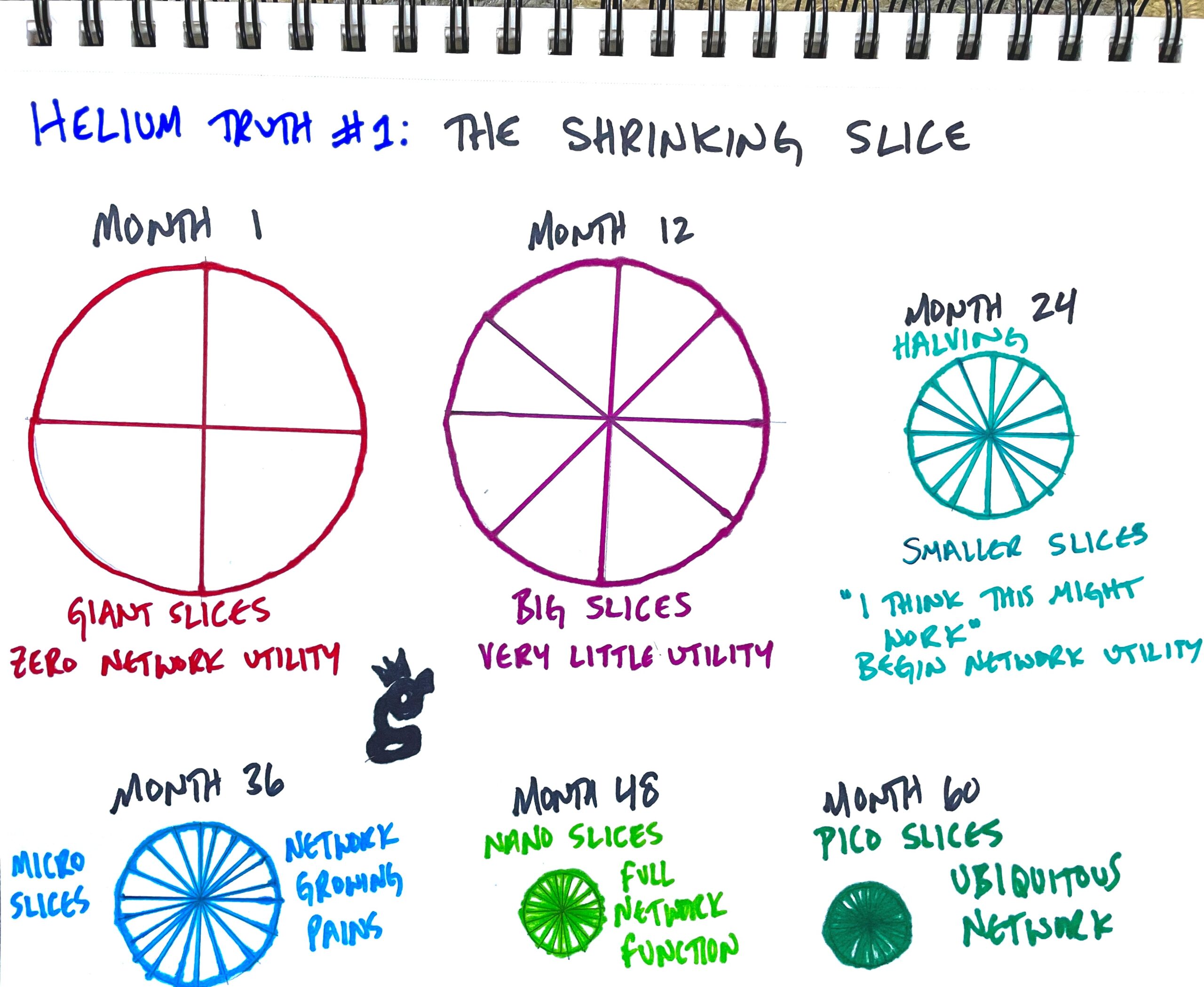
This means that when your rewards shrink, it's not a scam or a rug, it's actually a sign the thing is working: The network is GROWING. That's a good sign for the overall health of the network.

Truth #2: Over time, the Hotspots that earn the most will be ones that provide the most utility to the network. Utility can be measured in two majorly different ways: Proof of Coverage, or PoC, and Data Flow, which is measured in the amount of data transferred through a Hotspot.

At the start of growth, network utility is measured through the first three letters of WUPU (Wide, Unique, Proveable, and Useful) to provide PoC. PoC is what we're all focusing on now in March 2022, because no one is really using the network at scale yet. PoC is the driving force behind the growth of the network, and is a powerfully elegant way of using tokenomics to build a network before you need it.

Once the network starts to actually get used at scale, utility will be measured by how much data your Hotspot processes.

So, if your Hotspot isn't earning, first ask yourself how much value its providing to the network. Common mistakes are to think that you're special and the network owes you something. You're not, it doesn't. This is a decentralized network built to incentivize superb radio coverage. Admittedly, it's not perfect, but it's not (by a long shot) a scam or a rug. It's an uncaring measure of excellence, and by definition, most of us will be average.

Truth #3: The data for just about every network statistic is publicly available. It may not be easy for the common internet user to understand, but it's there. That's what we'll dive into for the rest of this, mostly focusing on a rad tool called Helium Analytics, which you can find here.

The raw data for Helium Analytics comes from what's called an ETL. ETL stands for Extract, Transform, and Load, and it's basically a copy of the data contained in the Helium blockchain. You can run your own ETL, but it can get expensive to store all of that data. As of March 2022, the blockchain is about 4 terabytes of data. That's a lot, and a great reason to let someone else take that on.

Thankfully, Dave Akers over at Helium Analytics has done just that. Let's dive in to the tool he's built to help you understand all the data the Helium blockchain holds!

Let's start with what you want to know: Is my Hotspot doing what it's supposed to do when it comes to earnings?

Now, "supposed to do" means different things to different people. For me, I look at past earnings in 7 day chunks, and I expect that over time those earnings will drop. I'll typically use the Watchium app for keeping an eye on what my Hotspots are doing (use code GRISTLEKING to get early access), but you can also use the Helium Explorer.

If there is a sudden drop or rise that doesn't match what I'm expecting, then I look at the global average, both the targeted average (what *should* have happened) and the actual average. Helium Analytics makes this ultra easy. For these examples I'll be using today, but you can use the date box in the top right to dive deep into the past. :)

Go to the Daily Data Rewards Summary, then look all the over on the right side, under "Actuals."
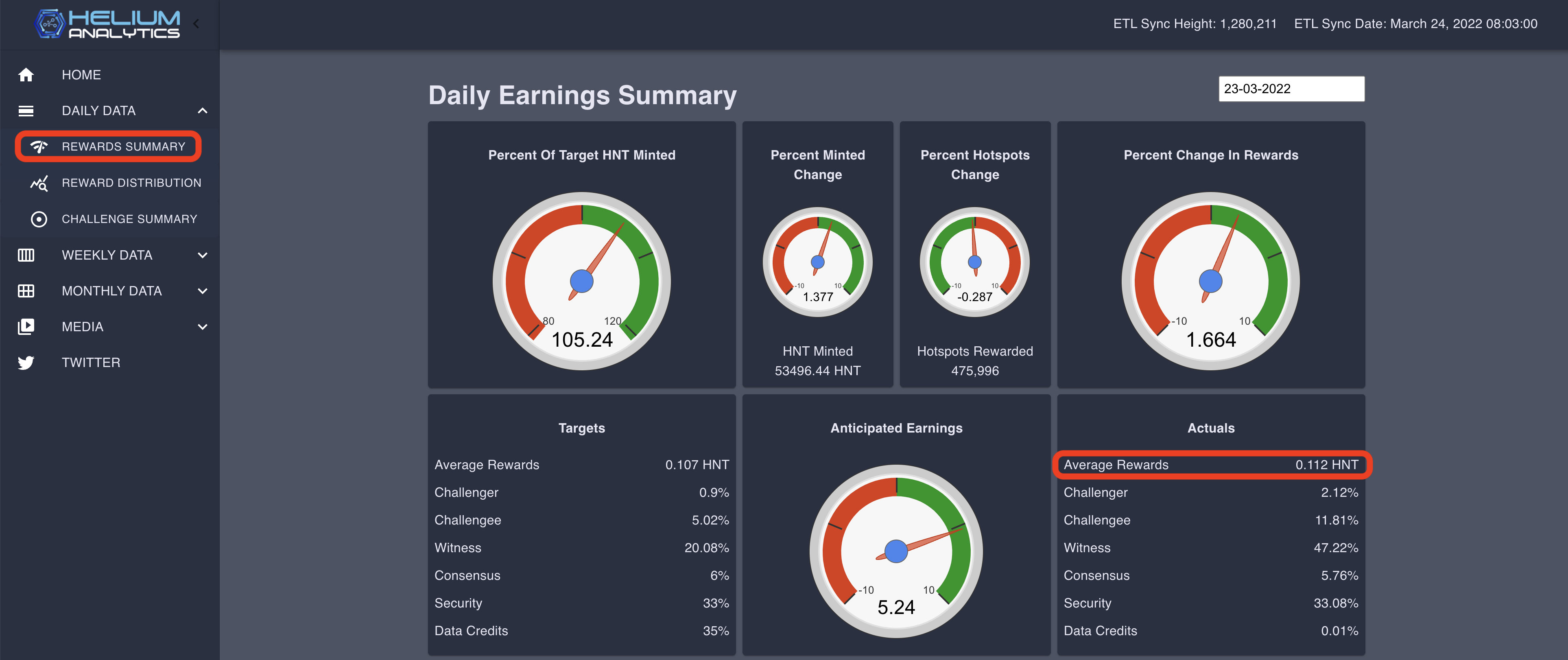
Now for me, I'm kind of a location snob: If it's not awesome OR serving a very specific coverage purchase, I won't put one up. I like my locations to be 3x global average at the minimum. Not everyone can do that, I'm just sharing with you what I'm looking for. The important thing here is to see if there's a temporary global shift in earnings along with where your Hotspot(s) stacks up.

The next thing to pay attention to is whether those dials are in the green or the red. If they're in the red, you can expect your earnings to be down. If they're in the green, expect earnings to be (generally) up. All of us who've run Hotspots for any amount of time know that earnings are spiky; you've got days where you feel like you're nailing it and days where you wonder what's wrong. Those are normal.

Ok, now you have a pretty good idea of where everybody else is, and you should have a good idea of where you are. But...you've heard that "everyone" on Twitter/Discord/Reddit/FB/YT is complaining of rewards being down. That's something you can check over on the Rewards Distribution tab.
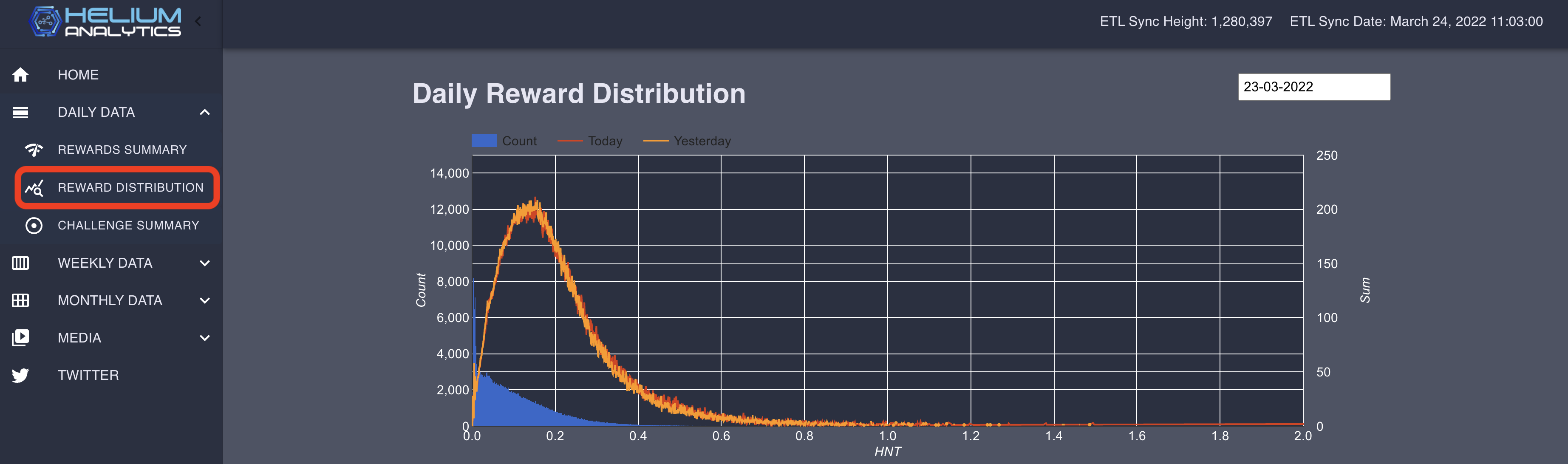
This is a "distribution graph" (Dave at Helium Analytics particularly likes these) with 3 colors on it. The orange line is what happened yesterday. The red line is what's happening today. If those two lines are overlapping (the way they are in this screen shot, you can be pretty sure that rewards across the Network are not down.

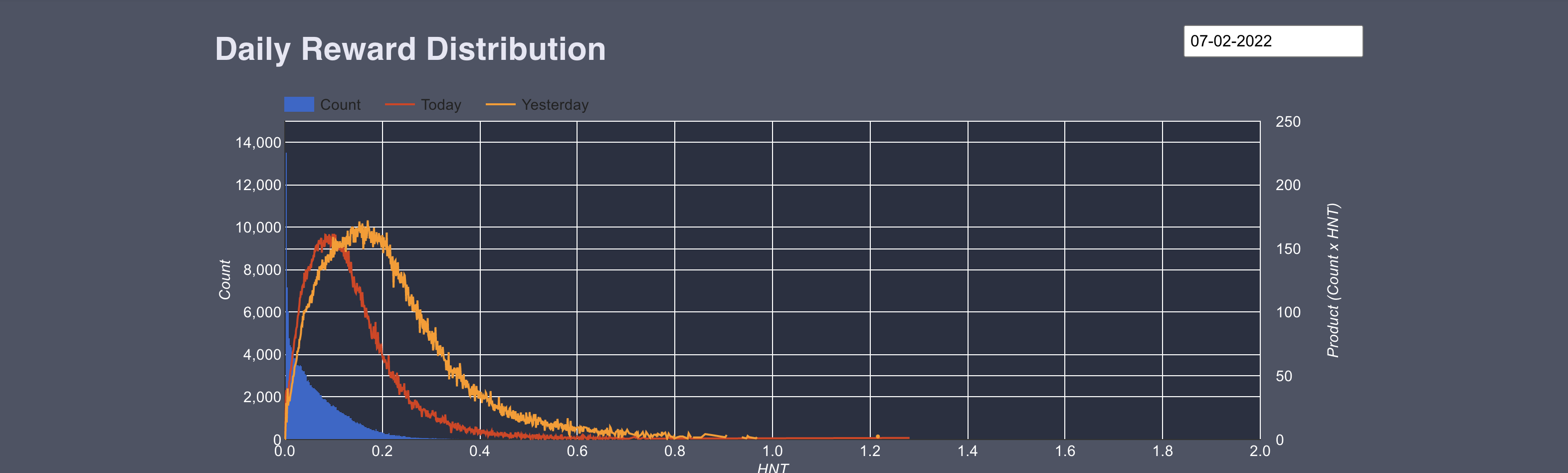
If you see something like this, where the red "today" line is left of the orange "yesterday" line, you know rewards are down across the Network.
The blue area is the number of hotspots at each point. As you can see if you click through the days, MOST hotspots make .4 or less per day.

The left side Y-axis is the number of Hotspots in each "group", the right side Y-axis is the total amount of HNT each "group" of Hotspots made, and the bottom is how much HNT each individual Hotspot made.

A "group" of Hotspots is all the Hotspots that made the same amount, say .46915 HNT that day.

Now let's focus back on the next thing that makes sense for your average Hotspot owner, which is how many Hotspots are actually active on the Network. This was surprising to me; at any one time, about 30% of all Hotspots are offline! Dave says he's been watching that stat for a while, and it's stayed reasonably constant throughout the growth of the network.
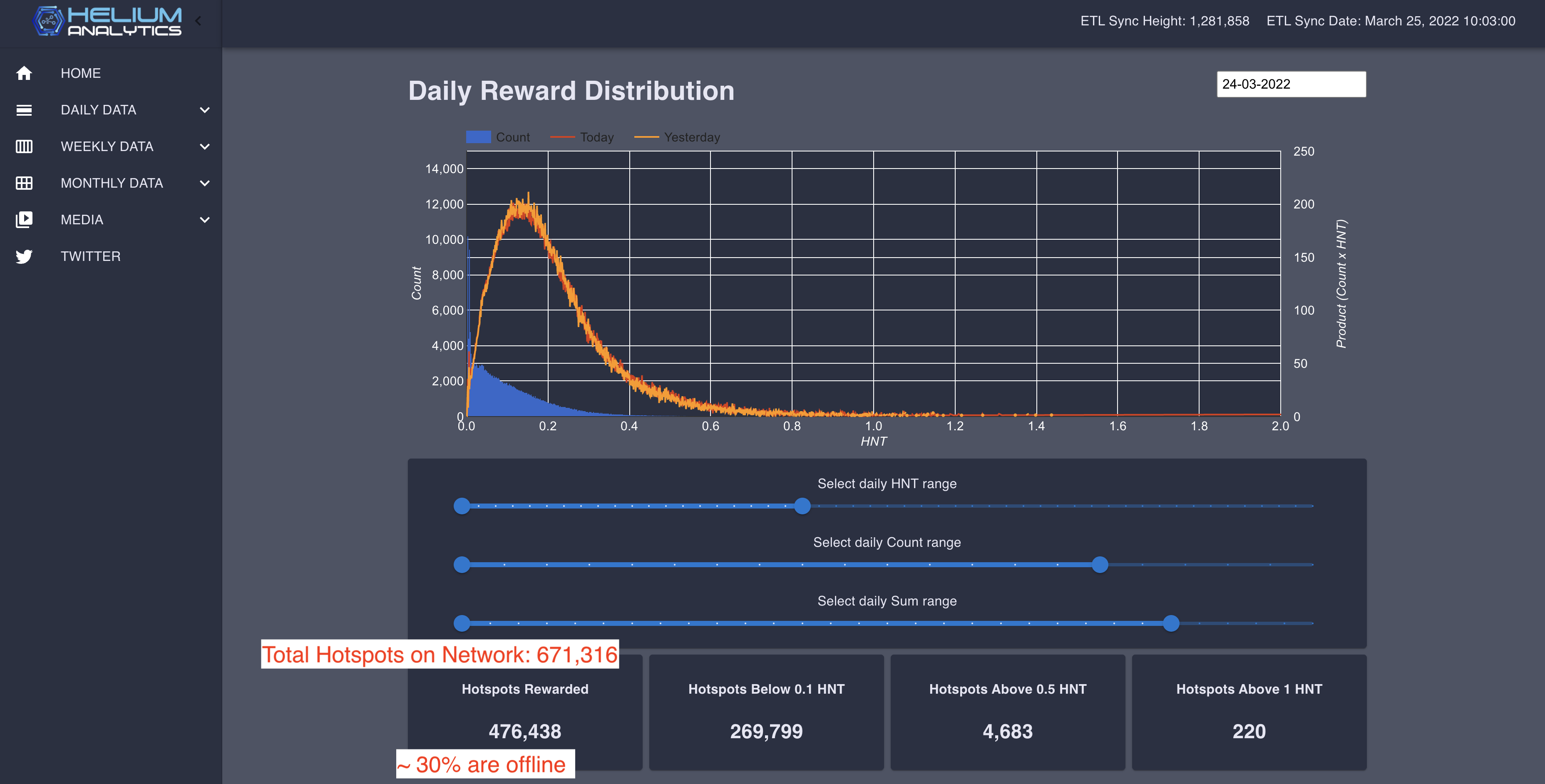
Now, WHY 30% of Hotspots are offline at any one time is a mystery to me, though I've heard lots of potentially true explanations. My takeaway as a Hotspot owner who is interested in earnings is that it's fine for those of us online; we don't have to split such thin slices of pie. :)

The last thing to dig into is the Challenge Summary data, and while you can dig in REEEAL deep, I stop right at the top, looking at the Average Challenges (that's per day) and the PoC interval (this is how often an average Hotspot will Beacon). In this case, 544 minutes equal about every 9 hours. Now, that's a rough calc, but close enough for me to use.
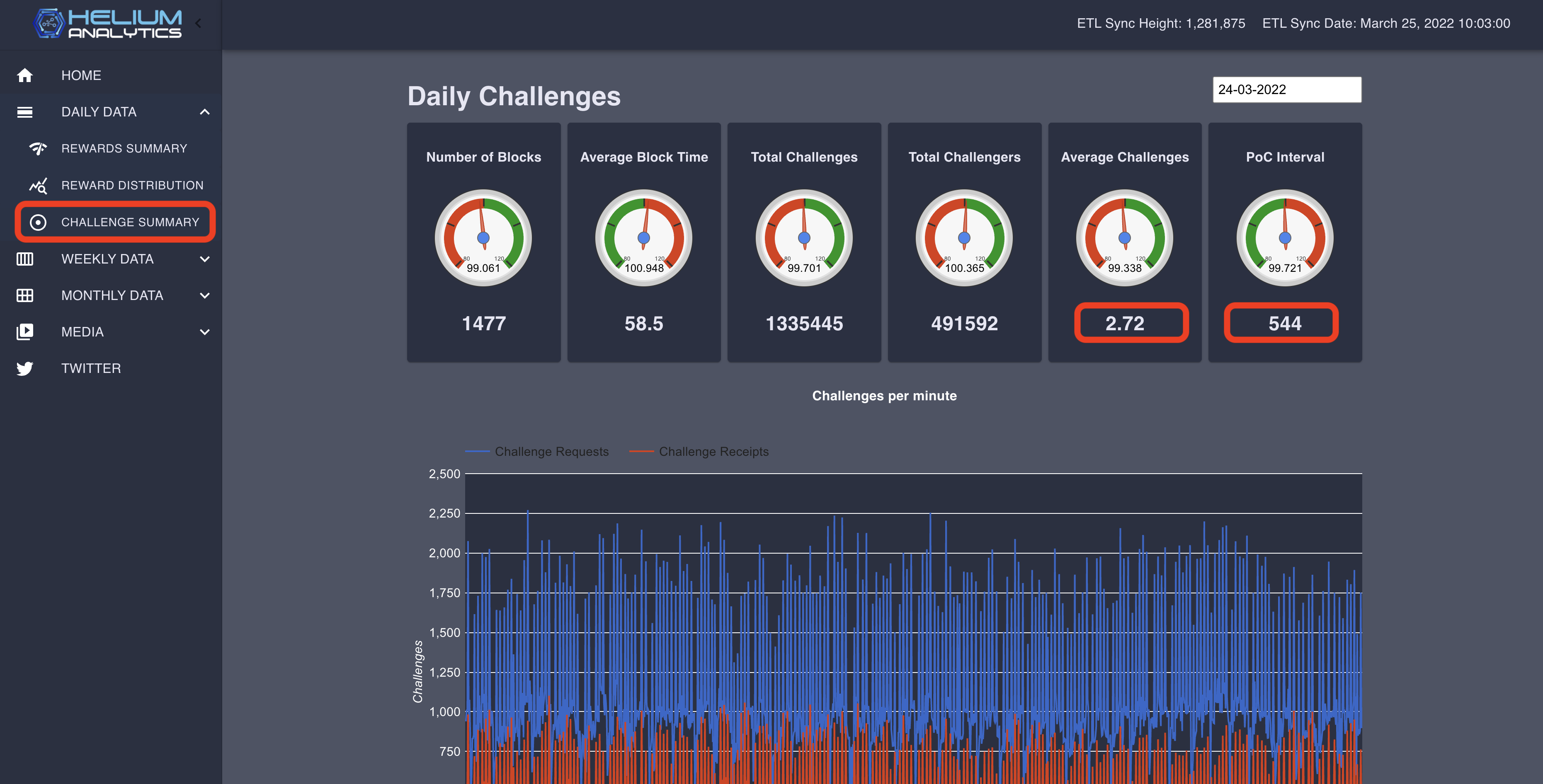
One thing to note here is that the PoC interval can be changed on the blockchain. The Helium team will do this in the short-term future just to keep the blockchain from getting too congested while we still have "full fat" Hotspots on it. When this was written (the morning of March 25th, 2022), the interval was 475.
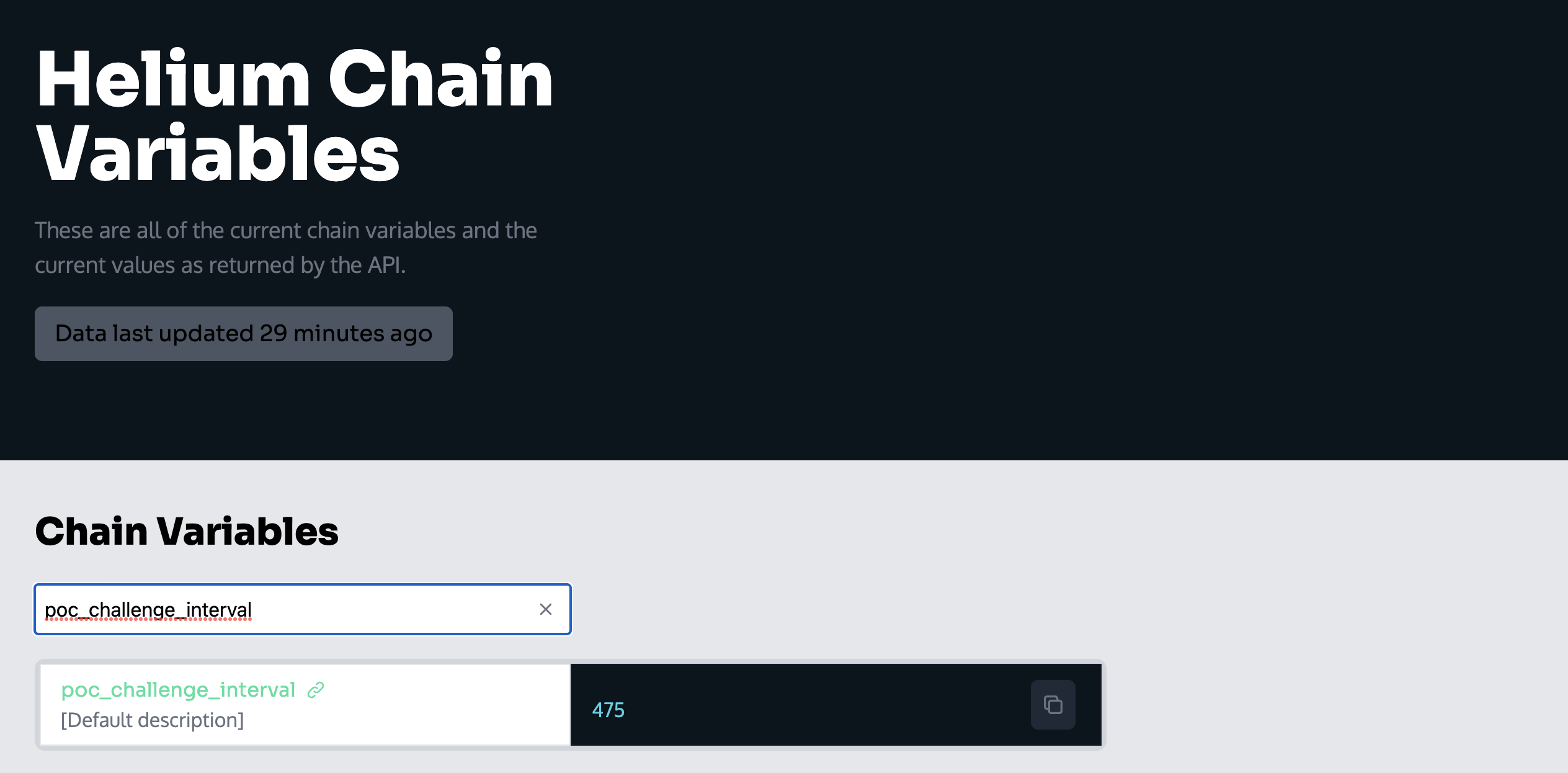
A few hours later, that interval had changed to 950. Kind of cool to be writing a blog post right in the middle of Helium history.
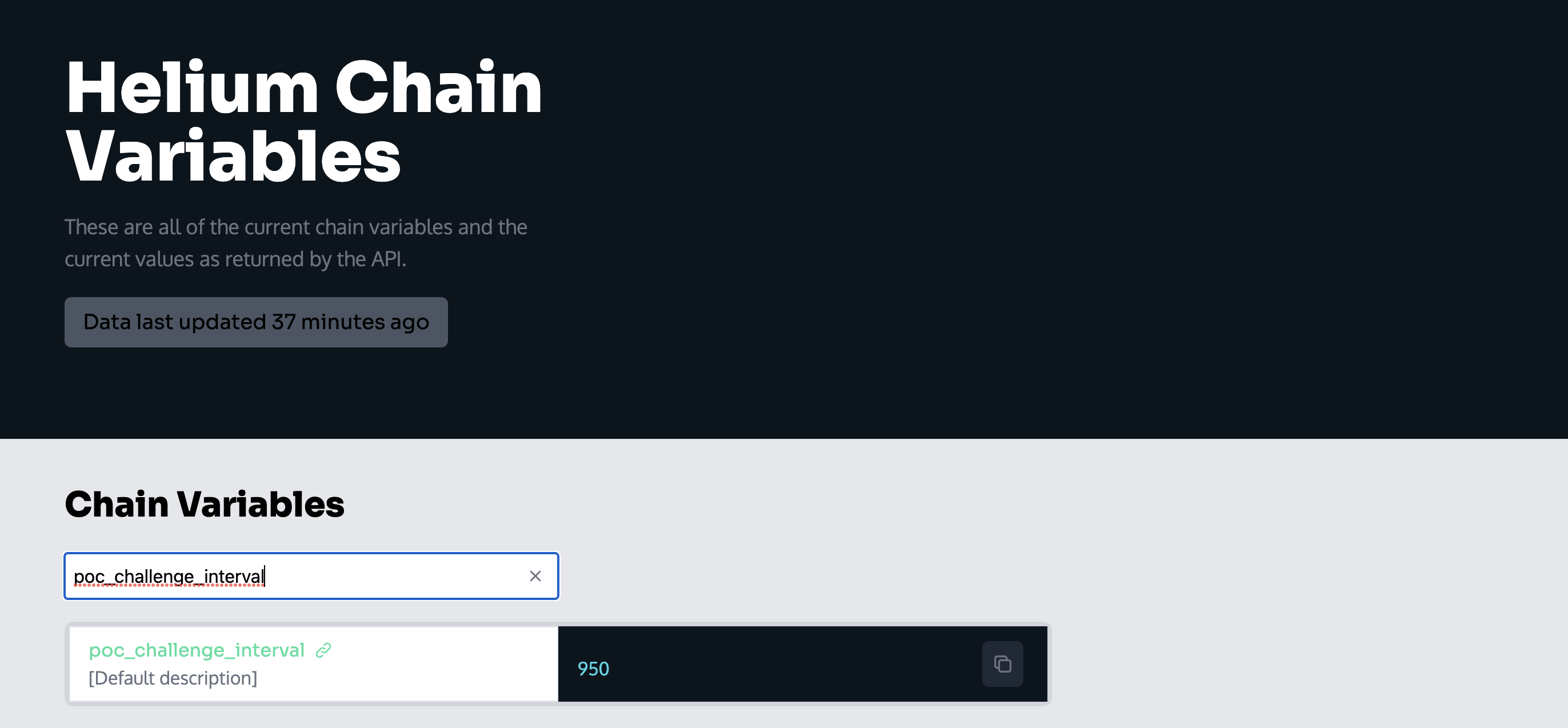
Maybe that's a little on the nerdy side. If you want to check this, you can see any of the chain vars over here, on Helium.Plus.

You can certainly dive deeper, and we do in this video, but for now I think you've got the most useful basics to help determine for yourself the health of the Network. Rock on!

https://youtu.be/Y2O4MeHXNDY

Hey, if you're enjoying the content on this blog and want to either support it OR you want to join a crew of enthusiastic Helium participants, check out the courses I've built to help you understand Helium or consider joining the Gristle Crüe! Thanks so much for reading, and have a rad day!

Archived Comments

Chris Rowse - 6/27/2022

Hi, Tries Helium Analytics .... looks like the last ETL date was 11 May Has it gone? Thanks Chris


Nik - 6/27/2022

Hi Chris, nope, it's still up, the ETL is behind though.

Is Your Helium Radio Signal Good Enough?

· 17 min read
Nik
Site Owner

How do you make sure a radio signal is within acceptable limits for Helium? Short version: Assert your antenna gain (including your cable loss) and location accurately and you don't need to do anything else.

Wait, you want more? Dawg, why didn't you say so? Let's dive in!

First, let's start with why we need an "acceptable" strength. Three words: Proof Of Coverage. We need to be able to prove that we're actually providing coverage where we claim we are. This is important for two reasons. First, when businesses hear about the world of IoT and Helium, if we can show them a map of where our coverage has actually been proven to exist and at what strength, they can quickly make a decision regarding whether or not they want to use the Helium Network, and if they need to add a new Hotspot to provide coverage.

Second, we need to prove coverage in an accurate way in order to combat gaming, aka cheating. Understanding how this works requires a little bit of radio theory, but relax, I'll walk ya through it.

As you read this and the example I give at the end, you'll come to the understanding that as of now, March 2022, the RSSI limits are gobsmackingly lax. This will change. For now, just bookmark that idea as "work in progress." Onward!

Let's start with that signal strength, or RSSI. RSSI stands for Received Signal Strength Indicator, and, as its name indicates, is a measurement of the received signal strength. In order to know what the received signal strength *should* be, we need to know a few things. Those are broken into 3 sections.

1. Beaconer Information

  • Beaconer's transmit power. In the US, most of our hotspots transmit at 27 dBm. Your region may be different.
  • Beaconer's cable loss. (in the Helium app, this is included in the antenna gain section) This is a function of cable efficiency and length. 100' of LMR400 at 915 MHz will lose 2.2 dB.
  • Beaconer's reported antenna gain.

Knowing the Beaconer's transmit power comes from knowing what region of the world the Hotspot is in, and what the legal limit is for power output. For example, US915 can blast at 27 dBm while EU868 is limited to 16 dBm.

2. Distance & Region

Over any given distance a radio signal will lose a theoretical amount of strength. The actual amount can change, sometimes drastically, depending on environmental characteristics like vegetation or building obstacles, and to a lessor extent from humidity, rain, snow, sleet, and pollution. The theoretical amount is called FSPL, or Free Space Path Loss. This is the loss in signal strength in "normal" clear air.

3. Receiving (Witness) Information

  • Witness' reported antenna gain
  • Witness' reported cable loss (in the Helium app, cable loss is included in the antenna gain section)
  • Witness reported RSSI (at what strength did they "hear" the signal?)

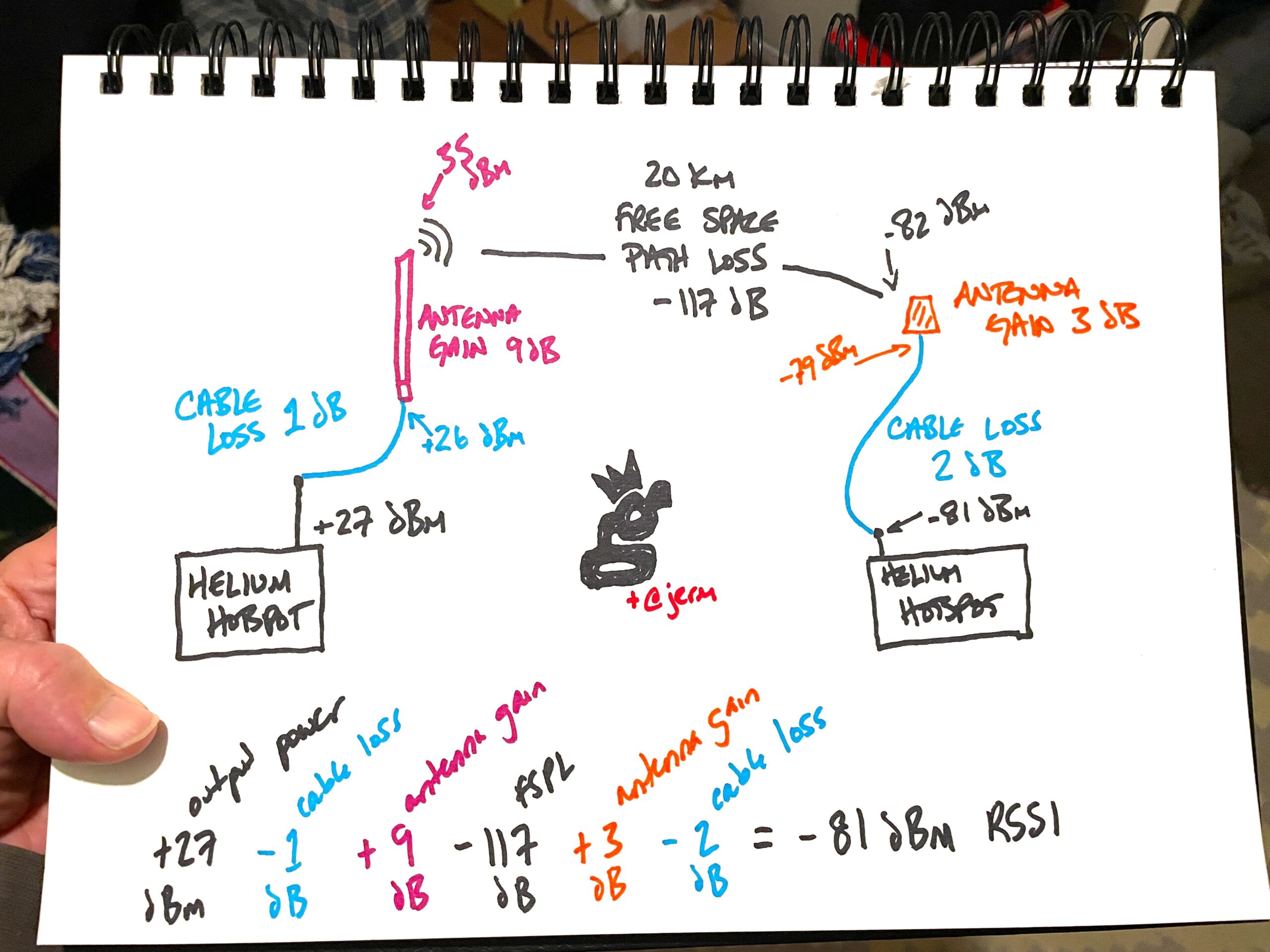
How does that look? Lemme draw ya a picture, and yes, I'll make up a few numbers.

It starts off with the Hotspot's Beacon output, loses power along the cable, the antenna shapes and focuses the energy out into space, where energy is lost, the receiving antenna picks it up according to its gain, energy is lost again as it goes down the cable and is finally received in the Witnessing Hotspot.

The -81 RSSI dBm that the receiving Hotspot (aka the Witness) reports is then compared against what it should have received at, given how far away it's asserted from the Beaconing Hotspot as well as the output power for that region.

Now, there's a problem, because there's the theory, then there's the real world, and then there's our interpretation of what should "count" in the real world. Remember that term "gobsmackingly lax" I used above? Here's where you start to understand it.

You see, as much as we'd like to think that we humans can accurately assess and calculate the world around us, we're not always as accurate as we'd like to be. The actual path loss over 20 km may be much higher if there's vegetation in the way (lookin' at you, Florida) or buildings (Hi New York!). Since the radio models Helium uses don't yet take vegetation or buildings or other obstacles into account, the actual results can be much weaker than predictions, sometimes by large margins.

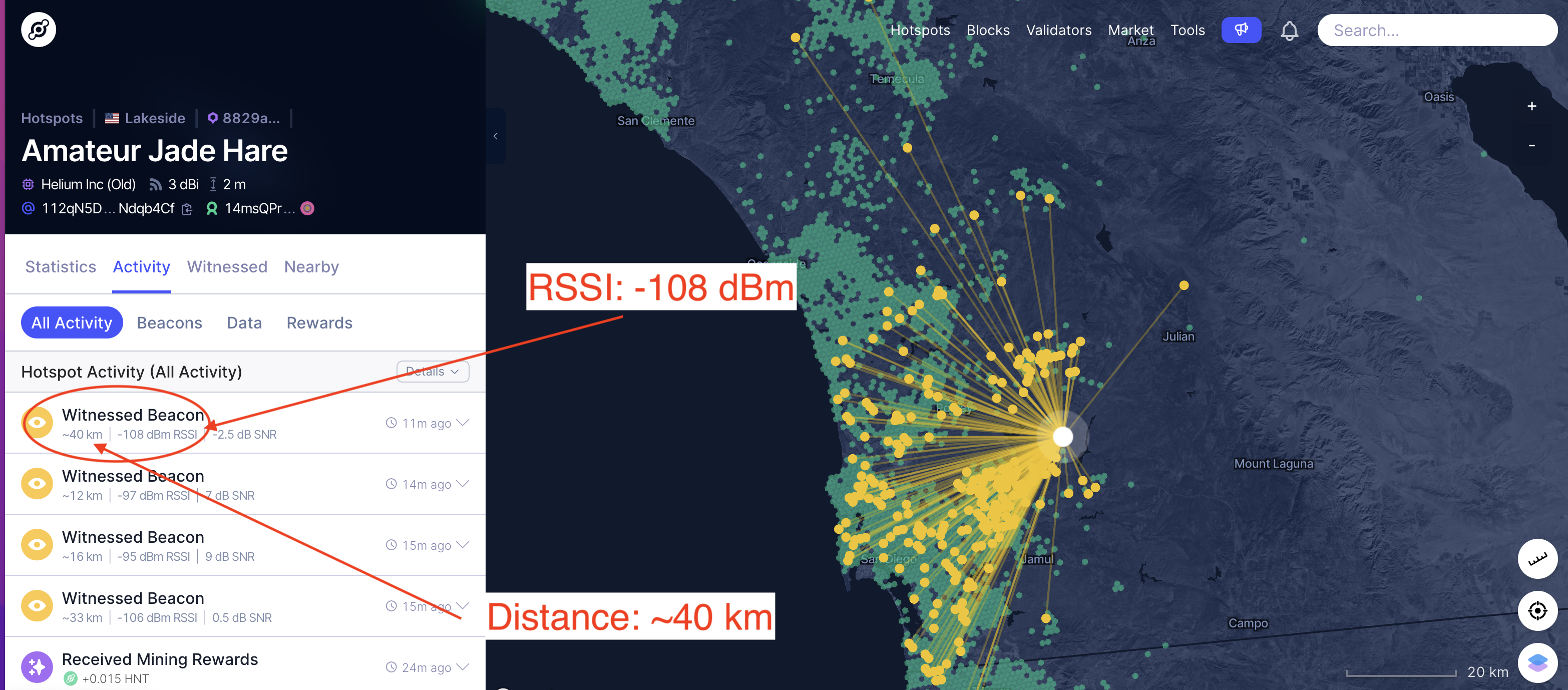
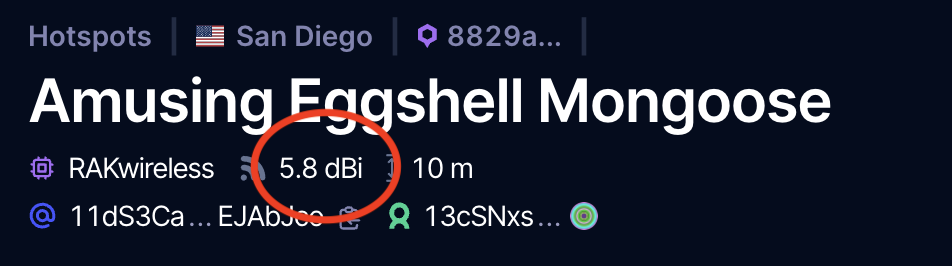
How does it work? Let's take an example. Here's Amateur Jade Hare with a 3 dBi HNTenna Witnessing a Beacon from Amusing Eggshell Mongoose, which has an asserted antenna gain of 5.8 dBi and is 40 km away.

Ok, so that's cool, but where did I get the info about Amusing Eggshell Mongoose? Right off Explorer.

That could be a 5.8 RAK, or it could be a 6 dBi from McGill with .2 of cable loss. By the way, you can add or subtract all this "dBi, dB, and dBm" stuff interchangeably without worrying about the differences for now. Radio geeks will bristle at that statement, by the way. I guarantee you I'll get at least one snide comment about how you can't possibly do that and live. Whatevs.

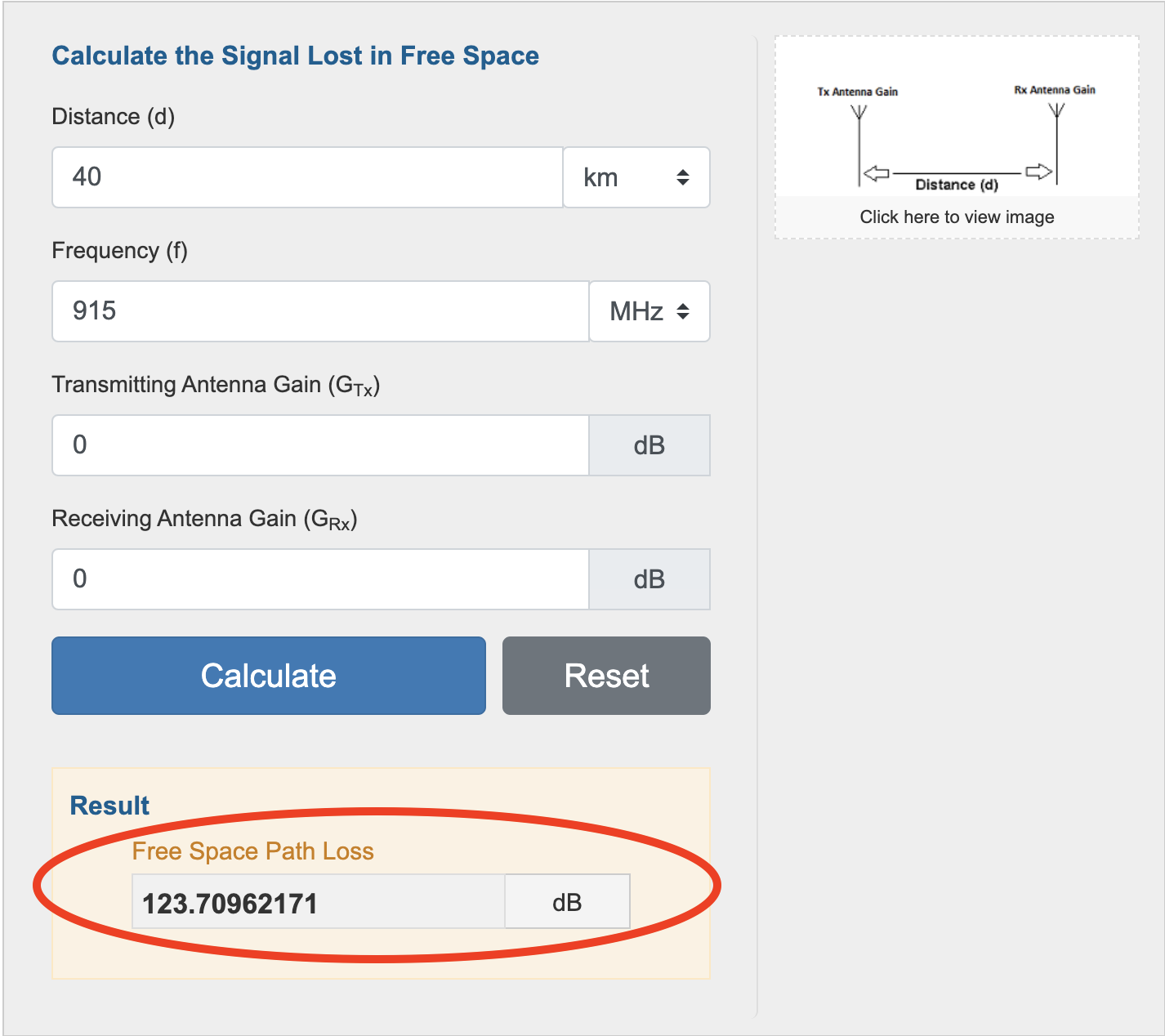
What about the FSPL? I headed over to EverythingRF's calculator for that, here's what I got:

I'll call that 124 to make the math easy. So now we've got everything we need.

  • Beaconing Hotspot Output (US915) = 27 dBm
  • Cable Loss = .-2 dB
  • Beaconing Hotspot Antenna Gain/Cable Loss = 6 dBi
  • FSPL = ~124 dB
  • Receiving Antenna Gain (including cable loss, in this case almost nothing because it's 4' of LMR400) = 3 dBi

So what SHOULD the reported RSSI be?

27dBm - .2 + 6 - 124 + 3 = -88.2 dBm RSSI

What was the reported RSSI? -108 dBm!

That's almost a 20 dB difference, and it still cleared the line! What does that tell you? It tells ME that it is bloody difficult to correctly assess location based solely on RSSI and current radio modeling. I know for a fact that AJH is where it says it is; it's my Hotspot. I don't know about Amusing Eggshell Mongoose, but if it's a gaming hotspot it's doing a terrible job of earning. My guess is that AEM is where it says it is.

Where does this leave us? With a thornier problem then when we started, as we now realize that gaming through attenuation is significantly easier than you might have thought, since the leeway is so great. For now, at least you know how to check your RSSI values. If you want to see the equations Helium is using, check their github, starting here. Yeah, it ain't easy to read.

The solution is for Helium to start ramping up the fspl_factor chain variable, which will clamp down on allowable RSSI and make it more of a real control. Before you start screaming about what Helium should do and how fast they should do it, keep in mind that they are managing an enormous and complex system, and gaming is (these are MY words, not theirs) a relatively small problem compared to keeping the blockchain running.

The great news is that if you're not an RF geek, none of this matters. Assert your correct antenna gain including cable loss, and focus on what's actually important, which is WHERE you put your hotspot. Need help with that? Take my Helium Basic Course or the HeliumVision Master Class; I built 'em to help you understand the things that actually matter in Helium.

Rock on!

p.s. Giant thanks to Jeremy Cooper for his help explaining this to me and fact checking my usual hasty assumptions. All mistakes are mine, all righteous accuracy is his. If you want to get an idea of the experience and skill being thrown at this problem, I strongly recommend you check out the interview we did on YouTube.

Additional Ultra Geeky Thoughts from @Jerm

Although most US hotspots can and do use a conducted power of 27 dBm when transmitting, a few things can make it different:

  • Manufacturer uses a radio that can't output 27 dBm.
  • The blockchain has asked the radio to transmit at a lower power due to EIRP limits, but the radio can't do that specific power, so it chooses the next lower level. Example: A 10 dBi antenna in the US would require a +26 dBm transmit. If the card can't do +26 dBm it might do +25 dBm.

When either of these occur, the actual transmitted power the hotspot used is reported on the blockchain. This means that the average user just relying on Explorer may not see it, but the precise data is entered (and used) by the blockchain.

Archived Comments

Nathan - 2/8/2022

Thank you for the great analysis! I'm in the market for a new antenna, so this was incredibly helpful.


Pawel - 2/9/2022

Hi Nathan I am going to setup around 10 SenseCap in my town, have possibilty istall them around 20 meter high , all of them ( that the plan) with clear view, and all see each other. As they not yet arrived , i am studying as much us i can...Here is my question. Plan is to set them up , each one 1km each other with 3dbi anthena. Doing a math and RSSI is around 67 SenseCap 14 dB - 1db (cable loss) + 3 (antenna g) - 85 dB ( fspl ) + 3 (antenna from other side) - 1 (cable loss) = 67 dBm RSSI Looking at other simillar setup RSSI most of them around 120 - https://explorer.helium.com/hotspots/112eouVv2fFtMQyM3WKCGZ2EmXDebHNV3F9ES1PemN1MTG3K3PLh/activity Am i doing something wrong , is that RSSI will cause witness_rssi_to_high ? Greetings from Poland, amazing webpage!


Nik - 2/9/2022

Hi Pawel, I think you'll be fine, keep me posted on how it goes! ~Nik


edu - 2/17/2022

"By the way, you can add or subtract all this “dBi, dB, and dBm” stuff interchangeably without worrying about the differences for now." Subtracting pears from apples the calculations will always be wrong.


Nik - 2/17/2022

I don't believe so in this case, but help me understand. For example, if I have a miner putting out 27 dBm hooked to cable that has a loss of 2 dB connected to an antenna that has a gain of 5 dBi, then the "antenna gain" I enter into the Helium app to let the Network know what to expect will be 27 - 2 + 5 = 30 dBm. What am I missing?


Hew - 2/22/2022

Nik, my understanding is that in your case, you enter 3db (5-2) in the Helium app setup, along with your antenna height. They know your power output.


Les - 2/22/2022

Help me understand how Amateur Jade Hare can beacon and witness like this at 3dbi? I am guessing amplifier and attenuation by not reporting actual antenna dbi?


Nik - 2/23/2022

It's a function of the location. It has a tremendously good line of sight. There's not more than that to it; no fancy amplifier or attenuation etc. It's just a 3 dBi HNTenna placed at about 6' high on top of a 3,000 mtn.


Les - 2/23/2022

Thank you for responding. I appreciate what you do.


Jonny - 3/4/2022

Hi there. Very good content. In the calculations of the article I think that you are taking into account the antenna gains twice. The FSPL calculator is already using them, so no need to sum them again. Or you could just set them to 0 in the calculator. The theoretical RSSI of your example should be -88. Tell me if I am wrong. Regards,


Nik - 3/4/2022

Nice catch, that makes sense. Let me double check with my radio geek homies to make sure, then I'll update this. Thanks Jonny!


Randy - 3/19/2022

Hi, very interesting. I'm wondering if you can help me understand an invalid witness report I got a couple days ago. I'm up little over 100 meters, and most of the other sites I can see are about 20km away on the other side of San Francisco Bay. I put up an 8 dBi antenna a few days ago, with 15 feet of LMR-400 on a Bobcat 300, rated loss through the cable of 0.7dB, so I'm reporting 7.3dBi. For the most part it's working well, but there are a couple of invalid witness reports that don't make sense to me. Example: the other station is a Cal-Chip Connected Devices something-or-other, reporting its location as 33km away, reported as 30m up (probably a mistake for "above ground", but close to correct for ASL height), Explorer shows ~33km distance (measured 33.39km), with a 5.8dBi antenna. I get an FSPL of 108.94434015dB from the everythingrf.com calculator. Assuming 27dBm and zero cable loss for the transmitter, their EIRP would be 32.8dBm, and 32.8 - 108.94434015 is -76.14434015. Explorer tells me the transaction had an RSSI of -80dBm, which would make sense if we add some cable loss on the transmit side, and an SNR of 7.8dB. The SNR does seem high, but--maybe we just got lucky, and the noise happened to be low? edit [Just realized I neglected to add my antenna gain into the final RSSI calculation, which brings it up to -68.84] Anyway, I don't understand why this was flagged as invalid. Can you explain? Also, I'm very confused as to the current state of PoCv10, 11, etc., and frustrated at how difficult it seems to be to get definitive, official information. Comments on that? Thank you!


Randy - 3/19/2022

Apologies for being so chatty. As Jonny noted above, the "FSPL" calculator is not really calculating FSPL, it's doing path loss, including antenna gains. True theoretical FSPL then would be 122.0521234dB. With that correction, my predicted RSSI comes out to -81.95212337dBm, so very close to the actual value. If the transmitter's antenna gain is actually 8dBi, and my cable loss is just a bit higher, it's almost an exact match. In any case, the numbers are reasonable, and both stations are within legal limits for the US.


Toby - 4/25/2022

How much are your services?


Nik - 4/25/2022

Hi Toby, you can find all services & prices via the tabs on the home page.


Vilmos Opra - 5/1/2022

Hi Nik! I just got a kidney transplant, your interesting writings will heal me! When I go home I will set up the miners again based on your descriptions! Greetings from Europe, a small country, this is Hungary! Vilmos Opra / no Oprah/


James - 6/20/2022

Great informative site - thanks for sharing all this knowledge! A quick question if I may. If I have a 6dBi antenna with a 2dB loss cable is that the same has having a 4dB antenna with zero loss cable (hypothetically obv!)


Nik - 6/20/2022

It is as far as signal strength. It's not as far as signal pattern. Does that make sense?


James - 6/21/2022

Thanks for your reply. Yes it does make sense, that was what I was getting at. I was wondering if mounted on my roof andmy 6.2 dBi antenna with a 30ft LMR400 cable would behave like a 5dBi antenna in all respects! So, my antenna is rated as 6.2dBi and I entered 6.2dBi in the app when I asserted my hotspot as I assumed that was the correct thing to do. Assuming a cable loss of 1.2 dBm should I edit my hotspot to show a 5dBi antenna as that is roughly what it is I guess...?


Nik - 6/21/2022

Yep, exactly right. You're aiming to let the network know what to expect as far as signal strength.


James - 6/22/2022

Cool, thanks again for taking the trouble to answer. I am in the UK and I only setup my first hotspot 10 days ago, I bought a 6.2 dBi antenna a week ago and put it on my roof. My stats are 39 witnessed in three days and 103 beacons 7 day average according to Helium Explorer. I am wondering though if this is likely to be improved by a lower gain antenna as I have fairly good lines of sight for about 15/20km in a 270 degree radius and line of sight for about 7km for the other 90 degrees. The biggest concentration of other hotspots though are in the 270 degree arc about 10km away and a lot of people seem to just plug them in and put them on a windowsill by the looks of the stats of some random ones I have clicked on, so would a lower gain antenna be more likely to reach these? When I say lower gain I mean one of the 3dBi ones. All the diagrams and explanations seem to suggest that a lower gain antenna is better in a block of flats, which is fine, but other hotspots are likely to be only meters away in that scenario. How does a lower gain antenna fair when the lines of sight are good to the next town but it is 15km away..?


Nik - 6/22/2022

Hi James, the only accurate results will be found from testing, but at a guess I wouldn't expect a huge improvement from changing your antenna; they just don't make that much of a difference.


Tony - 7/27/2022

Hi to everyone. I hope you guys have a wonderful day and hopefully someone can help me a bit. I have 3 antennas. 8 dbi, 6 dbi and 4 dbi. Hights of the antenna is around 20 m high (Lodnon/UK) I have a 5 m cable LMR400 and also 10M cable LMR400. Miner is bobcat 300. What I am wondering is this. With 8 dbi, I get so many invalid witness because they're too close. With the 6 dbi not so many and with 4 almos none. So my question is why does this 8 dbi have so many invalid witness? Should it not reach those miners that are a bit outside of london? I thought if I use the 4 dbi, it will not leave the central london where I live so I got the 8 dbi to get out of london and witness those that are over 10 km away. My other question is what if I connect two antennas to the same miner. Will that work? Has anyone tried it? The 4 dbi and the 8 dbi. The 6 dbi I have does fine on its own. Thanks


Nik - 8/1/2022

Hi Tony, there are a few answers that are complex regarding how RF works, but one useful very simple one: Choose either the 4 or the 6 dBi, sell the rest, and work on other more productive aspects of Helium. Optimizing antennas is a fun game for geeks, it's not really important for the rest of us. :). Let me know if that helps.


Testing Your Helium Antenna & Placement With A GLAMOS

· 16 min read
Nik
Site Owner

Do you have the best antenna for your location? What kind of coverage is your Helium Hotspot providing? Is the location you've identified as good on Helium.Vision actually that good?

https://youtu.be/beHpEHt0wQU

The way to answer these questions definitively is to test your setup. No amount of simulation, prediction, or just thinking (or even hoping) will replace the stone-cold facts of an actual test.

Testing Helium Antennas with the GLAMOS

I've covered a few ways to test various components, but this time we'll dig in to where the rubber meets the road:

QUESTION: How will a specific antenna at a specific proposed location actually perform?

Let's start by defining what kind of data you'd need to answer that question.

First, you're going to want to know if your ANTENNA is actually working, and how well it's working.

Second, you'll want to know HOW MANY Hotspots your proposed location can be witnessed by. Since beacons & witnesses are two sides of the same coin, it's pretty reasonable to assume that "if they can hear you, you can hear them." Yes, that's an assumption. Yes, I'm familiar with the assumption ASS-U-ME problem. This particular assumption is very likely to be useful, though it may not be as accurate as we'd like.

Third, if you plan on actually using the Helium Network (which is where all the long term profits are), a test should show you what kind of coverage your proposed location will provide beyond just being witnessed by other Hotspots.

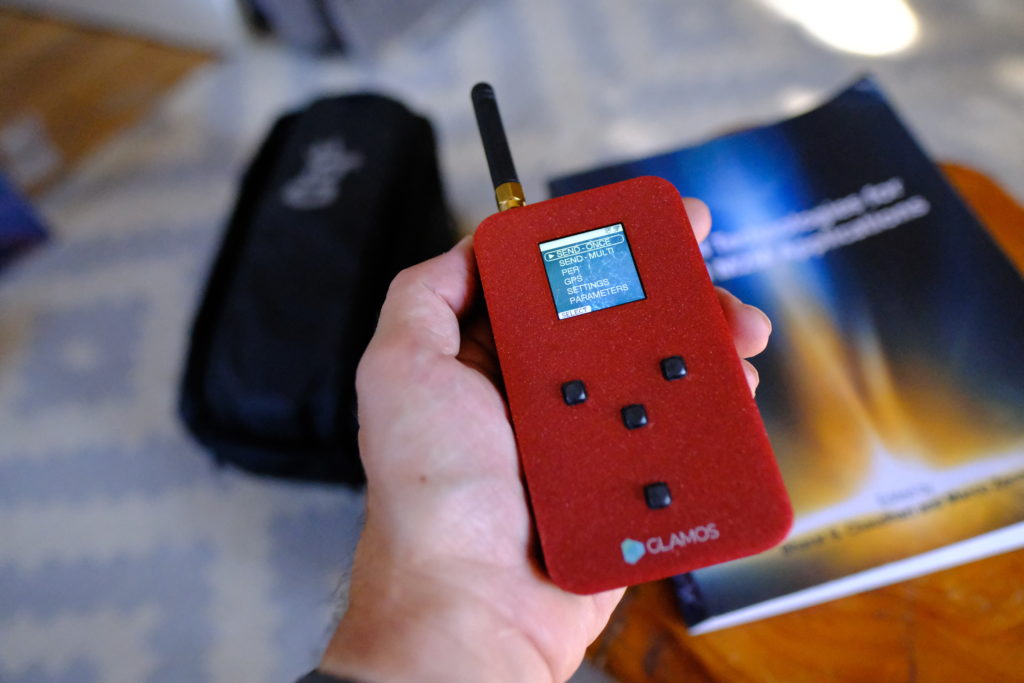
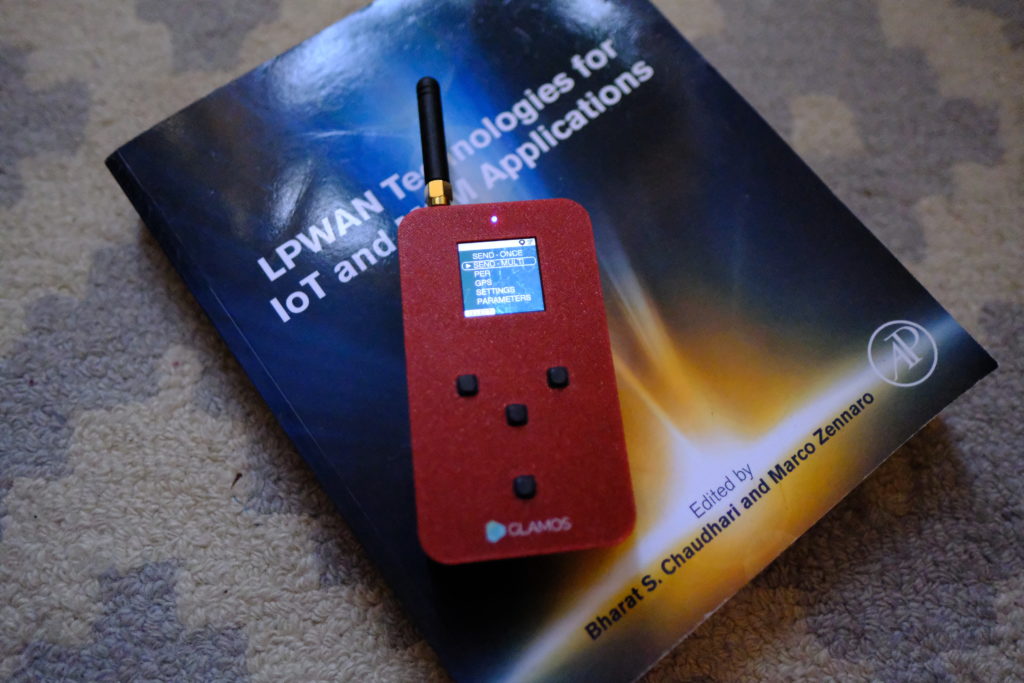
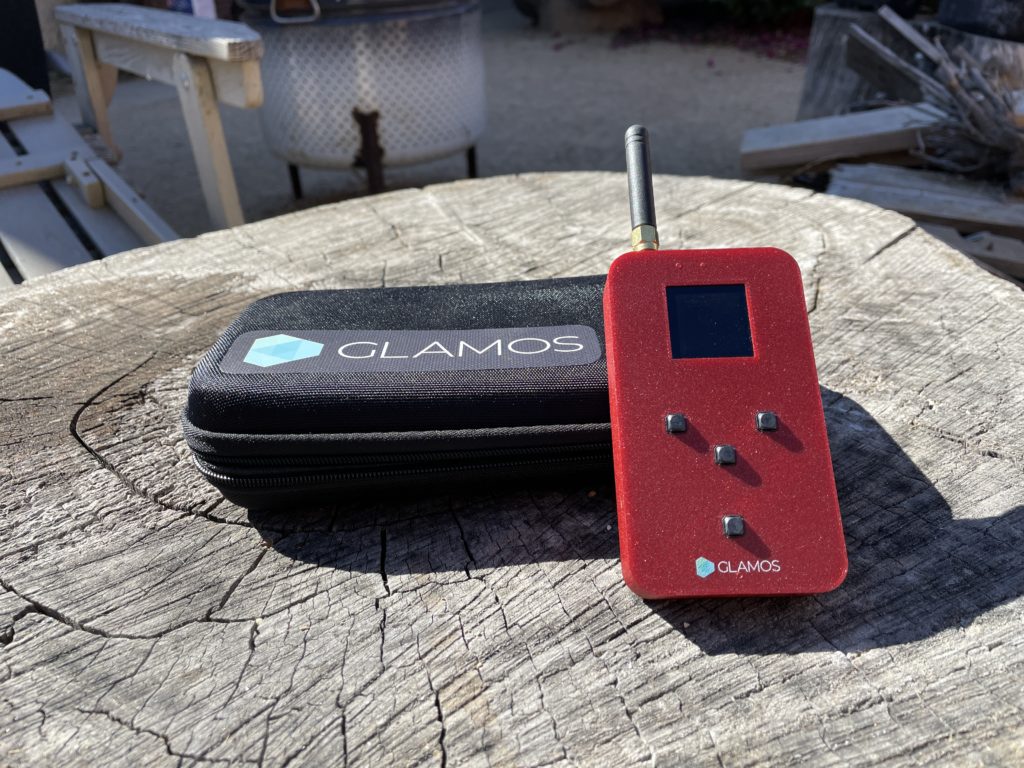
I'm using a GLAMOS Walker, along with its companion app/site, to do my testing.

Here's how it works in broad strokes, then we'll dig into the details.

1. Set up the GLAMOS.

2. Take the GLAMOS to your proposed location, attach the antenna(s) you're going to use or test, and fire off a bunch of beacons.

3. Head back over to the GLAMOS app to see your results.

GLAMOS SET UP - PART 1

The set up is straightforward. Slaven, the creator of the GLAMOS, gives world class support, so if you get stuck when you're going through the directions, check in on the Discord #glamos channel for help from him or the GLAMOS community.

The first thing to do is create an account over on the GLAMOS app, then follow the instructions below. I've included both Slaven's demo video as well as a written out version.

https://youtu.be/KNUkJyHfcTE

  1. Go to the GLAMOS app, then create an account or sign in.
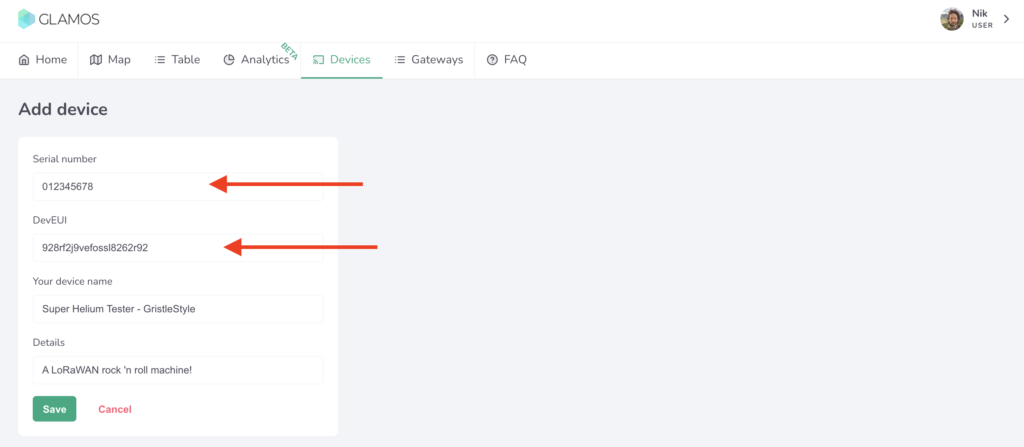
  2. Go to Devices on the top menu, and Add Device

Now add in the Serial Number and DevEUI of your device. You should have received an email with these when you bought the GLAMOS, so you can just copy/paste 'em in. Or, like me, you can miss the email, turn the GLAMOS on and go to Settings --> Keys then manually type 'em in.

Trust me, you should use the copy/paste option. :)

Ok, so you might think now that all you've got to do is attach the antenna you want to test, head to your location, and mash that SEND - ONCE button.

Not so fast, turbo. You need to add in the gateways (aka Helium Hotspots) you want to test. That could be a large area, or it could just be the deployment net you're using. If you'd like to test all the gateways within a radius of a point, you'll need to set that up. Here's how:

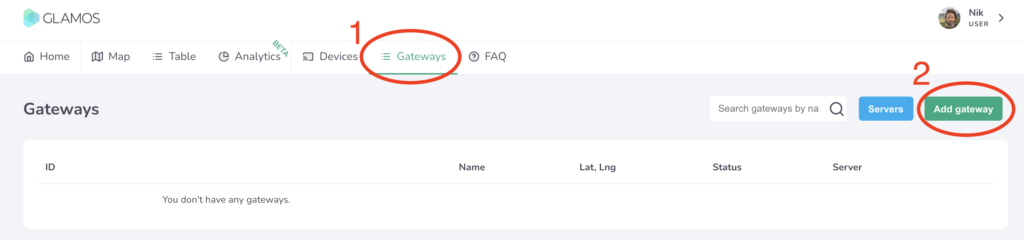
Go to the Menu bar at the top of the app and click on Gateways, then click on the Add Gateway button.

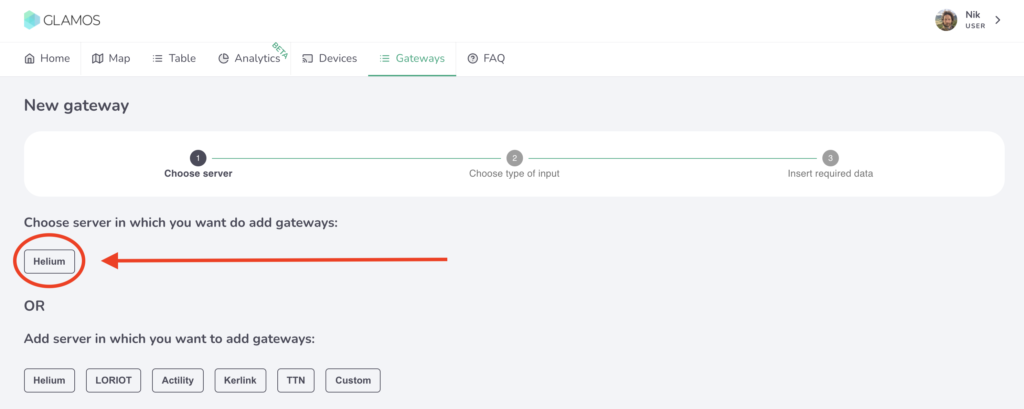
Every Gateway has to know what Server it's going to use. In this case, we're using Helium, but the GLAMOS can also be used for other protocols & projects.

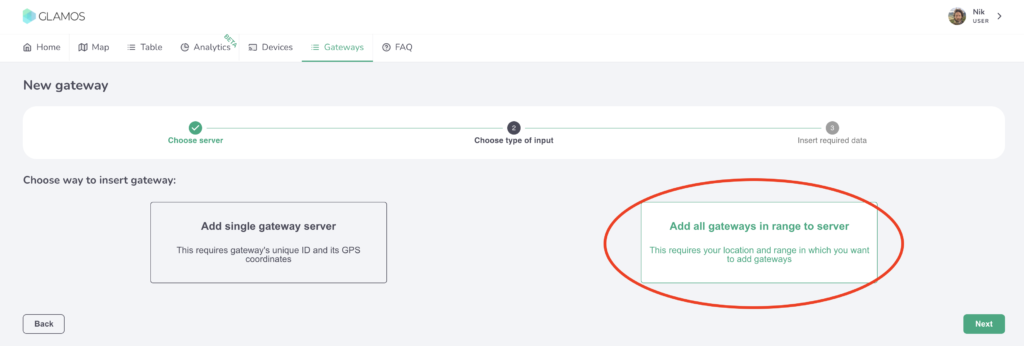
Now you've got a choice: Do you want to test a very specific part of the Network, say a few Helium Hotspots you've deployed to see if they can "see" each other, or do you want to do testing of all gateways over a wider area? I wanted to test a couple antennas over a wide area, so I chose "Add all gateways in range to server", like this:

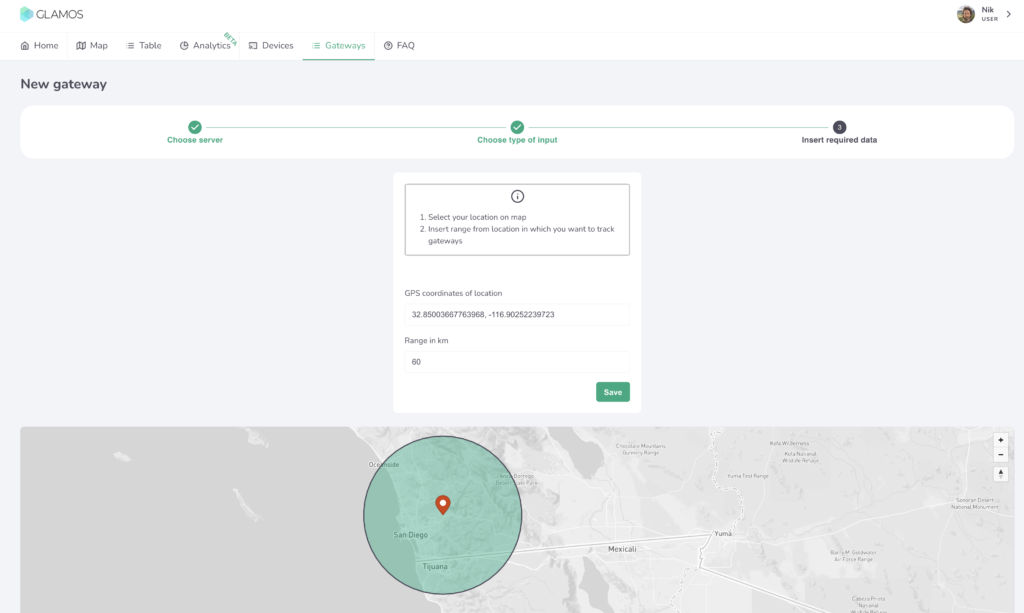
Select a center point and a radius, then let 'er rip.

Back in the Gateways menu you'll now see your new Server, woohoo! Cool, so now your GLAMOS knows what to do. Next up is telling it who to do it with. You'll need to get it connected to your Console account on the Helium Network. Yep, the data credits to run this thing will come from your account. Relax, it's pennies.

PART 2: PROVISION GLAMOS ON HELIUM CONSOLE

Slaven, the creator of the GLAMOS, has made a little vid for ya on how to navigate this.

https://youtu.be/pwa3mXbS3x8

Just in case you need that decoder script link from the video, here it is. The one I started with is below, but that's being updated all the time. Use the link for the latest version.

function Decoder(bytes, port) { 
// Decode an uplink message from a buffer (array) of bytes to an object of fields.
//Decoder for GLAMOS Walker device.

var decoded = {};

decoded.latitude = ((bytes[0]<<16)>>>0) + ((bytes[1]<<8)>>>0) + bytes[2];
decoded.latitude = (decoded.latitude / 16777215.0 * 180) - 90;
decoded.latitude = +decoded.latitude .toFixed(7);

decoded.longitude = ((bytes[3]<<16)>>>0) + ((bytes[4]<<8)>>>0) + bytes[5];
decoded.longitude = (decoded.longitude / 16777215.0 * 360) - 180;
decoded.longitude = +decoded.longitude .toFixed(7);

var altValue = ((bytes[6]<<8)>>>0) + bytes[7];
var sign = bytes[6] & (1 << 7);
if(sign)
{
decoded.altitude = 0xFFFF0000 | altValue;
}
else
{
decoded.altitude = altValue;
}

decoded.ant = bytes[8];

decoded.accuracy = 3;

decoded.position_num = bytes[9];


return decoded;
}

Ok, so now your GLAMOS Walker is set up, it's connected to the Helium Network and you're ready to start testing. Nice work!

TESTING ANTENNAS WITH THE GLAMOS

If you have antennas with N-type fittings (many of them do), you'll need an adaptor to go from the GLAMOS to the antenna. Current GLAMOS have a little connector-adaptor kit. I bought mine a while ago, so mine didn't. I mean, you know me: I would've made cables anyway.

You can order custom cables from McGill Microwave. I'd recommend 4-5' of LMR 240, and get SMA-Male and N-Male connectors. Obvi you can use the GLAMOS to test antenna cables as well, so if you want to get wild order different lengths and types, but for now we'll keep it simple.

Cables are generally a good idea because standing too close to the antenna when you test it can skew the results. I made one that was 4' long so I can sit at the base of my testing rig and work the GLAMOS away from the antenna.

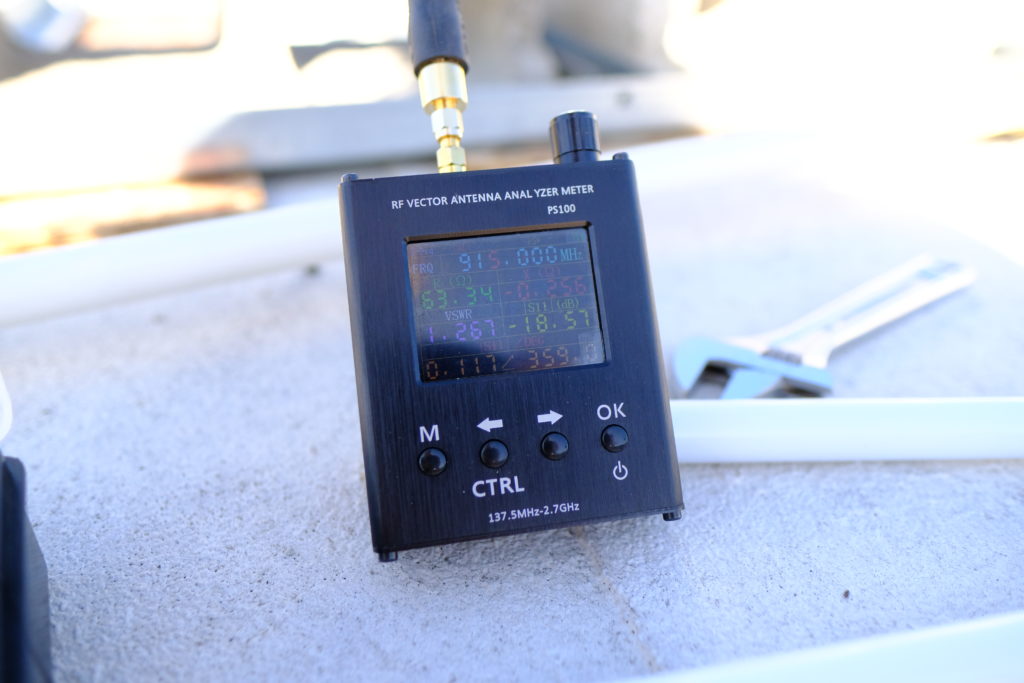
I start by checking to make sure the antenna is actually working and all my connections are good. For this, I use a little VNA I got off Banggood, though you can get 'em off Amazon as well. Here's a VSWR reading of 1.267 off the HNTenna, excellent as usual. For the purposes of this test we just want to make sure the VSWR is lower than 2. All of the antennas in this test were between 1.175 and 1.367. So far, so good.

Now to test with the GLAMOS! I followed Slaven's advice and set up the GLAMOS to send 10 messages each time. I did that 2 times for each antenna, so I had decent numbers to work with.

You can find this setting in the GLAMOS under SEND - MULTI --> SAME SF(loop) -- REPEAT (set that to 10x).

The readings off a single packet don't give you enough data to make a good decision. Data credits are cheap as chips, so burn 'em up. In this case I tested 5 antennas 20 times each, and with a few misfires I managed to spend 277 DC. Whoop de doo. You get 10,000 DC for $1 US.

I spent the next hour just mounting, connecting, testing, disconnecting, mounting, reconnecting, testing, disconnecting...

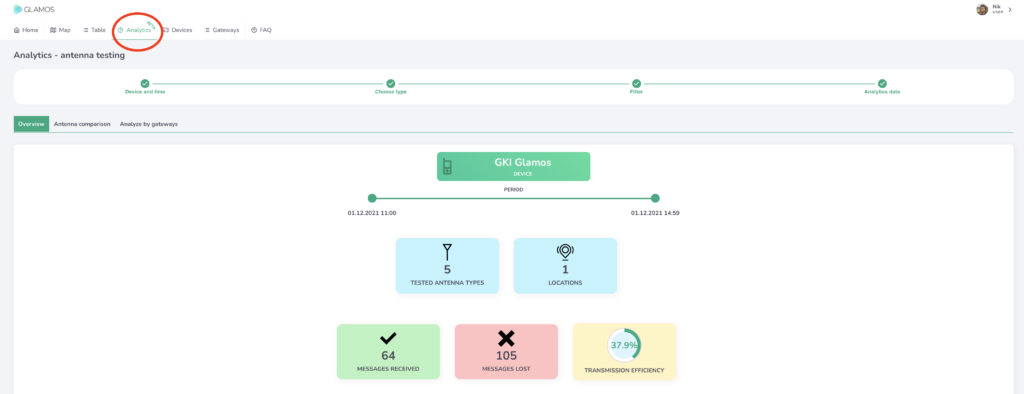
Once you're done testing, head back to a computer and pull up the GLAMOS app so you can dig into the data. You can look at the data on the GLAMOS in the field if you want, but I like big screens. On your desktop in the app, go to Analytics, select the Device, Date, Time, and Type of test, then filter and fidget and sort to your heart's delight.

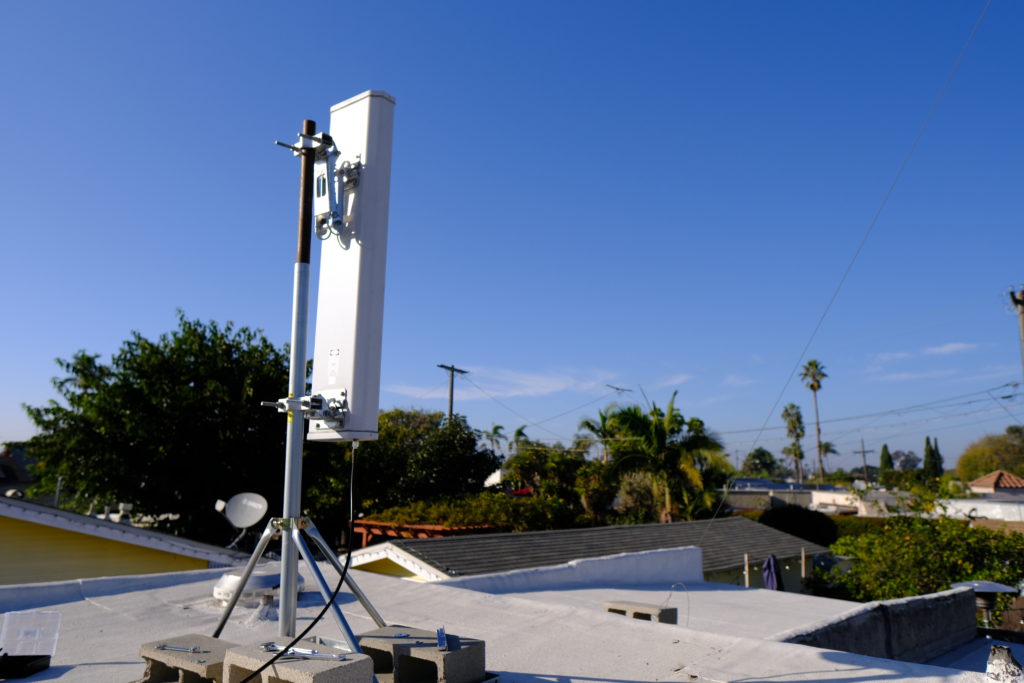
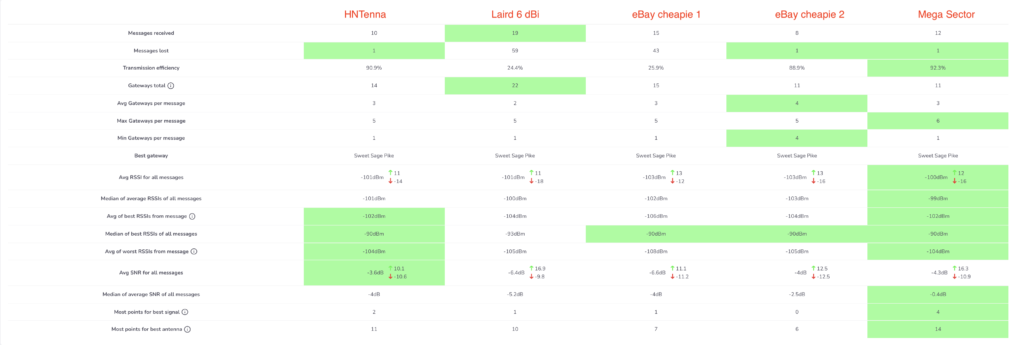
The results from this test of 5 antennas were pretty cool, at least for me. I tested the HNTenna, a Laird 6 dBi, 2 eBay cheapies, and the giant 13 dBi sector antenna I used before I knew what I was doing. Here are the results.

The obvious takeaway is wrong, just FYI. I threw that 13 dBi in there just to see what would happen, knowing it would have skewed results. Remember, every 3 dB is a doubling in power, so a 13 dBi is pushing out a focused signal more than octuple (what a word!) the power of a little 3 dBi. That means it'll "win" hands down in every measure of signal strength.

I was pleased to see the HNTenna did well, and I was surprised how good at least one of the eBay cheapies was. I would've expected the Laird to do a bit better, though it definitely had the most messages received. For reference, and so you don't go out and immediately replace your antenna with a ridiculously overpowered sector, I had that Mega Sector up for a MONTH with earnings in the bottom 10% of all Helium Hotspots before I managed to tweak the settings and dial down the power significantly so it'd fall within acceptable levels. Once I did that it performed well, although now that I have the HNTenna on it it's doing just as well or better at about a third of the price and a hundreth of the install hassle.

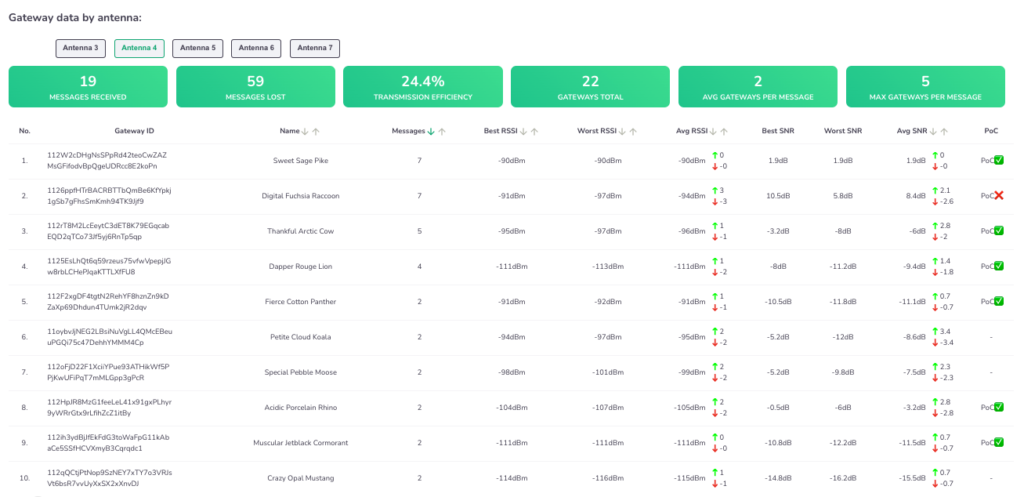
The GLAMOS app really lets you dig around in the data, listing out how each antenna for all the gateways that witnessed it. Here's the Laird, for example:

Check out that far right column where it tells you whether or not the signal would have fallen within the current (PoCv10) RSSI/SNR ratio. That will change with the update to PoCv11. Super useful!

You can use the GLAMOS to test more than antennas; you can test locations, whether indoor or outdoor will perform better, and by how much, and how a long cable might effect your actual reach. We haven't even gotten into using it for testing sensors yet, I'll leave that for another post.

So, what antenna should you buy? I'd start by picking up a GLAMOS testing unit before I went and bought any more antennas. Learn how to use it, then test your antennas, test your locations, and deploy a smarter, better, more efficient (and more profitable) Helium Network.

So...How Does This Help Me With Providing Coverage and Earning Profit?

Helium is a blockchain network that rewards users who provide WUPU (Wide, Unique, Proveable, and Useful) coverage. The better your WUPU coverage, the more you'll earn. Now, WUPU isn't a Helium metric, it's something I teach people about to help them understand at broad strokes how to assess a potential deployment.

If you want to have a high earning hotspot, testing the Wide and Proveable aspects of coverage is essential. Now, whether or not your coverage is Unique or Useful is something you'll need to assess in different ways. I'd start with my post on HIP 17 and scaling, then check out how to use the Network.

Rock on in your Helium glory, and best of luck to you in your deployments!

Archived Comments

Randy Armitage - 12/8/2021

Hey Nik I went to #mappers on the Helium Discord looking for info on how to use my Glamos to support the mapping project. Scrolled to the bottom of the pinned messages, which led to this article. While informative, the content doesn't seem to cover much of what the title hints at. Am I missing something or is the process of testing antennas very similar to generating coverage data? Thanx ?


Nik - 12/8/2021

Hi Randy, in general, good coverage is a proxy for good earnings. It's not precise, as earnings will depend on local density and scaling, but if you want to earn HNT on Helium one of the essential aspects is knowing what coverage your location/antenna combo will provide.


Nathan - 12/16/2021

Hey! Great article! Love all the data and very thankful for your amazing blog here! I just recently received my glamos walker (super exciting) and I am seemingly having the same issue as randy. I got it in order to contribute to the helium mapping project and after having set it up, find myself confused on whether I am actually contributing. Testing my own antennas is nice (which I'll try sometime in the future) but I can't seem to figure out A) If I'm actually providing coverage data for the network B) How to setup the glamos to automatically contribute once turned on. Any insight or hints in the right direction would be great.


Nik - 12/16/2021

Hi Nathan, I don't think there's an auto-fire Mapper style setting on the GLAMOS. It's designed built to test a bunch of different specific spots to make sure a sensor at that spot can reach a gateway, not to continuously beacon in order to provide coverage. I'll change the name of the post, as it seems to be misleading people.


Ben - 12/25/2021

Hey Nik, question about this assumption made in the article — “Second, you’ll want to know HOW MANY Hotspots your proposed location can be witnessed by. Since beacons & witnesses are two sides of the same coin, it’s pretty reasonable to assume that “if they can hear you, you can hear them.” I’ve just gotten and set up my miner recently, inside, stock antenna, 650 ft above the ground in a high rise overlooking the suburbs (for background). I’m actually finding that this assumption doesn’t seem to be true, in that I’m getting people witnessing my beacons for 55km+ but I don’t seem to be able to connect with anyone beyond a kilometer of me. Any ideas or thoughts? I’ve read about the principle of antenna reciprocity, and the only think I can think of is maybe the window that’s in front of the antenna is blocking really weak signals and making them impossible to distinguish from noise.


Nik - 12/26/2021

Hi Ben, it's not technically correct, it's just a useful model to use. It's likely that many hotspots around you are not as well placed. Think about this as well; you always get to know what hotspots witnessed your beacon, but you don't always win the lottery to witness the beacons of other hotspots.


Tom - 1/12/2022

Hey Nik, off topic here but I heard you on the Hotspot Podcast and you did a great job. My question is, you me mentioned T-Mo approaching a large hotspot fleet owner with a threat to cut them off. I could not find anything on this(articles, etc.). Is there a link you could share? Thanks as always and congrats on your Helium community Noble award. (you got my vote!) Tom


Nik - 1/12/2022

Hi Tom, thanks! Nothing I can share on that beyond the podcast convo; the fleet owner is pretty private.


Tom - 1/12/2022

Fully understand. Thanks.


How To Troubleshoot Your Helium Hotspot

· 7 min read
Nik
Site Owner

Helium is a rapidly growing and wild ecosystem. Like any other new ecosystem, things are constantly changing, and the main sources of information most new users rely on (Explorer and the Helium app) can be up 48 hours behind.

That means when you check your Hotspot via Explorer on Tuesday, you could be looking at Sunday's information when it comes to whether or not you're relayed, or whether your Hotspot is online.

This isn't because Helium lnc likes to be slow, it's because the whole thing is so popular and grew so fast that the reporting side of things hasn't caught up yet. That, by the way, is a very non-technical explanation. The actual explanation is deeply technical. In any event...what do you do when your Hotspot stops working?

What I've found with hotspots over the course of consulting sessions with hundreds of clients and moderating the official Helium Discord since last spring is 2 main facts:

  1. If you have a problem, you're probably not alone. There IS a solution or at least an explanation, you just have to find it.
  2. If you haven't made any adjustments and your hotspot suddenly goes offline, the absolute best thing to do is wait, usually 48 hours.

With all that said, if you're absolutely driven to do SOMETHING because your hotspot is having problems, here are a few resources to use as you get it sorted out.

Helium Power User Superpower #1

First, and this isn't what you want to hear, but patience is a superpower when it comes to Helium. If you have your hotspot plugged into power and an ethernet cable (NOT on WiFi), your next best step to earn maximum HNT is probably to go fishing for a week. That's not the way most of us are used to solving problems, but if you've got a production hotspot and you haven't changed anything, there's not a whole lot to do.

If you DID change something (swapped the antenna, moved the hotspot, reasserted the location, etc), use Superpower #1.

Helium Power User Superpower #2

Second, about the only thing you CAN do is open up the port on your router that makes sure your hotspot can talk to the Helium Network. That port is 44158. There are a few thousand pages on the internet at this point devoted to telling you how to open port 44158 for your Hotspot.

Helium Power User Superpower #3

Third, the "Search" box on the Official Helium Discord is probably the single most useful thing you can use. Are you "unable to initiate a session" when you try to use Discovery? Copy/paste that phrase into Discord search; you'll find the latest on what's going on.

Helium Power User Superpower #4

Fourth, the second most useful thing after the Search box on Discord is probably @BFGNeil's HeliumStatus tool. It runs $2/month to use it, at least as of March 2022.

Helium Power User Superpower #5

As of mid-March 2022, we are starting to see an enormous growth in apps that help you understand the Helium Network. Here are some of my faves:

  • Watchium - Keep track of your Hotspot status and get basic info on what's gone wrong
  • Hotspotty - Track your fleet and get alerts when a Hotspot goes down
  • Helium Analytics - Keep an eye on where you are in the relation to the global average.

What About The Gamers?!

Finally, a word about gamers, cheaters, hackers and other of those ilk. In general, they're usually not worth it for the average Helium user to pay attention to. Sure, they're getting sexy daily HNT earnings or they have an obviously cheating deployment pattern, but for the most part the Helium team is shutting them down quickly or limiting what they earn. Gaming WAS a huge problem; the Modesto cluster back in late summer of 2020 was exhibit A. Now gaming is an annoyance and distraction, but not really a network problem.

Helium is made up of some of the smartest people I've met; they are NOT unaware that gaming exists, they're working hard to eliminate it, they're very capable, and they have plenty of other things to do that are equally important when it comes to the health of the network.

Rules For Helium Mining Success

At the end of the day, your "job" as a Helium deployer is to take care of what's in your control. Keep your Hotspot connected to power & internet by cables (do NOT use WiFi). Get the antenna high, use a thick enough antenna cable to limit loss, and make sure your antenna is providing WUPU (wide, unique, proveable, and useful) coverage. That's how you'll earn the most.

This shit ain't complicated, it's just hard.

If you need further help with optimizing your hotspot, read through the rest of this blog or join the Gristle Crüe!

We've helped some of the highest earners on the Helium Network go from zero to hero, and we'd love to walk you through how to maximize your Helium opportunity.

Rock on!

Archived Comments

Charles Davis - 11/22/2021

I'm waiting for my miner. From the manufacturer (being patient). Your overview was very stout with fundamental advice that I could grasp. I was about to over-supply on antenna use. Your zen about patience found a home with me, I will keep that in mind. Thanks for the steady hand.


Nik - 11/23/2021

Right on Charles. Patience is a superpower in the world of Helium.


Spencer - 11/25/2021

Brand new to this game. Day one my Nebra Outdoor was working great with decent earning. Day 2 and onward it’s not connected to network. If it connected via Ethernet port to the router and worked for a day , would the router just quit working? Eth ports work for other devices, just no longer my Nebra hotspot.


Nik - 11/25/2021

Hi Spencer, what is the Nebra diagnostic tool telling you? Have you checked out the interview I did on BFGNeil's HeliumStatus.io? Goes beyond the relay issue and into troubleshooting. Nebras in particular can be a PITA. Carefully check all the physical connections in the box; they can be loose. Also look up the Nebra light patterns and what they're telling you.


Spencer - 11/25/2021

Thank you. I will start with the video. Just perplexing as it was working and now not. Lights all good with exception of blue flashing 4x telling me no network connection. The real beauty of this is the hotspot is at a relatives and now quite a distance from me. I did try to run a diagnostic check but couldn’t connect to the unit via Bluetooth.


Nik - 11/25/2021

Just went through the same thing with a client (4x blue flash). Make sure that port is open on your network, then test with Neil's tool. Do not use Explorer or the App for up to date info.


Spencer - 11/27/2021

Hi Nik, I have tried to reach out through the contact link on this page. It keeps telling me that my message isn’t delivered. I would like to discuss your services for what I hope is basic but just not basic enough for me. Thank you


Nik - 11/27/2021

Hi Spencer, that's odd, I've received & replied to a bunch of your emails. You can email me directly at [my first name, spelled correctly (no "c")], then @ and this website. Maybe your email provider is blocking my replies? Alternately, you can just order the Hotspot Rescue Service here.


macbannai - 12/24/2021

So far all my deployments are using WiFi and it struck me when you suggested on your deliverance video that wifi is disastrous, perhaps you can elaborate on why WiFi is so disastrous other than an obvious low bandwidth scenario, for example what if wifi signal isn't an issue?


The Helium CLI Wallet - Not For The Faint Of Heart

· 11 min read
Nik
Site Owner

There's almost no good reason to use the CLI (Command Line Interface) wallet for a normal person, but...not everyone who gets into Helium is normal. If, like me, you're faced with having to use it, this series of instructions might help.

This is NOT written for experts who know what they're doing; they'll laugh at this. This is NOT written for most of the Helium community. Trust me, you don't need to use the CLI wallet for regular tasks. This IS written for someone like me; slightly curious, driven by the usual HNT incentives, and willing to futz around with things they don't understand. If that's you, enjoy!

It started off with a friend of mine creating a 24 word wallet. Yes, you can create those, just not on the Helium app.

We were testing a hotspot I'd sent him and wanted it to "live" in its own wallet during testing. Once testing wrapped up, I wanted to move the hotspot from the wallet where it was to another wallet where I have other hotspots. This was in part just to keep all HNT earnings in one place, and in part to have (MUCH) easier control over it for me, as a "generally-non-code-using" member of the Helium community.

Now, my friend is a security wizard and fluent in about a million coding languages, so for him managing anything via CLI is just standard stuff. For me, it was more like being thrown in the middle of a Russian street fair knowing I had to buy a very specific item; say a 17mm hex head bolt with a thread pitch of 1.6.

I don't speak Russian, but damn, I really wanted that hex head bolt!

This particular hotspot serves as one of my tracking units, so I re-assert the location every time I go to track an event, and then when I bring it back. Being able to easily move it (dragging a pin on the app) is important to me.

So, there I was, with an open Terminal window on my Mac and no real idea what to do. My friend had just taken a very time-demanding job, so he was mostly unavailable. We'd grab a few minutes here and there, but at the end of the day what you need for this kind of thing is about 3 hours of solid "Let me walk you through this". The reason you need 3 hours for an expert to help you is they have to deal with you making about 2 hours and 59 minutes worth of mistakes along the way. In this case, despite being extraordinarily generous, my friend just didn't have that time to give at this moment. So...

In 40+ years of zinging around the sun on this spaceship we call Earth, I've found that if you ask enough people for help, read as much as you can on Google, and just keep going, you figure things out.

The following is a condensation of the process, leaving out all the mistakes I made over the course of a few days, including missing key formats, entering the wrong information, entering information incorrectly, using the wrong commands, forgetting a vital letter, relaying what I was seeing incorrectly to experts, and yep, even missing a single syntax hiccup.

Working with code can be VERY frustrating. If you get just one tiny thing wrong, the computer, the program, and in general, the world, doesn't give a single shit. Still, when you get it right, it is extraordinarily satisfying.

Ok, here we go!

Step 1: Get the Helium Wallet onto your computer.

Start here and load Helium's CLI wallet onto your local computer. Look for the "Releases" link, click that, then download the appropriate tar.gz file. You'll need to unzip that, then you can run the full PATH or just use ./helium-wallet in front of your commands.

I like to start out by ls-ing, just so I have a record of what is where. I'm new at this, so the old hands may laugh at my constant ls habit, but it's very useful for me.

nik@my-computer downloads % ls
helium-wallet-v1.6.8-x86-64-macos helium-wallet-v1.6.8-x86-64-macos.tar.gz

Now that you've made sure you have what you need on your computer, the next step is to use it!

Before you go on, if you get stuck on any of these steps or want to know more, just type -h or --help at the end of your command. That'll give you the help menu for that particular command or subcommand, which *can* be useful. It does NOT always tell you what you're missing. Ask me how I know. :)

nik@my-computer Downloads % /Users/nik/Downloads/helium-wallet-v1.6.8-x86-64-macos/helium-wallet --help                                           
helium-wallet 1.6.8
Common options for most wallet commands

USAGE:
helium-wallet [OPTIONS] <SUBCOMMAND>

FLAGS:
-h, --help
Prints help information

-V, --version
Prints version information


OPTIONS:
-f, --file &lt; files>...
File(s) to use [default: wallet.key]

--format &lt; format>
Output format to use [default: table] [possible values: table, json]


SUBCOMMANDS:
balance Get the balance for a wallet. The balance is given in HNT and has a precision of 8 decimals
burn Burn HNT to Data Credits (DC) from this wallet to given payees wallet
commit Commit a transaction to the blockchain
create Create a new wallet
help Prints this message or the help of the given subcommand(s)
hotspots Display list of hotspots associated with wallet or transfer a hotspot to another wallet
htlc Create or Redeem from an HTLC address
info Get wallet information
multisig Commands multi signature transactions
oracle Report an oracle price to the blockchain
oui Create or update an OUI
pay Send one (or more) payments to given addresses
request Construct various request (like payment) in a QR code
securities Work with security tokens
upgrade Upgrade a wallet to the latest supported version of the given format. The same password is used to
decrypt the old and encrypt the new wallet
validators Commands for validators
vars Commands for chain variables
verify Verify an encypted wallet

Step 2: Load the selling wallet

This is the one with 24 words, so I needed to use "bip39" after the --seed command.

nik@my-computer ~ % /Users/nik/Downloads/helium-wallet-v1.6.8-x86-64-macos/helium-wallet create basic --seed bip39 --output adw-wallet.key
Space separated seed words:[this is where you enter your 24 word seed phrase]
Password: [enter the password you want to use for this wallet on this computer]

That will give you an output confirming you've loaded the correct wallet (it'd be hard to load the incorrect wallet, but it's nice to see confirmation). I'll show you what that looks like in the next step.

Step 3: Load the buying wallet

This is the 12 word "normal" wallet, so I used the "mobile" after the --seed command.

nik@my-computer downloads % /Users/nik/Downloads/helium-wallet-v1.6.8-x86-64-macos/helium-wallet create basic --seed mobile --output gki-wallet.key
Space separated seed words: [this is where you enter your 12 word seed phrase]
Password: [enter the password you want to use for this wallet on this computer]

That should give you an output that looks like this (you will have seen something similar when you loaded your selling wallet).

+---------+-----------------------------------------------------+
| Key | Value |
+---------+-----------------------------------------------------+
| Address | 14sT3TpAqxahjy6aGFvTHB4zqCX1mx31a1aYwNJ56TtzkM1DzQC |
+---------+-----------------------------------------------------+
| Sharded | false |
+---------+-----------------------------------------------------+
| Verify | true |
+---------+-----------------------------------------------------+
| PwHash | Argon2id13 |
+---------+-----------------------------------------------------+

The address in that table should match your buying wallet's address.

Step 4: Use the CLI "sell" command

This tells the blockchain what your selling wallet is doing ("transferring" a hotspot.)

nik@my-computer Downloads % /Users/nik/Downloads/helium-wallet-v1.6.8-x86-64-macos/helium-wallet -f adw-wallet.key hotspots transfer sell 11oXZSoRW7pLQppvbQfbipzPpe4DbuUzssKHvKHkvWjvvJ5FmyW 14sT3TpAqxahjy6aGFvTHB4zqCX1mx31a1aYwNJ56TtzkM1DzQC  
Password: [the password to the selling wallet's key file]

Funnily enough, you don't need to use the "commit" subcommand when you sell, only when you buy. Weird. Anyhoo...that Sell command will give you an output like this:

2gGvAQohAGmlHdiIljDi7IOvWS2+Cx8fVYwRumnnfw3rrz/cnCdWEiEBcUAYhbrCcB2pYOhl3osDLN9SSPP1WOmzB21uDUKLDB8aIQH9o5Dm6AUfxvGboCq4knzehnEZGWs4NN2MGNuPu1zMmCJAxsNIL0AHvrbUcYgXcRryKIYCTTR7wY0hBSqn50E9dhz9jwjCtH621HDFVNpCghnb/AonxlOWxE8GPsTVYpsFCEDYrQM=

You'll need that in the next step.

Step 5: Use the CLI "buy" command to receive the sold hotspot.

nik@my-computer Downloads % /Users/nik/Downloads/helium-wallet-v1.6.8-x86-64-macos/helium-wallet -f gki-wallet.key hotspots transfer buy --commit 2gGvAQohAGmlHdiIljDi7IOvWS2+Cx8fVYwRumnnfw3rrz/cnCdWEiEBcUAYhbrCcB2pYOhl3osDLN9SSPP1WOmzB21uDUKLDB8aIQH9o5Dm6AUfxvGboCq4knzehnEZGWs4NN2MGNuPu1zMmCJAxsNIL0AHvrbUcYgXcRryKIYCTTR7wY0hBSqn50E9dhz9jwjCtH621HDFVNpCghnb/AonxlOWxE8GPsTVYpsFCEDYrQM=
Password: [the password to the selling wallet's key file]

Hit "enter" after your password, and you should see something like this:

{
"hash": "AfPo-ulQVWAMQVNT8z309XvBVQGEDM5qxoo9a1wJ8kA",
"txn": "2gHxAQohAGmlHdiIljDi7IOvWS2+Cx8fVYwRumnnfw3rrz/cnCdWEiEBcUAYhbrCcB2pYOhl3osDLN9SSPP1WOmzB21uDUKLDB8aIQH9o5Dm6AUfxvGboCq4knzehnEZGWs4NN2MGNuPu1zMmCJAxsNIL0AHvrbUcYgXcRryKIYCTTR7wY0hBSqn50E9dhz9jwjCtH621HDFVNpCghnb/AonxlOWxE8GPsTVYpsFCCpARz7hD7AUaswLWe0H+99OtesPqKCyLuToqpTvlR6QezVx0I4bRtOdrGB7NoGtQXRFWVeOKS3Y2g6RB31gTEUGAUDYrQM="
}

Step 6: Check your work using the Helium API.

Copy and paste that "hash" from above into the Pending Transactions URL on the Helium API, like this:

https://api.helium.io/v1/pending_transactions/AfPo-ulQVWAMQVNT8z309XvBVQGEDM5qxoo9a1wJ8kA

At first it'll return something that says "pending", but after a few tense minutes of wondering whether you got it all right, something like this should come up. The key thing you're looking for is that the "status" changes to "cleared".

{"data":[{"updated_at":"2021-09-15T14:49:03.471321Z","type":"transfer_hotspot_v1","txn":{"type":"transfer_hotspot_v1","seller":"13od1JZtPrqJY8dAQoDVwGmDWYcPUGXqfXMyGsDGznPXDBUREd4","hash":"AfPo-ulQVWAMQVNT8z309XvBVQGEDM5qxoo9a1wJ8kA","gateway":"11oXZSoRW7pLQppvbQfbipzPpe4DbuUzssKHvKHkvWjvvJ5FmyW","fee":55000,"buyer_nonce":0,"buyer":"14sT3TpAqxahjy6aGFvTHB4zqCX1mx31a1aYwNJ56TtzkM1DzQC","amount_to_seller":0},"status":"cleared","hash":"AfPo-ulQVWAMQVNT8z309XvBVQGEDM5qxoo9a1wJ8kA","failed_reason":"","created_at":"2021-09-15T14:48:30.013020Z"}]}

Step 7: Relax. You're done.

My great hope is that this saves at least one person the few days it took me to bumble through this. An enormous thanks to @madninja, @tteague and @jerm at Helium for shining a light or holding my hand through the worst parts, and a generous thanks to the many anonymous or unnamed folks who left clues throughout the internet for me.

Rock on, Heliites!

Archived Comments

Brandon - 10/25/2021

I learned to used the CLI wallet a few weeks back, because I wanted to store my HNT with my Ledger wallet. Now I do not have to worry about "not my keys not my coin", I feel much better more secure keeping it stored there.


Gary - 10/30/2021

Nic, Thanks for writing this blog post. Can you shoot a screen capture video showing us how to do this on Windows 10. It's seems like 90% of the videos talking about creating a CLI wallet are made by people run Mac OS or Linux. All of the videos made by Helium, are by or are for developers. People like me and you, don't seem to exist. Or maybe there is an infinitesimal number of us that don't know how to do this. That video would be perfect for your YouTube Channel. @Brandon- Once I get one set up, I want to do the same thing.


Nik - 10/30/2021

Hi Gary, I'm actually on a Mac with no Windows around, sorry mate! I get your frustration though. Just keep going and looking into it, you'll get it!

Hampus - 12/3/2021

Hi Nik! I did this quite a few times in October without much problem. Now, however, it seems as if they have changed the commands and the workflow. It seems to me that I should do helium-wallet.exe -f wallet.key hotspots transfer --commit I get some output and a hash, but no base64 string. Do you know how to transfer hotspots now? Really happy for some help.


Nik - 12/3/2021

Hi Hampus, the best place to get help is over in the Discord in the official Helium Server, look for #cli-wallet-development


E. - 12/3/2021

Thank you. I just figured this out today with a Ledger. It took we a couple weeks of frustration before realizing that I could drag and drop the cli file to create a new directory..... Years of working with Adobe has shown me that the answer to every annoying issue is a couple simple key strokes away from success. It' just figuring it out.


Jeroen - 9/13/2022

Hi Nik, great explanation on how to transfer a hotspot. I accidently onboarded my helium hotspot to the Helium wallet app which is not for storing hotspots as it seems. So now i need to transfer it to the Helium Hotspot app. In step 4 you mention the adress? 11oXZSoRW7pLQppvbQfbipzPpe4DbuUzssKHvKHkvWjvvJ5FmyW CAn you tell me where this value comes from? Greetings Jeroen


Nik - 9/13/2022

It's just a filler address; we created a wallet specifically for the demo.


Mitch Koulouris - 10/30/2022

I’m quite a bit rusty on my programming skills. This appears to be a way to transfer a hotspot from a CLI (24 word) helium wallet to a Helium app (12-word) wallet. I mistakenly had a miner transferred to a CLI wallet and need to move it to the Helium app (12-word) wallet in order to assert its new position. Am I correct in understanding what you’ve show above accomplishes this?


What Does A Good Hotspot Cluster Look Like?

· 10 min read
Nik
Site Owner

40-60 Hotspots, all about 1,500m away from any other, with any one of 'em having clear line of sight to at least 30 others.

Wait, you want more, and you want to know how I came up with that (with help)? Start by reading my post on PoC cycles, otherwise you'll be missing some key points. Done? Great!

Let's start with the worst case for HNT earnings: You're a lone wolf Hotspot, with no Hotspots within tx/rx distance. You can't Witness, so you miss out on 75% of available earnings. Even with a few Hotspots around you, the odds that any of your Hotspots will Beacon and initiate the larger part of the earnings cycle is low. Short version: You're not going to earn very much.

The next worst case is the opposite. You're surrounded by thousands of other Hotspots who are overcrowding the hex density rules and no one is earning very much because all your earnings are scaled. Again, you're not going to earn very much.

Ok, so now we've established the "my porridge is too hot" and "my porridge is too cold" sides. Where's the happy medium?

For help with wading through the data, I turned to the #gigs-and-bounties channel on Discord, though Helium.Jobs is another great option for getting help with anything Helium related. In this case, the folks over at LongFi Solutions responded to my request and we started into it.

Let's start with my hypothesis (which was wrong, by the way). Here's a decent way of thinking about it, it was just missing enough data points.

https://youtu.be/GtwO3EoJzPY

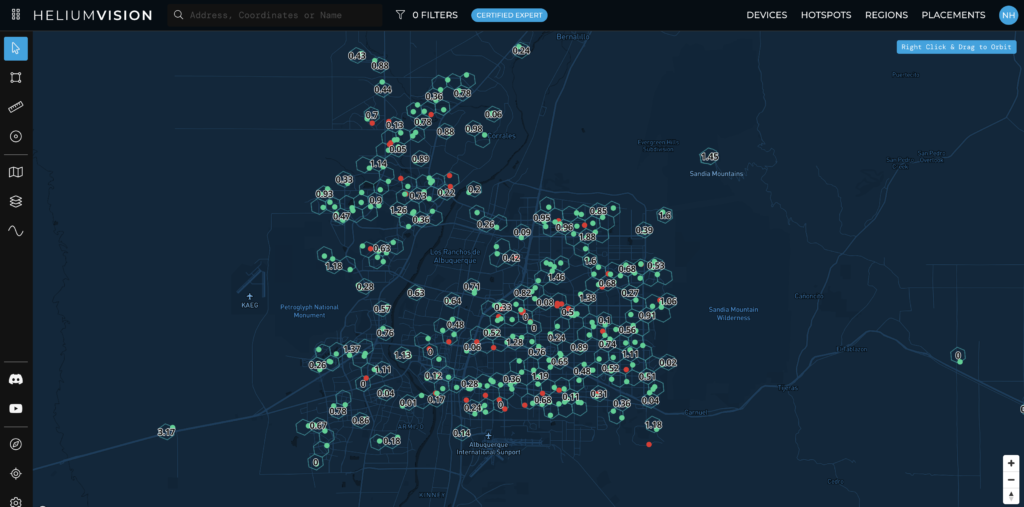
I thought the minimum number of hotspots you'd need in order to reliably witness beacons and therefore earn the majority of PoC rewards, would be around 300, just like Albuquerque. Here you can see the 24 average HNT earnings for any given res 8 hex using HeliumVision.

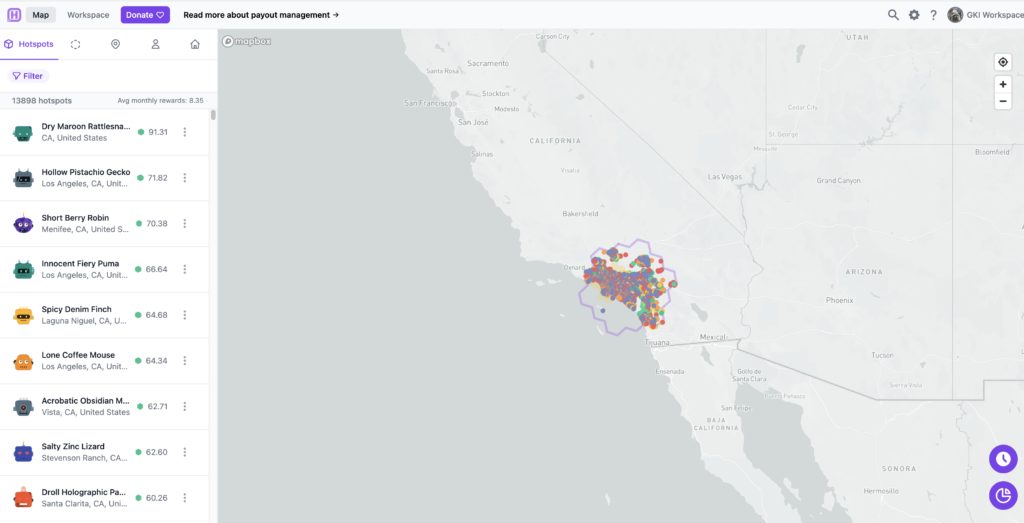
The average monthly HNT earnings of a Hotspot in Albuquerque is around 14 HNT. That may not sound much, but it's higher than anything else I could find, by a lot. I spent some time centering the map in Hotspotty on cities and seeing how many hotspots were there as well as average earnings.

It's a fast (well, slow because you're asking the map for a TON of info) and dirty way to get a "broad strokes" overview, although as you'll see, it allows you to miss some important points. Here's what I jotted down.

[ninja_tables id="2507"]

I figured that was a good start, but knew I should probably ask around for help with data that was a little more carefully assessed and parsed. Plus, where was the gold?

Where were the best spots in the country to deploy, and how many Hotspots do you REALLY need? Teling me that San Francisco is not a good place to deploy a Hotspot really isn't that helpful.

So, here's what the folks LongFi Solutions found when they dug in to my question.

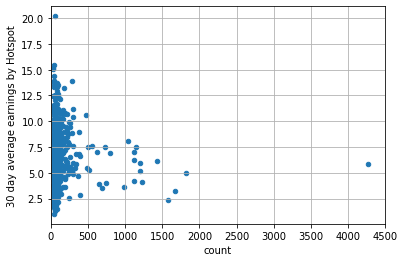
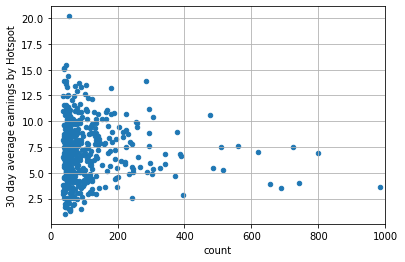
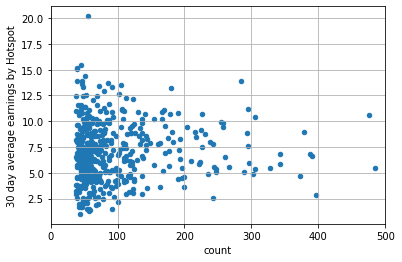
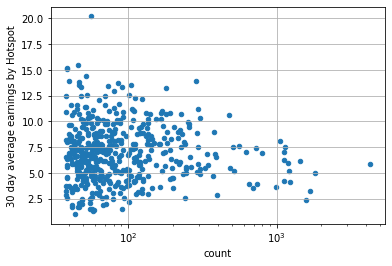
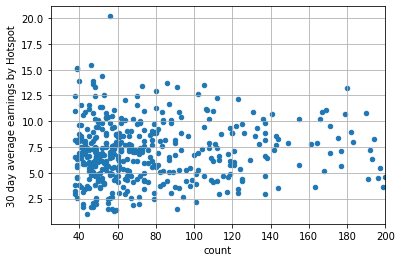
What is that saying? What the heck is it? On the Y axis is the 30 day average of HNT earnings per Hotpots. On the X axis is the number of Hotspots in the city. We're zooming in progressively on each graph.

Caveats: I asked for the data on the top 500 US cities. I know, I know, I'm not a statistician. There are probably a ton of things you could get wrong by misinterpreting the data, and among the things not accounted for (off the top of my head) we're missing topography and signal strength/data size (spreading factor) changes around the world. Still, a few interesting points popped out.

Wait, you want to play with this data yourself? Cool, please share what you find here so we can all learn more! Download the data here, it's a 32 MB file, just FYI.

Here are my takeaways:

  • You probably need at least 40 hotspots to be earning well.
  • 40 hotspots isn't a guarantee, it's just a reasonable target.
  • Once you get beyond 300 hotspots, it's not that you can't earn, it's that avg earnings are low, which is important for fleet deployers.

Here are additional takeaways from the LongFi Solutions crew (specifically, @the-wildcard on Discord)

  • It's interesting to see how things converge as you move to the right, I guess it's to be expected though
  • With the pace of new hotspots coming online, a lot of these numbers include hotspots that haven't earned yet. Will revisit in a week or 2 to see what's changed.
  • Most interesting to me was that the cities with the highest average earnings per hotspot have 40-60 deployed, a little lower than what I'd expected would be needed to maximize

A few additional points are worth mentioning. Remember, I was looking for best areas, not necessarily the best locations. Locations are straightforward: Get the thing high with clear line of sight and view to lots of Hotspots. Area is harder; how many Hotspots do you really need?

Now we're all one step closer to finding out. If YOU are a data geek and would like to contribute, please let me know what you're thinking in the comments, I'd love to include you in the collective wisdom!

If you'd like to join a group of like-minded individuals when it comes to learning about and optimizing Helium deployments, check out the Gristle Crüe!

Until next time, rock on!

Archived Comments

KH - 10/13/2021

Thanks for this.. But did you forget about the reward witness scale and HIP 15 in your throughts?


Nik - 10/13/2021

Not so much forgot as "didn't include". Working with fleet deployments lately, they need to start "big picture" and once they find a likely place, explore further.


Brad - 10/13/2021

Hi Nik, Can you clarify: "You probably need at least 40 hotspots to be earning well, and by earning well I mean as of Oct 12th an avg monthly HNT earning of 14 or above." Does that mean you need to be WITNESSING at least 40 hotspots to be earning well? If so, is that measured by the number of "recently witnessed" hotspots in Helium Vision? Some of my stats: HS 1: 15 recently witnessed. Earning .39 HNT per day HS 2: 25 recently witnessed. Earning .53 HNT per day HS 3: 28 recently witnessed. Earning .28 HNT per day HS 4: 15 recently witnessed. Earning .25 HNT per day Those are all in a metro area with around 150 other hotspots. There are no other hotspots in the same hex as mine at resolution 8. All have other hotspots in some of the adjoining hexes. All are at rewards scale 1. HS 1 & 4 witness the same number of hotspots but their earnings are significantly different. HS 3 witnesses more that HS 2 but makes significantly fewer HNT. I know it's more complicated that just witnessing hotspots, but what would be causing these differences if the number of witnessed hotspots is 75% of the rewards and what can I do to improve rewards? These are all Bobcats with the stock antenna inside a single pane of glass. I'm planning on changing to outdoor antennas 15-20 feet higher than they all are now. I assume this should increase rewards significantly, or is there more I should do? Thanks!


Nik - 10/13/2021

Hi Brad, 40-60 is just a starting point. Take a look at the scatter plot graphs to get an idea of where the avg earnings in a cluster of 150-ish is. Getting your antenna outside and higher almost always increases rewards. Rock on!


Shaggy - 11/30/2021

HEY so thanks for all the great info. good pictures. And answering so many questions all the time. My biggest hang up right now is what cellular modem to use I see the rut used a lot which I read it has option to use VPN on it. Are you guys using them? Because without having a static ip address which not all cell providers have them... so does VPN keep it from being relayed? Then what type of sim are u using what brand and is it unlimited or special iot m2m type or just a cheap 20 or 30 dollar unlimited data talk text with or without static and what brand? Anyone with a handful of set up on cell modems using a family plan let me know please.


Nik - 11/30/2021

No worries Shaggy, check over here for the latest on the 240 setup.


Bronson - 2/22/2022

Question? ... 40-60 in what size of an area? In the article, you did it by cities, but what does that mean area or hex-wise?


Nik - 2/22/2022

Depends on local topography. 40-60 that can *generally* see each other seems to work well, although lately I've seen clusters as small as 20 where at least one Hotspot was up in the .2 HNT/day (double the global avg).


Gábor - 4/1/2022

Hi Nik! I live in a quite hilly area and I found a good spot which isn’t scaled and the nearest hotspot is 30km away with no line of sight. I was thinking about placing 5-6 hotspots in that hilly area among villages which have line of sight of each other. Do you think like 5-10 hotspots will be enough to earn very well if they all see each other? Thank you for your help!


Nik - 4/1/2022

Hi Gábor, that's along the lines of what the Network is looking for (correctly placed proveable coverage) but with 5-10 you may not have as many beacons issued as you'd need to earn maximally. I'd think about how you use the Network as part of the ROI plans.


How To Use Hotspotty To Crush

· 9 min read
Nik
Site Owner

Hotspotty started as a way for Daniel Andrade (@spillere on Discord) to manage the growing fleet of Helium Hotspots he was rolling out together with Maxime Goossens and Alexis Argent.

In the beginning we had a tiny script that would send our daily rewards to a Telegram group.

It's, uh, grown from that. :)

Let's start with a little background on the Hotspotty team. Daniel is a Brazilian born itinerant consultant trained as an electrical engineer with an interest in web design & coding. He has contributed heavily to the Helium community.

Maxime is their engineering wizard, combining a drive to solve complex problems with an ability to show you, very quickly, the useful parts of the data.

Alexis has a strong interest in open source communications and blockchain technology. He's founded 2 companies in VoIP and Wireless distribution.

They recently walked me through the latest incarnation of Hotspotty in the accompanying video (vid link at the bottom).

What is Hotspotty, and how can you use it to help you within the Helium ecosystem?

Hotspotty is designed to be an all-encompassing tool for Helium users, from owners of single hotspots out to groups running a fleet of thousands. What does all-encompassing...encompass? Let's go through the high points.

Understand the Network

First, Hotspotty helps you visualize the complex math, equations, and rules that govern the growth of a healthy Helium network. If you've ever been confounded trying to wrap your head around HIP 17 with its density target, or number of siblings, or density max rules, Hotspotty makes the whole simple to understand from the perspective of any hotspot on the planet.

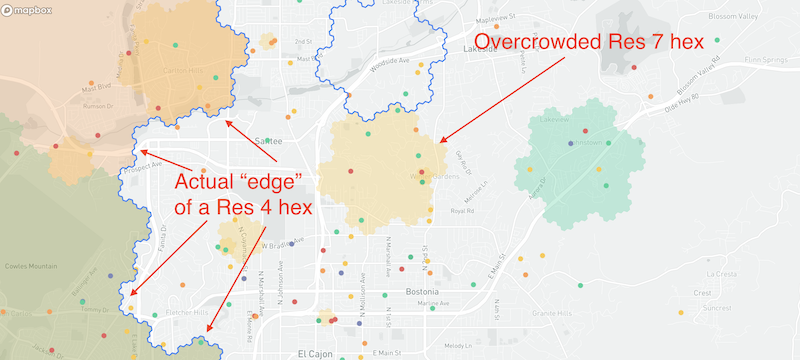
screenshot of Hotspotty app showing where the edges of hexes are as well as showing where overcrowded, or problem, hexes are.

Now you can see what the edge of any hex looks like (NOT a straight line), and also very quickly see where the "problem" hexes are so you can work to clear them. If you want to dive a bit deeper into HIP 17, I've got a post written up on it over here.

Collaborate with your team

Now, let's say you work with other people to manage your Network. You might have Installers, or Hosts, or a Fleet Manager, or even a Region Manager. You can separate out all those roles into Contacts or Members, assign them labels, and give them appropriate access.

Contacts may not be internal members; they could be an installer you just want to use occasionally, or a host who doesn't need to see your whole network but does need to get paid out monthly (or however you do it, this is NOT tax advice!)

Hotspotty allows you to also have Workspace Members who DO get access to the inside track. You can add these to your Members list, invite 'em in, and let them collaborate with you.

Optimize your deployment

Ok, so once you've started building your team, how do you optimize your Helium Network deployments? By diving into the Map section of the Hotspotty app and taking a look at the various tools available. As of Sep 18th, 2021, most of the tools focus on *avoiding* bad places rather than finding the best places, but that second part is coming, and soon.

What is a "bad" place in the land of Helium? I'd define it generally in three ways:

  • Density - Local and Regional
  • Topography - Signals blocked by earth
  • Volume - Enough Hotspots to reliably connect & initiate the earning sequence

I've talked a bunch about optimizing your hotspot placement (see my Rough Guide for a deep dive), but it can be complicated to run all the numbers hotspot by hotspot.

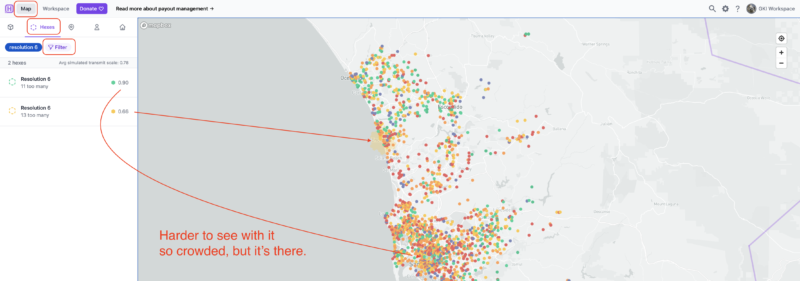
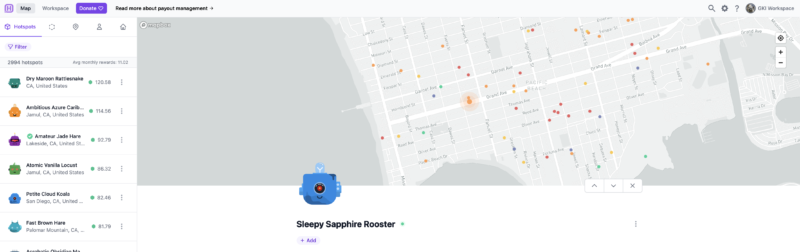
Seeing a "bad" place on Hotspotty is as easy as opening the app, clicking on the Map section, then clicking on the Hexes tab, and if you want to see specific resolutions, clicking on the Filter button.

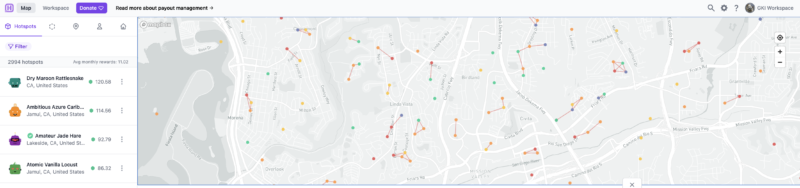
There's another cool feature you can use just for quick checks, and that's seeing where hotspots are too close together to have a *valid* witness (the "300 meter" rule.) Here's what it looks like when you turn on the layer in the settings cog, at the top right.

See all those line between hotspots? Every one of those indicates that those hotspots are too close to each other to be a valid witness. Neat, eh?

Collaborate with the Helium community

Now comes one of the coolest parts of Hotspotty, though it'll take all of us working together to make useful: Collaboration. Of course, you can collaborate with your internal team, and that's cool, but as Max from Hotspotty says after looking through reams of data:

What we discovered is actually quite interesting; most of the optimization is beyond your control.  Your earnings are defined by your environment.

-Max @ Hotspotty

Managing the Environment - Contacting Hotspot Owners

How do you manage your environment? By talking to other people! Hotspotty allows you to do this in a reasonably anonymous way. You can send a message to any hotspot, and if that hotspot owner ever looks at Hotspotty, they'll see someone has messaged them. They can choose to ignore it, or they can "claim" the wallet associated the hotspot the received the message and start a conversation with you.

What does it look like? Let's walk through the 4 step process.

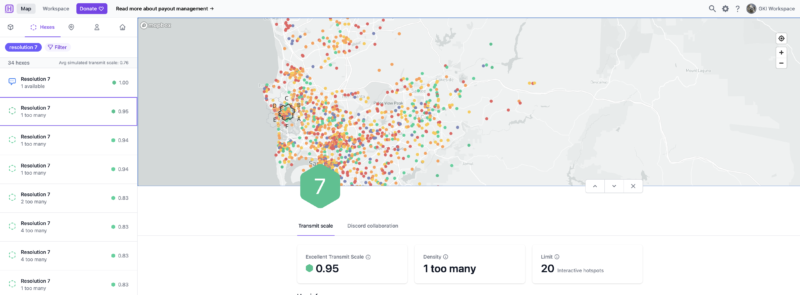
Step 1: Identify the problem. In this case, I filtered America's Finest City (San Diego) by res 7's, then just randomly selected one to see if there was an easy fix. I mean, Hotspotty is telling me we only have to move 1 of 'em!

Step 2: Dig in and look for easy wins. In this case, there's a hotspot that right on the edge of the res 7 AND is also super-crowding another hotspot. Easy fix!

Step 3: Identify the exact Hotspot.

Step 4: Initiate contact. Be cool, offer help. Do NOT be a jackwagon! Only showing them how THEY can move to benefit YOU is NOT helping the community. :)

Managing the environment: Spawning a Discord Channel

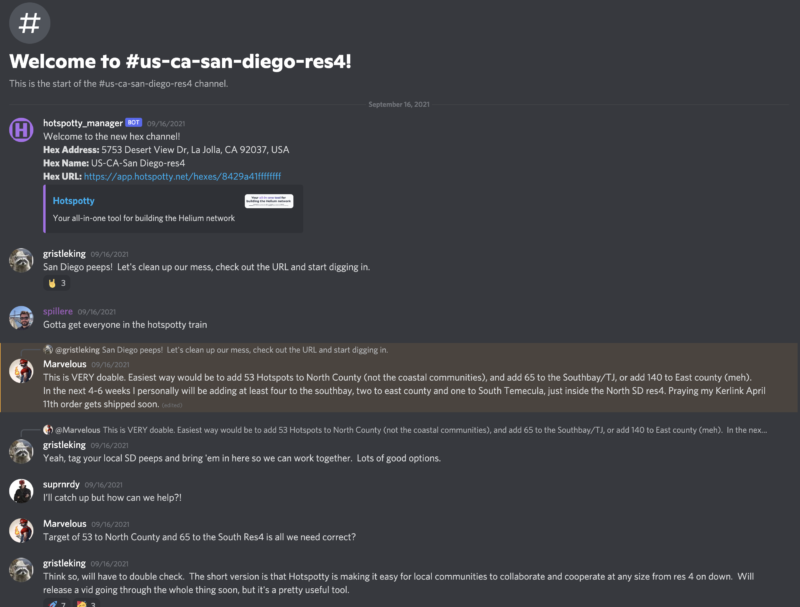
Another rad way to invite your local crew to participate is by "spawning" a Discord channel based on a specific hex. You choose your problem hex, spawn the Discord (which will open up a new channel in the Hotspotty Discord), then rally folks into it. I've done the "rally" side by working in the much larger regional channels over on the Helium official discord and saying, "Hey, if you're in [San Diego] and want to improve our reward scale, jump on into the discussion and let's crank up earnings together, [here]!"

As an example, here's the San Diego res 4 Discord channel.

Manage payouts

Finally, you can manage payouts. The Hotspotty v1 is still alive and well for this. On v2 (which is what I've covered in this post) as of today, you can just get the correct numbers for what you need to pay out, but can't automagically make it so your wallet pays another wallet on some certain date/time, but that's coming.

Ready to dive in? Cruise over to Hotspotty and sign up to get started. Enjoy, and let's make the Helium Network radical together!

VISIT THE HOTSPOTTY WEBSITE

The full interview is over on the Toobz, or you can watch it right here.

https://youtu.be/7v19oWawO1Q

Until next time, rock on!

If you’re looking for work in the Helium ecosystem, please check out this rad project I’m a part of called Helium Jobs. You can post and find jobs there, help support the ecosystem by making it easier to connect professionally, and let the world know that YOU exist and want to help contribute within the Network. Rock on!

Archived Comments

AndyCA - 9/20/2021

Thank you. Such a useful tool.


How Do You Find The Best Site For Your Hotspot?

· 7 min read
Nik
Site Owner

Well, the race is officially on. With at least two unofficial halvings coming in the near future, it's pretty darn important right now to:

A) Get your Helium hotspot up and earning and

B) Secure the best spot you possibly can.

In the case below, this hotspot is on private property with an incredible view of both my favorite place to fly a paraglider in San Diego AND an excellent view of the southern half of San Diego county.

Wait, what? More halvings? Yep, you've got 2 coming. One from network growth (network size will probably double by the end of the year) close to 300k.

Doubling the network equals (for the AVERAGE hotspot) half the rewards. Now, that's the average hotspot, but it's best to be conservative with these calculations.

What's the second halving? 5G. IF 5G rolls anywhere near as fast as they rolled out the current hotspots, it'll chew through the "up to 35%" of HNT set aside for network data transfer.

Remember, 5G is the opposite of LoRa. LoRa is small packets/large distance. 5G is large data, small distance. 5G chews through data like I used to eat gallons of ice cream; it disappears.

The catch (and really the current "doubling") is that if the "up to 35% of" HNT for data transfer doesn't get used, it gets redistributed to PoC rewards. That's us, running regular hotspots, collecting HNT for challenging, beaconing, and witnessing. Mostly, for witnessing, but that's another story.

Since our current PoC (Proof of Coverage, more on that here) rewards account for 26% of all HNT (let's call that about a third) and the data across the network isn't anywhere near capacity of "up to 35%" (we'll call that another third) we're basically getting two thirds of all HNT distributed, which is double what we're technically earning.

So, when that data gets used up by 5G hotspots, our rewards will be halved again from today. That's the bad news.

The good news is that wherever there's challenge, there's opportunity. For you hard chargers who are willing to hustle for the love of crypto and fun new enterprises and high-risk/high-return livin', giant opportunities still abound. Let's talk about a few of 'em.

First, there's the stuff you do yourself. You can use Helium.Vision or Hotspotty or Kudzu to go deep or HotspotRF (or even Google Earth) to keep it simple. Find the high points and places where your hotspot can be placed for maximum earnings. Maybe you get fancy on Google Earth and run an altitude layer to make sure you're only looking at islands in the sky, or you re-watch the demo I did on Helium.Vision and make sure you know how to use all aspects of that super powerful tool.

A hotspot with a high volume / low density view is optimal, but even a high volume / high density view like the one below can be a high earner.

You find the spot, you figure out who owns the rights to it, you contact them, negotiate an agreement, install your hotspot, and, as my English uncle says, "Robert's your father's brother." Us Yanks are little more direct and just say "Bob's your uncle."

Hot tip? Look for land brokers. They represent empty lots of land that could use a little income. That tip came from one of my most successful clients who is also an absolute wizard marketer. He has built a marketing & sales system for Helium placements that gets a 50% callback rate on leads (unheard of!) and he cherry picks the best spots. Without giving away his location, out of the top 10 Helium hotspots in his area (a place with over a thousand hotspots), he's runs 3 of 'em. He sells that system, if you're interested in that just reach out.

Finding your own placements is one of those "most work equals most rewards" deals, but if you've got a lot of hotspots, that's a lot of work.

That brings us to your second option, a recent start-up called Sitenna.com. They connect you (the antenna/hotspot owner) with land owners. You don't look for spots, you just supply the hardware, pay the rent, and collect HNT. Obviously it's slightly more complicated, but that's the gist.

If "pay to play" is your game, Sitenna is looking to be a very promising option. Tell 'em Gristleking sent ya, it'll be good for a laugh. They're a couple of recent Y-combinator types on a trajectory to crush; we Helium peeps might as well go along for the ride.

Third, you can make your own placements. This is by far the hardest, as well as in the long run *probably* the most profitable. You go out and find a business that could actually benefit from LoRa. It'll need to meet very specific requirements: They'll want to cover a large area, they don't need a ton of data, there's a clear profit motive, and they're willing to see the world in a new way.

Whether that's a cattle rancher in Montana, a scooter operator in Cancun, a boat tour operator in Cabo San Lucas, or FedEx, well, there's a whole giant world of opportunity out there for ya, but it does wear overalls and look a lot like work.

Here's me and a buddy at the beginning of my very first off grid placement (when I thought antennas mattered), about to do a 12 mile round trip hike in the mountains carrying 60 lbs each on the way out and running out of water on the way back. That was straight work, yo.

If you're looking for help to optimize YOUR hotspot placements, whether it's the one on Mom's house or the fleet you're rolling out in a far off land, consider hiring an expert for help.

In the meantime...get 'em!

How To Use PoE To Power Your Helium Hotspot

· 8 min read
Nik
Site Owner

How do you use PoE? Do you need a splitter, an injector, or both? How does it all work?

Let's dive in! PoE is one of those things most of us never have to deal with and can seem like a mystery. It's not. It's super simple, let me show you how it works.

First, P-O-E stands for Power Over Ethernet. It's a way to combine BOTH the power AND the Ethernet connection into one cable. You're literally running power over an ethernet cable.

When deciding to use PoE, check to see if your hotspot supports it natively like the Nebra Outdoor (Option 1, below) or doesn't (Option 2.)

Here's a handy Hotspot Connection table to figure out what you have.

Note on the Syncrobits that they have "Passive PoE", which is non-standard. Make sure you get the right type of Injector for them. Ok, on to the diagram.

Ok, but what do injectors or splitters actually look like? We'll start with an Injector:

See how the power cord comes in on the right side, and then there are 2 ports on the left?

One of those ports, "Data In", is for the ethernet cord that comes FROM your router. That brings the data INTO the injector.

The other port, labeled "Power & Data Out", is what you'll use to take both power and data OUT, going up to 300' over an ethernet cable to your hotspot.

What about the Splitter? What do those look like, and when would you need one?

First, look up your hotspot specs. SOME hotspots (the outdoor Nebra, for example) support PoE natively; they don't need a Splitter on the far end.

However, if your hotspot has a port for a power plug (USB-C, barrel plug, etc) AND an Ethernet port you can use a PoE Splitter. Those look like this:

That blue cable coming in from the bottom represents the long cable run from the Injector to wherever your hotspot is. The Splitter than splits out the Power and the Ethernet, and you connect both to your hotspot.

The one tricky thing is being careful to not "double power" your hotspot. Don't run PoE AND a power cable to the hotspot. It sounds silly, I know, but I've heard stories about the "people who think more is better", so I figured I'd warn ya.

If you'd like to support the blog, pick up your PoE Injectors & Splitters via these links:

If you learn best by watching something, here's a video. Yeah, the cables are a little messy in the vid. If that part of it confuses you, well shit, you're probably having trouble tying your shoes and should stay away from putting up badass hotspot placements.

https://www.youtube.com/watch?v=oHzBNQOHqrY&t=7s

That's PoE explained. Get after it!

Wait, you want to see what it looks like in an actual enclosure, with a hotspot, and all fancy? Here ya go:

https://www.youtube.com/watch?v=pKCWOBQy22U

~Nik @ GK

Archived Comments

Stephen - 7/25/2021

Thanks Nik. I use these injector/splitters on my Bobcats, they work perfectly and a little less bulky: https://www.amazon.ae/gp/product/B08P8Z5PDQ/ref=ppx\_yo\_dt\_b\_asin\_title\_o04\_s00?ie=UTF8&psc=1 A few more benefits for users to think about when using PoE: a. by removing power adapters from your outdoor case you're also reducing the heat a little. b. by having easier access to the power source (lets say at ground level or at least indoors), it's much easier to power cycle the unit.


Marcus Makabenta - 8/4/2021

Why my ethernet port from my spectrum wifi router is not going when connected to poe injector (basically all cables are connected correctly). Thank you for the answer.


Nik - 8/4/2021

Hmm, I'm not sure mug. Sorry!


CaptMartini - 8/16/2021

Brilliant write-up. Much appreciated. This makes for a clean and tiddy install. I will pay it forward. Cheers.


Nik - 8/16/2021

Hell yeah, love hearing that. Rock on Cap!


Jake - 9/3/2021

For the Outdoor Nebra - does it matter if the injector you buy is 100mbps or 1000?


Nik - 9/3/2021

Probably not; data rate on the hotspots rarely exceed 300 kpbs.


Darren Warren - 9/13/2021

Since I have a Syncrobit I need to make sure I buy a passive injector? Example: TP-Link PoE Injector | PoE Adapter 24V DC Passive PoE Thanks!


Nik - 9/13/2021

Hi Darren, Syncrobit says "Support for Passive PoE" on their spec sheet. I'd double check with them just to be sure.


Dylan - 9/14/2021

My POE splitter is very hot. I bought a DSLRKIT Active PoE Splitter 48V to 5V 5.2V 2.4A USB TYPE A Female 802.3af for tablets and just used a short USB A Male to USB C cable to go into the Sensecap M1.


Andrew - 9/26/2021

Does bobcat run on 802.3at or 802.3af? Does it matter? Don't want to fry my rig.


Nik - 9/27/2021

Good question Andrew, I'd check with Bobcat to make sure. They don't say anything about it on their spec sheet.


Nelson - 10/22/2021

Thanks for the great post. I have a setup where its much easier to get my Ethernet cable from the bobcat to a wifi extender rather than the router. Do you know of any issues using this setup. Thus far, I haven't been able to get it online even after trying a port forward.


Nik - 10/22/2021

I've heard of other people having the same issues with WiFi extenders. Always best to go straight from the router into your Hotspot via ethernet, even when it's a lot harder to do. :)


Raf - 11/16/2021

Bobcat operates on 2.4Ghz Wi-Fi (802.11.b/g/n) Source: Joe P#0175 (discord channel) Joe Petrungaro 7/27/2021 Thanks a lot for your posts Nik \(^_^)/


Amos - 12/16/2021

Instead of a POE Injector splitter can I use a POE switch. I have a POE Switch powering other devices.


Nik - 12/16/2021

Hi Amos, sure, the PoE switch should be able to replace the injector. You'll still need a splitter on the Hotspot side if it's not PoE capable.


Richard - 12/17/2021

Hey KING, I was doing an upgrade to my RAK and installed a POE splitter to tidy up a hotspot and now my miner says its RELAYING, didn't before installing the POE splitter. Any thoughts or give it some time?


Nik - 12/17/2021

Shouldn't be the splitter that's the issue. Go through Jason's relay flow over here, that should get you sorted.


How to do a Helium Hotspot Placement Assessment

· 19 min read
Nik
Site Owner

Getting the most out of a Helium hotspot deployment requires a strategy to maximize your placement, antenna elevation, and then physically deploying the thing.

Most of the earnings will come from the placement. I know it's usually easiest to just put it up in your house, but it's probably worth assessing a few spots before you install it in the easiest place possible. Here's a video walking you through how to assess a location for a Helium hotspot deployment.

https://youtu.be/mDKNdRTxwIQ

Now, you probably know your local area pretty well, but I've seen a lot of clients surprised by "hidden" geographical features that blocked their RF viewshed and therefore their earnings.

With assessment tools being affordable (I use Helium.Vision, but there are other tools as well), there's no excuse not to do your homework and determine whether or not all the effort that goes into physically deploying a hotspot will be worth it at your house or somewhere else.

The video walks you through the steps to take that will help you run an assessment on your place. This is just a small piece of the Strategy & Optimization consulting I do, but I thought it would be super useful for many of you who want to start on the journey of maximizing your hotspot.

Oh, as a hot tip: I now start with temporary deployments just to test things out. I can put an antenna up in under an hour, Beacon using Discovery mode just to check on things, then let it run for a week or two before putting in a more permanent placement. Mastwerks is what I'm using for an excellent tripod that'll get that antenna up high temporarily. You can find other options, but I wanted the best out there. ;)

Best of luck to you, and please, if you do something different I'd love to hear about it! If you'd like help understanding more about Helium and how to maximize this opportunity, take a course or consider hiring me.

Archived Comments

Chris - 6/13/2021

One hotspot I deployed was “Unique Blonde Bear,” I used Helium RF and it looked like it would not be a good placement for the hotspot. I optimized the setup using your guide and placed it on a 22 ft. pole Now I have about 14+ hotspot connections. Wondering if there’s anything else I can do to optimize the coverage. Cheers!


Nik - 6/13/2021

Hi Chris, once you get it at the max height for your location, that's about the most you can do. Nice job on the 14!


Tom Fool - 6/14/2021

Hey Nik, quick question regarding Helium.vision - does it know if your hotspot has been updated? Say I change the antenna and placement slightly but its still in the same location - will helium.vision be able to account for that or is it just a simulation giving rough estimates? Is discovery mode the only way to tell if a hotspot is witnessing in "real time"?


Nik - 6/14/2021

Tom, HV will pull data in from whatever you've reported via the Helium App; if you've updated your antenna & elevation, that's what will display. The simulations *can* change radically depending on elevation, less so with antenna gain. Discovery mode is just a snapshot in time of what nearby hotspots have witnessed your beacon.


Ady - 6/14/2021

Hi Nik, I’m awaiting for my RAK hotspot miner order, my question is I live in a rural area in the UK my nearest hotspot is 45kilometers away. Does this mean I’ll not be able to have any witnesses and should be looking to move it elsewhere in a built up location. You’re advise greatly appreciated. Ady


Nik - 6/14/2021

In general, yes, you'll want to be able to see at least 4 other hotspots in order to begin to earn maximally.


Simon Moreno - 6/15/2021

How did your miner mined 80+ helium token within 2 weeks? I added your Helium and it added up only 5 helium tokens?


Nik - 6/15/2021

Hi Simon, not sure I understand the question. Would you re-phrase?


David - 7/22/2021

Hey Nik, I've had my rak v2 miner for a month, it connected to the network day one with no issues, there are roughly 7 miners near me within a 10km radius, and hundreds within 100km. I'm the only miner in my area through lvl 6 on helium vision. I'm at one of the highest points in the county so it would seem it's a perfect spot. I'm beaconing and witnessing other miners, but I haven't had a single witness yet. I didn't even earn 1 from hnt in 30 days. I have the miner inside on the second floor right next to the window, roughly 30ft in the air, not near any metal or obstructions I can see or am aware of. I just found your blog, both the hnt help desk abs the discord have given me mixed answers, no one seems to know what's wrong. Could my miner be defective? If I build a 20ft tower and put the miner outside all that any difference or is there anyway I can troubleshoot that? It doesn't seem to make sense that I can witness other hotspots around the world, but no one can see me? No one has any answers and a few other ppl are complaining that their rak v2s can't be seen - do weak just have bad placements or are you aware of any issues with the v2s? I know they had tremendous issues getting them. I ordered in February and didn't get mine until this month. I can't quite afford your full assessment, but would $50 get me anywhere? I'd really appreciate any help you can give me.


Nik - 7/23/2021

Stock antenna? If you're witnessing other miners that's good. Troubleshooting steps: 1) Is there any way to get the antenna outside, even temporarily, just to test if that's a good fix? That might run you $30-70 for the cable, depending how long a run you need. 2) Does Discovery mode work? 3) With only 7 HS in a 10 km radius, that might be the issue, especially if they're not well placed. 4) For $50 you could build a mapper and test your coverage as well as running data through your device. If that works, then it'll probably be an issue with the other hotspots.


David - 7/23/2021

Yes it's the spock antenna - if I took it outside temporarily I'd have to drop it about 8ft from where it's at. Opposed to drilling through the roof or brick id probably have to build a little tower and could probably get it 20-30ft in the air but it would still be lower than where it is now. Do you think with an upgraded antenna I might reach some of the further hotspots or will that not make a difference if they are too far away? When you say issue with the other hotspots - Do you mean they are too far or they aren't working properly? I understand a little bit about RF frequency, I just don't see the brick making a huge difference. It's just been a bit frustrating with the massive delay. Is there a YouTube tutorial for the mapper, that seems a little over my head with the coding, I don't want to accidentally break anything and the quick start guide is a dead link?


Nik - 7/23/2021

Hi David, I'd start with getting the antenna outside for a day or two, just to see if that's the issue. If it is, then you can build a tower. The other hotspots may be poorly deployed; sometimes they see you, sometimes they don't. You'll have to Google around for a tutorial, or head to the Discord and check the #mappers thread.


David - 7/23/2021

Hey Nik, I think I see what the problem is - I'm north of Pittsburgh and even though I'm at one of the highest points in the state, the terrain of the whole state is "the rolling hills of Pennsylvania" out side building a 100ft tower - it looks like I'm not going to reach anything because one way or another there's a hill in the way - and a few of the close miners do have poor setups - 2 are relayed, and 3 of them are using 8dbi antenna's - I can't imagine that's a good idea for the terrain. I can't build a massive tower, but if I was able to get it up about 20-30ft and got one of those hntennas do you think it would make any difference? There are roughly 9 miners between 7-10km from me. I don't know how much the hills are blocking the frequency from where they are. I was never able to figure out how to add credits or get the frequency thing to work on helium vision. I did get one response from another hotspot while running discovery mode with the miner outside on the ground, but still no witnesses - it really seems like it's the hills and the only real way around hilly terrain is be more miners closer together.


Nik - 7/23/2021

The HNTenna (or any antenna) won't make a difference when it comes to punching through hills; they just won't do it. See if you can use the Line of Sight tool on Helium.Vision, that'll quickly tell you if you're likely to be able to witness/beacon with other hotspots. Rock on!


David - 7/23/2021

Nik, Just looking at quick line of site scenarios - it seems I need to get it to almost 120 Ft to get over anything - I actually might be able to hide in a tree in my yard - do you have any suggestions for an internet connection though wifi won't reach it there. I have some outdoor lighting so powering it isn't a major issue the line is already there. I might be easier to mount on a tree and there's no way I can put anything that large on the roof - if I got to that height - would a 5dbi antenna make sense - in theory it should be clear for a good 15miles since I'm on such a high point to start with - or would it be better to go with 3dbi so it has better reach into valleys - I'm hopeful that a few more will pop up in my area, I'm a bit shocked to see how many are actually in the city and I'm seeing new ones pop up more and more as miners are finally being shipped out. Thanks for all your help btw - not a single person on discord suggested checking line of sight - every just kept saying just wait for it to load on the the blockchain and I was pretty sure that was just BS. I can't believe there aren't better how to guides from the companies selling these. I'm really glad I found your site.


Nik - 7/23/2021

I'd use PoE if you can; you've got 300' to work with on that and it solves your internet problem. Either antenna should be fine. I'm not a fan of tree mounts, though I do have at least one client who's had success with 'em. Charge!


Ray - 7/23/2021

If I extend my antenna from my chimney say 10 - 20 feet. the chimney is about 25 30 feet already, should I worry about lighting hitting my antenna, there is not much lighting though. There may be some other trees a little higher in the 3 arc property. Also, is the antenna that comes with the synchro bit I believe 3.8 be the best to use if I want to reach a 5-mile radius with other machines in the area? does the 3.8 antennae reach out in a circle compared to the others out there? Thank you


Nik - 7/24/2021

Hi Ray, with a lightning arrestor added you'll be doing all you can to prevent damage to your equipment. Sounds like a pretty low risk (from a lightning perspective) install to me. A 3.8 dBi antenna will be fine, just make sure it's rated for outdoor use. If not, the upgrade to an outdoor rated antenna will run you from $35-$150, depending on what you get.


Gerry - 8/8/2021

Great information Nik, and super helpful. Question about optimal value from placement of multiple miners - There are 0 miners in my town, but I have 7 miners arriving with the first batch coming in 3 days. Main street in my town is roughly 1 mile long and extends 1/4 mile on each side of main street. I am on one end of town within 300 feet of the highway between 2 of the biggest cities here in Texas. In regards to the placement of 7 miners, and outside of the discussion regarding terrain and buildings etc would it A - be better to have a tight hexagon cluster at one end of town where my house is to leverage HIP17_res_8, or B - would it be better to try to zigzag crossing main street to deliver more coverage. Another consideration I struggle with is the thought around a tight placement grid that would best make it look like there is no room at the Inn for new hotspots within "my" grid. The drive to head in that direction is to aim to have the most possible control over each of the hotspots in that grid in regards to any necessary upgrades to antennas, outdoor enclosures or mast height. Thank you for taking questions here.


Nik - 8/8/2021

Hey Gerry, I'd focus on providing excellent wide coverage with the HS youhave. You just won't have the opportunity to witness beacons as much with only 7 hotspots, no matter if you deploy them tightly or spread out. As the network grows, we all beacon less frequently. Plus, you can't really *own* or prevent anyone from doing anything. I guarantee you'll have some jackwagon put a hotspot up right next to yours. Has happened to me. The best thing to do is to make sure every placement is the best it can possibly be, and that it has clear line of sight to as many other miners as possible.


Ray - 8/17/2021

My son has a house with a Direct TV antenna on the roof they are not using. Can he use that to connect his SP hotspot mining machine? Also, Would a 5.8 ANTENNA reach the same radius distance or more as the 3.8 that comes with our mining machine.? Thank you, Ray


Nik - 8/17/2021

Hi Ray, the Direct TV antenna won't work; not the same freq. Either the 5.8 or the stock will be fine; they'll both reach plenty far.


Bob - 8/20/2021

Hey nik, 3 questions 1. Is the stock antenna usually water proof i have the 4dbi bobcatminer one. 2. When first setting up my hotspot, in the assert location step, where you drag the little triangle to the other little triangle, my actual location is a few meters off(30maybe) from where it placed it, is this a big deal? 3. And lastly ,when setting up the hotspot how important is it to accurately type in your elevation on the antenna details, because most of the hostspot with really high earnings are at 0m of elevation in my area so i can only assume its not relevant? Thanks for your hard work and time to help us all out.


Nik - 8/20/2021

Hi Bob, 1. Bobcat has told me their antenna is outdoor rated; I don't know about waterproof (like underwater), but outside should be fine. 2. A few meters isn't a big deal. It'll always snap to the middle of the res 12 anyway. 3. Unimportant for now to enter antenna details, but it will eventually be important once we go to PoCv11, especially if you're using a higher gain aftermarket antenna. The default elevation is 0, that's what a lot of people just leave it at.


Hotspotty Improved: Deep Research For A Better Way - Gristle King - A Guide to Helium - 11/4/2021

[…] the main­te­nance guy over at the Empire State Build­ing, etc. If you need help, I’ve got a blog post over here about how to do an […]


michael walsh - 12/27/2021

Hey, Nik I live in the NJ/NY area and I have various places that I can place my miner such as 60 story buildings to areas to huge warehouses. I currently have it in my house as connected via ethernet but I am running into the issue of port forwarding to resolve the relaying issue. If you can reach back out to me with some advice on an antenna, best location, and how to remove this thing out of relay mode it would be much appreciated. Also anyone seeing this thread can reach out to me and can possibly utilise the various locations I have to mine.


Nik - 12/27/2021

Hi Mike, I'd post your properties over in the Real Estate section of HeliumJobs. I offer paid consulting that covers your questions, check out your options here.


Allan - 12/30/2021

Hey Nik, I am all new to Helium mining and recently purchased 2 RAK Miners (Gold 8GB editions). I set them both up currently inside for now. 1 is connected and seeing little reward, probably due to stock antenna and inside, the other is in another room and is relayed with no witnesses which i assume as it connected to the first miner. I set up port forwarding, i changed it to another network (other router but connected to main network router) and still it shows as relayed. Maybe this is normal, i do not know but before i start to change antennas and look to set up outside, any advise you can offer? Also i am in an apartment, is there an easy way to install a new outside antenna on a balcony set up where i have limited elevation options? Thanks a bunch,


Nik - 12/31/2021

Hi Alan, I'd suggest getting them at least 1 km apart, getting the antennas outside, and up high. 2 miners on one network usually force a relay on one of 'em.
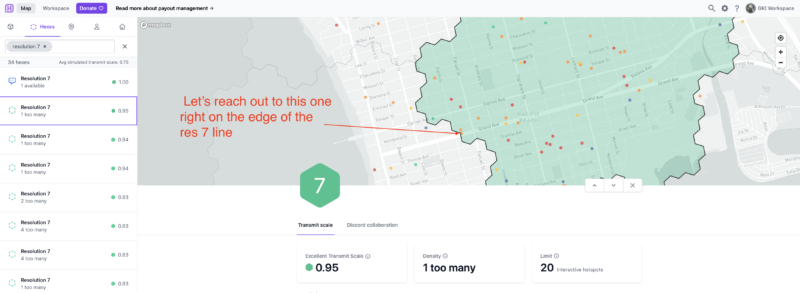
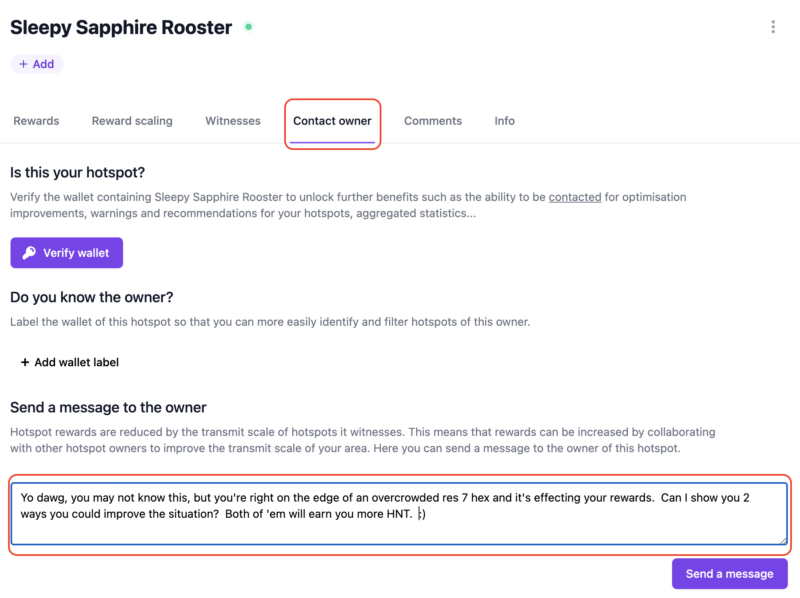

Allan - 1/1/2022

Thanks Nik, I will ask a friend to place 1 of the units in his apartment and use an outside antenna :)


Allan - 1/4/2022

Hi Nik, Sorry for another message. I switched off one of the miners and will relocate it next week, however it still shows as online through the app? Also how do i get the main one (the one that is still connected to network and shows a 0.37 transmit scale which i assumed it would go back to 0.77 before i set up a 2nd miner? Maybe it takes more time to revert back to 0.77 or does it depend on the set up of the 2nd miner at a new location? Thanks a bunch


Nik - 1/4/2022

No worries. The app can be delayed by days, don't worry about it showing as online still. Should be 2 and a half days (approx) for the scale to update once the miners are moved.


Allan - 1/6/2022

Great thanks, You were right, moved back up to 0.72 transmit scale, however i am unable to remove it from relayed even after port forward, restart etc. Even checked with Port Checker and everything looks good there, port is Open, looked in the diagnostics from the app, everything looks good, Outbound/Inbound = Green, BlockChain Sync = 100% green, so everything looks all good, just the relayed part i need to figure out now. Thanks a bunch as always


Nik - 1/6/2022

Hi Allan, try this post, and use HeliumStatus.io for checking your status.


Sam - 4/16/2022

Hey Nik, Moving the antenna outside is not an option for everyone specifically the one's living in apartments with no balconies and buildings around. I was thinking to move the antenna to building roof but in summer its too much hot here. Now the solution I am thinkjng of is: there is a room at the roof in my building for lifts motor and AC is always on there. If i can move my miner in that room with POE and connnect a 5.8 dbi antenna with it which will be placed on the roof of the same room. But before doing it I have few questions: 1. Will the magnets and motors in the lift room interefete with the lorawan signals? 2. If I place the bobcat miner on the roof top under some shade, in summers weather can damage the hardware? I am talkjng about 8th floor ad region is middleeast( Bahrain). If I can go with this approach i can place the miner a bit far from this lift room. 3) If I place miner in the lift room and antenna lets say 7 ,8 meters away , will this work fine? Appreciate if you can help here.


Nik - 4/16/2022

Good question, you'll have to try it out. Bahrain is pretty darn hot, I'd keep the 'cat cool if you can. 7-8m run for cable is no problem, just use something like LMR400.