How To Set Up a RUT 240 for an Off Grid Helium Hotspot - Prepare for Challenge!

With a generous assist from the folks over at HNTenna, here's a step by step method for setting up your RUT 240 (the cell modem that allows an off grid Helium Hotspot to connect to the internet.)
I'll start by saying that off grid set ups are not for the faint of heart, the easily discouraged, or folks who avoid challenges. You WILL run into challenges. Batteries will go bad. Miners will overheat. Your data plan will need to be far larger than normal (100 GB/month is what you want as of Nov 2021.) Don't do off grids unless you're willing to proactively solve those, usually on your own.
UPDATE -- OFF GRID DATA PLANS
The latest advice (25Nov2021) is to NOT do any of the below, but to get a standard SIM card plan (I know this doesn't sound right) of 2 GB @ 4G and unlimited at 3G $15/month T-mobile and let them be relayed.
If you're determined to still go forward with this, try Proslashers instructions for the 240, over here. If you buy a pre-built VPN from him, use gristleking at checkout for $10 off your order.
Off grid set ups ARE for folks who love rad projects, who are willing to problem solve, and who get more joy out of figuring shit out rather than having a plug 'n play solution handed to 'em. Nothing wrong with either one, but there's a definite success formula here that does not favor "Please do this for me" mindsets.
Before we dig in, let me make a semi-official disclaimer: This post is a set of guidelines that have been successfully used to set up a RUT 240. No one involved in this is offering any official support, though I'll help as best I can via the Comments section at the bottom of the post. If this setup doesn't work for you, please do NOT DM me. Post to comments so we can all learn from your challenges.
Teltonkia (makers of the RUT240) have recently posted a video on how to set it up. I'll leave our old guide in here for posterity, but here's how Teltonika recommends you do it:
https://www.youtube.com/watch?v=ek\_moDNr5Is
The "Old" Way (for Posterity only, we no longer recommend this)
Start by turning off your computer WiFi, then connecting your computer via an ethernet cable to the RUT240's LAN port. I used an adaptor to get from Ethernet to USB-C; you can get those on Amazon.
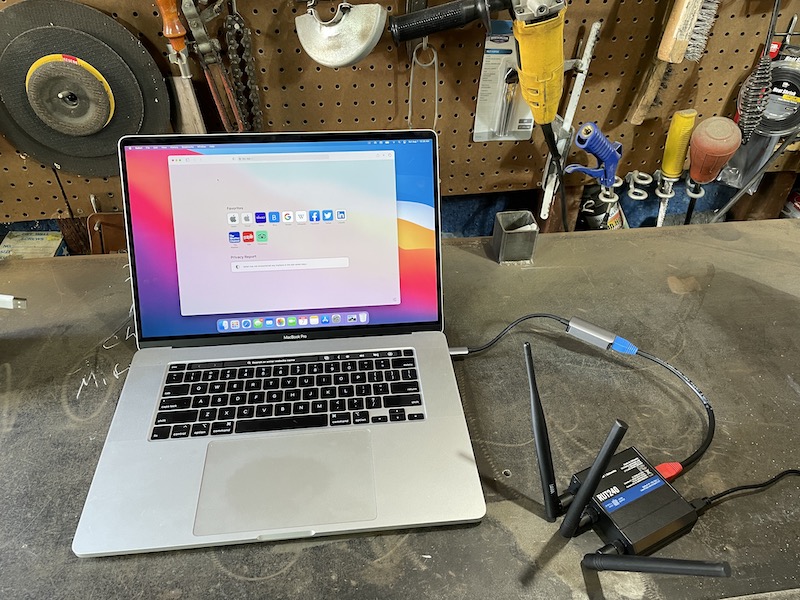
Power up the RUT 240. Wait.
On your computer, navigate to 192.168.1.1 in your URL.

Enter admin01 for the password and click the LOGIN button.
You will be prompted to enter a new password. Do it, then click SAVE. Keep in mind that the modem can take a while to "think", so just be patient after you hit SAVE on this, and any other screen.
You now have 2 options, one simple, one complicated. They have both worked. Try the simple one and see if it works. If it doesn't, try the complicated one.
Option 1 - Setup Wizard
System —> Setup Wizard —>
Step 1
Set local time, enter password
Step 2
Uncheck Auto APN
APN —> Custom—> [enter your APN if you got a static IP]
Step 3 —> Skip
Step 4 Wifi —>
WiFi SSID: [Name it whatever you want]
Password: [your password]
Leave WiFi enabled for now, it’ll make setup easier later on when the system is installed, you’ll just need the laptop to access it.
Write down the Router Serial & MAC address, then log into to rms.teltonika.lt
Add Device using the MAC address & Serial number
Go to System Management and look for:
Reboot
Select auto-reboot every 24 hours by checking every day of the week.
Log out. You're done.
Option 2 - Let's Get Geeky: Not true static IP, but static DHCP lease
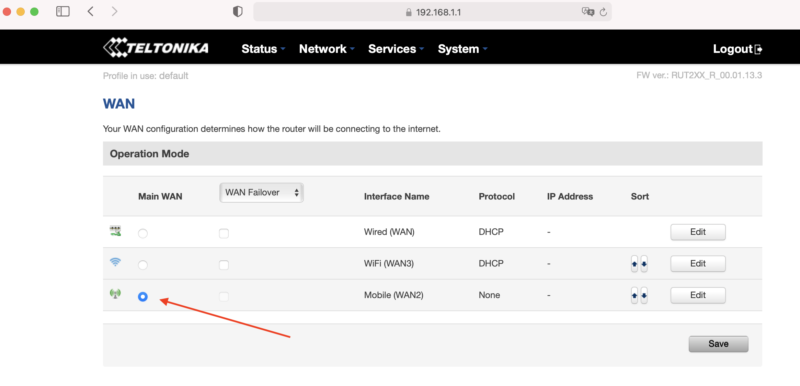
Start from just after you set the password on your RUT 240, above. Now, on the top menu bar, navigate to Network --> WAN. You'll see a screen like this, usually with Wired (WAN) selected.
Select Mobile as the Main WAN, then SAVE.
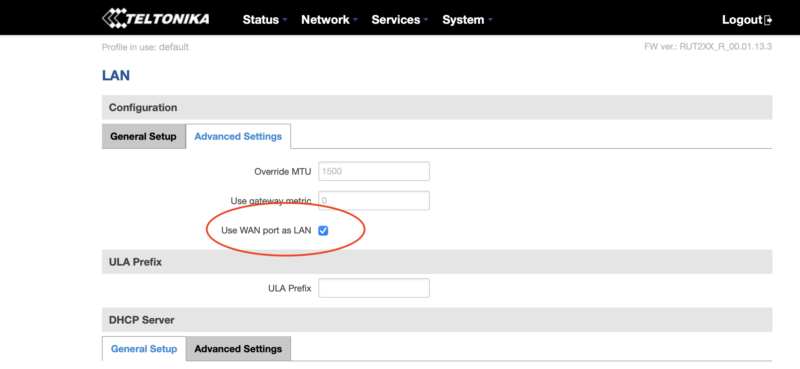
Next, in the top menu bar go to Network --> LAN and select the Advanced Settings tab.

Select Use WAN port as LAN, then SAVE.
Now navigate to Network --> Wireless, where you'll disable the WiFi. This'll disable the wireless access point and save you power, which is important for off-grid setups :)

You're crushing it. Just keep going. Ready for the next part? Read it carefully first, then execute.
Before continuing, do the following in order:
- Unplug the ethernet cable that is connected to your computer from the LAN port on the RUT240
- Plug the ethernet cable into the WAN port on the RUT240.
- Connect the Helium Hotspot to the LAN port on the RUT240 with the ethernet cable supplied
- Power on the Hotspot.
Nice work! Now, navigate to Status --> Network and click on the LAN tab. Find the MAC address of the Helium hotspot, highlight the MAC and copy it.
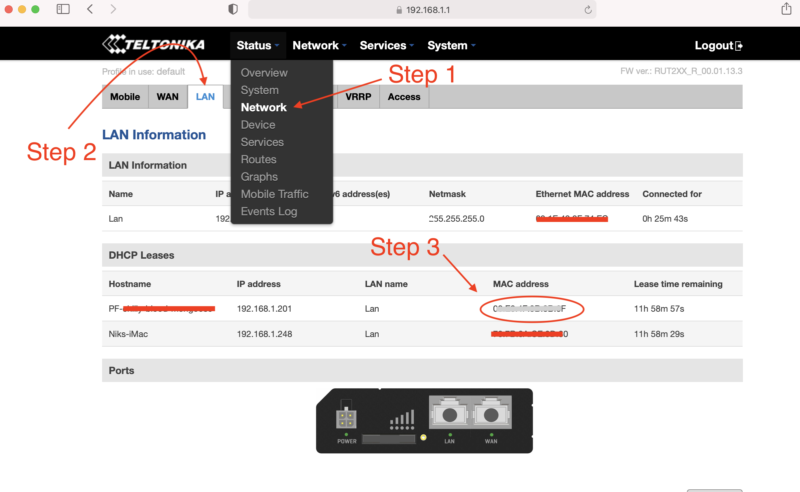
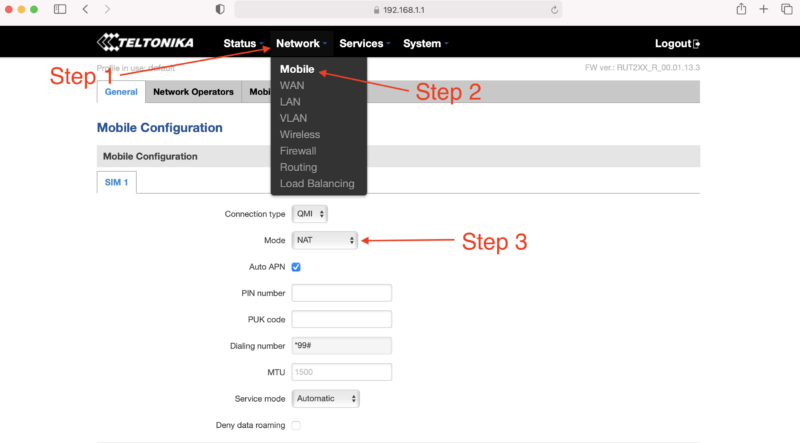
With the MAC address copied, navigate to Network --> Mobile. Look for Mode and select Passthrough.
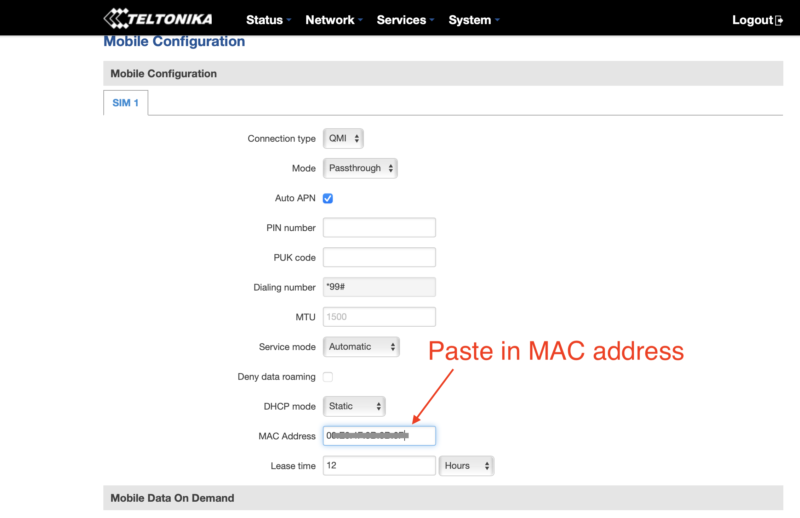
New fields will appear. Locate the MAC Address field and paste the copied MAC address of the helium hotspot. Click SAVE.
One more thing...you have to enter your APN. I had to do this, but forgot to take screenshots of it. See where it says Auto APN on that screen, and the box is checked? Uncheck that, then follow what makes sense and enter in your APN (your SIM card provider will be where you get that.)
If that becomes a huge PITA and a sticking point, I'll update this tutorial.
How Much Data Will Your Off Grid Hotspot Need?
UPDATE: For an off grid miner as of November 2021, you're going to want 100 GB/month, and that still may not be enough. For a long time, the 50 GB/month plan called out below with T-mobile was enough, but with the blockchain size growing, it's no longer cutting it. I'll leave the rest of this in here for posterity, but any reference to plans lower than 100 GB/month is outdated and wrong.
Here's a graph of the network data traffic for a group of hotspots on a 10 minute average:
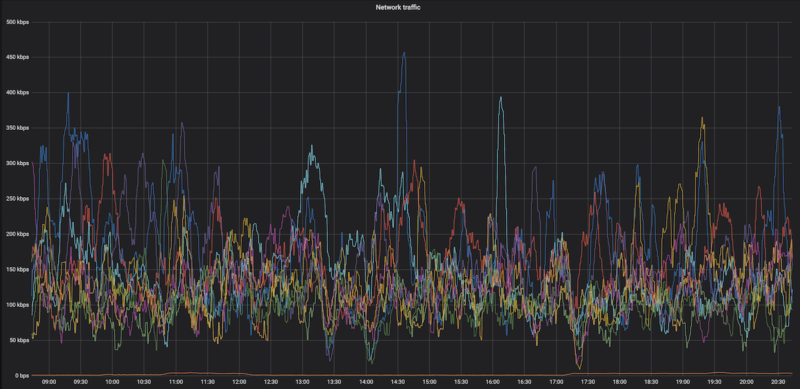
Yep, that highest of high spikes is 450 kbps, and almost everything is below 300 kpbs. So, while data is important (you need a lot of it), speed is usually not. With that said, I'm getting reports in the field of 650 kbps and above spikes that temporarily shut down hotspots. Be ready with patience when that happens.
Recently I've heard from folks testing 4G speeds reporting that a 15 Mbit up/down (vs 10 down and .8 up) gave a 250% increase in HNT rewards, so speed may matter more than we thought. This is definitely worth further investigation, and the T-mobile planned called out below may not be fast enough or large enough for you, depending on the local speed of your 4G connection.
What SIM card should you use?
T-mobile has a BUSINESS (NOT personal) plan that's $50 for 50GB at 4G speed, then unlimited data at 3G speed, which is supposed to be 3 mbps minimum. That should work MOST of the time for us. If you have a plan that's working for you ALL the time, please add it to the Comments section below.
I've got a T-mobile rep who is clued into what we need, his details follow.
The plan is available nationwide in the US, and as far as the rep knows it's not going away any time soon.
T-Mobile doesn't guarantee the speed (apparently there are no speed guarantees in the world of telco wireless), but I've got clients who've been using this and it's working fine most of the time.
Here's the rep I talked to. We went through the whole Helium scenario, so when you call him he'll be prepped. Just tell him Nik from Gristleking sent ya, that should jog his memory.
Abu McLean
In order to protect his email from the bots: ABUBAKAR.MCLEAN17 then use the little @ symbol then put in T-Mobile.com
Direct: 615-445-4008
Hours: 9:15AM to 6:15PM CST (Mon – Fri)
- You'll need a business account. You can't (as far as I know) run this off your social security number.
- Ask for the 50 GB at $50/month plan with unlimited data at 3G after the 50.
- You can get a Static IP for $5 more, ask for a “SOC Static Public IP”. UPDATE, MAR 21, 2022: You don't need a static IP for much longer, this may not be worth it.
- SIM card price is the same: $20 + sales tax (~$2) per SIM card
If you email him, would you cc me (my first name, which is Nik, then @ and this website) so I can keep track of how it's going and any snags that come up?
Oh, you're in Canada? Here's what a client sent me:
FYI - I found a cell carrier with a static IP that doesn't get relayed in Canada. If you call Rogers, get a hold of their small biz department and ask for a static IP, they'll mail you a SIM card that works with the RUT240 instructions on your blog. The only problem is that because this is Canada, its $120/month for 50 GB + $20/month for every 10 GB after that, and it's $12/month for the static IP. Ouch!
-M in the great Canadia
This guide was almost entirely written by the crew at HNTenna and passed on to me. With their permission and with a few changes, I'm making it available to you. Rock on!
Archived Comments
Mike - 8/11/2021
Hey Nik, Fantastic site, man. I've probably read every article about Helium here at least twice. Regarding the RUT240 and a mobile plan, have you heard of Embedded Works/IoTDataWorks? It looks like they offer a 12-mo pre-paid unlimited data usage but only at 64K speed with an optional static IP for an extra $20. Looks like this would be perfect for Helium mining, but wondering if you had any thoughts on it. https://www.embeddedworks.net/wsim4827/
jim c - 8/12/2021
thanks i was just about to send mine back
Nik - 8/12/2021
Hi Mike, 64kb/s won't work for full fat miners, check out this link for more on that. Current miners (NOT Light Hotspots) need 300kb/s. This plan would work for Light Hotspots, which will likely need just 4kb/s.
Mike - 8/12/2021
Thanks for the reply, Nik. I had read your article about light vs full-fat miners and you mentioned monthly data usage but I didn't see anything about speed/bandwidth. I didn't realize the full miners needed so much bandwidth so I'm glad I asked.
jim c - 8/12/2021
attempt one ... fail... here's why... after switching wan port to lan port and attemptempting to swith off the wireless rut says unable to switch do to multiple access points if you then go to network , wireless and disable the extra AP it will refresh and give another AP automatically. I would keep working through this and see if it works right now i dont need to power off my bobcat when i do i will revisit and update
Rex - 8/17/2021
Hi Nik: It's great to finally have an excuse to write you! It sounds like finding a compatible SIM card for the RUT 240 is the problem statement here. I'm calling around and haven't found a solution yet. But... I may have found an alternative. Verizon offers a device called the jetpack 8800L. It costs about $200 and they offered me a monthly plan for $20. https://www.verizon.com/internet-devices/verizon-jetpack-mifi-8800l/ Is this a viable solution? Are there better options out there?
Nik - 8/17/2021
Hi Rex, right on! I wouldn't trust a Jetpack for off-in-the-mountains off grids, but a lot of people are successfully using 'em in the city.
Mauricio Curbelo - 8/18/2021
Anyone found a SIM card that works in Canada?
RG - 8/19/2021
Rex / Nik: I'm using this setup in a building where internet isn't available. Verizon and probably the other mobile carriers are using Carrier-grade NAT. Even after opening TCP port 44158 on the jetpack, my miner is still relayed. I'm hoping that I can get a static IP from Verizon, will contact them and report back. Nik: you say that a lot of people have been successful with this setup? how did they resolve the relayed issue?
Nik - 8/19/2021
Hey RG, I'm looking for a solution as well; the old T-mobile one was fine (and worked with this), but T-mobile no longer offers that program. I've been hearing that Mint is a good option, but I haven't used it yet.
Rex - 8/19/2021
RG and Nik: Oh man. I'm installing my first miner and after a day of toiling around with it got past the relay blues. I spoke with the Teltonika and CradlePoint folks yesterday. The CradlePoint IBR 600 series is mobile carrier agnostic but sells for $600 while the IBR 400 you have to pick your vendor up front for $400. The Teltonkia is $170 and I think is vendor agnostic. I'm purchasing one and going to run some tests with it. As a general rule, I'd rather pay a few more bucks upfront then be stuck in a perpetual big monthly expense tied to an uncertain revenue stream...
Nik - 8/19/2021
Yep, I've used Cradlepoint 650C and 200 and both work very well, just way more expensive.
Riley - 8/21/2021
Hello Nik. Aside from the instructions you've provided, I'm assuming that you still want to create a static IP for the miner and port forward 44158, right? I also saw on Discord that you recommend purchasing an "SOC Static Public IP". Would this purchased IP be for the RUT or for the miner?
Brandon - 8/21/2021
Thank you for all the great content on your page! After opening 44158, is purchasing a static IP from the carrier the only way to resolve relayed status? With Verizon is looks like $500 to purchase static and a business account is required. Can anyone confirm this or know of another option?
Nik - 8/21/2021
Hi Brandon, it *might* be the best way to resolve that. I'd look into T-mobile, they seem to have plans for businesses (not sole proprietors) that are $55/month for 100 GB. That seems to not be reliably there, depending on the sales associate you talk to. Sometimes they'll do it, sometimes you just have to hang up and call back to get another one. :)
Nik - 8/21/2021
Hey Riley, Yep, the static IP and port forward are recommended. The static IP would be for the RUT.
Marie - 8/23/2021
Great article thanks! Setting up my first remote setup :) Regarding the APN, can we leave it on auto APN? Or do we absolutely need to setup it up manually?
Nik - 8/23/2021
Hi Marie, Sometimes the auto APN seems to work, sometimes it doesn't. This whole business is tricky with lots of trial and error, please let us know what ends up working for you so we can share the success knowledge. :)
drew - 8/27/2021
Hey Nik, I followed this tutorial (thanks for that) and my speeds are grossly slow.. According to speedtest, the best i got download was 1.6mbps and upload was .01 (believe it or not). I did the business account with Tmobile so we should be good there.. I was thinking maybe the antennas that came with the RUT are lousy so I ordered the Quspot one. What minimum dl/ul speeds do you think are necessary for the hotspots? Also I may test out some QoS settings, that might help.. I noticed there are some existing ones there, any thoughts on changing those to normal?
Nik - 8/27/2021
Hi Drew, you'll need 300 kbps for the miner, that's mostly for download. Sounds like the upload side is a problem for that. Double check with T-mobile, it may just be the coverage in your area (though I'm not sure about that at all.)
RG - 8/30/2021
Using a mint sim in a MiFi card will work but isn't viable. Mint's unlimited data plan caps Mobile Hotspot use at 5GB. The next plan under unlimited has free mobile hotspot but is only 15GB a month. Hotspot data is drawn from the monthly allotment and speeds are slowed until the next cycle. I couldn't test port forwarding: The Alacatel Mifi card bought from Amazon doesn't have port forwarding on its dashboard, just Mac filter and some other basic stuff. If other Mint MiFi folks have a different setup, I'm all ears.
Nik - 8/31/2021
Hi RG, have you tried the T-mobile plan at the bottom of this post?
RG - 8/31/2021
Nik, I'll give it a whirl and report back.
Dave - 8/31/2021
I think I am purpose of this tutorial. Questions: 1. Why not run the miner off the LAN port without any configuration? 2. Why do you need to configure the WAN port as a LAN port? 3. Any guess as to how much battery power is be saved by turning off the WIFI on the router? -I was thinking I would want to leave it on so I can easily survey the internet speed and connectivity of my off-grid hotspot. *FYI- I am able to use my Google Fi sim on the Rut 240 (RUTRUT24001U000).
BCH - 9/5/2021
Thank you Nik for this nice article. I have read many on your website and am impressed by your work. I am using a RUT240 and RUT950 (240‘s were out of stock). The main challenge getting rid of relayed is that most mobile carriers run CGNAT which means you do not have a public IP address but get one which is already in their NAT. To receive such a card in Switzerland I only found one carrier (Sunrise) and they charge you 60$ and you need a business account. I see many relayed devices in my area which earn decent amount of HNT. Since Friday morning I am having the same issue as many others… my miners are fully synced since more than 8 hours. When I use the discovery mode I see many hotspots but I haven‘t issued a PoC or witnessed one in more than 3333 blocks…. Hope this gets sorted out by Helium soon.
Nik - 9/5/2021
Yeah, the network is still struggling to keep up. Glorious opportunity, but lots of chaos. Might check with Andreas Spiess for SIM card options; he's the only Swiss guy I can think of who's probably helpful with IoT stuff, though he's skeptical of Helium. :)
Mario - 10/6/2021
Hi Nik, just getting accustomed with the RUT240 remote management and need a bit of guidance. I just stumbled upon management-deviceaccess where "This function provides you with the possibility to set up remote HTTP access to devices that are connected to a device's LAN, provided that the device in question has been registered to RMS." There are four inputs needed: 1 Name (obviously whatever you want) 2 Destination IP (believe 192.xxx.xxx of the Bobcat) --> 3 Destination port? (hmm, tried putting 80 as that's the default on the Teltonika wiki and 44158, both did not work). 4 Protocol (HTTP or HTTPS?) Or is it not working because "provided that the device in question has been registered to RMS" means that I somehow would need to register the Bobcat to RMS for it to work? (sorry if this seems silly) PS after updating the RUT to the latest firmware I am now getting temperature updates, which is useful!
Nik - 10/6/2021
Hi Mario. I checked with the author of that guide, here's what he had to say: The default port for the HTTP protocol is 80 and the default port for the HTTPS protocol is 443, so a HTTP server waits for requests on those ports. Select the protocol you want to use and then have that port be open for it. So if HTTP then Port 80 or HTTPS then port 443 Registering the bobcat in the RMS most likely means entering its MAC and IP into a table whereever the RMS lives Hope this guy still has his on the bench and can easily test.
Mario - 10/10/2021
Hi Nik, thx for putting in the effort and reaching out to the author! Tried all the combinations - no use, not letting me into the Bobcat 300 remotely. Can get into RUT240 though through RMS and WEBUI proxy. Guess something extra needs to be done for it to work. So, for now, unfortunately no remote temperature checkup, no remote OTA & diagnostic, restarting the Bobcat etc. Btw looks like my RUT240s &/or bobcats keep changing the setup so having difficulty even setting them up and making them stable. It keeps going from NAT:none to NAT: symmetric. Port 44158 stays open, connected: yes, dialable: yes. Even the helium api in OTA says "listen_address": "/ip4/109.xxx.x.xx/tcp/44158" height: 1047354". So no p2p (relay) which should be right, yes? I followed your guide and added 2 things: (1) NETWORK-LAN-STATIC-LEASES Passthrough E8:XX:XX:XX:XX 109:XXX:X:XX (this was added automatically through the guide NETWORK-MOBILE-PASSTHROUGH-COPYMAC-SAVE) Bobcat E8:XX:XX:XX:XX (192.168.X.XXX) 192.168.X.XXX (this I added because I read I need to do through another source) (2) NETWORK-FIREWALL-PORTFORWARDING Bobcat TCP 44158 192.169.X.XXX 44158 Didn't work (longterm)... so even tried adding one more port forward (again, another source, ) NETWORK-FIREWALL-PORTFORWARDING Bobcat TCP 44158 192.169.X.XXX 44158 Passthrough TCP 44158 109:XXX:X:XX 44158 And that works (for now), on 1/3 RUT240s... So in light of all this craziness its causing me, do you have an option for remote RUT240 setup (#Croatia)? or, what does one after: 1 calling the ISP and asking them to remove CGNAT; 2 adding the APN they say & following 3 following "How To Set Up a RUT240 for an Off Grid Helium Hotspot - Prepare for Challenge!" have to do to set the RUT240 all the way? Apologies if I'm being a PITA. Just trying to join the Helium revolution from another country and doing my best.
Nik - 10/10/2021
Mario, Thanks for chiming in and adding your experiences & findings, super helpful! I don't think there's an easy way to monitor the hotspots themselves yet. I'd look for a networking expert to get help on the 240 side; they can probably walk you through custom settings as well as how to interpret the results. This blog post is mostly to get you started and to show one way that has worked.
Joe Hrdina - 10/20/2021
Hey Nik. Just wanted to say thanks for all the info you've shared. Since running the off-grid units, what have you averaged for actual data usage? I've seen some people claiming 100s of GB in a month.
Nik - 10/20/2021
Hi Joe, 100 GB/month is not unheard of right now, and it'll keep getting worse until Light Hotspots come. I haven't found a better plan than the T-mobile one, but it's getting to be "not enough".
Josh - 10/22/2021
has anyone had any success in port forwarding 44158 with a static ip? I have secured a static IP with my ISP but cannot get miner out of relay. ISP has no firewall with the APN they provided for my static IP and my Rut240 has the port open in both directions and I'm at a loss here.
Mario - 10/24/2021
Hi Josh, I have 4x RU240s and still struggling. Taking hours and hours and shouldn't be like that. After all, it's definitely not a cheap router. Dunno if it will help cuz I don't have a static IP from ISP, but here's how I do it without. After GristleKings tutorial you also need to do 4 things: 1) NETWORK-LAN-STATIC-LEASES Passthrough E8:XX:XX:XX:XX 109:XXX:X:XX (you will have this when you finish the MOBILE-PASSTHROUGH step). bobcatminer / E8:XX:XX:XX:XX (109:XXX:X:XX) / 192.168.X.XXX (you add this after it) Save & WAIT... (important!) until the little thing in the top right stops spinning. 2) NETWORK-FIREWALL-GENERAL: Input should be: accept. Output should be: accept. Forward: mine is reject by default but seems to work. (any network expert here?) 3) NETWORK-FIREWALL-PORTFORWARDING bobcatminer TCP 44158 192.168.X.XXX 44158 Save & WAIT... (important!) until the little thing in the top right stops spinning. 4) REBOOT THE MINER & wait. Is there is a network expert here and if I did something wrong or something can be done better or something should be done before something is done please tell me. Also, sometimes, when someone accidentally unplugs everythings (happens at some out-of-home locations) my BOBCATS become relayed. Hate that. So, if someone knows a workaround - please help! :)
Josh - 10/27/2021
Mario: I figured it out. First of all, you need to have your APN provisioned with a static ip. You will need to open a business account and pay extra monthly to maintain the static ip. You will also spend countless hours attempting to reach the right person/department that can get you in touch with the division that will handle the APN provisioning. Once you have a static ip RUT240 will not stay out of relayed. Even with the port opened correctly, you find the miner going in and out of relayed mode. I solved this problem by using a CraddlePoint device over the RUT.Unfortunately the Craddlepoint device is twice the cost of the RUT. Now the next issue. The Craddlepoint is a 12V vs the 5V RUT240, so you may need to use a different battery/solar panel to allow for the extra energy consumption. My miner is off-grid, non-relayed with a healthy connection now. However... My earnings did not increase nor decrease so ultimately the trouble I went through was all for nothing lol. To make sure that being out of relayed does not really make a difference with earnings I tried on another one of my locations, and guess what...? No change in earnings. I no longer bother with getting my off-grid units out of relay mode. It's a lot of trouble, time and costs that are simply unnecessary for hotspots that are setup on mountain tops with plenty of other hotspots connections that can easily be 'relayed' with little to no loss in earnings. Good luck!
Dillon - 10/29/2021
Hey Nik, So I just ordered a rut 240 for my remote miner setup and I was looking at data plans and I came across nolimitdata.net and they do 900gb plans for $90 a month. I know it’s a bit overkill but do you think it would be worth considering for a remote miner setup? Any other recommendations would be great as well.
Nik - 10/29/2021
Def. overkill, but probably better that than underkill. What speed is that data at? 4G seems to be the min.
Dillon - 10/29/2021
It’s 4g at 1.5 mbps
Warren - 10/29/2021
I looked at the offering for nolimitdata.net, and it advertises 10-50 Mbps download speed. No mention of upload speed. I am just beginning to to consider a remote setup. Am I correct on assuming that tethering to a cell phone is not feasible?
Nik - 10/29/2021
Feasible, just not recommended. :)
Andreas - 11/1/2021
Thanks a lot for the great content. I've bought all the parts for a nice offgrid setup, but am currently stuck on how to power the RUT240. I have a Victron 75/15 charge controller connected to a battery and a solar panel. How do I make sure I have exactly the right power supply for the RUT? Any tips?
Nik - 11/1/2021
Hi Andreas, the RUT240 takes 9-30v; you can just power it straight from the Victron.
stephen - 11/2/2021
Remote management system Remote HTTPS settings Name : Bob IP: 192.168.1.123 (obviously the miner IP) Port: 80 Protocol: HTTP and then we get access to the web UI for speed test etc. ?
Mario - 11/5/2021
@Stephen --> tried and tested, yes! :)
Reggie - 11/8/2021
Hi Nik, Do I need my own business account to get the sim card from T-mobile? Do you have any other carriers you can suggest that would not require a business account? I have a mobile hotspot from cricket wiereless. Could I possibly use the sim card from this and put it in a rut 240 and make it work?
Nik - 11/8/2021
Hi Reggie, you'll need a business account to get a SIM card from T-mobile. I guess it doesn't technically have to be yours. I don't have any other carriers right now. You can try the Cricket mobile hotspot, but I'd consider that a very temporary solution.
Blair Wells - 11/10/2021
Nik, im hesitant to hook the RUT240 up to to the wanderer. so if what i have read is right, i use pins 1 and 2 not 3 & 4 only? is there a link to a 4pin connector for just power and ground?
Nik - 11/10/2021
Not sure. I just cut the connector and hooked it directly in. The RUT will take 9-30v and the Wanderer puts out 12.
David Morefield - 11/12/2021
Nik, I recently have felt thee squeeze of death from T-mobile and their 50gb data plans. My remote sites (my top two earners) are on rooftops in the Houston area. I would hit the 50gb wall about 15-16 days into the month and boom, I was down until the next billing cycle. Given your affinity for the Teltonika RUT240, I decided to order a couple for the Verizon network and go with an unlimited plan through them. Figuring out the network configuration was not easy, but I was able to find my way. I have posted a link with a step by step for configuring a RUT240 for Verizon on my website - https://basicbitcoinstrategy.com/configuring-the-teltonika-rut240-for-verizon/ I also am really digging the RMS tool that allows you to remotely manage a device connected to your RUT240 via a webgui, this ought to allow me to connect to a hotspot like a SenseCap, Syncrobit or Bobcat for functions like fast sync or manually initiating updates. I am looking forward to getting these out in the field on Verizon :)
tony - 11/13/2021
nice writeup, but after clicking the WAN port as LAN and SAVE, I'm unable to log back to 192.168.1.1 Anyone having that issue? Wireless still works fine on laptop (haven't gone to the next step of disabling it). Any ideas if WAN port as LAN is really needed?
Blair - 11/27/2021
solar setup in the lab, Verizon 150gb plan prepaid - I spent a lot of time trying to configure my RUT240 i tried PPP and QMI as suggested here. I have had 0 success. The mobile data will connect, however my miner gets no data. i get data going through it i guess, but max of 5kbs and i have no idea what data is passing. RMS does not work when mobile connected. cannot connect my miner into the front of the device without sending the RUT into immediate, definite cause and effect slow blink of death on my RUT. Tried a syncrobit, Rak and sensecap. I have no idea how any of you guys have this thing working... at all, makes it more frustrating bc i know it can, but not for me. is there a link that has ALL of the correct settings? i tried what was here and also in all of the comments, and it still does not work. ANY help would be amazing! Thanks!
Nik - 11/28/2021
Hi Blair, you are not alone, I've had some frustrating experiences with the RUT240 as well. The Teltonika forums are pretty good for getting help, or you could factory reset and use Proslasher's instructions for a VPN, here.
Nik - 11/28/2021
Right on, let me know how it goes!
Blair - 11/28/2021
will do, thank you so much, how on Earth you figured this all out on your own baffles me. Truly a pillar-to-post member of our network. I am researching today while my battery charges, will work tonight and update later.
Nik - 11/28/2021
Lots of banging my head against a wall until the wall gave way. :)
Mat - 12/1/2021
I don't know if this helps anyone in terms of data usage but I am using a verizon hotspot (relayed) in a high altitude location with lots of traffic. (Southern California) For the first time I have reached over 100gb, I imagine if I wasn't relayed I might have hit over 100gb sooner.
Orr - 12/29/2021
My RUT240 went offline as soon as I saved after the Passthrough / pasting the miner's MAC address step. The host reported that wifi is still on so the modem is working, I just can't connect remotely. Did this happen to you as well?
Cody - 1/13/2022
The issues with this still a thing? I've finally pieced together everything I need for an off grid and came back for the instructions on the router and saw this. Just my luck ha!
Nik - 1/13/2022
Seems to be pretty variable; some folks having no problems, some are flatlined. May have connection to the recent uncovering of the denylist Helium was using to combat gaming. I'd expect any off grid right now to present challenges above and beyond a normal hotspot deployment. Proceed if you like solving problems! :)
Cody - 1/13/2022
Ah gotcha. I'll give it a go and see what happens! Thanks for the info
Sal - 1/23/2022
I'm having a similar issue. My RUT240 has internet access but I can't get the internet to the miner. It's extremely frustrating. Been working at it for over 3 days. I have followed step by step 50 times and still cant get the miner to connect. Any ideas?
klis10 - 1/26/2022
Have several RUT240s with Bobcat miners and T-mobile business static IP addresses. Results from first install in November have been lousy and am thinking of converting the other SIM cards back to regular non-static addresses and monthly low data consumer plans as Nik suggested in late Nov. Doesn't seem worth paying for $55 monthly plan at this point. Any other suggestion?
Doug - 2/1/2022
Hi Nik, just wondering why you've suggested nonstatic IP and the 2GB plan, then 3g unlimited. Will the miner still be using internet from the rut to stay synced? If it's relayed, I thought it would just borrow internet from other hotspots. If so, why have a router at all? For now I'm going to try your suggestion of the $15/month tmobile plan, but would appreciate any elaboration. Thanks!
Nik - 2/1/2022
Just reporting what I'm hearing for folks with full fat hotspots deployed in the field. Yes, the miner will still be using internet.
Ryan - 2/4/2022
@ BLAIR did you get through the RUT240 setup? I experienced the exact same challenge you described. Yesterday I believe I finally broke through. Yet I still don't know exactly what caused the issue. I just reconfigured again and again. Finally went with near default settings. I did learn that t-mobile just plain never configured the static IP they sold me and it took contacting the sales rep to get it done. Support was really bad but of course the sales rep was pretty sharp.
Ryan - 2/4/2022
@Blair, the RUT240 cord (at least mine) contains only 2 wires (red / black) despite the weird connection to the device. I've powered it direct into the wanderer. Also, I only succeeded getting the MINER to connect to the hotspot's internet upon plugging it directly into the Wanderer. I've had it running through a step down / resister usb-thing because I thought that was safer. At least in my case, the miner appeared to power OK but it would give weird errors regarding including "Too many DNS lookups" and others which caused about 1 week of madness on my end. Finally I theorized it was a power issue. Of course, it actually could have been something else I accidentally fixed in the process. But I'm finally online today. The crazy thing is I could have sworn the damn thing worked fine in testing.
Shukhrat - 2/21/2022
Hi. Thanks for the tutorial. I got rut240 and updated the firmware to the latest. I got verizon sim to work on it. It shows that is has data connection. However, I cannot get the internet to go to the sensecap miner. Can you help?
Nik - 2/21/2022
Hi Shukhrat, are you connecting directly via ethernet cable through the LAN port? That should solve it.
Shukhrat - 2/22/2022
Hi Nik, I am connecting the sensecap to rut via the lan port. I am connecting the laptop to rut via the wan port. I followed the steps to make wan port act as lan. The rut dashboard shows connection and even has up and down packets going thru. However, i cannot ping from it. 100% data loss. and i cannot get the miner up. yesterday the miner was up for a bit but then i still could not ping.
Nik - 2/22/2022
Hmm, I wonder if it's an issue with the IP address you've been assigned.
Shukhrat - 2/22/2022
Nik, so after chatting for over 2 hours with verzion i found out that I cannot use my plan with that device. I have to upgrade to a business plan. what plan/provider do u use?
Nik - 2/22/2022
Hmm, for a while it was T-mobile. Abu (the T-mobile rep) has his info at the bottom of the page, I'd start with calling him. Your other option is to check in on the Helium #enclosures-off-grid channel to see what the latest recs are.
Matthew - 3/16/2022
Are you suggesting putting the SIM card into the RUT240? I have finestra miner without a SIM card slot. Also, are there any other providers you know who can do this and still offer a static IP?
Nik - 3/16/2022
Yep, that's where it goes.
Patrick - 3/17/2022
Wanted to give my experience and see if anyone has any ideas. I’ve followed the set up directions over and over again from base factory settings. I currently am using an ATT prepaid card with a 100gigs with a sencap but will switch it unlimited through first net if I can get it working. I have good service when i connect via wifi but i can’t get the port 44158 to show as open using a port checker no matter what i do. I set a static IP and port forwarding rule but nothing works. This is what I’ve done over and over again. Please help ??
Matthew - 3/18/2022
I'd be curious to see the response for Patrick too. I'm about to purchase the same set-up. On a different note - What about the Cellular antenna and cable? What cable do you use to go from the cellular router to outside the enclosure? Also, what cellular antenna do you use outside the enclosure? Can you use the rut240 factory antenna outside, wrapped in silicone tape at base? If I need to run the cellular cable 40 feet, will that cause any problems?
Nik - 3/19/2022
In San Diego I've just run LMR195 or 240 from the cell modem inside the enclosure to the antennas mounted directly into the wall of the enclosure. No problems with that so far. I don't have a great answer on the port forwarding question.
Sam - 3/22/2022
Im also curious to see if anyone has any solutions or ideas for Patrick's setup.Ive invested a lot of time and money to have my remote setup up for it to be relayed. I have scoured the internet, but I'm sure I am missing something. The only difference for examples I see online is the firmware. I updated to the latest firmware the RUT240 had to offer, could this be affecting the relayed status?
Mario - 4/1/2022
Hi Nik. Quick question, I just noticed the part "select auto reboot every 24 hours" on the RUT240. I don't think it was always there (months ago). Any particular reason for that and won't it change the listen ip every 24 hours then..? (option 2 - lets get geeky, not true static ip but static dhcp lease). Thx!
Nik - 4/1/2022
I also forget when that got added in. I had heard from a number of off gridders they felt it helped them avoid relay. Thanks for the correction!
Scottie Davis - 4/15/2022
Hey Nik, if we ever actually make it to lite hotspots, what would you estimate the amount of data usage/data plan we would need?
Nik - 4/15/2022
Hi Scottie, we'll make it. ;) 75-100MB/month. More on 'em here. Rock on!