16 posts tagged with "helium basic course"

View All Tags

Foundations of Relayed Hotspots (and how to fix 'em!)

· 6 min read
Nik
Site Owner

I got a chance to sit down with the mighty @BFGNeil recently and boy did I learn a ton! Neil is one of my fellow Helium Discord moderators and one of the most helpful and knowledgeable members of the community.

Neil's built what I think is the single most useful tool for most Helium Hotspot owners at this point, which is HeliumStatus.io

https://youtu.be/xSbF-r-vjh4

The reason it's so useful is that it gives you LIVE feedback when you're fixing the relay issue. This is unlike Helium Explorer or the mobile app, which can be up to a week behind when it comes to reporting accurate information.

We go through what relay is, how to fix it at a high level, why it exists, and when it will be permanently solved. Neil's been fixing relay for folks on Discord pretty much since it was a problem. In fact, he was one of the first ones to see that it was and would be a problem, and you could make the case that he's the reason most of us know about relay; the status checker he originally built has been added to both Explorer and the app!

This latest version, HeliumStatus.io (you'll need to sign up for an account, it's free to use but it costs a small amount to monitor your hotspots) is the kind of simple, direct tool that makes troubleshooting a whole lot easier. It's not magic, and it won't fix it for you (most of the time), but it'll let you know if what you're doing is working.

This conversation isn't just about fixing relay; there are plenty of guides for that. We talk about some of the structure of the internet (public and local IPs), what it costs OTHER hotspots when yours is relayed, and the only reason you should ever turn off your hotspot.

We talk about why you should never use WiFi to connect your Hotspot to the Network, what seed nodes are, what gossip is, why you should fix relay (it's not just for your earnings, ya selfish bugger!), and the best thing you can do for the network once you've deployed a hotspot. Enjoy the convo!

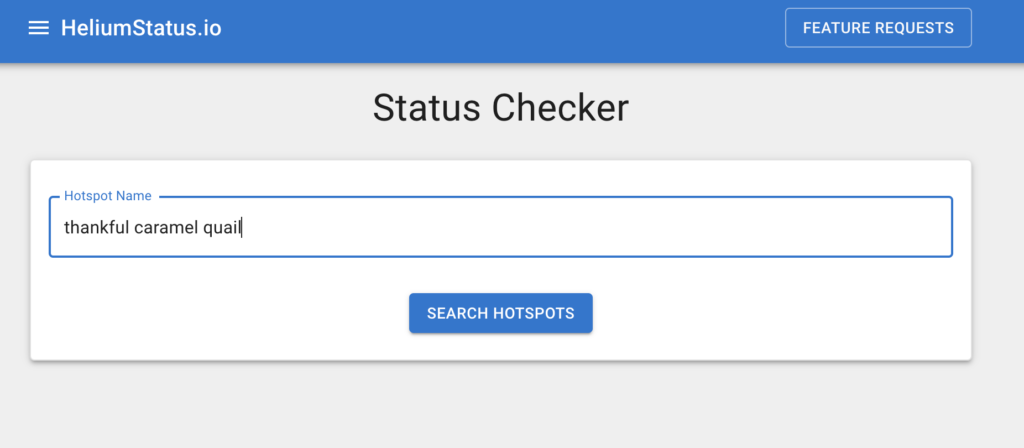
Ready to dig in to HeliumStatus? Ok, here's what it looks like once you've signed in:

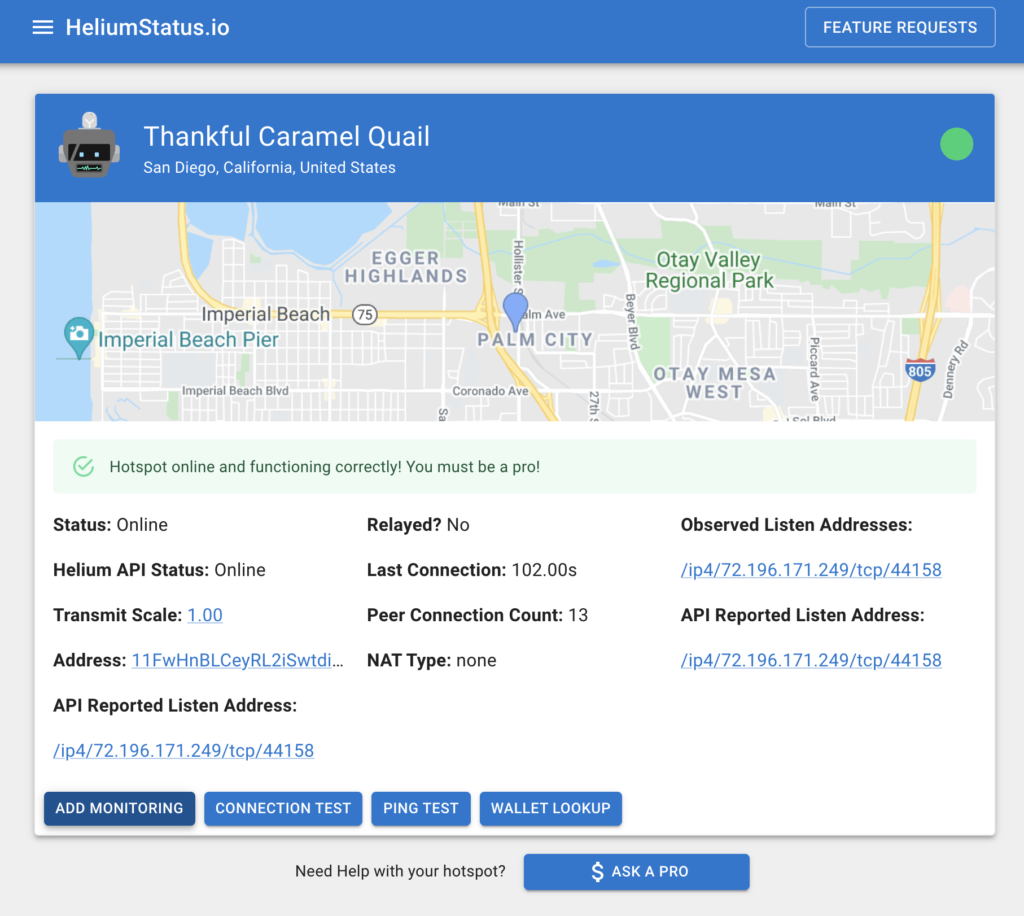
Enter in your hotspot and hit the Search Hotspots button. From there, choose your hotspot. Remember Thankful Caramel Quail? You can read about its setup over in the Anatomy of a Hotspot post. When you hit the Search button, it'll bring up a bunch of options. Choose yours, and this is the next page.

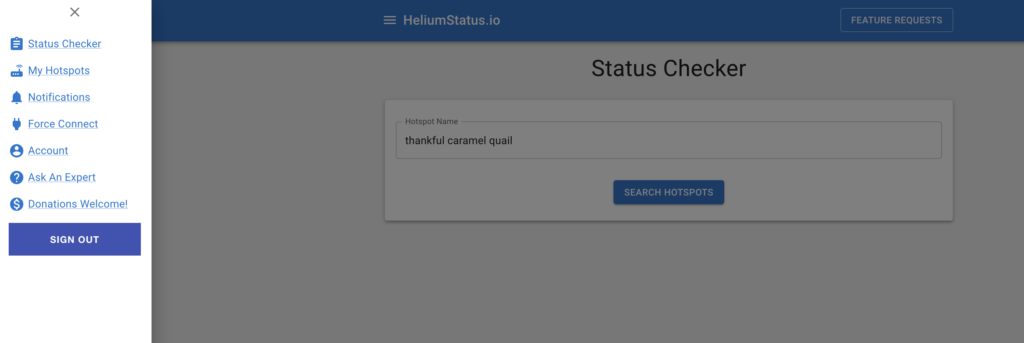
Off to the left is the menu. We go through all the options in the video, but it's pretty straightforward. When I checked TCQ, she was singing along fine (although the Monitoring is showing me a few things about the stability of the internet connection down there, and that's a wired ethernet connection!)

That's it! I encourage you to use the heck out of the tool and monitor your hotspots for at least a month just to see the enormous fluctuations in connection; you are not alone in the Helium rodeo! If you have more questions for Neil you can hit him on Discord or his website, here. For now, sit tight, keep your hotspot connected via Ethernet, and remember: (almost) Never unplug!

Rock on!

Archived Comments

Jordan Silvera - 11/17/2021

Hey Nik, quick question. When it comes to the different models of miners, are some more finicky when it comes to relayed status? Also, on your remote deployments, do you have issues with relayed status? How do you remote troubleshoot? I was considering buying some OG miners (the white square with the green) for cheap. I have not read any issues with them for a remote deployment. Any advice? Thanks


Nik - 11/17/2021

The OGs are good, the RAKs are probably the best miners as of 2021. Yep, off grids have issues with relay just like everyone else, it takes some work to sort out the network issues. You can mostly remote troubleshoot although you'll occasionally have to do site visits -- that's the nature of off grids.


Jaime - 11/17/2021

Hi Nik, Have you ever seen a Rak Goldspot miner (from MNTD) cause a router to keep rebooting itself when connected via an Ethernet cable? I've been using my miner successfully with Wifi for about three weeks now, but as soon as I try hard-wiring it with a cable, my Nighthawk R6400v2 router just shuts itself down and reboots, repeatedly. I've tried two different Cat 6 Ethernet cables and I've tried two different jacks in the back of the router. All signs are pointing to the fact the my router is just junk, but I was just wondering if there is anything else you can think of that I could try first.


Matt - 11/17/2021

Hi Nik, I'm a big fan of what you do. This tool is pretty awesome, thank you for sharing. I'm curious about what a typical ping latency range might be? Mine is showing about 170ms. I'm also really curious about being connected ethernet vs good wifi. Do you have anything you can link me covering specifics? Or is ethernet just preferred because it's generally more stable? Thanks for your time man, mucho appreciato


Nik - 11/17/2021

I think Neil was saying US hotspots can subtract 100ms or so. I'm guessing 170 is fine. Ethernet cable is just more stable than WiFi; Neil talks about it in the video. Rock on!


Dannyrough - 1/12/2022

I have to different ip Observed Listen ip different from api listen ip How to solve it


Lessons Learned From A Year Of Helium Deployments

· 11 min read
Nik
Site Owner

It's been a little over a year since I started deploying Helium Hotspots. In that year, after deploying Hotspots both on grid and off grid on homes, commercial buildings, and (my favorite) in the mountains, I've learned a ton about what to do, what not to do, and how to make the most of the Helium experience.

I've had the great privilege of helping hundreds of clients deploy their hotspots as well, whether it's a family in Oregon putting one up on their house or a fleet owner out of NYC deploying thousands. What I've learned from all this can be summed up in three main points below.

First, Helium is simple.

It can seem intimidating, and the details can get overwhelming, but at the end of the day, the deployments that earn the most provide 4 types of coverage. I call this WUPU coverage. Here's what WUPU stands for:

Wide - The coverage your Hotspots provides should have as great a range as possible. It should go from right where your hotspot is, and waaay out to the visible horizon. Your first job when deploying a Hotspot is to make sure you can get the antenna in a place where it has a ton of long, open views. Being blocked in by trees, mountains, or buildings can kill your wide coverage.

Unique - Any network benefits from a little redundancy, but not too much. The coverage your Hotspot provides (IF you want a high earning Hotspot) should ideally be something like a 75/25 split between unique and redundant. Now, that's more of a guideline and very difficult to assess, but as a general rule of thumb, if you want a high earning Hotspot, put it in a place that opens up new ground for the Helium Network whilst also providing a little redundancy for other Hotspots close by.

Proveable - We prove our location solely through the strength of radio signals as assessed by the laws of physics. We don't use GPS as it's too easy to spoof. I know, most of us don't know how to spoof GPS. That doesn't mean it's not possible, and the Helium Network has to protect itself against all attack vectors, one of which is GPS spoofing. Helium does that by relying on your Hotspot to transmit and receive precisely measured radio signals, and to compare those measurements against humanity's understanding of physics. It's not perfect, but it's the best we can do, and Helium is ALWAYS working to improve it.

You prove your location by correctly entering the details of your antenna and your locations so Helium knows what variables to enter in their distance/signal strength equation. If you enter incorrect variables, you can expect to miss out on rewards because your "proof" is not matching up with the expected outcome.

Useful - Finally, high earning coverage is useful. The Network has to be useful to provide value, and the highest earners generally process actual data on the Helium network. They may not process a lot of data right now, but a high earning placement will always be in a position to process a ton of data from a variety of sensors.

While the rewards for processing that data are small now, we can expect that to grow, and grow, and grow over time.

Second, Helium is complicated

Helium is more or less an ambitious engineer's dream. It's a system that grows itself through basic human incentives. Because these incentives are so powerful, there's a constant game of cat and mouse with the good guys (the majority of the Helium community) and "gamers", or people who are gaming the system to cheat and earn more HNT. As HNT gains in value, these incentives become more powerful, attracting smarter and more capable gamers to attempt to exploit the system.

https://youtu.be/\_kWCs3TH9GI

This ends up as a battle between many very smart competitors. The stack of talent at Helium Inc is gob-smackingly capable, but the array of skills that gamers bring to the table is equally impressive.

That's great for a robust network, but it can make things difficult to understand for those of us who are not technologically savvy. Knowing the difference between a packet forwarder and a miner, a gateway and a sensor, a server, a router, and a Validator and the languages they all speak can mean the difference between earning a ton of HNT or having to (frustratingly) sit on the sidelines wondering why your miner isn't working.

This complexity is both the shield that protects us and the obstacle that can temporarily slow or stop our earnings. In order to participate in the Helium Network at an above average level, you'll have to be ready to roll up your sleeves and learn a little more about radio signals, code, and the physical act of deploying Hotspots (and specifically, getting your antenna in the right location and up high.)

Third, Helium as an avenue for both personal growth and wealth creation is unlike anything I've ever experienced.

As you may have already experienced, just learning about the Helium ecosystem can expand your world in ways you never thought possible. Whether you decide to get geeky and build a test setup just to see how the whole thing works, or you wade through the complexities of HIP 15 & 17, Helium has a way of forcing you to expand your capabilities.

Take it from me; at the start of this thing, about all I knew was that *something* was going on. I didn't know about turning a Raspberry Pi into an HNT earning Helium Hotspot (which you can no longer do, though you can still build a non-earning one). I didn't know about code. I'd never used Docker, or Python (or BASH, or Shell, or anything).

I knew that I could work hard, use tools in a workshop, read and study just as well as anyone else on the planet, and I put in the work required for extraordinary placements. Everything else I learned on the job. You can do the same. I've done it and I've watched and helped hundreds of people do it; I know it's possible.

That leaves us with the final piece of Helium, which is wealth creation. When I saw a Hotspot down the street from me making the equivalent of US$3,000/month back in September of 2020, well, I thought the same thing you would: How do I get into this?

As it turns out with many cryptocurrency and blockchain projects where you find it early, that journey of discovery has turned out well for me so far. Crypto in general can create life-changing wealth, and Helium is no exception. I'm not talking about just me, although it's certainly changed my life from one where I struggled to pay off credit card debt to one where I don't check my bank account before buying groceries at the store.

Anyone who is involved at this early stage, who takes the time to learn about Helium and how best to participate in the eco-system in order to grow the Network in healthy ways, and takes action, well, they're going to change the course of their financial lives.

That's been one of the coolest parts for me; sharing this journey with YOU, and making sure you're along for the ride. Very early on (my very first Hotspot), I had a good friend step in and hold my hand as I walked through the steps of getting a Hotspot put together and online. It helped build an extraordinary friendship, and was such a positively charged example of how one person can help another achieve independence that I am driven to try and pass that experience on to you.

This blog is one of the results of that. All of the information on here is free, so you can follow my journey, learn from my mistakes and victories, and develop your own understanding of how you can best participate in Helium. If you'd like a guided tour, well, I offer that too.

About 5 months into this, after writing the first few articles (the Rough Guide and the one on choosing an antenna specifically), I started getting phone calls from people needing help. At first it was fun to get those, especially the one at 9 o'clock at night from the Ukranian guy out of Buffalo considering a 1,000 Hotspot purchase. It was like being in a spy-thriller movie. "Chello, I hav some qvuestions for you."

Still, my phone started ringing non-stop, so I had to manage my time somehow. I started charging for consulting time, walking people through a condensed version of all I'd learned about Helium. I found that conversation usually takes at least an hour, sometimes longer. At the end of the hour, you have a much better understanding of what to do, and almost invariably we've corrected a few misunderstandings about Helium. Like I said above, Helium is complicated.

After doing hundreds of those consults, I developed a standard flow that addressed 80-90% of all misunderstandings, and tailored the other 10-20% to individual questions for each unique situation.

I decided to record that standard flow and make it available for more people at a much lower price than my one-on-one consulting fee. This makes it more affordable for more people and gives you the ability to learn when you're ready and not on my schedule, which can be booked out further in the future than you want to wait.

That recorded presentation is here if you want to check it out. In just under an hour it'll take you through all the most important parts of the Helium Network, and cover most of the things I cover on this site. To be very clear, you can get the same information for free if you read every page on this site; this is just the faster, easier, more efficient way of getting information into your brain. Your choice, your time. Rock on, Helium peeps!

p.s. If you're wondering what happened to that 13 dBi antenna in the video, well, check it here. :)

Archived Comments

Kyle - 11/16/2021

Ordered in May. Delivered in September. 10x'd my exposure and have been enjoying the process to built a fleet of them. The installs are challenging and rewarding for a good setup. Thanks for your content. Glad I found you on youtube this evening


Alex Wildgoose - 11/24/2021

How do you get landowner permission to place these free standing hot spots out in the wild?


Nik - 11/24/2021

Hi Alex, just ask 'em. If you can figure out who owns it, what the restrictions are, and what might benefit them, that's a great start. For long term placements I'd connect with local WISPs.


How To Map The Helium Network for Coverage and Profit - Gristle King - A Guide to Helium - 12/1/2021

[…] Lessons Learned From A Year Of Helium Deployments November 15, 2021 […]


nick - 12/10/2021

I think we are neighbors. Amatuer Jade Hare. Im have long basil eel, falky gauz bird, tricky gunmetal bull which just got replaced by Curved brown baboon. Thats the new 5g. I have 6 more on the way. Blossom Valley will be done:)


Nik - 12/10/2021

Right on, love me some Blossom/El Monte Valley action!


Nick S - 12/11/2021

My buddy and I seen your miner on the map and we were trying to figure out how you got it out there. He lives on CreekHills. He has the highest house in Blossom Valley . We tried to find it with a drone with no luck. Once I seen that picture I knew that it had to be AJH. Very cool set up.


Nik - 12/11/2021

Right on Nick, Blossom/El Monte Valley is one of my favorite places to be, and good to know we have robust Helium coverage there. :)


Andy - 12/23/2021

Just a big Thank YOU. Using some of your knowledge along with some of my existing experience, I was able to put up a new hotspot at a great location that just jumped to #2 in the USA for daily rankings with nearly 2 HNT/day. I've got some additional good locations in mind, but I'm finding out that internet access is a pain. I wish I had tripped across you & Helium 6 months ago, but I'm glad I made it.


Hotspotty Improved: Deep Research For A Better Way

· 9 min read
Nik
Site Owner

The Hotspotty team was gracious enough with their time to walk me through some significant improvements of their Helium tool.

Bottom Line Up Front: If you run a fleet of hotspots, using the newest version of Hotspotty will make managing payments FAR easier, will improve your deployments at scale, and will help you assess the impact of PoCv11.

Do you need this if you're not running a fleet? While it's still useful, the payments & assessment features won't have as much impact on you.

At the end of the day, no matter if you're got one hotspot or ten thousand, the winning formula is:

Do a good job, accurately report what you’ve done and you’re most likely to earn the most possible.

-zee Gristleking

Quick disclaimer: I randomly selected hotspot and wallet addresses for the examples in this blog post. With one exception, I have no idea who these people are. All of this is public information, but none of it is connected to any official Gristle King work or clients.

With that out of the way, let's dig in. I'd recommend signing up for an account at Hotspotty and having a separate window open with your Hotspotty account while we go through this.

You can watch the interview I did with them on this new version, here:

https://youtu.be/tD5UnpUakjI

We'll start with a few definitions, then go into the workflow recommended by Hotspotty

Hotspot - This is a physical hotspot that has been added to the blockchain and has a three word name (Rhythmic Red Rooster, etc)

Location - This is where your Hotspot physically is. That should be within 150m of where you've asserted it on the blockchain (using the Helium app). You may have "mis-asserted" for privacy reasons or to clear a hex. Locations can also be used as "proposed" locations where you're thinking of putting a hotspot.

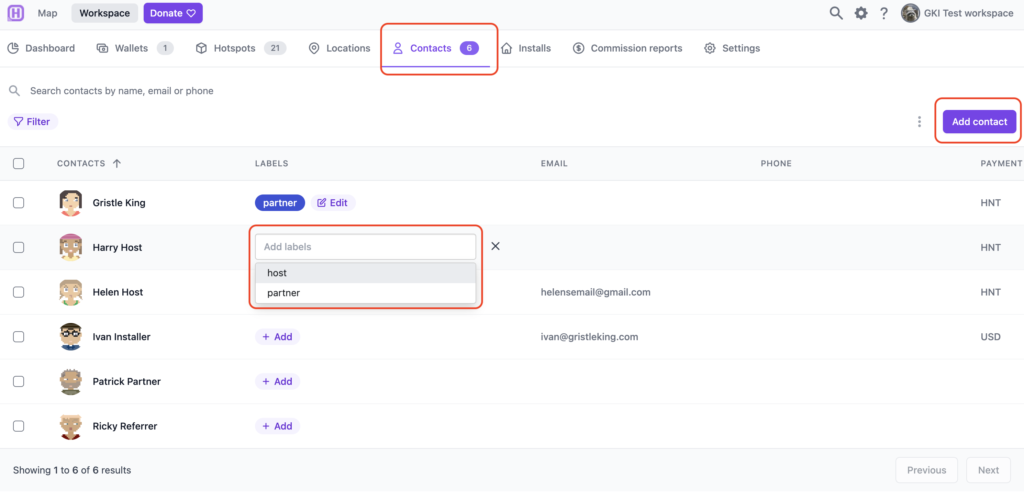
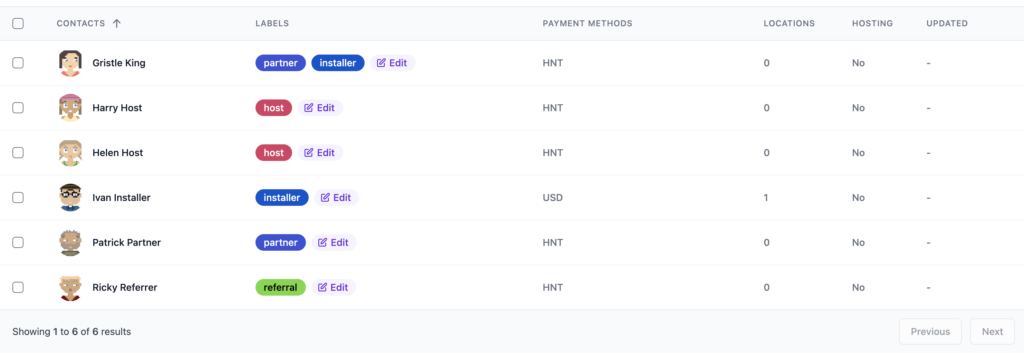
Contact - This is a person associated with the Install. They could be the installer, a host, a partner in your business, a referrer, or something else. Each Contact can have a different (or none at all) commission applied.

Install - This ties together the above three things: The Hotspot itself, its physical Location, and the Contacts associated with it.

I'll warn you up front; Hotspotty is NOT the simplest way to manage just a few hotspots, and can be overwhelming/overkill if you're not running a fleet of 'em. If, however, you ARE running a fleet, well, Hotspotty is an excellent tool.

So the workflow goes like this: Order Hotspot-->Create Payment Structure-->Assess Locations-->Identify Contacts-->Receive Hotspot-->Create an Install.

An Install connects the Hotspot, the Location, and the Contact. The order can jumble around a bit depending on what you're doing, as you'll see. Let's start at the beginning.

First, you order your Hotspots.

While you're waiting for the Hotspots to arrive, you've got a few things to do in Hotspotty. One is to create the structure for what you're doing, starting with your commission structure.

Are you going to pay a 20% commission or a 50% one? Is there a standard installer fee you're going to pay? Do you have partners you need to split this with? Each one of those splits is associated to a Label in Hotspotty.

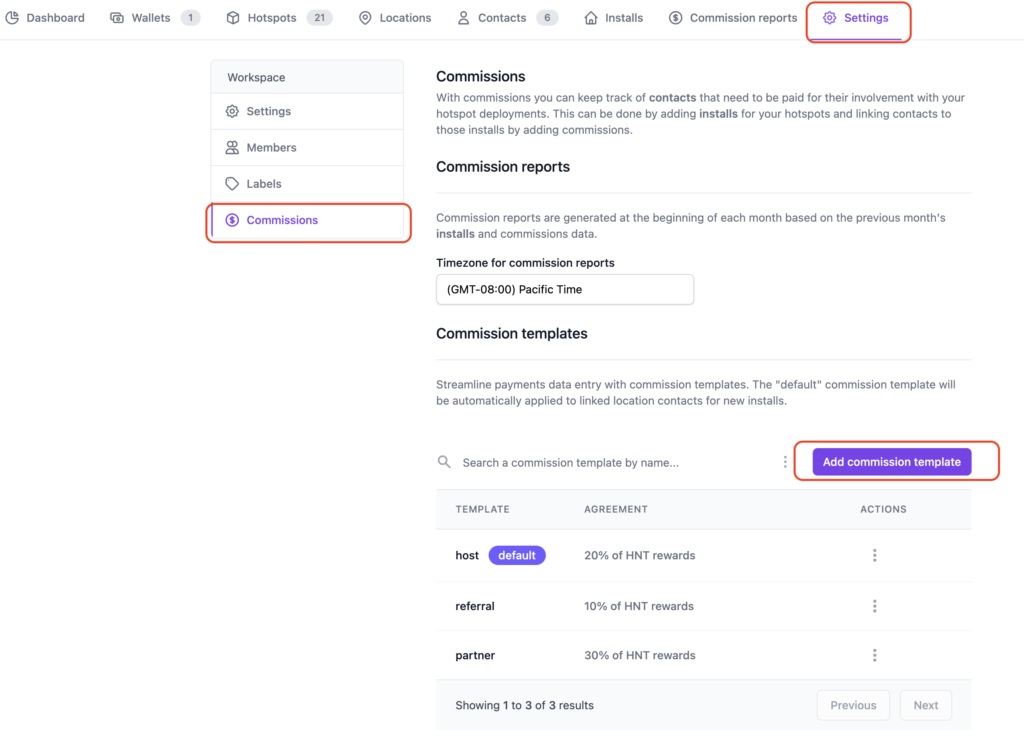
Let's go into Hotspotty's Settings and get this set up. Make sure you're in the Workspace (not the Map), then look for Settings on the top right.

Once in Settings, look for Commissions on the little menu on the left, then set up templates for what you'll pay out. I added Host, Referral, and Partner.

Now you know WHAT you're going to pay, you've got choices as to your next steps. You can add Contacts or you can add Locations. I'll start with Contacts, but what you do will depend on your scenario.

For each Contact you can add Labels. A Contact can have multiple Labels. The default labels come from the Commission setup you just did, but you can add custom labels; I added an "Installer" label for old Ivan, then used it for Gristle King as well. I mean, I'll get my hands dirty. :)

Cool, so now we know WHO we're working with. Let's find some Locations that we think might be good! Obviously the steps of what comes first, Locations or Contacts, is up to you and depends on your set up. With one fleet client I'm working with, we know who the main partners are and the installers, but the Hosts are added as we bring them into the system.

Check out Grandma's house, your office, the radio tower over yonder, the taller mountain overlooking the city, your locker mate's brother's friend who knows the maintenance guy over at the Empire State Building, etc. If you need help, I've got a blog post over here about how to do an assessment.

Once you've added your Locations into Hotspotty take a look at what they'll do to the transmit scale, whether or not they're too close to other Hotspots, and how they'll change the transmit reward scale where they're placed.

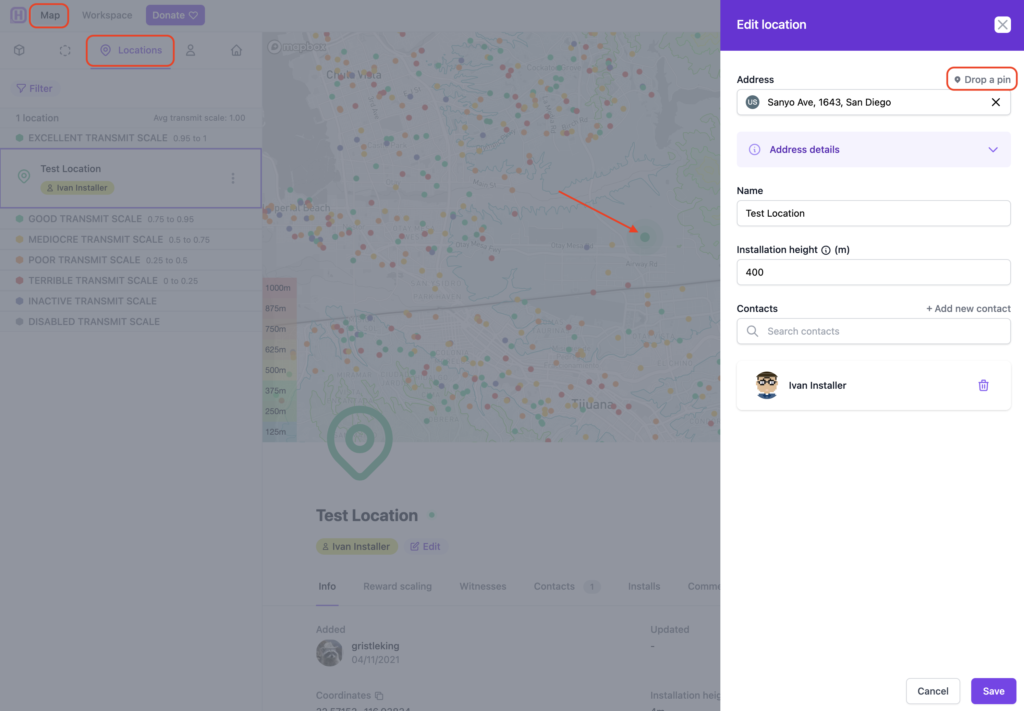
You add Locations over in the Map, up at the top left. Click on the Locations tab, drop a pin, drag the map, then add whatever information you'd like to the Location. Yep, Ivan be climbing on this one. ;)

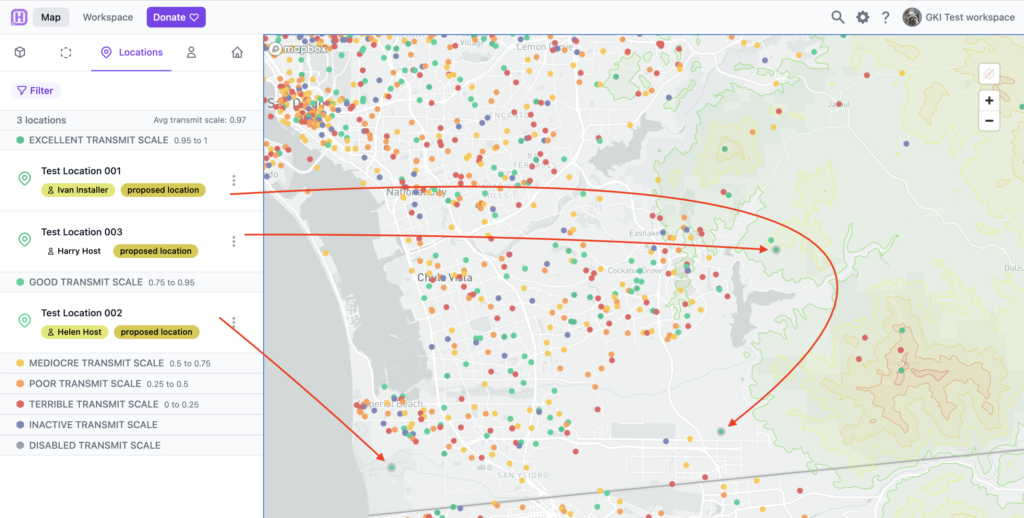
Once you've got a couple locations in, it'll look like this. The dot with a border around it signifies a Location (vs a Hotspot.)

Now we've got Labels, Contacts, and Locations, all we need is to receive our Hotspots, do an Install, then make Payments!

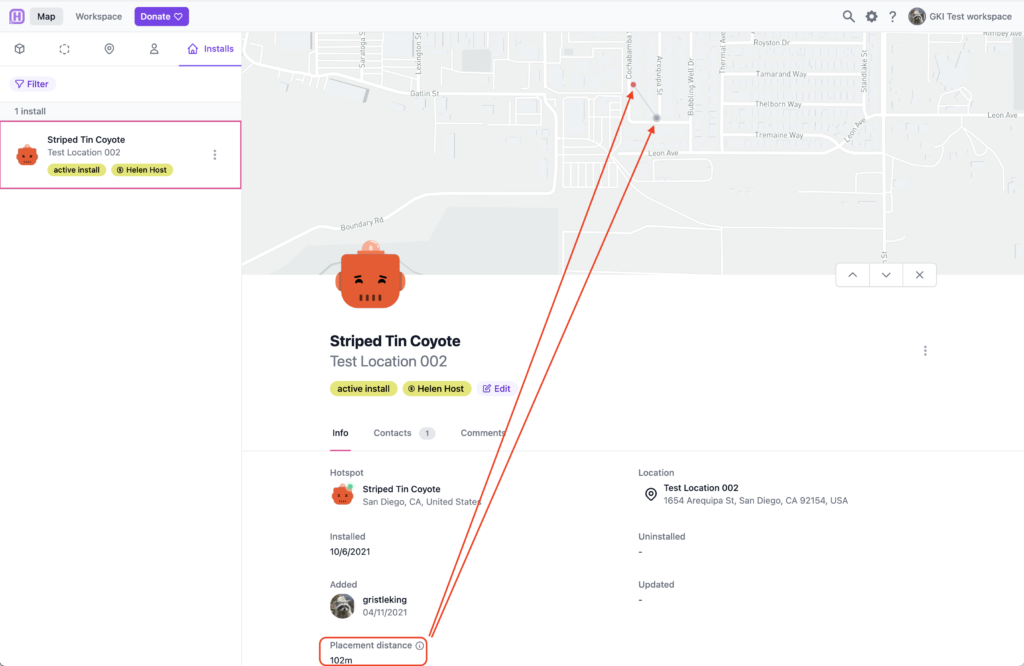
Let's say in Test Location 002, above, the Hotspot isn't actually going in that spot for privacy reasons. Again, for demonstration reasons, let's say this Hotspot is actually Striped Tin Coyote, but Helen Host doesn't want the world to know where she lives. We change the Location to be where it actually is, then on the Helium App we assert the Hotspot 102 meters away from where it actually is. Hotspotty helps us keep track of that difference with Placement Distance.

So now we've got a Hotspot connected to a Location and a Contact. Voila, an Install!

If you'd like to go deeper into how you'd use that on a fleet, I'm available for hire. Yes, if you're running a fleet, you can and should go WAY deeper; this was just an intro.

Ok, that was kind of complicated. What about Payments? This is way easier.

Payments With Hotspotty

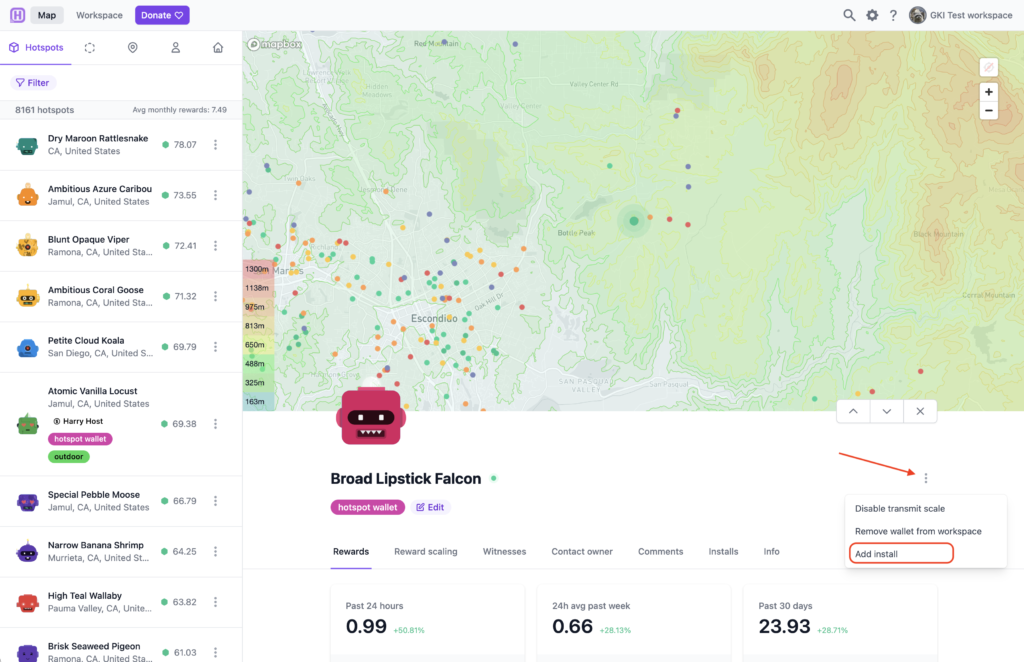
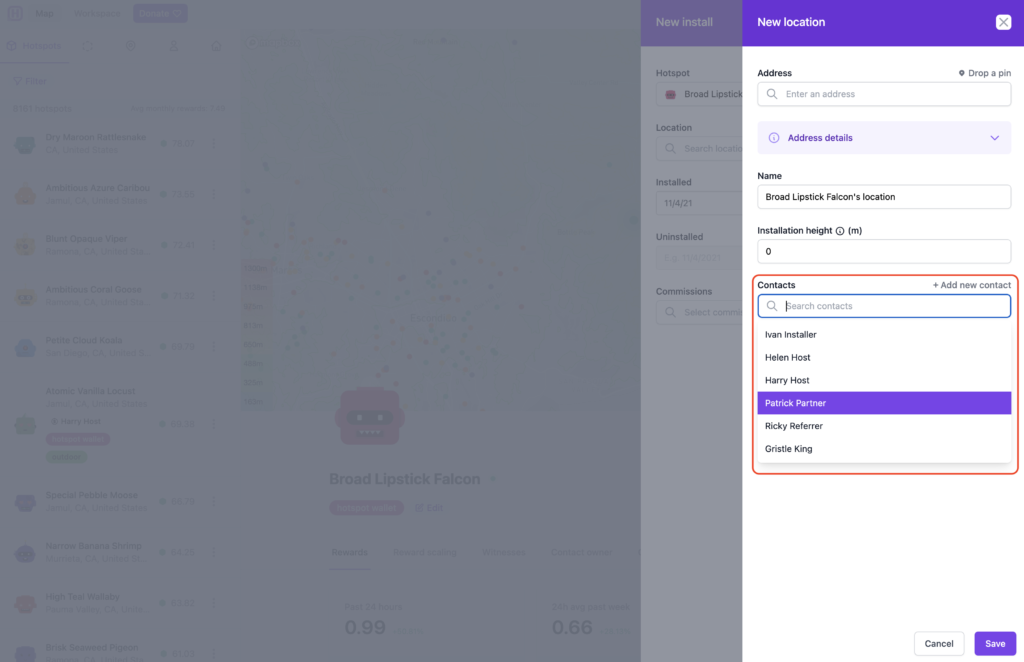
Pick a Hotspot; we'll use Broad Lipstick Falcon. In this case, Ricky Referrer told us about this spot, Ivan Installer did the install, and Patrick Partner manages it. We'll add all three of those Contacts by adding an Install to this Hotspot.

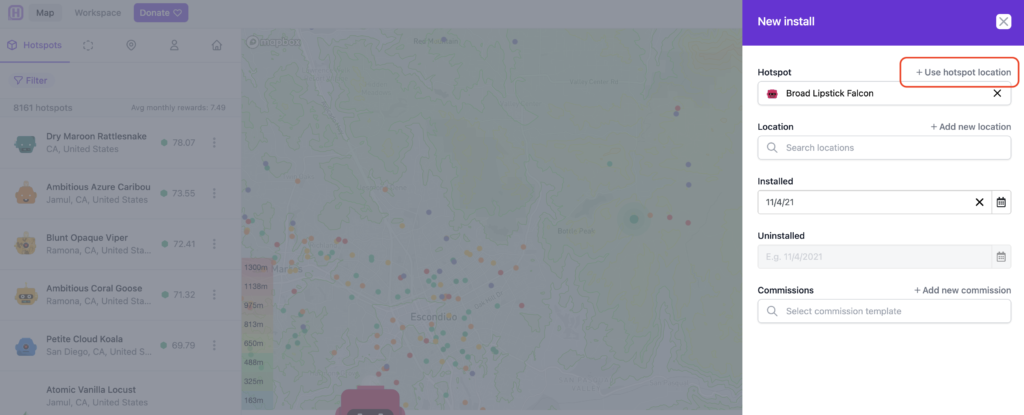
In this case, I'll use the asserted hotspot location, then I'll add the Contacts to this Hotspot.

Once you click "+ Use hotspot location" it'll bring up the next tab, where you start to add Contacts. Like this:

Once you've got everything properly labeled and the Commissions assigned, it starts to get way easier. Go to Workspace --> Commission Reports.

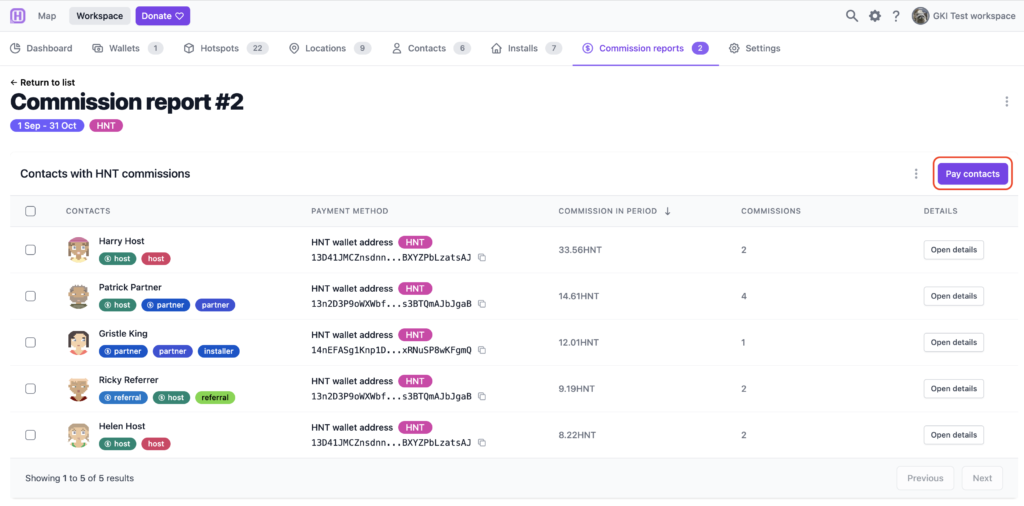
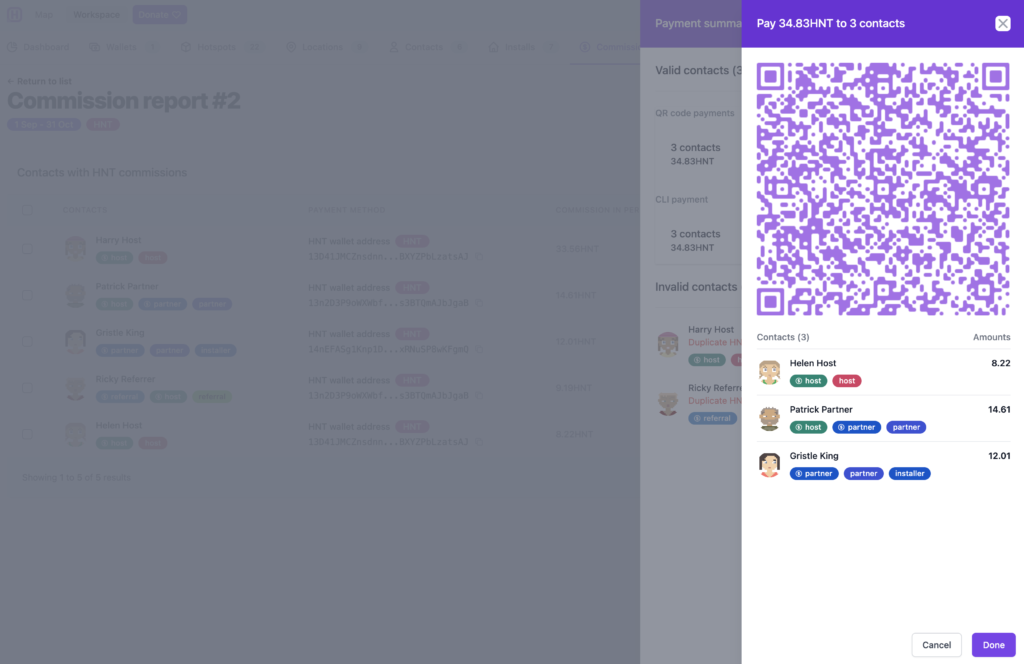
Then hit "Generate report", fill out the date range and run it. I think I set mine back to September of 2021. Wait a second or two, and then click on your newly generated report. It'll look something like this. The coolest part is the "Pay contacts" button at the top right. Hit that.

That will bring up a QR code allowing you to pay all of those contacts from your Helium app wallet. Yep, all at once. Up to 30 contacts at a time. Bam.

That's it, payments are done!

That should help you get started using Hotspotty's latest version. It IS complicated, and you'll spend some time just banging around various windows and tabs for a bit. Don't worry, within a few days you'll be whizzing around like Max and crushing all your Hotspot management tasks.

If you want to use Hotspotty, head on over to their site and fire up an account. If you just want someone to use and manage this complex & powerful tool for you, I have a few slots per month to help fleet-deployment clients get through the start up phase.

Rock on, and enjoy using this powerful tool!

Archived Comments

steve Stinders - 11/14/2021

Hi Nik Have you got an email address please?


Nik - 11/14/2021

I do, head over to the Contact page to reach out. https://gristleking.com/contact/


Reports From The Field: Tracking With Helium

· 9 min read
Nik
Site Owner

I recently drove up to participate in the USA Hike & Fly's Ojai race on October 31st, both as an athlete and a provider of tracking with Helium. The athlete side was fun, but expensive. I landed in the bushes and tore up my wing enough to warrant buying a new one. Not cheap. Still, rad to blast up the backside of the range then launch off the ridge in an attempt to fly the course instead of hike it.

The other reason I went up was to provide custom tracking for race participants. Having recently done the very first paragliding tracking event up in Utah, for the X Red Rocks race, I managed to avoid a few mistakes, repeat a few more, and learn a ton about how best to run tracking for people who move fluidly from earth to air.

As a quick recap, a "hike and fly" race is one where you attempt to complete a course by hiking on the ground or flying your paraglider. Typically these races start in a valley and you hike up to the top of a mountain or ridge, then launch off from the high point and tag other points, either in the air or on the ground. These "points" are usually cylinders of various sizes, from 10m radius to a 5 km radius.

Ok, so what does it take to track a paragliding race with Helium?

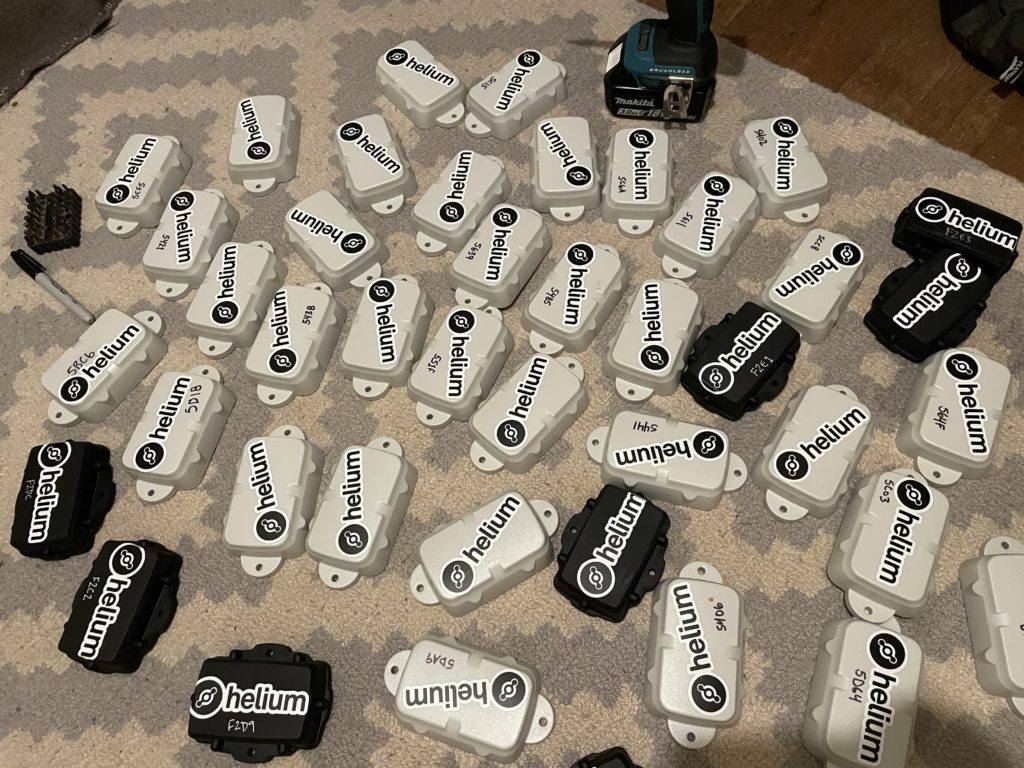
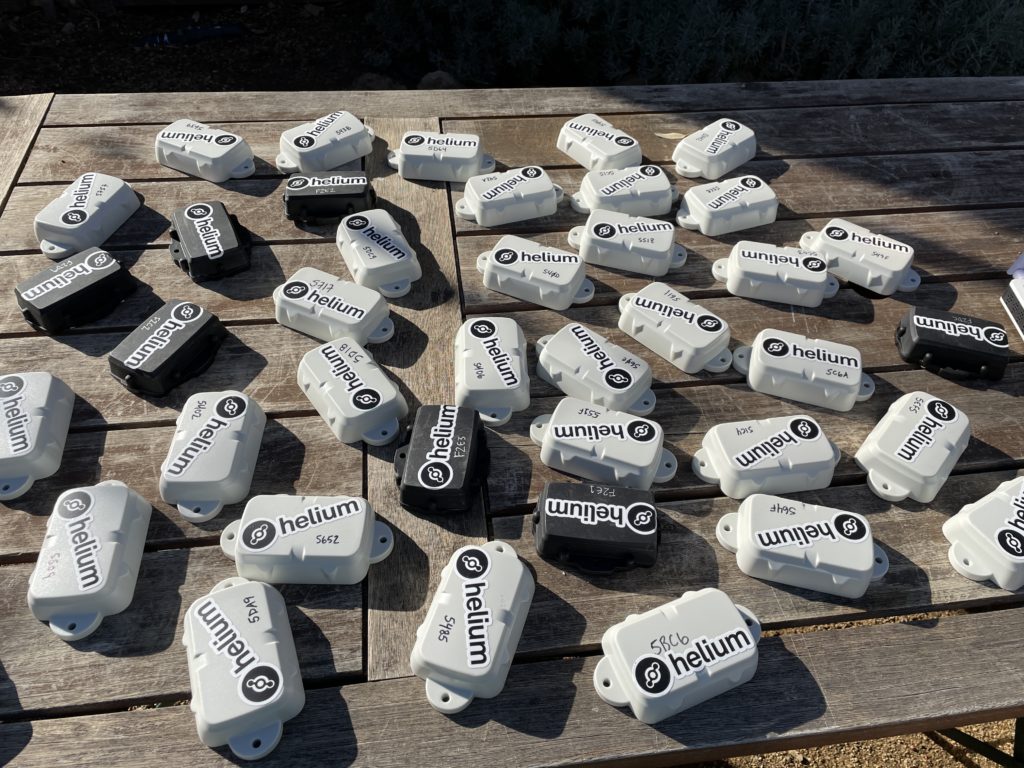
Let's start with the prep work. With 30 participants, I wanted to have more than enough trackers ready. My wife Lee & I prepped 40 Digital Matter Oysters, which were originally designed for vehicles but work well enough OTS (Off The Shelf) for paraglider tracking. Here they are after we'd gotten stickers on 'em, labeled 'em with a useful number, and put the GKI contact info on the back, in case anyone forgot to return theirs at the end of the day.

Yes, I used a driver to pull the back plates off all of 'em. At 6 screws each that would've taken forever manually.

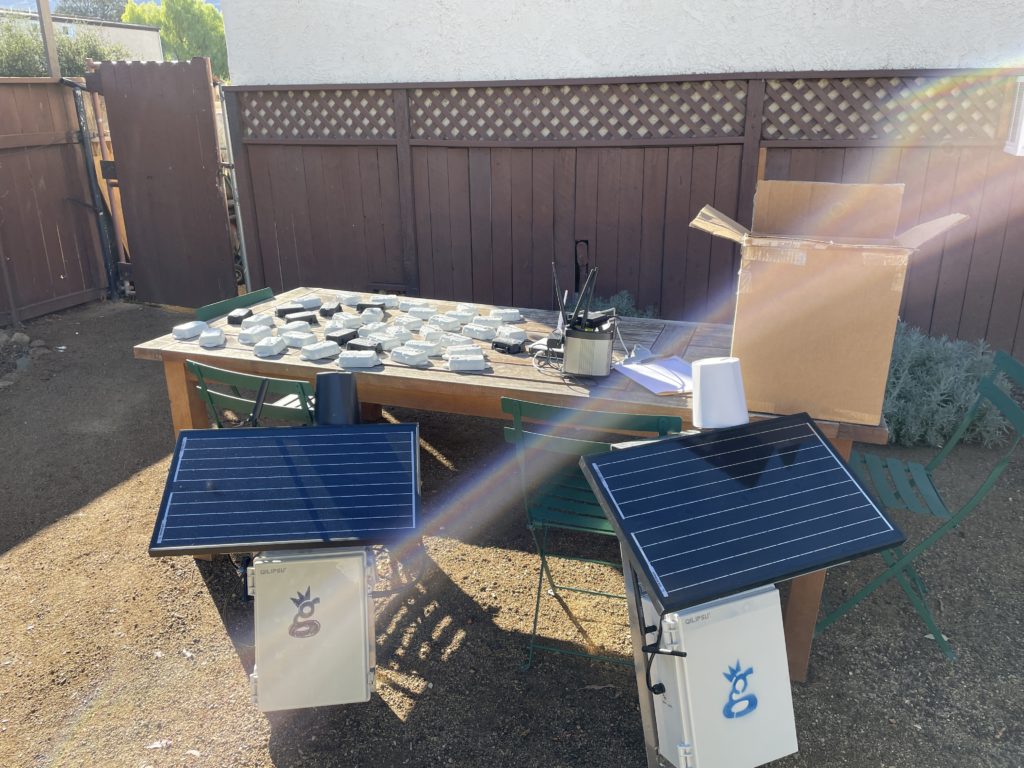
The next step was getting up to Ojai, where the race would be held. Lee & I loaded up the truck and headed north, arriving in the evening at The Hummingbird Inn. The next morning I laid out all my gear for initial function checks. So far, so good.

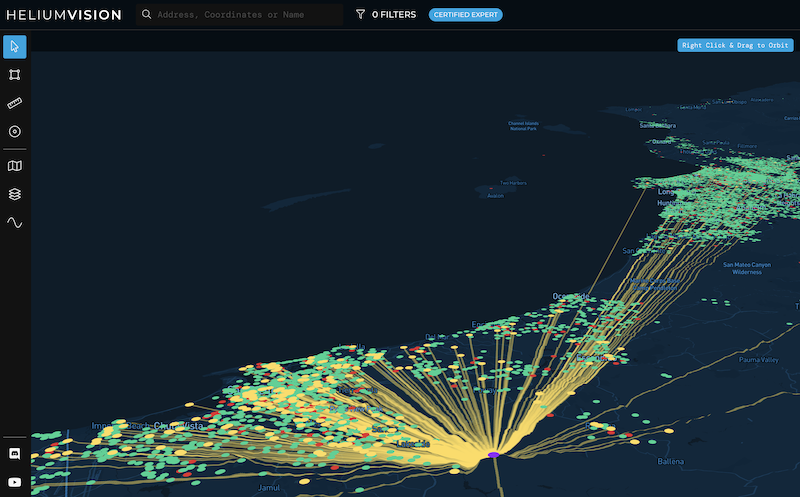
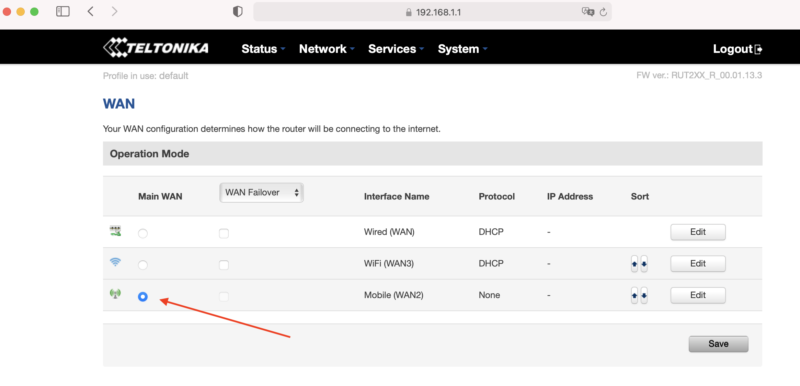
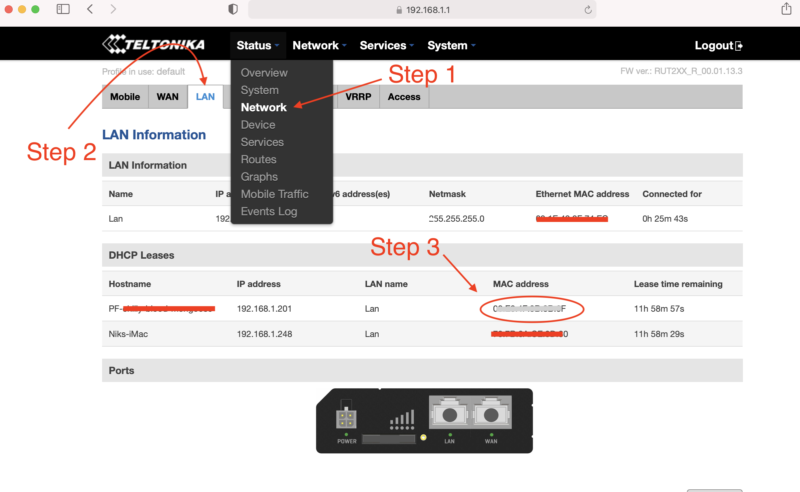
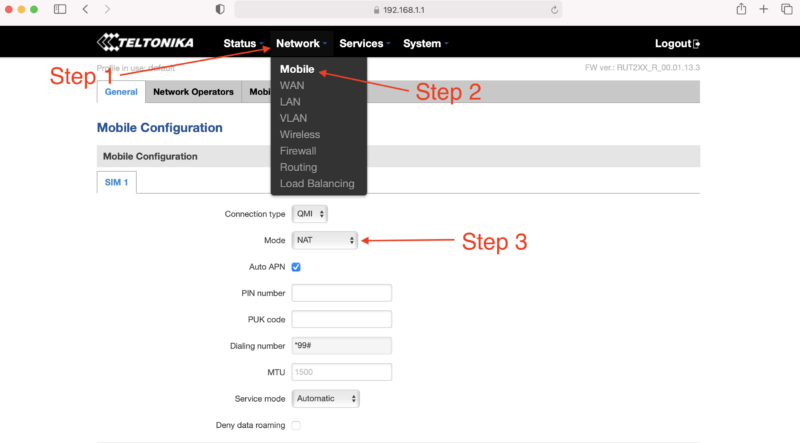
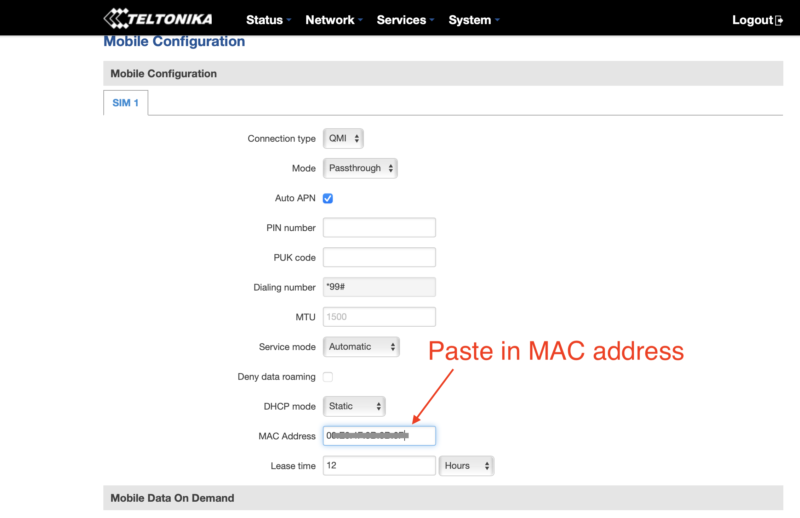
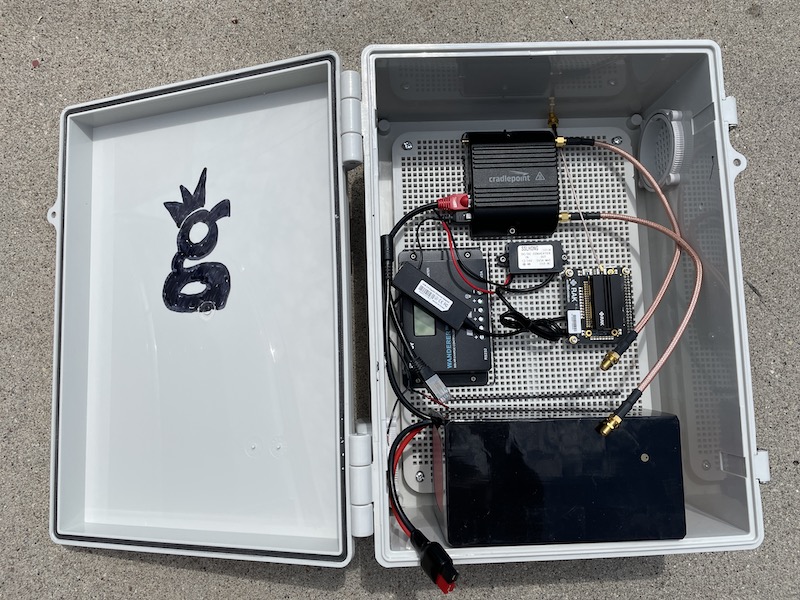
One thing I was doing as a test run this time was running a mobile hotspot, Late Rainbow Bee. I built a Data Only Hotspot using directions over on the Helium site and using a Dragino LPS8, a RUT240 cell modem, and small Goal Zero Yeti 200X battery I had laying around from another project. On this project I wasn't able to get it to pass data via the RUT240, so work remains to be done. Probably an issue with the RUT240 setup. Still, that in and of itself has been a fun little project. Ok, onward!

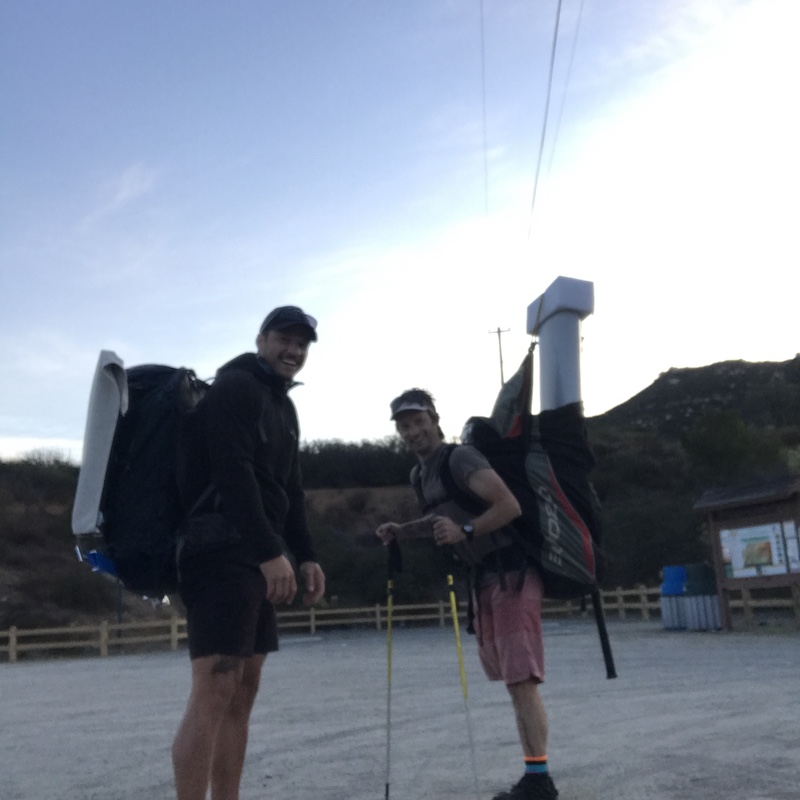
I rallied fellow San Diego pilot Kris Souther to head up with Lee & I to place the two GKI Hotspots, Atomic Blood Wolverine & Fierce Honey Badger. We bumped over a bunch of dirt roads together and got everything sorted out.

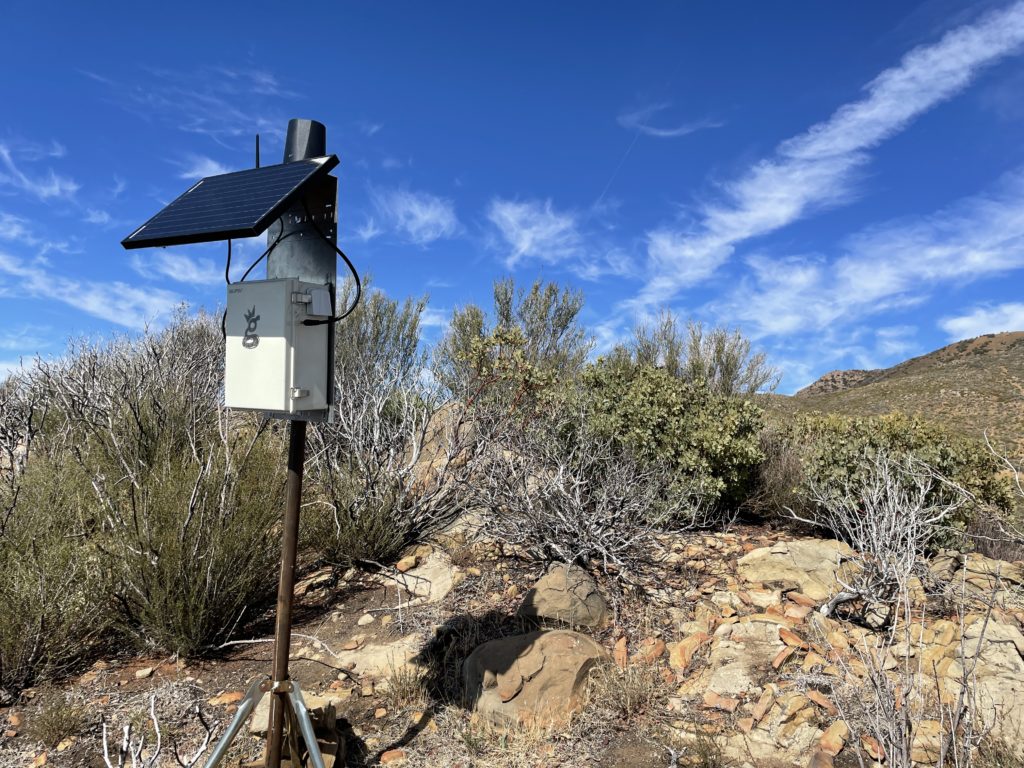
Here's the Badger over by Chief Peak. For those of you way into building these things, this is a slightly older build mode (directions here). Notice the RP-SMA connector (not an N-type) for the bulkhead connection. N-types are way sturdier. That's 3' of LMR400 cable, a 30 watt panel, and a 20 Ah battery. Oh, and of course, an HNTenna.

Once the Badger was up we drove the long and rough road over to Nordoff, which had stunning views, a fire observation tower, and a paragliding launch.

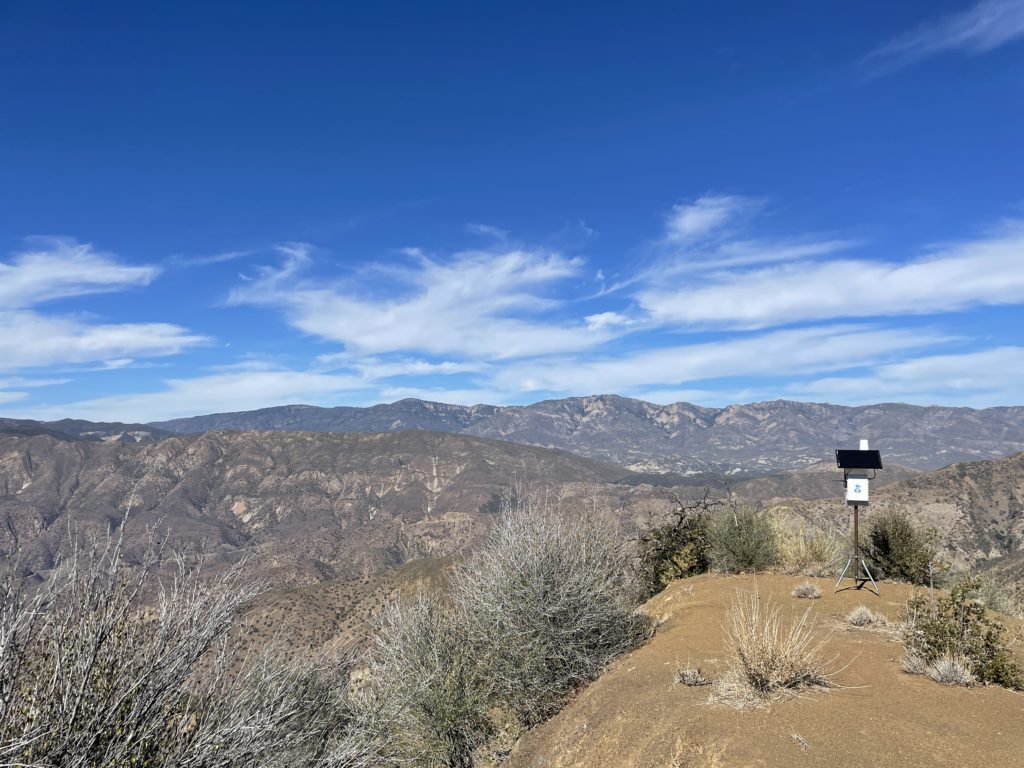
I set up Atomic Blood Wolverine on a flat spot with giant views, and our work was done.

Kris brought along his wing, and once ABW was up, laid out his wing and launched off Nordoff Peak.

Lee & I drove back down, and I checked in on my two hotspots to make sure they were running. One wasn't, most likely due to no cell signal. One of many lessons learned was to make sure I check the function of the cell modem and the hotspot BEFORE leaving the thing up and running.

I spent the rest of the afternoon checking and re-checking all my trackers, needing to shake a few of 'em to get them to connect (movement triggers a radio transmission). Tommy over at LoneStar Tracking was super helpful walking me through basic troubleshooting processes, and by the end of it I had all the units I needed for race day.

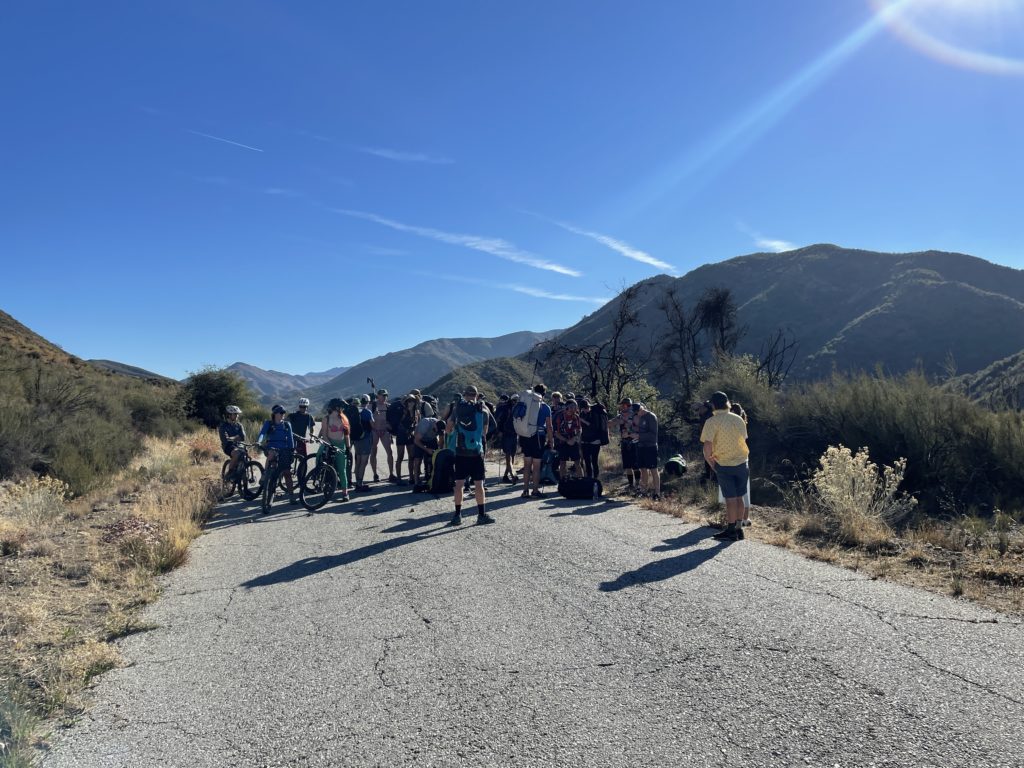
Lee & I got up early Sunday morning and drove over to the meeting point to hand out trackers. I gave a brief overview to the racers about what was happening, what Helium was, and the benefits & shortfalls of a custom deployed LoRa tracking system, then I turned off "Gristleking" mode and went into athlete mode. Here's the start line down on Rose Valley Road.

We had a couple of mountain bikers as part of it, they biked the whole thing, which was pretty cool. A few of 'em even carried trackers!

From there it was a straight grind fest to gain the ridge, including some off-piste action within minutes of the start when we missed our turn off. That's how adventures go, right?

https://youtu.be/BAPwteMjLkc

After managing to land in thick brush unscathed and yet tear up my wing so badly I needed to buy a new one, I packed it all up, hiked down 6 miles down Gridley Trail to meet Lee, and we drove around for almost 4 hours picking up the hotspots back in the mountains. Dirt roads are slow going! The sun was setting and the marine layer was rolling in fast as we came back down the mountain.

Lessons Learned

  • easier way to power cycle the trackers is needed, both to save battery & as a function check
  • always check a remote hotspot BEFORE walking away from it
  • the Data Only Hotspots are a neat idea but require a fair amount of geekery to get going
  • without cell signal (or some kind of internet connection) your hotspot won't be useful
  • simple method of having a written chart to keep track of (no pun intended) who got what tracker worked really well
  • it takes a ton of time to get to some of these places. You probably want to be on site at least 2 days early
  • prior map study and thinking about coverage is essential; need to shift out of "High Earning" mode and into "Best Coverage" mode

Hope that helps YOU as you deploy and use the Helium Network. Here's to all of us growing and crushing it together. Rock on!

Archived Comments

Joseph Campos - 11/15/2021

Nik, great post. In my mind it appears a major limiting factor is the deployment of the miners due to the time/energy required to get to each location. I have spent the last year learning the in's and out's of Digi's Xbee modules, specifically leveraging their ability to do mesh networking. It would mean pivoting away from the Helium side of things, but think if each user's tracker through the mesh network provided connectivity for other users. You can still use the same central gateway with a cellular backhaul (I actually was able to create a standalone xbee compatible solar cellular gateway that is about the size of a brick), but the differentiator is leveraging the whole team to achieve dynamic connectivity. Once people are up in the air, they become your best located "hotspot" because they have the elevation advantage. Current Digi's most user friendly programable module is the Xbee3 (https://www.digi.com/products/embedded-systems/digi-xbee/rf-modules/2-4-ghz-rf-modules/xbee3-zigbee-3), but it uses 2.4ghz. They are suppose to be launching a 915mhz version in the next few months (hopefully) which could be a game changer for this application. I have created custom modules for another application (mine measure something else so they don't have GPS) that fit in the palm of your hand, use mesh, and can last all day on a rechargeable battery so I think achieving a similar form factor to the oyster is possible. I'm happy to brainstorm if you are interested.


What Does PoCv11 Mean For Me?

· 26 min read
Nik
Site Owner

Short version: Use a low gain antenna, report your location and antenna gain accurately. If you're in the US, this isn't a big deal, as our radios pump out enough power to get excellent range even with a low gain antenna. If you're in a region (UK, EU, etc) where your radio output is low, PoCv11 will probably decrease your range significantly.

Updated Deep Dive over here.

Want to read on for posterity? Cool!

PoCv11 is designed to help the Network more accurately assess location from radio frequency strength signals and to keep Hotspots in RF regulatory compliance. It cleans up a few mistakes Helium made early on in trying to assess radio signal strength in an attempt to combat gaming.

That's it. If you are accurately reporting your antenna gain and your location, there's no penalty and nothing else you need to do.

Normally I love to explain complicated things, but this one is so damn simple it's hard to do better than Amir Haleem, CEO at Helium:

i'll try and summarize what PoC V11 does:

adds regional support for PoC - today the network treats all PoC activity as if it's operating in the US. this is a problem as different regions run on different radio frequencies and at different power levels (by law), so what is considered valid or invalid varies substantially. V11 adds regional awareness based on the asserted location of the Hotspot

removes SNR from the validity checks - today both the signal-to-noise ratio and free space path loss calculation (FSPL) is used to determine whether PoC packets are valid or not. this was an attempt to make it more difficult for gamers to lie about their location. it hasn't worked well and is being removed. SNR proved to be fairly useless as a mechanism, so now only an FSPL calculation is used to determine whether Hotspots are where they say they are in relation to each other

adds a regional frequency check - V11 introduces a check to make sure that PoC packets are being sent at the correct frequency for the region the Hotspots are located in. for example if a Hotspot is transmitting packets in the US frequency bands but based in South Korea, those packets would now be invalid

complies with local power output regulations - different regions have different maximum power output laws for unlicensed radios. in the US, for example, the max EIRP is 36dBm. in the EU this is 16.5dBm. currently in PoC v10 the power output is hardcoded to 27dBm for the US and rest of the world, and 14dBm for the EU. V11 will reduce the power output if the combination of the maximum output power + antenna gain exceeds the local laws - for example, a Hotspot operating in the US with a 5.8dBi antenna would have a total EIRP of the Hotspot power output (27dBm) + the 5.8dBi antenna = 32.8dBm total EIRP, which is below the 36dBm allowed. nothing would change in this case. if instead the antenna was changed to a 10dBi antenna bringing the total EIRP to 27dBm + 10dBi = 37dBm, the miner software will reduce the power output of the Hotspot by 1dBm so that the total is less than equal to the 36dBm allowed by law. in the EU a 5.8dBi antenna would cause the Hotspot power output to be reduced to 10.7dBm so that the total EIRP is 16.5dBm

PoC V11 does not have anything to do with the 10 witness maximum, or the witness randomization changes that were added recently. we're hoping to activate PoC V11 in early October. it is currently not active.

But, but, but, it COSTS MONEY to state my antenna gain! Relax, dawg. It costs 55,000 DC. That sounds like a lot. It's not.

1 DC = $. 00001. So, 55,000 x .00001 = $.55. You can afford that.

I know you want to get all worked up about PoCv11 and how it will change things. Relax, it's not a big deal as long as you're playing by the rules. It's part of Helium's efforts to improve the network. Color within the lines (report your location, antenna gain, and elevation accurately) and PoCv11 will only make things better.

Archived Comments

David - 10/15/2021

Without sounding critical, it's important that people understand that the above relates a lot more to the US, in the UK where a good set up, LMR400 cable, roof mounted several metres above your house with good line of sight will still see a RAK 5.8 reach 4-5 hexes if you're lucky due to the already reduced power (I have 24 hotspots in a variety of environments running and have tried multiple antenna in multiple locations for weeks at a time so have a little experience) spending money on a decent 8 DBI makes a huge difference in HNT earnings here, and there's a strong feeling that those in the EU are getting hit hard for spending hundreds on a good set up, whilst most US users aren't bothered so the "don't worry" comments are from those likely to be based in the US and therefore unaffected - an "I'm alright Jack" attitude and I'd suggest an emphasis in the your writing that it's a US focus only. There's also a lot of confusion on Discord as to whether the reduction in power is only temporarily applied at the point of broadcasting a beacon and the full strength of the antenna is still available the rest of the time, or if its applied for both broadcast and receive.


Nik - 10/15/2021

Great points David, thanks for bringing 'em up!


Jonathan Pampers - 10/18/2021

Correct me if I am wrong, but surely those in the EU (or other countries with a lower EIRP level) can't really grumble about Helium lowering power outputs so that they are within legal levels? If the long-term growth of the network is what people want, surely hundreds/thousands of hotspots operating over legal levels in a country is a good way to go about getting it banned?


David - 10/20/2021

Hi Jonathan While I agree its got to be legal, the main issue is commercial viability- if no matter what you did your hotspot could only reach 2 RES 8 hexes, and required a good roof mount to get even that, would the current reward structure justify its long term viability and would that provide effective coverage to build the network that is envisioned? If you're looking at a European population nearly 2.5X that of the USA, then it's vital for global growth that it works effectively here, and if it is reduced, then compensation has to be increased per hotspot for people to continue to invest in the boxes and grow the network - if after POC11 a US box with a 5.8 can reach 6 miles and a European box with the same antenna can reach only 2 after it's power is reduced (which is what you currently might see with a standard 1.2 DBI here if very lucky) then assuming circular coverage you're looking at a massive difference in coverage per hotspot - 13 square miles vs 113 square miles and a massive difference in rewards earned. For HNT to work and increase in value over time you need to see continued increased global coverage, people just won't continue to invest in boxes in Europe if it isn't financially beneficial to the buyer here, destroying the HNT value for US owners.


Jonathan Pampers - 10/21/2021

I agree with you there David. From the southeast asian perspective, we have similar EIRP limits to the EU, and whilst the economic disparity between SEA and the USA might still be enough incentive in the short term, there does need to be an effective long-term incentive for people to establish good coverage.


Mario - 10/21/2021

@David, thx so much for your thoughts! You're completely right. Got my bobcats on September 7th (2 months late) to Croatia (EU) and been struggling ever since to catch up. 8 bobcats, extra taxes, LMR-400, outdoor rooftop setups, poe, splitters, solar panel, LifeP04 batteries etc. for one off-grid, >300 hours of work & troubleshooting. Not too cheap, especially cuz 75% of the stuff I needed to order from outside of Croatia... If I count in the hours spent, well, the ROI is... lets just say underwhelming. Averaging 0.3 HNT per miner with shifting to WUPU mindset isn't what I expected but still pushing through and struggling. At least for now (honestly). Or maybe I'm doing something wrong but still haven't figured out what... For example, Slow Hotpink Camel has >90 witnesses. Discovery >110. Not relayed, port open, ping-ok. rooftop, RAK antenna, 2 feet LMR400 cable... Yet, in the last days it's made 1.426 HNT TOTAL. Thats 0.2 average a day. I mean seriously wtf, some on first floors or indoors make that much. I just don't think its fair because in comparison to others with (worse or same no. of witnesses etc.) its way less. If only someone can point me in the right direction. @gristleking? :) Anyway, enjoy the rest of your days people and good luck to us on this endeavour.


Nikko - 10/22/2021

Does your general rule of thumb to place your miner location within 150m of its actual location still apply?


Nik - 10/22/2021

Yep. The closer the better, but 150m will probably continue to be fine. I mean, we won't know until after PoCv11 actually hits, but I'm guessing it'll be fine.


Vapaaherra - 11/7/2021

Hi Nik! Thanks for all the great content regarding Helium mining! A question from a European reader concerning PoC v11: is 3 dbi & more power from the hotspot equal to, say, 5.8 dbi & reduced power from the hotspot in the EU, or is there going to be a benefit in the future to use a higher gain antenna in the EU? Is it still going to provide longer range and/or different shape of the radio “donut”?


Nik - 11/8/2021

Vapaaherra, as I understand it, all hotspots in a region will be transmitting at equal power once PoCv11 goes into effect, as long as the hotspot owners accurately enter their gain into the app. Now, I'm sure that a bunch of people will either forget to update or will try entering various other numbers outside of what they're doing in an attempt to connect with more local hotspots. I'm not sure how that will work out, other than accuracy within a dB or 2 is probably close enough. That's just a guess though. We're all pretty darn curious about how it'll pan out. Here in the US I'm just going to use a low gain antenna (3 dBi), report it accurately and see what happens.


Volkan - 11/9/2021

What is the implication for the UK then? If I have understood this correctly - we are currently, even with stock antennas, broadcasting over the legal limit. With PoC v11 we will see the overall signal strength reduced to be just under the 16.5dbmi that is allowed (as I understand it the changes will hard code attenuation to deliberately NOT equal but just undershoot the legal limits) Will this mean we see reduced network coverage due to signal throttling? Will this result in a different outcome / rebalancing of transmit scales in hex's due to reduced signal strength? From the outside it seems like a change that will barely affect the US but will have quite big implications in the UK / EU


Nik - 11/9/2021

That appears to be an accurate assessment. I don't think we'll see a rebalancing of transmit scales, although that's a very interesting idea to apply regionally. Write a HIP up!


Dizzy - 11/10/2021

I dont know how it is in the Europe and other countries but US citizens have a lot of power and control on our governments rules. Perhaps there is method to voice the antenna power limit so low?


Mark - 11/13/2021

Thanks King for sharing your experience. When setting antenna gain, should the dbi losses via antenna cable length and connections be factored in for accuracy?


Nik - 11/13/2021

Yep. Remember, they're trying to measure what will be received, which will include your gain & loss from antenna, cables, connectors. Prolly not a huge deal to be off by 1 dBm, so if you're not engineer-accurate no big deal.


Why My Helium Mining Profitability WENT DOWN?! - 11/21/2021

[…] Gristle King POCV11 review – https://gristleking.com/what-does-pocv11-mean-for-me/ Check the current status of the Helium network – […]


Ethan - 11/30/2021

Hey Nik, As of today (11/30/2021), with SNR being removed from the calculation and leaving only RSSI, do you have the RSSI limits that would make a witness event 'invalid' or 'valid'. See the following link for the previous POcv10 SNR vs RSSI limits graph. Let me know if the link doesn't work. https://ibb.co/8PZ7gk4


Nik - 11/30/2021

I don't think we've moved to PoCv11 yet Ethan, so the old chart is still in play.


Jay - 12/11/2021

I have a 6dbi with 30' feet of lmr400. I input it at 5.8 because I know there is some loss with 30' of cable. Not sure if I did it right but I guess will see on Monday.


Nik - 12/11/2021

Technically that amount of cable loss will be 1.4 plus your connectors, so you're closer to 4.6, maybe 4.5.


Renas - 12/13/2021

Hey Nik, great post. Will pocV11 regulate power in both transmit and receive or just transmit? Are the power limitations only dependant on what antenna gain you input in the app or can Helium detect your actual power? If it is merely dependant on what you input in the app, could you not in theory still use a 8 dBi and input 3 dBi in the app in an attempt to not get your power limited? Thanks in advance!


Nik - 12/13/2021

Hi Renas, PoCv11 evaluates signals on both sides, transmit and receive. If you put in an inaccurate number, the further that number away is from reality, the more likely you'll have an invalid witness event. Remember, power DOUBLES every 3 dB. If you use an 8 dBi and input 3, your antenna will both sending and receiving an additional 5 dB, which is almost quadruple (2 x 2) what it "should" be. As long as you accurately report your setup, there's no further action required. As far as I know, there's no way to detect if you're accurately reporting or not other than the submitted reports. Helium can't detect what your actual power is, just what's being reported by your miner.


Stan - 12/13/2021

I am in UK. Following Niks advice I got HNtenna's for my 2 hotspots and I reach hotspots 60km away. That is a lot more than 4 hexes. I also get far better rewards than most around me and a noticeably better at receiving transmissions than many who appear to have higher gain antenna up higher than mine and reaching 80 to 100kms on transmit. Just get an HNtenna !!


Nik - 12/13/2021

Thanks for the report Stan, glad it's working well for ya!


Dennis - 12/15/2021

Hello, Love your content, thank you! Quick question... do we need to reset our location and pay the fee also or do we just resubmit the Antenna and dbi gain using the wallet app?


Nik - 12/15/2021

Shouldn't need to reassert your location (unless you actually move your hotspot). Just make sure your gain is reported accurately and you should be fine. :)


anders - 12/17/2021

What is the benefit of having a higher gain antenna in EU when the power signal is getting limited so much? If I compare using a 8 dbi antenna and the power gets reduced to match the power of a 3 dbi antenna, wouldn't it always be better to use a 3 dbi antenna in all cases since the power signal would be the same anyway? Also, the 3 dbi antenna would cover a bigger beam path than the 8 dBi. So using a 8 dBi you would lose coverage AND signal strength with pocv11. Is this correct or am i misunderstanding this? Thanks Nik.


Nik - 12/17/2021

I think you're accurately assessing the situation. I don't see a benefit to a higher gain antenna in the EU (or almost anywhere). There are exceptions, for sure, but in general a low gain antenna up high & outside will earn the most for any given location.


Rob Irwin - 12/18/2021

Thank you so much for all the advice you put out here and on Youtube Nik, my knowledge of helium mining has accelerated so quickly since discovering your site. Could you help me with a specific bit of advice regarding POCv11 and the UK/EU please? I have an indoor nebra currently with an 8dbi nebra antenna, 6 meters of LMR-400 cable and a lightning arrestor. Now that POCv11 has kicked in does this mean my Nebra is throttling the output to a full 4.1dbi and taking into account the loss for the cable and arrestor or would the antenna now be something like 3dbi due to cable and fitting losses? Secondly, does this throttling effectively change the signal pattern of the 8dbi antenna to look more like a 3dbi antenna or would it stay narrow and long, just weaker? I'd like to know if its worth the effort to change to a 5.8dbi or even lower dbi antenna. I'm in a remote location you see and there aren't many other hotspots around which is why I have been using the 8dbi.


Nik - 12/18/2021

Hi Rob, the Nebra won't throttle anything, but Helium will depending on what you enter into the app. Take the antenna gain, subtract the cable/connector loss, and enter that into the app. Cable loss won't change the pattern, it'll just weaken the signal throughout that pattern.


Mario - 12/19/2021

Hi Nik. You said it’s not a big deal as long as I'm playing by the rules... but in my case it's a huge deal. PoCv11 did the opposite for me (getting 20 invalids that I didn't have before) and earnings down "clipped" by 60% (round vanilla dragonfly). Everything asserted correctly, 3dbi McGill antenna gain - 3m(10ft) LMR-400 Times Microwave cable (0,384 loss) - Times Microwave arrestor (0,2 loss) - 0,1 for connectors = 2,316 dbi asserted. High up overlooking the city. Was making 0.7 HNT before PoCv11, now down to 0.25. Any suggestions what to do, please...? (EU located, Bobcat 2GB, RUT240)


Nik - 12/19/2021

Hi Mario, interesting that you're doing everything "right" and your earnings went down. My *guess* is that your invalids are coming from nearby hotspots who haven't updated their antenna gain, which will change the reported values into the involid zone. That's just my guess. It's an off grid?


Stefan - 12/20/2021

Nothing actually changed since POCV11, my hotspot is 150m away from the real location and my antenne dbi is 5 instead of 4. So POCV11 isn't a big deal....


Nik - 12/20/2021

100%, thank you Stefan!


Hi - 12/23/2021

Hi everyone :) one question. Where did 16,5 dbm came from when in Europe MAX EIPR = 25mw and this is 14 dbm. In that case we cannot use any antenna or I missing someting?


DimmiD - 12/28/2021

Hi Nik! I understand, that PoCv11 reduces the power of the transmitted signal. But what does mean " PoCv11 evaluates signals on both sides, transmit and receive" for the receiving side? Is the receiving (the witnessing) miner applying its antenna gain mathematically to the physically measured RSSI? Best Regards! Dimmi


Nik - 12/28/2021

The final "number" used to assess antenna signal strength takes into account both the gain on the tx side and the sensitivity (gain) on the rx side.


Matthew Yim - 12/30/2021

I bought the RAK 8dbi antenna from them direct and it comes with a 3ft cable but they don’t specify the type of cable it is. I recently just switched from a 5.8 dbi and I noticed my earnings decreased by about half, that is after a day of increasing by 15%. What should I put in for the antenna gain in my settings? Lastly, I’m in the suburbs (ASHBURN, Va, USA) and my miner is 9 meters up on the second floor window with a decent view outside. Do you think 5.8dbi would be better? Regardless both antennas came with cables that were no specified so I don’t know what to put for the gain?!? What’s a ballpark I should put because I have just been putting the antenna gain.


Nik - 12/30/2021

A day isn't long enough to make a good decision. You're fine to just put 5.8 in the app, though if you want, you can account for cable loss. I don't think it'll make a huge difference.


Matthew Yim - 12/30/2021

Thanks nick but from what I have specified do you think 5.8dbi or 8dbi is better?


Matthew Yim - 12/30/2021

Also when I compare the same hotspot that I witness, I am trying to compare the RSSI and SNR values. Is a better signal a lower negative number for RSSI and a higher more positive number for SNR?


Nik - 12/30/2021

Best to test it, but for now, read this.


Matthew Yim - 12/30/2021

Will do thanks! But could you address my final question? I have been comparing the witness transactions between the same beaconer (5.8dbi antenna vs 8dbi antenna). I noticed that while the RSSI values are LESS NEGATIVE for the 8dbi, for the most part, and the SNR is MORE NEGATIVE (these are in comparison to the 5.8dbi). Does a LESS NEGATIVE RSSI such as -101 vs -103 mean a stronger signal? Also, in terms of SNR, is a MORE NEGATIVE SNR better, such as -5 vs 5? Thank you!


Nik - 12/30/2021

Yes, -101 is stronger than -103. Totally worth reading this article on RSSI & SNR as it relates to Helium.


Why My Helium Mining Profitability WENT DOWN?! – PennsylvaniaDigitalNews.com - 1/9/2022

[…] Gristle King POCV11 review – https://gristleking.com/what-does-pocv11-mean-for-me/ Check the current status of the Helium network – […]


Mark Hallworth - 1/22/2022

Hello Nik, thanks for the great posts as usual always very informative, not sure if you remember me i was getting the RAK 5.8dbi antenna on a 10ft pole, its been doing really well, just to let everyone know it witnessed a beacon 189km away which is approx 116miles i was gobsmacked, so pocv11 doesnt seem to reduce or limit the receiving side of the antenna, ive also sent a beacon myself 109km so pretty good stats, it can also witness local hotspots to me, this is on 9metres of lmr400 mcgill microwave cable, i havent added the loss yet but i will be doing, i do have a question, would i benefit from trying an 8dbi, as some hotspots im witnessing are also being witnessed in red areas which affets rewards, so was looking to go even farther away to green areas so they are less prone to send a beacon to those red ones. Cheers.


Nik - 1/22/2022

Right on! No need to go to an 8 dBi, you typically won't see a huge difference in range when you go up in dBi with LoRa. Higher gain is used more to punch through known obstacles. PoCv11 won't effect your gain at all on the receiving side (as far as I know), it'll just take it into account. It will, however, dial you back on the tx side if you're over the legal limit.


Terry - 2/4/2022

Hi.. from the UK here and i have been putting 3.5 for my 4db antenna with 5mtr LMR400 cable... is that correct or should i just leave at 4? Reading up through the thread it seems to suggest that helium will throttle the power and rx dependant on what is sees set, is this the correct assumption?


Nik - 2/4/2022

Hi Terry, Helium will only throttle power if your gain takes you over the legal limit.


Steve - 2/8/2022

I know someone asked above, but surely people arent going to update their antenna (EU) UNLESS they get invalid warnings. Its not a guarantee leaving a lower dbi in the app and using a higher dbi antenna will result in this, until tried. So surely people are going to try to keep a higher transmit power


Nik - 2/8/2022

That's a reasonable assumption, though I bet people will be driven more by earnings than invalid warnings. ;)


Drei - 2/9/2022

In the UK and I just got my miners. Looking around me the reward has dropped drastically. I also have 2 bobcats which I may not get to use. Is there any point getting any better antennas? I was thinking to use a 12dbi inside the loft and another 4 to 6 dbi outside mounted on the chimney, this would be with 2 different hotspots, or maybe one in the back garden, but won't be doing much for distance, maybe 50 meters max. Or just stick to 1 hotspot. if so which way? In the loft with a stronger antenna and removing around 5dbi from it? Or the external one of 6dbi or 4dbi and reporting it like you suggested at -1.4dbi.


Nik - 2/9/2022

One hotspot per location is best practice. External antennas almost always outperform ones indoors. Remember to report the EIRP, not actual cable loss. So, ANTENNA GAIN minus CABLE LOSS is what you enter into the app. If you had a 6 dBi antenna with 1.2 dB of cable loss, you'd report an antenna with a 4.8 gain. Does that make sense?


Patrick - 2/12/2022

Hi Nik, Thank you for all your great support to the Helium community! I think I read somewhere that you used to like patch/directional antenna but not after the inroduction of PoCv11. Is that true and if so why is that? Thanks a lot! Patrick


Nik - 2/12/2022

Actually, the other way around. Prior to PoCv11 they were very difficult to get to work well because you had to offset the gain. With PoCv11 in place you no longer get penalized by the additional gain. Still, you're almost always better off with an omni anyway, so there's not a huge point in using directionals.


Jacobus - 2/13/2022

As far as TRANSMITTING is concerned: In Dutch regulations I see 25 mW ERP which is 14 dBm ERP, which corresponds to 16.15 (not 16.5) dBm EIRP. EU CE certificate for Bobcat miner 300 2 GB EU version says LoRa RF power is 9.90 dBm ERP. So I would argue 14 - 9.90 = 4.1 dBm is the maximum nett antenna gain, including losses caused by cable, connectors and lightning arrestor, if I dont want my TX power to be reduced by PoCv11. As for RECEIVING: For RX a high gain could still be interesting, right? If the majority of your earnings come from witnessing (and not from beaconing) than you might consider using a higher antenna gain and accepting the possible reduction of beaconing, as long as you maximize your earnings by witnessing more other hotspots. And then of course there will be people specifying lower antenna gain then they use in reality, as long as they don't get invalid witnesses. To have "best of both TX and RX worlds". Since I try to really clear this up for myself, I was curious where you found the 16.5 dBm EIRP for Europe. Thanks!


Nik - 2/13/2022

Hi Jacobus Great question & observation, sounds like you know about this than I do. :) I'll have to dig around for the 16.5 number, that came from Amir Haleem's quote. I found the EIRP on page 27 of the LoRa-Alliance LoRaWAN Regional Parameters document. "By default, the Max EIRP is considered to be +16 dBm". If you find anything else I can improve, please let me know. Thanks for bringing this up!


John - 2/14/2022

Hello Nik! Quick question or your opinion: if our current HEX is already occupied will it be worth it to place (on the app not actually) the miner on the next HEX which is empty!? The distance is 250m from the actual location.. Thanks in advance :)


Nik - 2/14/2022

Hi John, The official line is that you should assert the location where it is. My take is that mis-asserting your Hotspot is fine within, say, 150 meters for privacy reasons. You can certainly test it out beyond that. Make sure you're checking all res and not just 8.


Hey - 3/6/2022

Hey, for example if I have 7.5 antenna and my tottal los brings me to 5.8 dbi, should I add 5.8 into application or put 3dbi in order to avoid limiting my power output? I live in EU.


Nik - 3/6/2022

If you put it lower than it is you may end up broadcasting outside of legal limits. I'd just keep it accurate and use your calculated 5.8.


Ben - 4/9/2022

Hi Nik, I am in the U.K. and installing a 6dbi mcGill optimised antenna with 32 feet of lmr600. Should I input it at 5 because I know there is some loss with 32 feet of cable. I am now thinking the LMR600 was a bad investment due to new POC rules and I should have stuck to the RG58. Do you know the DBI output of the EU Bobcat 300 miner?


Ben - 4/9/2022

Hi Nik, I have been doing some research and I don’t think the 16.5DBM for the EU is correct. Everything I have read it’s coming back at 20DBM? Can you confirm, maybe it’s recently changed in 2022. If I google what is the eirp limit Europe, I get a global list, even if I search for U.K. all comes back at 20DBM can you confirm your findings. Thanks Ben


omarov - 12/23/2022

hi man. how could I know what the best (RX/ TX DBI) is according to my installation.. any calculations or advise antenna 10dbi . lmr400 30 meter antenna 10 dbi. lmr400 5meters antenna 8,5 dbi. lmr400 20 meters. and specific calculation can assume what should I adjust my flarm booster,,,>>>??? thank you


Victory With Helium: Power Moves For New People

· 26 min read
Nik
Site Owner

Ok, so you just found Helium and are wondering what to do next? Let's walk through the whole system so you'll know what to do and what NOT to do. We'll go through the ecosytem of Helium, the incentive of HNT, explain Helium Wallets as well as the Burn and Mint equilibrium, and make sure you get started the right way the first time.

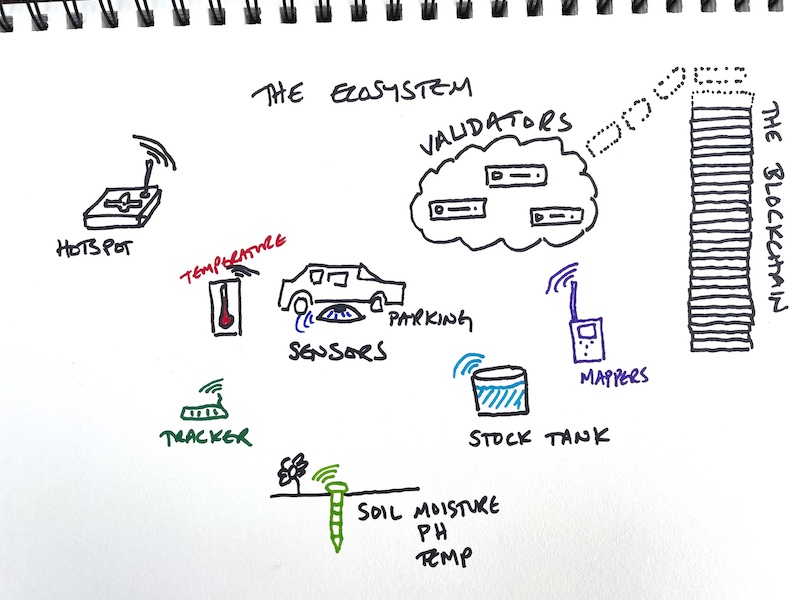
The Ecosystem

Helium is a blockchain that encourages you to provide provable wireless coverage for the Internet of Things (IoT).

This wireless coverage is NOT WiFi, and it won't give you internet*.

Helium allows a wide variety of devices, called sensors (door open/close, parking lot sensor, temperature & humidity, etc), to transfer their data onto the internet. Ultimately, Helium aims to be a ubiquitous network that allows anyone to easily install a wireless sensor that connects to the internet. For examples of how Helium is being used today, you can see examples ranging from CO2 monitoring to tracking vehicles to activity monitoring, and even a better mousetrap.

In order to provide coverage, anyone can order and deploy a Helium-compatible Hotspot. Hotspots are a combination of computer and radio and are made by many different manufacturers, from RAK to Bobcat to Syncrobit, Seeed, Kerlink, and more.

Inside the Hotspot, the computer runs the blockchain mining operations and tells the radio what and when to broadcast. The radio does what the computer tells it, and it reports to the computer what it "hears".

In return for mining, broadcasting, and receiving, each Hotspot earns some portion of the 2,500,000 HNT (Helium Network Token) currently distributed every month.

Helium is run by VERY smart engineers who have built an incredible system. If you see something that doesn't make sense, it may take some time to understand it. Know that Helium explains everything as if you're an engineer who already understands what they're explaining. It always makes sense, but it can take a long time and some effort to understand. That's one of the things I try to help you with on this site. :)

If you'd like to understand as part of a group, consider joining the Gristle Crüe, where we meet weekly on Zoom and have a private Discord to bring you up to speed and keep you at the bleeding edge of what's going on.

Cool, I think I get it. So...why is everyone I talk to about Helium so bonkers about it?

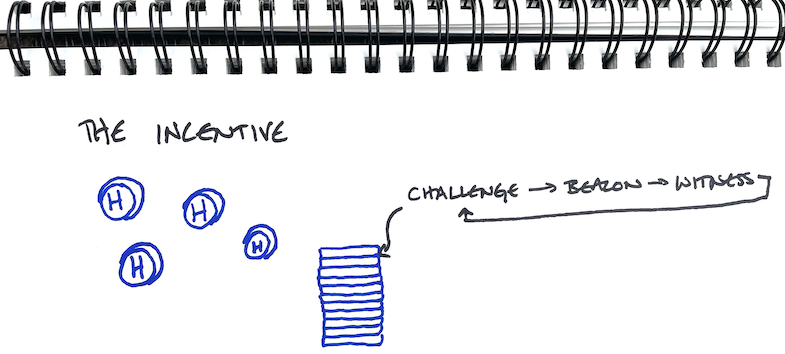
The Incentive: HNT

Helium Network Tokens, or HNT, are what drive this whole train. The better the coverage you provide (pages and pages have been written on how to provide excellent coverage), the more HNT you earn. HNT is a cryptocurrency and can be traded for many other currencies, including US dollars. That's mostly why people are going so bonkers for Helium. That, and the fact that it's the leading edge of a wave of technology that's about to change our entire society, but...let's leave that for now and focus on the fundamentals.

Hotspots earn HNT for 4 different actions:

  • Creating a Challenge
  • Beaconing a Challenge (you're acting as a "Challengee" in this case)
  • Witnessing a Challenge
  • Passing Data on the Network

Need more info on the PoC cycle of Challenges, Beacons and Witnesses? Go deep here.

For turning HNT into USD I mostly use Binance.us, but I've also used Bilaxy. In general, crypto exchanges can be unreliable. If you do trade HNT for anything, I suggest getting it on the exchange, making your trade, and pulling your earnings off the exchange in as short a time as possible.

For buying Hotspots, check out Helium Deploy, here.

At the time of this writing, you could buy 1 HNT for about US$20.

Let's Talk Helium Economics

As a casual user, you can basically bookmark this whole Economics section with: The price of HNT will be speculative until we hit mass network adoption, then the price will de-couple from crypto and reflect an actual market value. IF that happens, it will probably be a major source of wealth creation for holders of HNT.

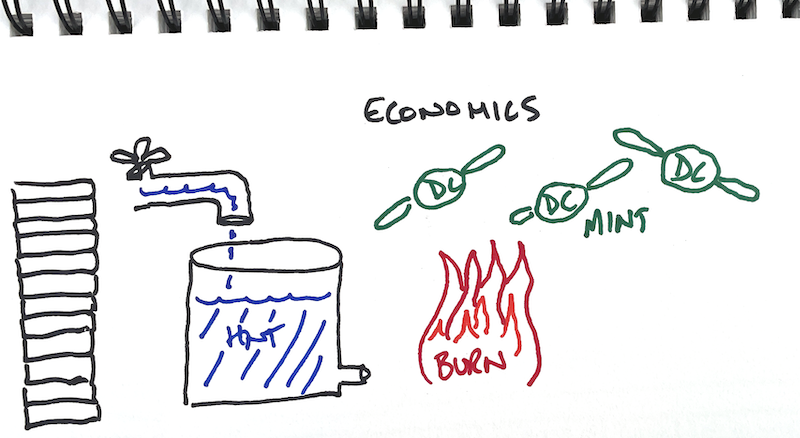
Helium manages the supply of HNT in a few ways. The longer version is here, in HIP 20. The shorter version is below.

First, there's a maximum supply; no more than 223 million HNT will ever come into existence. Every 2 years, the amount of HNT made available for distribution is cut in half, a process called (wait for it...) Halving.

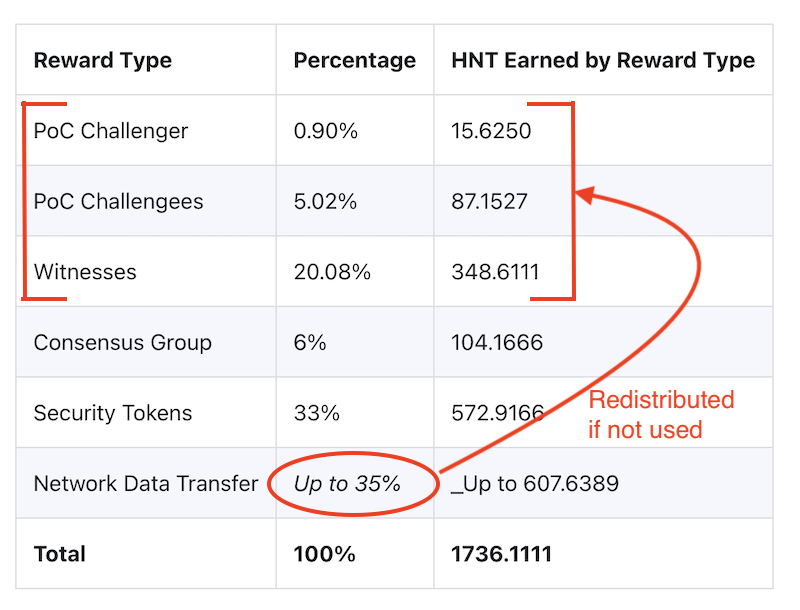
Until Aug 2023, the Helium Network has a target production rate of 2,500,000 HNT/month. That HNT gets distributed amongst investors, Hotspot owners, Validators, and Network Data Transfer. More on those in a minute.

The second way Helium manages the supply is with a Burn & Mint Equilibrium. What the heck is that? We'll have to backtrack a bit here. Remember when I said you could use a sensor to transfer data on the Helium network? Well, you pay for the data not with HNT, but with Data Credits (DC). The only way to get Data Credits is by "burning" HNT.

When you "burn" and HNT, you "mint" a Data Credit.

The value of a Data Credit doesn't change (it'll always cost $0.00001 per DC), but the value of HNT can swing wildly.

As the Network starts getting more use, more HNT will be burned to create DC. With less HNT on the market, the price of HNT will (probably) go up. As the price of HNT allows you to buy more Data Credits to use the Network, you need less and less HNT to do the same amount of work.

Of course, at some point, you run out of HNT, right? I mean, there IS a cap to how much will be mined.

Nope. There's one more management tool when it comes to HNT, and it's called Net Emissions. Net Emissions is one of those economic tools that flummoxes most of us and fascinates economists.

For the geekier types...Net Emissions means that every time Data Credits are used (and HNT is burned), an equal number of HNT will be minted to replace that. The catch? There's a cap to the total HNT that can be minted per epoch. What's an "epoch"? Short version: About 30 minutes. Long version here. With a cap to Net Emissions, Burn & Mint can still be a useful deflationary force.

Technically, we could still run out of HNT, but it'll take 50 years and my guess is that within 20 years the idea of Helium will be as antiquated to us now as pagers currently (2022) seem.

Ummm, enough about economics...where do I keep my HNT? I heard something about a wallet?

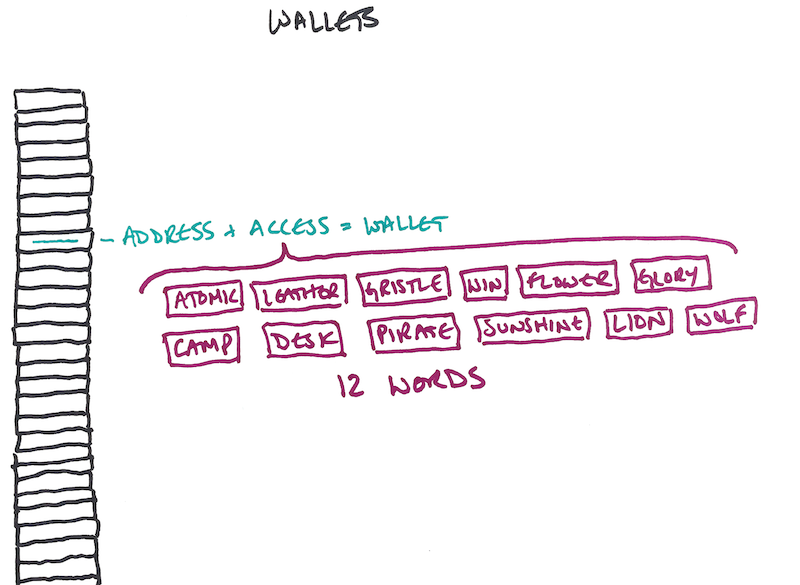
A "Wallet" is really just access to an address on the blockchain. It's not a physical thing. Most people use the Helium app to create and manage their wallet. When you first download the Helium app on your phone and create a wallet, you'll be instructed to write down 12 words. Those 12 words are the ONLY way to access your wallet. If you lose those words, you lose access to that wallet, and any HNT or Hotspots attached to that wallet. The 12 words are a big deal.

You can sign out of one wallet and sign into another wallet on the same phone; the wallet is NOT locked to your phone. You can't have both wallets open simultaneously on one phone.

For ease of use, the app also creates a PIN for your wallet. Once you've signed in to your wallet on the app, you'll just need the PIN to access it again, instead of typing in the 12 words each time. Every time you sign out and then sign in again, you have the option to change your PIN. Your 12 words never change.

A Wallet is the controller for a Hotspot; every Hotspot that is earning is attached to just one Wallet. You can have multiple Hotspots in your Wallet, but you can't have multiple Wallets that split a Hotspot.

Wallets are public; anyone can see your wallet address, how many HNT are in that wallet, and how many Hotspots are attached to your wallet. Since you can have more than one wallet, it's not a bad idea to have multiple wallets just for a little bit of privacy. Use one to manage your hotspots, and another wallet with no hotspots attached to it as a "savings" account where you routinely transfer your HNT to. It's not a foolproof system, but it does make it a little more difficult for anyone to see just how much HNT you've earned.

Ok, cool, so I've got a wallet and a hotspot. What do I do now?

Managing Your Hotspots

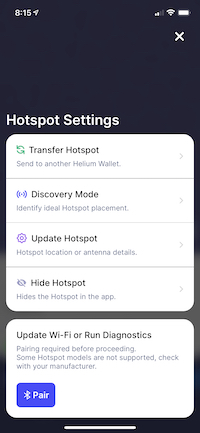
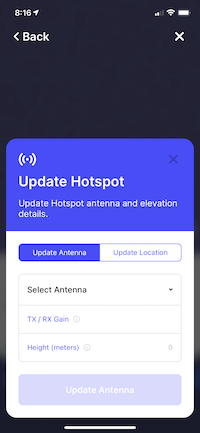
You manage your hotspots from your wallet. When you're signed into your wallet on the Helium app, you can change, or "re-assert" their location. You can change the stated elevation of the antenna. You can change the stated gain of the antenna. As of early Sept 2021, none of those reported stats matter, but they all eventually will feed into the earnings algorithm, so it's a good idea to accurately state your elevation and antenna gain.

Speaking of changing location, I think it's reasonable to "assert", or place your hotspot within about 150 meters of where it actually is. You don't have to be any more accurate than that. This will give you (or your hosts, if you've placed your hotspot at someone else's location) privacy.

Currently and for the foreseeable future, while the Helium App and Explorer will only show you the location of a hotspot down to a res 8 hexagon (a res 8 hex is about 1,000 meters across). Still, the Helium API allows anyone with an understanding of the code to see more or less exactly where you've asserted your hotspot. For my clients, I usually suggest asserting it at the closest street intersection within 150 meters.

Wait, did you say "antennas"? Aren't those the single most important thing ever in Helium?

Antennas

Antennas are one of those things that seem like they're really important, but they're not. They're kind of similar to how you looked in high school; zero relation to what you ended up doing in real life. I've written a bunch about antennas to help dispel the notion that they have a huge impact on earnings. They don't.

If you want the best antenna out there for most situations it'll cost $150 plus shipping. It usually won't make more than a 15% difference over a cheap piece of sh*t. I like nice things, so that's what I use, but most of the time it won't be magic. If you just want an antenna that works very well but doesn't cost as much, try anything from McGill.

The single biggest mistake people make when buying an antenna that can have a negative impact on earnings is to think that higher gain = better antenna. It doesn't. A higher gain doesn't get you anything except a narrower radiation pattern. Occasionally, if you're trying to punch through one or two dense strips of trees, a higher gain can help. Mostly, they just hurt.

But, but, but, Witnessing makes me the majority of my HNT, and I have to have a great antenna to Witness, right?

Nope. I wrote about that in Can I Get A Witness?

Ok Nik, so what actually makes a difference?

Location

The location of your hotspot is the number one determiner of your HNT earnings. If you're in a place with optimal density and volume of hotspots you'll earn more. If you're in a place with too few hotspots that your hotspot can "see" you won't have the opportunity to Witness Beacons. If you're in a place where it's too dense you'll Witness plenty of Beacons, but they'll be low value.

The density limits are covered by HIP 15 and 17, which is described in the "optimal density and volume" link, above.

I've got a HIP 17 explainer video, as does Helium, and just about every YouTuber on the planet. It's complex, but not impossible. You got this!

A good rule of thumb for minimum volume (number of hotspots your hotspot can "see") to earn maximally is around .005% of the network.

[Number of Hotspots on the Network] x [.00005] = Minimum number of hotspots your Hotspot should be able to reliably see in order to routinely witness beacons.

That's neat, although I don't do math. Is there another way to think about earning more?

Optimizing your Helium Hotspot consists of picking the best location, getting up to the minimum elevation required for that location, and then using the right gear. Each one of those steps is progressively less important. If you want a rough guide for this, start here.

The right gear has very little to do with your earnings, whereas location & elevation are critical. If you'd like help with understanding how to optimize your Hotspot (and make sure you know how and where to move it if needed), I'm available for hire. For about the price of one extra hotspot you'll know everything you need to know in order to earn the most out of your deployments. You can also join the Gristle Crüe and be part of a community all learning together and helping each other. I built it for you!

Thanks Nik! Just a few more things. WTF is a relay? Is it bad? Can I fix it?

Relay

Having a hotspot be "relayed" means, in short, that instead of your hotspot reporting directly to the blockchain, all of its reporting information gets passed through, or relayed, by another hotspot. This happens because your firewall blocks your hotspots from talking to the interwebz. Your hotspot then has to "relay" all its information through nearby hotspots.

This means the information flow is slower and less reliable, and you're less likely to earn HNT. Being relayed does not always mean you'll earn less, although it usually does. If you're relayed, it's a good idea to go through @Jason from Discord's fantastic "Solving the Relay Problem" flow.

Hey, I bought a [insert Hotspot manufacter here] is it the best one?

Miners

Miners, (also called "Hotspots" or "Gateways") are made by many different manufacturers. They're all about the same, though in the rush to meet the demand some manufacturers have had more problems than others. You can buy Hotspots here.

In general, I've found the RAK V2s to be the best of the lot, mostly because they've had the most time to work on their product. Bobcats and Sensecaps are also good, though the Bobcats will need a heat sink if you put 'em outside or in the attic. Nebras are considered the worst of the bunch, though there were high hopes for them early on. With a little fiddling, all hotspots can be improved upon as far as being stable and performing well in the heat.

No hotspot is faster or higher earning than any other hotspot as far as comparing brand/model to another brand/model. When choosing what hotspot to buy, make sure you follow the link above or from Helium's Approved Manufacturer page as a ton of scammers have popped up to take advantage of your desire for a Hotspot.

One very important thing to note when it comes to Helium Hotspots is that Helium itself doesn't have any control over the manufacturer.

In general, the process is that a manufacturer applies to the DeWi alliance (a neutral third party entity with no dogs in the fight) for a license to make hotspots. The manufacturer provides a sample product to the DeWi Alliance and makes a bunch of promises about how great its product will be.

Helium is NOT the entity that assess Helium-compatible Hotspots. The DeWi Alliance considers each application and does its best to assess whether or not a manufacturer can do what it claims it can do.

If a manufacturer makes a mistake, or doesn't do something well, there isn't a reasonable for Helium to somehow punish that manufacturer; that's left up to the market. It's the fairest way possible to administer a decentralized network, though it can be bloody frustrating if you're the one who bought a unit that never arrives.

Can you tell me about any other weird little details I might need to know?

Connections

Connections between hotspots and antennas can be confusing. There are RP-SMA, and sometimes SMA, and sometimes N-type connectors. The best way to figure out what you need is to figure out what the connector is on whatever you're connecting, then get a cable with the opposite gender connector. Yes, it's that simple. Yes, it also feels risky and frustrating. You got this! If you'd like a table of what connector your hotspot probably needs along with pictures of what it all looks like, go here.

That's it, most of Helium in a nutshell. Now you know enough to get started on deploying your Helium Hotpots, using your wallet, and contributing to the Network. Let's do this!

*Technically, the coverage is called LongFi. You don't need a SIM card to access LongFi, there's no minimum fee to use the network, and ranges are up to 100 times that of WiFi. It's very different than WiFi, even though they both transfer information wirelessly.

Archived Comments

Alex Haiek - 9/13/2021

Hi Nik ~ Need your 4 digit code on Discord so I can send an invite, I reside in So California and have an issue my RT240 registration port forwarding. Thank you! Alex


Nik - 9/13/2021

Hi Alex, Start here. I'm 0634, though I try not to do any troubleshooting over DM in Discord; that way everybody can learn together rather than just 1 at a time.


David - 9/21/2021

I just spent an hour or so looking at a selection of 50 hotspots including mine, and manually counted up the amount of "Sent Beacon" signals shown in explorer over the last 30 days - came back with some interesting reading! for the relayed hotspots, in my totally unscientific study the average sent beacon figure was 0.66 a day, for non-relayed the average was 1.7 a day, nearly 3 times more! just shows how important relaying is to earnings, (and worth mentioning DHCP binding in there as part of the port forward process too, as people dont understand that part) and shows how much less HNT you're earning if you're mainly witnessing relayed hotspots - people missing out on a fortune in HNT because others don't bother to set up port forwarding. I wish Helium would give out and official figure for beacons sent for relayed vs non relayed, as people on discord not realising this and still thinking being relayed isn't really a problem.


Matthew Marcus - 10/2/2021

Nik! The OG himself. Mr. Gristle King. This is without a doubt the best, most simple and most effective explanation of Helium I’ve yet to come across. You, sir, have a gift of explaining the complex to a fifth grader. Bravo. I’ve been doing the Helium thing for about a year now, and have learned a lot. But I continue to learn more and share the Helium opportunity with friends and family. I’ll be sharing this post with them, just as I tweeted it out to the world. BTW, why aren’t you on Twitter…??? https://twitter.com/themarcus/status/1444326905021358086 Thanks for all of your great content and willingness to educate, inform and lead the community. Appreciate you!


Lessons Learned From A Year Of Helium Deployments - Gristle King - A Guide to Helium - 11/15/2021

[…] things dif­fi­cult to under­stand for those of us who are not tech­no­log­i­cal­ly savvy. Know­ing the dif­fer­ence between a pack­et for­warder and a min­er, a gate­way and a sen­sor, a serv­er, a router, and […]


Nick - 1/12/2022

Do you think theres any benefit in having 1 wallet per hotspot? I have this weird thought that the network would penalise people with lots of hotspots, especially if they were in the same neighbourhood. I have 6 and I am sure the 3 close together at mine and my neighbours are being 'throttled' as theyre the same setup as the others in a very similar area and used to earn more than the others until I added all 3...


Nik - 1/12/2022

Hi Nick, that doesn't make sense. I wonder what else is going on?


William - 6/7/2022

Hi there I want to send a second miner to a friend in a better place…. It’s a bit too far to travel and I want the hotspot in my wallet how do I add a miner and then send to friends, what app will they then use thanks this is a great site


Nik - 6/7/2022

Hi William, you can add the miner to your wallet, then "assert the location" at your friend's place. Send the device to him, and he can use the Helium app to get your Hotspot added to his local WiFi. Does that make sense?


William - 6/9/2022

Hi Nik thanks for your reply, just to clarify… to add the second miner to my wallet do I need to plug it in and sync…. If so do I need to unplug my first miner that I am keeping here? Will my friend need to download a Helium app to pair it… sorry for all questions but I am still a bit confused and thanks again


Nik - 6/9/2022

No worries. Plug in the second miner, connect to it via Bluetooth, add it to your wallet, assert the location at your friend's house, wait an hour or so, then unplug and send it off. No need to sync or unplug your first miner.Yes, your friend will need to download the Helium app to pair to it.


William - 6/9/2022

That’s great … one last thing just to be safe… does he need my app pin as it’s my miner or does he need to get a full new wallet with his own 12 seed numbers… sorry I don’t want him to get confused… I heard there is a utility app for this process… thanks again


Nik - 6/9/2022

He should use his own credentials. Never share your app PIN or your 12 words with anyone! Cost me $50k to learn that one.


William - 6/10/2022

I wasn’t going to share the words…. Sorry to hear you got burned….. i take it that my friend gets the app and will be able to pair the miner to his Wi-Fi ( that’s why I asked about giving him the pin as I would have thought that as the miner is registered to me that no one else could access it)…. Anyway thanks I added it to my own wallet and it is registered now and I’m sending it today… thanks William


William - 6/11/2022

Ok thanks…. I presume he will be able to pair the miner with his own Helium app even though it’s registered to me….and I can send tokens to his app….. Thanks for all your help


Nik - 6/12/2022

Yes, he'll be able to pair through his own Helium app.


Bill - 6/29/2022

Hi there, thanks for all your help and patience… that miner is up and running. I hope you don’t me asking for information… this is the most useful and helpful site… I wish I had come across it earlier. Anyway I am in London and really it’s not worth it for me and it’s adding value to Helium. I’m going to visit friends west of London and I am going to relocate my miner with some friends. I have a choice of about 4 places I can set it up but I am not sure what is the process ( I am aware of the $10 fee to assert) but if I want to try and find the best location as l will be there for 10 days do I need to pay €10 each time I try a new location… thanks and also if I am posting in the wrong section please let me know


Nik - 6/29/2022

Hi Bill, I don't think you'll have time to gather enough information at each spot; you really want 7 days of data to make a decision. I'd recommend just using a rough guesstimate based on what the probable line of sight is to other miners that DON'T have connections to lots of other miners. Does that make sense?


Bill - 6/29/2022

Hi thanks for your reply. I’m actually just going to host it at a friends place. I’m not going to be. moving as much as originally planned. I was wondering can you connect the miner and not reassert till it looks at least an improvement on London. Or will it not work in another location without a new assert. Thanks again


Nik - 6/29/2022

Hi Bill, technically you could move it without reasserting its location, but that may appear to the Network to be gaming (if all the RSSI values are off) and you could get on the denylist for that. I'd just "rule of thumb" it with regards to whether or not you think the new location will be better or worse, then move it accordingly.


Bill - 7/2/2022

Hey thanks again…. I actually am at my friends house and I am trying to do the right thing and change location but now I’m up against another problem …. A couple of weeks ago I moved the few coins from the app to Binance and now I don’t have the $ 10 hnt to pay…. I logged into Binance as the coins are there and when I tried to withdraw back to my helium wallet they have suspended HNT withdrawal…. Also the brand new one I sent to my mate up the north of UK is online but the remote assert to his place failed though I still have 1 free assert left…not having any luck


Nik - 7/3/2022

I'd try the remote assert (with the free assert) again in a day. Outside of that, you're stuck waiting to earn more HNT or have Binance open back up. Sorry mate!


Bill - 7/7/2022

Hi Nik......thanks for all your help......managed to assert the miner and it's fully online today....I bought HNT on 3 exchanges but none allowed transfer of HNT ( for my other one I am moving out of London...........I'm hopeful that the asserted one may earn a HNT so I can pay the assert fee....( the alternative was to send it back here and it would take 2 to 3 months to earn on HNT.....anyway I am really glad I stumbled on here as you explain the whole process and the background of the network...my 2 friends have found thus blog really interesting as I couldn't have given them such an in depth overview and more about Helium.....I am very positive about the Network even though I havent had much luck so far but the searching for info pays off in the end......big thanks BILL


How Do You Find The Best Site For Your Hotspot?

· 7 min read
Nik
Site Owner

Well, the race is officially on. With at least two unofficial halvings coming in the near future, it's pretty darn important right now to:

A) Get your Helium hotspot up and earning and

B) Secure the best spot you possibly can.

In the case below, this hotspot is on private property with an incredible view of both my favorite place to fly a paraglider in San Diego AND an excellent view of the southern half of San Diego county.

Wait, what? More halvings? Yep, you've got 2 coming. One from network growth (network size will probably double by the end of the year) close to 300k.

Doubling the network equals (for the AVERAGE hotspot) half the rewards. Now, that's the average hotspot, but it's best to be conservative with these calculations.

What's the second halving? 5G. IF 5G rolls anywhere near as fast as they rolled out the current hotspots, it'll chew through the "up to 35%" of HNT set aside for network data transfer.

Remember, 5G is the opposite of LoRa. LoRa is small packets/large distance. 5G is large data, small distance. 5G chews through data like I used to eat gallons of ice cream; it disappears.

The catch (and really the current "doubling") is that if the "up to 35% of" HNT for data transfer doesn't get used, it gets redistributed to PoC rewards. That's us, running regular hotspots, collecting HNT for challenging, beaconing, and witnessing. Mostly, for witnessing, but that's another story.

Since our current PoC (Proof of Coverage, more on that here) rewards account for 26% of all HNT (let's call that about a third) and the data across the network isn't anywhere near capacity of "up to 35%" (we'll call that another third) we're basically getting two thirds of all HNT distributed, which is double what we're technically earning.

So, when that data gets used up by 5G hotspots, our rewards will be halved again from today. That's the bad news.

The good news is that wherever there's challenge, there's opportunity. For you hard chargers who are willing to hustle for the love of crypto and fun new enterprises and high-risk/high-return livin', giant opportunities still abound. Let's talk about a few of 'em.

First, there's the stuff you do yourself. You can use Helium.Vision or Hotspotty or Kudzu to go deep or HotspotRF (or even Google Earth) to keep it simple. Find the high points and places where your hotspot can be placed for maximum earnings. Maybe you get fancy on Google Earth and run an altitude layer to make sure you're only looking at islands in the sky, or you re-watch the demo I did on Helium.Vision and make sure you know how to use all aspects of that super powerful tool.

A hotspot with a high volume / low density view is optimal, but even a high volume / high density view like the one below can be a high earner.

You find the spot, you figure out who owns the rights to it, you contact them, negotiate an agreement, install your hotspot, and, as my English uncle says, "Robert's your father's brother." Us Yanks are little more direct and just say "Bob's your uncle."

Hot tip? Look for land brokers. They represent empty lots of land that could use a little income. That tip came from one of my most successful clients who is also an absolute wizard marketer. He has built a marketing & sales system for Helium placements that gets a 50% callback rate on leads (unheard of!) and he cherry picks the best spots. Without giving away his location, out of the top 10 Helium hotspots in his area (a place with over a thousand hotspots), he's runs 3 of 'em. He sells that system, if you're interested in that just reach out.

Finding your own placements is one of those "most work equals most rewards" deals, but if you've got a lot of hotspots, that's a lot of work.

That brings us to your second option, a recent start-up called Sitenna.com. They connect you (the antenna/hotspot owner) with land owners. You don't look for spots, you just supply the hardware, pay the rent, and collect HNT. Obviously it's slightly more complicated, but that's the gist.

If "pay to play" is your game, Sitenna is looking to be a very promising option. Tell 'em Gristleking sent ya, it'll be good for a laugh. They're a couple of recent Y-combinator types on a trajectory to crush; we Helium peeps might as well go along for the ride.

Third, you can make your own placements. This is by far the hardest, as well as in the long run *probably* the most profitable. You go out and find a business that could actually benefit from LoRa. It'll need to meet very specific requirements: They'll want to cover a large area, they don't need a ton of data, there's a clear profit motive, and they're willing to see the world in a new way.

Whether that's a cattle rancher in Montana, a scooter operator in Cancun, a boat tour operator in Cabo San Lucas, or FedEx, well, there's a whole giant world of opportunity out there for ya, but it does wear overalls and look a lot like work.

Here's me and a buddy at the beginning of my very first off grid placement (when I thought antennas mattered), about to do a 12 mile round trip hike in the mountains carrying 60 lbs each on the way out and running out of water on the way back. That was straight work, yo.

If you're looking for help to optimize YOUR hotspot placements, whether it's the one on Mom's house or the fleet you're rolling out in a far off land, consider hiring an expert for help.

In the meantime...get 'em!

How To Set Up a RUT 240 for an Off Grid Helium Hotspot - Prepare for Challenge!

· 37 min read
Nik
Site Owner

With a generous assist from the folks over at HNTenna, here's a step by step method for setting up your RUT 240 (the cell modem that allows an off grid Helium Hotspot to connect to the internet.)

I'll start by saying that off grid set ups are not for the faint of heart, the easily discouraged, or folks who avoid challenges. You WILL run into challenges. Batteries will go bad. Miners will overheat. Your data plan will need to be far larger than normal (100 GB/month is what you want as of Nov 2021.) Don't do off grids unless you're willing to proactively solve those, usually on your own.


UPDATE -- OFF GRID DATA PLANS

The latest advice (25Nov2021) is to NOT do any of the below, but to get a standard SIM card plan (I know this doesn't sound right) of 2 GB @ 4G and unlimited at 3G $15/month T-mobile and let them be relayed.

If you're determined to still go forward with this, try Proslashers instructions for the 240, over here. If you buy a pre-built VPN from him, use gristleking at checkout for $10 off your order.


Off grid set ups ARE for folks who love rad projects, who are willing to problem solve, and who get more joy out of figuring shit out rather than having a plug 'n play solution handed to 'em. Nothing wrong with either one, but there's a definite success formula here that does not favor "Please do this for me" mindsets.

Before we dig in, let me make a semi-official disclaimer: This post is a set of guidelines that have been successfully used to set up a RUT 240. No one involved in this is offering any official support, though I'll help as best I can via the Comments section at the bottom of the post. If this setup doesn't work for you, please do NOT DM me. Post to comments so we can all learn from your challenges.

Teltonkia (makers of the RUT240) have recently posted a video on how to set it up. I'll leave our old guide in here for posterity, but here's how Teltonika recommends you do it:

https://www.youtube.com/watch?v=ek\_moDNr5Is


The "Old" Way (for Posterity only, we no longer recommend this)

Start by turning off your computer WiFi, then connecting your computer via an ethernet cable to the RUT240's LAN port. I used an adaptor to get from Ethernet to USB-C; you can get those on Amazon.
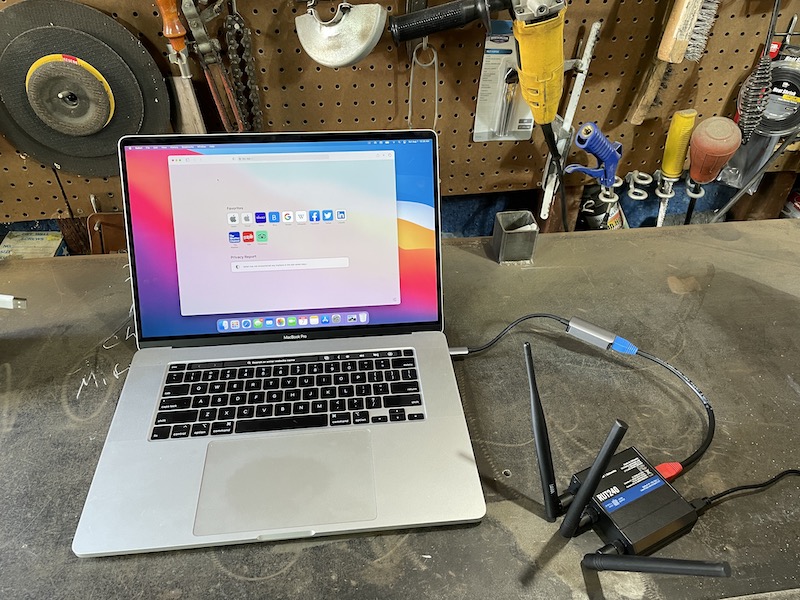
Power up the RUT 240. Wait.

On your computer, navigate to 192.168.1.1 in your URL.
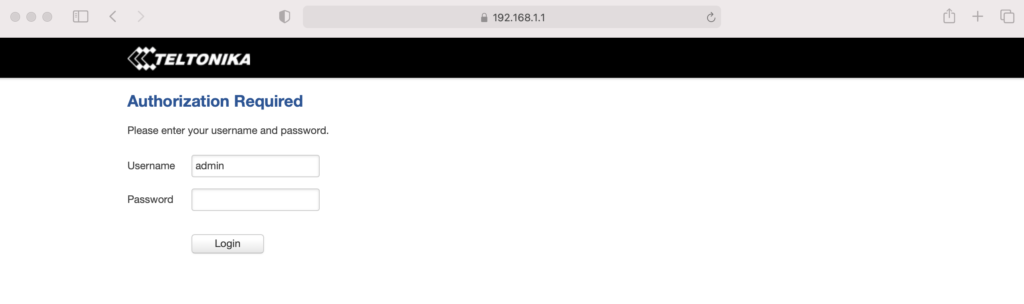
Enter admin01 for the password and click the LOGIN button.

You will be prompted to enter a new password. Do it, then click SAVE. Keep in mind that the modem can take a while to "think", so just be patient after you hit SAVE on this, and any other screen.

You now have 2 options, one simple, one complicated. They have both worked. Try the simple one and see if it works. If it doesn't, try the complicated one.

Option 1 - Setup Wizard

System —> Setup Wizard —> 

Step 1 

Set local time, enter password

Step 2

Uncheck Auto APN

APN —> Custom—> [enter your APN if you got a static IP]

Step 3 —> Skip

Step 4 Wifi —>

WiFi SSID: [Name it whatever you want]

Password: [your password]

Leave WiFi enabled for now, it’ll make setup easier later on when the system is installed, you’ll just need the laptop to access it.

Write down the Router Serial & MAC address, then log into to rms.teltonika.lt

Add Device using the MAC address & Serial number

Go to System Management and look for:

Reboot

Select auto-reboot every 24 hours by checking every day of the week.

Log out. You're done.

Option 2 - Let's Get Geeky: Not true static IP, but static DHCP lease

Start from just after you set the password on your RUT 240, above. Now, on the top menu bar, navigate to Network --> WAN. You'll see a screen like this, usually with Wired (WAN) selected.

Select Mobile as the Main WAN, then SAVE.

Next, in the top menu bar go to Network --> LAN and select the Advanced Settings tab.

Select Use WAN port as LAN, then SAVE.
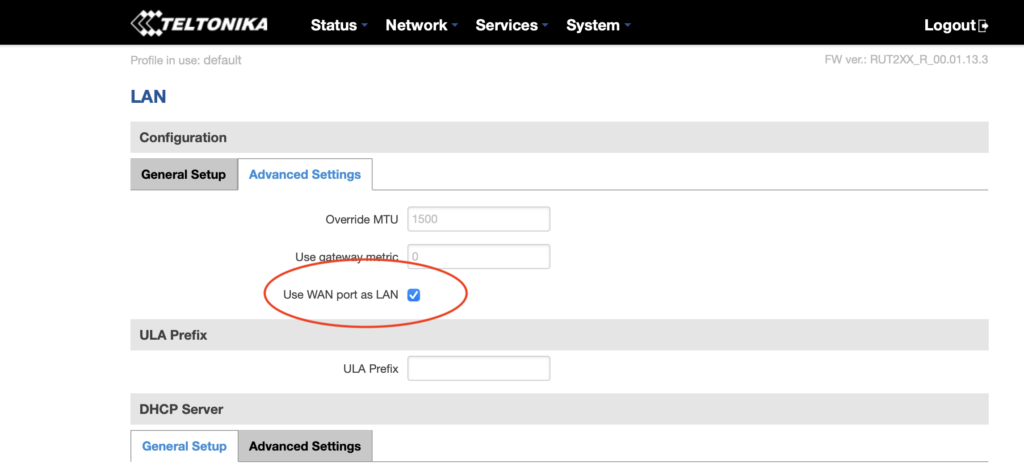
Now navigate to Network --> Wireless, where you'll disable the WiFi. This'll disable the wireless access point and save you power, which is important for off-grid setups :)
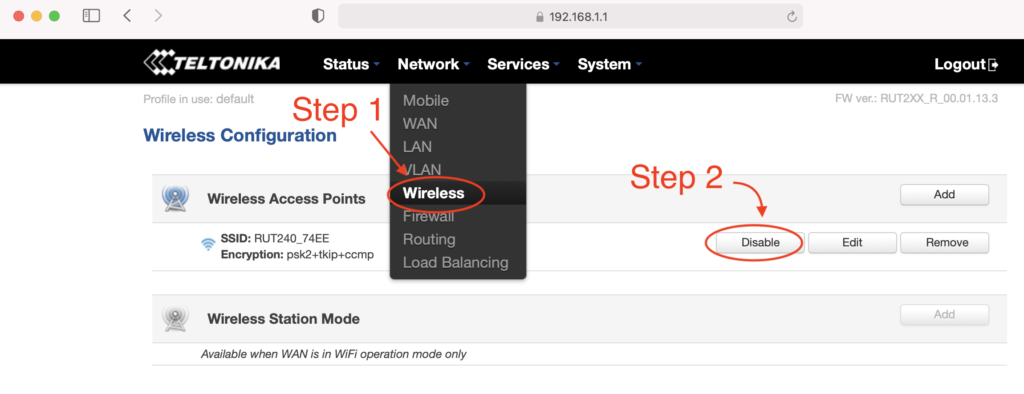
You're crushing it. Just keep going. Ready for the next part? Read it carefully first, then execute.

Before continuing, do the following in order:

  • Unplug the ethernet cable that is connected to your computer from the LAN port on the RUT240
  • Plug the ethernet cable into the WAN port on the RUT240.
  • Connect the Helium Hotspot to the LAN port on the RUT240 with the ethernet cable supplied
  • Power on the Hotspot.

Nice work! Now, navigate to Status --> Network and click on the LAN tab. Find the MAC address of the Helium hotspot, highlight the MAC and copy it.
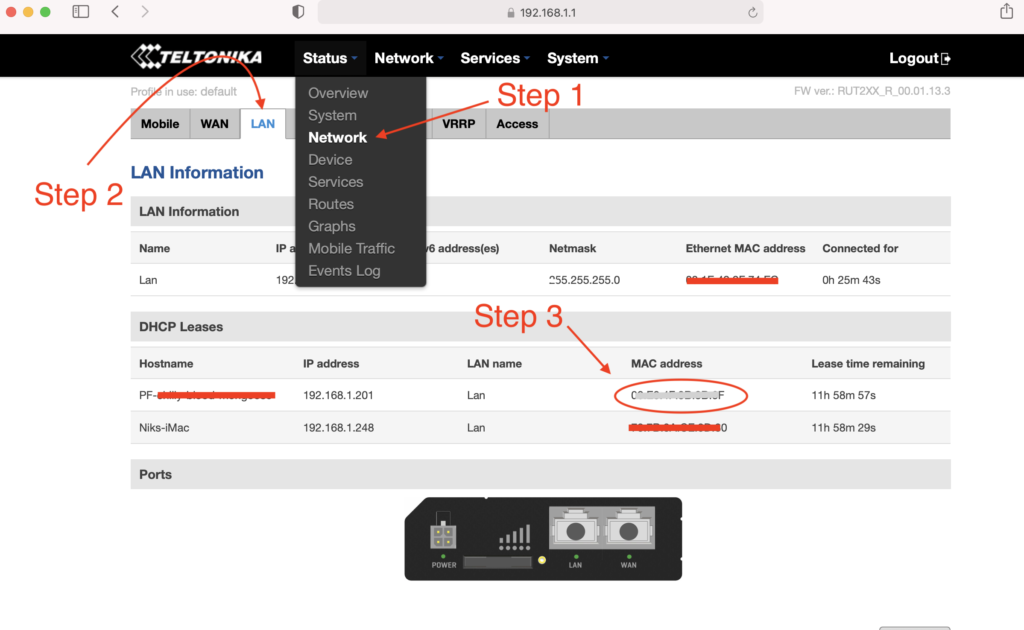
With the MAC address copied, navigate to Network --> Mobile. Look for Mode and select Passthrough.
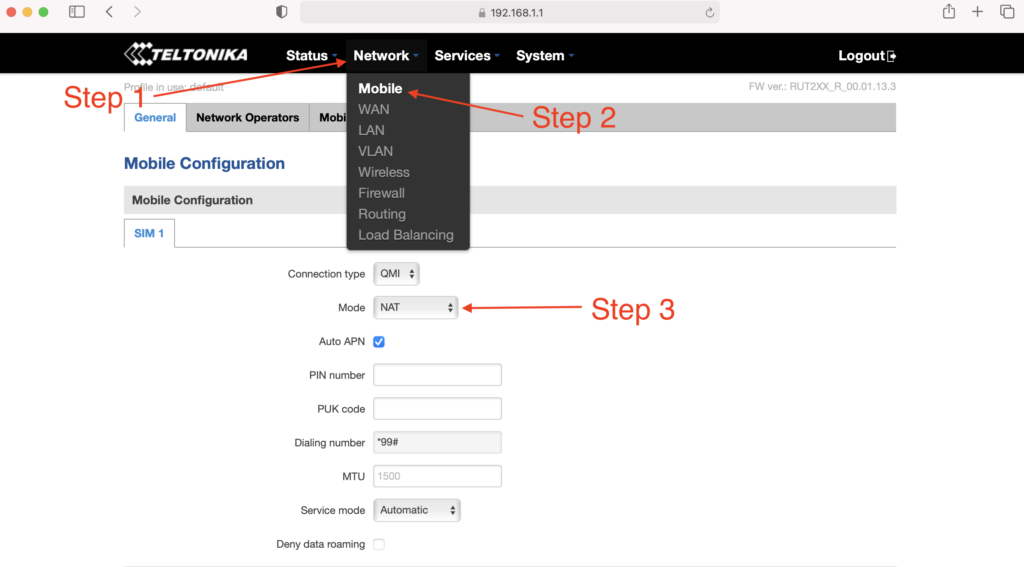
New fields will appear. Locate the MAC Address field and paste the copied MAC address of the helium hotspot. Click SAVE.
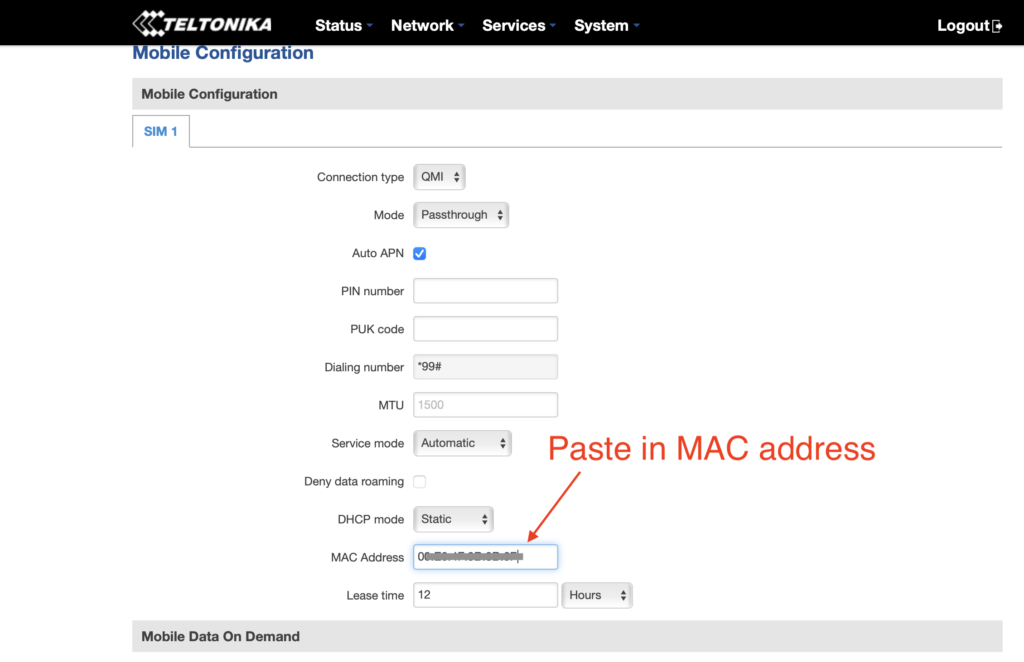
One more thing...you have to enter your APN. I had to do this, but forgot to take screenshots of it. See where it says Auto APN on that screen, and the box is checked? Uncheck that, then follow what makes sense and enter in your APN (your SIM card provider will be where you get that.)

If that becomes a huge PITA and a sticking point, I'll update this tutorial.

How Much Data Will Your Off Grid Hotspot Need?

UPDATE: For an off grid miner as of November 2021, you're going to want 100 GB/month, and that still may not be enough. For a long time, the 50 GB/month plan called out below with T-mobile was enough, but with the blockchain size growing, it's no longer cutting it. I'll leave the rest of this in here for posterity, but any reference to plans lower than 100 GB/month is outdated and wrong.

Here's a graph of the network data traffic for a group of hotspots on a 10 minute average:
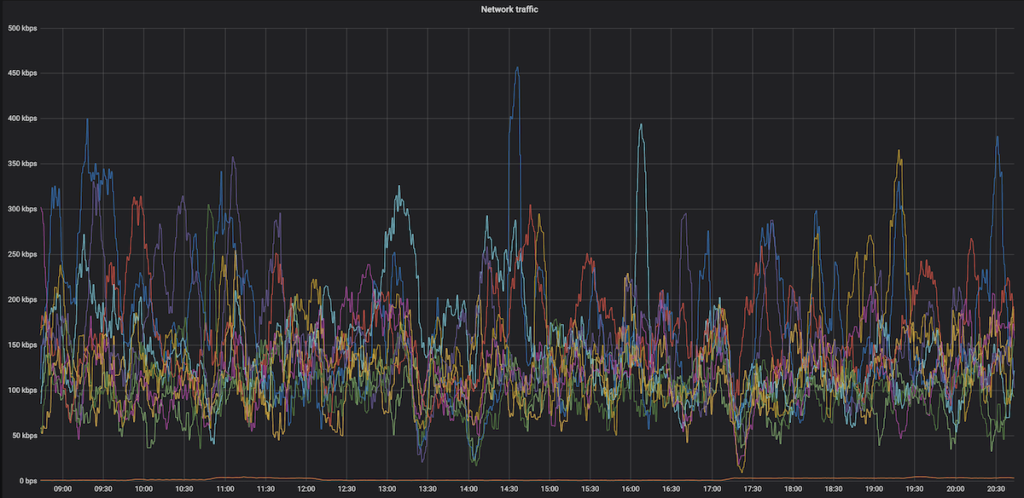
Yep, that highest of high spikes is 450 kbps, and almost everything is below 300 kpbs. So, while data is important (you need a lot of it), speed is usually not. With that said, I'm getting reports in the field of 650 kbps and above spikes that temporarily shut down hotspots. Be ready with patience when that happens.

Recently I've heard from folks testing 4G speeds reporting that a 15 Mbit up/down (vs 10 down and .8 up) gave a 250% increase in HNT rewards, so speed may matter more than we thought. This is definitely worth further investigation, and the T-mobile planned called out below may not be fast enough or large enough for you, depending on the local speed of your 4G connection.

What SIM card should you use?

T-mobile has a BUSINESS (NOT personal) plan that's $50 for 50GB at 4G speed, then unlimited data at 3G speed, which is supposed to be 3 mbps minimum. That should work MOST of the time for us. If you have a plan that's working for you ALL the time, please add it to the Comments section below.

I've got a T-mobile rep who is clued into what we need, his details follow.

The plan is available nationwide in the US, and as far as the rep knows it's not going away any time soon.

T-Mobile doesn't guarantee the speed (apparently there are no speed guarantees in the world of telco wireless), but I've got clients who've been using this and it's working fine most of the time.

Here's the rep I talked to. We went through the whole Helium scenario, so when you call him he'll be prepped. Just tell him Nik from Gristleking sent ya, that should jog his memory.

Abu McLean
In order to protect his email from the bots: ABUBAKAR.MCLEAN17 then use the little @ symbol then put in T-Mobile.com
Direct: 615-445-4008
Hours: 9:15AM to 6:15PM CST (Mon – Fri)

  • You'll need a business account. You can't (as far as I know) run this off your social security number.
  • Ask for the 50 GB at $50/month plan with unlimited data at 3G after the 50.
  • You can get a Static IP for $5 more, ask for a “SOC Static Public IP”. UPDATE, MAR 21, 2022: You don't need a static IP for much longer, this may not be worth it.
  • SIM card price is the same: $20 + sales tax (~$2) per SIM card

If you email him, would you cc me (my first name, which is Nik, then @ and this website) so I can keep track of how it's going and any snags that come up?

Oh, you're in Canada? Here's what a client sent me:

FYI - I found a cell carrier with a static IP that doesn't get relayed in Canada. If you call Rogers, get a hold of their small biz department and ask for a static IP, they'll mail you a SIM card that works with the RUT240 instructions on your blog. The only problem is that because this is Canada, its $120/month for 50 GB + $20/month for every 10 GB after that, and it's $12/month for the static IP. Ouch!

-M in the great Canadia


This guide was almost entirely written by the crew at HNTenna and passed on to me. With their permission and with a few changes, I'm making it available to you. Rock on!

Archived Comments

Mike - 8/11/2021

Hey Nik, Fantastic site, man. I've probably read every article about Helium here at least twice. Regarding the RUT240 and a mobile plan, have you heard of Embedded Works/IoTDataWorks? It looks like they offer a 12-mo pre-paid unlimited data usage but only at 64K speed with an optional static IP for an extra $20. Looks like this would be perfect for Helium mining, but wondering if you had any thoughts on it. https://www.embeddedworks.net/wsim4827/


jim c - 8/12/2021

thanks i was just about to send mine back


Nik - 8/12/2021

Hi Mike, 64kb/s won't work for full fat miners, check out this link for more on that. Current miners (NOT Light Hotspots) need 300kb/s. This plan would work for Light Hotspots, which will likely need just 4kb/s.


Mike - 8/12/2021

Thanks for the reply, Nik. I had read your article about light vs full-fat miners and you mentioned monthly data usage but I didn't see anything about speed/bandwidth. I didn't realize the full miners needed so much bandwidth so I'm glad I asked.


jim c - 8/12/2021

attempt one ... fail... here's why... after switching wan port to lan port and attemptempting to swith off the wireless rut says unable to switch do to multiple access points if you then go to network , wireless and disable the extra AP it will refresh and give another AP automatically. I would keep working through this and see if it works right now i dont need to power off my bobcat when i do i will revisit and update


Rex - 8/17/2021

Hi Nik: It's great to finally have an excuse to write you! It sounds like finding a compatible SIM card for the RUT 240 is the problem statement here. I'm calling around and haven't found a solution yet. But... I may have found an alternative. Verizon offers a device called the jetpack 8800L. It costs about $200 and they offered me a monthly plan for $20. https://www.verizon.com/internet-devices/verizon-jetpack-mifi-8800l/ Is this a viable solution? Are there better options out there?


Nik - 8/17/2021

Hi Rex, right on! I wouldn't trust a Jetpack for off-in-the-mountains off grids, but a lot of people are successfully using 'em in the city.


Mauricio Curbelo - 8/18/2021

Anyone found a SIM card that works in Canada?


RG - 8/19/2021

Rex / Nik: I'm using this setup in a building where internet isn't available. Verizon and probably the other mobile carriers are using Carrier-grade NAT. Even after opening TCP port 44158 on the jetpack, my miner is still relayed. I'm hoping that I can get a static IP from Verizon, will contact them and report back. Nik: you say that a lot of people have been successful with this setup? how did they resolve the relayed issue?


Nik - 8/19/2021

Hey RG, I'm looking for a solution as well; the old T-mobile one was fine (and worked with this), but T-mobile no longer offers that program. I've been hearing that Mint is a good option, but I haven't used it yet.


Rex - 8/19/2021

RG and Nik: Oh man. I'm installing my first miner and after a day of toiling around with it got past the relay blues. I spoke with the Teltonika and CradlePoint folks yesterday. The CradlePoint IBR 600 series is mobile carrier agnostic but sells for $600 while the IBR 400 you have to pick your vendor up front for $400. The Teltonkia is $170 and I think is vendor agnostic. I'm purchasing one and going to run some tests with it. As a general rule, I'd rather pay a few more bucks upfront then be stuck in a perpetual big monthly expense tied to an uncertain revenue stream...


Nik - 8/19/2021

Yep, I've used Cradlepoint 650C and 200 and both work very well, just way more expensive.


Riley - 8/21/2021

Hello Nik. Aside from the instructions you've provided, I'm assuming that you still want to create a static IP for the miner and port forward 44158, right? I also saw on Discord that you recommend purchasing an "SOC Static Public IP". Would this purchased IP be for the RUT or for the miner?


Brandon - 8/21/2021

Thank you for all the great content on your page! After opening 44158, is purchasing a static IP from the carrier the only way to resolve relayed status? With Verizon is looks like $500 to purchase static and a business account is required. Can anyone confirm this or know of another option?


Nik - 8/21/2021

Hi Brandon, it *might* be the best way to resolve that. I'd look into T-mobile, they seem to have plans for businesses (not sole proprietors) that are $55/month for 100 GB. That seems to not be reliably there, depending on the sales associate you talk to. Sometimes they'll do it, sometimes you just have to hang up and call back to get another one. :)


Nik - 8/21/2021

Hey Riley, Yep, the static IP and port forward are recommended. The static IP would be for the RUT.


Marie - 8/23/2021

Great article thanks! Setting up my first remote setup :) Regarding the APN, can we leave it on auto APN? Or do we absolutely need to setup it up manually?


Nik - 8/23/2021

Hi Marie, Sometimes the auto APN seems to work, sometimes it doesn't. This whole business is tricky with lots of trial and error, please let us know what ends up working for you so we can share the success knowledge. :)


drew - 8/27/2021

Hey Nik, I followed this tutorial (thanks for that) and my speeds are grossly slow.. According to speedtest, the best i got download was 1.6mbps and upload was .01 (believe it or not). I did the business account with Tmobile so we should be good there.. I was thinking maybe the antennas that came with the RUT are lousy so I ordered the Quspot one. What minimum dl/ul speeds do you think are necessary for the hotspots? Also I may test out some QoS settings, that might help.. I noticed there are some existing ones there, any thoughts on changing those to normal?


Nik - 8/27/2021

Hi Drew, you'll need 300 kbps for the miner, that's mostly for download. Sounds like the upload side is a problem for that. Double check with T-mobile, it may just be the coverage in your area (though I'm not sure about that at all.)


RG - 8/30/2021

Using a mint sim in a MiFi card will work but isn't viable. Mint's unlimited data plan caps Mobile Hotspot use at 5GB. The next plan under unlimited has free mobile hotspot but is only 15GB a month. Hotspot data is drawn from the monthly allotment and speeds are slowed until the next cycle. I couldn't test port forwarding: The Alacatel Mifi card bought from Amazon doesn't have port forwarding on its dashboard, just Mac filter and some other basic stuff. If other Mint MiFi folks have a different setup, I'm all ears.


Nik - 8/31/2021

Hi RG, have you tried the T-mobile plan at the bottom of this post?


RG - 8/31/2021

Nik, I'll give it a whirl and report back.


Dave - 8/31/2021

I think I am purpose of this tutorial. Questions: 1. Why not run the miner off the LAN port without any configuration? 2. Why do you need to configure the WAN port as a LAN port? 3. Any guess as to how much battery power is be saved by turning off the WIFI on the router? -I was thinking I would want to leave it on so I can easily survey the internet speed and connectivity of my off-grid hotspot. *FYI- I am able to use my Google Fi sim on the Rut 240 (RUTRUT24001U000).


BCH - 9/5/2021

Thank you Nik for this nice article. I have read many on your website and am impressed by your work. I am using a RUT240 and RUT950 (240‘s were out of stock). The main challenge getting rid of relayed is that most mobile carriers run CGNAT which means you do not have a public IP address but get one which is already in their NAT. To receive such a card in Switzerland I only found one carrier (Sunrise) and they charge you 60$ and you need a business account. I see many relayed devices in my area which earn decent amount of HNT. Since Friday morning I am having the same issue as many others… my miners are fully synced since more than 8 hours. When I use the discovery mode I see many hotspots but I haven‘t issued a PoC or witnessed one in more than 3333 blocks…. Hope this gets sorted out by Helium soon.


Nik - 9/5/2021

Yeah, the network is still struggling to keep up. Glorious opportunity, but lots of chaos. Might check with Andreas Spiess for SIM card options; he's the only Swiss guy I can think of who's probably helpful with IoT stuff, though he's skeptical of Helium. :)


Mario - 10/6/2021

Hi Nik, just getting accustomed with the RUT240 remote management and need a bit of guidance. I just stumbled upon management-deviceaccess where "This function provides you with the possibility to set up remote HTTP access to devices that are connected to a device's LAN, provided that the device in question has been registered to RMS." There are four inputs needed: 1 Name (obviously whatever you want) 2 Destination IP (believe 192.xxx.xxx of the Bobcat) --> 3 Destination port? (hmm, tried putting 80 as that's the default on the Teltonika wiki and 44158, both did not work). 4 Protocol (HTTP or HTTPS?) Or is it not working because "provided that the device in question has been registered to RMS" means that I somehow would need to register the Bobcat to RMS for it to work? (sorry if this seems silly) PS after updating the RUT to the latest firmware I am now getting temperature updates, which is useful!


Nik - 10/6/2021

Hi Mario. I checked with the author of that guide, here's what he had to say: The default port for the HTTP protocol is 80 and the default port for the HTTPS protocol is 443, so a HTTP server waits for requests on those ports. Select the protocol you want to use and then have that port be open for it. So if HTTP then Port 80 or HTTPS then port 443 Registering the bobcat in the RMS most likely means entering its MAC and IP into a table whereever the RMS lives Hope this guy still has his on the bench and can easily test.


Mario - 10/10/2021

Hi Nik, thx for putting in the effort and reaching out to the author! Tried all the combinations - no use, not letting me into the Bobcat 300 remotely. Can get into RUT240 though through RMS and WEBUI proxy. Guess something extra needs to be done for it to work. So, for now, unfortunately no remote temperature checkup, no remote OTA & diagnostic, restarting the Bobcat etc. Btw looks like my RUT240s &/or bobcats keep changing the setup so having difficulty even setting them up and making them stable. It keeps going from NAT:none to NAT: symmetric. Port 44158 stays open, connected: yes, dialable: yes. Even the helium api in OTA says "listen_address": "/ip4/109.xxx.x.xx/tcp/44158" height: 1047354". So no p2p (relay) which should be right, yes? I followed your guide and added 2 things: (1) NETWORK-LAN-STATIC-LEASES Passthrough E8:XX:XX:XX:XX 109:XXX:X:XX (this was added automatically through the guide NETWORK-MOBILE-PASSTHROUGH-COPYMAC-SAVE) Bobcat E8:XX:XX:XX:XX (192.168.X.XXX) 192.168.X.XXX (this I added because I read I need to do through another source) (2) NETWORK-FIREWALL-PORTFORWARDING Bobcat TCP 44158 192.169.X.XXX 44158 Didn't work (longterm)... so even tried adding one more port forward (again, another source, ) NETWORK-FIREWALL-PORTFORWARDING Bobcat TCP 44158 192.169.X.XXX 44158 Passthrough TCP 44158 109:XXX:X:XX 44158 And that works (for now), on 1/3 RUT240s... So in light of all this craziness its causing me, do you have an option for remote RUT240 setup (#Croatia)? or, what does one after: 1 calling the ISP and asking them to remove CGNAT; 2 adding the APN they say & following 3 following "How To Set Up a RUT240 for an Off Grid Helium Hotspot - Prepare for Challenge!" have to do to set the RUT240 all the way? Apologies if I'm being a PITA. Just trying to join the Helium revolution from another country and doing my best.


Nik - 10/10/2021

Mario, Thanks for chiming in and adding your experiences & findings, super helpful! I don't think there's an easy way to monitor the hotspots themselves yet. I'd look for a networking expert to get help on the 240 side; they can probably walk you through custom settings as well as how to interpret the results. This blog post is mostly to get you started and to show one way that has worked.


Joe Hrdina - 10/20/2021

Hey Nik. Just wanted to say thanks for all the info you've shared. Since running the off-grid units, what have you averaged for actual data usage? I've seen some people claiming 100s of GB in a month.


Nik - 10/20/2021

Hi Joe, 100 GB/month is not unheard of right now, and it'll keep getting worse until Light Hotspots come. I haven't found a better plan than the T-mobile one, but it's getting to be "not enough".


Josh - 10/22/2021

has anyone had any success in port forwarding 44158 with a static ip? I have secured a static IP with my ISP but cannot get miner out of relay. ISP has no firewall with the APN they provided for my static IP and my Rut240 has the port open in both directions and I'm at a loss here.


Mario - 10/24/2021

Hi Josh, I have 4x RU240s and still struggling. Taking hours and hours and shouldn't be like that. After all, it's definitely not a cheap router. Dunno if it will help cuz I don't have a static IP from ISP, but here's how I do it without. After GristleKings tutorial you also need to do 4 things: 1) NETWORK-LAN-STATIC-LEASES Passthrough E8:XX:XX:XX:XX 109:XXX:X:XX (you will have this when you finish the MOBILE-PASSTHROUGH step). bobcatminer / E8:XX:XX:XX:XX (109:XXX:X:XX) / 192.168.X.XXX (you add this after it) Save & WAIT... (important!) until the little thing in the top right stops spinning. 2) NETWORK-FIREWALL-GENERAL: Input should be: accept. Output should be: accept. Forward: mine is reject by default but seems to work. (any network expert here?) 3) NETWORK-FIREWALL-PORTFORWARDING bobcatminer TCP 44158 192.168.X.XXX 44158 Save & WAIT... (important!) until the little thing in the top right stops spinning. 4) REBOOT THE MINER & wait. Is there is a network expert here and if I did something wrong or something can be done better or something should be done before something is done please tell me. Also, sometimes, when someone accidentally unplugs everythings (happens at some out-of-home locations) my BOBCATS become relayed. Hate that. So, if someone knows a workaround - please help! :)


Josh - 10/27/2021

Mario: I figured it out. First of all, you need to have your APN provisioned with a static ip. You will need to open a business account and pay extra monthly to maintain the static ip. You will also spend countless hours attempting to reach the right person/department that can get you in touch with the division that will handle the APN provisioning. Once you have a static ip RUT240 will not stay out of relayed. Even with the port opened correctly, you find the miner going in and out of relayed mode. I solved this problem by using a CraddlePoint device over the RUT.Unfortunately the Craddlepoint device is twice the cost of the RUT. Now the next issue. The Craddlepoint is a 12V vs the 5V RUT240, so you may need to use a different battery/solar panel to allow for the extra energy consumption. My miner is off-grid, non-relayed with a healthy connection now. However... My earnings did not increase nor decrease so ultimately the trouble I went through was all for nothing lol. To make sure that being out of relayed does not really make a difference with earnings I tried on another one of my locations, and guess what...? No change in earnings. I no longer bother with getting my off-grid units out of relay mode. It's a lot of trouble, time and costs that are simply unnecessary for hotspots that are setup on mountain tops with plenty of other hotspots connections that can easily be 'relayed' with little to no loss in earnings. Good luck!


Dillon - 10/29/2021

Hey Nik, So I just ordered a rut 240 for my remote miner setup and I was looking at data plans and I came across nolimitdata.net and they do 900gb plans for $90 a month. I know it’s a bit overkill but do you think it would be worth considering for a remote miner setup? Any other recommendations would be great as well.


Nik - 10/29/2021

Def. overkill, but probably better that than underkill. What speed is that data at? 4G seems to be the min.


Dillon - 10/29/2021

It’s 4g at 1.5 mbps


Warren - 10/29/2021

I looked at the offering for nolimitdata.net, and it advertises 10-50 Mbps download speed. No mention of upload speed. I am just beginning to to consider a remote setup. Am I correct on assuming that tethering to a cell phone is not feasible?


Nik - 10/29/2021

Feasible, just not recommended. :)


Andreas - 11/1/2021

Thanks a lot for the great content. I've bought all the parts for a nice offgrid setup, but am currently stuck on how to power the RUT240. I have a Victron 75/15 charge controller connected to a battery and a solar panel. How do I make sure I have exactly the right power supply for the RUT? Any tips?


Nik - 11/1/2021

Hi Andreas, the RUT240 takes 9-30v; you can just power it straight from the Victron.


stephen - 11/2/2021

Remote management system Remote HTTPS settings Name : Bob IP: 192.168.1.123 (obviously the miner IP) Port: 80 Protocol: HTTP and then we get access to the web UI for speed test etc. ?


Mario - 11/5/2021

@Stephen --> tried and tested, yes! :)


Reggie - 11/8/2021

Hi Nik, Do I need my own business account to get the sim card from T-mobile? Do you have any other carriers you can suggest that would not require a business account? I have a mobile hotspot from cricket wiereless. Could I possibly use the sim card from this and put it in a rut 240 and make it work?


Nik - 11/8/2021

Hi Reggie, you'll need a business account to get a SIM card from T-mobile. I guess it doesn't technically have to be yours. I don't have any other carriers right now. You can try the Cricket mobile hotspot, but I'd consider that a very temporary solution.


Blair Wells - 11/10/2021

Nik, im hesitant to hook the RUT240 up to to the wanderer. so if what i have read is right, i use pins 1 and 2 not 3 & 4 only? is there a link to a 4pin connector for just power and ground?


Nik - 11/10/2021

Not sure. I just cut the connector and hooked it directly in. The RUT will take 9-30v and the Wanderer puts out 12.


David Morefield - 11/12/2021

Nik, I recently have felt thee squeeze of death from T-mobile and their 50gb data plans. My remote sites (my top two earners) are on rooftops in the Houston area. I would hit the 50gb wall about 15-16 days into the month and boom, I was down until the next billing cycle. Given your affinity for the Teltonika RUT240, I decided to order a couple for the Verizon network and go with an unlimited plan through them. Figuring out the network configuration was not easy, but I was able to find my way. I have posted a link with a step by step for configuring a RUT240 for Verizon on my website - https://basicbitcoinstrategy.com/configuring-the-teltonika-rut240-for-verizon/ I also am really digging the RMS tool that allows you to remotely manage a device connected to your RUT240 via a webgui, this ought to allow me to connect to a hotspot like a SenseCap, Syncrobit or Bobcat for functions like fast sync or manually initiating updates. I am looking forward to getting these out in the field on Verizon :)


tony - 11/13/2021

nice writeup, but after clicking the WAN port as LAN and SAVE, I'm unable to log back to 192.168.1.1 Anyone having that issue? Wireless still works fine on laptop (haven't gone to the next step of disabling it). Any ideas if WAN port as LAN is really needed?


Blair - 11/27/2021

solar setup in the lab, Verizon 150gb plan prepaid - I spent a lot of time trying to configure my RUT240 i tried PPP and QMI as suggested here. I have had 0 success. The mobile data will connect, however my miner gets no data. i get data going through it i guess, but max of 5kbs and i have no idea what data is passing. RMS does not work when mobile connected. cannot connect my miner into the front of the device without sending the RUT into immediate, definite cause and effect slow blink of death on my RUT. Tried a syncrobit, Rak and sensecap. I have no idea how any of you guys have this thing working... at all, makes it more frustrating bc i know it can, but not for me. is there a link that has ALL of the correct settings? i tried what was here and also in all of the comments, and it still does not work. ANY help would be amazing! Thanks!


Nik - 11/28/2021

Hi Blair, you are not alone, I've had some frustrating experiences with the RUT240 as well. The Teltonika forums are pretty good for getting help, or you could factory reset and use Proslasher's instructions for a VPN, here.


Nik - 11/28/2021

Right on, let me know how it goes!


Blair - 11/28/2021

will do, thank you so much, how on Earth you figured this all out on your own baffles me. Truly a pillar-to-post member of our network. I am researching today while my battery charges, will work tonight and update later.


Nik - 11/28/2021

Lots of banging my head against a wall until the wall gave way. :)


Mat - 12/1/2021

I don't know if this helps anyone in terms of data usage but I am using a verizon hotspot (relayed) in a high altitude location with lots of traffic. (Southern California) For the first time I have reached over 100gb, I imagine if I wasn't relayed I might have hit over 100gb sooner.


Orr - 12/29/2021

My RUT240 went offline as soon as I saved after the Passthrough / pasting the miner's MAC address step. The host reported that wifi is still on so the modem is working, I just can't connect remotely. Did this happen to you as well?


Cody - 1/13/2022

The issues with this still a thing? I've finally pieced together everything I need for an off grid and came back for the instructions on the router and saw this. Just my luck ha!


Nik - 1/13/2022

Seems to be pretty variable; some folks having no problems, some are flatlined. May have connection to the recent uncovering of the denylist Helium was using to combat gaming. I'd expect any off grid right now to present challenges above and beyond a normal hotspot deployment. Proceed if you like solving problems! :)


Cody - 1/13/2022

Ah gotcha. I'll give it a go and see what happens! Thanks for the info


Sal - 1/23/2022

I'm having a similar issue. My RUT240 has internet access but I can't get the internet to the miner. It's extremely frustrating. Been working at it for over 3 days. I have followed step by step 50 times and still cant get the miner to connect. Any ideas?


klis10 - 1/26/2022

Have several RUT240s with Bobcat miners and T-mobile business static IP addresses. Results from first install in November have been lousy and am thinking of converting the other SIM cards back to regular non-static addresses and monthly low data consumer plans as Nik suggested in late Nov. Doesn't seem worth paying for $55 monthly plan at this point. Any other suggestion?


Doug - 2/1/2022

Hi Nik, just wondering why you've suggested nonstatic IP and the 2GB plan, then 3g unlimited. Will the miner still be using internet from the rut to stay synced? If it's relayed, I thought it would just borrow internet from other hotspots. If so, why have a router at all? For now I'm going to try your suggestion of the $15/month tmobile plan, but would appreciate any elaboration. Thanks!


Nik - 2/1/2022

Just reporting what I'm hearing for folks with full fat hotspots deployed in the field. Yes, the miner will still be using internet.


Ryan - 2/4/2022

@ BLAIR did you get through the RUT240 setup? I experienced the exact same challenge you described. Yesterday I believe I finally broke through. Yet I still don't know exactly what caused the issue. I just reconfigured again and again. Finally went with near default settings. I did learn that t-mobile just plain never configured the static IP they sold me and it took contacting the sales rep to get it done. Support was really bad but of course the sales rep was pretty sharp.


Ryan - 2/4/2022

@Blair, the RUT240 cord (at least mine) contains only 2 wires (red / black) despite the weird connection to the device. I've powered it direct into the wanderer. Also, I only succeeded getting the MINER to connect to the hotspot's internet upon plugging it directly into the Wanderer. I've had it running through a step down / resister usb-thing because I thought that was safer. At least in my case, the miner appeared to power OK but it would give weird errors regarding including "Too many DNS lookups" and others which caused about 1 week of madness on my end. Finally I theorized it was a power issue. Of course, it actually could have been something else I accidentally fixed in the process. But I'm finally online today. The crazy thing is I could have sworn the damn thing worked fine in testing.


Shukhrat - 2/21/2022

Hi. Thanks for the tutorial. I got rut240 and updated the firmware to the latest. I got verizon sim to work on it. It shows that is has data connection. However, I cannot get the internet to go to the sensecap miner. Can you help?


Nik - 2/21/2022

Hi Shukhrat, are you connecting directly via ethernet cable through the LAN port? That should solve it.


Shukhrat - 2/22/2022

Hi Nik, I am connecting the sensecap to rut via the lan port. I am connecting the laptop to rut via the wan port. I followed the steps to make wan port act as lan. The rut dashboard shows connection and even has up and down packets going thru. However, i cannot ping from it. 100% data loss. and i cannot get the miner up. yesterday the miner was up for a bit but then i still could not ping.


Nik - 2/22/2022

Hmm, I wonder if it's an issue with the IP address you've been assigned.


Shukhrat - 2/22/2022

Nik, so after chatting for over 2 hours with verzion i found out that I cannot use my plan with that device. I have to upgrade to a business plan. what plan/provider do u use?


Nik - 2/22/2022

Hmm, for a while it was T-mobile. Abu (the T-mobile rep) has his info at the bottom of the page, I'd start with calling him. Your other option is to check in on the Helium #enclosures-off-grid channel to see what the latest recs are.


Matthew - 3/16/2022

Are you suggesting putting the SIM card into the RUT240? I have finestra miner without a SIM card slot. Also, are there any other providers you know who can do this and still offer a static IP?


Nik - 3/16/2022

Yep, that's where it goes.


Patrick - 3/17/2022

Wanted to give my experience and see if anyone has any ideas. I’ve followed the set up directions over and over again from base factory settings. I currently am using an ATT prepaid card with a 100gigs with a sencap but will switch it unlimited through first net if I can get it working. I have good service when i connect via wifi but i can’t get the port 44158 to show as open using a port checker no matter what i do. I set a static IP and port forwarding rule but nothing works. This is what I’ve done over and over again. Please help ??


Matthew - 3/18/2022

I'd be curious to see the response for Patrick too. I'm about to purchase the same set-up. On a different note - What about the Cellular antenna and cable? What cable do you use to go from the cellular router to outside the enclosure? Also, what cellular antenna do you use outside the enclosure? Can you use the rut240 factory antenna outside, wrapped in silicone tape at base? If I need to run the cellular cable 40 feet, will that cause any problems?


Nik - 3/19/2022

In San Diego I've just run LMR195 or 240 from the cell modem inside the enclosure to the antennas mounted directly into the wall of the enclosure. No problems with that so far. I don't have a great answer on the port forwarding question.


Sam - 3/22/2022

Im also curious to see if anyone has any solutions or ideas for Patrick's setup.Ive invested a lot of time and money to have my remote setup up for it to be relayed. I have scoured the internet, but I'm sure I am missing something. The only difference for examples I see online is the firmware. I updated to the latest firmware the RUT240 had to offer, could this be affecting the relayed status?


Mario - 4/1/2022

Hi Nik. Quick question, I just noticed the part "select auto reboot every 24 hours" on the RUT240. I don't think it was always there (months ago). Any particular reason for that and won't it change the listen ip every 24 hours then..? (option 2 - lets get geeky, not true static ip but static dhcp lease). Thx!


Nik - 4/1/2022

I also forget when that got added in. I had heard from a number of off gridders they felt it helped them avoid relay. Thanks for the correction!


Scottie Davis - 4/15/2022

Hey Nik, if we ever actually make it to lite hotspots, what would you estimate the amount of data usage/data plan we would need?


Nik - 4/15/2022

Hi Scottie, we'll make it. ;) 75-100MB/month. More on 'em here. Rock on!


How I Built An Awesome Lightweight Off Grid Helium Miner

· 29 min read
Nik
Site Owner

How small can you build an off grid miner? Can everything fit in one backpack? How light can that pack be? Finally, why would you want a tiny off grid miner?

And yeah, those are Puppies Make Me Happy sunglasses.

I'll start with the last question. Why would you want a tiny off grid miner? The short answer is "weight". If, like me, you are super stoked on the idea of hiking in an off grid miner to a place deep in the wilds, you will eventually get over the idea of carrying in heavy equipment. I did that on my first off-grid, carrying in awkwardly loaded 60+ lb rucks over 6 miles of rugged terrain with 3k' of gain.

It was the hardest thing I've done since running a hundred miles back in 2015. Fun once, and rad to share with a friend (we EACH had huge, awkward loads to carry), but not something I was desperate to repeat.

Still, being generally unafraid of physical work, I did the same thing a few more times, just to be sure it wasn't just a one-time suckfest. One off-grid took 6 (SIX!) trips in to install.

By that time, I figured out that while I really like hiking heavy shit long distances out in the mountains, I'd probably enjoy hiking in a light ruck even more. So I set about building one. I also wanted to re-measure my initial power draws because I was seeing off grid setups that seemed smaller with a higher load..

After a conversation with @BFGNeil on Discord about using a Pi Zero and a RAK 2245 hat to put together just the packet forwarder (from a DIY Alpha code I received way back when they were still available), I decided to try it out. The enormous advantage of having just a packet forwarder (and not the full fat miner) is the lower data plan size I can use for the cell backhaul.

I cannnot overstate this advantage. Please do NOT think you'll be able to use a small data plan (100MB or less) on your production Helium compatible Hotspot. You'll need 50 GB MINIMUM, and will be much safer with 100 GB. I got lucky to find Helium right as they launched (and then quickly closed) the DIY program. This guide gives you an idea of what a Light Hotspot will be like.

One last note before we dig in. Off grids are hard, and complicated, and sometimes complex. If you just want to buy an off grid setup, I'd start with IoT Off Grid. If, however, you LOVE building your own stuff, keep reading!

Let's start with a gear list.

PLEASE NOTE: This is MY gear list. It will probably not fit exactly what YOU are trying to do. My goal is to have a tiny, lightweight, right-on-the-edge of power requirements for a Light hotspot in a high sun area. Make SURE you measure your power draws before just blindly ordering what I used and thinking it'll magically work for your area. Your challenges will be making sure you have enough power and making sure you have enough data.

[ninja_tables id="2104"]

The great news is that packet forwarders are what "light hotspots" will be, so it's likely that you'll be able to do this same thing and in a cleaner looking package by mid-2022.

The second advantage of a Light Hotspot is the lower power consumption. Compared to a regular miner, with a packet-forwarder-only setup you can shave off enough watts to really drop both battery size and solar panel size.

Here's the power it's pulling. Note the size of that "hotspot". It's MUCH smaller than current production hotspot, and pulls about ½ of the power.

https://youtube.com/shorts/muwblkr3J0U

Remember, volts x amps = watts, so this is right around 1.5 watts. It jumps around a bit, but in any event, that ain't much.

Add in a cell modem and the solar charge controller with the packet forwarder on a Pi Zero and you're looking at about 3.4 watts total. For comparison, a RAK V2 by itself pulls around 2.3 watts.

Want more data on power draws? Here ya go!

[ninja_tables id="2112"]

Of course, it also depends on the winter sun hours in your area. If, like me, you live in America's Finest City (San Diego), you have more winter sun hours than just about anyone in the US. That means you can use a much smaller solar panel (30 watts is what I chose) as well as a smaller battery (20 Ah in my case.)

I put those together in an enclosure with the packet forwarder, a smaller cell backhaul (IBR200 instead of the 650C I've used before, many off gridders are now using a Spitz), the same charge controller I've used, and had a tidy little package.

Still, you're left with mounting the thing, which can be a real bear. The solution I came up with was inspired by something I saw over at MP Antenna, plus the fact that I love to hand bend metal.

I started out with a sheet of 12" x 48" .0125 5052 aluminum. 5052 is a good mix of toughness and rigidity. 6061 will crack when you bend it, and 3003 will flex too easily. I marked out the holes for cutting and the lines for bending.

I wanted to be able to mount this bracket anywhere, easily. One of the challenges of an off grid setup is actually mounting the thing. Though you can't see 'em in the above pic, the latest version has slots for worm drive (hose) clamps as well as the screw/bolt hole mounts you see here. This will easily mount to a round object, like a pipe or a pole or a tree. It'll mount to a flat surface as well, like a rock wall or the side of a building.

Next up is drilling & cutting 'em out. Aluminum is pretty easy to work with, which makes this a nice project.

Next up was cutting the "window", which allows you to reach in with a drill and mount on the back holes before putting the solar panel on. Here's the plate drilled and cut, ready for bending.

When I go into production (that's a joke, by the way) I'll use a press brake and water jet, but for prototyping you can't beat a bar clamp (as long as you don't mind a little physical work). You put the plate in the bar clamp, make sure your bend line is straight, tighten everything up, and start hammering. Hand bending takes patience; you don't see a lot of progress at first, but over time you'll end up with a beautifully bent line.

https://vimeo.com/573430910

As you can see, I set up a little cardboard angle measurement device which gives me an angle of 148, or a 32 degree bend. 32 is our latitude, and gives your solar panel the most sun rays during the shortest days of the year. Here's what it looks like with the first bend finished.

From there you just slide the plate up and hammer out a 90 degree angle. I'll usually go back and forth a few times with the bends. On a press brake you don't need to, but when hand bending I always find a little extra love makes for a cleaner job.

It's not uncommon to have "extra" bends in there, which you'll need to flatten out on an anvil. In this case the "roof" had a slight arc to it. I leap at any chance to use my Nimba Titan, here she is ready to assist in the flattening process. Man, the right tools make the job easier!

All that hammering attracted my wife's attention. She knew the best fuel for any endurance event is the cake from Paleo Treats, so she brought some out. Damn, that Key Lime is good!

https://vimeo.com/573431945

Fueled with cake and ready for the next step, I assembled the box, the panel, and the antenna.

This next part may be confusing, as I'm using pictures from a few different builds here. The parts you see in this build on the inside of the enclosure are the RUT240 cell modem (NOT the IBR200), a Renogy Wanderer 10, and a Bioenno Power 20 Ah LiPoFe4 battery. The hotspot itself is a Pi Zero coupled to a 2287 concentrator and Pi hat from Parley Labs.

Here's just the RUT240 and the DIY Hotspot.

I printed up little red PETG brackets for the RUT240 and the Pi Zero on my Prusa 3D printer. At about $800 for a kit, they're a very useful thing to have if you get into this off-grid world.

If you don't have (or want) a 3D printer, go to the Prusa World map page and look for folks near you who are willing to print them up for you. That's how I did my first 3D prints. Here's the Pi Zero nestled into its bracket. Brackets make it very easy to attach components to the "perf board" that comes with most enclosures.

Wait, you want everything labeled for ya? No prob:

inside an enclosure with labels

Here it is mounted on the nearest available space (my workbench) as a test run. Please note that you're not limited to mounting on workbenches. ;)

The box still needs vent holes cut and vents mounted along with the holes & glands for antenna cables, but this gives you an idea of how the thing works. It is WAY easier than any other off grid mount I've built. Here's a quick video of it with the HNTenna and a cell antenna mounted, though no cables run yet.

https://vimeo.com/573292248

The next step is breaking it all down and seeing if I can fit it in my backpack. One of the real beauties of this setup is how small it is. Most backpacks on the market are way too small to fit a large enclosure. This backpack is built for elk hunters to carry out their meat, but I figured Stone Glacier wouldn't mind if I repurposed their EVO 3300 as a telecommunications pack. To be clear, this is not (by far) the cheapest pack you can buy to do this job. I just like nice things.

From left to right you've got the pack, the solar panel, below the panel is the HNTenna, then the enclosure with a GK tool roll on it, and finally, the bracket.

Now, that bracket has some sharp edges, so if you're going to strap it on a pack you'll want to cushion those. I had some leftover foam laying around the shop, so I taped it on with painters tape (comes up off easily) and set up the pack.

You can't see it in that pic, but I've also padded the solar panel, which is against my back in the pack. While the panels don't scratch super easily, they're not the toughest thing out there, and any scratch can decrease the efficiency. That's something you want to avoid when you've got such a small panel. Here's the pack with everything in it, all ready to go.

I'm guessing the whole thing weighs less than 35 lbs. If you've ever gotten into pack weight and how it can effect your ability to perform under pressure, you know that this is right at the limit of what saps courage over time. I'm not expecting to engage in any firefights while mounting this thing, so I feel pretty safe, even if I'm slightly over S.L.A Marshall's recommended weight.

After loading the pack up I decided to re-wrap the bracket with a cleaner looking foam setup using pipe insulation. Here's what that looks like, just for reference.

The gear is pretty straightforward (aside from the bracket). This is a slightly different setup than the one I've shown you. Try to identify the components on your own, hit the comments if you need help.

IBR200 cell modem, Renogy Wanderer charge controller, 12-5v buck converter, and then whatever your hotspot is. Here's the interior layout with almost nothing hooked up. The two pink/orange cables go out to the cell modem antennas. You can see the vent up at the top right. There's also one at the bottom left. Because the PiZero doesn't have a native Ethernet connection I picked up a converter for it. Everything else is pretty straightforward.

If you're looking to do this same thing, keep in mind that this enclosure may NOT fit your hotspot, at least as I currently have it laid out. RAK V2s will be fine, but other hotspots may need to be mounted on the door, or just require a reshuffling.

Ok, that wraps up most of the details on this project. If you'd like help getting your Helium Hotspot off grid, consider hiring me to walk you through the best ways to both build and place your hotspot. Rock on!

Archived Comments

Gary - 7/10/2021

Hey Nik that's pretty impressive! I wish I lived in an area where I could go off grid like that. I bet that will definitely be worth all the hard effort you put forth into this project. Rock on!


Nik - 7/10/2021

Thanks Gary!


Peter simon Batrony - 7/11/2021

so awesome!!


Paul - 7/12/2021

Hi Nik! That’s awesome what you achieved here! What about the network? How did you connect the hotspot to the network? Are you using 4G with a dedicated plan?


Michael I Slattery - 7/12/2021

Why no info about your antenna and the dbi?


Nik - 7/12/2021

Hi Michael, it's an HNTenna, should be a link in the article to it. Just in case, visit them here.


Nik - 7/12/2021

Yep, that's a Cradlepoint IBR200 in there, which is a cellular modem. Cell modems allow your hotspot to connect to the internet. Because this is just a packet forwarder I can use a much smaller plan than a "full fat" miner. Once Light Gateways start to be sold, you can do the same thing. In the meantime, you'll need on the order of 40-50GB/month, although that may not be enough. One off-grid I know is on track to use 90GB this month!


KBR - 7/13/2021

Still waiting on my hotspots to come in, but when I do I will be sure to give you a call1


Alan Halley - 7/15/2021

Hey, Nik, And why are you deploying this tech? Alan


Nik - 7/15/2021

Hi Alan, mostly because this is the most fun way for me to deploy a Helium miner. I like the mix of designing, building, assessing a placement, then getting it deployed. There are certainly easier ways to do this. For the first test run on this miner I've just got it deployed on a mountain top you can drive up to; easy to test that way, and great coverage.


Brandon Kling - 7/16/2021

Nik why only 3dbi? Is it because you are deploying this in a place with varying elevations? Also why HNtenna? I've seen RAK/CalChip antenna's also. thanks. -brandon


Nik - 7/16/2021

Hi Brandon, 3 dBi because most of the time a high gain isn't the right choice. HNTenna because I think it's the best antenna on the market. I'm seeing it routinely hit other gateways 170+ km out.


Paulo Bazzo - 7/24/2021

This looks great but I wondering, what will make it secure from vandals or from people coming around your set up and messing with it? Of course it will be locked but don't you think off grid miners can be somewhat risky?


Nik - 7/25/2021

Yep, that risk definitely exists. Aim to mitigate by putting it behind fences or some other "primary" form of protection.


Justin - 7/30/2021

Nik- great piece! On the security question, I know Helium Explorer will show that a miner is in a hexagon, but that is a pretty large area. Is there a way for someone to identify exactly where the setup is located if they wanted to go out and mess with it?


Nik - 7/30/2021

Yep, any of the current paid services (Helium.Vision, HotspotRF etc) will report your asserted location. That information is public, you just can't see it on Explorer. One way to hedge against being found is to assert in the middle of the nearest street intersection within about 150m of your location. Close enough that you're still accurate re. coverage stuff, far enough away to maintain privacy. If you're way off in the back of beyond with no miners (or street intersections) close by, it's just tougher to hide it, though you *probably* have some more wiggle room with distances.


Marie - 8/6/2021

This is epic!!! Quick question, how much data does a miner consume per month? 10gb? 20gb?


Nik - 8/6/2021

Hi Marie, plan on 90 GB/month and you should be fine. At the beginning it was 20-30GB/month but that has slowly crept up.


Manny - 8/10/2021

Love the enthusiasm about building fully off grid miners. I wanted to do this but couldn't figure out where to start until I read this article and your previous one. Can you tell me the process as to how you get permission to place the miners on top of a mountain or hillside? For instance, do you just find a piece of public land and post it where ever you please or do you have to call the City/County and request permission and pay any fees associated to it?


Nik - 8/10/2021

Hi Manny, I had a relationship with the land owners on the mountain; I'd placed a weather station on there the year before. If you can find private land owners they'll be far easier to deal with than the city/county.


Mike - 8/12/2021

Nice work! Do you know if a Multitech MultiConnect could be used instead of the RUT 240? If so, any drawbacks?


Anthony - 8/26/2021

This is super cool! What's the ROI look like for this miner? or how much do you make each month from it?


Nik - 8/26/2021

Depends on where you place it; location is everything when it comes to earnings.


ray - 8/30/2021

So you just bought a RAK2245 which is a light hotspot? How did you pair it to your phone/helium app?


Nik - 8/30/2021

Hi Ray, sort of. This is a bit confusing. For about a month and a half in late 2020, Helium opened up a DIY program, where you could buy your own hardware, receive an "alpha code" from Helium, and build your own Hotspot. They quickly turned it off as they learned how susceptible to gaming it was, but anyone who had received a code was able to build a working hotspot with it. I had a few friends do that, and funnily enough they abandoned the project and gave me their alpha codes. This is a hotspot I built that uses one of those alpha codes. It doesn't pair with a phone or app.


Dan - 9/2/2021

Genius. Pure Genius... and I actually LOL'd at the word Suckfest.


Nik - 9/2/2021

Right on Dan, glad it made ya laugh and helped you learn. Charge!


Glenn Stanford - 10/1/2021

Great! Exactly what do I need to deploy on towers without ISP service. Can get the miner just don’t know diddly about all the other equipment. I am versed in PV and associated equipment. How are you dumping your excess PV harvest? A dc light bulb etc? Thanks


Nik - 10/1/2021

Hi Glenn, if you have access to a tower you'll need both power & internet connection, the latter of which can come via cell modem; a RUT240 is a good option there. Not sure about excess PV harvest, am letting the charge controller handle that. :)


Helium Deployed: The Network In Action - Gristle King - A Guide to Helium - 10/7/2021

[…] It start­ed with the usu­al last minute scram­ble to get every­thing ready for a big project. The night before I was out in the shop cut­ting masts and prep­ping enclo­sures to make sure I had every­thing ready for a big week! Dur­ing the past year, I’ve learned a bunch about get­ting these things out in the wild. The lat­est improve­ment I learned from a client (thanks Dave H!) was using these lit­tle tripods for a “plant it any­where” set­up that’s easy to car­ry. […]


Mason - 10/21/2021

Hey Nik, I am actually really wanting to do an off-grid system because I live in Utah and a hotspot up on the side of the mountain would do incredibly well. But my only fear is having someone steal all the equipment because the location is all seen on the app. have you run into that yet?


Nik - 10/22/2021

Hi Mason, Yep, I've heard of hotspots getting stolen; one of those risks you run. Mitigate it with placing on private property, ideally behind a fence or otherwise difficult to get to (obvi you need to ask for permission.)


Reports From The Field: Tracking With Helium - Gristle King - A Guide to Helium - 11/2/2021

[…] Peak. For those of you way into build­ing these things, this is a slight­ly old­er build mode (direc­tions here). Notice the RP-SMA con­nec­tor (not an N?type) for the bulk­head con­nec­tion. N?types […]


Ivo - 11/3/2021

Hi Nick. I think the solar panel will vibrate in strong winds. It would be good to finish two struts between the panel and the main support plate on which there is a box with a hotspot. This prevents vibrations and possible breakage of the solar panel. Ivo - Czech republic ?


Nik - 11/3/2021

Hi Ivo, it might. I like the idea of struts, though it makes it harder to pack. I've got a new way of putting it all together with the solar panel & box mounted separately on a pole. The idea came from a client and I'm digging it, although I still have improvements to make regarding securing the box & panel to the pole so they don't slide around. Hose clamps are fine for "normal" weather, but heavy winds will rotate a panel.


Ivo - 11/3/2021

I'm afraid that the aluminum will crack when strong vibrating without support from below. I have one more question for you. I can use a cable with an impedance of 75 ohms instead of a 50 ohm cable ? cable : Televes T100 PE 215501 Cu / 100m / 6,6 mm (75ohm) - attenuation -16dB - 100m inner conductor, braid and foil - pure copper Will this cable work just like a 50 ohm cable?


Nik - 11/3/2021

Nope, you'll need a 50 ohm for that.


happy - 11/8/2021

where do you get that power injection come from does the modem give off power to power the miner, from what i understand a poe power injector is need to power up that poe splitter


Nik - 11/8/2021

The power on an off-grid comes from the battery. The battery will power both the modem and the hotspot. PoE is something different. More on PoE here.


Matthew Brown - 11/12/2021

Hey Nik, Is it still possible to create a DIY hotspot miner? Not especially for off grid, but for home or office use as well. I would love to explore this since there is such a shortage of device available. I also want to explore the off grid installations soon, but with no devices available It really isn't too feasible for me to do much exploring.


Nik - 11/12/2021

Hi Matt, you can create one, but it won't earn anything. The DIY program was closed very quickly after it opened up due to vulnerabilities to gaming that are still having repercussions today.


spencer - 11/14/2021

Hey Nik love the post. Was wondering if you had any recommendations on wireless connection (cell modem) since setting up your off grids. AKA would you recommend anything different now that you have set some up? Thanks!


Nik - 11/14/2021

Hi Spencer, Yeah, I think I'm going back to the Cradlepoint cell modems. The RUT240 just isn't as reliable in my experience.


Lessons Learned From A Year Of Helium Deployments - Gristle King - A Guide to Helium - 11/15/2021

[…] Hotspots both on grid and off grid on homes, com­mer­cial build­ings, and (my favorite) in the moun­tains, I’ve learned a ton about what to do, what not to do, and how to make the most of the Heli­um […]


Jay McMurtrey - 11/27/2021

Nik, What's the best U.S. based data plan you've come across, or that you are using? Jay


Nik - 11/27/2021

Good question. I'm running the equivalent of a Light Hotspot, so my plan will not work for you. Right now (Nov 27, 2021), the off grid community is getting hit by a Helium anti-gaming measure and no one has a great way to fix it. Since that update, I've heard of many people using a bog-standard T-mobile card with 2GB data/month at 4G then unlimited at 3G and that works for them. No static IP, just a regular old SIM card. Still, that's not a guarantee. More over here.


Johny - 12/4/2021

Hi Nik, You drilled the holes yourself through the enclosure right? What was used to ensure that you still have the same weather protection, is it simply using rubber grommets? Or are they more specialist seals? Kind regards, Johny.


Nik - 12/4/2021

Hi Johny, I drilled the holes myself. Depends on what you're putting through, but the N-types & the RP-SMA connectors I used have a built in weather seal. You could more to that if you wanted, or you could just use a cable gland, which is what I did with the wires for the solar panel.


Emmanuel Abiona - 12/13/2021

Hi, I'm new are you able to sell me an outdoor encloser with solar and everything in it to make it functional, for a Bobcat?


Nik - 12/13/2021

Hi Emmanunuel, nope, I don't sell those, just show you how to make 'em. There are a couple other businesses out there who do sell 'em, although none yet where I'm stoked enough on their product to recommend them.


Kiryl - 1/18/2022

Hey Nik. How were you able to use cell router? Any port forwarding? My miner gets "relayed" when using cell router.


Nik - 1/19/2022

Hi Kiryl, there are lots of different ways to do it, with varying degrees of success. As of today, Jan 19th 2021, there doesn't appear to be a surefire way of NOT being relayed. You may find this post on setting up a RUT240 for an off grid useful.


Niko - 1/24/2022

Hi Nik- Wondering how you got access to this spot / permission? Isn't this public land?


Nik - 1/24/2022

Hi Niko, while it's right next to public land, this is on private land, and permission is a result of a multi year long relationship and having worked on previous projects together.


Graeme - 9/13/2022

No link for the antenna cable for cell antenna, exterior - Mouser. Can you update this.


Nik - 9/13/2022

Hi Graeme, that's because the connections will differ depending on your miner & antenna. I've used a ufl to N-type like this for mine to get from inside to outside, then put the HNTenna directly on that.


How to take your Helium Hotspot Off Grid - Gristle King - A Guide to DePIN - 8/16/2024

[…] is an updat­ed ver­sion of my think­ing on off-grid min­ers, that blog post is here. Much of the below infor­ma­tion is out­dat­ed, but I’m leav­ing it up as a record. […]


HIP 17 - Why Are You Getting Scaled?

· 24 min read
Nik
Site Owner

It's one of the most confusing aspects of Helium; you put up your hotspot in an "empty" res 8 hex, but you still get your transmit rewards scaled. Why is that, and what can you do about it?

First, let's talk about "transmit reward scaling". What is it? Let's take it straight from the Github proposal:

[...]for each transmit, the transmitting hotspot’s reward will be based on the number of witnesses and then scaled by its own transmit reward scale.

For witnesses, they will receive a portion of reward based on the number of witnesses scaled by the transmitter’s reward scale. 

Translation -->

When you beacon, any reward "assigned" to you for that beacon will be multiplied by your transmit reward scale. If you have a transmit reward scale of .5, all the rewards you get for beaconing will be cut in half. (Your Reward) x (0.5) = 50% of your rewards.

When you witness, any reward assigned to your hotspot is scaled by the transmitter's reward scale. That means if you witness a hotspot's beacon, but that hotspot has a transmit reward scale of .5, your witness reward will be cut in half. (Your Reward) x (0.5) = 50% of your rewards.

But how the heck is the rewards scale calculated? Which resolution should you look at? Here's the vid:

https://youtu.be/826pM9h3ZsU

What's the short version for readers?

  • Your reward scale is a function of hotspot density assessed at different scales (resolutions).
  • Helium assesses your rewards scale at EVERY resolution.
  • The transmit reward scale calculation is a "waterfall", affecting every resolution from 4-10.
  • You can be in your own res 8, or res 7 but still be in an overcrowded res 4 and get scaled. See the video for an example.
  • Sometimes the rewards don't make sense. This can usually be explained by blockchain lag, OR it's likely that Helium is doing some behind-the-scenes math to combat gaming.

Groundwork for Understanding HIP17 - Hexes & Siblings

Let's start with the idea of siblings. At any resolution size, a sibling is any hex sharing a side with your hex. Every hexagon has 6 sides and therefore 6 sibling hexes.

A sibling is just one of 3 chain variables, or "chain vars" that the Helium blockchain uses to determine transmit reward scaling at any resolution size.

The chain variables are:

  • Density Target - How many hotspots can be in a hex WITHOUT any other hotspots around
  • Density Max - The most number of hotspots you can have in your hex, even if the Sibling/Density Target variables are met
  • Siblings - The number of siblings that need to meet the Density Target before you can move to Density Max

For example, at resolution 8 (res 8), the chain vars are 2, 1, 4. Yes, it's confusing. No, I didn't write it. Yes, I can explain it. I'll go in order of the chain vars.

  • 2 refers to the number of siblings that will need to have the Density Target in them in order for your hex to have up to the Density Max before being scaled.
  • 1 is the Density Target, or the number of hotspots per hex Helium allows IF the hotspot had no other hotspots nearby.
  • 4 is the Density Max, which is the maximum number of hotspots you can have in a hex once conditions are met (Number of Siblings each having the Density Target.)

That means if you're in a res 8 hex in the middle of the desert with no one around you, you can only have 1 hotspot per hex before you get TRS'd (Transmit Reward Scale). If you had 2 hotspots in your hex, your TRS would be 0.5, or 50%.

If you're in a res 8 in the city where it's a little more crowded, and you have at least 2 siblings that ALSO have 1 hotspot in them, then you begin to be able to add more hotspots, up to 4 hotspots in your hex before getting TRS'd.

The same thing applies at every resolution. Once you get it, it'll make a lot more sense.

The last thing to remind you of is that you'll frequently see wonky numbers that won't make sense. Sometimes those are outdated numbers that just take a few days to drop off. Sometimes that's a result of the "children" hexes affecting the area covered (more on that in the HeliumVision Master Class, which you should totally sign up for.)

At the end of the day, even an 8 year old child could look at New York City and know it's overcrowded, or Basalt, Colorado and know it's underpopulated. While this is a little bit of rocket science (the guy who wrote it now works on rockets), the intent is one of common sense: There is no benefit to the network for overcrowded areas.

That's really all you have to remember. Best of luck with your deployments, and if you need help going deeper or optimizing your Helium hotspot, consider hiring me.

Rock on!
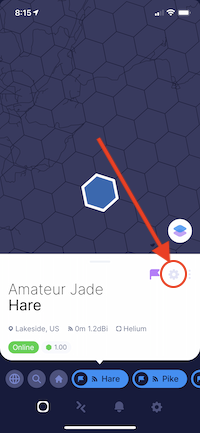
Archived Comments

Gils - 6/21/2021

best explanation of HIP 17 ever !!!
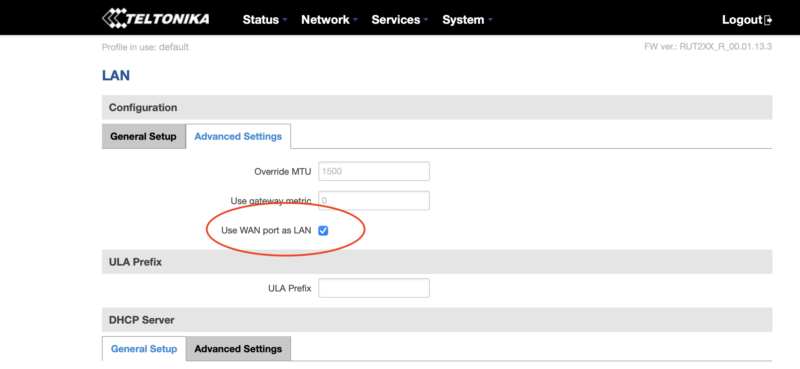

Nik - 6/21/2021

Awesome, thanks Gils!


David Fant - 6/30/2021

Hi Nik, thanks for the write up. It gives me a better understanding of how to look at the different hex resolutions. I am still learning so bear with me... I am looking at a hex that has 11 beacons of which six are off-line, and the Helium Explorer shows it scaled at 0.63. Not sure why the six are off-line, but I believe that non are optimized (external antennas) installations. If we install an antenna that is significantly higher than the rest, (22 story roof with unobstructed views) will we end up being scaled along with the rest? Thanks in advance!


Nik - 6/30/2021

Hi David, yep, you'll get scaled with the rest. As of June 2021, no consideration is given to the elevation of an individual hotspot placement. If you're seeing 11 hotspots in a res 8 hex, I'd look for another hex. :)


David - 7/8/2021

Hi Nik, thanks for your recommendation. I may have missed it in the material, but, will I also be scaled if I place a hotspot in a hexagon with another hotspot that is offline? Thanks again.


Nik - 7/8/2021

Good question, I'm not sure of the answer. I know that offline hotspots fall off the map within a few days, so as long as they don't come back online, you're safe in the long run.


Natko Jankovi? - 7/9/2021

Hi Nik, great to have you, I appreciate your efforts and expertise! So sometimes scaling is not as it should be, depending of Helium interest for the Network spread...There is not much we can hold on to!? Allso in the answer you wrote, there are a few in my area of interest offline for more than 4months and still red approx 174148 blocks behind ( pls.see 881e130d43fffff)... Can you get from Helium staff more clear instructions about positioning and scaling, and what make hotspot losing scaling from 1 to 0,67 if it is alone in res 7 hexagon like there are 2 (see hex 881e130d65fffff) vs. this hex 881e130dc9fffff?! Thak you in advance for explaining us this corelations and unlogical?!


Devon - 7/9/2021

Hi again Natko to touch base on your question, offline miners could be a multitude of things. Also reward scaling changes can take some time to load (ex: if you turn a miner off it will take up to two days for it to not show on the explorer map). If they have been offline for more than 3+ months chances are they will not come back online (at least in your area) usually this is because of EMRIT always having to re-assert hotspots to new areas/customers. It sounds like you are ready for a Standard Helium Strategy & Placement Optimization, this is where we would go over every aspect of the Helium Network that you are inquiring upon. Please fill out this form if you are interested in a session. https://gristleking.com/placement-assessment/


Nik - 7/9/2021

Hi Natko, interesting re. the offline ones. I always look for placement locations that are unequivocally awesome, but it's reasonable to want to put a miner in a place where the offline ones aren't providing coverage. I don't think Helium will give much more clarity on positioning and scaling, as those are the most easily "gamed" aspects right now. I'd aim (overall) for placements that offer clear benefit to the network. "If there's any doubt, there is no doubt." (One of my favorite movie lines.)


John Frederick - 7/29/2021

Hello Nik. Great video. But something that wasn't mentioned was elevation. Unless I missed it. Let's say I have an antenna at the top of a 20 story building and someone else has a hotspot transmitting from the 5th floor of the same building. There's this next to a window. I'm obviously the one on top of the roof with a greater potential of reaching other hotspots. Now let's assume that these same two hotspots are the only two in the hexagon. Are you saying I will share half of everything I get with the guy on the fifth floor?


Nik - 7/29/2021

Yep, any hotspot in the same res 8 hex as you will cut your earnings unless the sibling requirements are filled. What will *probably* happen is that if your HS is providing far better coverage, the split will reward you more favorably over time. That's just my guess (and how I'd tweak the network if I was king).


pcste - 8/13/2021

thanks for this article, ive finally started to understand how this is working..imo this explanation should be the official placement instructions as there is so much false info on discord about placement.


Nik - 8/13/2021

Right on, glad it helped. :)


Sebastian - 8/17/2021

I have an issue. I got scaled down from 1 to .83. I really need help, please.. I have just 2 hotspots in hex8 with at least 2 siblings so the max would be 4 it doesn't make sense. Please can someone have a look? I'm willing to pay


Nik - 8/17/2021

Sebastian, check your other resolutions; I bet you're overcrowded in one of 'em.


pcste - 8/18/2021

Well i thought I understood it but i got scaled when 2 more HS's moved into my res 8 , 1 of them in my res10 and 9. (my res 8 has 2 siblings) so my HS and the 1 in the same res 10 both became 0.5 but the 3rd 1 in the same res 8 but different res 9 was 1.0..... i moved my placement out of the res 10 and out of the same res 9 as the other 0.5 HS and now all 3 of us in the res 8 are 0.67 and not 1.0 heres a link to the discord post i made which includes an image of the HS's https://discord.com/channels/404106811252408320/803306566916767816/877549612033007626 Im wondering if i need to place my HS in the res 8 above me but that would 'place' my HS 180m away from its true location, can i place it that far away? Any help would be gratefully received.


Nik - 8/18/2021

Hi Pcste, if you have one sharing your res10 you'll get scaled no matter what. If you'd like to dig in to optimal deployments including placements I offer consulting services, here.


pcste - 8/18/2021

Im not in res 10, I moved my placement out of the res 10 (as mentioned), and my scale went up from 0.5 to 0.67. As far as i can tell, from reading your instructions and hip 17 I have fullfilled the criteria so cant understand why still scaled ? Im obviously getting something wrong but just cant see it. Thanks for the offer of consulting services, and if i was starting from scratch and wanted help with more than just this issue i may have been interested, however that package is more than i am needing atm. i can only move my HS maybe 1 or 2 res 10 hexes, as such, it will cost me $20 to try 2 new locations around my true location. Thank you again for this article and advice.


Nik - 8/18/2021

Hi Pcste, there's a nuance to HIP17 I didn't understand until recently that explains this. Basically, you don't jump immediately from density target (in the case of res 8 it's 1) to density max. It scales up according to *how many* siblings are filled. If you have 2 siblings meeting the density target, you can have 2 in your hex. If you have 3 siblings meeting the density target, you can 3. 4 siblings = up to 4 in yours, and then 4 is the max. So if you had 5 siblings meeting the density target at res 8, you could still only have 4 in yours. That pattern holds at every other res level up to res 4, where there's a slight (and more or less inconsequential) change. As far as how far away can you "mis-assert", the official line is that your location gets locked to the middle of the res 12 you assert it in. In practice, gamers have gotten away with far more, but that's...gaming.


Dick Headstrong - 8/19/2021

Hey, Thanks for everything. This is an unrelated question that I wasn't sure where to ask it. I've got one hotspot up and running in an enclosure with ethernet and POE. I have a second miner (SenseCap M1) I also want to move outside but would be using WIFI (because my friend at this location doesn't have wired internet). Do indoor units use the LoRan antenna to access the wifi connection as well or is it a separate internal antenna? Or would I need to purchase a separate WIFI module which had the place to add a wifi antenna? There are no additional ports on the sensecap to plug other external antennas into. The enclosure has many ports for attaching a variety of external antennas. If it's a small internal antenna, I'm sure it would be getting blocked to some degree by the aluminum enclosure. Also, anyone know what the likelihood of overheating an indoor miner like this encased in a metal enclosure during the summer? I'm thinking about getting the consultation, I just wish there was another price entry point. $500 seems kind of steep for just 2 or 3 miners. Although to be fair, I've probably leached at least $100-$200 worth of info just from your free advice, so I'm not complaining. I'm just saying that I'm sure others besides myself would come over to the paying side if there were other options. In fact, if you posted some of your public crypto or helium addresses, I would throw some coins in one of your wallets, right now. Thanks


Nik - 8/20/2021

Hi Dick, the WiFi antenna and the LoRa antenna are separate things; they use different frequencies. All Hotspots that I know about have both. The WiFi antennas provide a less stable connection than an ethernet cable, to greater and lesser degrees depending on brand. For the consult price, it is what it is. I provide everything free here on the blog, so the consultation is for those folks who value their time and don't want to go through every post and video I've ever made. There's something weird about providing an address for donations that I just don't like; feels too much like I'm putting some kind of bullshit obligation on people. I'd rather keep it clean. If you want a customized walkthrough for your specific situation from an expert, you pay. For everything else, it's free.


Dick Headstrong - 8/20/2021

Hey, This is off topic but very important. Someone stole my hotspot. I think it might be related to sitebot. But the ownership of my hotspot was transferred without my permission to this account 14B6r9xZbsVrjMgyiE8kahSWCxruAhYWLwWYMEwh3Kb636mti1V The only transaction I did was with sitebot to "claim" my hotspot on their site to get full site amenities. I donated 0.1 HNT . Otherwise I made no transactions with my wallet or account. I will pay you to help me resolve this and I think it might be a topic to be covered in your blogs. Thanks


Dick Headstrong - 8/20/2021

Hey, Just read your response to my earlier comment. Totally respect the thing about putting your address out for donations. I'd still like to give you something for the help you've already given, but really need some help on this stolen hotspot issue. Name a price and I will probably pay it. If it's the whole $500, I have one issue. How do you do an optimization in 30 days when you say that's the minimum scale for assessing profits?? You would have to wait at least 60 days before even comparing 2 strategies? Thanks Again,


Nik - 8/21/2021

That's pretty odd. Where did you get your hotspot from?


Nik - 8/21/2021

Hi Dick, the Optimization is all about getting you set up in the right way. Once we go through how to do it, you can monitor and change things yourself confidently. The 30 day support window is there just in case you have any questions that come up post-consult; I can usually save you a ton of time in finding an answer.


Kgp - 8/21/2021

Hey Nik, love the website, you’re awesome. A couple of my rak miners finished syncing several hours ago but still no activity (challenges, witnesses, etc) and also noticed my transmit scale says N/A on helium explorer. Should I just give it more time? Or do you suggest powering off and back on? Any other troubleshooting solutions? Thanks!


Nik - 8/21/2021

Hi Kgp, give it more time. If they just finished syncing they'll probably beacon sometime in the next 24 hours. I'd wait 2 days before doing anything.


Mark Silen - 9/10/2021

Fantastic explanation !!!


Nik - 9/10/2021

Thanks Mark!


David - 9/10/2021

Hi Nik, I hope you are doing well. Quick question- can we select who we witness to not have our rewards scaled down? We have a site that has great elevation, and the simulation shows 637 witnesses, but nearby hotspots ratings are mostly less than 1.00. I was shocked at the $HNT estimates and want to know if we can select who we witness. Thanks in advance!


Nik - 9/10/2021

Hi David, nope, you don't get to pick who you witness. You *could* try to manage that with directional antennas or shielding, but not worth it; I mean, why not be able to witness as many beacons as possible?


David - 9/12/2021

Hey Nik, we simulated a site that has excellent elevation - 300+ feet, the only live miner in hex (one hotspot turned off for over 6 mo.), a 3dbi antenna, witnessing 637 hotspots at 175% percentile. According to HotspotRF we will only be rewarded 9 $HNT a week. Shouldn't the site be earning maximum rewards because we have taken the time to optimize the installation? I understand the People's Network needs the best coverage for IoT senors to transfer their data, however, if we are not able to earn a decent amount of $HNT, then the incentive of deploying hotspos goes away. There should be an option to not witness hotspots that are ridiculously scaled to near zero earnings because they are stepping all over each other. I'm just saying. Sorry for the rant! LOL


Nik - 9/12/2021

It's a good point, though you have to imagine all those hotspots you're earning off of are earning even less. :). Also, simulations are just simulations, they're not real. HotspotRF has said they're only accurate 60% of the time, +/- 20%. That's because it's bloody hard to predict the earnings on a network growing so rapidly. Right now (12Sep), anything over 1 HNT/day is still pretty good.


Winning At Helium: The Right Way To Get Started - Gristle King - A Guide to Helium - 9/14/2021

[…] your hotspot is the num­ber one deter­min­er of your HNT earn­ings. If you’re in a place with opti­mal den­si­ty and vol­ume of hotspots you’ll earn more. If you’re in a place with too few hotspots that your hotspot can […]


Why Are My Helium Hotspot Earnings So Spiky? - Gristle King - A Guide to Helium - 9/15/2021

[…] and there­fore trans­mit more bea­cons than a small vil­lage with 4 hotspots. Even though the earn­ings per Hotspot is like­ly to be less in a city, you just have more oppor­tu­ni­ties to […]


Robert Watkins - 9/16/2021

I am waiting on 18 bobcat hotspots that are spaced about 2 weeks apart my 20 week ship estimation date will be mid oct give or take:/ But I will find the money for the help you have been a life saver with your free info and I might as well get it right the first time. Thank you Brother!


Trey - 9/17/2021

Hey Nik! Great post as always. I would like to move my hotspot to a new location. Explorer shows that hex location, and some surrounding sibling hex's to have a hotspot. The weird thing is that all of these hotspots (4) in total across (3) Hexes, are not beconing, witnessing, or doing anything. Will my hotspot still be scaled even though they are inactive but still shown "online"?


How To Use Hotspotty To Crush - Gristle King - A Guide to Helium - 9/18/2021

[…] Now you can see what the edge of any hex looks like (NOT a straight line), and also very quick­ly see where the “prob­lem” hex­es are so you can work to clear them. If you want to dive a bit deep­er into HIP 17, I’ve got a post writ­ten up on it over here. […]


What Does A Good Hotspot Cluster Look Like? - Gristle King - A Guide to Helium - 10/12/2021

[…] who are over­crowd­ing the hex den­si­ty rules and no one is earn­ing very much because all your earn­ings are scaled. Again, you’re not going to earn […]


Mark - 11/3/2021

Hi, I have 2 others in my hex 8, and my reward scale is now 0.26. Can i move my location on the app more than 110 meters but less than 150 meters in order to get into a new hex? Hotspotty says if i do that my rewards and the other two hotspots near me will go up to 0.77. Will this work or is roughly 120m too far to fake my location away from me?


Nik - 11/3/2021

We'll see how sensitive PoCv11 is. Technically you shouldn't do this, but practically, well, lots of people misassert to "clear" a hex.


Lessons Learned From A Year Of Helium Deployments - Gristle King - A Guide to Helium - 11/15/2021

[…] to get geeky and build a test set­up just to see how the whole thing works, or you wade through the com­plex­i­ties of HIP 15 & 17, Heli­um has a way of forc­ing you to expand your […]


James - 11/15/2021

Hey Nik, any guidance regarding the choice between A. A way overcrowded urban area (Vancouver) with heavy scaling (0.2) but many many witnesses, or B. Zero scaling in a rural area with at most 3 witnesses (one old them being a "hotspot relay"? Option B will be helping the network expand, but I don't expect there to be a lot of data transfer in the area.


Nik - 11/15/2021

Neither are good, though option B has more potential to improve.


Mark Liccardello - 11/19/2021

Thx for your info & videos! I HAVE A TERRIBLE witness reward units # 17. Is this because another hotspot moved into my hex? I am thinking I can reassert the hotspot 535 meters without moving the hotspot... not sure Thx for your input...


Nik - 11/19/2021

Probably, though remember to check ALL res sizes, not just the res 8.


Ben - 12/2/2021

I am very new to this so pardon the elementary question. Helium exporer is showing no other hotspots nearby. How should I expect my helium to work? Is it ideal to not have other hotspots or do we want more nearby?


Nik - 12/2/2021

Hi Ben, you want enough local Hotspots to reliably "Beacon" and "Witness". Ideally you're looking at, oh, 40-60 within a few kilometers of you. Check out the Helium Basic Course, you might dig it.


Jamie Barratt - 12/10/2021

Hi Nik Apologies if you have addressed this and I have missed it, how can we control our witness rewards units? My Transmit scales are all at 1.00 but my witness rewards units are averaging .44 Thanks Jamie


Nik - 12/10/2021

They're a factor of the hotspots around you; nothing you can do other than move.


Jamie Barratt - 12/10/2021

Thought so but wanted some clarity on it, thank you!


Michael - 12/30/2021

Hi, newbie here and hungry for clarity. I'm looking at an area with lower population density, but zero miners and no siblings. If I am the first and only miner in the area is that a benefit? Does a lower population density reduce my earnings?


Nik - 12/30/2021

Hi Michael, nope, you need other miners around you in order to earn. You earn ~75% of your rewards from "hearing" (Witnessing) other transmissions (Beacons.)


Mario - 4/15/2022

Hi Nik, I asked a question on discord and immediately got a 24h timeout and dunno why... The question was this (didn't write the exact numbers, now I have to you): HIP 58 question for Helium/Nova. I only had a handful (11) of witnesses but was doing fine. 50% (6) of that witnesses were up to 217 km away because the radio waves traveled across the sea (and I'm located on the coast). Now that they are invalid... --> Will my Witness Reward Units stay low or will it improve i.e. do invalid witnesses account into Witness Reward Units? If yes, that now seems unfair because I get nothing for them and less rewards for the scarce area in general I'm trying to cover with Helium/Nova network. Can you please answer me? I just escaped two weeks ago from a 6x overcrowded city, put an HNTenna on a small hill overlooking the sea, started getting 0.3 HNT per day, said to myself yeah!, and frankly, now I'm kinda sad. Also, if the answer is yes and they do account, the only thing is see I could do is switch the expensive HNTenna that cost 400$ to import with the stock antenna so it stops going across the sea... Anyway m8, guidance needed! :)


Nik - 4/15/2022

Hi Mario, Sounds like you're a little early to that area. I'm not sure about invalid witnesses & WRU. Rather than switching out an antenna, I'd add a local Hotspot or two and improve coverage. Hotspots are getting much lower in price than they were. What part of the world are you in?