26 posts tagged with "helium hotspot"

View All Tags

What Does A Great Helium Hotspot Look Like?

· 10 min read
Nik
Site Owner

Seeing other deployments is one of the fastest ways to get great ideas (and avoid costly mistakes!)

I thought it'd be useful to the community to share a little more detail about our Helium Hotspot deployments. Here's your chance to shine!

What hotspot are you using? What antenna? Are you happy with this deployment? What will you change next time? Any recommendations for others? The more info you can share, the more we'll all learn and the better the network will get.


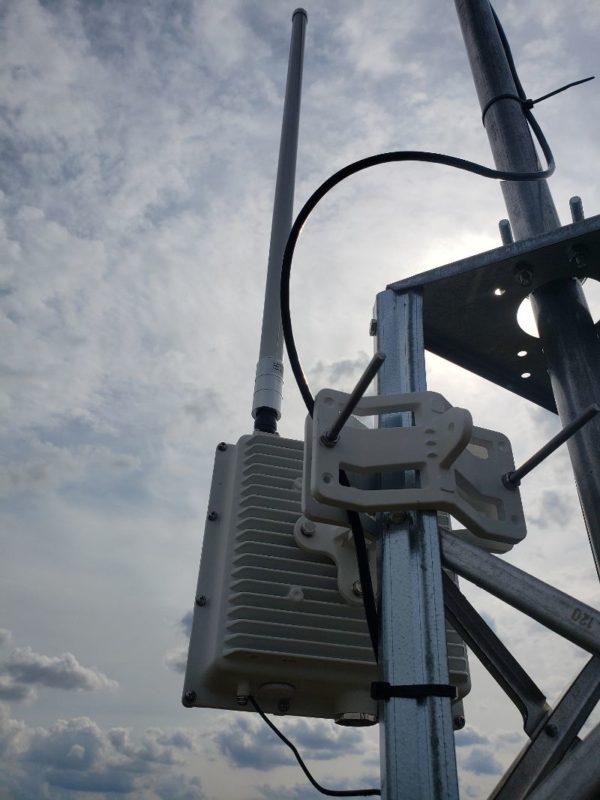
Hotspot Mfr: RAK
Antenna Mfr: eBay supplier
Antenna Gain: 8 dBi
Elevation (meters above ground): 11
Cable type used: LMR400, 20'
Mounting Deployment Notes: On top of commercial building, routinely goes offline & back on. Hotspot relayed but witnessing well. Locally overcrowded, need to move this one!


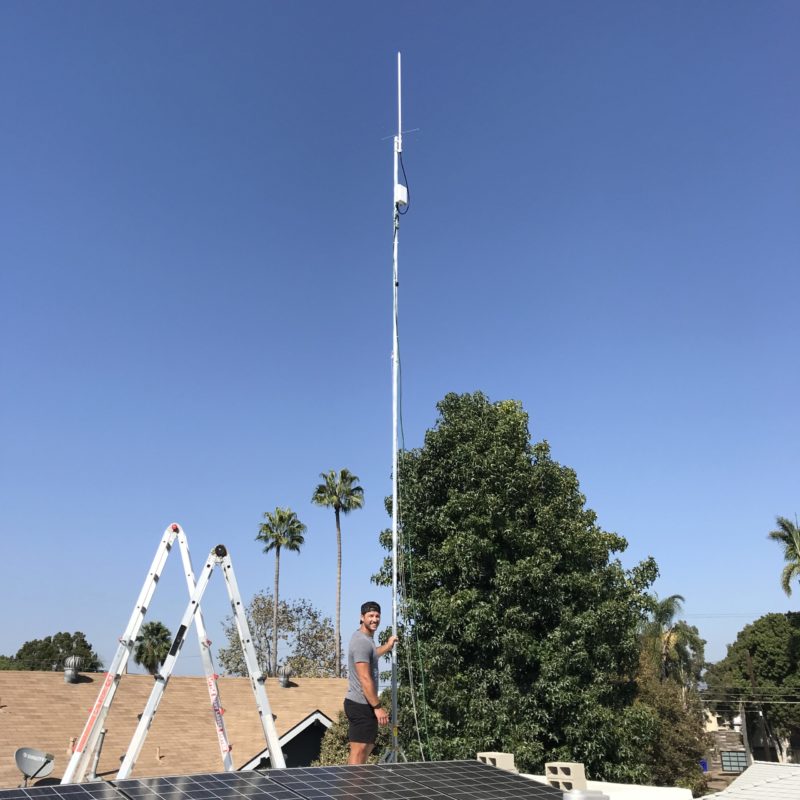
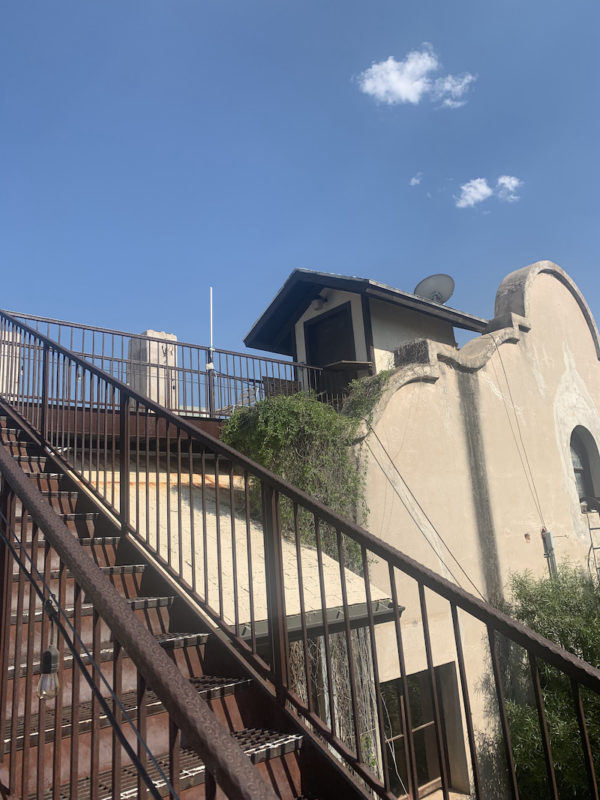
Hotspot: RAK
Antenna Mfr: Nearson
Antenna Gain: 9 dBi with an attenuator to remain within acceptable RSSI/SNR limits
Elevation (meters above ground): 10
Cable type used: LMR400
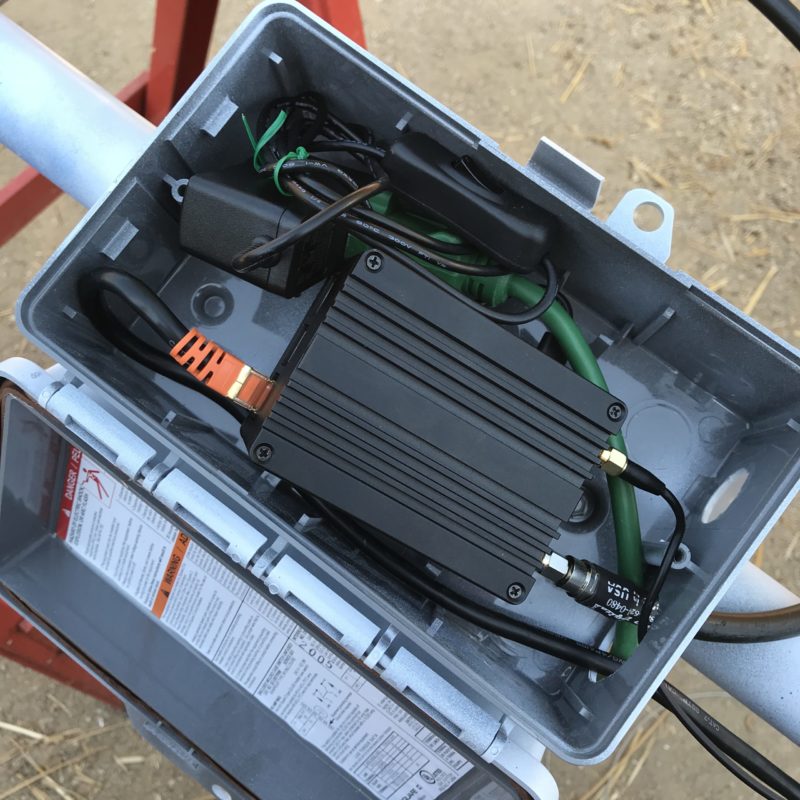
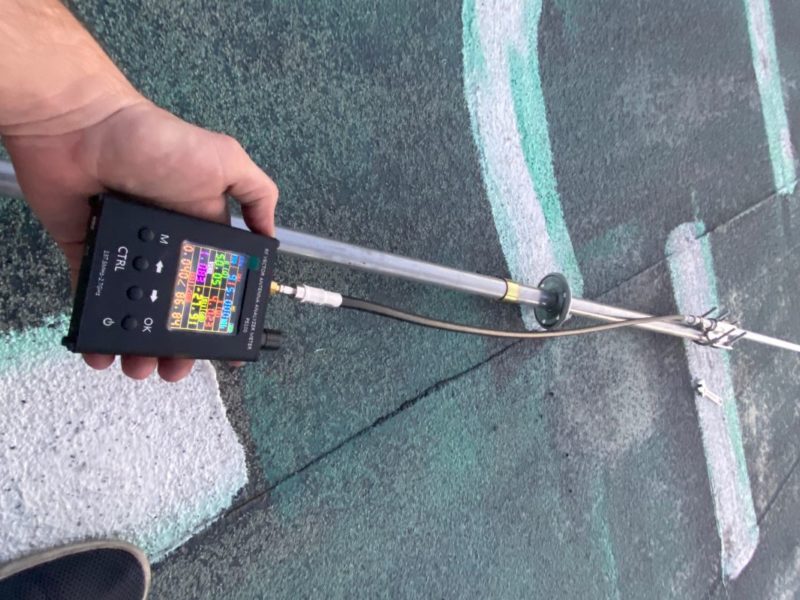
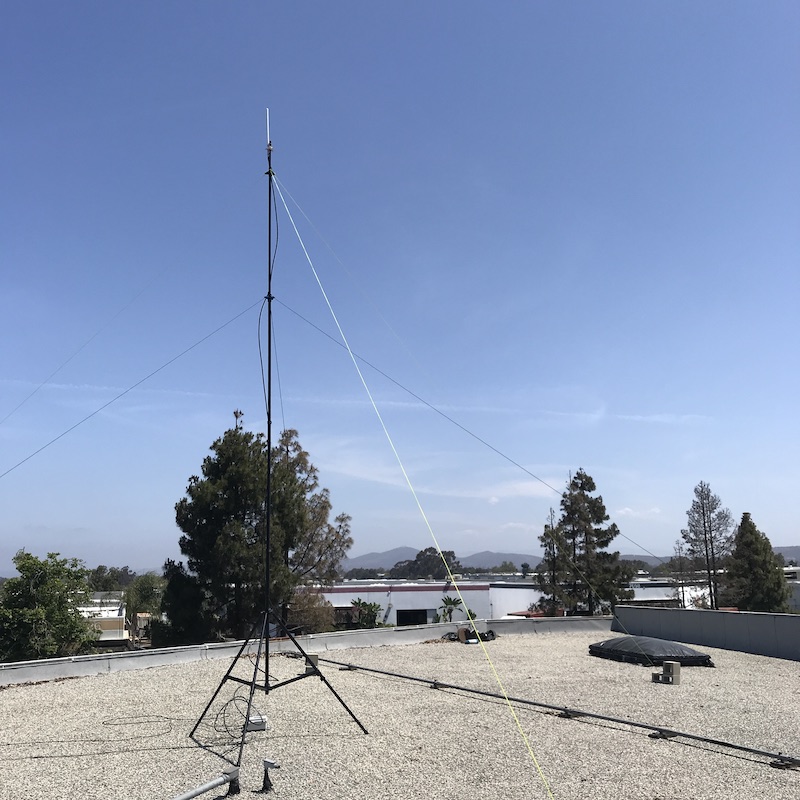
Mounting Deployment Notes: mounted on residential roof, in a now overcrowded area. First deployment, so used both a power cable (green) & and ethernet cable.


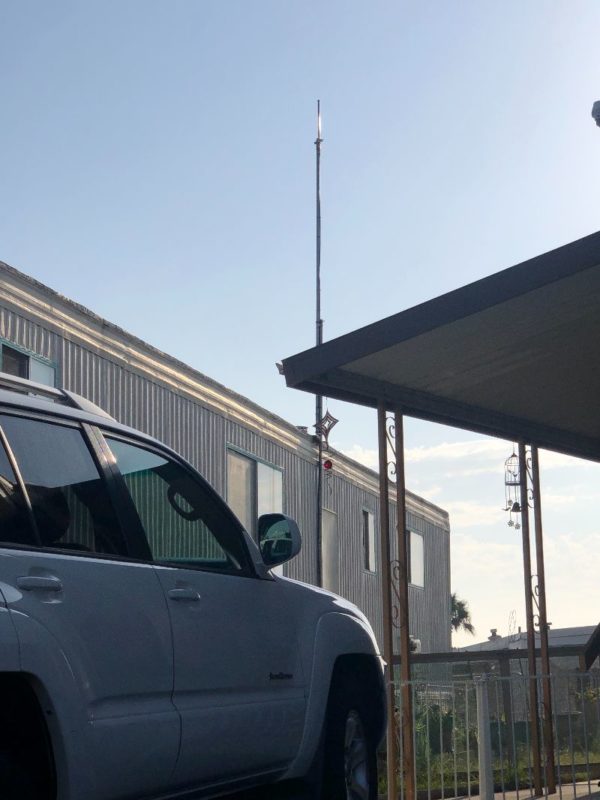
Hotspot Mfr: Helium Hotspot (The OG!)
Antenna Mfr: Nebra
Antenna Gain: 5.8 dBi
Elevation (meters above ground): 7
Cable type used: LMR400 UF
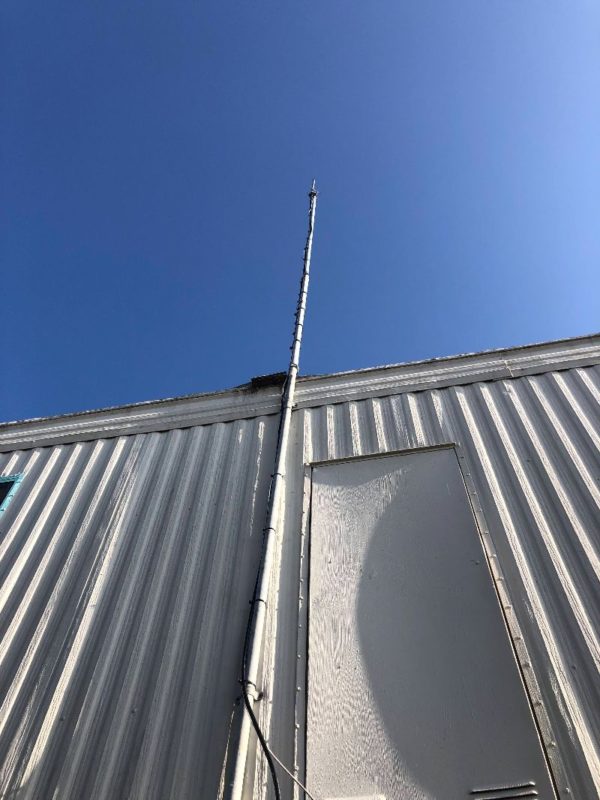
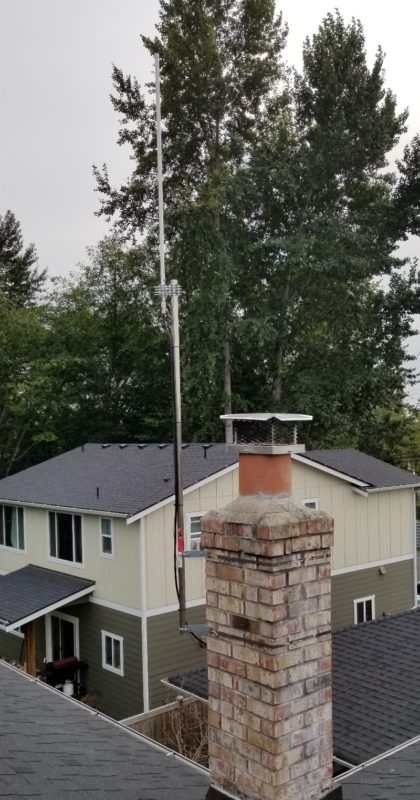
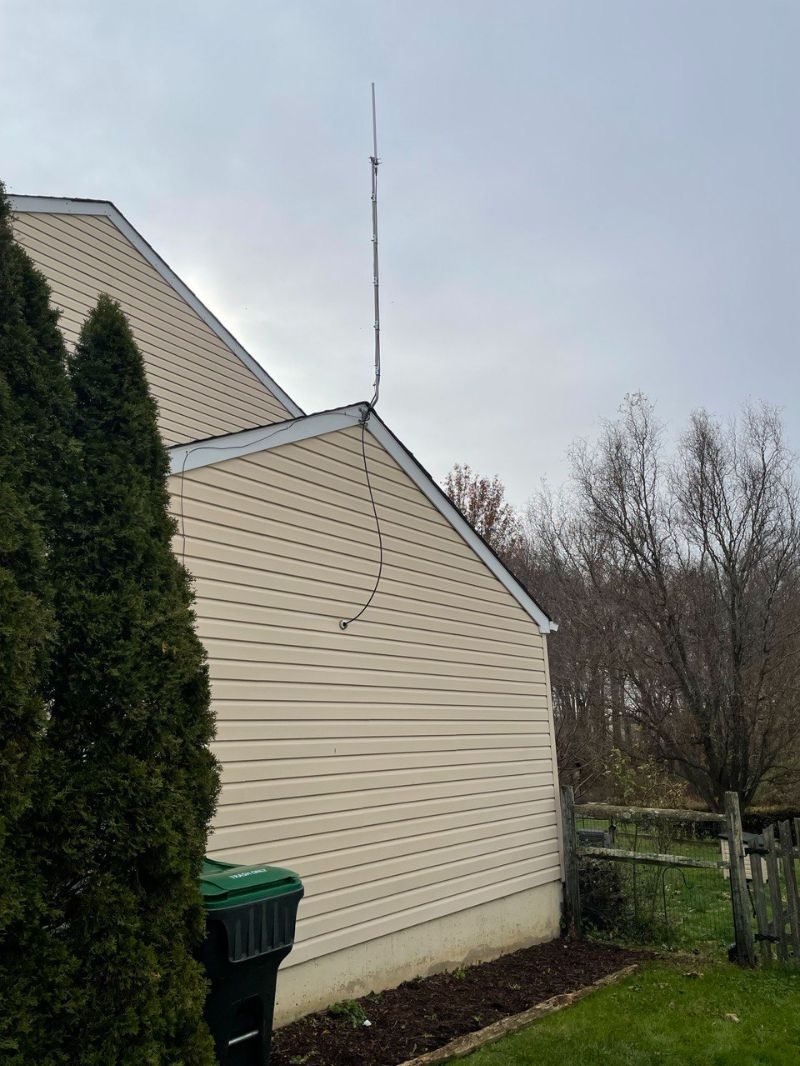
Mounting Deployment Notes: Lighting arrestor on antenna end, grounded to a water pipe. Home Depot 10.5 foot steel top rail attached to an old tv antenna pole with hose clamps and industrial zip ties(found on Amazon). If utilizing an old install, make sure to reinforce the old brackets or put new ones. The LMR400 I ran through the wall where the old coax cord went through into the living room. The white plastic coax cable cover I just made the hole a little bigger, put that putty drywall stuff in the wall and sealed the outside with a white all purpose sealant for roofs. Easiest install I've done.


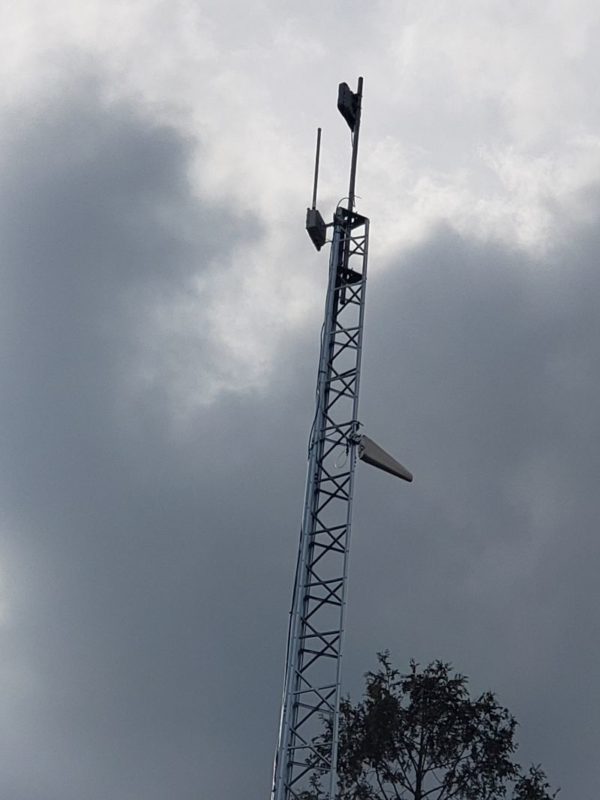
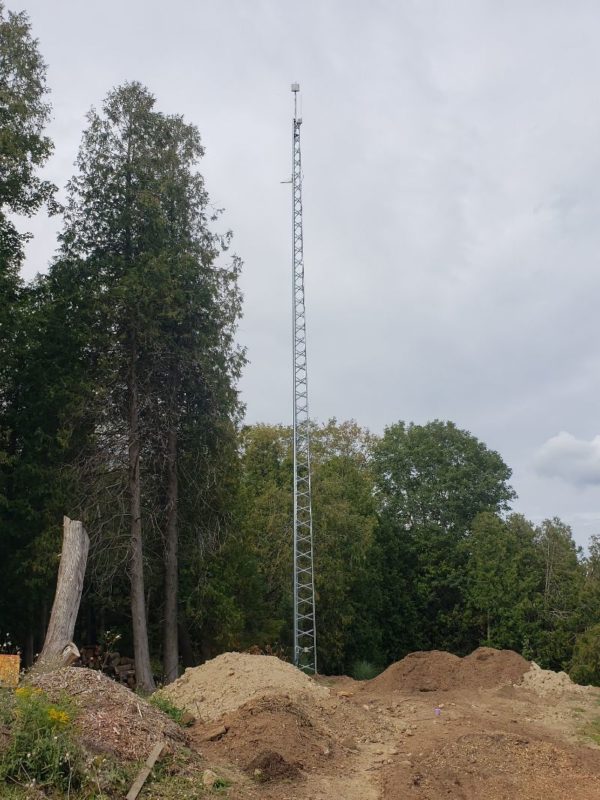
Hotspot Mfr: RAK
Antenna Mfr: RAK Wireless
Antenna Gain: 8 dBi
Elevation (meters above ground): 21
Cable type used: direct connection
Mounting Deployment Notes: RAK miner installed in outdoor enclosure on 68ft self-supporting tower. I built this tower for my client last December in order to improve his wireless internet connection speed. I arranged to use his tower to test the location. Used 75ft premade CAT5 cable drop from miner to surge suppressor with messenger cable for grounding. Surge suppressor installed at the base of the tower and grounded to a copper grounding rod. 50ft CAT5 cable drop from surge suppressor to POE adapter. Installed on Sept 4th. Still under testing.
Hotspot Name: Quaint Ceramic Porcupine


Hotspot Mfr: Bobcat
Antenna Mfr: RAK Wireless
Antenna Gain: 5.8
Elevation (meters above ground): 21
Cable type used: 30' RG-214 silver plated wire
Mounting Deployment Notes: I used 30ft of RG-214 silver plated wire and I went ahead and got all the stripping and crimping tools along with connectors. I'm still being relayed. [The host] is worried about opening up port forwarding, so we are going to get our miner its own router to set up port forwarding. 
Hotspot Name: Old Zinc Elk


Hotspot Mfr: Bobcat Miner 300
Antenna Mfr: RAK Wireless
Antenna Gain: 5.8
Elevation (meters above ground): 7
Cable type used: 20' LMR400
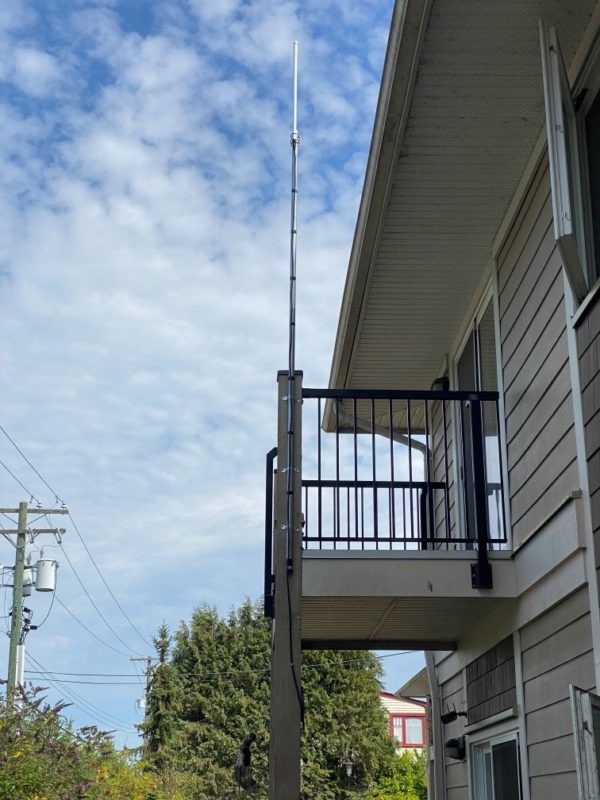
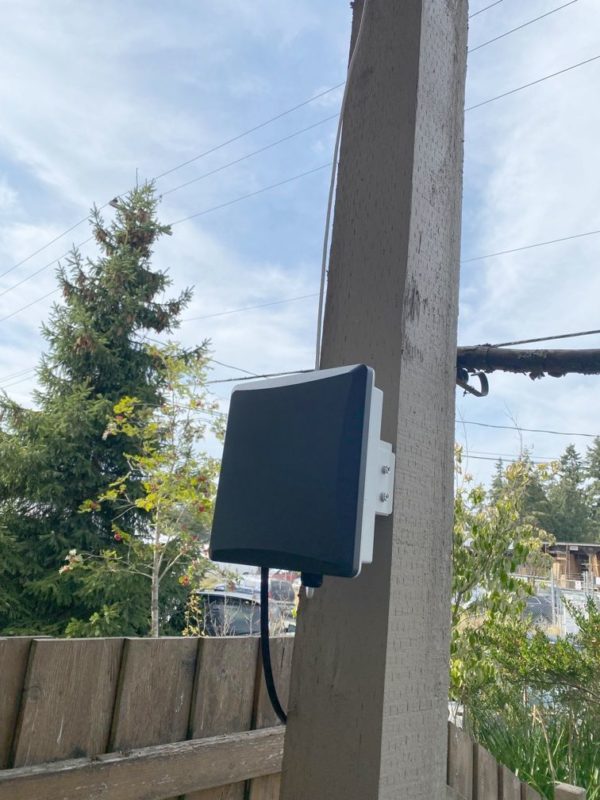
Mounting Deployment Notes: I used the Rakwireless bobcat outdoor enclosure kit. I spoke with my neighbor upstairs and asked for his permission to use the railing of his balcony for mounting. I drilled a hole through the exterior wall into my apartment for the CAT6 cable and mounted it neatly to the underside of the balcony, down the beam, and into the exterior enclosure.


Hotspot Mfr: Bobcat Miner 300
Antenna Mfr: Rokland
Antenna Gain: 10
Elevation (meters above ground): 11
Cable type used: 30' LMR400
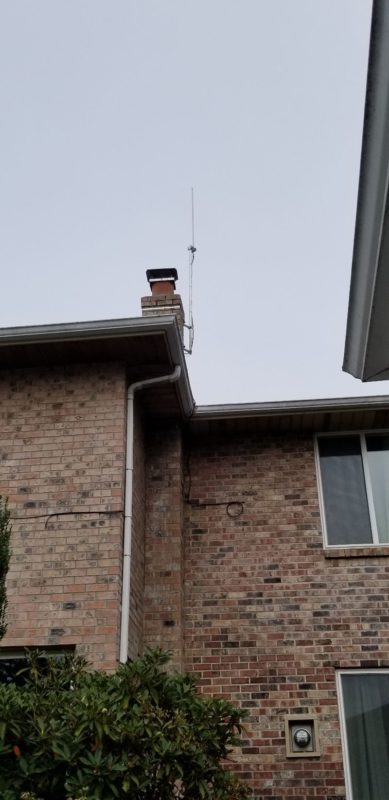
Mounting Deployment Notes: Bobcat is inside, the antenna is mounted to my chimney. It is 35 feet above my driveway surface. I used hotspotrf to determine the height and antenna gain so my setup should be getting about 19 witnesses, but I'm having ZERO luck and only earn .01 HNT most days (from initiating challenges only, I have 0 witnesses). I do have a 5.8 dBi and a 8 dBi antenna on the way from RAK right now. I'm hoping that I am just missing the witnesses with too much antenna gain and a different antenna will fix the issue.
Hotspot Name: Rich Cerulean Sparrow


Hotspot Mfr: SenseCAP M1
Antenna Mfr: HNTenna
Antenna Gain: 3
Elevation (meters above ground): 24
Cable type used: LMR600
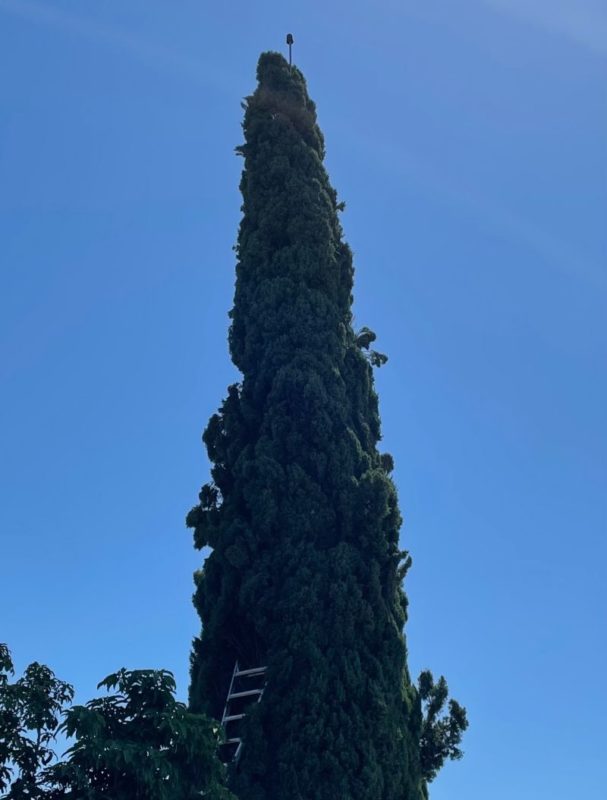
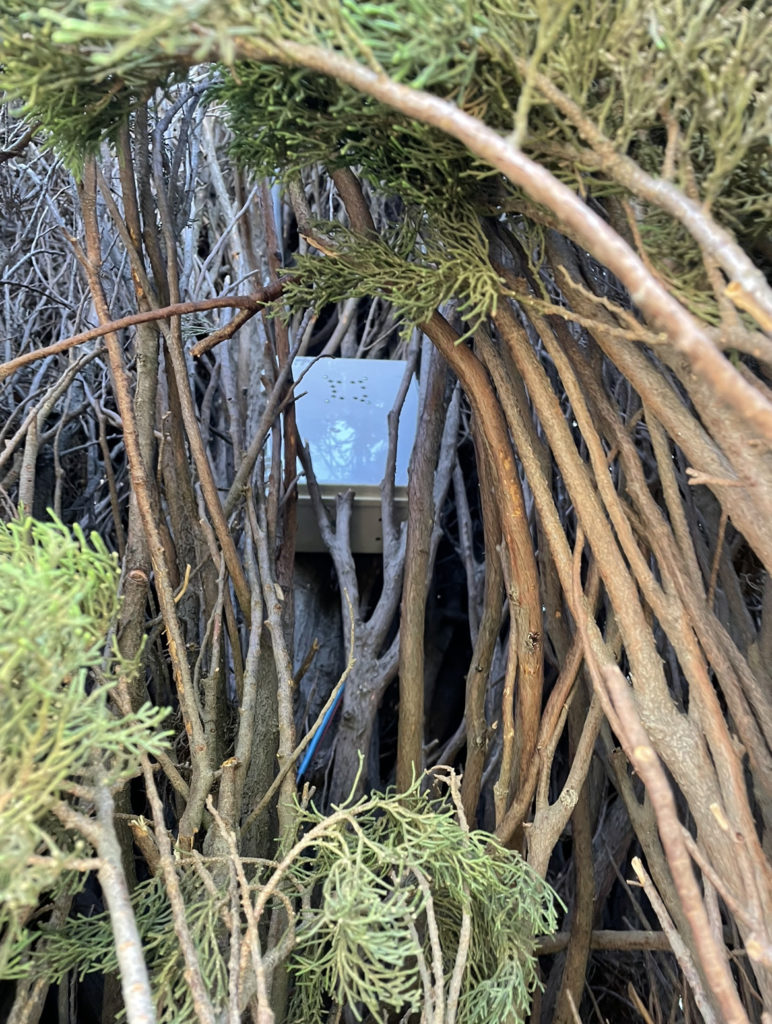
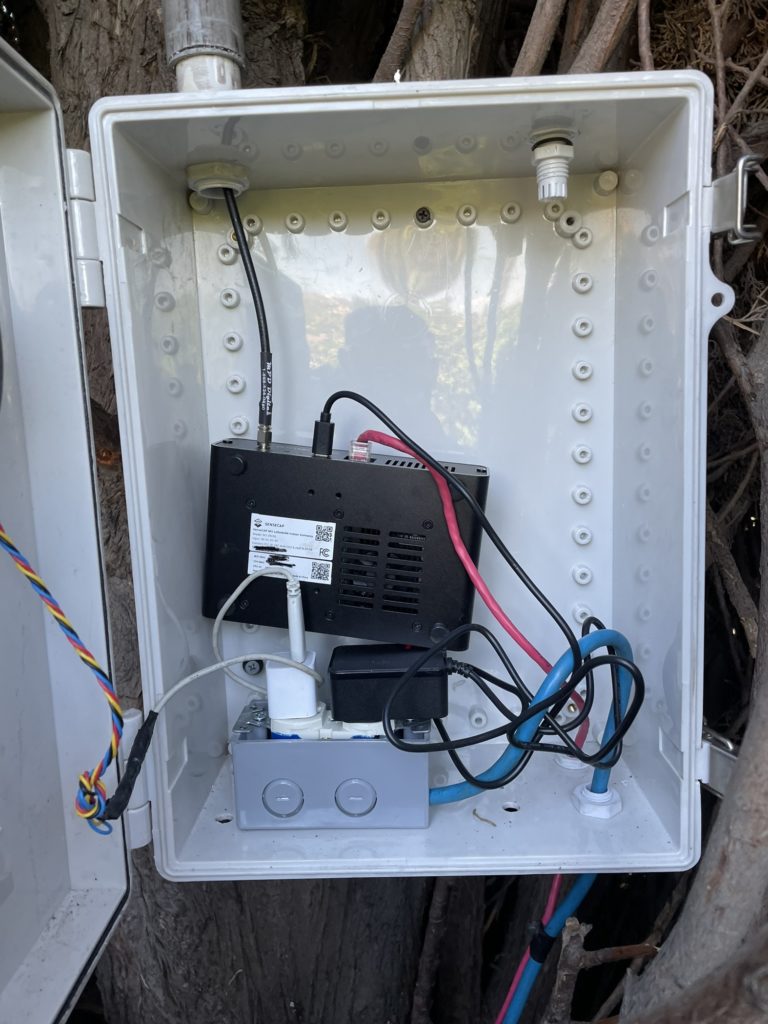
Mounting Deployment Notes: The biggest challenge was getting the antenna up in the 65ft tree. First, I used 50ft of 1 in conduit PVC, strung together, and shoved it up the tree. It probably took 300 times to get it in the position it is in now. It could be more to the left, but after 300 tries and one week later, it's good enough. Next, we need to get the antenna on top. Using the 50ft of LMR600, I strapped about 100ft of 550 (parachute) cord to an old N type connector, and using 1/2 underground watering plastic hose, pushed the LMR600 over the top, until it came down the side of the tree, to where I could reach it. I connected the antenna, and using the 550 cord, pulled the LMR600 back down through the conduit, until the antenna calmly rested at the top. This took about eight tries to accomplish. The conduit decided to come barreling down the side of the tree most times, or the 550 cord snapped because of the sharp edges on the connector. Once the cable was back through the tube and the antenna was secure to the top, I cut the conduit and cable to length, installed the box in the tree, and hooked everything up. I have a 12v fan mounted on the cover, running off a 5v iPhone charger. Using discovery, I am hitting about 550 hotspots. So far, I am up to 170 on the explorer.
Hotspot Name: Hot Orchid Okapi


Hotspot Mfr: SenseCAP M1
Antenna Mfr: HNTenna
Antenna Gain: 3
Elevation (meters above ground): 13
Cable type used: 70' LMR600
Mounting Deployment Notes: I just received a RAK outdoor enclosure and I will be mounting the hotspot on the mast. It was originally a Bobcat at this location and I didn't trust it outdoors. It's located on a commercial building using a non penetrating roof mount and a telescoping 28 ft. mast. It's located on the edge of 13 well spaced hotspots and doubles the rewards of the next best one in the group, well worth the effort of guying a tall mast!
Hotspot Name: not provided


Hotspot Mfr: RAK Hotspot
Antenna Mfr: L-Com
Antenna Gain: 8
Elevation (meters above ground): 15
Cable type used: LMR400
Mounting Deployment Notes: 31' Telescoping Mast on top of an industrial warehouse. Powered w/ PoE.
Hotspot Name: Fancy Orchid Pigeon


Hotspot Mfr: RAK Hotspot
Antenna Mfr: RAK Wireless
Antenna Gain: 8
Elevation (meters above ground): 7
Cable type used: LMR400 trim to 5.332m (36 1/2 wavelength @ 915MHz
Mounting Deployment Notes: Mounting used a cantilever beam eve mount about the garage. Added solid copper 6 AWG for suppressor drain to earth ground spike at electrical service entry. Used a pass through to garage for feeder cable typically with marine cabin antennas. Has an option to add an inline step attenuator 1-30 dBi to tune antenna gain. Sealed external N-Types connectors with teflon/silicone/PVC electrical tapes.


If you'd like to share your work, I'll give it a quick review to make sure it looks good & get yours posted up ASAP. Thank you for contributing!

[formidable id="15"]


Archived Comments

Jacob - 9/9/2021

Hey Nik, Thanks for sharing these. I recognize the second deployment listed aka your first deployment. I believe its listed as 14 meters high on the explorer, but here it's listed as 10 meters. Is it safe to assume it's 10 meters? Also, if you were setting up this deployment today, would you use a different antenna (3 dBi or 5.8 dBi) or would you stick with the 9 dBi with attenuator?


Nik - 9/9/2021

Hi Jacob, it's probably somewhere between the 2 elevations; the pole is 23' and the roof is, oh, maybe 13-15', maybe more above ground. If I were to set up again I'd use the 3 dBi HNTenna. That 9 dBi cost me HNT while I figured out what the problem was.


How Do You Find The Best Site For Your Hotspot?

· 7 min read
Nik
Site Owner

Well, the race is officially on. With at least two unofficial halvings coming in the near future, it's pretty darn important right now to:

A) Get your Helium hotspot up and earning and

B) Secure the best spot you possibly can.

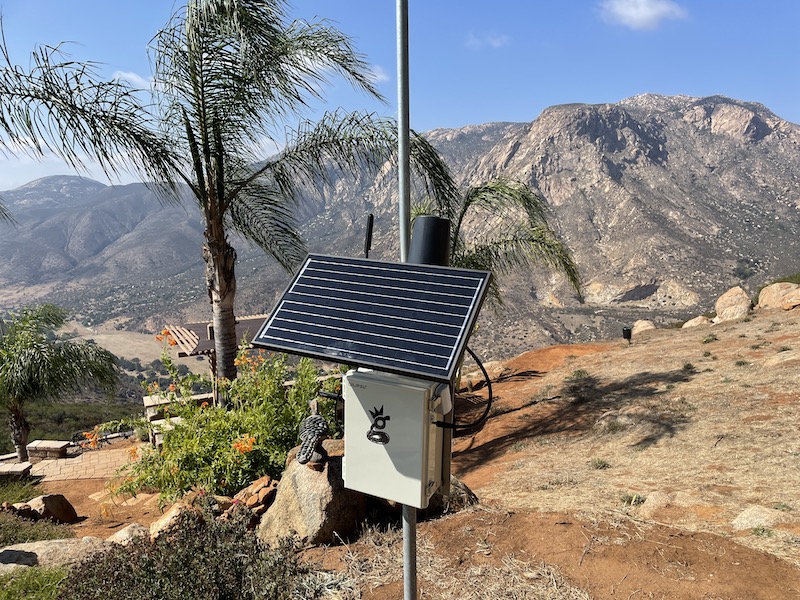
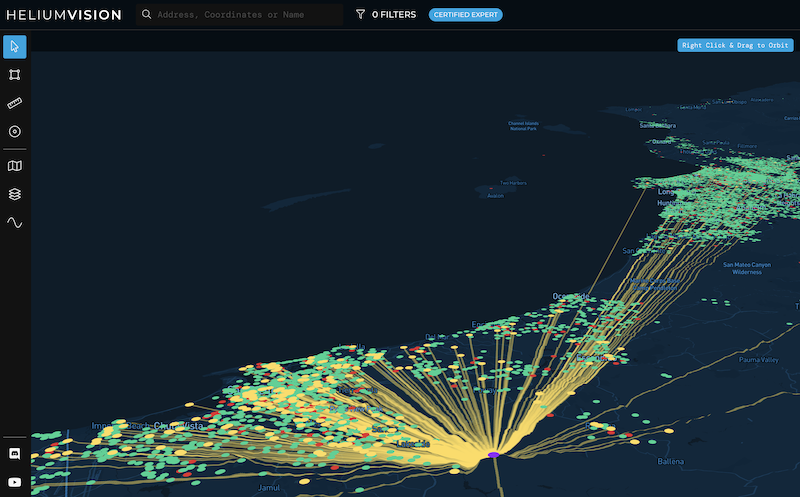
In the case below, this hotspot is on private property with an incredible view of both my favorite place to fly a paraglider in San Diego AND an excellent view of the southern half of San Diego county.

Wait, what? More halvings? Yep, you've got 2 coming. One from network growth (network size will probably double by the end of the year) close to 300k.

Doubling the network equals (for the AVERAGE hotspot) half the rewards. Now, that's the average hotspot, but it's best to be conservative with these calculations.

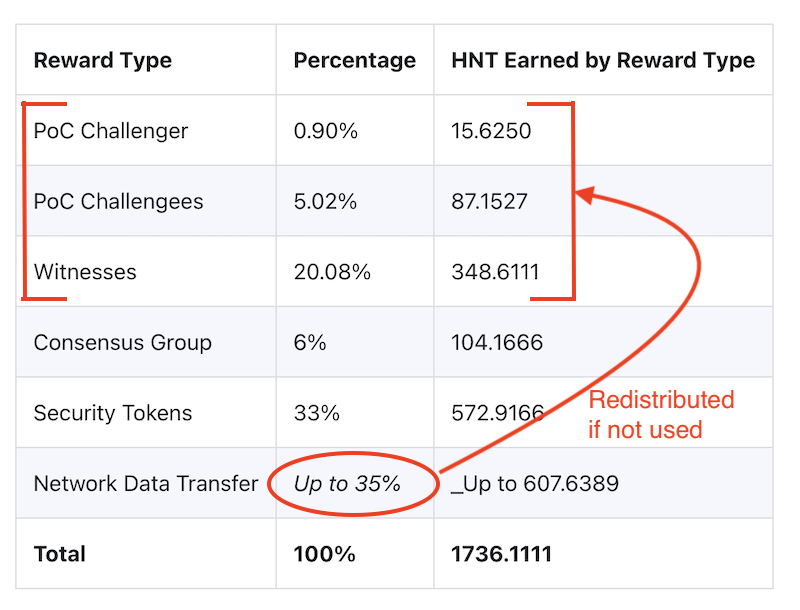
What's the second halving? 5G. IF 5G rolls anywhere near as fast as they rolled out the current hotspots, it'll chew through the "up to 35%" of HNT set aside for network data transfer.

Remember, 5G is the opposite of LoRa. LoRa is small packets/large distance. 5G is large data, small distance. 5G chews through data like I used to eat gallons of ice cream; it disappears.

The catch (and really the current "doubling") is that if the "up to 35% of" HNT for data transfer doesn't get used, it gets redistributed to PoC rewards. That's us, running regular hotspots, collecting HNT for challenging, beaconing, and witnessing. Mostly, for witnessing, but that's another story.

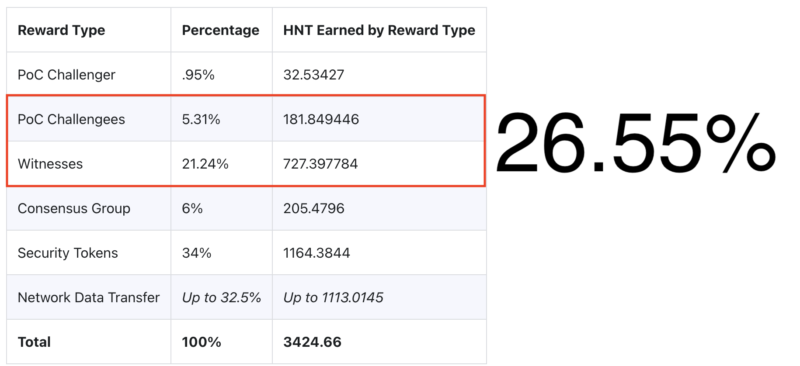
Since our current PoC (Proof of Coverage, more on that here) rewards account for 26% of all HNT (let's call that about a third) and the data across the network isn't anywhere near capacity of "up to 35%" (we'll call that another third) we're basically getting two thirds of all HNT distributed, which is double what we're technically earning.

So, when that data gets used up by 5G hotspots, our rewards will be halved again from today. That's the bad news.

The good news is that wherever there's challenge, there's opportunity. For you hard chargers who are willing to hustle for the love of crypto and fun new enterprises and high-risk/high-return livin', giant opportunities still abound. Let's talk about a few of 'em.

First, there's the stuff you do yourself. You can use Helium.Vision or Hotspotty or Kudzu to go deep or HotspotRF (or even Google Earth) to keep it simple. Find the high points and places where your hotspot can be placed for maximum earnings. Maybe you get fancy on Google Earth and run an altitude layer to make sure you're only looking at islands in the sky, or you re-watch the demo I did on Helium.Vision and make sure you know how to use all aspects of that super powerful tool.

A hotspot with a high volume / low density view is optimal, but even a high volume / high density view like the one below can be a high earner.

You find the spot, you figure out who owns the rights to it, you contact them, negotiate an agreement, install your hotspot, and, as my English uncle says, "Robert's your father's brother." Us Yanks are little more direct and just say "Bob's your uncle."

Hot tip? Look for land brokers. They represent empty lots of land that could use a little income. That tip came from one of my most successful clients who is also an absolute wizard marketer. He has built a marketing & sales system for Helium placements that gets a 50% callback rate on leads (unheard of!) and he cherry picks the best spots. Without giving away his location, out of the top 10 Helium hotspots in his area (a place with over a thousand hotspots), he's runs 3 of 'em. He sells that system, if you're interested in that just reach out.

Finding your own placements is one of those "most work equals most rewards" deals, but if you've got a lot of hotspots, that's a lot of work.

That brings us to your second option, a recent start-up called Sitenna.com. They connect you (the antenna/hotspot owner) with land owners. You don't look for spots, you just supply the hardware, pay the rent, and collect HNT. Obviously it's slightly more complicated, but that's the gist.

If "pay to play" is your game, Sitenna is looking to be a very promising option. Tell 'em Gristleking sent ya, it'll be good for a laugh. They're a couple of recent Y-combinator types on a trajectory to crush; we Helium peeps might as well go along for the ride.

Third, you can make your own placements. This is by far the hardest, as well as in the long run *probably* the most profitable. You go out and find a business that could actually benefit from LoRa. It'll need to meet very specific requirements: They'll want to cover a large area, they don't need a ton of data, there's a clear profit motive, and they're willing to see the world in a new way.

Whether that's a cattle rancher in Montana, a scooter operator in Cancun, a boat tour operator in Cabo San Lucas, or FedEx, well, there's a whole giant world of opportunity out there for ya, but it does wear overalls and look a lot like work.

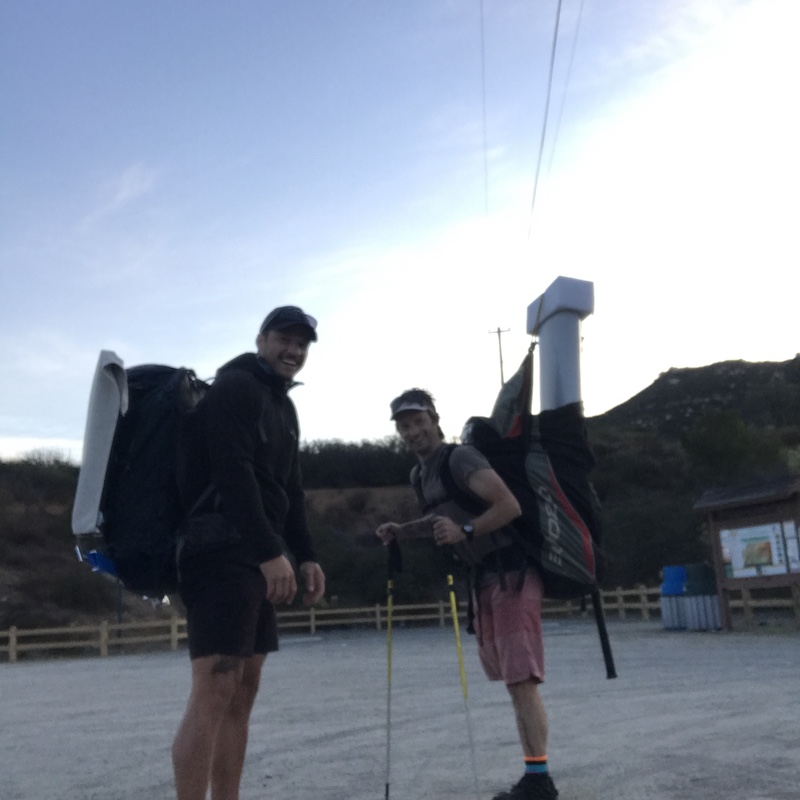
Here's me and a buddy at the beginning of my very first off grid placement (when I thought antennas mattered), about to do a 12 mile round trip hike in the mountains carrying 60 lbs each on the way out and running out of water on the way back. That was straight work, yo.

If you're looking for help to optimize YOUR hotspot placements, whether it's the one on Mom's house or the fleet you're rolling out in a far off land, consider hiring an expert for help.

In the meantime...get 'em!

How To Set Up a RUT 240 for an Off Grid Helium Hotspot - Prepare for Challenge!

· 37 min read
Nik
Site Owner

With a generous assist from the folks over at HNTenna, here's a step by step method for setting up your RUT 240 (the cell modem that allows an off grid Helium Hotspot to connect to the internet.)

I'll start by saying that off grid set ups are not for the faint of heart, the easily discouraged, or folks who avoid challenges. You WILL run into challenges. Batteries will go bad. Miners will overheat. Your data plan will need to be far larger than normal (100 GB/month is what you want as of Nov 2021.) Don't do off grids unless you're willing to proactively solve those, usually on your own.


UPDATE -- OFF GRID DATA PLANS

The latest advice (25Nov2021) is to NOT do any of the below, but to get a standard SIM card plan (I know this doesn't sound right) of 2 GB @ 4G and unlimited at 3G $15/month T-mobile and let them be relayed.

If you're determined to still go forward with this, try Proslashers instructions for the 240, over here. If you buy a pre-built VPN from him, use gristleking at checkout for $10 off your order.


Off grid set ups ARE for folks who love rad projects, who are willing to problem solve, and who get more joy out of figuring shit out rather than having a plug 'n play solution handed to 'em. Nothing wrong with either one, but there's a definite success formula here that does not favor "Please do this for me" mindsets.

Before we dig in, let me make a semi-official disclaimer: This post is a set of guidelines that have been successfully used to set up a RUT 240. No one involved in this is offering any official support, though I'll help as best I can via the Comments section at the bottom of the post. If this setup doesn't work for you, please do NOT DM me. Post to comments so we can all learn from your challenges.

Teltonkia (makers of the RUT240) have recently posted a video on how to set it up. I'll leave our old guide in here for posterity, but here's how Teltonika recommends you do it:

https://www.youtube.com/watch?v=ek\_moDNr5Is


The "Old" Way (for Posterity only, we no longer recommend this)

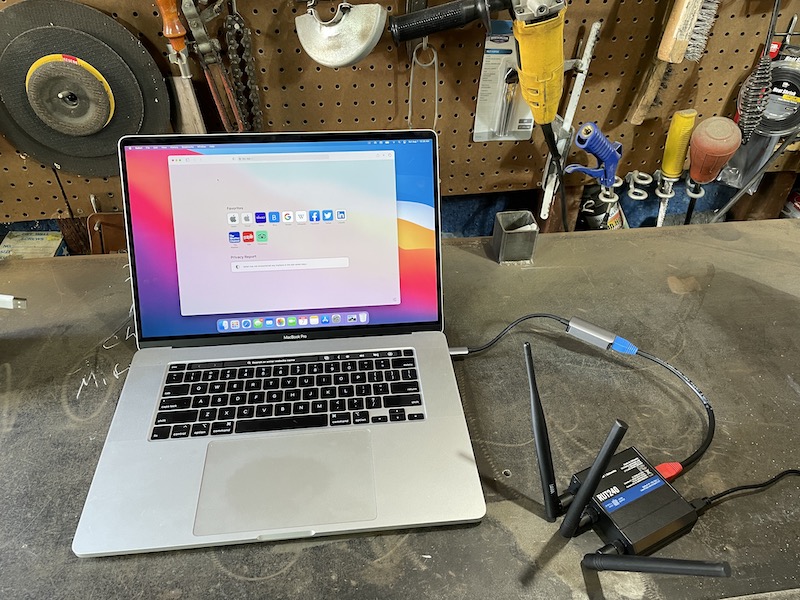
Start by turning off your computer WiFi, then connecting your computer via an ethernet cable to the RUT240's LAN port. I used an adaptor to get from Ethernet to USB-C; you can get those on Amazon.

Power up the RUT 240. Wait.

On your computer, navigate to 192.168.1.1 in your URL.

Enter admin01 for the password and click the LOGIN button.

You will be prompted to enter a new password. Do it, then click SAVE. Keep in mind that the modem can take a while to "think", so just be patient after you hit SAVE on this, and any other screen.

You now have 2 options, one simple, one complicated. They have both worked. Try the simple one and see if it works. If it doesn't, try the complicated one.

Option 1 - Setup Wizard

System —> Setup Wizard —> 

Step 1 

Set local time, enter password

Step 2

Uncheck Auto APN

APN —> Custom—> [enter your APN if you got a static IP]

Step 3 —> Skip

Step 4 Wifi —>

WiFi SSID: [Name it whatever you want]

Password: [your password]

Leave WiFi enabled for now, it’ll make setup easier later on when the system is installed, you’ll just need the laptop to access it.

Write down the Router Serial & MAC address, then log into to rms.teltonika.lt

Add Device using the MAC address & Serial number

Go to System Management and look for:

Reboot

Select auto-reboot every 24 hours by checking every day of the week.

Log out. You're done.

Option 2 - Let's Get Geeky: Not true static IP, but static DHCP lease

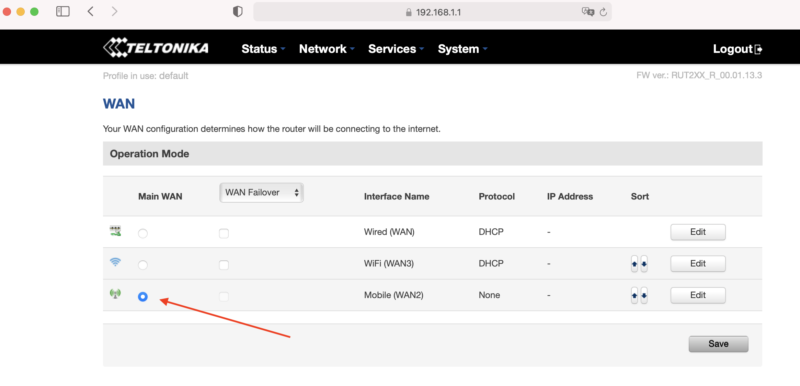
Start from just after you set the password on your RUT 240, above. Now, on the top menu bar, navigate to Network --> WAN. You'll see a screen like this, usually with Wired (WAN) selected.

Select Mobile as the Main WAN, then SAVE.

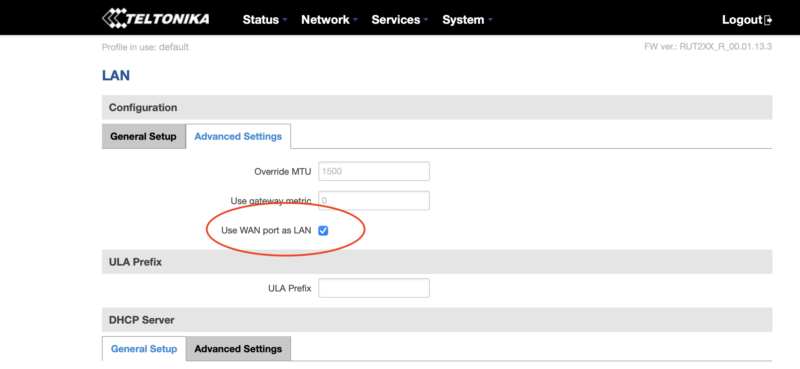
Next, in the top menu bar go to Network --> LAN and select the Advanced Settings tab.

Select Use WAN port as LAN, then SAVE.

Now navigate to Network --> Wireless, where you'll disable the WiFi. This'll disable the wireless access point and save you power, which is important for off-grid setups :)

You're crushing it. Just keep going. Ready for the next part? Read it carefully first, then execute.

Before continuing, do the following in order:

  • Unplug the ethernet cable that is connected to your computer from the LAN port on the RUT240
  • Plug the ethernet cable into the WAN port on the RUT240.
  • Connect the Helium Hotspot to the LAN port on the RUT240 with the ethernet cable supplied
  • Power on the Hotspot.

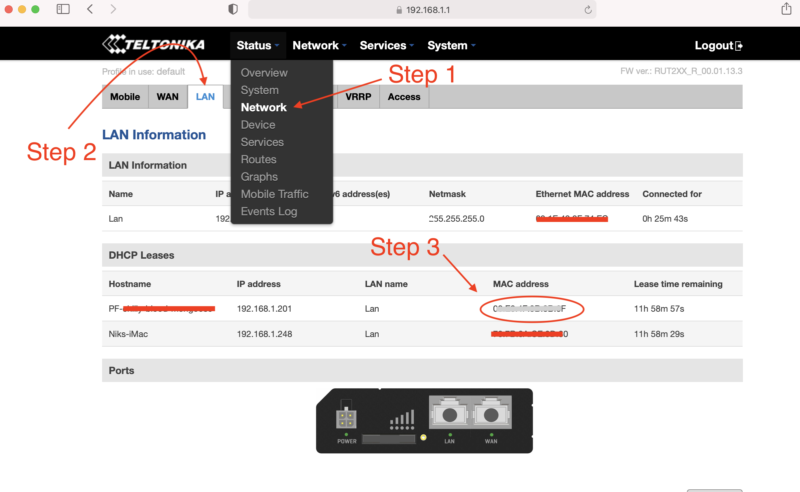
Nice work! Now, navigate to Status --> Network and click on the LAN tab. Find the MAC address of the Helium hotspot, highlight the MAC and copy it.

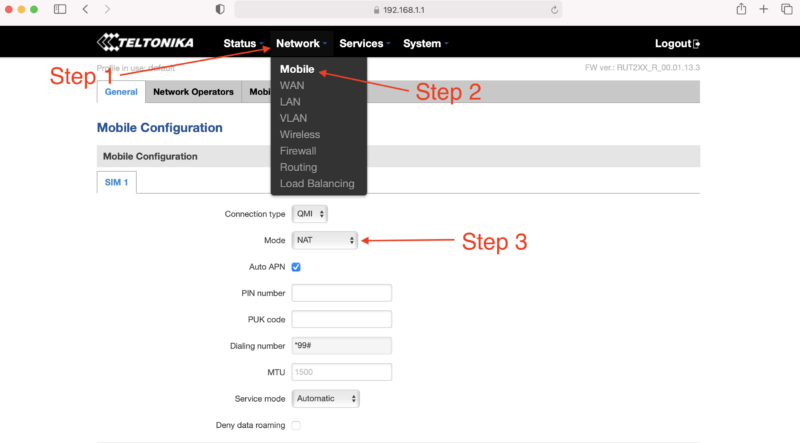
With the MAC address copied, navigate to Network --> Mobile. Look for Mode and select Passthrough.

New fields will appear. Locate the MAC Address field and paste the copied MAC address of the helium hotspot. Click SAVE.

One more thing...you have to enter your APN. I had to do this, but forgot to take screenshots of it. See where it says Auto APN on that screen, and the box is checked? Uncheck that, then follow what makes sense and enter in your APN (your SIM card provider will be where you get that.)

If that becomes a huge PITA and a sticking point, I'll update this tutorial.

How Much Data Will Your Off Grid Hotspot Need?

UPDATE: For an off grid miner as of November 2021, you're going to want 100 GB/month, and that still may not be enough. For a long time, the 50 GB/month plan called out below with T-mobile was enough, but with the blockchain size growing, it's no longer cutting it. I'll leave the rest of this in here for posterity, but any reference to plans lower than 100 GB/month is outdated and wrong.

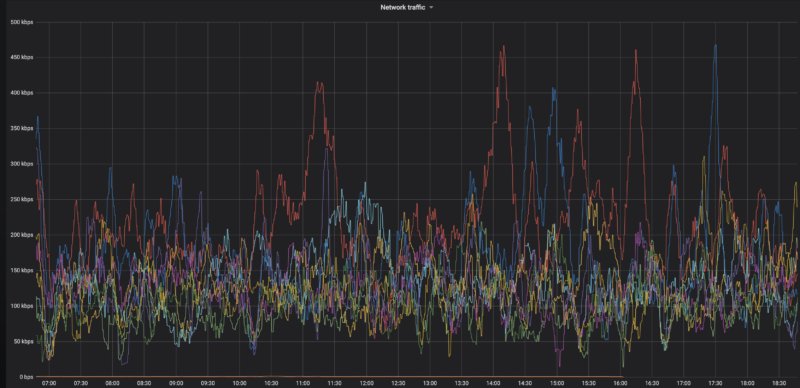
Here's a graph of the network data traffic for a group of hotspots on a 10 minute average:

Yep, that highest of high spikes is 450 kbps, and almost everything is below 300 kpbs. So, while data is important (you need a lot of it), speed is usually not. With that said, I'm getting reports in the field of 650 kbps and above spikes that temporarily shut down hotspots. Be ready with patience when that happens.

Recently I've heard from folks testing 4G speeds reporting that a 15 Mbit up/down (vs 10 down and .8 up) gave a 250% increase in HNT rewards, so speed may matter more than we thought. This is definitely worth further investigation, and the T-mobile planned called out below may not be fast enough or large enough for you, depending on the local speed of your 4G connection.

What SIM card should you use?

T-mobile has a BUSINESS (NOT personal) plan that's $50 for 50GB at 4G speed, then unlimited data at 3G speed, which is supposed to be 3 mbps minimum. That should work MOST of the time for us. If you have a plan that's working for you ALL the time, please add it to the Comments section below.

I've got a T-mobile rep who is clued into what we need, his details follow.

The plan is available nationwide in the US, and as far as the rep knows it's not going away any time soon.

T-Mobile doesn't guarantee the speed (apparently there are no speed guarantees in the world of telco wireless), but I've got clients who've been using this and it's working fine most of the time.

Here's the rep I talked to. We went through the whole Helium scenario, so when you call him he'll be prepped. Just tell him Nik from Gristleking sent ya, that should jog his memory.

Abu McLean
In order to protect his email from the bots: ABUBAKAR.MCLEAN17 then use the little @ symbol then put in T-Mobile.com
Direct: 615-445-4008
Hours: 9:15AM to 6:15PM CST (Mon – Fri)

  • You'll need a business account. You can't (as far as I know) run this off your social security number.
  • Ask for the 50 GB at $50/month plan with unlimited data at 3G after the 50.
  • You can get a Static IP for $5 more, ask for a “SOC Static Public IP”. UPDATE, MAR 21, 2022: You don't need a static IP for much longer, this may not be worth it.
  • SIM card price is the same: $20 + sales tax (~$2) per SIM card

If you email him, would you cc me (my first name, which is Nik, then @ and this website) so I can keep track of how it's going and any snags that come up?

Oh, you're in Canada? Here's what a client sent me:

FYI - I found a cell carrier with a static IP that doesn't get relayed in Canada. If you call Rogers, get a hold of their small biz department and ask for a static IP, they'll mail you a SIM card that works with the RUT240 instructions on your blog. The only problem is that because this is Canada, its $120/month for 50 GB + $20/month for every 10 GB after that, and it's $12/month for the static IP. Ouch!

-M in the great Canadia


This guide was almost entirely written by the crew at HNTenna and passed on to me. With their permission and with a few changes, I'm making it available to you. Rock on!

Archived Comments

Mike - 8/11/2021

Hey Nik, Fantastic site, man. I've probably read every article about Helium here at least twice. Regarding the RUT240 and a mobile plan, have you heard of Embedded Works/IoTDataWorks? It looks like they offer a 12-mo pre-paid unlimited data usage but only at 64K speed with an optional static IP for an extra $20. Looks like this would be perfect for Helium mining, but wondering if you had any thoughts on it. https://www.embeddedworks.net/wsim4827/


jim c - 8/12/2021

thanks i was just about to send mine back


Nik - 8/12/2021

Hi Mike, 64kb/s won't work for full fat miners, check out this link for more on that. Current miners (NOT Light Hotspots) need 300kb/s. This plan would work for Light Hotspots, which will likely need just 4kb/s.


Mike - 8/12/2021

Thanks for the reply, Nik. I had read your article about light vs full-fat miners and you mentioned monthly data usage but I didn't see anything about speed/bandwidth. I didn't realize the full miners needed so much bandwidth so I'm glad I asked.


jim c - 8/12/2021

attempt one ... fail... here's why... after switching wan port to lan port and attemptempting to swith off the wireless rut says unable to switch do to multiple access points if you then go to network , wireless and disable the extra AP it will refresh and give another AP automatically. I would keep working through this and see if it works right now i dont need to power off my bobcat when i do i will revisit and update


Rex - 8/17/2021

Hi Nik: It's great to finally have an excuse to write you! It sounds like finding a compatible SIM card for the RUT 240 is the problem statement here. I'm calling around and haven't found a solution yet. But... I may have found an alternative. Verizon offers a device called the jetpack 8800L. It costs about $200 and they offered me a monthly plan for $20. https://www.verizon.com/internet-devices/verizon-jetpack-mifi-8800l/ Is this a viable solution? Are there better options out there?


Nik - 8/17/2021

Hi Rex, right on! I wouldn't trust a Jetpack for off-in-the-mountains off grids, but a lot of people are successfully using 'em in the city.


Mauricio Curbelo - 8/18/2021

Anyone found a SIM card that works in Canada?


RG - 8/19/2021

Rex / Nik: I'm using this setup in a building where internet isn't available. Verizon and probably the other mobile carriers are using Carrier-grade NAT. Even after opening TCP port 44158 on the jetpack, my miner is still relayed. I'm hoping that I can get a static IP from Verizon, will contact them and report back. Nik: you say that a lot of people have been successful with this setup? how did they resolve the relayed issue?


Nik - 8/19/2021

Hey RG, I'm looking for a solution as well; the old T-mobile one was fine (and worked with this), but T-mobile no longer offers that program. I've been hearing that Mint is a good option, but I haven't used it yet.


Rex - 8/19/2021

RG and Nik: Oh man. I'm installing my first miner and after a day of toiling around with it got past the relay blues. I spoke with the Teltonika and CradlePoint folks yesterday. The CradlePoint IBR 600 series is mobile carrier agnostic but sells for $600 while the IBR 400 you have to pick your vendor up front for $400. The Teltonkia is $170 and I think is vendor agnostic. I'm purchasing one and going to run some tests with it. As a general rule, I'd rather pay a few more bucks upfront then be stuck in a perpetual big monthly expense tied to an uncertain revenue stream...


Nik - 8/19/2021

Yep, I've used Cradlepoint 650C and 200 and both work very well, just way more expensive.


Riley - 8/21/2021

Hello Nik. Aside from the instructions you've provided, I'm assuming that you still want to create a static IP for the miner and port forward 44158, right? I also saw on Discord that you recommend purchasing an "SOC Static Public IP". Would this purchased IP be for the RUT or for the miner?


Brandon - 8/21/2021

Thank you for all the great content on your page! After opening 44158, is purchasing a static IP from the carrier the only way to resolve relayed status? With Verizon is looks like $500 to purchase static and a business account is required. Can anyone confirm this or know of another option?


Nik - 8/21/2021

Hi Brandon, it *might* be the best way to resolve that. I'd look into T-mobile, they seem to have plans for businesses (not sole proprietors) that are $55/month for 100 GB. That seems to not be reliably there, depending on the sales associate you talk to. Sometimes they'll do it, sometimes you just have to hang up and call back to get another one. :)


Nik - 8/21/2021

Hey Riley, Yep, the static IP and port forward are recommended. The static IP would be for the RUT.


Marie - 8/23/2021

Great article thanks! Setting up my first remote setup :) Regarding the APN, can we leave it on auto APN? Or do we absolutely need to setup it up manually?


Nik - 8/23/2021

Hi Marie, Sometimes the auto APN seems to work, sometimes it doesn't. This whole business is tricky with lots of trial and error, please let us know what ends up working for you so we can share the success knowledge. :)


drew - 8/27/2021

Hey Nik, I followed this tutorial (thanks for that) and my speeds are grossly slow.. According to speedtest, the best i got download was 1.6mbps and upload was .01 (believe it or not). I did the business account with Tmobile so we should be good there.. I was thinking maybe the antennas that came with the RUT are lousy so I ordered the Quspot one. What minimum dl/ul speeds do you think are necessary for the hotspots? Also I may test out some QoS settings, that might help.. I noticed there are some existing ones there, any thoughts on changing those to normal?


Nik - 8/27/2021

Hi Drew, you'll need 300 kbps for the miner, that's mostly for download. Sounds like the upload side is a problem for that. Double check with T-mobile, it may just be the coverage in your area (though I'm not sure about that at all.)


RG - 8/30/2021

Using a mint sim in a MiFi card will work but isn't viable. Mint's unlimited data plan caps Mobile Hotspot use at 5GB. The next plan under unlimited has free mobile hotspot but is only 15GB a month. Hotspot data is drawn from the monthly allotment and speeds are slowed until the next cycle. I couldn't test port forwarding: The Alacatel Mifi card bought from Amazon doesn't have port forwarding on its dashboard, just Mac filter and some other basic stuff. If other Mint MiFi folks have a different setup, I'm all ears.


Nik - 8/31/2021

Hi RG, have you tried the T-mobile plan at the bottom of this post?


RG - 8/31/2021

Nik, I'll give it a whirl and report back.


Dave - 8/31/2021

I think I am purpose of this tutorial. Questions: 1. Why not run the miner off the LAN port without any configuration? 2. Why do you need to configure the WAN port as a LAN port? 3. Any guess as to how much battery power is be saved by turning off the WIFI on the router? -I was thinking I would want to leave it on so I can easily survey the internet speed and connectivity of my off-grid hotspot. *FYI- I am able to use my Google Fi sim on the Rut 240 (RUTRUT24001U000).


BCH - 9/5/2021

Thank you Nik for this nice article. I have read many on your website and am impressed by your work. I am using a RUT240 and RUT950 (240‘s were out of stock). The main challenge getting rid of relayed is that most mobile carriers run CGNAT which means you do not have a public IP address but get one which is already in their NAT. To receive such a card in Switzerland I only found one carrier (Sunrise) and they charge you 60$ and you need a business account. I see many relayed devices in my area which earn decent amount of HNT. Since Friday morning I am having the same issue as many others… my miners are fully synced since more than 8 hours. When I use the discovery mode I see many hotspots but I haven‘t issued a PoC or witnessed one in more than 3333 blocks…. Hope this gets sorted out by Helium soon.


Nik - 9/5/2021

Yeah, the network is still struggling to keep up. Glorious opportunity, but lots of chaos. Might check with Andreas Spiess for SIM card options; he's the only Swiss guy I can think of who's probably helpful with IoT stuff, though he's skeptical of Helium. :)


Mario - 10/6/2021

Hi Nik, just getting accustomed with the RUT240 remote management and need a bit of guidance. I just stumbled upon management-deviceaccess where "This function provides you with the possibility to set up remote HTTP access to devices that are connected to a device's LAN, provided that the device in question has been registered to RMS." There are four inputs needed: 1 Name (obviously whatever you want) 2 Destination IP (believe 192.xxx.xxx of the Bobcat) --> 3 Destination port? (hmm, tried putting 80 as that's the default on the Teltonika wiki and 44158, both did not work). 4 Protocol (HTTP or HTTPS?) Or is it not working because "provided that the device in question has been registered to RMS" means that I somehow would need to register the Bobcat to RMS for it to work? (sorry if this seems silly) PS after updating the RUT to the latest firmware I am now getting temperature updates, which is useful!


Nik - 10/6/2021

Hi Mario. I checked with the author of that guide, here's what he had to say: The default port for the HTTP protocol is 80 and the default port for the HTTPS protocol is 443, so a HTTP server waits for requests on those ports. Select the protocol you want to use and then have that port be open for it. So if HTTP then Port 80 or HTTPS then port 443 Registering the bobcat in the RMS most likely means entering its MAC and IP into a table whereever the RMS lives Hope this guy still has his on the bench and can easily test.


Mario - 10/10/2021

Hi Nik, thx for putting in the effort and reaching out to the author! Tried all the combinations - no use, not letting me into the Bobcat 300 remotely. Can get into RUT240 though through RMS and WEBUI proxy. Guess something extra needs to be done for it to work. So, for now, unfortunately no remote temperature checkup, no remote OTA & diagnostic, restarting the Bobcat etc. Btw looks like my RUT240s &/or bobcats keep changing the setup so having difficulty even setting them up and making them stable. It keeps going from NAT:none to NAT: symmetric. Port 44158 stays open, connected: yes, dialable: yes. Even the helium api in OTA says "listen_address": "/ip4/109.xxx.x.xx/tcp/44158" height: 1047354". So no p2p (relay) which should be right, yes? I followed your guide and added 2 things: (1) NETWORK-LAN-STATIC-LEASES Passthrough E8:XX:XX:XX:XX 109:XXX:X:XX (this was added automatically through the guide NETWORK-MOBILE-PASSTHROUGH-COPYMAC-SAVE) Bobcat E8:XX:XX:XX:XX (192.168.X.XXX) 192.168.X.XXX (this I added because I read I need to do through another source) (2) NETWORK-FIREWALL-PORTFORWARDING Bobcat TCP 44158 192.169.X.XXX 44158 Didn't work (longterm)... so even tried adding one more port forward (again, another source, ) NETWORK-FIREWALL-PORTFORWARDING Bobcat TCP 44158 192.169.X.XXX 44158 Passthrough TCP 44158 109:XXX:X:XX 44158 And that works (for now), on 1/3 RUT240s... So in light of all this craziness its causing me, do you have an option for remote RUT240 setup (#Croatia)? or, what does one after: 1 calling the ISP and asking them to remove CGNAT; 2 adding the APN they say & following 3 following "How To Set Up a RUT240 for an Off Grid Helium Hotspot - Prepare for Challenge!" have to do to set the RUT240 all the way? Apologies if I'm being a PITA. Just trying to join the Helium revolution from another country and doing my best.


Nik - 10/10/2021

Mario, Thanks for chiming in and adding your experiences & findings, super helpful! I don't think there's an easy way to monitor the hotspots themselves yet. I'd look for a networking expert to get help on the 240 side; they can probably walk you through custom settings as well as how to interpret the results. This blog post is mostly to get you started and to show one way that has worked.


Joe Hrdina - 10/20/2021

Hey Nik. Just wanted to say thanks for all the info you've shared. Since running the off-grid units, what have you averaged for actual data usage? I've seen some people claiming 100s of GB in a month.


Nik - 10/20/2021

Hi Joe, 100 GB/month is not unheard of right now, and it'll keep getting worse until Light Hotspots come. I haven't found a better plan than the T-mobile one, but it's getting to be "not enough".


Josh - 10/22/2021

has anyone had any success in port forwarding 44158 with a static ip? I have secured a static IP with my ISP but cannot get miner out of relay. ISP has no firewall with the APN they provided for my static IP and my Rut240 has the port open in both directions and I'm at a loss here.


Mario - 10/24/2021

Hi Josh, I have 4x RU240s and still struggling. Taking hours and hours and shouldn't be like that. After all, it's definitely not a cheap router. Dunno if it will help cuz I don't have a static IP from ISP, but here's how I do it without. After GristleKings tutorial you also need to do 4 things: 1) NETWORK-LAN-STATIC-LEASES Passthrough E8:XX:XX:XX:XX 109:XXX:X:XX (you will have this when you finish the MOBILE-PASSTHROUGH step). bobcatminer / E8:XX:XX:XX:XX (109:XXX:X:XX) / 192.168.X.XXX (you add this after it) Save & WAIT... (important!) until the little thing in the top right stops spinning. 2) NETWORK-FIREWALL-GENERAL: Input should be: accept. Output should be: accept. Forward: mine is reject by default but seems to work. (any network expert here?) 3) NETWORK-FIREWALL-PORTFORWARDING bobcatminer TCP 44158 192.168.X.XXX 44158 Save & WAIT... (important!) until the little thing in the top right stops spinning. 4) REBOOT THE MINER & wait. Is there is a network expert here and if I did something wrong or something can be done better or something should be done before something is done please tell me. Also, sometimes, when someone accidentally unplugs everythings (happens at some out-of-home locations) my BOBCATS become relayed. Hate that. So, if someone knows a workaround - please help! :)


Josh - 10/27/2021

Mario: I figured it out. First of all, you need to have your APN provisioned with a static ip. You will need to open a business account and pay extra monthly to maintain the static ip. You will also spend countless hours attempting to reach the right person/department that can get you in touch with the division that will handle the APN provisioning. Once you have a static ip RUT240 will not stay out of relayed. Even with the port opened correctly, you find the miner going in and out of relayed mode. I solved this problem by using a CraddlePoint device over the RUT.Unfortunately the Craddlepoint device is twice the cost of the RUT. Now the next issue. The Craddlepoint is a 12V vs the 5V RUT240, so you may need to use a different battery/solar panel to allow for the extra energy consumption. My miner is off-grid, non-relayed with a healthy connection now. However... My earnings did not increase nor decrease so ultimately the trouble I went through was all for nothing lol. To make sure that being out of relayed does not really make a difference with earnings I tried on another one of my locations, and guess what...? No change in earnings. I no longer bother with getting my off-grid units out of relay mode. It's a lot of trouble, time and costs that are simply unnecessary for hotspots that are setup on mountain tops with plenty of other hotspots connections that can easily be 'relayed' with little to no loss in earnings. Good luck!


Dillon - 10/29/2021

Hey Nik, So I just ordered a rut 240 for my remote miner setup and I was looking at data plans and I came across nolimitdata.net and they do 900gb plans for $90 a month. I know it’s a bit overkill but do you think it would be worth considering for a remote miner setup? Any other recommendations would be great as well.


Nik - 10/29/2021

Def. overkill, but probably better that than underkill. What speed is that data at? 4G seems to be the min.


Dillon - 10/29/2021

It’s 4g at 1.5 mbps


Warren - 10/29/2021

I looked at the offering for nolimitdata.net, and it advertises 10-50 Mbps download speed. No mention of upload speed. I am just beginning to to consider a remote setup. Am I correct on assuming that tethering to a cell phone is not feasible?


Nik - 10/29/2021

Feasible, just not recommended. :)


Andreas - 11/1/2021

Thanks a lot for the great content. I've bought all the parts for a nice offgrid setup, but am currently stuck on how to power the RUT240. I have a Victron 75/15 charge controller connected to a battery and a solar panel. How do I make sure I have exactly the right power supply for the RUT? Any tips?


Nik - 11/1/2021

Hi Andreas, the RUT240 takes 9-30v; you can just power it straight from the Victron.


stephen - 11/2/2021

Remote management system Remote HTTPS settings Name : Bob IP: 192.168.1.123 (obviously the miner IP) Port: 80 Protocol: HTTP and then we get access to the web UI for speed test etc. ?


Mario - 11/5/2021

@Stephen --> tried and tested, yes! :)


Reggie - 11/8/2021

Hi Nik, Do I need my own business account to get the sim card from T-mobile? Do you have any other carriers you can suggest that would not require a business account? I have a mobile hotspot from cricket wiereless. Could I possibly use the sim card from this and put it in a rut 240 and make it work?


Nik - 11/8/2021

Hi Reggie, you'll need a business account to get a SIM card from T-mobile. I guess it doesn't technically have to be yours. I don't have any other carriers right now. You can try the Cricket mobile hotspot, but I'd consider that a very temporary solution.


Blair Wells - 11/10/2021

Nik, im hesitant to hook the RUT240 up to to the wanderer. so if what i have read is right, i use pins 1 and 2 not 3 & 4 only? is there a link to a 4pin connector for just power and ground?


Nik - 11/10/2021

Not sure. I just cut the connector and hooked it directly in. The RUT will take 9-30v and the Wanderer puts out 12.


David Morefield - 11/12/2021

Nik, I recently have felt thee squeeze of death from T-mobile and their 50gb data plans. My remote sites (my top two earners) are on rooftops in the Houston area. I would hit the 50gb wall about 15-16 days into the month and boom, I was down until the next billing cycle. Given your affinity for the Teltonika RUT240, I decided to order a couple for the Verizon network and go with an unlimited plan through them. Figuring out the network configuration was not easy, but I was able to find my way. I have posted a link with a step by step for configuring a RUT240 for Verizon on my website - https://basicbitcoinstrategy.com/configuring-the-teltonika-rut240-for-verizon/ I also am really digging the RMS tool that allows you to remotely manage a device connected to your RUT240 via a webgui, this ought to allow me to connect to a hotspot like a SenseCap, Syncrobit or Bobcat for functions like fast sync or manually initiating updates. I am looking forward to getting these out in the field on Verizon :)


tony - 11/13/2021

nice writeup, but after clicking the WAN port as LAN and SAVE, I'm unable to log back to 192.168.1.1 Anyone having that issue? Wireless still works fine on laptop (haven't gone to the next step of disabling it). Any ideas if WAN port as LAN is really needed?


Blair - 11/27/2021

solar setup in the lab, Verizon 150gb plan prepaid - I spent a lot of time trying to configure my RUT240 i tried PPP and QMI as suggested here. I have had 0 success. The mobile data will connect, however my miner gets no data. i get data going through it i guess, but max of 5kbs and i have no idea what data is passing. RMS does not work when mobile connected. cannot connect my miner into the front of the device without sending the RUT into immediate, definite cause and effect slow blink of death on my RUT. Tried a syncrobit, Rak and sensecap. I have no idea how any of you guys have this thing working... at all, makes it more frustrating bc i know it can, but not for me. is there a link that has ALL of the correct settings? i tried what was here and also in all of the comments, and it still does not work. ANY help would be amazing! Thanks!


Nik - 11/28/2021

Hi Blair, you are not alone, I've had some frustrating experiences with the RUT240 as well. The Teltonika forums are pretty good for getting help, or you could factory reset and use Proslasher's instructions for a VPN, here.


Nik - 11/28/2021

Right on, let me know how it goes!


Blair - 11/28/2021

will do, thank you so much, how on Earth you figured this all out on your own baffles me. Truly a pillar-to-post member of our network. I am researching today while my battery charges, will work tonight and update later.


Nik - 11/28/2021

Lots of banging my head against a wall until the wall gave way. :)


Mat - 12/1/2021

I don't know if this helps anyone in terms of data usage but I am using a verizon hotspot (relayed) in a high altitude location with lots of traffic. (Southern California) For the first time I have reached over 100gb, I imagine if I wasn't relayed I might have hit over 100gb sooner.


Orr - 12/29/2021

My RUT240 went offline as soon as I saved after the Passthrough / pasting the miner's MAC address step. The host reported that wifi is still on so the modem is working, I just can't connect remotely. Did this happen to you as well?


Cody - 1/13/2022

The issues with this still a thing? I've finally pieced together everything I need for an off grid and came back for the instructions on the router and saw this. Just my luck ha!


Nik - 1/13/2022

Seems to be pretty variable; some folks having no problems, some are flatlined. May have connection to the recent uncovering of the denylist Helium was using to combat gaming. I'd expect any off grid right now to present challenges above and beyond a normal hotspot deployment. Proceed if you like solving problems! :)


Cody - 1/13/2022

Ah gotcha. I'll give it a go and see what happens! Thanks for the info


Sal - 1/23/2022

I'm having a similar issue. My RUT240 has internet access but I can't get the internet to the miner. It's extremely frustrating. Been working at it for over 3 days. I have followed step by step 50 times and still cant get the miner to connect. Any ideas?


klis10 - 1/26/2022

Have several RUT240s with Bobcat miners and T-mobile business static IP addresses. Results from first install in November have been lousy and am thinking of converting the other SIM cards back to regular non-static addresses and monthly low data consumer plans as Nik suggested in late Nov. Doesn't seem worth paying for $55 monthly plan at this point. Any other suggestion?


Doug - 2/1/2022

Hi Nik, just wondering why you've suggested nonstatic IP and the 2GB plan, then 3g unlimited. Will the miner still be using internet from the rut to stay synced? If it's relayed, I thought it would just borrow internet from other hotspots. If so, why have a router at all? For now I'm going to try your suggestion of the $15/month tmobile plan, but would appreciate any elaboration. Thanks!


Nik - 2/1/2022

Just reporting what I'm hearing for folks with full fat hotspots deployed in the field. Yes, the miner will still be using internet.


Ryan - 2/4/2022

@ BLAIR did you get through the RUT240 setup? I experienced the exact same challenge you described. Yesterday I believe I finally broke through. Yet I still don't know exactly what caused the issue. I just reconfigured again and again. Finally went with near default settings. I did learn that t-mobile just plain never configured the static IP they sold me and it took contacting the sales rep to get it done. Support was really bad but of course the sales rep was pretty sharp.


Ryan - 2/4/2022

@Blair, the RUT240 cord (at least mine) contains only 2 wires (red / black) despite the weird connection to the device. I've powered it direct into the wanderer. Also, I only succeeded getting the MINER to connect to the hotspot's internet upon plugging it directly into the Wanderer. I've had it running through a step down / resister usb-thing because I thought that was safer. At least in my case, the miner appeared to power OK but it would give weird errors regarding including "Too many DNS lookups" and others which caused about 1 week of madness on my end. Finally I theorized it was a power issue. Of course, it actually could have been something else I accidentally fixed in the process. But I'm finally online today. The crazy thing is I could have sworn the damn thing worked fine in testing.


Shukhrat - 2/21/2022

Hi. Thanks for the tutorial. I got rut240 and updated the firmware to the latest. I got verizon sim to work on it. It shows that is has data connection. However, I cannot get the internet to go to the sensecap miner. Can you help?


Nik - 2/21/2022

Hi Shukhrat, are you connecting directly via ethernet cable through the LAN port? That should solve it.


Shukhrat - 2/22/2022

Hi Nik, I am connecting the sensecap to rut via the lan port. I am connecting the laptop to rut via the wan port. I followed the steps to make wan port act as lan. The rut dashboard shows connection and even has up and down packets going thru. However, i cannot ping from it. 100% data loss. and i cannot get the miner up. yesterday the miner was up for a bit but then i still could not ping.


Nik - 2/22/2022

Hmm, I wonder if it's an issue with the IP address you've been assigned.


Shukhrat - 2/22/2022

Nik, so after chatting for over 2 hours with verzion i found out that I cannot use my plan with that device. I have to upgrade to a business plan. what plan/provider do u use?


Nik - 2/22/2022

Hmm, for a while it was T-mobile. Abu (the T-mobile rep) has his info at the bottom of the page, I'd start with calling him. Your other option is to check in on the Helium #enclosures-off-grid channel to see what the latest recs are.


Matthew - 3/16/2022

Are you suggesting putting the SIM card into the RUT240? I have finestra miner without a SIM card slot. Also, are there any other providers you know who can do this and still offer a static IP?


Nik - 3/16/2022

Yep, that's where it goes.


Patrick - 3/17/2022

Wanted to give my experience and see if anyone has any ideas. I’ve followed the set up directions over and over again from base factory settings. I currently am using an ATT prepaid card with a 100gigs with a sencap but will switch it unlimited through first net if I can get it working. I have good service when i connect via wifi but i can’t get the port 44158 to show as open using a port checker no matter what i do. I set a static IP and port forwarding rule but nothing works. This is what I’ve done over and over again. Please help ??


Matthew - 3/18/2022

I'd be curious to see the response for Patrick too. I'm about to purchase the same set-up. On a different note - What about the Cellular antenna and cable? What cable do you use to go from the cellular router to outside the enclosure? Also, what cellular antenna do you use outside the enclosure? Can you use the rut240 factory antenna outside, wrapped in silicone tape at base? If I need to run the cellular cable 40 feet, will that cause any problems?


Nik - 3/19/2022

In San Diego I've just run LMR195 or 240 from the cell modem inside the enclosure to the antennas mounted directly into the wall of the enclosure. No problems with that so far. I don't have a great answer on the port forwarding question.


Sam - 3/22/2022

Im also curious to see if anyone has any solutions or ideas for Patrick's setup.Ive invested a lot of time and money to have my remote setup up for it to be relayed. I have scoured the internet, but I'm sure I am missing something. The only difference for examples I see online is the firmware. I updated to the latest firmware the RUT240 had to offer, could this be affecting the relayed status?


Mario - 4/1/2022

Hi Nik. Quick question, I just noticed the part "select auto reboot every 24 hours" on the RUT240. I don't think it was always there (months ago). Any particular reason for that and won't it change the listen ip every 24 hours then..? (option 2 - lets get geeky, not true static ip but static dhcp lease). Thx!


Nik - 4/1/2022

I also forget when that got added in. I had heard from a number of off gridders they felt it helped them avoid relay. Thanks for the correction!


Scottie Davis - 4/15/2022

Hey Nik, if we ever actually make it to lite hotspots, what would you estimate the amount of data usage/data plan we would need?


Nik - 4/15/2022

Hi Scottie, we'll make it. ;) 75-100MB/month. More on 'em here. Rock on!


How To Use PoE To Power Your Helium Hotspot

· 8 min read
Nik
Site Owner

How do you use PoE? Do you need a splitter, an injector, or both? How does it all work?

Let's dive in! PoE is one of those things most of us never have to deal with and can seem like a mystery. It's not. It's super simple, let me show you how it works.

First, P-O-E stands for Power Over Ethernet. It's a way to combine BOTH the power AND the Ethernet connection into one cable. You're literally running power over an ethernet cable.

When deciding to use PoE, check to see if your hotspot supports it natively like the Nebra Outdoor (Option 1, below) or doesn't (Option 2.)

Here's a handy Hotspot Connection table to figure out what you have.

Note on the Syncrobits that they have "Passive PoE", which is non-standard. Make sure you get the right type of Injector for them. Ok, on to the diagram.

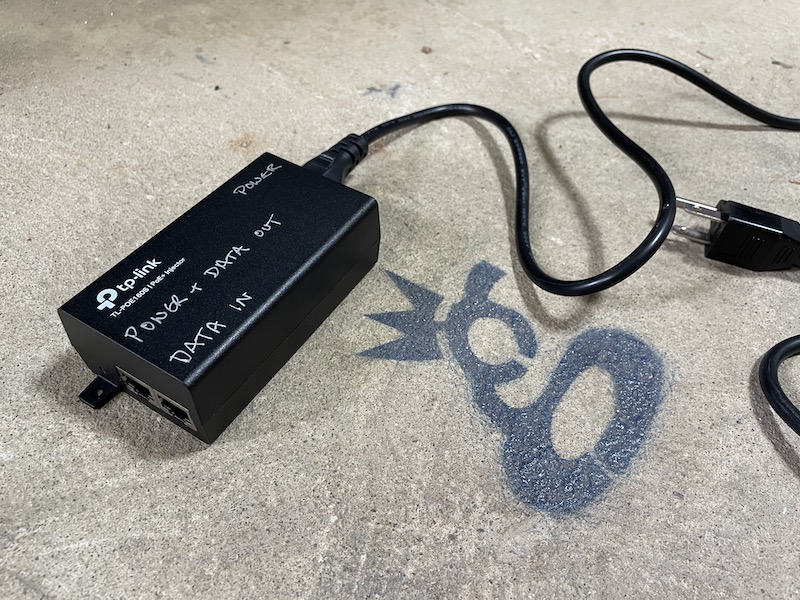
Ok, but what do injectors or splitters actually look like? We'll start with an Injector:

See how the power cord comes in on the right side, and then there are 2 ports on the left?

One of those ports, "Data In", is for the ethernet cord that comes FROM your router. That brings the data INTO the injector.

The other port, labeled "Power & Data Out", is what you'll use to take both power and data OUT, going up to 300' over an ethernet cable to your hotspot.

What about the Splitter? What do those look like, and when would you need one?

First, look up your hotspot specs. SOME hotspots (the outdoor Nebra, for example) support PoE natively; they don't need a Splitter on the far end.

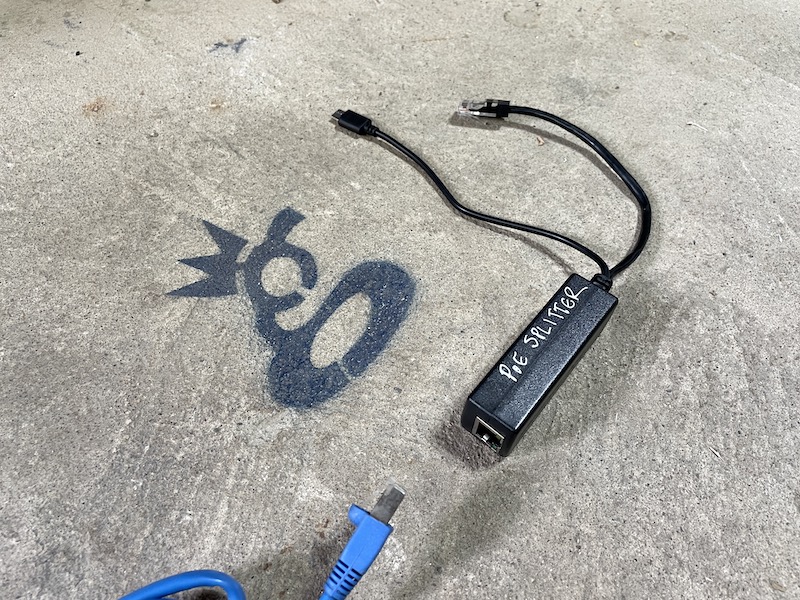
However, if your hotspot has a port for a power plug (USB-C, barrel plug, etc) AND an Ethernet port you can use a PoE Splitter. Those look like this:

That blue cable coming in from the bottom represents the long cable run from the Injector to wherever your hotspot is. The Splitter than splits out the Power and the Ethernet, and you connect both to your hotspot.

The one tricky thing is being careful to not "double power" your hotspot. Don't run PoE AND a power cable to the hotspot. It sounds silly, I know, but I've heard stories about the "people who think more is better", so I figured I'd warn ya.

If you'd like to support the blog, pick up your PoE Injectors & Splitters via these links:

If you learn best by watching something, here's a video. Yeah, the cables are a little messy in the vid. If that part of it confuses you, well shit, you're probably having trouble tying your shoes and should stay away from putting up badass hotspot placements.

https://www.youtube.com/watch?v=oHzBNQOHqrY&t=7s

That's PoE explained. Get after it!

Wait, you want to see what it looks like in an actual enclosure, with a hotspot, and all fancy? Here ya go:

https://www.youtube.com/watch?v=pKCWOBQy22U

~Nik @ GK

Archived Comments

Stephen - 7/25/2021

Thanks Nik. I use these injector/splitters on my Bobcats, they work perfectly and a little less bulky: https://www.amazon.ae/gp/product/B08P8Z5PDQ/ref=ppx\_yo\_dt\_b\_asin\_title\_o04\_s00?ie=UTF8&psc=1 A few more benefits for users to think about when using PoE: a. by removing power adapters from your outdoor case you're also reducing the heat a little. b. by having easier access to the power source (lets say at ground level or at least indoors), it's much easier to power cycle the unit.


Marcus Makabenta - 8/4/2021

Why my ethernet port from my spectrum wifi router is not going when connected to poe injector (basically all cables are connected correctly). Thank you for the answer.


Nik - 8/4/2021

Hmm, I'm not sure mug. Sorry!


CaptMartini - 8/16/2021

Brilliant write-up. Much appreciated. This makes for a clean and tiddy install. I will pay it forward. Cheers.


Nik - 8/16/2021

Hell yeah, love hearing that. Rock on Cap!


Jake - 9/3/2021

For the Outdoor Nebra - does it matter if the injector you buy is 100mbps or 1000?


Nik - 9/3/2021

Probably not; data rate on the hotspots rarely exceed 300 kpbs.


Darren Warren - 9/13/2021

Since I have a Syncrobit I need to make sure I buy a passive injector? Example: TP-Link PoE Injector | PoE Adapter 24V DC Passive PoE Thanks!


Nik - 9/13/2021

Hi Darren, Syncrobit says "Support for Passive PoE" on their spec sheet. I'd double check with them just to be sure.


Dylan - 9/14/2021

My POE splitter is very hot. I bought a DSLRKIT Active PoE Splitter 48V to 5V 5.2V 2.4A USB TYPE A Female 802.3af for tablets and just used a short USB A Male to USB C cable to go into the Sensecap M1.


Andrew - 9/26/2021

Does bobcat run on 802.3at or 802.3af? Does it matter? Don't want to fry my rig.


Nik - 9/27/2021

Good question Andrew, I'd check with Bobcat to make sure. They don't say anything about it on their spec sheet.


Nelson - 10/22/2021

Thanks for the great post. I have a setup where its much easier to get my Ethernet cable from the bobcat to a wifi extender rather than the router. Do you know of any issues using this setup. Thus far, I haven't been able to get it online even after trying a port forward.


Nik - 10/22/2021

I've heard of other people having the same issues with WiFi extenders. Always best to go straight from the router into your Hotspot via ethernet, even when it's a lot harder to do. :)


Raf - 11/16/2021

Bobcat operates on 2.4Ghz Wi-Fi (802.11.b/g/n) Source: Joe P#0175 (discord channel) Joe Petrungaro 7/27/2021 Thanks a lot for your posts Nik \(^_^)/


Amos - 12/16/2021

Instead of a POE Injector splitter can I use a POE switch. I have a POE Switch powering other devices.


Nik - 12/16/2021

Hi Amos, sure, the PoE switch should be able to replace the injector. You'll still need a splitter on the Hotspot side if it's not PoE capable.


Richard - 12/17/2021

Hey KING, I was doing an upgrade to my RAK and installed a POE splitter to tidy up a hotspot and now my miner says its RELAYING, didn't before installing the POE splitter. Any thoughts or give it some time?


Nik - 12/17/2021

Shouldn't be the splitter that's the issue. Go through Jason's relay flow over here, that should get you sorted.


Light Hotspots Explained

· 27 min read
Nik
Site Owner

What the heck is a Helium Light Hotspot, and why does it matter? If you're not tech savvy, the whole thing can seem confusing. Let's clear it up.

We'll begin with the different types of Hotspots: Regular, Light, and Data Only.

Regular (I call 'em Full Fat) Hotspots are what Helium started out with. They create challenges, they beacon, they witness other hotspots, AND they store a copy of the blockchain on 'em. That last part began creating problems as the network and the blockchain grew.

As the blockchain grew, it took up more and more of the memory of those hotspots, causing the blockchain to bog down. With the blockchain bogged down, hotspots had trouble getting their witness and beacon receipts recorded, which caused spiky (and unsettling) earnings as well as blockchain stalls. Nobody likes it when your money stalls.

To solve this, the Helium community came up with, voted on, and passed the idea to create a new entity on the network called a Validator. Validators don't do anything except blockchain stuff. They neither beacon nor witness. They can *create* a challenge for Light Hotspots, but for now (March 2022) they just validate (hence the name) all the receipts for all the challenges and witnesses and beacons that hotspots submit. With those validated receipts they form a block and add it to the blockchain.

Having Validators allows us (all of the Helium network) to create and use what's called a "Light Hotspot". Light Hotspots don't have to keep a copy of the blockchain; Validators do that for them.

Validators can also create Challenges for Light Hotspots to Beacon. I know, I know, this is getting confusing.

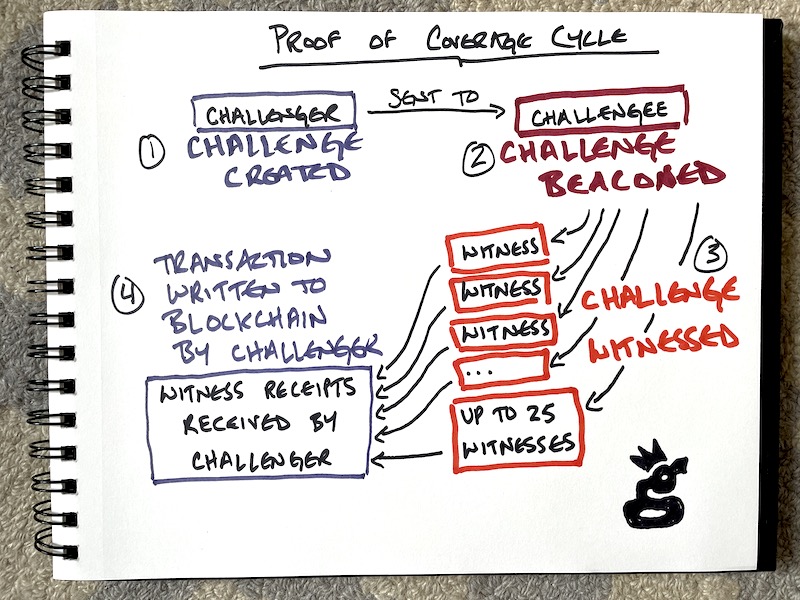
To clear it up, here's a short diagram of how the Proof of Coverage Cycle works (the number of hotspots has now dropped from 25 to 14)

Light Hotspots will only be able to do steps 2 and 3, above. Those earn the lion's share of PoC HNT.

Light Hotspots won't do step 1 or 4. You may think that'll lose you a bunch, but it won't. A Light Hotspot misses out on earning HNT because it won't create Challenges (aka being a PoC Challenger.) Creating Challenges doesn't earn very much; less than 1% of all HNT distributed per epoch. An epoch is 30 blocks, and blocks are mined about one every minute.

Light Hotspots will still be able to earn for Beaconing (being a Challengee) and Witnessing. Here's how it breaks down:

Now, that leaves one more entity to deal with, a Data Only Hotspot. Data Only Hotspots will ONLY be rewarded for processing data. They won't be able to earn for challenges, witnesses or beacons. They won't need to. Data Only Hotspots are what the 5G version of a hotspot will be; Data Monsters, and almost nothing else. :)

So, that's the Proof Of Coverage Cycle, which you need in order to understand the next part.

Now, let's get into what makes a Light Hotspot different from a Regular (Full Fat) Hotspot in slightly more technical terms.

The flow starts with Sensors, because that's what Helium is built for.

This introduction of "Sensors" can be confusing, because most of what you've paid attention to and heard about so far is your hotspot (also known as a "gateway") getting rewarded solely for connecting (Challenging, Beaconing, & Witnessing) to other hotspots.

Still, sensors are the whole reason the network is being built, so I'm including them in their rightful position at the top of the line.

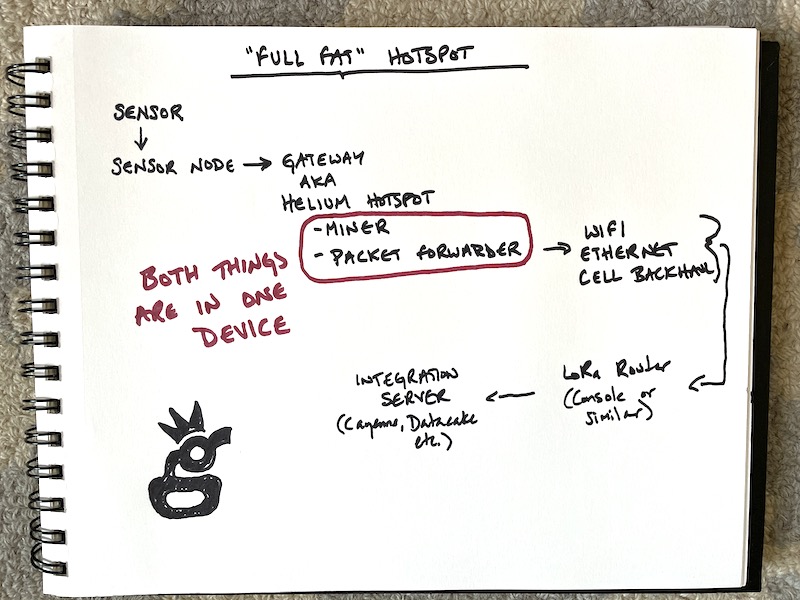
For now, let's see what it used to look like, before Validators. This was the case for all current production hotspots as of July 2021 (OG, RAK, Sensecap, Syncrobit, Nebra, etc.)

Both the Miner & the Packet Forwarder are on the same device. This way the Miner could keep a copy of the blockchain for itself as well as create, issue, and record Challenges, Beacons, and Witnessing.

The Sensor picks up data from the environment and passes it to the Sensor Node. The Sensor Node transmits it to the Gateway (Hotspot). The Hotspot spends most of its time listening for those data packets coming from Sensor Nodes. Occasionally, a Hotspot will Beacon out a message of its own for other Hotspots to hear that essentially says, "Here I am, check the strength and bearing of my signal just to be sure."

Other hotspots Witness that Beacon, record that transaction, and then a group of Hotspots (the Consensus Group) agrees on which transactions are valid and which are gaming, spoofs, or just mistakes. They all connect via some kind of internet connection; WiFi, Ethernet, Cell Backhaul, etc.

Any data that actually got passed from Sensors goes to the LoRa Router (in most cases Helium Console, although you can run your own.)

Finally, that data is turned into a form more readable by humans on an Integration Server, like MyDevices Cayenne, Datacake, or others.

So, that's how it worked BEFORE Light Hotspots. Can you see the problem? If a tiny little computer (basically a Raspberry Pi) has to do all of that AND keep a copy of the blockchain on it, eventually it gets overwhelmed. What's the solution? Don't make it do so much computing-heavy work.

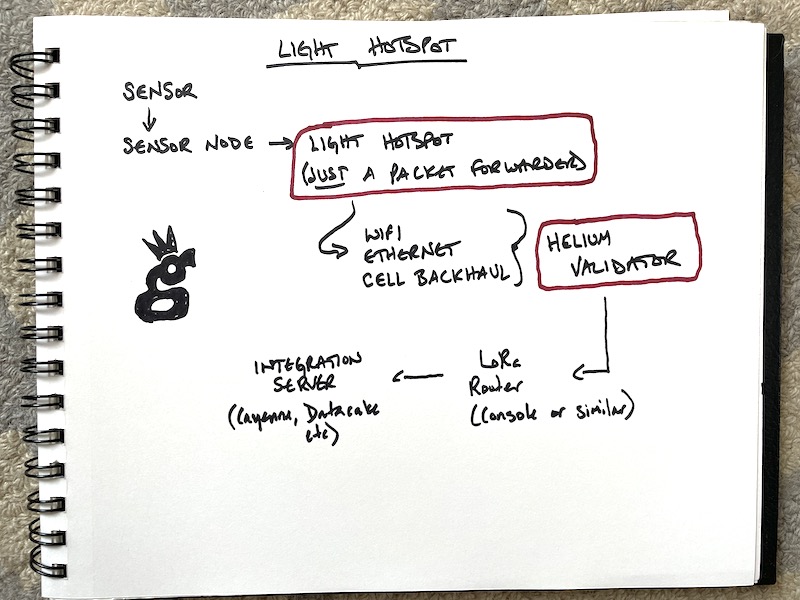
Now let's look at a Light Hotspot, which keeps the radio element but removes the computing & data-heavy requirements of the miner from the device, and puts that onto the Validators.

Light Hotspots still do the "radio" things; Issue beacons and witness other beacons. They just don't have to do the resource intensive recording anymore; the Validators are doing that.

The flow after Validators is the same as before: Through a LoRa Router, then an Integration Server.

It's important to note that what's getting "validated" by validators is the passage of data; NOT the data itself. That data "lives" outside the blockchain and is heavily encrypted.

All of this is also laid out over on the Helium site, where you can see the milestones and dates for when all this gets completed.

Can you see the difference between Light Hotspots and Full Fat Miners?

Yep, a Light Hotspot is JUST a packet forwarder, which is basically just a radio connected to the internet. It can transmit (beacon) and receive (witness) other gateways, and it can do the same for sensor nodes. It leaves all the heavy lifting of mining and validating to the Validators.

A Regular "Full Fat" Hotspot (every current production miner as of July 2021) has both the Miner AND the Packet Forwarder on it. Here's what the network data traffic looks like for a group of hotspots. Looks like it mostly stays below 350 kpbs. You'll notice a little yellow/orange line at the bottom. That's the network data transfer for a packet forwarder (aka Light Hotspot.)

That group of Helium Hotspots have to send ALL of their mining work to other miners. That's anywhere from 20-90 GB month! It's also why the blockchain was bogging down before Validators came online. At any one time, only 16 full fat miners (running on little Raspberry Pi's!) were processing ALL of the transactions submitted to the entire blockchain from 90k other Hotspots. Whew!

In comparison, a Light Hotspot uses around 100 MB/month. Light Hotspots will still be able to Witness and Beacon and earn from doing that, along with earning data credits for the data they process. Here's the same graph with just a Light Hotspot on it (the host took it off at 1600 for maintenance and fiddling, so it stopped totally then.)

Since they're transferring so little data, this means that Light Hotspots can use tiny little computers (like a Pi Zero or smaller) that don't get bogged down trying to process the transactions of 90k+ full fat hotspots.

That should help with understanding Light Hotspots and why they're important. Hit me up with questions in the comments, and if you'd like to go deeper in the Helium network, consider hiring me to help with your next project.

Oh, and in case you want a quick vocab rehash:

Sensor - A device that collects environmental data. This could be temperature, wind speed, the number of cars parked in a parking lot, etc.

Sensor Node - This transmits the sensor data to the gateway. Many times a Sensor (like the LHT65) consists of both a Sensor and a Sensor Node.

Gateway - This is what you probably think of as a Helium Hotspot. A Gateway is the thing that receives data from a Sensor Node, then passes it on to the network. Gateways ALSO receive and transmit data with other gateways, a process called Witnessing and Beaconing. That's covered in depth, here.

Miner - A miner is what records the passage of information (NOT the information itself) and adds it to the blockchain, so anyone can see the information flow. Again, they CAN'T see the data (it's encrypted), but they can see that data was passed.

Packet Forwarder - This is the radio part of a current production hotspot. It transmits (beacons) out, mostly to prove it is where it says it is. It also listens for incoming packets of information from Sensor Nodes.

Validator - The Validators do what the Miners used to do, and they'll eventually take over all mining operations. Validators confirm, or validate, the transactions submitted by the miners (and in the future, packet forwarders) to the blockchain. Validators are what make the information on the blockchain trustworthy.

Network Connection - You need to connect your Hotspot or soon, Light Gateway, to the internet somehow. This can happen via WiFi, and Ethernet cord, by cell connection (also known as "cell backhaul") or satellite connection.

LoRa Router - Helium Console is an example of a this. A LoRa router is the thing that takes the information submitted from the miner through the blockchain and begins to get it into readable form.

Integration Server - This is what allows you to actually "see" the data and use it, as a normal human and not a machine or high wizard of tech. You can use MyDevices Cayenne, or Datacake, or any one of a number of services like those.

This post was written with technical help from @jerm on Discord. All mistakes are mine, all righteous accuracy is his.

Archived Comments

KUZYK - 8/2/2021

Thanks for the explanation. When the Helium cloud Validator will be available to support the light Hotspot or Gateways? Has it been tested ?


Nik - 8/2/2021

They're aiming for Q2 2021 according to their site.


Block 27: $HNT Halving, #HeliumBirthday, 112K+ Hotspots, Console 2.0, and More! – Helium 5G - 8/6/2021

[…] fewer components will be required. Catch up with Gristle King in his “Light Hotspots Explained” blog, and read more about the milestones for the transition on […]


Manuel - 8/6/2021

Hi Nik, Thanks for the great and very informative post! In reading the documentation from helium’ official page (link below) I found this paragraph a bit concerning for people (like myself) who are in process to procuring a regular helium gateway (aka “Full Fat”). How should this “INFO” be taken in the context of all the current helium gateways doing both data forwarding and HNT mining? Will they be eventually discontinued and physically replaced by light hotspots? or will the transition to light hotspots will simply require disabling the mining function of the standard hotspot? “INFO: Gateways running a Packet Forwarder and Miner is not considered a Light Hotspot and will never earn HNT.” https://docs.helium.com/use-the-network/light-hotspots/#what-is-a-light-hotspot


James Steortz - 8/6/2021

So at some point will there be a firmware update that will turn full fat hotspots into light hotspots? Or will this be a sperate product?


Stephen Refsnes - 8/7/2021

This is amazing! Also love that off-grid setups will need much less cellular data a month! 100mb is nothing!??


Nik - 8/7/2021

Yeah, the data requirement is significantly less. Excited for that!


Joe - 8/9/2021

Thanks Nik. One thing I’m sure many of us are wondering is “With this new information, what will be the best way to earn HNT going forward?” I have 8 more miners that are still delayed (was supposed to be August delivery; now looking at December or sometime in 2022) Will they be obsolete when they arrive?


Nik - 8/9/2021

It's a good question, and I don't know the answer. If I had 8 on order I *might* cancel 'em and put the money into getting one or two off of eBay so I can earn right now, BUT that's ONLY if I had 2 very good spots. Location is key for earning; only buy as many as you can place in excellent locations. Even then (as always), earnings are not a guarantee.


Graham - 8/10/2021

Nik, Absolutly brilliant Infomation, As a newbie to Helium this info has been invaluable. I'll refer to this again and again i'm sure. One thing i couldnt find an answer too, apologies if ive missed it, is when my syncrobit hotspot finally arrives, Can i place it in a different property / location linked to the router in that location rather than the router at my home address? and still earn and contribute of course. Thanks again Graham


Nik - 8/10/2021

Hi Graham, yep, you can "assert" your miner wherever you want. As long as your radio signals match up to where you say the miner is, you're fine. Does that make sense?


Gordon Shupe - 8/17/2021

Nik, first let me say your posts and resources have been awesome – thanks for sharing so much expertise and analysis! I am working with over a dozen miners in flat Florida. All except one are on 20'+ 5.6 dBi antenna's carefully placed. Most all of them are averaging 1.5 HNT / Day since the halving. Most of them are connecting to 6 or more witnesses. Except the one at my house... Curly Gingham Vulture https://explorer.helium.com/hotspots/112daaAvArU2gh8epH9uFrgBCs3ExiED6PmzE9Xu39EeybvLcT4h Curly is connected by ethernet (POE to base of antenna cable) I have specified port forwarding for inbound and outbound (although I didn't have rules set up to block it), and it has remained connected, synced, powered, and below 103? F in a weatherproof box underneath the eave. 25 foot low loss cable with lightning adapter. About a month ago it continued to witness other beacons and has earned decent Helium (as much or more than my others) but has gone 2 weeks at a time without being challenged or sending a beacon. Got any ideas what I could try next?


Ben - 8/18/2021

Hi Nik, great post and thank you for the information! id like to get your opinion on something. i have 11 miners coming, 3 ordered 16 June 2021 (bobcat), 7 ordered 24th June 2021 (bobcat), and 1 ordered 12th August 2021 (Linxdot). all of the miners have locations pre-arranged for installation. all indoor miner on ethernet cable, with 8 dbi outdoor antenna's average heights will be 6M-12M high. The area they are all going to be located where they will earn 1.00 rewards (that could change by the time my miners arrive). and there is a very good spread of other peoples miners about 50-100 within a 5-8 mile radius, uk based. so they should get some good coverage. with all of this in mind would you say that its still worth me doing/ going ahead? i have read your comment above mentioning about potentially cancelling orders and buying miners on ebay to start sooner? the way i have approached HNT mining is, if all miners i set up make 1 HNT per day each that's 11 HNT @ £10 per coin... lets say the price remains around £10 for 1 year (even though its going up quite nicely at the moment) that is £40k per year before fee's or sharing with the others.. would you say with that set up it's possible/realistic? am i missing anything i should need know about HNT? I've been researching pretty much every other day since I heard about helium but as I'm still new to all this it can be overwhelming at times. after reading your page here, it has me second guessing if there's a better way to make HNT rather than using the miners, or potentially soon the light hotspots will be better to use rather than the ones i've ordered. its been 8 and 9 weeks since i placed my bobcat miner orders and bobcat are only on on order #170k EU... my order numbers are #1.2M EU, that leaves them the next 12 weeks to follow through with their 12-20 week delivery guide.. with 1M+ EU orders to go before mine (not including US orders) they've managed to ship roughly 40k orders in the last 8 weeks? I don't think I'm getting my miners until 2030 at this rate lol. unsure on what to do next. thanks again!


Nik - 8/18/2021

Hi Ben, Bobcat's been pretty good so far about meeting their deadlines. I'd be careful betting on *anything* long term. The CEO at Helium has said miners will probably settle at 1 HNT/month eventually. As long as your miners have clear line of sight to each other, and you've got 11 total, you *should* earn more than that, at least as of mid-August 2021.


Gateways, Validators, Miner ... - Erklärung Helium Begriffe - Nodle, Helium und MXC Mining Deutschland [LoRa-Projekt.de] - 8/25/2021

[…] Bei der Recherche rund um Helium – The People’s Network findet man zahlreiche Beiträge mit englischen Fachbegriffen. Ein Versuch der Erklärung Helium Begrifflichkeiten basierend auf dem englischen Artikel von kyk13. […]


Glenn - 8/27/2021

So glad I stumble onto this. Thanks for this. The info on here is invaluable. Question: will the light Hotspots be significantly cheaper to purchase and will manafactures be able to keep up with orders if it contains less components and is easier to make?


Nik - 8/27/2021

Hi Glenn, they'll probably be significantly cheaper. As far as less components, they'll still need the radio components, which is part of the problem. I'd expect that'll be the bottleneck, if there is one.


LEO - 9/10/2021

Amazing content as ever, Nik, thanks! Any idea when we might see the light hotspots on sale? Debating putting in another order now with Kerlink, but if light hotspots will be available soon, and will be much cheaper, then could make sense to wait.....tough call!


Nik - 9/10/2021

Thanks Leo! Hmm, they were supposed to be shipping in Sept, so it's anyone's guess. Maybe end of year?


Chris - 9/19/2021

I’m confused. Are my bobcat and rak miners now obsolete? Can they be switched to light hot spots?


Nik - 9/19/2021

No, your miners are not obsolete. They work now and will continue to work when we make the switch to light hotspots.


Angel Ivan Castell Rovira - 10/9/2021

Thanks for the information provided, that was very useful! Here my question: I planning to buy a dragino LPS8. This is a data-only hotpot). I would like to convert it to a light-hotspot Do you think that's possible? This dragino LPS8 contains a Semtech CI SX1308 Lora concentrator, 2x1257 LoRa Transceivers and a Linux OS running on a 400Mhz AR9331 with 64MB of RAM and 16MB of flash. Do you know what hardware is missing in order to be able to perform the PoC? Thanks in advance!


Nik - 10/9/2021

Nope. Data-only and Light Hotspots are 2 different things with 2 different security requirements. You're missing the security element on the LPS8.


Nrose - 10/13/2021

Will the earnings drop when light hotspots are active?


Nik - 10/13/2021

Well, by the time light hotspots come online, earnings will be down from where they are. You'll miss out on earning for Challenges, but those are only about 5% of PoC earnings anyway.


Kelvin - 10/20/2021

Hi Nik, from the ROI point of view, which will make more sense? a Full Hotspot which cost $1k+ or a data only hotspot which cost around $150. Does it mean that the full hotspot will have to setup as a light hotspot in the future? Wouldn't the earning be reduced or lower that will affect the ROI? Similarly for data only hotspot, I was wonder would anyone even bother with will data only hotspot? Pardon me for all the questions.


Nik - 10/20/2021

Unless you have an area with an incredible amount of data, the Full Hotspot will make more sense for now. Remember, a "Data Only" hotspot is NOT the same as a Light Hotspot. Once Light Hotspots become available, they'll be the way to go.


A Rough Guide To Helium Hotspot Placement - Gristle King - A Guide to Helium - 11/4/2021

[…] watch­es 2 or 3 movies most nights (100–150 GB/month). This will con­tin­ue to increase until Light Hotspots come online some­time in […]


Didi Setiadi - 11/14/2021

Awesome explanation Nik. Two things that I did not seen are GPS and computation processor. If the case light hotspot like that then it does not require SBC, ST micro is one of MCU which is ready to utilize Semtech license I guess.. GPS data is required data when the hotspot is located alone or island hotspot. What do you think NIK?


Nik - 11/14/2021

Hi Didi, I'm not sure on the comp-processor side. GPS is so easy to spoof that Helium doesn't even bother with it.


Helium Light Hotspots & Data Only Hotspots? Transitie Helium Miners uitgelegd - Helium Miners Nederland - 11/27/2021

[…] https://gristleking.com/light-hotspots-explained/ […]


Helium Light Hotspots & Data Only Hotspots? Transitie Helium Miners uitgelegd - Helium Miner Venlo - 11/27/2021

[…] https://gristleking.com/light-hotspots-explained/ […]


Elena - 12/10/2021

Hello, thank you for detailed explanation.. Now i start to worry , i have ordered some hotspots and waiting in que.. Should i just as for refunds.. Because price is really high till 1000 euros with taxes.. Light hotspots will be around 100 eu.. So why should i pay 5-7 times more for stuff wich will be same as 100 eu value.. Please assist me, im confused now ...


Nik - 12/10/2021

Hi Elena, Tough question. No one knows what the price on Light Hotspots will be, or when they'll actually ship. There's not a downside to having a "full fat" hotspot, so keeping your place in line might be your best option. Sorry I couldn't help more!


Michail - 12/21/2021

I have a question. Will the existing non-light hotspots remain with the challenging functionality or will the be ported to light hotspots? Will there be any option or who is deciding for it?


Nik - 12/21/2021

Hi Michail, they'll lose the challenge ability but keep the Witness & Beacon rewards. We (the entire Helium community) decide that.


Helium Light Hotspots & Data Only Hotspots? Transition Helium Miners Explained - Welcome to HNT-Helium.com - 12/22/2021

[…] Source: https://gristleking.com/light-hotspots-explained/ […]


samuel law - 1/3/2022

hi Nik great bit of info, Can I have an data only and full fat at the same address?


Nik - 1/3/2022

I don't think so; they're both providing the same service, so you'd be duplicating coverage and not adding value to the Network.


Fraugdib - 2/4/2022

Does anyone have an actual number of earnings for a dragino lps8 over a month? I don't need another explanation of the differences in theory after the fine job this fellow did in the post above. I'm just looking for any verified number that equates toa month of ear ings on a dragino lps8


JackJack - 2/17/2022

Hello Will hip 54 and 55 greatly effect my earnings? I am running four Milesight UG65 hotspots. Thank you for the great info!


Nik - 2/18/2022

Nah, shouldn't be an issue.


Art Kutin - 3/6/2022

Hi Nick, thank you for this great info! Does the fact that full fat hotspots will be converted to light hotspots now that HIP 54 and 55 has passed mean that all the headaches with port forwarding will become a thing of the past since the won't be receiving inbound connections as challengers? Would it also become easier to set up off grids using cellular without having to have a static IP or setting up VPNs? That would be awesome.


Nik - 3/6/2022

Yep, Light Hotspots solve all those problems. They'll be a real step up for off-grid deployments.


Dennis - 4/12/2022

I missed the fact that fat hotspots will be converted to Light... makes more sense now. 1. From my understanding, Validators are already online and running. 2. Hip 54/55 passed, but not yet implemented as of today? Is the actual code already written, and tested? 3. I would assume this will be a update to current fat hotspots firmware. i.e. delete local copy of blockchain, and now point to a validator for this info. Also update to helium apps, to show what is relivant now. 4. Is there a firm date for this rollout? 5. Assume rollout would be staggered vs. 700k-800K fat hotspots attempting to update to Light all at the same time? Any ideas specifically how this will be rolled out globally? 6. Is there any estimate for how long it will take to be fully implemented? 7. Will light hotspots be allowed to get info from "any" validator? Assuming light hotspots would keep a copy of all current Validators to contact.


Nik - 4/12/2022

Great questions Dennis. Up to date info can be found on the Helium Discord. In general terms, I'd expect to have a transition to Light Hotspots complete with bugs worked out by the end of May. Official timelines predict sooner than that, and the Helium/Nova team is capable enough to nail it, but I'd guess on the conservative side. 1. yes 2. Yes 3. Yes 4. No 5. Staggered, not sure of details. 6. Probably an official one somewhere, see my comment above. 7. I believe so.


Sandor - 4/23/2022

Hi Nik, With the hip55, you will still need static IP for cell connection? Thank you


Nik - 4/23/2022

Nope, shouldn't need one.


Me - 5/12/2022

Since port forwarding is no longer required, does that mean hotspots can share same public IP?


Nik - 5/12/2022

Good question. Probably, but what would be the reason?


Williamus Prime - 5/16/2022

Hey Nik! So... we've made the switch to light hotspots, and therefore we don't expect gigabytes and gigabytes of data to be used every month. I just wanted to pick your brain for a minute if you have any ideas or feedback... I had a Bobcat running on a SIM card ("cell phone data plan") internet connection, and it would consume between 3.7 to 4.3 gigabytes per 24hr as a "full fat Bobcat", and this exceeded the limits of the monthly data, so this particular Bobcat got unplugged until the light hotspot update arrived. I updated it to be a light hotspot using my home internet, and got it synced and caught up. I confirmed that it's running the latest OTA version (1.0.2.91, released 2022-05-13), which means that it's currently running the "light hotspot" update. Then I tried running it yesterday (2022-05-15) using the SIM card internet connection again, and it chewed through more than a gigabyte of data in about 12 hours. You would think that it probably wouldn't even consume an entire gigabyte of data in an entire month. I'm just wondering if you heard anything about this ongoing "full fat data" usage following the light hotspot update, and if maybe the developers are still working the kinks out of the light hotspot data usage? I can't imagine why I would be using this amount of data unless I'm keeping a local copy of the blockchain instead of pointing to a validator. I saw in the comments that you mentioned the transition to light hotspots might stretch into end of May, but yeah, any ideas/comments greatly appreciated. And for the above post dated May 12, maybe this person was asking about multiple hotspots sharing the same public IP so that their (multiple) hotspot traffic could be hidden from cellular/internet providers by routing multiple hotspots through a single VPN. Like, multiple hotspots using cellular connections can now share the same single VPN connection, which could decrease costs for a fleet of helium hotspots. To clarify/summarize for anyone wandering through these comments, you may or may not know that BEFORE the light hotspot update, you wanted to create port forwarding to avoid "relayed" status and maximize earnings. This is pretty easy to do on your home's internet, however, creating successful port forwarding BEFORE the light hotspot update meant that any installation involving a SIM card ("cell phone data plan") was forced to battle technology limitations to avoid being "relayed", and this involved using VPN-to-VPS in order to get around CGNAT, which then allowed creating a static IP and port forwarding. Long story short with technical terms aside, the light hotspot update eliminates the need for something called port forwarding, and so this technical battle is no longer necessary with the light hotspot update, because we no longer need port forwarding with the light hotspot update. And this is great news if your intended location has power but no internet, because for a "cell phone data plan" style internet connection (or any internet connection for that matter), you don't need a static IP, and you don't need port forwarding for port 44158.


Nik - 5/16/2022

Hi Williamus, we ain't through the transition yet. Once we get through it you'll see it settle down and the data requirements will be as expected. Might take longer than we all want.


Brian - 5/16/2022

Any updates on the data usage of hotspots now? How much data and what rate?


Nik - 5/16/2022

Nothing yet, the Network is still in flux.


Stan - 5/18/2022

Who makes light hotspots ?


Nik - 5/18/2022

Most of the current manufacturers eventually will.


John - 6/13/2022

Is a fixed IP still required?


Nik - 6/13/2022

Shouldn't be.


Mike - 8/25/2022

Since the transition period to light Hotspots in regard to the blockchain syncing is finally done have you already performed a final analysis of the data usage?


Nik - 8/25/2022

I haven't performed a final analysis. Any specific questions?


Joe - 12/19/2023

I'm not earning anything anymore since the switch. I guess it's time to unplug.


Lucas McNea - 12/23/2024

super helpful with the diuagrams, much appreciated. Just getting into LoRa and helium for agriculture sensors and smart ag.


Does A Helium Hotspot Actually Expose You To Powerful Radiation?

· 13 min read
Nik
Site Owner

Are Helium Hotspots dangerous to be around? How much RF energy do they emit? Should you or your hosts be worried about the exposure levels? Let's run through the facts, then you can make your own decision.

We'll start with this: In general, Helium Hotspots rarely emit any RF. They're built to receive signals far better than transmit them. That's because the whole point of the network is to "listen" for really faint signals from sensors at long range.

Still, Helium Hotspots DO occasionally transmit out power in the form of a "beacon". Beaconing usually happens less than 3 times per day. Sometimes you'll have a banner day and it'll beacon 5 times. That's unusual, so I'll use 3 or less when making the calculations below. Just to be clear:

A beacon is a single transmission witnessed by any Hotspot.

https://docs.helium.com/blockchain/proof-of-coverage/

In this case you can ignore the "witnessed by a hotspot" aspect. For now we're focusing solely on the power in a beacon, not whether or not it was received.

You can see how often your hotspot beacons just by checking on Helium Explorer. Here's an example from one of mine on an unusually active day:

Yep, 2 beacons inside of 5 hours. We are bangin'! By the way, for those of you concerned with earning HNT, your "slice of the pie" for beaconing is relatively low, so don't worry about "not beaconing enough". Once a day is fine.

Back to RF exposure and power! Helium uses LoRa as a radio protocol, and what we call a "beacon" is technically a "chirp". Let's dig a little deeper on that. From Helium's blog:

LoRa uses what is known as a “chirp” protocol and spreading factors (SF) are the duration of the “chirp”. Typically you’re looking at a range of SF7 to SF12 where the 7 is the shortest time on air. Each step up doubles the time on air to transmit the same amount of data and increases the range. Due to local restrictions, we are limited by max payload sizes to certain spreading factors, usually SF8 and SF9 for most packets.

https://engineering.helium.com/2020/10/02/spreading-factor-changes-poc.html

How long does an SF8 or SF9 (or even an SF 12) chirp last? Let's take a look at this table from Semtech (the owner of LoRa technology). Here's a screenshot:

There are 1,000 milliseconds (ms) in a second, so for all chirps, we're looking at under a second of time that RF is being emitted.

Cool, so now we have a time established: Less than one second per beacon.

The next (obvious) question is: How strong are these beacons?

For those of you who've read the Cable Loss & EIRP post, you'll remember that the most powerful hotspots (American hotspots) blast out a massive 27 dBm. I'm joking about the massive part. dBm stands for Decibel MilliWatts, and 27 is about half a watt. You can do this calculation yourself over at DigiKey's website. I'll make it easy and just paste it in here:

I can hear you say it: "Ok Nik, but what about when someone uses a MAXIMUM GAIN! (said in my best monster truck voice) antenna? In the US, the legal max antenna gain we can use is 9 dBi.

27 dBm + 9 dBi = 36 dBm. So, how many watts is that? Let's cruise back to DigiKey's calculator and see.

Holy smokes, almost 4 watts! That's enough to fry a... Wait a second. How much power is 4 watts? Is there anything else we might possibly use for comparison?

Yep, you guessed it. Cell phones. Cell phones in general have 2 "levels" of power they emit: .6 watts, and 3 watts. Typically, most people use their cell phones while holding them within 2 feet of their face. If you have long-ass gibbon arms, maybe you can get it 3 feet away from your face. You can reduce your exposure by growing your arms or just following common sense guidelines.

When you are talking on a phone is when it emits the most power; it has to transmit your voice. At that point, you are holding a device to your head for more than a second (if watching people in public is any indication, it's more like non-stop) that is emitting up to 3 watts.

Let's go back to the Helium Hotspot one last time and just think about where it's placed. While I recommend always placing it outside (NOT for RF exposure reasons, but to provide the best coverage), some people can' t do that due to HOA or other building restrictions. So let's assume worst case: In your house.

If it's in your house, it's unlikely that you hold your Helium Hotspot to your head. It's probably on a table or by a window. Let's say it's reasonable to be at least 3 feet away from the antenna at all times. We'll do a quick calculation check on that distance with the MAXIMUM POWER antenna to see what you're being exposed to, using HintLink's RF Exposure Calculator. By the way, a 9 dBi omni antenna (the maximum gain you can legally use) is about 4 feet long. Most people don't like the way a 4' long fiberglass pole looks inside the house.

Since I'll assume that you're not working in a Controlled Environment (think RF labs, or near super high RF emitters like a cell tower site), we'll calculate the exposure based on the max limits you'd encounter in your ordinary life. In that case, (ah, fuck it, I'll make this huge because this is my final answer.)

A Helium Hotspot emits .07% of the Maximum Permissible Exposure to RF devices. It does that for less than a second, less than 4 times per day.

I do know that some people are super sensitive to RF. If that's you, it may not be the best idea to participate in the building the world's largest wireless network. For the rest of ya, go deeper if you want, but after looking into it, this seems like enough for me to say that the RF being emitted from a Helium Hotspot is not something I'm going to worry about.

If you need more help with understanding Helium, whether you have antenna questions, want help with optimization, or just want to talk through the Helium ecosystem and how you can fit in, take a look at joining the Gristle Crüe.

Rock on!

Archived Comments

John Hickmott - 7/13/2021

Hi Nik, This confirms my speculation on this matter, especially as regards beaconing, power and listening time. I do wonder about p2p and OTA comms, though, mostly as related to all these updates that come from Helium and the vendors. It sounds like gobs of data going over air rather than the internet. A comment on that and maybe a link would be appreciated. Thank You! John


G - 7/15/2021

Thanks Gristle, you have been granted PhD level cert in Quantum Splaining. Toxic RF effects from HS is FUD fodder and seemingly not a rational consideration. Sooooooo many other things to worry about. Death by land shark or Discord overdose lead the list, well behind lethal antenna installation mishaps.


Jacob Ertel - 7/26/2021

Nik, Thank you for sharing your knowledge of Helium. I have found your explanations very helpful. However, I don't find the statement that miners only transmit when they are sending a beacon to be true. Personally, I think the RF exposure is insignificant, but I just want to set the record straight. Remember, that the point of Helium is to create a world wide LoraWAN network so that sensors and "things" can connect wirelessly to the internet from anywhere. You are correct in stating that miners are optimized for listening to sensors, however they can still transmit to devices. (I am not the most up to date on Helium hardware, but I think each miner can listen to eight sensors at a time, but can only talk ot transmit to one sensor at a time) I will provide an example: There is a GPS vehicle tracker available that can also immobilize the car if it is stolen. It uses the Helium network to communicate, as it is significantly cheaper than paying for a cellphone plan for the device. Normally the tracker is sending GPS location data to a miner, and the miner relays that data to the internet, so the owner can look at it on a website or app. This represents a listen or receive case. However, if the car is stolen, the owner can immobilize the using the internet. The miner then talks or transmits RF to the vehichle tracker signaling it to stop the car. In conclusion, miners do emit RF energy. How often, depends on what people are willing to pay for.


Nik - 7/26/2021

Jacob, totally makes sense, thanks for clarifying. Do you have any info regarding duration/power and if that will differ from a beacon?


Mohammad - 10/2/2021

Thank you very much! Very informative. So is the max 9dbi because above it is harmful? For example a 15 dbi antenna and the hotspot will produce 15 W. It still doesn't look like dangerous if comes only 5 times a day and each time less than a second. Right?


BB - 10/3/2021

Very insightful. Can you address "Jacob Ertel" comment above?


Nik - 10/3/2021

9 dBi is the max in the US due to FCC regs. Due to the way LoRa propagates, there's no real sense in using a 15 dBi antenna for Helium Hotspots


Nik - 10/3/2021

Hi BB, what part did you want addressed?


John Lee - 11/19/2021

Hi, I was wondering if it would be safe to have a miner in the same room as you all day? 2.3 DBI


Nik - 11/19/2021

Probably safer than the other EMF in that room if you've got a computer, phone, etc. :)


Mikel Izpura Pinillos - 1/13/2022

Hola Nick. Tengo la duda sobre si el hotspot hará interferencias en un audífono y en un implante coclear


Nik - 1/13/2022

I wouldn't think so, I'd think they're using/picking up very different frequencies. Ya can't hear 915 with the human ear, as far as I know.


Jason Russell - 3/10/2022

Correct cochlea implant speech processors only sample the audible spectrum. 2k-22kHz


Jason Russell - 3/10/2022

The human ear is 2k to 22kHz. The quarter wavelength cut off for 915MHz is 228MHz.


Nik - 3/10/2022

Love the depth of knowledge you have, thanks for contributing! ~Nik


Aean - 3/19/2022

I notice there's always a lot of confusion between RF (radio waves) and sound. Allow me to explain: Frequency is simply a unit of measurement based on timescale. Specifically, the unit hertz is the amount of times a wavelength repeats within the timespan of a second. For example, 120V 60 Hz AC power (the US power standard) reverses polarity 120 times a second, because you have to go from positive, to negative, then back to positive to complete a 360 degree cycle, thus what makes the current "alternating". This makes it complete 60 full cycles a second. 60 Hz. The distinction between sound waves and radio waves is the medium of transport. Sound is a pressure wave caused by physically moving molecules, be them water, air, or anything else that can vibrate when struck. Pressure changes form the polarities of our "waves" with changes to positive or negative pressure compared to static. If these pressure waves reach our ears at anywhere from 20 Hz to 20 kHz, our eardrums will conduct these pressure changes and perceive them as sound. In space, which is an empty vacuum, there is no matter to conduct your pressure waves, and thus sound cannot travel. Radio, visible light, radar, microwave, 5G, are different frequencies of the same spectrum of non-ionising radiation (not to be confused with nuclear radiation). We can see the sun and other objects of space because these "waves" are in the form of photon particles radiating from a source. Photons, without going to deep into the physics of it, change polarity at a frequency as they travel through time, thus inhabiting some part of the spectrum of RF (radio frequency). Light is just the spectrum of RF that we can perceive. The most important frequency range for human speech is 1000-4000 Hz. Even if we somehow had RF at 2000 Hz, you would not be able to hear it, because humans cannot hear light.


Nik - 3/19/2022

Thanks Aean, excellent points and much appreciated that you took the time to go through all that. Rock on!


Carlos - 4/16/2022

Still unconvinced of the safety. In the documentation for multiple different Helium miner devices I found online, it states “This equipment should be installed and operated with minimum distance 20cm between the radiator and your body.” 20cm = 7 inches. If it’s far less radiation than a cell phone why does it come with this kind of warning??


Helium 101: Cable Loss and EIRP.

· 54 min read
Nik
Site Owner

Got questions about what kind of cable you should use to connect your Helium hotspot to your antenna? Want a Helium-specific cable loss table?
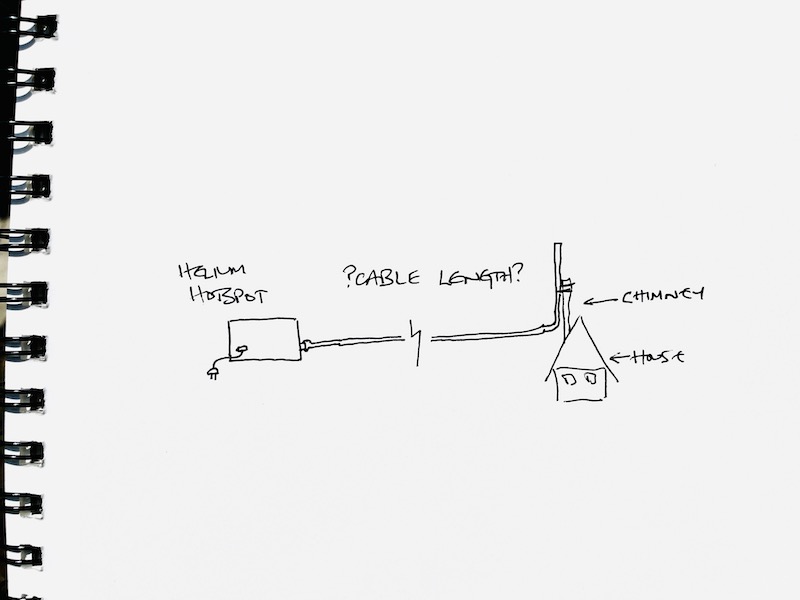
You're not alone! Lots of folks want to know if they should use LMR 240 or 400 or 900, or how long it can be, or if they should use the cable that came with their cheap-o eBay antenna.

In order to answer that, I'm going to walk you through how the whole thing works. That way, instead of asking me if your XX antenna with YY feet of ZZ cable will work, you'll know how to calculate the answer.

First, let's talk about the precise but confusing terminology in the land of RF (Radio Frequency). Well, if you want to just skip to the cable loss tables, go here.

You'll commonly see dB (decibel), dBm (decibel milliWatt), and dBi (decibel isotropic) thrown around, as well as dBm, EIRP, ERP, FSL, and others. Sheesh, that's a lot!

We'll start with dB, which stands for "Decibel". A decibel is the difference between two signal levels. RF engineers (and the rest of us) use it to add or subtract the effect of cables (or other "system devices") on signal strength.

dB are logarithmic: Every time you add 3 dB of gain, you double to the signal level. Every time you halve power, you subtract 3 dB. That means a 3 dBi antenna is doubling your emitted power over a zero gain antenna! But wait...that can't be right, can it? Antennas don't "add" energy.

As I've covered in other blog posts, antennas focus and shape energy. They don't add energy. It's kind of like a garden hose sprayer with multiple spray patterns. The water pressure going into the nozzle doesn't change, but as you switch from "mist" to "shower" to "stream", your emitted pattern changes.

That pattern change, and the resulting focus and range, is measured in dBi (decibel isotropic).

Ok, it's about to get a little more confusing, but I promise you can understand this.

"Isotropic" refers to having the same energy value in all directions. It's the idea that an antenna could emit a perfectly shaped "globe" of energy. For various reasons, it's impossible to build an isotropic antenna. Every antenna in the real world emits energy in slightly uneven patterns.

Still, RF engineers use a perfect 0 dBi as a reference point. As you go up in gain (the dBi goes from 0 to 1 to 3 to...13), the pattern becomes less and less globe-like and more focused in a single direction & plane.

That brings us to EIRP, or Effective Isotropic Radiated Power. This is a measure of the radiated power coming out of an antenna in the direction of its largest lobe. What's a lobe? Let me show you:
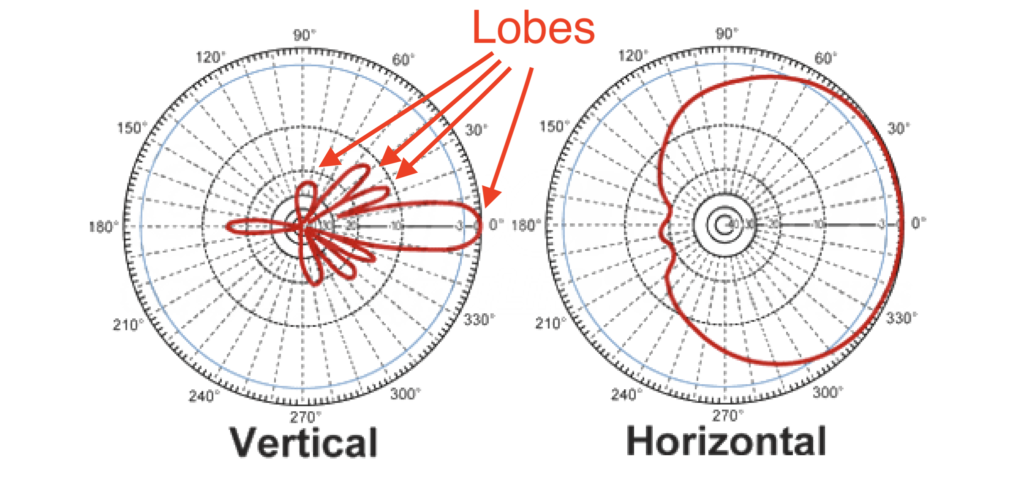
Why is that max lobe energy measure of EIRP important? Because that's what regulatory agencies (like the FCC) use to measure the power coming out of an antenna.

In the US on the 915 MHz frequency we use, the FCC limit for EIRP is 36. You get the EIRP by adding the transmitted power in dBm (what gets fed into the antenna) to the antenna gain in dBi.

Transmitted power is measured in dBm, or decibel milliwatts. The max transmit power we can use in US Helium Hotspots is 30 dBm, or 1 watt. For Euros, the max transmit power for uplinks is 14 dBm. You can read more on this here, in the LoRa docs. I'm US based, so we'll stick with the US numbers for this article.

The transmitter used in a US Helium Hotspot pushes out 27 dBm. The stock antenna shipped with the original Helium Hotspot was a 3 dBi Antenna gain.

That gives us a total EIRP of 27 dBm + 3 dBi = 30 dBm

If you're US based and do the math, you're now realizing why a 9 dBi antenna is the limit for your Helium Hotspot deployments. 27 dBm + 9 dBi = 36 dBm, or the max allowable EIRP.

But wait, wait, wait, Nik. I thought this post was about cable loss? Why are we talking about antennas and gain? Well, when you pass energy through a cable, you lose some of it. Different cables lose energy at different rates, usually measured as dB per distance. In general, thicker cables lose less, and thinner cables lose more.

Cable loss effects EIRP, because remember, EIRP is a measure of what is "fed into the antenna". So:

EIRP = Transmitter power (dBm) - Cable loss (dB) + Antenna Gain (dBi)

This is why you can have a 9 dBi antenna with lots of valid witnesses if you have cable loss that brings your EIRP down to what Helium considers "normal" limits.

Before we get to the cable loss table, let's cover one more term that gets thrown about, which is FSPL, or Free-Space Path Loss. This is the decrease ("attenuation" for the RF nerds) in radio signal power over distance. FSPL is important in Helium because it's one of the factors the blockchain uses to determine if the signal strength of any beacon is "out of bounds".

FSPL is used to combat gaming. If you've got 10 hotspots in your closet (remember Modesto?), you can "say" they're deployed in a perfect grid pattern, but using FSPL to calculate the signal strength that should be reported is one way to make sure they're actually, say, 800 meters apart and not all stacked on top of each other.

You can calculate FSPL here. Here's what that might look like for 2 hotspots 50 km apart with clear line of sight, both using 3 dBi antennas:
How would you know if that's within limits?

Let's do this! Remember that your hotspot pushed out 27 dBm. Let's imagine you're not using any cables, so cable loss is 0.

We've already accounted for the gain using the calculator, so we just subtract the FSPL from the transmitted power (27 dBm - 119.4 dB) to get -92.4 dB.

That's a signal strength within normal limits. For Helium hotspots in the US, most common signal strengths are (generally) between -90 and -122, though it can go higher or lower, down to -130 in some instances. Now, there are some other measures, both public and private, that Helium uses to combat gaming when assessing a tx/rx receipt, but these are the basics.

So, with all that as background, here's your cable loss table. Use your transmitter power minus the cable loss plus your antenna gain to get your EIRP, and make sure that number is 36 dBm or below.

You can get as detailed as you want, but I'd recommend not getting too wrapped up about your EIRP to the thousandth dBm.


[ninja_tables id="1782"]

Finally, one thing to think about is this: Having more power come out of your antenna isn't always a good thing. An effective way to plan your EIRP is to go after the LOWEST number you think you can get away with, say, 30 or lower. LoRa is already pretty darn capable, so "extending the range" with antenna gain can be pointless. I mean, I've seen a 3 dBi antenna be witnessed 200 km away. That antenna does a way better job of hitting lots of local hotspots than a higher gain would, in large part because of the effective pattern it has. Higher dBi doesn't always mean "useful longer range" (or greater HNT earnings). Just something to think about.

Rock on!

References & Resources

Archived Comments

Kerry Prudhomme - 6/15/2021

O K I'm a little confused. My first hotspot will be at my home. I live in a relatively flat area. I have tall trees about 50 - 100 feet from my house. I plan to use an 8 DBI antenna. I could place the hotspot within 20' of the antenna. Should I purchase an outdoor enclosure for the bobcat miner to reduce the amount of cable between the miner and the antenna. Is the 8 DBI antenna Ok in my situation?


Nik - 6/15/2021

Hi Kerry, I always aim to reduce the cable length between miner & antenna. You don't *have* to, it's just a good idea. Your 8 dBi antenna will probably be fine. Does that help clear it up?


Kerry Prudhomme - 6/16/2021

Thank you. I think I will purchase the enclosures. I will also need to purchase a short length of cable for each.


Dan Carare - 6/17/2021

Hi! So the best thing to do is to buy the most short cable with highest LMR 600, considering will be short distance between hit spot and antenna location ) Is this correct? Shir cable, maximum LMR Right?


Nik - 6/17/2021

Technically, yes. Practically, you don't need anything beyond LMR400 for most instances, and the 600 & 900 are thick and more difficult to work with.


scott dieken - 6/19/2021

Hey, could you please add the LMR900 cable to your chart. I do not understand why people would cheap out on their cables. I was making 2 grand a month on a rak miner with the factory provided rak antenna on an 8ft lmr-400 ft cable. I tried moving it up 25 feet with a 50 ft lmr-400 cable and was making zero dollars a day. If you can make one or two grand a month why buy anything but the very best cable? Then you don't even need these high dbi antennas. Please let me know if you have any good suppliers for lmr-900 cables. It wouldn't matter to me if the cable was $500 or $1000.


Nik - 6/20/2021

Hi Scott, sure, we can add LMR900.


Johnny - 6/26/2021

First, awesome stuff Nik. Thank you for sharing. Second, any links to pre-made cables you’d recommend and/or to tool and connectors that most easily make for reliable connections. Again, thank you.


Nik - 6/26/2021

Thanks Johnny. I'd use USACoax for cables. You definitely can make your own, but it's more expensive unless you're making a bunch, and even then you're probably still breaking even.


Evangelos Foutris - 7/1/2021

Hello Nik, thanks for the info! 1) You state one place that the max EIRP in US is 30 dBm but then elsewhere say 36 dBm. Can you clarify? 2) Is loss only from the antenna to the miner or also from the miner to the router (ethernet)?


Nik - 7/1/2021

Hmm, let me know where I screwed that up. For clarification: Max transmit power fed to the antenna is 30 dBm. Max EIRP (the focusing of that power) is 36 dBm. Does that make sense? More on that here.


scott dieken - 7/4/2021

if you wanted to make a longer cable run like 100ft using the lmr-600 could you offset some of the power loss using some kind of booster?


Nik - 7/4/2021

I haven’t seen that work well. Usually better off to figure out how to run long Ethernet and short antenna cable.


Natko Jankovi? - 7/9/2021

Please can you explain me is there any gain for those hotspots for Emrit which are all set to 1,2dBi and 0m vs. private which are adjusted to real values? No need to say that may hosts modify antenna and don't place hotspots on the ground level.. Are there any consequences for Emrit for this falsely setting gor thousends hotspots around the globe from Helium?


Devon - 7/9/2021

Hi Natko those settings (Antenna Height/Antenna Gain) are not currently active, and no there will never be penalizations for not having the proper parameters set. That will be utilized to advance the network specifications further. For now it is not active, and again even when it is active you will NOT need to have to settings match your system. It will only be in place to improve YOUR performance.


Nik - 7/9/2021

The current antenna & elevation settings in the app don't have any bearing on your RSSI/SNR values (as far as I know.). Shouldn't be an issue.


scott - 7/9/2021

hey nik your previous comment I haven’t seen that work well. Usually better off to figure out how to run Kong Ethernet and short antenna cable. I am not familiar with Kong Ethernet, and a google search really did not bring anything up. For those of us who have not bought outdoor units with POE could you please link to where I can find more info on Kong Internet. P.S. I did end up buying one of those HNTenna so we will see how much improvement I get next week when it arrives and I can get it installed.


Nik - 7/9/2021

Whoops, was typing so fast I put "Kong" instead of "long". Should be "long ethernet". :)


Helium Hotspots & EMF - One Man's Search - 7/12/2021

[…] those of you who’ve read the Cable Loss & EIRP post, you’ll remem­ber that the most pow­er­ful hotspots (Amer­i­can hotspots) blast out a […]


scott - 7/15/2021

what is the difference between kmr-400 and lmr-400


Nik - 7/15/2021

They look similar to me, the KMR claims to be more flexible. I haven't used it.


Michael Kozlowski - 7/17/2021

Hey there, I read that certain materials from placing an antenna indoors can cause dbi loss. I read that plywood can cause 4-6 dbi loss and that high efficiency windows could sometimes cause up to a 40dbi loss, ans paired with a bug screen, even worse! So my question being. If I were to mount say a 10dbi antenna inside my attic, would I be transmitting somewhere between 4-6 dbi, and retain the local vertical reach visibility benefits of having a 4-5.8 dbi antenna versus a 8-10dbi antenna which is more horizontal reaching? Thanks! I currently have a few miners setup with the stock 4dbi antenna next to windows but wondering if a 8-10dbi antenna in the attic would be better.


Nik - 7/17/2021

Hi Michael, good question. If it's in your attic it'll go through your roof just fine. I'd probably stick with a 6 dBi or lower, but the answer is always to test 'em out. :)


Valeri - 7/24/2021

Hi Nik, If I use 5.8dBi antenna and my cable length results in 2.8dBi loss would that mean that the performance (the radiation pattern and the ERP) of that antenna (5.8dBi - 2.8dBi in losses = 3dBi) and that of an 3dBi antenna without any cable extension would be the same (because they have the 3dBi gain)?


Nik - 7/24/2021

Nope. The radiation patterns are different for different antennas. A drop in power doesn't change the pattern of radiated power.


Richmond Mcfarland - 8/2/2021

How do I invest in the cryptocurrency, Helium?


Richmond Mcfarland - 8/2/2021

What do I need to do to invest in Helium, a cryptocurrency? I know its symbol is HNT, But I don't know to access it and buy some of it.


Richmond Mcfarland - 8/2/2021

Can I get an answer to how to invest in HNT


Nik - 8/2/2021

Look for cryptocurrency exchanges that list it. Binance.us and Bilaxy are two you can look at.


Nik - 8/2/2021

Sure. Just wait a bit, dawg. There's only one guy running this site. :) You'll probably get more information faster over on the Helium Trading Discord.


Brad - 8/3/2021

Hey Nik, I am looking at this chart and I think I need help with the math. I have a 5.8 Dbi antenna with 30' of LMR400. So, I am guestimating that is about a loss of 1 dB. But how do I calculate that out since dB and Dbi are different. 36 + 5.8 - ?(dB loss)? = ??? Also I pontificate the following: Is there math that makes an 8Dbi as effective as a 5.8, just by running longer cable? I guess the pattern doesn't change for the antenna, but it would kill the distance, effectively making the widest point of coverage, closer to you, correct or no?


Nik - 8/3/2021

Hi Brad, 30' of LMR400 will give you 1.17 dB of loss (3.9 dBi loss for 100', so 3.9 x 30%). dB = decibel (relative) and dBi = decibel isotropic (measured against an absolute). It's confusing, I get it. For the purposes of this equation you can add & subtract them without conversion. Re. making an antenna more "effective", I'm not sure I follow. You'll be putting less power through the same pattern as far as I know. I'd take the 5.8 over the 8 in pretty much every circumstance we'll have for Helium. :)


Brad - 8/4/2021

Thanks Nik, so basically, because of the cable length, I now have a 4.63 dBi antenna... For the "effective" question, I was thinking that upsizing the antenna to an 8 dBi instead of the 5.8 dBi would make up for the cable loss. Where it gets a little fuzzy for me is that an 8 dBi has a more laser-like pattern with less coverage close by. So, would the reduction in the dBI from the cable loss change the pattern to be more like the 5.8 or would it stay very narrow and just be a weaker signal?


Nik - 8/4/2021

Not really re. having an 4.63 dBi antenna. You have an antenna emitting at a certain pattern with a reduction in strength along that pattern equal to the cable/connection loss. Minor detail, but just to be clear. :) I'd keep it at a 5.8. LoRa has so much dang range anyway (4 dBi antennas ROUTINELY witness over 100 miles away) that this constant focus on whether or not an antenna is strong enough is misplaced.


Can I Get A Witness? - One Man's Search - 8/4/2021

[…] Every­one (in the US, and in most coun­tries) sell­ing a radio device has to have it cer­ti­fied by some nation­al body. In the US, that body is the FCC. One of the things they check dur­ing cer­ti­fi­ca­tion is that your device does­n’t break any emis­sion-strength rules (tech­ni­cal­ly EIRP, more on that here.) […]


Dave - 8/7/2021

For the case of a miner in an attic, any thoughts on 8 vs 5.8/6 dbi antenna? Rokland says that the 8 dbi antenna has a 25 vertical beam width. That still seems pretty wide, e.g. at 300m, the lower bound should be ~66m. So why would one go for the 6 dbi unless you live on a mountain?


Nik - 8/8/2021

Hi Dave, I aim for lower dBi unless there's a mitigating factor. From your situation (in the attic) the 8 dBi will probably work better, but as always with RF, you've got to test it. Please keep me posted on how it goes!


Michael - 8/13/2021

Hi Nik, I'm a bit confused. I generally understand what this post is saying but I'm confused with the different cable types. I see that my antenna has an RP-SMA Male connector and my Bobcat Miner 300 hotspot has an RP-SMA Female connector. I've seen "N-Male" thrown around on different websites, along with LMR-400. I assume I would need a cable with the RP-SMA Male + RP-SMA Female ends. However, when I do a search for LMR-400 with those connectors, the results don't look anything like what I'd need. I'm looking for a 2 or 3 foot cable and was wondering if you could send me a link of where to buy the cable I'd need?


scott dieken - 8/13/2021

could you compare these lmr cable types with the pulsar cable listed on rak for dbi loss? https://store.rakwireless.com/products/pulsar-cable-rak9731-rak9733?variant=39677580968134


Nik - 8/13/2021

Yep, head to USACoax. If they don't have what you want on their "Helium" offerings, look for their standard LMR400 or just call them. Their phone customer service is knowledgeable. Tell 'em Gristleking sent ya; they'll probably have no idea what you're talking about, but it'll be funny. :). Oh, and if you want to see what an N-male looks like, go here and scroll down.


Michael Johnson - 8/13/2021

Thanks Nik! I appreciate your sense of humor along with valuable information. I'll take a look at usacoax.com and reach back out on here if I still have questions. I might end up calling their customer service and tell 'em you sent me, for a good laugh too LOL


Nik - 8/13/2021

Hi Scott, use loss per distance to compare. For example on the page you linked, 16.4 feet has a loss of .9 dB on the Pulsar at 902-930 MHz. Check it against LMR over here (which is all 915 centered), where you'll see that LMR400 (for example) has a loss of .8 dB at 20 feet.


Brent - 8/13/2021

Hi Nik, If I needed 50ft of cable from the antenna to the miner is LMR 400 good enough or should I go with something higher like LMR 600 Thank you for all your awesome posts!


Nik - 8/14/2021

Hi Brent, it depends on the gain of the antenna. At 50' you'll probably want a 5-8 dBi gain antenna to offset cable loss.


Tom - 8/16/2021

Hi Nik, I got a RAK V1 and a Parkey Labs 5.8dbi antenna (link: https://shop.parleylabs.com/collections/antennas/products/5-8dbi-fiberglass-antenna-for-hnt-helium-hotspots-lorawan-us915-gray). I am on usacoax.com building a custom cable (link: https://usacoax.com/custom/custom-helium-lmr-400uf-ultraflex-cable-build-530.html) But I am not familiar with the terminologies of the cables. It is asking for which connection type should it be on CONNECTOR 1 (HOTSPOT SIDE) (options: no connector or RP-SMA male for $5 extra) and which one whould be on CONNECTOR 2 (options: no connector, N male, N female, N female-bulkhead or RP-SMA female (stock antenna extension)). Each one for extra $5. I need some 30" of cable from the top of my chminey until the basement, where the hotpost will stay. Can you please help me to determine which types of connections the cable should have? Thank you!


Charlie - 8/18/2021

Hi Nik, I got a 8dbi antenna on my roof 35ft high with 20ft of Lmr400. That is not much power loss. Anyway, on a few rare occasions at 7:30pm I reached 4x as many witness as normal in different directions 120km away in disco mode! I was ecstatic! However, I was never able to duplicate this again in discovery mode or real world. Any suggestions of what this might mean? Should I try turning my 8dbi antenna or changing to a 5.8dbi to widen the beam. Right now, my only witnesses are over 30km away. Thx


Chip05@me.com - 8/18/2021

Hey Nic, why does it seem like at night disco mode performs better! Is there a best time to run disco mode to get “Max effect” Thx Charlie


Nik - 8/18/2021

Hey Charlie, good question; the ham radio guys love this kind of stuff. I don't know about a "best time"; what you're aiming for with Disco is to get a rough approximation of how many witnesses your miner will have. Day or night obvi make a difference, but since your miner runs day & night it's probably worth it to check both, then see how that lines up with actual results.


Nik - 8/18/2021

Are your nearest hotspots 30 km away, or just your nearest witnesses?


Nik - 8/18/2021

Hi Tom, check out this page on cable connectors, that should help you sort it out. I usually write it down; that helps me clear it all up. "Bulkhead" connectors are extra long, to go through a (thin) wall, like a plastic enclosure; you probably don't need that.


SS Shah - 8/18/2021

Learning a lot from this site - I purchased the HNTenna 3 dbi outdoor antenna that you have recommended elsewhere, but will need to run approximately a 25 foot cable. It seems like this would be approximately 1 dbi loss per your table (if LMR 400). If I'm understanding correctly, this would bring the power from 30 dbi (27 + 3) down to 29 dbi (27 + 3 - 1) which seems like it would still be ok. Does this sound reasonable, or do I need a higher gain antenna to offset? I live in a suburb approximately 15 miles away from a very large city, which is why I was hoping to use the lower gain antenna. Thanks!


Nik - 8/18/2021

Totally reasonable, please let me know how it goes SS!


Scott Dieken - 8/19/2021

Nik Do you have any slightly higher gain antennas you recommend than the 3dbi. If I need to run a long cable like 50ft, a 3dbi just isn't enough to overcome the line loss. (I think) I have a 3dbi antenna doing very well right now on a short cable of 10ft but when it was higher on a 50ft cable it wasn't doing well at all.


Nik - 8/19/2021

Hi Scott, try the RAK 5.8, people seem to get good results with those.


alan pearson - 8/22/2021

Could you use a RF reflective metal, and place it next to your Omni-directional antenna to strengthen signal in a specific direction?


Nik - 8/23/2021

Hi Alan, sure, you're making a homemade sector antenna when you do that. It'd work, though maybe not very efficiently depending on design.


John Wilchynski - 8/27/2021

Hello Nic I live out in the boonies Florida. My nearest hotspot is 32km away. I have three Bobcat 300 units spread out in the area to form a network. We have many tall pine trees all over. What size towers should be used? I have access to 50 foot tv masts. Was thinking of 50 foot towers with 8dbi antennas. Is higher better? But then long cable runs. What do you suggest? Thank you.


Nik - 8/27/2021

Hi John, The higher the better in Florida; those pines are no joke! An 8 dBi at the end of a 50' cable should be fine if it's 50' up. Very tough environment for LoRa to go long distances.


Mike - 9/8/2021

I have a question about this statement: "That’s a signal strength within normal limits. For Helium hotspots in the US, that valid signal strength is (generally) between ?90 and ?122, though it can go down to ?130 in some instances." I'm not sure what this means but if this range is something to strive for, it means you actually want more cable loss. I ran thru the calculators and if my hotspot puts out 27dbm and my free space path loss is fairly low - for instance 3dbi antennas at both ends and the distance is only between 1 and 3 kilometers, the loss is 95db (at 3km). 27 -95 is -68 so if you want to be between -90 and -122, wouldn't you want to introduce more loss with a thinner cable? (LMR195 at 100 feet) Even with 10 more db of loss from the cable I'm still only at -78 which is not within the range. Or maybe I don't understand the comment about the range. Can you explain that?


Nik - 9/8/2021

Hey Mike, calcs look good. I'll pull the word "valid" from the post, as it's not quite accurate. Good catch! I should have said "most common". If you're running 2 x 3 dBi antennas, you are very unlikely to run afoul of any anti-gaming rules. While signal strengths are generally between -90 and -130, I've seen 'em be valid at stronger levels, although with current rules the SNR can be too high and invalidate the whole thing. In fact, SNR (at least for PoCv10) is the real problem, and a part of what I believe they're pulling out in PoCv11.


Mike - 9/9/2021

Nik, thanks for answering so quickly. So is all the hype about needing really low-loss cables overstated? In my case, I will need a 75 foot run. I don't need to hit hotspots 50 km away. However, there are a few at between 10km and 15km that I'd like to hit but I have plenty that are fairly close to me (1 to 5km). Also Vision shows that I have good line of sight for many of these including the 10km and 15km distant hotspots. So if I have the 75ft run of let's say LMR195 and have roughly 8db of loss and the free space path loss at 15km is 109, then 27 - 8 - 109 = -90 which is somewhat ideal based on your numbers but if it happens to be a little stronger that won't be a problem. For instance, right now, my little 3dbi antenna (direct connected indoors next to a sliding glass door) is solidly hitting a hotspot 8km away with an 8dbi antenna (on a 30 meter mast). The calculated signal strength is -71 and I'm getting plenty more rewards since he got started up. So again, is all the hype about needing the least cable just hype? When I mentioned a 75foot run on one of the Discord channels, I got a lot of people saying I was out of luck unless I got LMR900. Not sure I believe that. Thoughts?


Nik - 9/9/2021

Probably a lot more hype than anything else. "Needing" LMR900 is way overkill. 75' of LMR195 is on the low side for a 3 dBi antenna, but if your calcs are putting you well within acceptable levels you're probably fine. Please keep me posted on how it turns out!


Thing - 9/21/2021

Hello, i would lile to ask you about buying rak's 3 dbi antenna with 30 ft long lmr 400 cable for my bobcat. Will it cause too much loss or is 1.65 db loss is too much? And some resources says that bobcat's stock antenna is for indoor/outdoor use but i couldnt find any official answer. Can i use stock antenna with some insulation tape instead of rak? My last question is can i use 3 dbi antenna for bobcat? Because it's stock one is 4 dbi. So will it decrease my antenna gain or anything else? Thank you very much.


Thing - 9/21/2021

Hello, i would lile to ask you about buying rak's 3 dbi antenna with 30 ft long lmr 400 cable for my bobcat. Will it cause too much loss or is 1.65 db loss is too much? And some resources says that bobcat's stock antenna is for indoor/outdoor use but i couldnt find any official answer. Can i use stock one instead of rak's 3 dbi? (The reason that i want 3 dbi is the poc11). My last question is can i use 3 dbi antenna for bobcat? Because it's stock one is 4 dbi. So will it decrease my antenna gain or anything else? Thank you very much.


Nik - 9/21/2021

Check the connection loss chart on this page , 30’ of LMR400 isn’t a ton of loss. Bobcat data sheet here. You can use any antenna you want on a Bobcat (or any hotspot), 3 dBi is fine.


scott dieken - 9/23/2021

Can you make a blog post that explains what changes are in PoCv11?


Important Helium Update! How to update Antenna Dbi + location for POCV11 | ($HNT) | Chia (XCH)/Helium (HNT) Explained - 10/1/2021

[…] Helium 101: Cable Loss and EIRP. - Gristle King - A Guide to Helium gristleking.com Helium (HNT) ???????? ???????? ????? Twitter Facebook ??? Pinterest ???????? iost Chia (XCH)/Helium (HNT) Explained […]


Eric - 10/10/2021

Hello. Beginner here. I was wondering if cable loss affects the signal pattern of the antenna? Example: A 5.8 dpi antenna (outside) with a cable running 30 feet to a miner placed inside. Would the loss make the signal behave in more a "bubble" pattern like a 3dbi. Or remain more flat like the original 5.8 rating? Maybe a better example would be with a 8 dpi antenna. - Thank you.


Nik - 10/10/2021

Nope. The antenna will radiate at the same general pattern, just with less energy.


Elias - 10/15/2021

Hi nik What is the best dbi antenna to use on Cyprus (EU) on the city center of Nicosia Could you enlight me please ? Thank you


Richard Ogden - 10/15/2021

Thanks for all your excellent content Nik. Very much appreciated. From a British cousin !


Nik - 10/15/2021

I'd use a lower gain, 3-6 dBi. Whatever you get should be fine. Location & line of sight is far more important.


Mike - 10/23/2021

Nik, thanks for answering my questions above from September 8th and 9th. I ended up using 80 feet of LMR400. Got the antenna on a really nice tripod on top of my roof about 6 feet above my old TV antenna (which aIso got raised up a bit with the bigger tripod). Overall, the antenna is about 35 feet above the ground. When I had an HNTenna indoors behind a curtain, I was getting around $1 to $1.50 a day. When I moved it right next to the glass, that went up to $5 a day. When I moved the HNTenna 3dbi up to 35 feet with the 80 foot LMR400 ,that went up to around $500 to $550 a month (around $16 to $17.50 a day). A few weeks later, I switched to 6 dbi McGill tuned to see if that would do better. It does and I consider it worth it. The 6dbi really reaches out though to other hotspots that are between 10 and 30 km away. That's really nice. The rewards are up to between $20 and $23 a day. Perhaps the length of cable was worth going up to LMR400 flex but overall, this is a very nice setup for what I was expecting. Thanks again.


Nik - 10/23/2021

Right on, glad that worked out well for ya! Yeah, with those longer cable runs a higher gain antenna can make a difference.


Matty - 10/27/2021

Hi Nik, So many of of are amending our setups. I'm in the UK currently running s 5.8dBi antenna with a 10m run of LMR-400, for arguments sake let's say all my losses are 1dBi. You are asked to enter a dBi value into the Helium app, deducting the 1dBi loss from the 5.8dBi antenna and entering this value in doesn't seem correct to me. My understanding is that the antenna dBi value will never change? Am I missing something here? As I would still enter the dBi value in as 5.8dBi because cable loss will not change this? Cheers


James - 10/27/2021

Hi Nik, The helium app as asked for a dBi input for our antenna, I'm in the UK and run a 5.8dbi antenna with a 10m LMR-400 cable, for arguments sake let's say the cable loss/connector loss is 1dB, can you explain to my how this makes 4.8dBi? To me this doesn't make sense as my antenna is a fixed value, no amount of loss is going to change this. Is the value in the app 'dBi' incorrect for what we are now being advised to workout? (Cable and connector loss? Many Thanks,


Nik - 10/27/2021

Well, they're trying to calculate the output of your system, so I'd claim the loss and enter 4.8 in your case.


James - 10/28/2021

Hi Nik, Thanks for the response, whilst I get that it's a simple deduction. The cable loss doesn't change the end dBi, that is a static number surely, as that is set by your antenna? A 5.8dBi antenna will always be a 5.8dbi antenna? Is dBi the correct value being used?


Nik - 10/28/2021

The cable loss does change the dBi. In simple terms, dBi is a measure of the maximum power in a given direction from an antenna. With cable loss, that power will be reduced, since there's less energy going INTO the antenna in the first place. The antenna radiation pattern won't change, it'll just be outputting less power in all directions. Does that make sense?


R Ogden - 10/29/2021

Presumably there is no value in reporting cable loss if your antenna is at or below the maximum allowed before the miner reduces power to the antenna to get within the legal limit... iirc EU 4dbi and USA 9 dbi ?


Nik - 10/29/2021

Not right now, but come PoCv11 you'll need to accurately report gain or risk going over the RSSI limits.


Kevin s - 11/3/2021

First off I want to thank you for making such a comprehensive explanation!! I’m sure it was time consuming and I appreciate all the info as well as you taking the time to answer all our questions!! I’m here jn Denver Colorado which by the time my unit has arrived is quite saturated! Was able to find a location with 1.0 reward scale and plan to run a 50ft cable to the roof. I have numerous hotspots within 2 miles (maybe 20) and probably 100 within ten miles. And 750 I believe in within 50 miles... (as I said becoming a bit saturated!!!) Would you recommend sticking with the 3dbi (as I feel I’m going to hit my Max witness ammt with that) or should I try snd target as many as possible with 5.8 or 8? Also 400 on the cable since it’s 50ft? Or is the loss going to be somewhat irrelevant since I don’t need to reach out say 50km, if that’s the case do you think I’m ok with say a 195 to a 240 or would you recommend higher? And while I got you (sorry!) since denver is becoming so saturated going to be placing one in the mountains as a bit of an experiment. And some more rural areas as my reward scales being knocked down due to too many units jn the “larger hex” I’ve seen some witness all the way down here to denver from roughly 50-60 miles away (if I were to guess) on that I would assume higher dbi, what would you recommend an 8? And that I want to lose as little as possible so go with a 400 for cable correct or even higher? Last part tk that question that one IDEALLY I’d like to kind of point the direction back towards denver as the other way wouldn’t get line if aight over the continental divide, recommendations there? Sorry for the 10 part question! Been a 6 month long wait so I would love to get it right the first time!! Willing to spend the money to do it correctly the first time around but obviously don’t see the need to spend the extra money for say a 400 cord when I can get away with the 195 here in denver. But the main goal is to maximize the gains as with us all I’m sure ;) Again thank you so much for taking the time this will be the first out of ten I deploy so ANY information is GREATLY appreciate!! BY FAR the most informative post I’ve seen!! Can’t thank you enough! Keep up the great work it’s greatly appreciated!! Some of this is a bit over my head so thanks for holding my hand lol Thanks again! Best of luck.


Nik - 11/4/2021

Hi Kevin, stick with low gain antennas and short runs of antenna cable. A 3 dBi HNTenna is fine, and 20' or less of LMR400 for that is also fine. As you start to go beyond that you probably want a 5.8 antenna, but it really won't make much of a difference compared to *where* you put the the antenna & the lines of sight it has. 3 dBi antennas have been routinely hitting 30 km with clear Line of Sight over the hills/mesas in San Diego, and 200+km over water.


JV - 11/4/2021

Hi Nik, thank you so much for all the useful info you share that helps us to be be better Helium miners. I just have 1 question: I see a lot of reference to the cable loss and not as much to the connectors. I'm just wondering, when you add up the cable loss to the connector to the miner, the one to the lightning arrestor and the arrestor to the antenna, shouldn't you be factoring those in as well or are they so minute as to not make an appreciable difference? Thank you


Nik - 11/4/2021

Hi JV, cable connectors do add to the loss and you can include them. Any good connector should come with how much loss it induces, and you can add that into your calcs.


JV - 11/4/2021

What if it doesn't include that information, Nik? Is there a general rule that applies or a place with info we can consult? Thank you


Nik - 11/4/2021

Oh, on the safe side .5/connector. If they're high quality it's probably more like .1.


Jack Armas - 11/4/2021

NIK, thank you for the excellent article. I must admit a lot of the technical terminology went above my head. My hotspot is a RAK miner with a 60 foot LMR400 cable that runs all the way to the top of my house. It is attached to a 10 dbi antenna. With all that, I am not even witnessing. BTW, my miner is 'Acrobatic Wooden Beetle'. Feel free to look at it. Do I have the wrong antenna. How much loss do I have on this cable? Should a find a way to run an electrical line and ethernet cable to the roof and attach my miner up there inside a weather proof box? Sorry for all the questions and feel free to make fun of my ignorance. I just want to get this right. Thanks again.


Nik - 11/4/2021

Check lines of sight to local hotspots. Are you not witnessing *at all* or just not as much as you'd like? The antenna is too hot, for sure, though the cable length will offset that a little. I'd run much shorter antenna cable and a much lower dBi antenna.


Jack Armas - 11/5/2021

Hey NIK. I can confirm that I am not witnessing at on this 7th day into the HNT mining world. My antenna is 3 feet long and is sitting above any obstacles at the top of my chimney. So It should be true omnidirectional and have a 360 degree line of sight. What dBi would you recommend for a suburban house where 90% of homes are 1 story sub division homes? Again, I cannot thank you ENOUGH for your insight and expertise. TY TY TY!


Jack Armas - 11/5/2021

Hello NIK. I can confirm that 7 days into HNT mining, I am not witnessing at all. My 10 dBi is sitting at the top of my chimney with nothing blocking it. It should be a true omnidirectional 360 degree line of sight install. For a suburban house with nothing but 1 story subdivision homes, what dBi should I be using? What would be the max length cable I could get away with? Again, I cannot thank you ENOUGH for your expertise and guidance.


Nik - 11/5/2021

5.8 dBi will be fine for what you're doing; 10 dBi is way overkill. Florida is a tough environment for RF; flat, with LOTS of trees.


Peter Armenis - 11/10/2021

Hey Nik, first off great info and love your YouTube videos. I’m using a 5.8 antenna with a 25 foot lmr 400 cable. Cable loss calculator shows a 1.1 dbi loss. Should I be updating my antenna info to 4.7?


Nik - 11/10/2021

Right on, thanks Peter. Yep, that's what I'd update to.


Bob Jones - 11/13/2021

Nik, what do you think about ground planes. I have read somewhere they can helo focus signal. Thanks.


Nik - 11/13/2021

Yep, they can help shape the signal to go where you want it. The Bobcat stock antenna benefits greatly from a ground plane.


Shakir - 11/15/2021

Nik, I read about deducting the cable loss and entering the value in the miner. What happens if we do the opposite? Say 8dbi antenna with 20 ft of 400 cable, instead of deducting 0.8dbi, can we add 0.8dbi in the miner (8.8dbi) so the antenna will get 8dbi of power and not 7.2dbi? Thanks


Nik - 11/15/2021

Hi Shakir, your miner will output more power which will translate at the far end into a signal that looks suspiciously strong, and may invalidate your witnesses.


Darren - 11/18/2021

Nik, I’m looking at putting an antenna on top of a tower that is about 100’ tall. Then another 20’ to enclosure. So around a total of 120’ of cable. I plan on using a 8 dBi antenna. Can I use LMR 400? By my math I would loose 6 dBi. Or should I go with the LMR 600? I don’t want to put miner and router on the tower because I want to be able to get to those items without paying a company to climb the tower every time I might have to reset, etc. Thanks!


Nik - 11/18/2021

I'd use a lower loss cable, which will be a pain in the ass to work with. LMR600 or 900. And probably a lower gain antenna.


Darren - 11/18/2021

Nik: So I would be better off using my 5.8 dbi with LMR600? Hate to think of the cost of using LMR900. Thanks for the help. Trying to get it correct the first time so I'm not having to pay someone to run up and down a tower to change out antennas. Thanks for the reply.


Nik - 11/18/2021

Hi Darren, I'd run the calcs to see what your end output will be, then make the call from there re. antenna gain & cable type/loss.


Donnie - 11/18/2021

Hi Nik, I recently set up a Bobcat Miner and my SNR seems quite high. I failed to witness another miner 3.3 km away but I am able to witness one 15 km away. Funnily enough, (not really though) as I was writing this I failed another witness to that same miner. From what I have read, the invalids would be the result of the “anti-gaming” put into effect on the Helium Network since it falls outside of the “acceptable range" for RSSI and SNR. I am completely new to RF and though I have been reading, I am uncertain of the next steps to take. My first thought was to increase the noise somehow so that it would lower my SNR to an acceptable range. Is this possible with an attenuator maybe? Second idea was to increase the signal strength but I already have the antenna mounted from my chimney running through LMR 400 (53 ft) to lightning arrestor to LMR 400 (10 ft) to miner and am not sure putting it higher would help considering the factor may be on the other miner’s end. Any input is greatly appreciated. Thank you. Invaild Distance3.3 km DatarateSF9BW125 RSSI-94dBm SNR11.5dB Frequency903.9 MHz Valid Distance15 km DatarateSF9BW125 RSSI-113dBm SNR-2.8dB Frequency904.7 MHz 2nd Invalid Distance~3.3 km DatarateSF9BW125 RSSI-96dBm SNR8.8dB Frequency904.9 MHz


Jim B. - 11/23/2021

Nik, I consistently have Invalid Witnesses with a few miners around me, when I witness them or they witness me. When this happens the SNR is usually a positive value but never larger than 9db, most of the time its SNR 2-7db range but other times they are valid. How can this be corrected? (Examples below) VALID (my Miner): High Midnight Bobcat Distance ~2.8 km Datarate SF9BW125 RSSI -101dBm SNR 5.8dB Frequency 904.9 MHz INVALID Colossal Fleece Dove Distance ~2.8 km Datarate SF9BW125 RSSI -97dBm SNR 9dB Frequency 904.9 MHz


Nik - 11/24/2021

Hi Jim, valid/invalid depends not only on your setup but the setup (and really, gain) of those miners around you. If they have a higher gain antenna (and you do as well), there's not much that'll help until PoCv11 comes out.


Orion - 11/24/2021

If I paid you $500 to consult for me, what could you do to improve my situation? 1. I have a Gold RAK V2 on a 20 Foot flag pole with a 5.8 dbi antenna. 2. I have .27 transmit scale with a total of 6 other miners in hex. 3. Currently 112 witnesses Do you think, looking at those parameters, that you could improve my situation. My miner: https://explorer.helium.com/hotspots/11ouLbjduW7tdwzKr4SY7V2ekfHfGMPZdMbvyKh5ZALvDbe26G4


Nik - 11/24/2021

Probably not much left to do there; you'll need to find a better location.


Gary - 11/27/2021

In the "lobe" image its clear that even an omni directional antennae has a direction. How do to tell where that direction is? The reason I ask is I'm northeast of a large city. 99% of the miners are southwest or West of me. To the east there's nothing. So it would make sense to align the patter to face southwest. I have an 8dbi antenna with lighting arrestor (-.5 dbi) and 50' of rfc400 cable (-2.1 dbi) at about 35' feet high. Line of sight is good. I get valid witnesses out to 50km. I'm thinking the lobe direction is currently facing southeast based on my pattern of witness but I don't know how to officially tell.


Nik - 11/27/2021

Hi Gary, The lobes in that image are for a sector (directional) antenna. Every antenna you purchase *should* have a diagram showing you the radiation pattern from a vertical and horizontal perspective. Omnidirectional antennas do have dead spots, but they're basically not worth paying attention to for Helium deployments. An omni will "see" in all directions.


Helium Mining - Definitive Guide to Earning Optimum HNT - 11/29/2021

[…] you have a few options you can go for (the higher the cost, the lower the db loss). See here for a table of cable losses. I would typically go for LMR 400-600 cable as the best for price versus […]


Nodson - 11/30/2021

hi Nik. I have rac v2 miner with 6dbi antenaa, but cable neth is 90 feet (LMR400) is it normal confg? Thank you


Nik - 11/30/2021

That's a pretty long cable, but with a 6 dBi antenna shouldn't be an issue (depending on where you are. US no problem, Europe you'll want to upgrade/shorten the cable.) Make sure you enter the loss correctly there.


Marc - 12/4/2021

Thanks to this and all the rest of your article I think I have a pretty good grasp on which antenna and cable to use. Thanks! The one thing I'm wondering. I currently have a 10 ft. Lmr-200 cable connected to a 5.8dbi outdoor antenna. @5m height. My current further witness is 18km. If I change out for 10ft. Of lmr-400 there would be less db loss and assuming Los I should be able to get more range? I'm not quite sure what less loss is actually accomplishing


Aaron Olson - 12/9/2021

10 dbi antenna with 33 ft of cheap cable. What will this result in?


Mark S Werner - 12/10/2021

I think this question is answered... It want to be sure. I have an hntenna 3dbi outdoor connected with 20 ft of lmr240. Looks like loss is 1.5. Should I include the loss in the Helium app to account for the loss?


Nik - 12/10/2021

Yep, include the loss from the cable.


Jared Holm - 12/17/2021

Does cable loss change the focus of a higher dB antenna? i.e. Would a 9dB antenna that would have a flat focused plane be changed into a wider focused plane (as in your diagram on antenna gain) if it had a 4 dB loss form a 100' run of LMR400? Or is that not how it works? I am in FL with VERY flat topography (including buildings...it's essentially wide open space above the trees), but am under the tree canopy. I have the fun but difficult task of trying to position an antenna above the canopy where it should be able to "see" for miles. By my current understanding, I feel I need something like a 7 dB antenna up on 100' of LMR400 above the canopy, but am curious if I'll have a flat plane shooting over everyone. Thanks for all the awesome info!


Nik - 12/17/2021

Hi Jared, it won't change the pattern, it'll just weaken the output along that pattern.


Nate Martin - 12/19/2021

New Bobcat arriving in a few days. Located in between Phoenix & Tucson, just a few miners nearby, but have option to also place closer to City as needed; can you please email me with information regarding consultation for my setup & strategy?


Abner Silverio - 1/9/2022

HI buddy, how would you go about reducing the transmit gain? If you found u are running higher then you should and setup in the helium app to a 15dbi antenna and still was too high what can you put in the line to reduce the transmit gain?


Nik - 1/10/2022

What antenna are you running? That'd be where I'd start. :)


Attzaz Rashid - 1/12/2022

Hi, I've read through the article and embarrassed to say still stumped... I've got a 5.8dbi antenna on a 10m long LMR400 cable with a lightning arrestor between the aerial and cable. Is the figure I put into the helium app simply 5.8 less the loss in the cable which I think = 4.4dbi Any help would be really appreciated thank you! All the best Az


Nik - 1/12/2022

Yep, bang on. [Antenna gain] - [cable loss] - [insertion loss from lightning arrestor] = Asserted gain in app.


Ernest - 1/14/2022

I live in the suburbs on a hill and have an antenna on top of my roof about 40~ feet above ground. I am running 40ft of LMR400, which comes down to about 1.57db of loss. I used to run a 5.8db antenna when I had near 0 loss. Would it be more beneficial to swap to a 8dbi antenna due to the loss introduced with the new cable?


Nik - 1/14/2022

Probably not, I'd stick with the 5.8. Focus on keeping the antenna up high and you'll be getting the most benefit.


Alex - 1/18/2022

hi Nik, how are you - great post! I am trying to figure out my best setup. I have helium miner (bobcat 300) with the stock antenna on my roof. my house is prob 180m above sea level +10 meters for the antenna. most of the antennas i want to hear /see are below me or very far away (closest is 4km) . I actually think that I have to gain from a high gain antenna (8dbi is prob the sweet spot + 20 feet of cable + a lighting protector.) https://explorer.helium.com/hotspots/115s2Kxkwc5QMnBS3qLW2Bz7CBmwGRt7nFB9YRqQAiQ7C8pKUBP/activity does a high gain 8 or 10 sound too much? or a 6.5 better?


tanner - 1/18/2022

my fav part of this article is how GK says ‘i’m showing you how to do the math yourself!’ and all the comments are like ‘what about my setup, it’s like this:’ Thanks for the info, way to always make it digestible


Nik - 1/18/2022

6.5 to 8 is probably fine.


Alex - 1/18/2022

@nik ty very much - appreciate all your "guardian angel like approach" - i went with 8 to try and reach the remote islands :) @tanner you are right :) but as to myself and in my defense there are components implied in the distance and height which make the decision a little more "experience" based vs math based. I liked this calculator also https://www.pasternack.com/t-calculator-antenna-downtilt.aspx - it helps understand how the height and distance play into it as well as the vertical lobe degrees Alex


Chris - 1/20/2022

I messed up and ordered a LMR600 cable with the wrong connector. Will using a female to female converter result in a big lose? Is it worth replacing the cable or would it not make much difference?


Nik - 1/20/2022

Depends on the connector quality; anything you use should list its "insertion loss". Probably not a huge deal, though if you're running LMR600 you probably have a reason to avoid loss. ;)


Had - 2/11/2022

Hey NIK, is it worth runing 25 metter cable in order to climb antenna to roof of my 45metter building and completly open the view in full 360 circle? Or should I rather have around 150 degree open view and stay much lower but run short cable. Also which cable would you suggest for such a long setup? Is LDF 7/8 okay or should I stick to LMR - 600 or something else? Thank you for the answer in advance.


Nik - 2/11/2022

I'd say getting it high offsets any cable loss issues. Calculate cable loss for your length & frequency and decide on your cable choice from there.


Had - 2/11/2022

I already did, but I am not sure how much loss is a red flag? Is 2 db loss acceptable for 8-9 dbi antenna? I am from Europe btw. I saw that everyone just talking about LMR-400 as a standard and LMR-600 for longer set ups. So not sure if LDF cables are okay for hnt mining usage because no one is mentioning them even with the fact they got lower db lost.


Nik - 2/11/2022

2 dB loss should be fine. I'm not familiar with LDF, sorry mate!


Jeff - 2/21/2022

Hey Nik - Thanks for this awesome post - When you change the gain in Helium, this will only affect the Tx, not the Rx, correct? Say you have a 15dB antenna, if you set it to 15 in Helium, the Tx will be brought down to 36 (USA) while the Rx will remain at 42. Am I understanding this right?


Nik - 2/22/2022

Yep, that's correct. Whew, that'll be a tight pattern!


Jeff - 2/23/2022

Haha thanks! I'm not actually using a 15dBi - I was just using it as an exaggerated example. I run a 10dBi antenna and I'm planning to install a 2-way amplifier with a SAW filter on it and I want to make sure I'm in the legal range for my Tx without losing any Rx. Thanks again for all of your work in teaching us everything you know! Actually while I have you on the line - do you know if the Bobcat puts out 25dBi or 27dBi? I know the max for the US is 27 but most of what I can find in forums says Bobcat puts out 25.


Ben - 4/9/2022

HI Nik, First what an amazing article, I’ve read hundreds and by far this is the most comprehensive. I’ve just setup my Bobcat Miner, live in Scotland in U.K. However, I messed up with initial setup, I got conned on some cable. So my setup is bobcat 300, McGill 6DBI tuned antenna, I’m 63M above sea level and my antenna is 13m high (top of house). However, I have 15 metres of RG58 cable (I know right). I calculated the loss it’s over 6dbi so I’m not sure why I am seeing witnesses 24km away. I’m generating around .4HNT per day but only 5 witnesses/2 becons a day….. In 3 days time I am replacing the cable to 10 Metres LMR 600 (£100 just for the cable), once I setup I’m going to update Helium app with a .4dbi loss is that correct? So new antenna will be 5.6DBI. I’m more keen to see what impact it will have with the new cable? What’s your thoughts? Hopefully I’ll have more witnesses. I’ll update you on the results hopefully the upgrade of the new cable will pay for itself and show the results.


Nik - 4/9/2022

Right on Ben. You may have more witnesses if the extra signal gets you through a few more walls/trees. Depends on how many Hotspots are around you. .4 HNT/day right now is about 4x global average. :)


M Dave - 5/5/2022

Hi nik, How to calculate db , dbi, Eire for miner using 860 to 870:mhz…pls advice which antenna should I use.


Nik - 5/5/2022

Hey mug, follow the links in this article and you can run the calcs. Also, check out this article on choosing antennas.


Had - 5/19/2022

Hey, I recently upgraded from a stock antena to 7.5 dbi McGill and I have some invalids (rssi too high) when I am witnessing. My first thought was to try putting a higher number of dbi into the app but if I am correct that would just weaken my tx and not rx. I am runing a 15m of lmr 600 + a lightning arestor. Do you have any idea beside attenuator or you think I have to buy attenuator? Thank you in advance


Nik - 5/19/2022

Hmm, how long has it been? I might give it a few more days and let this whole Light Hotspots thing settle before I made any changes.


Raghav - 5/31/2022

I've a 6 Dbi antenna at the height of 15 meter. My Antenna is Connected with 12meter long LMR 400 Cable going through a 0.5 meter long RG316 Jumper(connector). What antenna gain should I mention on Helium App


Nik - 5/31/2022

Hi Raghav, add up all the losses from your cables and subtract that from the antenna gain. I'd probably include .2 dB per connector, but that's splitting hairs for this.


Ryan - 8/16/2022

First off thanks for responding to people. So here is the question. 5.8 antenna > arrestor > 25ft LMR240 > Miner. I want to add a amp (RX Gain +12dB,TX Gain +3dB, 2 saw filters) would it be better to add it near the miner or antenna...maybe not at all?


Nik - 8/16/2022

Amp not needed. I'm not sure about best positioning on it re. where in the chain, a quick search suggests closest to the antenna, but again, I'm not sure.

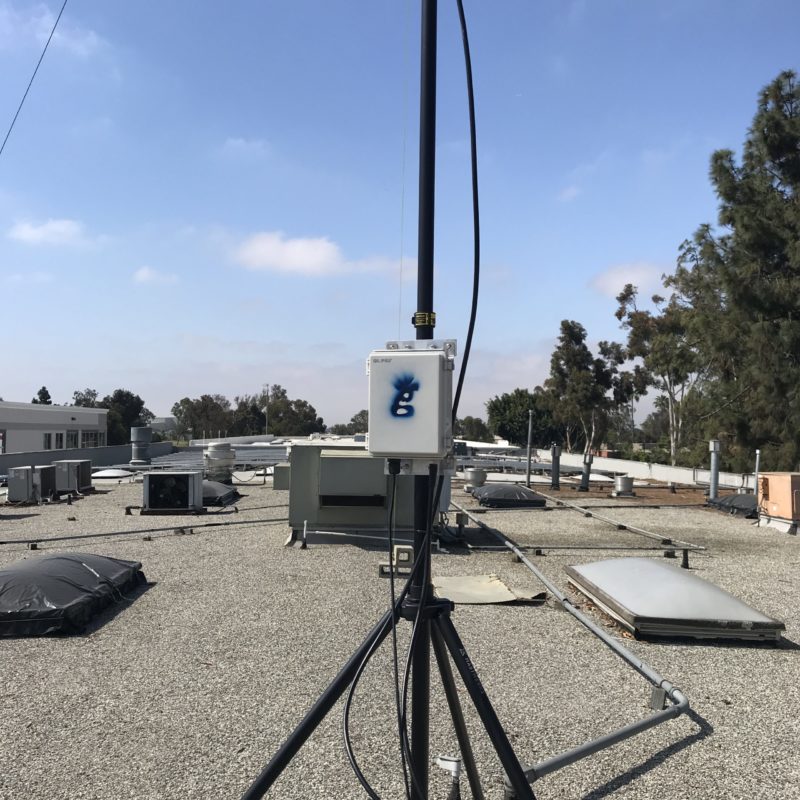
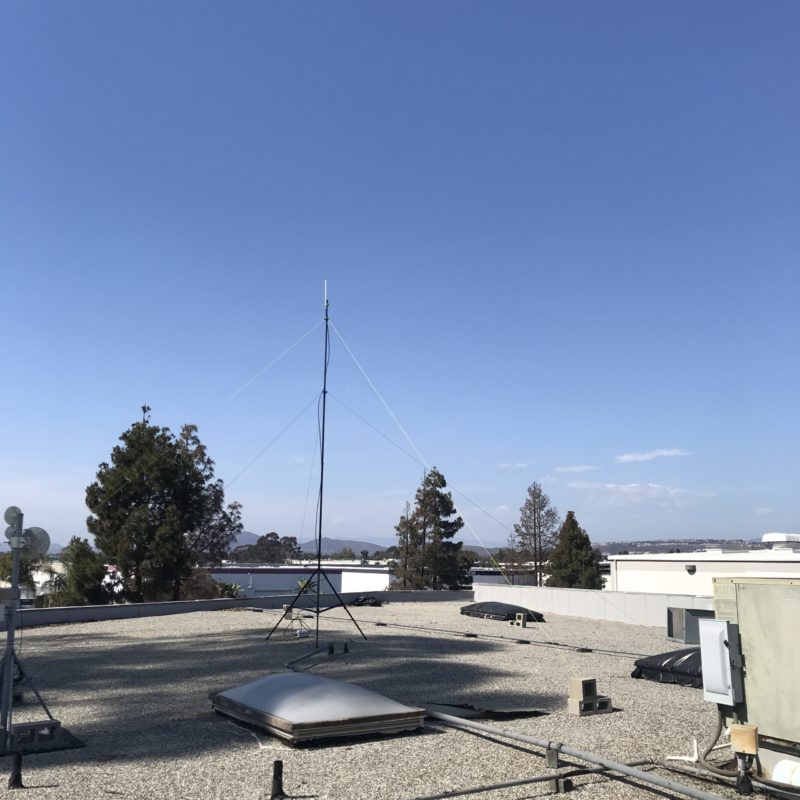
How to do a Helium Hotspot Placement Assessment

· 19 min read
Nik
Site Owner

Getting the most out of a Helium hotspot deployment requires a strategy to maximize your placement, antenna elevation, and then physically deploying the thing.

Most of the earnings will come from the placement. I know it's usually easiest to just put it up in your house, but it's probably worth assessing a few spots before you install it in the easiest place possible. Here's a video walking you through how to assess a location for a Helium hotspot deployment.

https://youtu.be/mDKNdRTxwIQ

Now, you probably know your local area pretty well, but I've seen a lot of clients surprised by "hidden" geographical features that blocked their RF viewshed and therefore their earnings.

With assessment tools being affordable (I use Helium.Vision, but there are other tools as well), there's no excuse not to do your homework and determine whether or not all the effort that goes into physically deploying a hotspot will be worth it at your house or somewhere else.

The video walks you through the steps to take that will help you run an assessment on your place. This is just a small piece of the Strategy & Optimization consulting I do, but I thought it would be super useful for many of you who want to start on the journey of maximizing your hotspot.

Oh, as a hot tip: I now start with temporary deployments just to test things out. I can put an antenna up in under an hour, Beacon using Discovery mode just to check on things, then let it run for a week or two before putting in a more permanent placement. Mastwerks is what I'm using for an excellent tripod that'll get that antenna up high temporarily. You can find other options, but I wanted the best out there. ;)
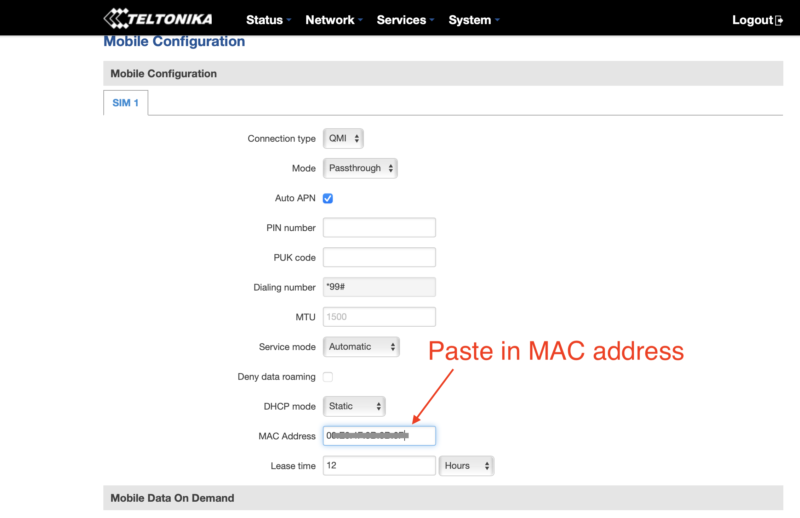
Best of luck to you, and please, if you do something different I'd love to hear about it! If you'd like help understanding more about Helium and how to maximize this opportunity, take a course or consider hiring me.
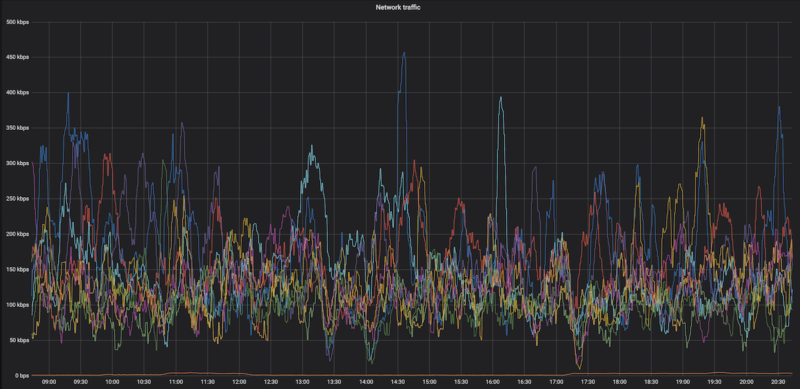
Archived Comments

Chris - 6/13/2021

One hotspot I deployed was “Unique Blonde Bear,” I used Helium RF and it looked like it would not be a good placement for the hotspot. I optimized the setup using your guide and placed it on a 22 ft. pole Now I have about 14+ hotspot connections. Wondering if there’s anything else I can do to optimize the coverage. Cheers!
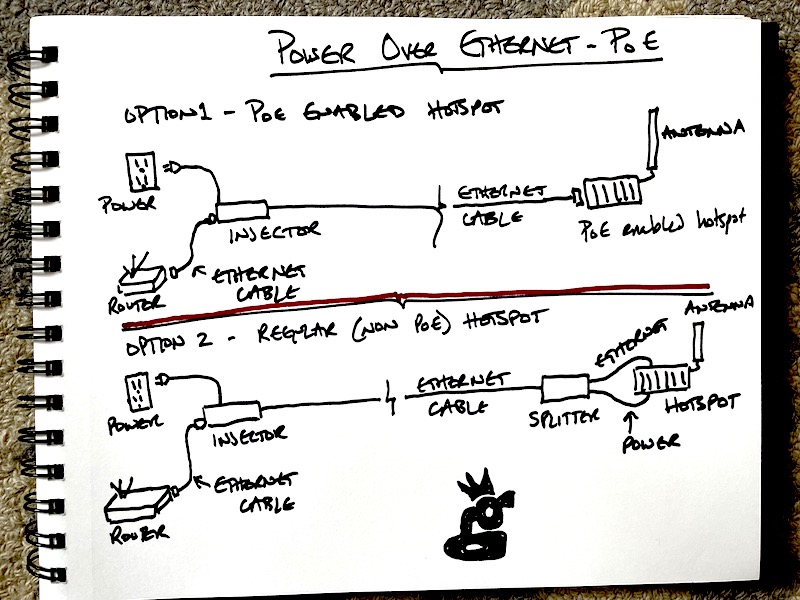

Nik - 6/13/2021

Hi Chris, once you get it at the max height for your location, that's about the most you can do. Nice job on the 14!


Tom Fool - 6/14/2021

Hey Nik, quick question regarding Helium.vision - does it know if your hotspot has been updated? Say I change the antenna and placement slightly but its still in the same location - will helium.vision be able to account for that or is it just a simulation giving rough estimates? Is discovery mode the only way to tell if a hotspot is witnessing in "real time"?


Nik - 6/14/2021

Tom, HV will pull data in from whatever you've reported via the Helium App; if you've updated your antenna & elevation, that's what will display. The simulations *can* change radically depending on elevation, less so with antenna gain. Discovery mode is just a snapshot in time of what nearby hotspots have witnessed your beacon.


Ady - 6/14/2021

Hi Nik, I’m awaiting for my RAK hotspot miner order, my question is I live in a rural area in the UK my nearest hotspot is 45kilometers away. Does this mean I’ll not be able to have any witnesses and should be looking to move it elsewhere in a built up location. You’re advise greatly appreciated. Ady


Nik - 6/14/2021

In general, yes, you'll want to be able to see at least 4 other hotspots in order to begin to earn maximally.


Simon Moreno - 6/15/2021

How did your miner mined 80+ helium token within 2 weeks? I added your Helium and it added up only 5 helium tokens?


Nik - 6/15/2021

Hi Simon, not sure I understand the question. Would you re-phrase?


David - 7/22/2021

Hey Nik, I've had my rak v2 miner for a month, it connected to the network day one with no issues, there are roughly 7 miners near me within a 10km radius, and hundreds within 100km. I'm the only miner in my area through lvl 6 on helium vision. I'm at one of the highest points in the county so it would seem it's a perfect spot. I'm beaconing and witnessing other miners, but I haven't had a single witness yet. I didn't even earn 1 from hnt in 30 days. I have the miner inside on the second floor right next to the window, roughly 30ft in the air, not near any metal or obstructions I can see or am aware of. I just found your blog, both the hnt help desk abs the discord have given me mixed answers, no one seems to know what's wrong. Could my miner be defective? If I build a 20ft tower and put the miner outside all that any difference or is there anyway I can troubleshoot that? It doesn't seem to make sense that I can witness other hotspots around the world, but no one can see me? No one has any answers and a few other ppl are complaining that their rak v2s can't be seen - do weak just have bad placements or are you aware of any issues with the v2s? I know they had tremendous issues getting them. I ordered in February and didn't get mine until this month. I can't quite afford your full assessment, but would $50 get me anywhere? I'd really appreciate any help you can give me.


Nik - 7/23/2021

Stock antenna? If you're witnessing other miners that's good. Troubleshooting steps: 1) Is there any way to get the antenna outside, even temporarily, just to test if that's a good fix? That might run you $30-70 for the cable, depending how long a run you need. 2) Does Discovery mode work? 3) With only 7 HS in a 10 km radius, that might be the issue, especially if they're not well placed. 4) For $50 you could build a mapper and test your coverage as well as running data through your device. If that works, then it'll probably be an issue with the other hotspots.


David - 7/23/2021

Yes it's the spock antenna - if I took it outside temporarily I'd have to drop it about 8ft from where it's at. Opposed to drilling through the roof or brick id probably have to build a little tower and could probably get it 20-30ft in the air but it would still be lower than where it is now. Do you think with an upgraded antenna I might reach some of the further hotspots or will that not make a difference if they are too far away? When you say issue with the other hotspots - Do you mean they are too far or they aren't working properly? I understand a little bit about RF frequency, I just don't see the brick making a huge difference. It's just been a bit frustrating with the massive delay. Is there a YouTube tutorial for the mapper, that seems a little over my head with the coding, I don't want to accidentally break anything and the quick start guide is a dead link?


Nik - 7/23/2021

Hi David, I'd start with getting the antenna outside for a day or two, just to see if that's the issue. If it is, then you can build a tower. The other hotspots may be poorly deployed; sometimes they see you, sometimes they don't. You'll have to Google around for a tutorial, or head to the Discord and check the #mappers thread.


David - 7/23/2021

Hey Nik, I think I see what the problem is - I'm north of Pittsburgh and even though I'm at one of the highest points in the state, the terrain of the whole state is "the rolling hills of Pennsylvania" out side building a 100ft tower - it looks like I'm not going to reach anything because one way or another there's a hill in the way - and a few of the close miners do have poor setups - 2 are relayed, and 3 of them are using 8dbi antenna's - I can't imagine that's a good idea for the terrain. I can't build a massive tower, but if I was able to get it up about 20-30ft and got one of those hntennas do you think it would make any difference? There are roughly 9 miners between 7-10km from me. I don't know how much the hills are blocking the frequency from where they are. I was never able to figure out how to add credits or get the frequency thing to work on helium vision. I did get one response from another hotspot while running discovery mode with the miner outside on the ground, but still no witnesses - it really seems like it's the hills and the only real way around hilly terrain is be more miners closer together.


Nik - 7/23/2021

The HNTenna (or any antenna) won't make a difference when it comes to punching through hills; they just won't do it. See if you can use the Line of Sight tool on Helium.Vision, that'll quickly tell you if you're likely to be able to witness/beacon with other hotspots. Rock on!


David - 7/23/2021

Nik, Just looking at quick line of site scenarios - it seems I need to get it to almost 120 Ft to get over anything - I actually might be able to hide in a tree in my yard - do you have any suggestions for an internet connection though wifi won't reach it there. I have some outdoor lighting so powering it isn't a major issue the line is already there. I might be easier to mount on a tree and there's no way I can put anything that large on the roof - if I got to that height - would a 5dbi antenna make sense - in theory it should be clear for a good 15miles since I'm on such a high point to start with - or would it be better to go with 3dbi so it has better reach into valleys - I'm hopeful that a few more will pop up in my area, I'm a bit shocked to see how many are actually in the city and I'm seeing new ones pop up more and more as miners are finally being shipped out. Thanks for all your help btw - not a single person on discord suggested checking line of sight - every just kept saying just wait for it to load on the the blockchain and I was pretty sure that was just BS. I can't believe there aren't better how to guides from the companies selling these. I'm really glad I found your site.


Nik - 7/23/2021

I'd use PoE if you can; you've got 300' to work with on that and it solves your internet problem. Either antenna should be fine. I'm not a fan of tree mounts, though I do have at least one client who's had success with 'em. Charge!


Ray - 7/23/2021

If I extend my antenna from my chimney say 10 - 20 feet. the chimney is about 25 30 feet already, should I worry about lighting hitting my antenna, there is not much lighting though. There may be some other trees a little higher in the 3 arc property. Also, is the antenna that comes with the synchro bit I believe 3.8 be the best to use if I want to reach a 5-mile radius with other machines in the area? does the 3.8 antennae reach out in a circle compared to the others out there? Thank you


Nik - 7/24/2021

Hi Ray, with a lightning arrestor added you'll be doing all you can to prevent damage to your equipment. Sounds like a pretty low risk (from a lightning perspective) install to me. A 3.8 dBi antenna will be fine, just make sure it's rated for outdoor use. If not, the upgrade to an outdoor rated antenna will run you from $35-$150, depending on what you get.


Gerry - 8/8/2021

Great information Nik, and super helpful. Question about optimal value from placement of multiple miners - There are 0 miners in my town, but I have 7 miners arriving with the first batch coming in 3 days. Main street in my town is roughly 1 mile long and extends 1/4 mile on each side of main street. I am on one end of town within 300 feet of the highway between 2 of the biggest cities here in Texas. In regards to the placement of 7 miners, and outside of the discussion regarding terrain and buildings etc would it A - be better to have a tight hexagon cluster at one end of town where my house is to leverage HIP17_res_8, or B - would it be better to try to zigzag crossing main street to deliver more coverage. Another consideration I struggle with is the thought around a tight placement grid that would best make it look like there is no room at the Inn for new hotspots within "my" grid. The drive to head in that direction is to aim to have the most possible control over each of the hotspots in that grid in regards to any necessary upgrades to antennas, outdoor enclosures or mast height. Thank you for taking questions here.


Nik - 8/8/2021

Hey Gerry, I'd focus on providing excellent wide coverage with the HS youhave. You just won't have the opportunity to witness beacons as much with only 7 hotspots, no matter if you deploy them tightly or spread out. As the network grows, we all beacon less frequently. Plus, you can't really *own* or prevent anyone from doing anything. I guarantee you'll have some jackwagon put a hotspot up right next to yours. Has happened to me. The best thing to do is to make sure every placement is the best it can possibly be, and that it has clear line of sight to as many other miners as possible.


Ray - 8/17/2021

My son has a house with a Direct TV antenna on the roof they are not using. Can he use that to connect his SP hotspot mining machine? Also, Would a 5.8 ANTENNA reach the same radius distance or more as the 3.8 that comes with our mining machine.? Thank you, Ray


Nik - 8/17/2021

Hi Ray, the Direct TV antenna won't work; not the same freq. Either the 5.8 or the stock will be fine; they'll both reach plenty far.


Bob - 8/20/2021

Hey nik, 3 questions 1. Is the stock antenna usually water proof i have the 4dbi bobcatminer one. 2. When first setting up my hotspot, in the assert location step, where you drag the little triangle to the other little triangle, my actual location is a few meters off(30maybe) from where it placed it, is this a big deal? 3. And lastly ,when setting up the hotspot how important is it to accurately type in your elevation on the antenna details, because most of the hostspot with really high earnings are at 0m of elevation in my area so i can only assume its not relevant? Thanks for your hard work and time to help us all out.


Nik - 8/20/2021

Hi Bob, 1. Bobcat has told me their antenna is outdoor rated; I don't know about waterproof (like underwater), but outside should be fine. 2. A few meters isn't a big deal. It'll always snap to the middle of the res 12 anyway. 3. Unimportant for now to enter antenna details, but it will eventually be important once we go to PoCv11, especially if you're using a higher gain aftermarket antenna. The default elevation is 0, that's what a lot of people just leave it at.


Hotspotty Improved: Deep Research For A Better Way - Gristle King - A Guide to Helium - 11/4/2021

[…] the main­te­nance guy over at the Empire State Build­ing, etc. If you need help, I’ve got a blog post over here about how to do an […]


michael walsh - 12/27/2021

Hey, Nik I live in the NJ/NY area and I have various places that I can place my miner such as 60 story buildings to areas to huge warehouses. I currently have it in my house as connected via ethernet but I am running into the issue of port forwarding to resolve the relaying issue. If you can reach back out to me with some advice on an antenna, best location, and how to remove this thing out of relay mode it would be much appreciated. Also anyone seeing this thread can reach out to me and can possibly utilise the various locations I have to mine.


Nik - 12/27/2021

Hi Mike, I'd post your properties over in the Real Estate section of HeliumJobs. I offer paid consulting that covers your questions, check out your options here.


Allan - 12/30/2021

Hey Nik, I am all new to Helium mining and recently purchased 2 RAK Miners (Gold 8GB editions). I set them both up currently inside for now. 1 is connected and seeing little reward, probably due to stock antenna and inside, the other is in another room and is relayed with no witnesses which i assume as it connected to the first miner. I set up port forwarding, i changed it to another network (other router but connected to main network router) and still it shows as relayed. Maybe this is normal, i do not know but before i start to change antennas and look to set up outside, any advise you can offer? Also i am in an apartment, is there an easy way to install a new outside antenna on a balcony set up where i have limited elevation options? Thanks a bunch,


Nik - 12/31/2021

Hi Alan, I'd suggest getting them at least 1 km apart, getting the antennas outside, and up high. 2 miners on one network usually force a relay on one of 'em.


Allan - 1/1/2022

Thanks Nik, I will ask a friend to place 1 of the units in his apartment and use an outside antenna :)


Allan - 1/4/2022

Hi Nik, Sorry for another message. I switched off one of the miners and will relocate it next week, however it still shows as online through the app? Also how do i get the main one (the one that is still connected to network and shows a 0.37 transmit scale which i assumed it would go back to 0.77 before i set up a 2nd miner? Maybe it takes more time to revert back to 0.77 or does it depend on the set up of the 2nd miner at a new location? Thanks a bunch


Nik - 1/4/2022

No worries. The app can be delayed by days, don't worry about it showing as online still. Should be 2 and a half days (approx) for the scale to update once the miners are moved.


Allan - 1/6/2022

Great thanks, You were right, moved back up to 0.72 transmit scale, however i am unable to remove it from relayed even after port forward, restart etc. Even checked with Port Checker and everything looks good there, port is Open, looked in the diagnostics from the app, everything looks good, Outbound/Inbound = Green, BlockChain Sync = 100% green, so everything looks all good, just the relayed part i need to figure out now. Thanks a bunch as always


Nik - 1/6/2022

Hi Allan, try this post, and use HeliumStatus.io for checking your status.


Sam - 4/16/2022

Hey Nik, Moving the antenna outside is not an option for everyone specifically the one's living in apartments with no balconies and buildings around. I was thinking to move the antenna to building roof but in summer its too much hot here. Now the solution I am thinkjng of is: there is a room at the roof in my building for lifts motor and AC is always on there. If i can move my miner in that room with POE and connnect a 5.8 dbi antenna with it which will be placed on the roof of the same room. But before doing it I have few questions: 1. Will the magnets and motors in the lift room interefete with the lorawan signals? 2. If I place the bobcat miner on the roof top under some shade, in summers weather can damage the hardware? I am talkjng about 8th floor ad region is middleeast( Bahrain). If I can go with this approach i can place the miner a bit far from this lift room. 3) If I place miner in the lift room and antenna lets say 7 ,8 meters away , will this work fine? Appreciate if you can help here.


Nik - 4/16/2022

Good question, you'll have to try it out. Bahrain is pretty darn hot, I'd keep the 'cat cool if you can. 7-8m run for cable is no problem, just use something like LMR400.


Gristle King On Helium Uplink

· 2 min read
Nik
Site Owner

It's been a heck of a ride so far, from the beginnings of looking for a better way to find lost paraglider pilots all the way out to being featured by Helium as a top hotspot optimization expert.

Travis Teague and I just did an episode of the Uplink, which Helium releases to showcase how the community is developing. A very cool show to do and a real honor.

We went through the genesis story of of the Kiwi SAR, through the first hotspot and my experiences building DIY hotspots back when the alpha code program was still open. That includes a few mountain deployments, a few urban deployments, a few suburban deployments and more consults with rad folks like you than I can count.

Here's the video:

https://www.youtube.com/watch?v=Y9E-3qOFDzo

While I aim to make enough information freely available so you can go through this blog (and the rest of the internet) and figure out how to optimally deploy your hotspot, if you'd like help with

  • Maximizing the opportunity to earn HNT with a well placed and well set up hotspot
  • Deciding whether or not it's the right time to jump
  • Figuring out what the next step is in the Helium network

Please consider hiring me to help you out. I'll put all of my knowledge and experience at your disposal to make sure you make the best of what you can and don't miss any big opportunities. No matter what you decide, I wish you the best of luck with your Helium journey, and I can't wait to see what you do with it!

Diving Deeper Into Your Helium Hotspot

· 2 min read
Nik
Site Owner

I sat down with Vishal from HeliumHiker to go through his pretty rad set of tools for getting deep into a Helium hotspot. I first found Vishal through using his Challenge Receipt Analysis dashboard which is my go-to tool for checking my hotspots and make sure they're singing. Looks like I might need to dig into this one and sort out the invalid witness issue...

Whether you're on Discord and want to get a quick view of what's happening through his HikerBot, or you're trying to figure out what's going on with your witnessing or beaconing, or you just want to do a skim through a bunch of different wallets or cities to see patterns in high earners, Vishal's tools make visualizing the data much easier.

I'll let Vishal do the talking. Enjoy learning more about how you can use the CRA dashboard to catch a hotspot that might have gone down or to optimize an antenna. With HeliumHiker (and the HikerBot on his Discord Server) you can cruise through cities (or wallets) quickly and see what the hottest spots around are. Very cool.

https://www.youtube.com/watch?v=A2CU3UjthaE

As you'll notice, this can get a little technical.

If you need help with getting your Helium hotspot back online and earning BUT you don't have time to get in to the weeds with learning about the RSSI/SNR curve or how to fix a relayed hotspot, or if the only thing you're sure of is that your hotspot isn't working... Consider hiring the Gristle King crew.

We've got a deep expertise in fixing all the sometimes complicated errors that can cost you HNT earnings -- go here to learn more about our Hotspot Rescue Service.

Resources