An (Early) Rough Guide to Setting Up GEODNET

· 25 min read
Nik
Site Owner

The Helium Network demonstrated just how powerful tokenized radio coverage could be, and a host of other companies are rolling out wireless networks, from WiFi to satellite to cell, using token incentives. GEODNET is one of those companies.

GEODNET allows you to set up a Hyfix Base Station in order to improve GPS accuracy. Most of us think of GPS as both accurate, "You have arrived at your destination", and infallible, "I don't need directions, I'll just plug in your address to my GPS."

Those tend to be true for finding your way to Paleo Treats, or Aunt Martha out in Montana, which require accuracy to within a few meters. If, however, you want accuracy down to the centimeter, you'll have to level up your game. That's what GEODNET is building.

GEODNET stands for Global Earth Observation Decentralized NETwork, and it combines the idea of a blockchain with a CORS Network. I'll explain what that means and how the whole system works further down the post. Before we get into the details of that, let me give you a quick walkthrough on the practical aspects of what you'll need to do to participate and earn in the GEODNET network.

  • Roof with a clear view all around for the antenna
  • Stable WiFi (no Ethernet option yet)
  • A place to put the miner indoors

Simple, right? You buy a station/miner from Hyfix, wait for 'em to ship (which can take a while, but we Helium types are used to that), then here's what you get in the box:

https://youtu.be/ZHOHuYpxI-g

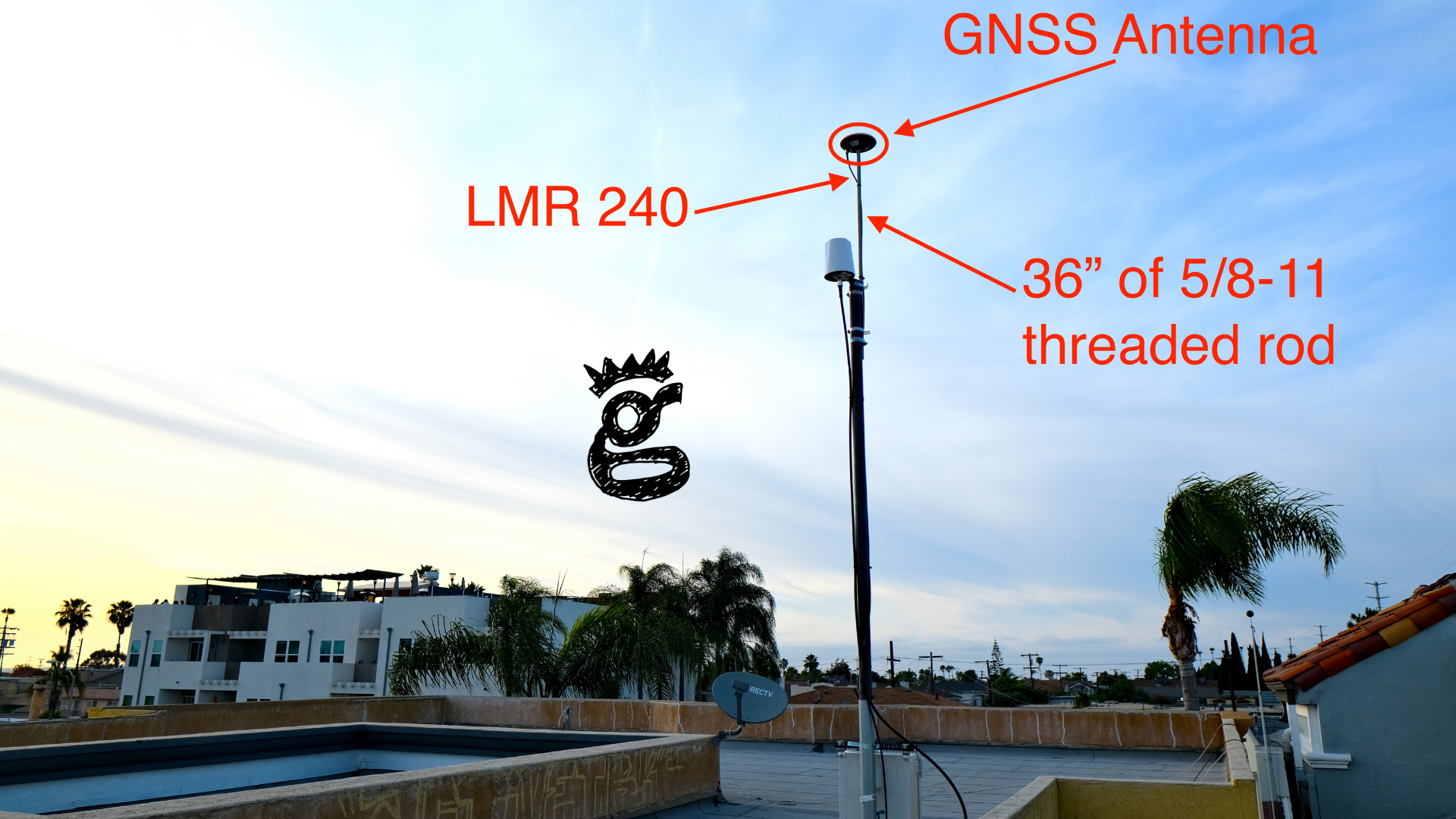
Pull all that out, put it together, then mount it on your roof and you've added to what's called an RTK network, but I'm getting ahead of myself. Let's start with what my setup looks like, then I'll walk you through why I did what I did. Yes, it's on the same pole as a Helium Hotspot.
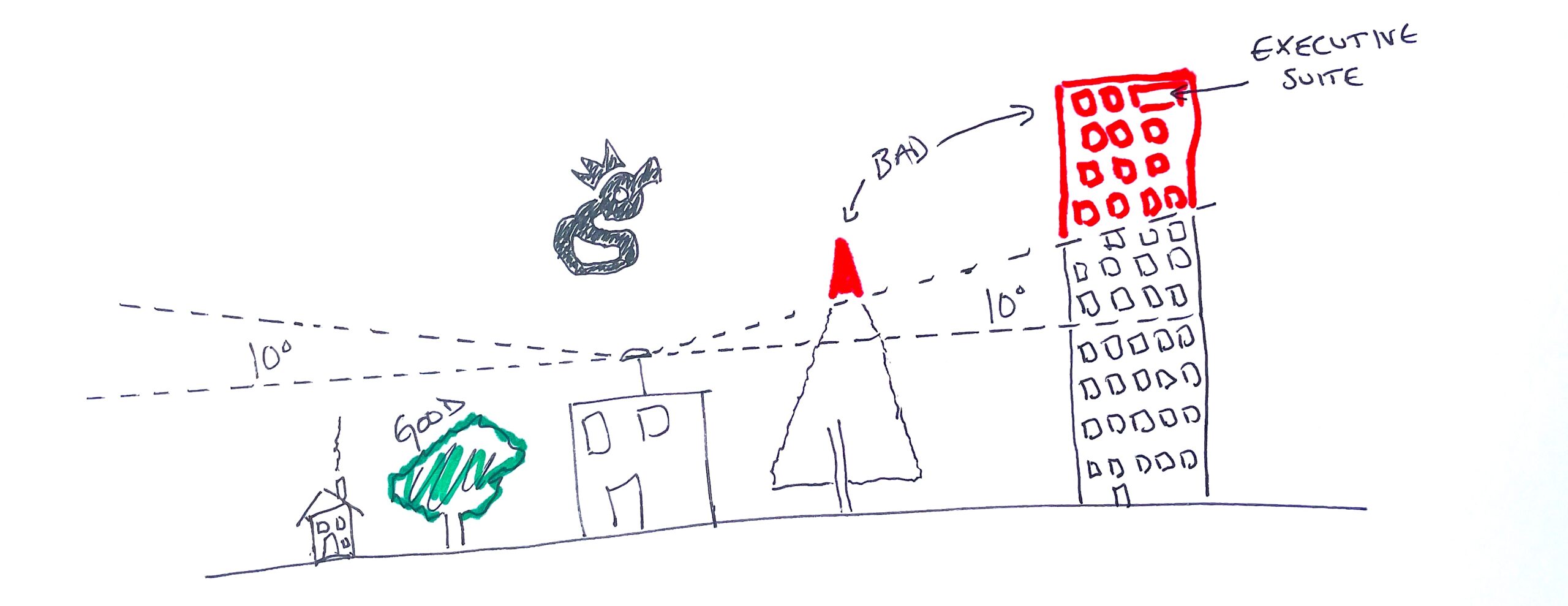
First, you'll need access to a roof with a clear view of the sky all around. Buildings, trees, and hills that block that clear view will cause a problem. Want "clear view" defined? Measure an angle from 10º and above in a circle around where you think you'll deploy this antenna. If there is anything solid in that path above 10º, you don't have a clear view.
For most of us who've deployed Helium miners outdoors, this is pretty easy to accomplish. A standard non-penetrating roof mount with a 10-20' pole in it, and the antenna mounted at the top of that pole will do the trick. There are, however, a few caveats.

First, due to the accuracy required, GEODNET recommends that your antenna be stable to the millimeter. Yes, that means your antenna shouldn't move more than a millimeter in any direction when "strong force" is applied. I used a 10' pole (1.75" .095 4130 from Competitive Metals in El Cajon) instead of my usual 20'+, with tough plastic wedging the pole into the roof mount base so it wouldn't move.

Second, if you're going to pursue "dual mining" (both Helium & GEOD on one pole), I'm recommending a longer mounting bolt than the one GEODNET supplies, which is 12" long. The longer mounting bolt (I used a 36" long 5/8-11 from my local Lowe's, or you can order one from Amazon) gives vertical separation between your Helium antenna (in my case, the HNTenna) and the supplied GNSS antenna. While there's a low likelihood of interference between the two, I figure for an extra $8 I might as well make a clean install. I attached everything with hose clamps. Love 'em or hate 'em, they sure make things easy.

Third, you may, as I did, need a longer cable than the supplied 10m one to reach from the antenna down to the miner. The supplied cable was labeled "SYV-50-3 Jumper".
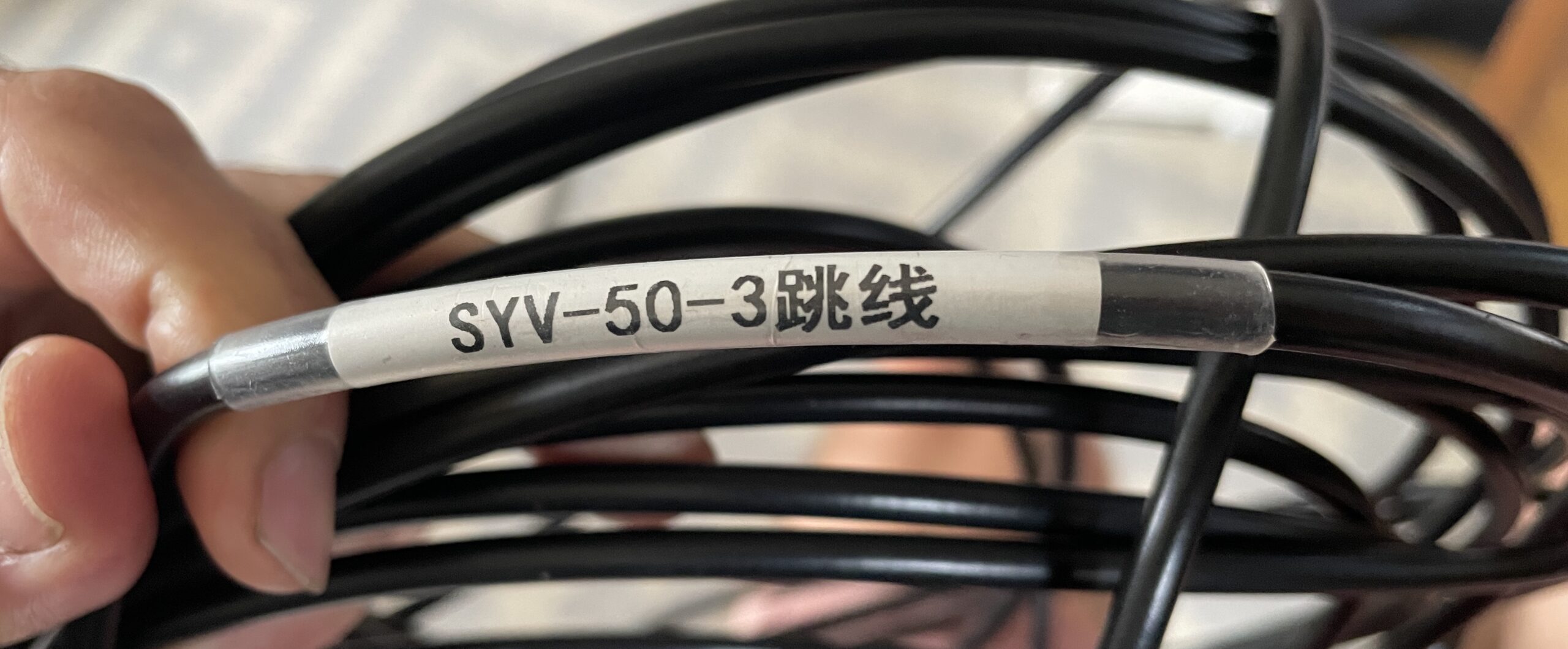
If I'm understanding that correctly, that's equivalent to RG-58. At the supplied length of 10m (~33') it would have a loss of 7.2 dB at 1575 MHz, which is the primary frequency used. I cut the cable open just to see what it looked like inside. It had a stranded core, thin insulation, and thin shielding.
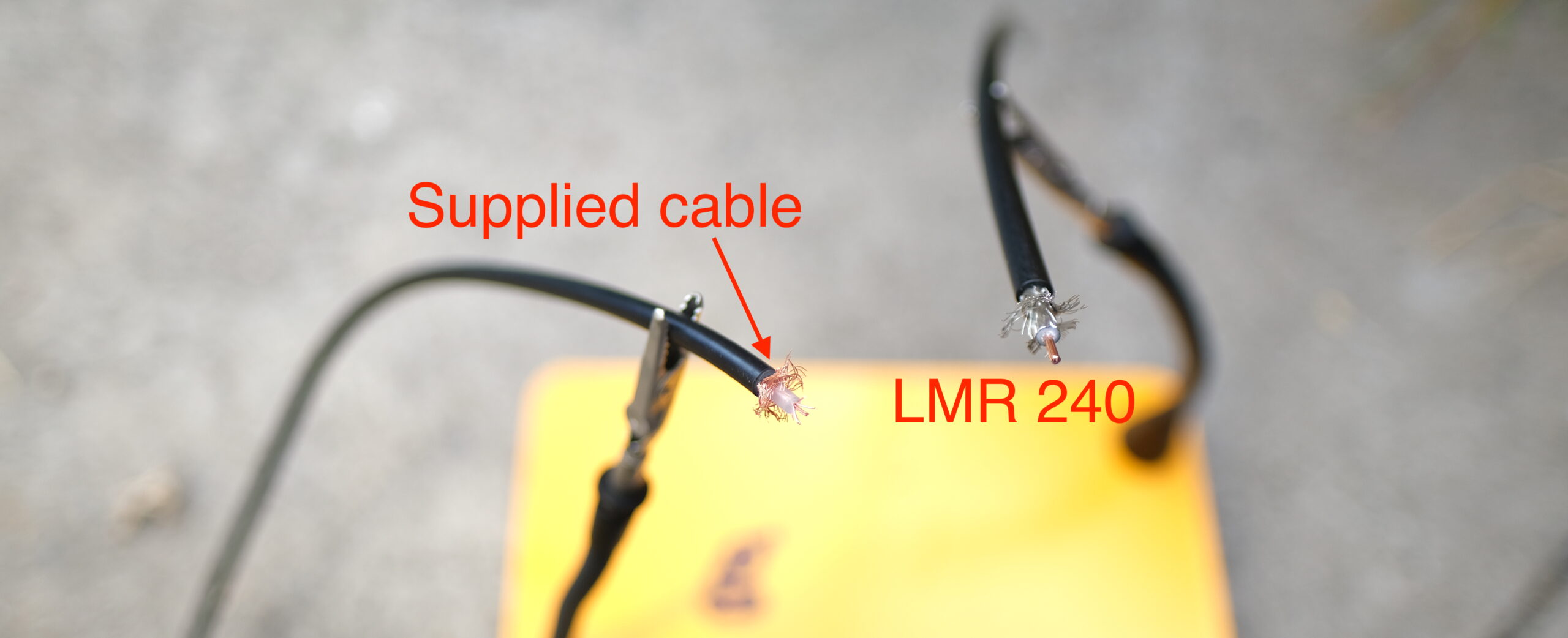
I used LMR240 (just because I had enough of it to make the run) and made a 50' cable with the appropriate connectors (TNC male and SMA male) for my setup. That introduces ~5.6 dB of loss into the equation if we're assuming a 1575 MHz frequency. The LMR240 has a solid core, thicker shielding, and thicker insulation. It is stiffer and very slightly thicker. The general takeaway here (thanks @Kartuc on Discord!) is to aim for 6 dB or less of cable loss.

The rest of set up is just running cables and following the directions from GEODNET, which you can find here for the miner.

Then you'll need to set up your GEODNET account using the "Quick Guide" found on their Discord and add your newly set up miner to your GEODNET account.

Ok, we've now got a GEODNET MobileCM™ Base Station set up. Want to know the details of how this thing works and really, what it does? Let's dive in!

I'm going to introduce some vocabulary that might be new to you (it was to me) that'll help you understand what this whole thing is, and why it's useful.

GNSS - Global Navigation Satellite System: This includes many kinds of satellite-based positioning systems.
GPS - Global Positioning System: One type of GNSS,
CORS - Continuously Operating Reference Station
RTK - Real Time Kinematic: A "correction stream" of data coming from an Earthside station to improve the accuracy of GNSS data.
Base Station - A known static Earthside location that receives satellite data, then transmits a correction data stream over the internet.
Rover - Any device that receives GNSS signals from a mobile platform. This is what most of would call "our GPS".

Here's the shortest way an engineer would describe this: A GEODNET MobileCM Base Station contributes to a CORS network of RTK base stations improving GNSS accuracy.

Septrentrio has done an excellent job explaining the details of GNSS over here.

The reasonably short version is that the satellites we use for GPS are basically flying clocks that travel known orbits, emitting regular signals. If you remember back to high school math, knowing where and when something is and how fast the signals it emits are traveling, one *should* be able to calculate where you are based on the time it takes to receive those signals. Relax, no one is going to make you DO that math.

However, a few interfering factors like space weather, atmospheric disturbances, and "multi-path" reflection of the satellite signal off buildings or other obstructions can introduce errors to accuracy by changing the signal path from satellite to your receiver,

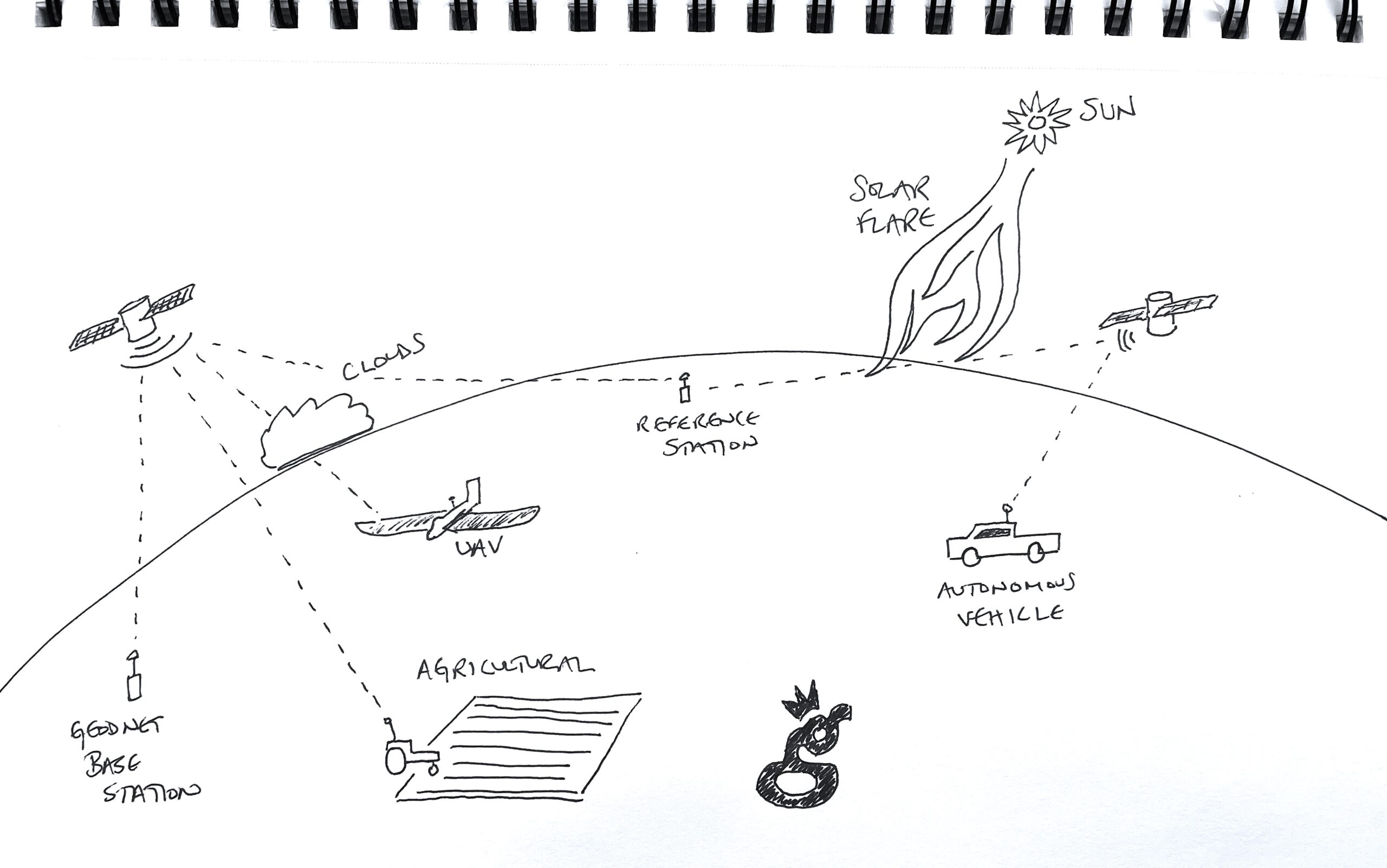
What you're doing when you set up a GEODNET is adding a reference point that improves accuracy. It "listens for" (receives) satellite data and reports back through the internet about when it heard that data. This allows for complex calculations to be done that, in essence, say something like:

"Hey, the Gristle King station heard a signal from Satellite XYZ a few seconds late. That probably means there's something going on with a solar flare or multi-path or atmospheric interference that delayed the signal between Satellite XYZ and the GK station. Let's go ahead and adjust for that disturbance for any receivers near the Gristle King station."

Since a fixed point on the ground doesn't move, having a base station creates a known reference point for calculations made between satellites and receivers elsewhere on the earth.
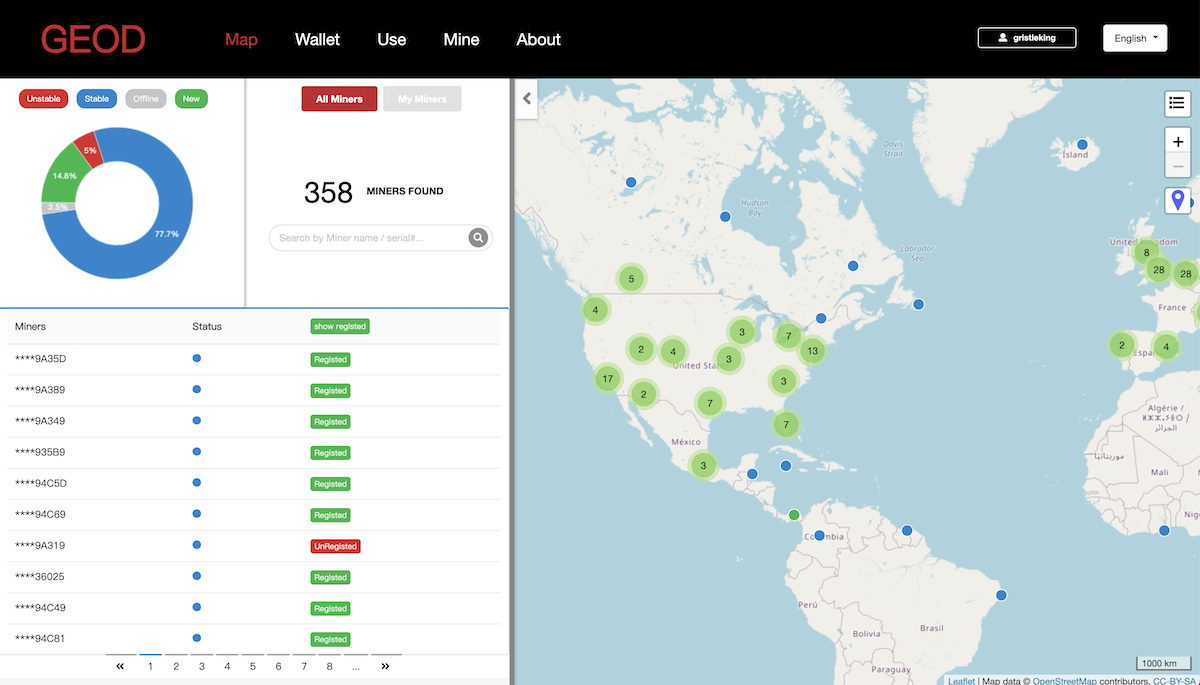
Ideally you've got a network of stations all reporting, which allows for the Gristle King station in San Diego to be referenced against stations in nearby towns like La Mesa, or cities like Tijuana or Los Angeles. As we get more stations online, the data gets more and more accurate. Here's what the map looks like today, May 28th, 2022.
How accurate can you get? With the right setup, and stations approximately 10 km apart, accuracy can be calculated down to the centimeter! That starts to get super useful if you're planting crops and want to put your seeds in the right place, or you're doing aerial photography, UAV (drone) navigation, hydrographic surveys, or you just want to know where that scooter is that you're supposed to be jumping on.

Ok, so all that's cool, but, uh, how do I get paid?

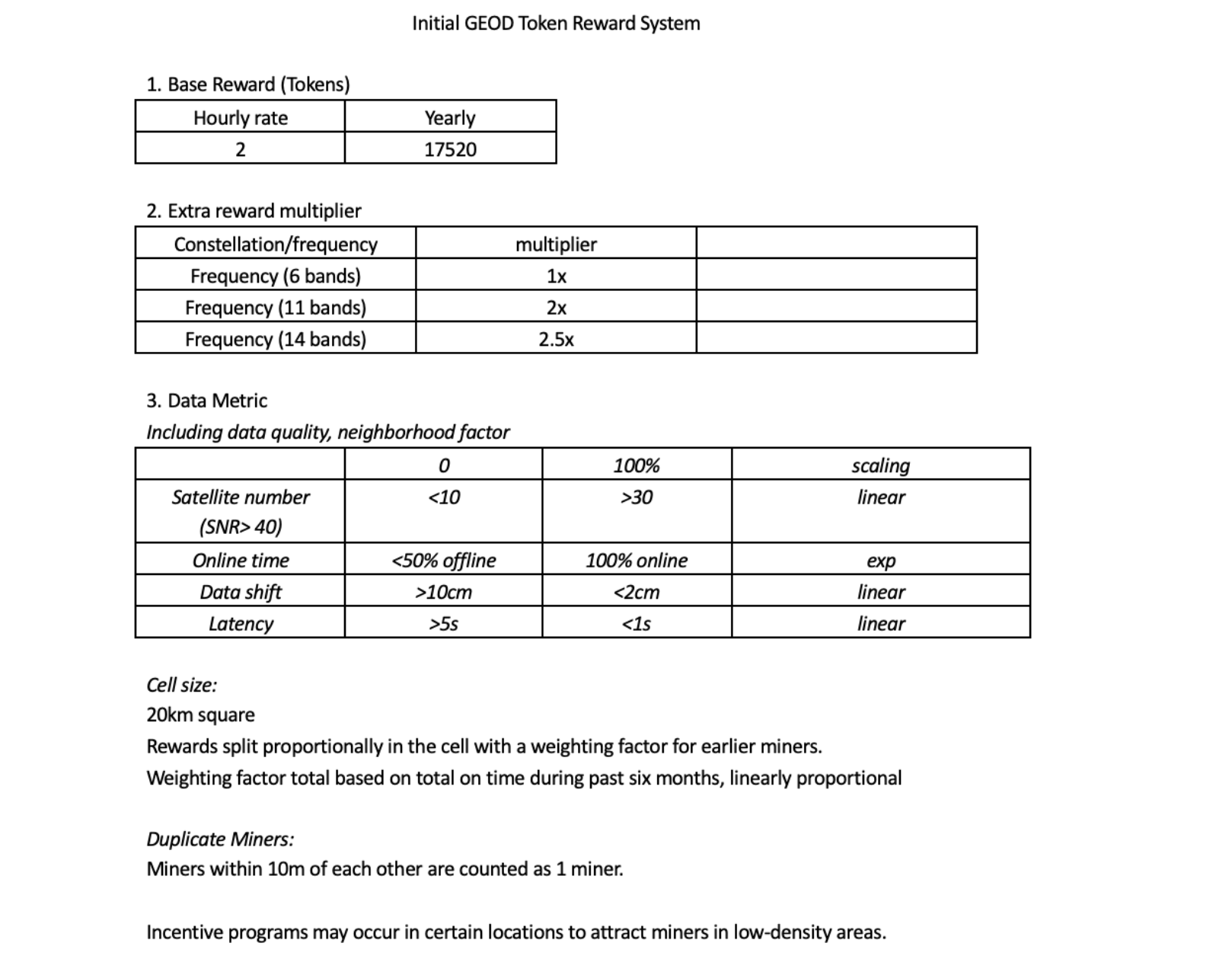
Just like every other wireless blockchain project, you get paid for the data you produce. There is an initial period for early adopters where as long as you have a miner up, you'll get paid just to keep it online & working. As of late May 2022, all registered stations receive 2 GEODs (the token) per hour. I'm assuming that is higher than we'll get as more stations join, and at some point we'll switch over to the white paper equation for Proof of Accuracy (PoA). Payment will then be based on signal quality, the number of signals received, uptime, and the location of your miner.
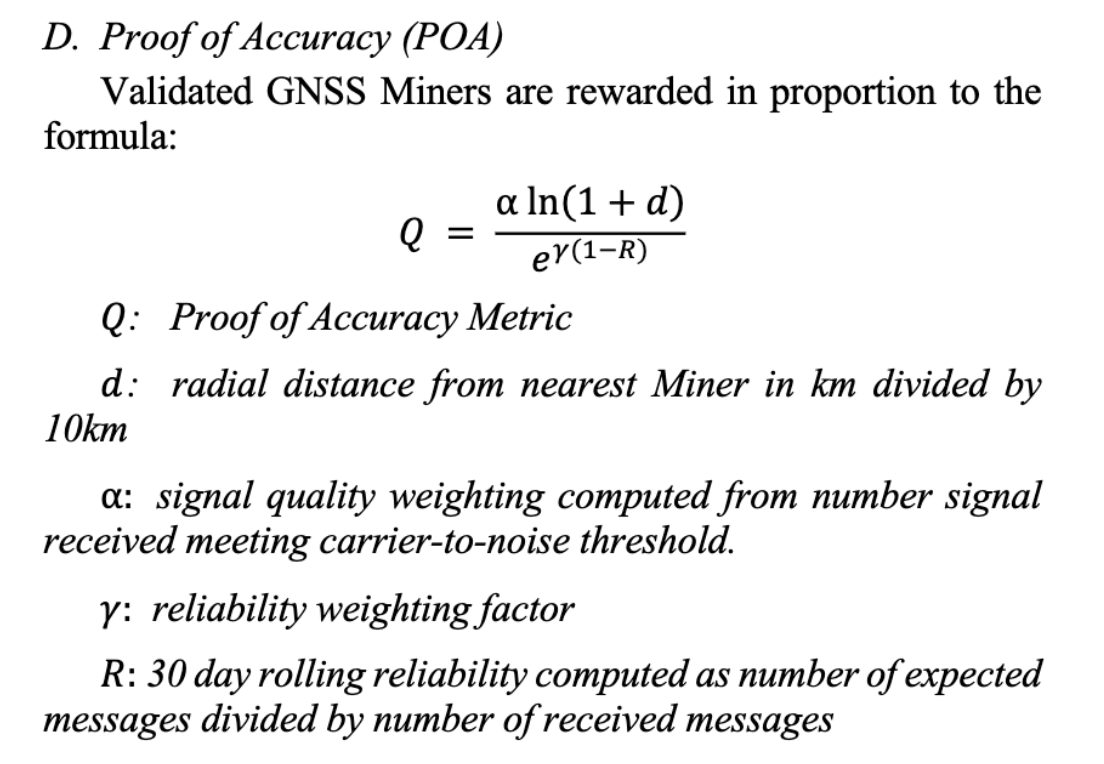
The total amount of tokens available comes from the token supply equation, which is also in the white paper.
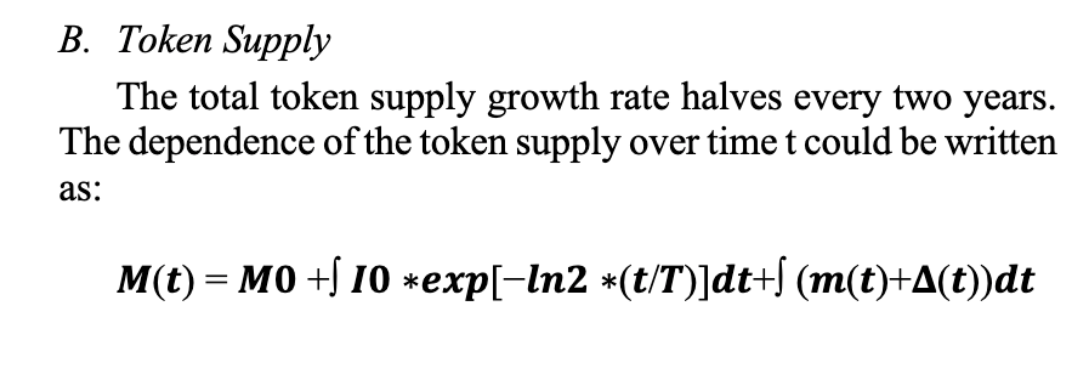
For an in depth explanation of those equations and their variables, check out the white paper. If you'd like a quick overview of the initial GEODNET reward system, take a look at this:
GEOD tokens are currently on Polygon, though they're aiming to switch to their own blockchain at some point. I've been receiving my tokens regularly, though it took a day or two for the flow to start.

Frequently Asked Questions

These are pulled from the AMAs that GEODNET has been doing and a user/ambassador named Rouven has been compiling. Rouven is a volunteer and runs a Facebook group in support of GEODNET. He's on Twitter & Instagram as well, follow him there if you want to stay up to date. These are NOT my questions nor answers, though I have edited some of them for easier reading.

Location Questions

How will GEODNET avoid/control saturation? If two miners are within 10km, the first miner online and stable will see a higher portion of the rewards. Basically, any miners within 10 km of each other are treated as the same miner splitting rewards. In general, everyone reading this memo (April 15th, 2022) is early and should probably not worry so much unless they are less than 5 km from another station. Even then, being early means rewards levels are high according to halving schedule. A year or so from now, a new entrant comes in very nearby to another station, they can be a bit more concerned. The current “cohort” is very early.

When can I see the 20 km cells on the map? Early May of 2022 was the prediction.

Can I move my miner to a different location? Yes, it will happen automatically if you move, but...be aware when you're offline, the online metric will be impacted, and if you vacate a spot you lose your seniority at that spot.

Token & Rewards Questions

When will the token be listed on exchanges? The realistic time frame is probably end of 2022.

What is the plan for the voting structure/method of the GeoDAO? Voting power will be proportional to staked tokens. 50% majority for normal decisions, 2/3 majority for big decisions.

Will there be any "protection" for early adopters? Total uptime metric will provide an Advantage to the early adopter who maintains station in a location consistently.

What are estimated rewards per day? This depend on quality of installation, location, up-time and # of satellites seen. A good installation should earn +/-30 tokens per day in year 1, with a halving planned for year 2.

Will the token be on its own blockchain eventually? Yes. It will start on Polygon to make it easier for everyone, but we are working on developing our own blockchain like Helium, with our own proof of location protocol.

Why is there a need for a new blockchain when there are so many fast, "green", and low fee blockchains? We are developing a new consensus protocol that implements secure, anonymous proof of location. This would be difficult / expensive to implement as a Smart Contract on top of another chain. Furthermore, if we use external blockchain, we will consume a lot of gas to operate the service providers nodes and deploy broad use of the service itself. If we use our own chain, this value instead consolidates back to the GEOD token which is good for the token holders.

Hardware & Setup Questions

Will other antennas (like Helium) cause interference? Helium antennas should not be a problem. Major LTE or TV towers will cause interference, try and keep away from them. [Nik's comment: The distance to keep away is not defined, though in other Q&A's they say that cell companies often add GNSS antennas to their own tower. Vertical standoff is probably the best way to manage this.]

What are the maintenance requirements? Minimal, you'll mostly have problems with local area network or power issues.

What antenna cable should I use? We ship with LMR400 and it is okay to 15m or so (we ship 10m). LMR600 is really the best cables but heavy. Use LMR600 if need for >15m. If using LMR400 cable, the cable could be extended another 30m or more. [Nik's comment: I did not receive LMR400 with my unit, and I used 50' of LMR240. I'm not sure how much difference this will make.]

During the winter season, will snow on the antenna influence the satellite accuracy? What about bird poop or dust? You do not need to try to clear the unit off. We have a unit in northern Norway with a lot of snow on it during February, and the signals were still very good. Poop and dust are transparent for RF. If the signal quality really goes down, you will be able to see this on the Console soon and then you could decide to clear the snow. GNSS frequencies are in the 1 – 1.5GHz range which is a long ways from ~2.4GHz where attenuation due to moisture is much bigger issue.

Will these units overheat and shutdown if the temps get too high? Not likely, as it would need to get up in the 70C realm to overheat.

Where I am [local regulations] require bonding & grounding of the antenna. The kit doesn't come with components to address this. You can add a lightening protector before the MobileCM SMA to protect HYFIX unit from lightening surge if you want. If the building has a ground strap/point then you can add a strap to connect from the TNC of the antennae to the building ground strap.

Can I run one of these off grid? Yes, you'll need a 4G connection in addition to solar panels and a battery.

Is there a safe limit of wind speed for the antenna to be exposed? How stable does it need to be? There is a global station in Patagonia where the winds are quite regularly 100km/hr. The antennae itself is not impacted by wind, but if you are in a high-wind location secure it extremely well. The general rule of thumb is that the antennae mount can hold your body weight! Millimeters of motion matter, the more secure the better.

What antenna does the GEODNET ship with?
The GEODNET ships with an SK6618 from Shsiki, you can find more on that here. When I got the chance to talk with GEODNET founder Mike, he was confident this was one of the best antennas on the market, and that, unlike Helium, you probably wouldn't get any noticeable improvement with an upgraded antenna.

Business Development & Use Questions

Will I be able to get some local weather data from my miner in dashboard and maybe a weather prediction? You will be able to visualize your own miners satellite visibility and signals quite quickly (by June). Eventually we can build a bigger picture and you will be able to see regional ground motion (such as plate movements), and the real-time Global Views of the ionosphere, like this one.

What’s are the requirements for becoming a device vendor/maker? Is there a device certification process in place to make new makers entering the market to ad here to certain data/reception/compliance standards? GEODNET is now actively working with a truly third party GNSS maker with no prior relationship to any GEODNET team member. This will pave the way to publish a good independent process, and GEODNET welcomes new miner makers. If there are other interested parties feel free to reach out thru the GEODNET website. We are not ready to openly publish the process yet, but can share it to qualified groups under NDA.

Who are the potential buyers of Geodnet data, and are there any deals already? Yes, we have one deal in place already (Ag oriented supplier Hemisphere GNSS) and in discussion with a 2nd company. We will also likely introduce self-service portal for individual users such as Drone Survey and traditional survey. Potential buyers might come from survey, farming, construction, mapping, autonomous vehicles, IoT applications like eScooter, blockchain apps for anonymous Proof of Location and Proof of Time.

Can the GEODNET base stations provide reference data for private, encrypted, low orbit GNSS satellites like the Xona Pulsar satellites, or is the focus and the hardware limited exclusively on open medium orbit GNSS satellites? We are looking into LEO satellites. [Nik's note: LEO = Low Earth Orbit]. I will reach out to Xona this week to discuss with them. We know Xona team well, and they have expressed support for GEODNET following its initial presentation in ION 2021. In the future, it would be ideal if GEODNET community can actually operate some Xona or similar LEO satellites to provide more decentralization and capability.

How would the GEOD Network utilize the Helium network as you mentioned a PCI slot for upgrading the miner? GEODNET network can use Helium to send GNSS correction downstream. The GEODNET miners are gathering the Space Weather data, but ultimately that data or a processed variant of the data must be sent to the “Rover/Mobile” GPS/GNSS, as that is the "thing" that needs an accurate position. This is normally done over 4G/LTE or in some cases on a low-data rate satellite channel called L-band. L-band is very slow and requires excellent sky visibility. Helium is a good alternative as the data is cheap, and the availability is wide spread. The Helium network would benefit greatly from this use case as GNSS corrections are relatively data intensive compared to many of the simpler LoraWAN applications. Normally it requires 300bits/sec to 1kb/set more or less continuously.

Is any API available to interact with the Geodnet console or to retrieve information about my miner? Not at this time, but we will do it eventually when we have a larger team to handle an API.

Can we host a Global Base and run a miner? [Nik's note: A Global base is a larger unit and different than a standard GEOD miner.] YES. This is fine and not a bad idea. An RF splitter can be used. We still need more Global Base Locations but not so much in central Europe. Africa, Central America, Central Asia, Northern Japan and Remote Island Locations are highly desired.

How will coordinates of the antenna will be calculated? The coordinates are continuously computed. GNSS stations are used to detect and track coastal tide motion as well as plate tectonic shifts. This is one of their big benefits. If the station is moved this is self-detected; however, it will also negatively impact the stations rewards for a while. So before official mining starts, place your station in a location that is stable and won’t require relocation.

Is the security of the GNSS data in the blockchain guaranteed? Can a nation-state force GEODNET to release the data for your purposes and misuse it or is this secured? This is a tricky and really great question. In short term GEODENT will have a centralized token issuance scheme on Polygon, so I think if the “FBI comes knocking” there is not much we could do but “help”. Later when GEODNET runs its own GEODNET chain ... then the network it is more fully decentralized. GEODNET then will be better protected from such potential abuse


That should answer most of your questions. If you want to order a miner you can do so here.

Hit me up in the comments with anything else and I'll respond or update this post as needed. GEOD on!

Resources

A quick word on the links in this blog post. Some of them are affiliate links, which will take you to a site that pays me a small commission on sales. There is no extra cost to you, and those commissions help keep the lights on here in Gristle-land.

Archived Comments

Zinga - 10/5/2022

Hello! Thank you for the information. My question, as I have decided to host a Global Station, is what is the internet speed required for the GEODNET equipment?


Nik - 10/5/2022

Not sure about speed for a Global Station, looks like you've asked in their Discord (which is where I'd point ya anyway.) The regular miner speed is really small; .01 Mbps down and .07 Mbps up.


Daniele - 7/11/2023

hi, is there a possibility to check the position of the antenna before buying it? Having a house in a mountain area (in the alps) it is difficult to know whether the position is acceptable or not.


Nik - 7/11/2023

Just head out to where you'll place the antenna and do a 360 scan of the horizon. If there is anything blocking signal within a 10 degree angle, it probably won't be as good a spot.


Mitch - 8/23/2023

Should be the highest point within at least 150ft radius,10 feet from the edge of a roof and 1.5m from the top of building to bottom of antenna. This helps with mitigating multipath and ensuring receiving a quality signal.


Nik - 8/23/2023

Thanks Mitch, that's helpful. Do you mean within 10' of the roof edge or more than 10'?


W Gerard Poole - 12/17/2023

Greetings, I'd like to ask a very general question. Are rural locations better than urban? Are higher altitudes better than lower? Thnaks, Gerard


Nik - 12/17/2023

Not really. What matters is whether or not the service is needed; you can identify that by the Superhexes that have a multiple on them.


Seb - 1/27/2024

thanks so much for your article!! love the pictures and it's all very easy to follow. I have very silly questions: 1) is an antenna required to mine? I live in an apartment and have no way to set up an antenna with direct views to the sky. If I buy the box, set up the "miner" without setting up the antenna, its virtually useless correct? 2) you reference Helium a lot, are they competitors in a way?


Nik - 1/28/2024

Hey Seb, yes, an antenna is required to mine, and the antenna will need to have a full "view" of the sky, so 360 degrees and more or less everything from the horizon up. Helium is the first of the "DePIN" projects to be very well known, and it's where I got my start with these kinds of projects. Helium is not a competitor to GEODNET, they do very different things.


Joe T. - 3/24/2024

Hey Nik, Stoked to have found you as I just took delivery of my GEODNet miner and am leaning heavily towards getting involved in the WingBits project (my hex is still available). Given that, I am leaning strongly towards deploying the antennas using the KP Performance Antennas Non-Penetrating Peak Roof Mount 60-inch Mast and 34-inch Extra Pole. I believe a setup like that would also have me hose-clamping the GEODNet antenna to either the 60 inch or 34 inch mast that comes with that mount, which it looks like is how you set up your GEODNet. Simply want to insure that a set-up like that has been successful given the tight parameters GEODNet wants for the project. Has your experience been good? Thanks for the great information!


Nik - 4/4/2024

Hi Joe, I'm not sure what you're asking. I've been running a GEODNET and Wingbits antenna within about 20' of each other, both about 10' above a roof that's 20' off the deck with more or less clear horizon all around. Since neither project requires transmit, there aren't the same height standoff restrictions you might get with, say, Helium & Meshtastic. Hope that helps!


Günter Schiller - 2/17/2025

Hallo habe den Miner an einer Stelle montiert wo kein stabiler Wlan Empfang ist bzw. immer wieder die 100% Token und Stundentarif nicht erziele. Meine Idee waere jetzt die Signale von Miner über Repaeter mit Lananschluss an meinen Router weiterzuleiten. Frage: macht das Sinn? VG Günther --- Hello I have installed the miner in a place where there is no stable WiFi reception and I am not always able to get the 100% token and hourly rate. My idea now would be to forward the signals from the miner to my router via a repeater with a LAN connection. Question: does that make sense? Best regards Günther


Nik - 2/17/2025

I'm not sure if a repeater via LAN will work that well. I'd try to get it into range of stable WiFi. Best of luck with it! --- Ich bin mir nicht sicher, ob ein Repeater über LAN so gut funktioniert. Ich würde versuchen, ihn in die Reichweite eines stabilen WLANs zu bringen. Viel Glück damit!
Advice: You're On The Moon, You Just Don't Know It.

· 9 min read
Nik
Site Owner

During this transition to Light Hotspots, which has been predictably uncertain, it hit me that many, if not most of the people who have been buying Helium Hotspots and deploying them don't have a strong understanding of the system.

It's as if you're on the moon and you're constantly wondering why there's no air, or why it gets so hot or cold, or why you bounce 20 feet when you walk. I'm not talking about how you earn HNT; any fool can do that. I'm not talking about the interactions between Hotspots, or how your rewards are affected by how densely packed local Hotposts are. I'm not even talking about the problem (and yes, there's definitely a problem) of gaming syndicates earning HNT for providing no real-world value.

I'm talking about the implications of what it means to participate in a decentralized system. On the surface level, decentralization is an easy concept. There is no centralized point of power, there is no one group that can manipulate the system. Any person or entity can come in to contribute and receive a fair share of the value they provide. That's the dream. So far, it's still a fantasy.

It's a fantasy in Helium for two main reasons. First and obviously, there is a fair amount of centralization in the system.

Centralization: The Current Reality

There had to be centralization in order to bring the thing into existence. Helium is still a young enterprise, and a central entity is the most efficient form of management to get the system strong enough to stand on its own.

Now, that doesn't mean it's completely centralized, or that the powers that brought it into existence aren't working very hard to make it decentralized.

We've got four main "players" in the space. Two of them are centralized and essential power players, and two of them are decentralized, though still essential.

First, the Nova team. Nova, formerly Helium Inc, is the group who created the idea of Helium. They wrote the code, did the marketing, manufactured (or more correctly, caused the manufacture of) the first few thousand Hotspots, and built out the initial platforms (first Slack and now a Discord server) for a growing community of Helium Hotspot deployers to build the wireless network. While they remain core contributors, they are trying to decentralize the system as rapidly as they can.

Second is the Helium Foundation. The Helium Foundation has three main roles: First, to be a steward of the intellectual property and brand assets of Helium. Second, to maintain the core technology and its repositories, including the Helium blockchain, miner, and Hotspot app source code. Third, to responsibly distribute and manage signing authority for changes to the system.

Nova & the Helium Foundation are the centralized power players. They maintain and control the system for now, guided by the community but with the ultimate authority to execute decisions.

The third player is you, the Hotspot deployer. Whether you've got one, ten, or ten thousand Hotspots, you are part of a core element of this system, and the most decentralized part of it. Individually, you have as much power as you care to be responsible for. Most of us, frankly, don't care to be responsible at all. More on that in a minute.

Finally, we have the users of the Helium Network. Users can range from one-sensor deployments by a Hotspot owner to monitor soil temperature in their garden out to 100,000 sensor deployments by large commercial entities. The larger those entities are, the more power they have to make changes to the system. Still, they don't have the same signing & executory authority of Nova and the Helium Foundation.

Those four players represent the current state of the network; not yet fully decentralized, though definitely moving in that direction. Before we get to the implications of a decentralized network (which every Hotspot owner should know), let's talk about one more thing. This "thing" that is either unknown, or misunderstood, or just so new to most people, is at the crux of discontent within the Helium ecosystem. The "thing", of course, is decentralization.

The responsibility to change, improve, strengthen, or destroy the Network is rapidly becoming more decentralized. No one entity totally owns it. All entities, including you, are responsible for all of those things.

The health of the Network is on you.

We don't, as Hotspot owners, tend to believe that. As (mostly) regular people, we're used to interacting with entities that are responsible for a network we are visitors in. Examples of this come in two general flavors: First, governments that set and enforce rules, maintaining order and infrastructure like the tax code, or our roads, or street lights, or airports. Second is businesses, like Amazon, or Apple, or even the local pizza shop.

In either of those networks, government or corporate, you have been participating in a heavily centralized network. While centralization gets a bad rap, for most of us it's A) the only way we've known of interacting with large entities, and B) it allows us to hold someone or something responsible. In general, centralization is a good thing. Centralized networks provide clear avenues for both improvement or complaints. If there's a pothole in the road in front of your house, you can complain to the city government. If you want a different leader (and there are laws supporting a voting system) you vote the old bastards out and bring in new ones.

On the commercial side, if you buy something on Amazon and you don't like it, or it doesn't work, or it isn't as described, you know exactly who to contact in order to remedy the situation. Amazon has taken on as much responsibility for their products as they can. You love that part, even if you hate Amazon. Even with companies we don't love to hate, we're used to them taking responsibility for their products. If you don't like your pizza, or you want a new flavor, you talk to the pizza shop owner.

Now, I can hear you saying it: "Nik, I know all this, why are you making such a big deal of it?"

I'm making a big deal about what you're used to (centralization) vs the system you're entering (a decentralized one) because living in a decentralized world is no less different from what you're used to than living on the moon.

It's not as if you're moving to a new country with new and slightly different laws.

You are no longer on the same planet.

The fundamental conditions you're used to do not exist here. It's as if you thought you were moving to a strange and exciting new city and ended up on the moon.

The laws are are written in a language that most of us don't understand. A set of rules we all agree to live by are barely built, and certainly not mature enough to protect against bad actors. The very atmosphere we breathe is different. The absolute crux of this is responsibility.

The fundamental responsibility of maintaining a healthy decentralized network lays with anyone who wants to take it on.

Now, you're used to "someone else" taking on that responsibility. You're used to, for example, a system with police in it. Those police have a recruiting and training system, a management scheme, and clear rules to maintain and enforce. They act in accordance with what their constituents want.

There is no "Helium Police Force".

The only thing that exists to protect a network of almost a million Hotspots is a few people, mostly volunteers, who feel they can help improve the system.

For most of you, that's when you start howling: BuT wHy dOesN'T soMeOnE PrOteCt mE?

This is the world of decentralization, dawg. A decentralized system has no obligation to protect you. While you can freely participate in the system (nothing stops you from buying a Hotspot, adding it to the Network, and receiving Network tokens), the responsibility for understanding the risks, hazards, and opportunities in that Network are yours. Your success is on you and a bunch of competent strangers.

Now, most of us just look for the opportunities, and really, focus on just one question: How much HNT can I make?

Hey, I get it. While it's not what got me into Helium, the earning potential of it was so staggering that you'd have to be a fool to pretend it doesn't exist. You'd have to be a greater fool to ignore the opportunities that exist in taking on some of those responsibilities. From anti-gaming to a Helium escrow business to Hotspot management to deploying sensor networks , the opportunities to build, profit, and generally succeed within this ecosystem are staggering.

Those opportunities are what I encourage you to explore at this point. Sure, the Network as of May 26th 2022 is a shitshow. That's fine. I expected it, as did anyone who realized the enormity of the task Nova & the HF took on when they initiated the transition to Light Hotspots. It's equivalent to moving from clunky old vacuum tube computers to a modern laptop, and they're going to do it in about 2 months. That's remarkable.

For now, let that problem belong to the centralized powers. Lean into the benefits of centralization while it lasts, and let them get this thing healthy enough to let it fly out of the nest. While the Helium Foundation & Nova Inc are doing that, the rest of us (well, those of us who want to win) will be focusing on deeply understanding and contributing to a decentralized network. That is the great gift they are going to give us. Will you be ready to receive it?

Remember, with great decentralization comes great opportunity. The real question is: How big of an opportunity do you want?

How To Get Remote Access to Your Hotspot

· 9 min read
Nik
Site Owner

How do you manage your Hotspot if it's at someone else's location? Whether there's a formal "Host Agreement" or it's your Aunt Sally, having the ability to remote in to your Hotspot's dashboard and do anything from a quick check on the latest transactions all the way to a reset or reboot, it's nice to have that ability.

I've been using remote.it to do this since I began putting Hotspots in remote locations. Here's how it works in broad strokes.

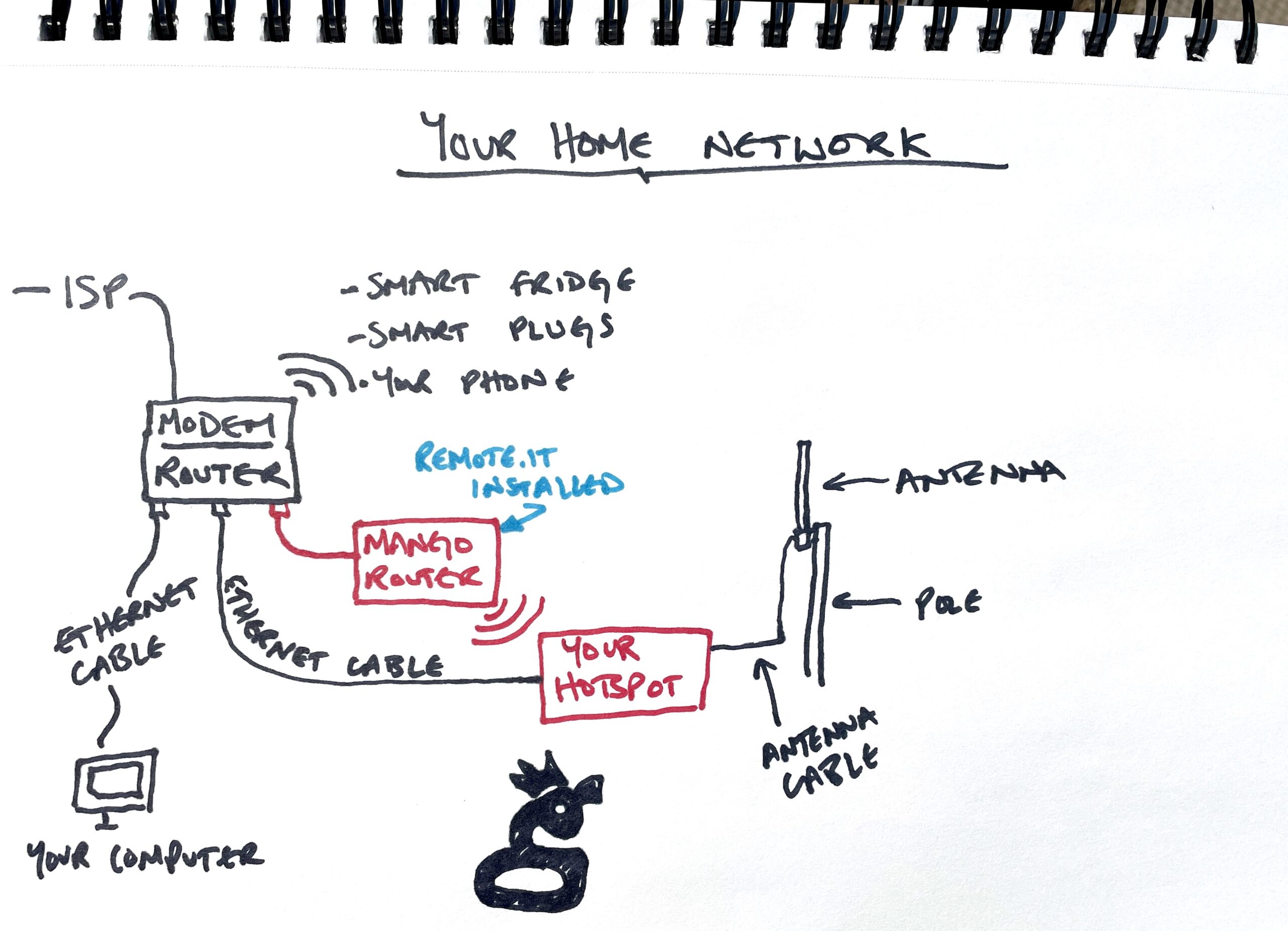
Every Hotspot is connected to a router. Most routers in the home are actually a combination of modem and router, and are more or less locked; you can't add new software like remote.it to them. What you CAN do is add another router that is more configurable, put remote.it on the extra router, and then create a connection from that 2nd router to your Hotspot. It sounds complicated, but it's really pretty easy. Let's walk through how to do it.

Oh, before we do, you should know about the upfront costs and limitations. The extra router is around $30 on Amazon. The remote.it service is free for up to 5 "devices" (aka Hotspots) and after that is $5/month for an unlimited amount of Hotspots. Until manufacturers start including remote access to each Hotspot's dashboard, this is a no-brainer if you want to be able to connect to your Hotspot remotely. Finally, if your Hotspot doesn't have a Dashboard, having remote access doesn't matter much.

Ok, let's start with a diagram showing what it looks like. If we wanted to be fancy, we could call this your network "topology". It's basically a map of your home network, from modem to router to all the devices you might have connected to the internet in your home. We'll focus on the specifics of the Hotspot connection here, but I've added a bunch of other devices just so you get a feel for the big picture.

First you'll have to order a Mango. Like I said, ~$30 or so on Amazon. This'll work with any router based on the OpenWRT Linux distribution, but for this tutorial we'll use the Mango.

While you're waiting for it to arrive, open up a remote.it account, which is free to open.

Once the Mango arrives you're ready to begin.

On Remote.it, you're going to generate a "command line install command". This sounds scary, but if you can click your mouse and follow directions you'll be fine. :)

Log in to your Remote.it account.

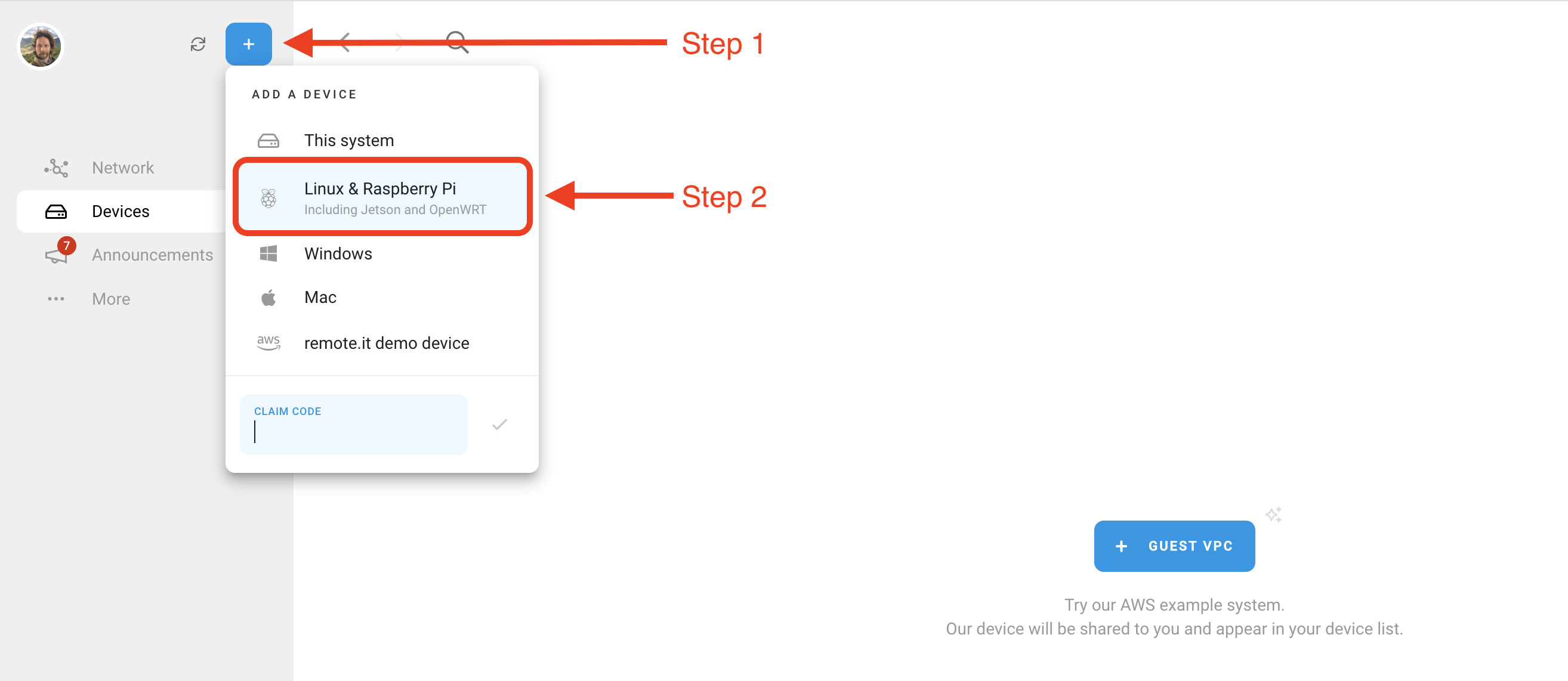
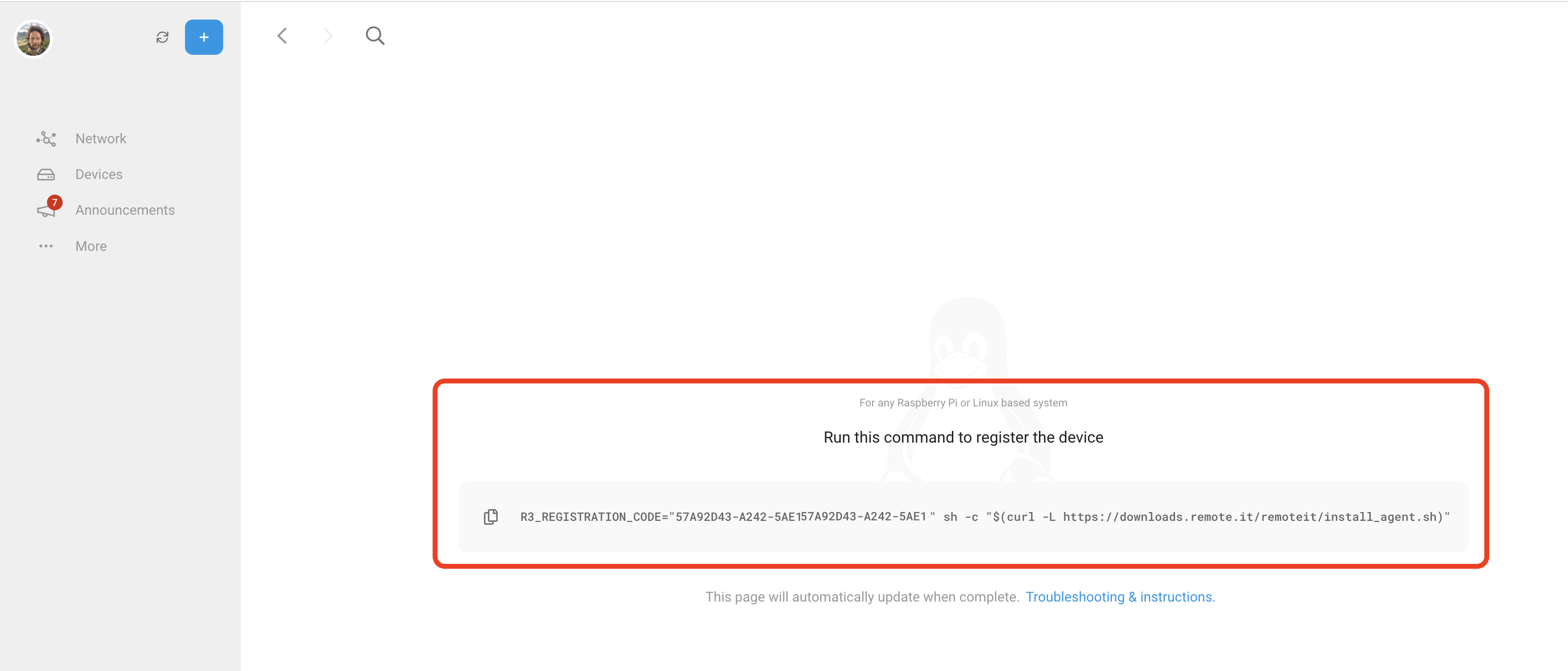
Hit the blue plus button to "Add A Device", then choose "Linux & Raspberry Pi".

That will bring up a code for you to copy. You can copy it now or come back to it later, but leave this tab open. You're going to need that command (the thing starting with R3_REGISTRATION...etc) later.

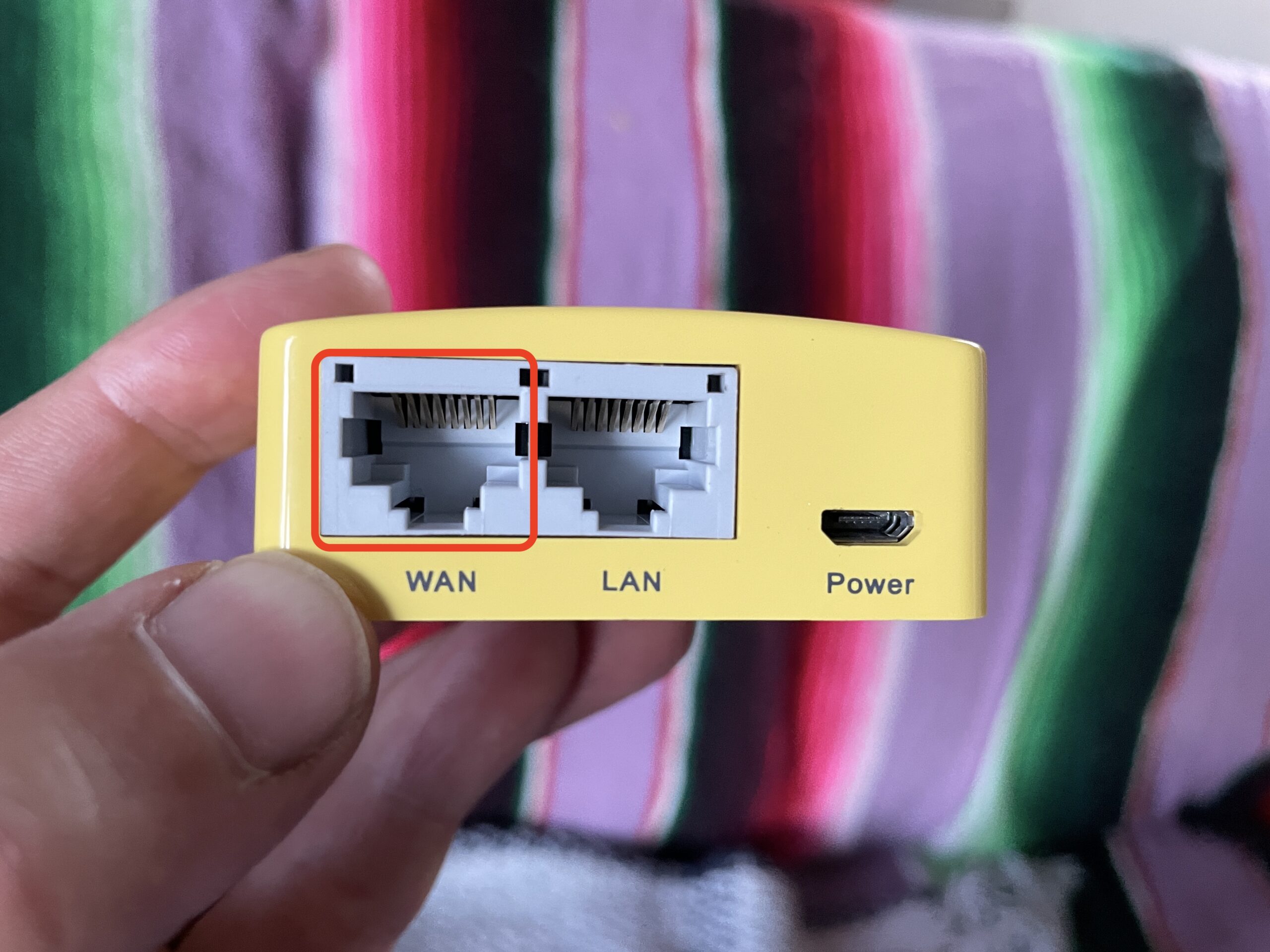
Over on the Mango, plug in power, then connect your Mango to your router with an ethernet cable. Use the WAN port on the Mango, and any LAN port on your router.

Power up the Mango. It'll start broadcasting a WiFi network, which you'll join using your computer.

  • Look for the Wi-Fi network on your computer, it'll be something like "GL-MT200N-V2-xxx".
  • Open a browser and go to http://192.168.8.1 That address should be on the back of the Mango box, and the password (which is probably goodlife, should also be there. Sign in. I think it made me change my password right away.
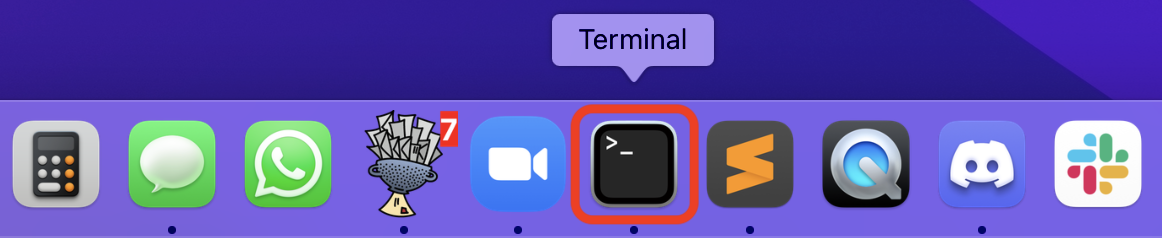
  • Open up the Terminal app if you're on a Mac, or for Windows, an "ssh client" like Putty (or whatever you use for command line).

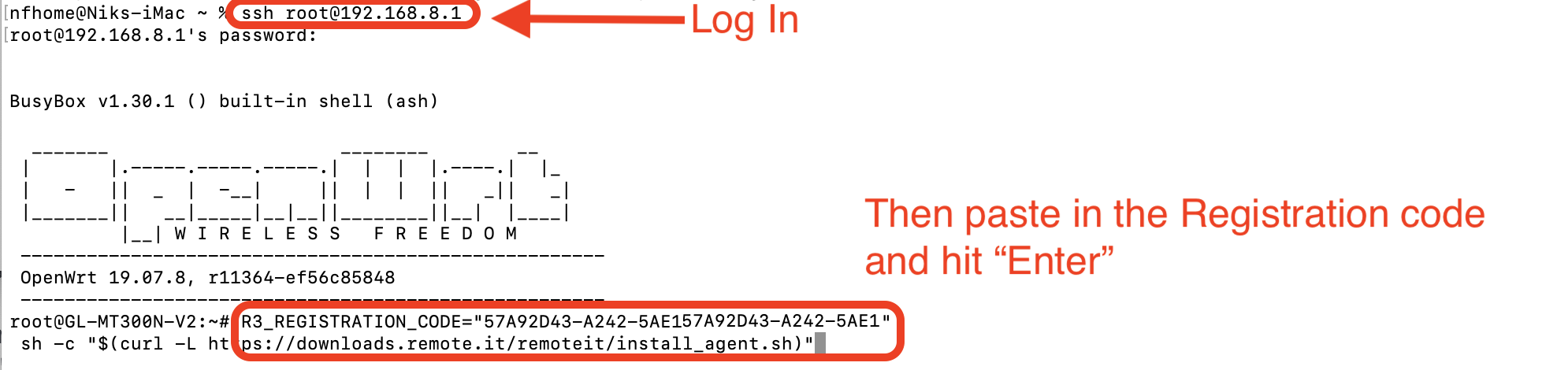
  • In your command line app, connect to the Mango using this command: ssh root@192.168.8.1 Again, the default password is goodlife if you haven't changed it.
  • Now that you're logged in to the Mango command line on Terminal, take the command you copied from the Remote.it website (R3_Registration-blah-blah-blah), paste that into your command line, then hit Enter.

  • It'll spit out a bunch of code. I always feel like a super secret hacker when this happens. You don't need to do anything, just watch the Matrix work. :). It's connecting your Remote.it account to your Mango.
  • Once it's done and you see another command prompt, type in exit, then hit Enter, then close the Terminal app.

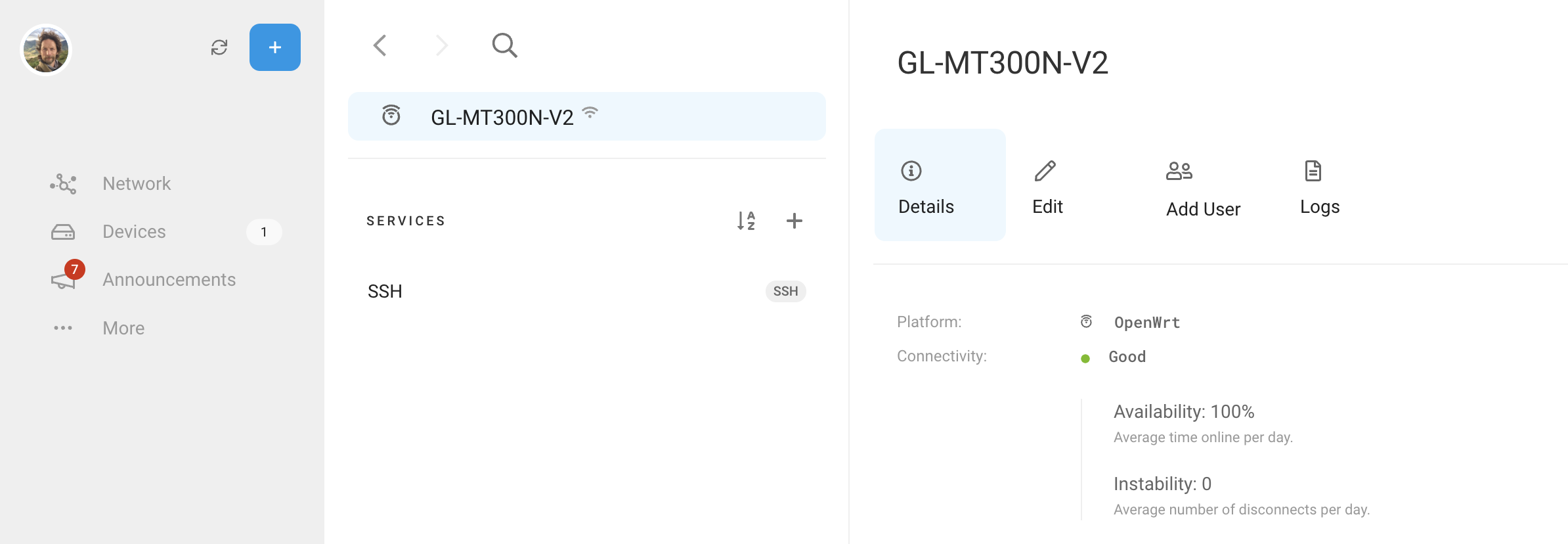
  • Wait a few minutes, then look in your Remote.it account and you'll see the Mango in your account.

  • Now your Mango is connected to Remote.it. The next step is to tell the Mango which device (your Hotspot) you want it to keep a line open to.
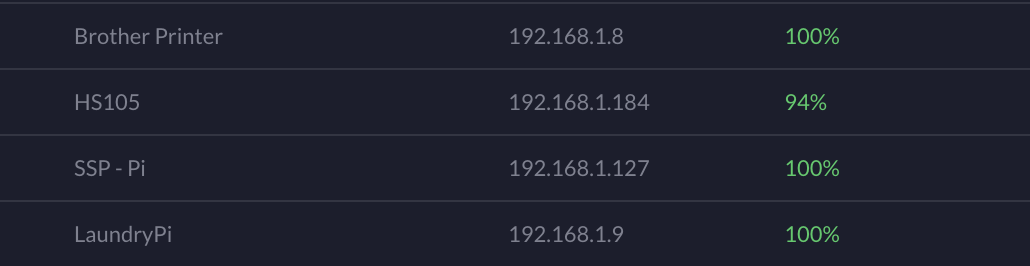
  • To do that, you'll need to find the local IP address of your miner. To find that, you'll need to log in to your regular router. Google your router name and "find device IP list" to do this. It'll take some time. Just go slow and follow those directions. Your list MAY look something like this.

  • You'll see a list of all the devices in your home on your router, from your printer to your computer to smart fridges. You're looking for the miner's IP address. It'll be something like 192.168.1.xxx.
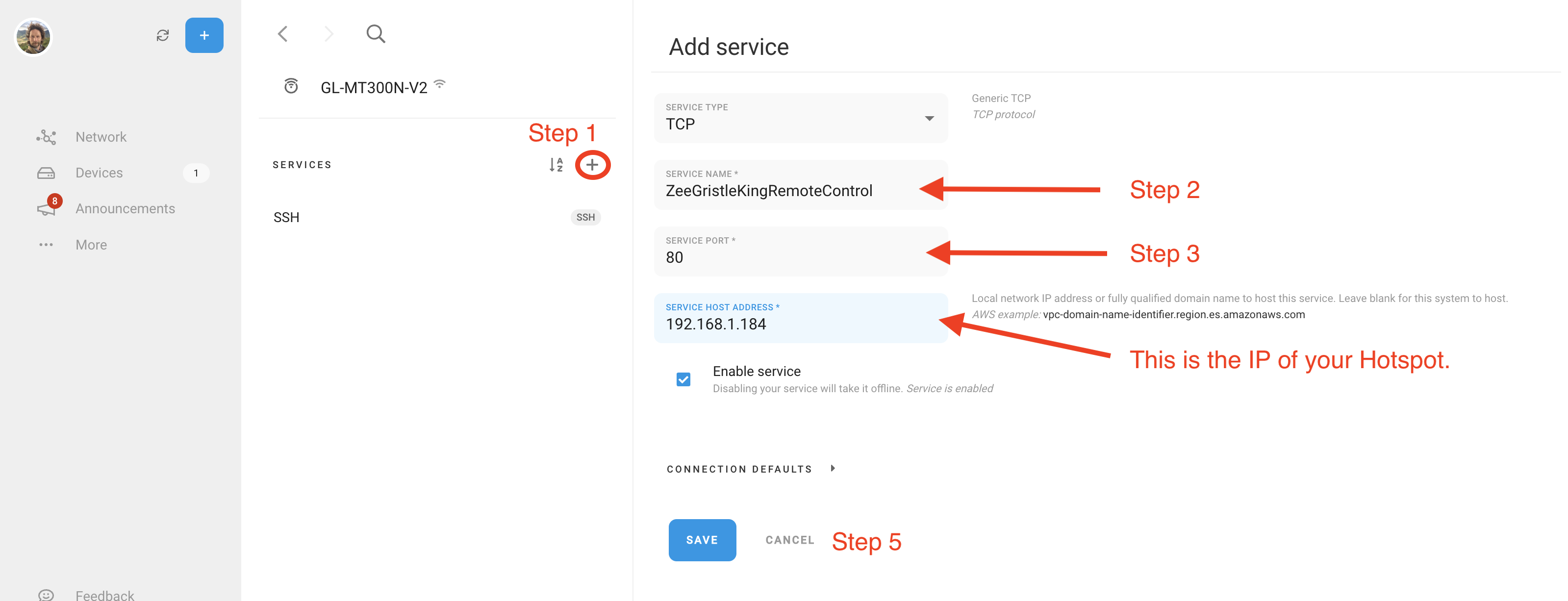
  • Now, back on the remote.it app, select your Mango, and under the Services column, click the + button to "Add Service".
  • Leave the Service Type as TCP.
  • Change the Service Name to whatever you'd like, say, "MyRemoteMinerAccess" or whatever.
  • Set the Service Port to 80.
  • In Service Host Address, paste in your miner's IP you just found on your home router.
  • Enable service, and Save.

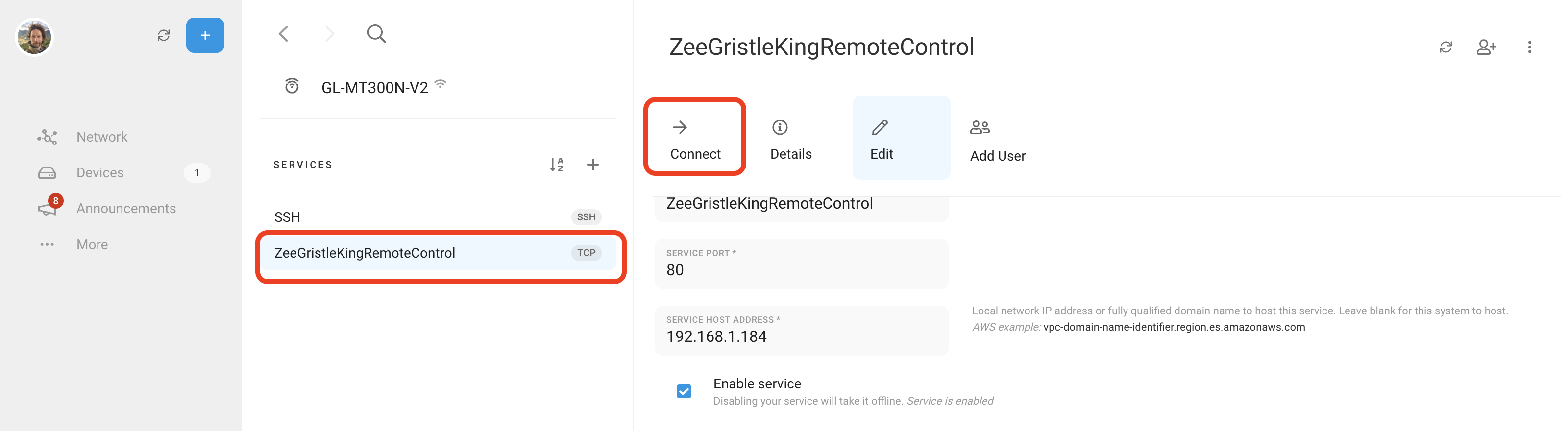
  • Wait for a minute or so and you'll see it appear in the Services column.

  • You're done! Now, from anywhere in the world you can log into your Remote.it account, select the Mango your Hotspot is attached to, click on the Service you just set up, then hit "Connect".
  • You'll see it say "Starting", then in the bottom right corner of the blue section look for an arrow with "Launch". Click Launch, and you're in!

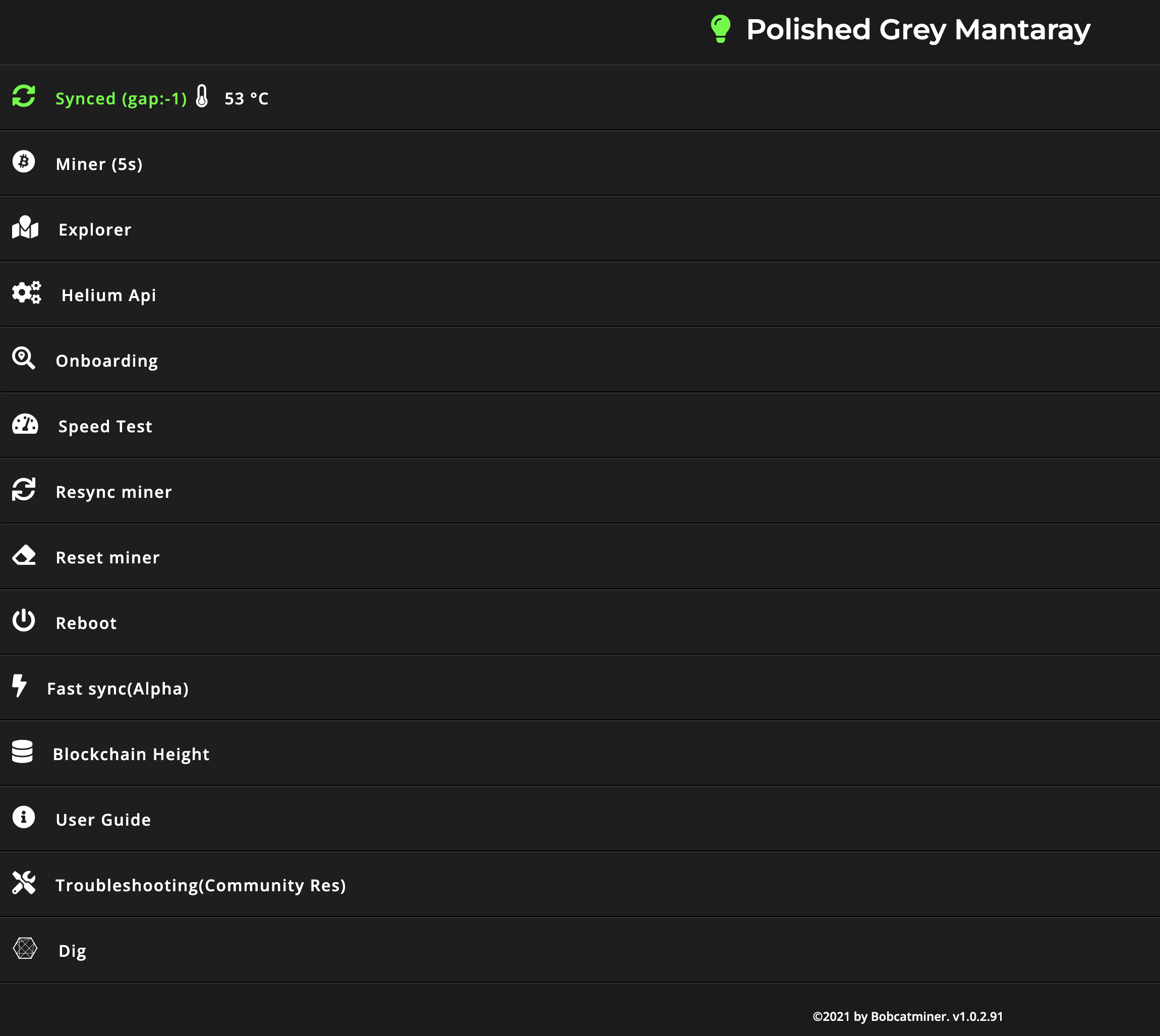
This is what that the Bobcat dashboard looks like, as an example:

Security concerns: If you want to get geeky, you can put the Mango on a different subnet on your network. I wouldn't worry about that complexity, but if you or your hosts are extra concerned about security, Google how to setup subnets on your router.

That's it, you're all set up with the Mango and remote access to your Hotspot's dashboard. Rock on!

Remote.it + Mango Benefits

  • Monitor online/offline status for your miner in real time from anywhere.
  • Check the stability of your miner's internet connection over time.
  • When using a cellular router connect to your miner and Mango, the data plan usage of remote.it (NOT your Hotspot)will be ~2MB per month to maintain an on-demand connection to your Miner. $49/year unlimited slow data (T-mobile card).
  • Get to the web interface of your miner. This ONLY works with Hotspots that have a web interface (like Bobcat).

Oh, one more potentially hot tip (that I haven't tested). The good people at Remote.it have pointed me in the direction of a T-Mobile SIM card that runs $49/year with unlimited data. Even though it's gawd-awful slow (64kbps), that *shouldn't* matter for Light Hotspots which should be below 1.4kbps. Your mileage may vary, but for the record, here it is.

Archived Comments

James Fox - 5/18/2022

Hi ! Jim at remote.it here. If anyone has questions about remote monitoring and mgmt …. or needs help to get started … email us at support@remote.it and you’ll hear back from us in 24 hrs or less. Usually less!!


backtran - 7/26/2022

Hi Nik, Couple of comments after using this guide: 1. Also works well with the GLX750 wireless router with integrated SIM card. Avoids buying the additional mango if you already have a GLX750 for an off grid installation. 2. I think for step setting up the services the HTTP selection is needed not TCP. At least for me TCP did not work but HTTP did. Thanks for all you do! Cheers


cr4zyw3ld3r - 2/14/2024

Do you know if those same terminal commands will work with this model?


Nik - 2/21/2024

Not sure, would love to hear about it if you try that out!


Want to Explore NFTs with Gristle King?

· 9 min read
Nik
Site Owner

When I bought my first NFT, the whole thing was complicated.  It still is, and it’s risky.  Most NFTs are art, so the value is in the eye of the beholder (and the market). While that means you can make a lucky million, you can also be left holding a bunch of NFTs that were supposed to be good, but..weren’t. That's how I did it; making a ton of bets, playing fast and loose, and frankly, losing most of the money I'd set aside to "learn the game". A few NFTs paid out well, but I was mostly left with a collection of jpegs I'd rather hide than display.

That's not a great experience, and I don't want you to have to pay the same price to learn the same lesson. Still, NFTs hold a lot of promise. They are a new form of digital proof. In the world we're heading into, I think the ability to hold, use, and understand that proof will be a valuable skill. I'd like to help you learn it.

The Gristle King NFT, which I call the G-Unit, is a way for you to enter into the world of NFTs and make sure you get something for your money beyond a jpeg.

When you buy and hold a G-Unit NFT, you get the following things:

  • Access to the Gristle King courses (the Helium Basic Course and the HeliumVision MasterClass), which is a $199 value.
  • A month's worth of entry into the Gristle Crüe ($49 value), my private Discord members channel where we meet once a week on Zoom to talk about the latest in Helium with experts in the field.
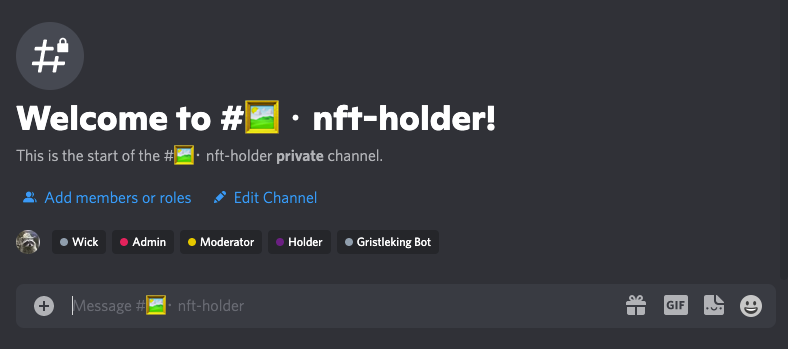
  • Access into a special channel on the Gristle King Discord called #nft-holders. Unlike many NFT projects I've seen, I'm not going to bullshit you with a bunch of hooey about how access to that channel will make you sprout wings and shit glitter. It won't. It will, however be a place where you can find other people who are very likely to be interested in both Helium and NFTs, and I think that intersection will be interesting. Value in that one is unknown.

So, depending on what ETH is when you buy the NFT, you should get pretty close to the same value if you'd spent money on the courses and to join the Crüe.

I'm only creating 749 of the G-Units, which is a small run in the world of NFTs. Projects usually create at least 1,000 if not 10,000 NFTs. I wanted to keep the group manageable as well as make it semi-exclusive. I'm under no illusions that the thing will "mint-out" in minutes, but I thought it'd be fun if you got to have something that no more than .00000096% of people on the planet will ever have. For that stat, I used a world population of 7.753 billion.

If you'd like to get an NFT, hit the big blue button.

MINT A GRISTLEKING G-UNIT NFT

If you'd like to know a little bit more about minting and how to use the NFT, watch this.

https://youtu.be/nKIJnI\_Qbdw

Once you have the NFT, here's how to access the benefits.

If you want to see the mechanics behind how this NFT came into existence, keep reading.

I started by buying a CryptoHoot, which is an NFT from a totally separate collection. Here's a "Hoot".

Now, you may be asking, "Nik, why the heck are you showing me an owl? I thought we were talking about G-units?!"

Well, this particular NFT gives you access to both a Discord server (which pretty much every NFT does) AND a tool called Shufflemint.

Shufflemint is the thing that makes this NFT special, at least for me. Shufflemint makes it so you can add a bunch of different layers of art, randomly shuffle those layers, and create a bunch of unique NFTs. That's pretty cool, and that's how the G-Unit is made.

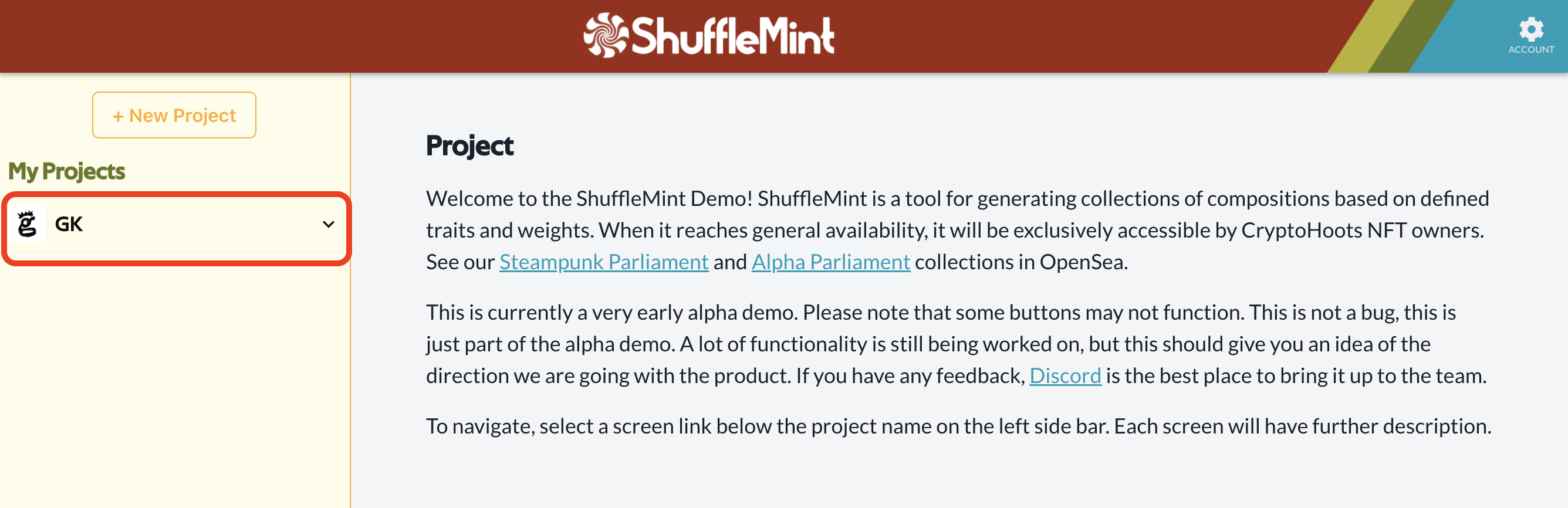
Here's how it starts, with a clean slate. You can see I've already created a project here, called "GK".

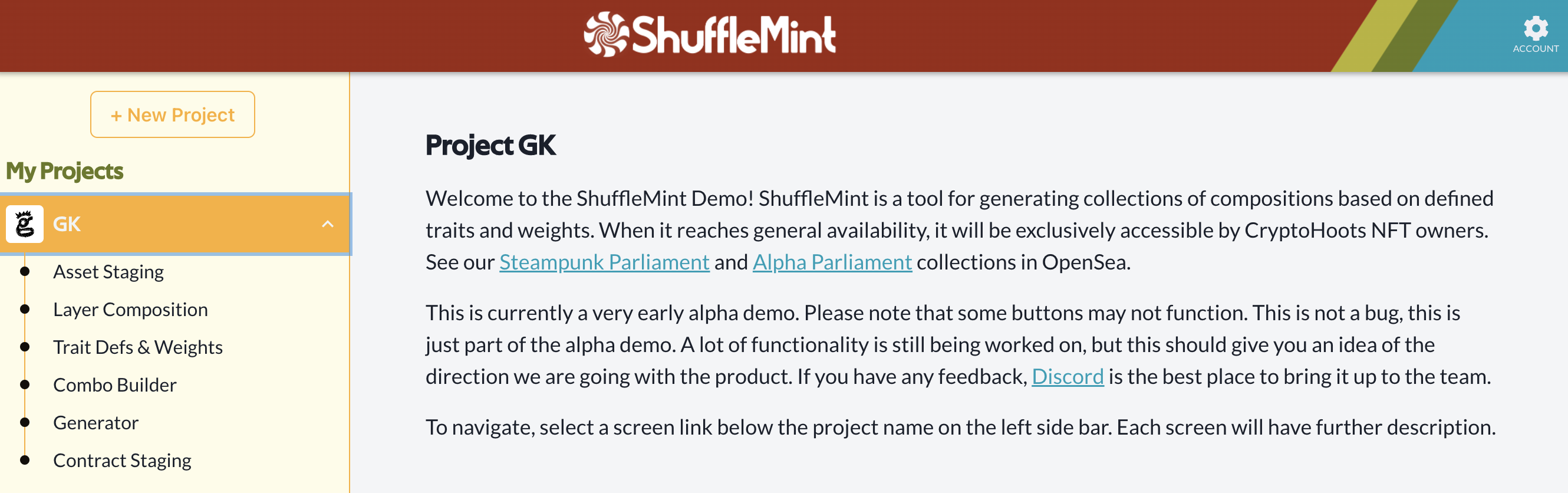
Inside that "Project" are a few different sections. Each section builds on the last. First, you load your assets (the pieces of each image that make up a final NFT image) into Asset Staging.

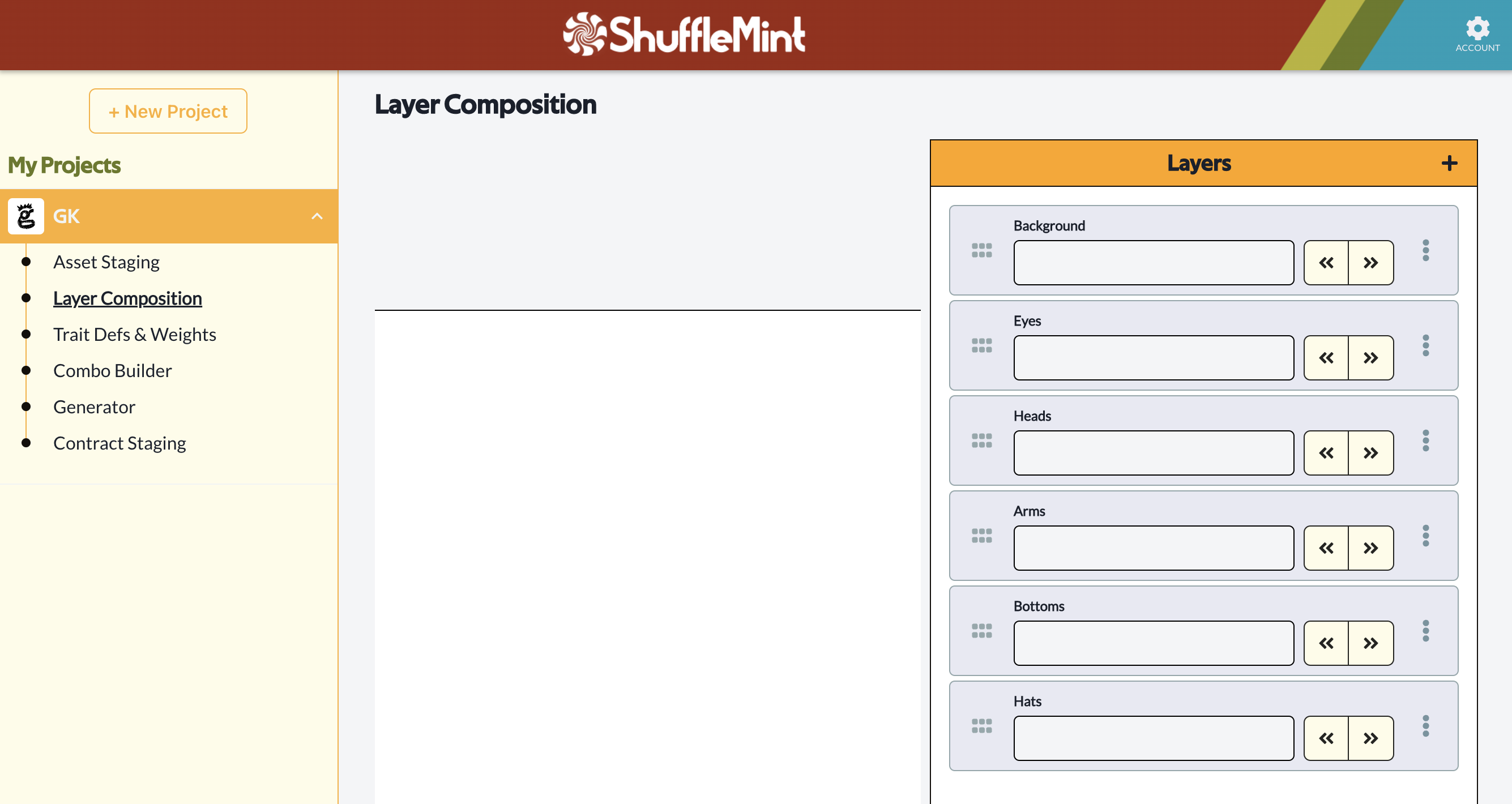
This NFT is a pretty simple project; 6 layer categories, each with a few different options. There are pancake hats and pink mohawks, different eye styles, bows & arrows and burritos & coffee. If you just threw it all in together it'd be a jumble of eyes and backgrounds and mohawks and pancakes, like this.

Nobody wants that, so you've got to organize it a little bit. Once your assets are in and labeled, you'll sort them into the correct layer order (background, eyes, heads, arms, etc).

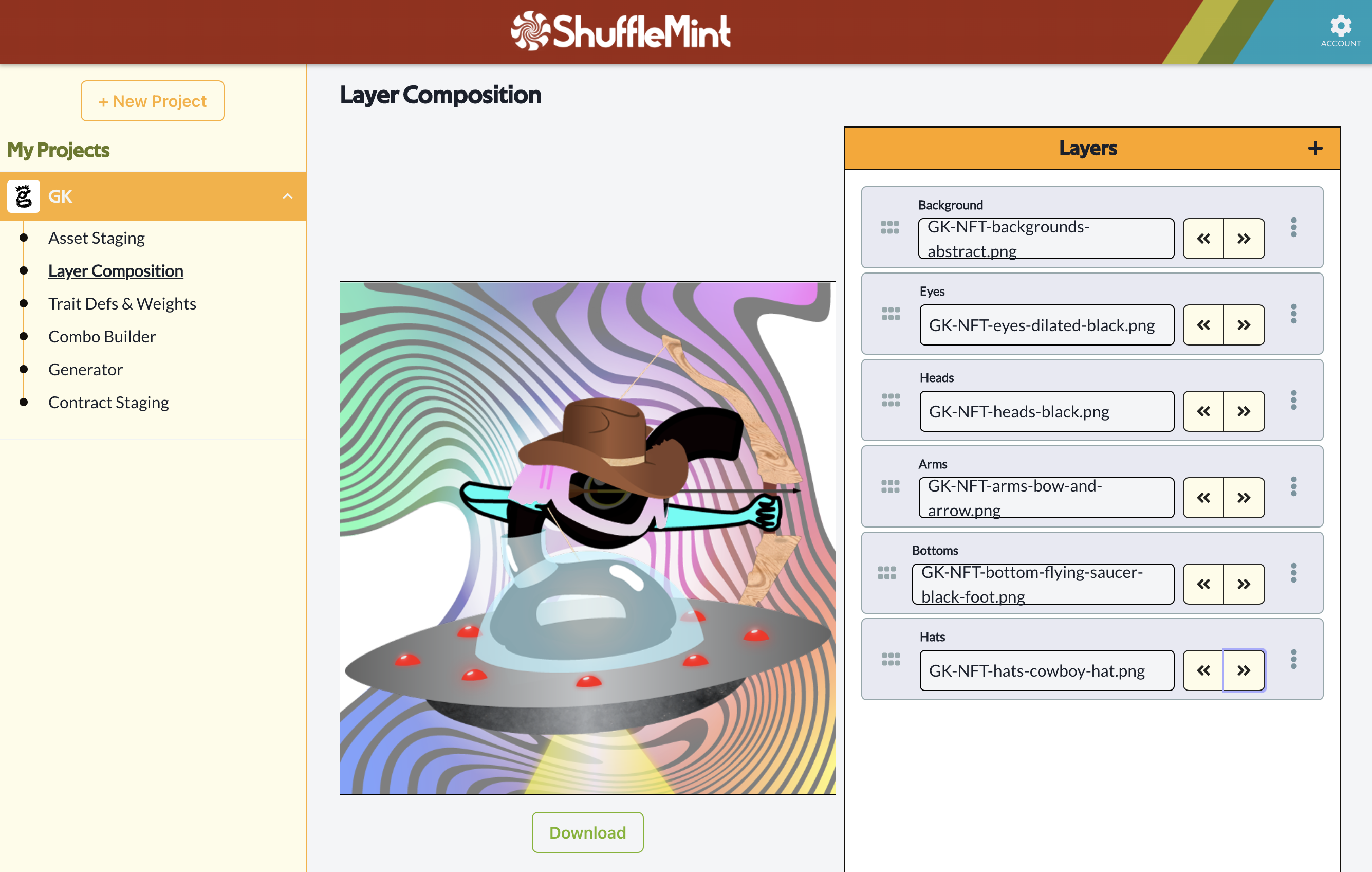
That can be confusing for those of use who aren't super visual people (like me), and this took me a while to figure out which layer should go where so it doesn't hide or get hidden by another layer. A fun puzzle! Once you have the layers ordered correctly, you can use those right and left arrows in the Layers column to flip through all your potential options. It might take years to see all possible options, so I just went through a few each time to confirm I had my layers in the right order. Here's an example of what it looks like when you choose a specific Asset from each Layer.

This really helps you see if you're getting it right!

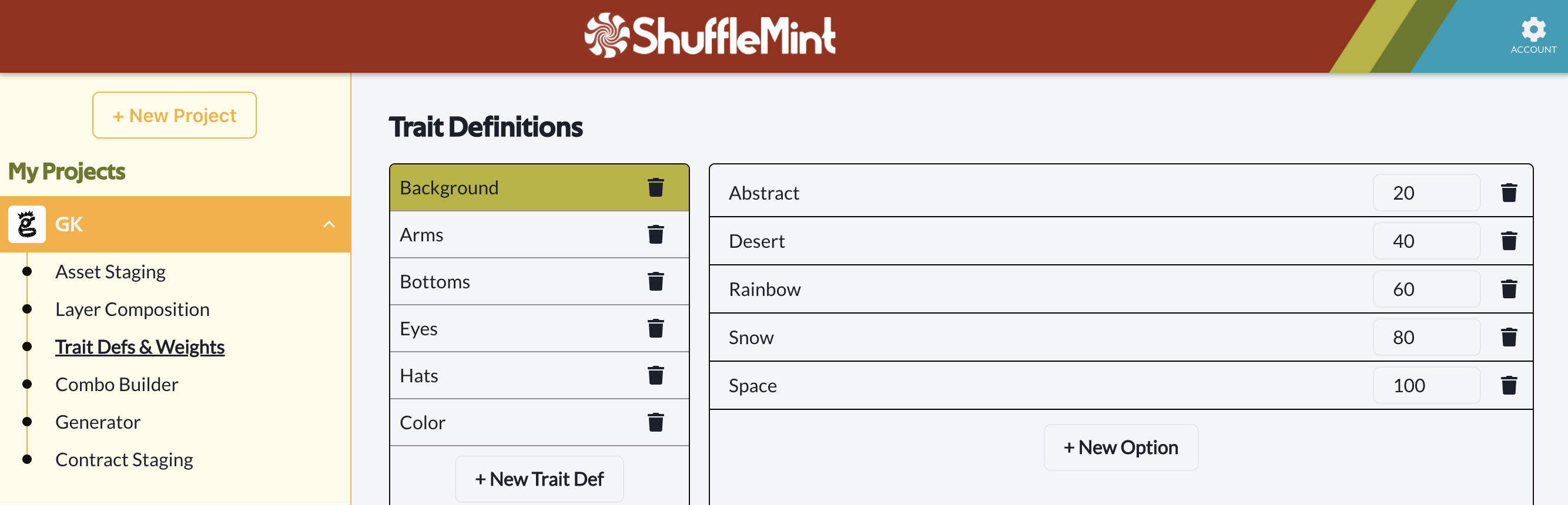
From there, you go through and give your Traits "Definitions" and "Weights". A Definition would be what I'd think of as a Layer Category, like Background, or Eyes, or Heads.

A Weight is the value for the relative frequency of a specific layer. For example, the Weight of the Abstract background (what you see in the above generated image) is 20. That means you'll see it 20% of the time, so it's relatively rare. Here are the Weights for the Trait called "Background".

The next part, "Combo Builder" isn't ready for prime time yet, so we'll go to the fun part, Generator!

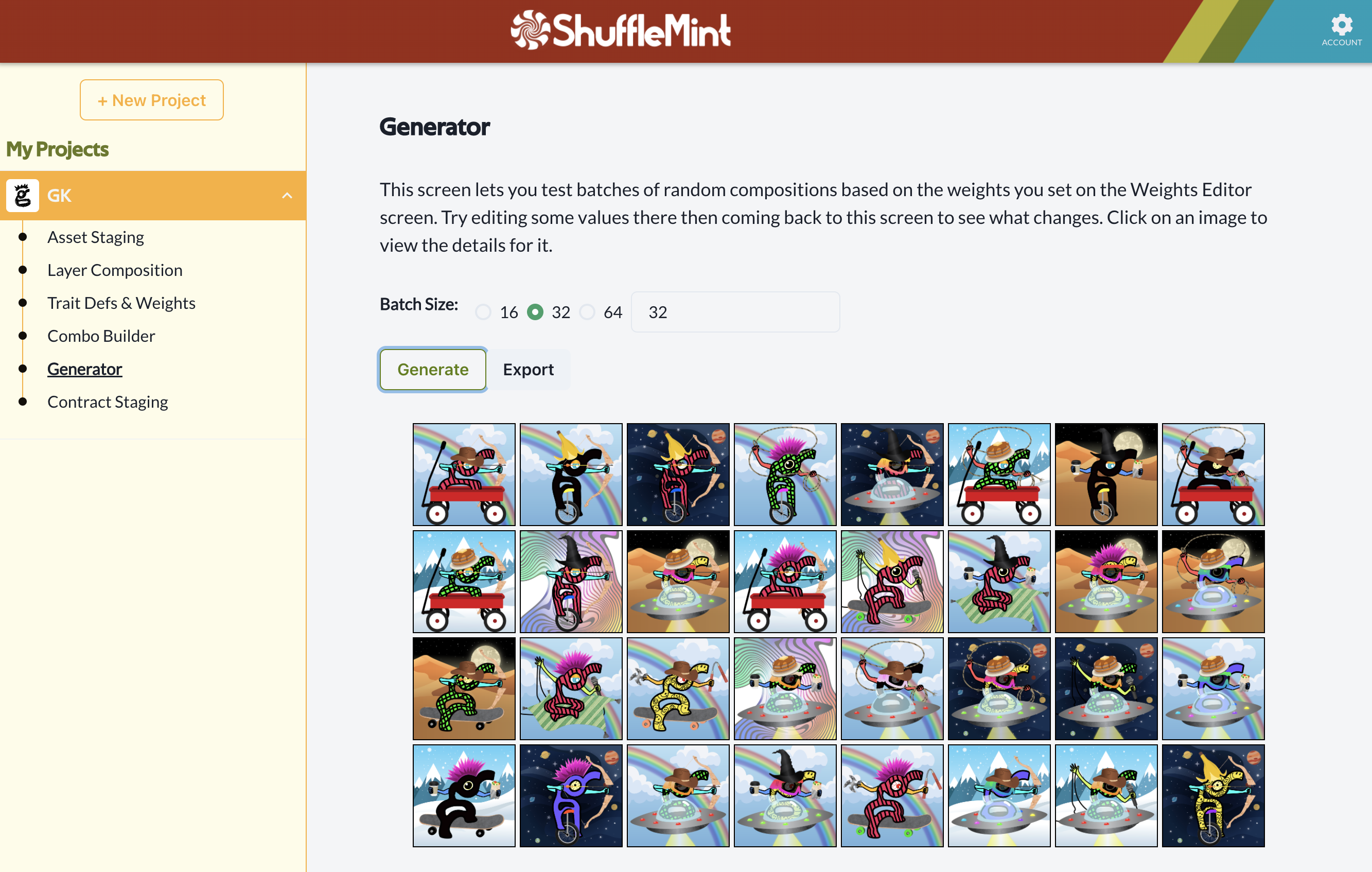
In the Generator section, you pick how many NFTs you want to Generate, then hit the button. Easy (and fun)! Here's a random example of generated G-unit NFTs (which may or may not be in the final collection.) Fun fact: Even though it looks like "body" is all one thing, every "body" is actually made from a "bottoms" and "colors" layer. The "colors" layer stood in for the color of the body. For a while we thought it might be cool to mismatch the two, but I wanted at least some uniformity in this, so all the bodies are the same color, top & bottom.

From there, you can launch it yourself, or, if you're like me and prefer to let professionals handle that, you reach out to the ShuffleDAO for help.

Now, you might think art generation piece is the end of it, but wait, there's more! One of the coolest things about NFTs (and really, web3) is how much collaboration can happen between strangers, and how transparent everything is.

In this case, I've never met any of the ShuffleDAO people in real life. We've talked on Discord, and we've chatted on Zoom, and we've even done a YouTube Live together, but I've never met 'em!

https://youtu.be/pf67iJmNjM0

Still, we're working together on this project as strangers who've decided to harness in together for a bit and pull for a common goal. As part of that, the contract that gets executed when the G-Unit goes live slices off a share for them and the ShuffleDAO project, and the way it does it is REALLY cool!

You see, the ShuffleDAO goal (in part) is to make easy for people like me to create and use an NFT as part of a community. When you buy a G-Unit NFT, part of the ETH you spend goes to ShuffleDAO for orchestrating the project. Part goes to buy their token, which is called $MINT, and then you get that $MINT dropped into your wallet.

Think of $MINT as rewards points; you can use it anywhere in the ShuffleDAO system, and you get it for free when you buy a GK NFT.

Here's the breakdown:
70% to GK
20% to ShuffleDAO
10% to $MINT, which you get back in your wallet.

So that's how the whole G-Unit NFT thing is working. I'm super psyched to launch this, and I'm pumped to meet all the holders in the Gristle King Discord #nft-holder channel, which right now is empty, just waiting.

Will I see you in there?


Hey, before I sign off, let me put a disclaimer in here: NFTs are volatile. You could lose all the money you put into this or any NFT (or crypto) project. You'll get charged with "gas fees" every time you do an ETH transaction, including buying this NFT, which will increase the cost of the NFT. I'm not a lawyer, or an accountant, or a financial advisor. None of this is anything close to professional advice. Never spend any money you're not willing to lose in the world of crypto. Do your own research and be careful out there.

Ok, that wraps it. Drop any comments, questions, feedback below, I'm always looking to learn & share lessons to improve. Rock 'n roll!

Archived Comments

Biggworm - 6/1/2022

Hi. I have a 2.3db antenna on my MNTD miner and it does great for me. Do you know what the lowest gain antenna is that we can buy. I've been Googling around for a while and there are an overwhelming number of results, but I just can't seem to find anything less than my 2.3 db. So do you know where I can find a 1 db gain antenna or something similar, if they even make a 1 db? Thanks for all you do for the community!


Nik - 6/2/2022

Hmm, I'm not sure. I think the stock antenna they OG Hotspots came with was 1.2 dB.


What Is HNT Crypto?

· 3 min read
Nik
Site Owner

So you're into crypto and you just discovered HNT? Let's go through the basics so you can decide whether or not you want to jump into the world of Helium.

First, what is HNT crypto?
HNT stands for Helium Network Token. HNT can be traded on crypto exchanges like Binance.us for whatever you'd like (dollars, BTC, ETH, euros, etc), or it can be used to buy Data Credits on the Helium Network. A Data Credit is how a user (not necessarily a miner) on the Helium Network pays to transfer data. Helium miners earn HNT for providing wireless (radio) coverage.

What is HNT mining?
HNT mining involves plugging in an HNT miner to power and the internet. The miner will automatically begin mining HNT based on the radio signals it sends and receives. The signals it sends and receives depend heavily on three things: How many other miners are nearby, how far away they are, and how many of them it can communicate with. You can optimize the signals your miner sends and receives (and therefore the HNT you earn) by using an aftermarket antenna connected to your miner with antenna cable, and getting the antenna on top of your house (or building, or mountain).

What is HNT worth?
HNT is a cryptocurrency with a volatile price. In the past year (May 2021 - May 2022) the price has been as low as $11 and as high as $60. You can check the current price here.

What is HNT used for?
HNT is used to buy Data Credits on the Helium Network. Data Credits are how you use the Network to transfer data. As of current writing, the only wireless network available on Helium is LoRa (for Long Range). LoRa is designed for IoT or Internet of Things devices. While you may not have heard of the IoT, it's one of the largest coming technologies that humanity will use to help understand our world.

Why is Helium (and HNT) special?
Helium is the first and so far the largest cryptocurrency and blockchain project to have an actual use in the real world. You can use Helium today to track anything from packages to pallet to planes to paragliders, or keep an eye on your crops, water pumps, buses, or even camels. While many blockchain projects are out there claiming to be useful, Helium is one of the few you can actually use right now.

How can I learn more about HNT?
This website was built to help you understand it! Check out our articles on a Rough Guide to Helium, or Which Antenna Should I Buy, or take one of my Helium Courses. If you'd like to join up with a group of Helium enthusiasts who are exploring and building solutions using Helium, join the Gristle Crüe. We meet weekly on Zoom to discuss the latest in Helium, and topics range from how to optimize your miner out to tax planning and of course, building an IoT business.

How Much Better Is Your Hotspot?

· 5 min read
Nik
Site Owner

After I did the statistics video with Matthew Patrick, I heard from @cryptofulness via Twitter. He reached out from Portugal to offer some help with a "t-test implementation" to test some Hotspots. If you remember, a "t-test" compares two sets of data and tells you whether or not there's actually a meaningful result.

In this case, the two sets of data are your hotspot's earnings and the global average. I'm going to walk you through how to use the tool Cryptofulness set up for me, and you can see for yourself if your Hotspot is REALLY doing better (or worse!) than the average, and by how much.

For reference (and yes, this counts as bragging), Amateur Jade Hare, which is a hotspot I have set up on a mountain in San Diego, has performed 612% above the Network average over the last 3 months. By the way, it's running a 3 dBi antenna. As I've said before, when it comes to earnings, antennas don't really matter. You could use an HNTenna (what I've got), or any of the McGill antennas, or a PPL antenna. On the PPL, use code GRISTLEKING for 5% off. Remember though, location is what drives earnings, NOT the antenna.

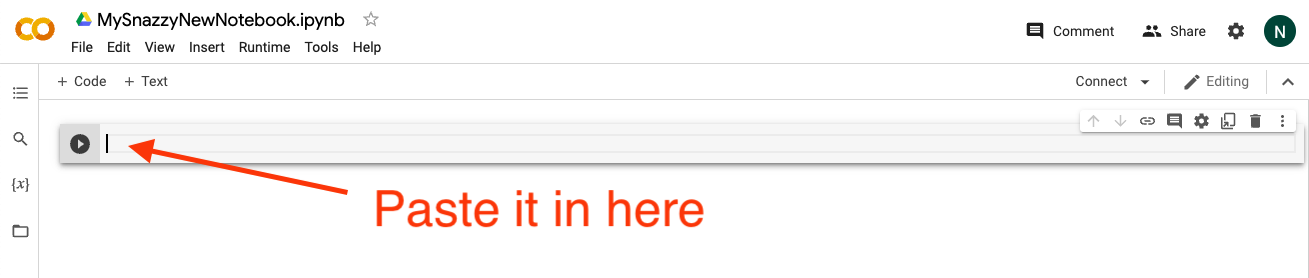
Ok, let's go! You'll need to sign in to a Google account, then open up a Google Colaboratory tab at this link:

https://colab.research.google.com/

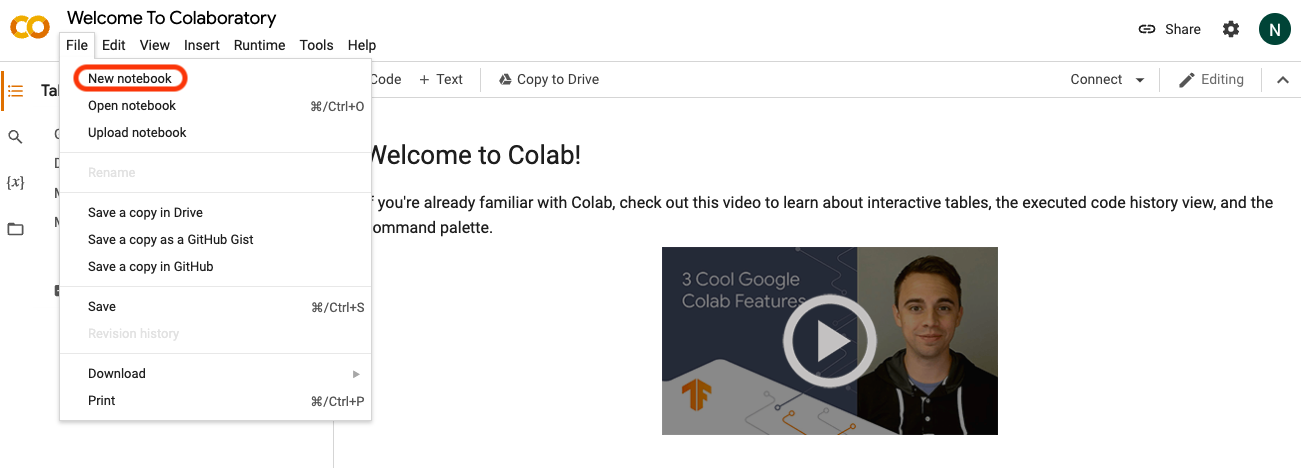
Choose "New Notebook".

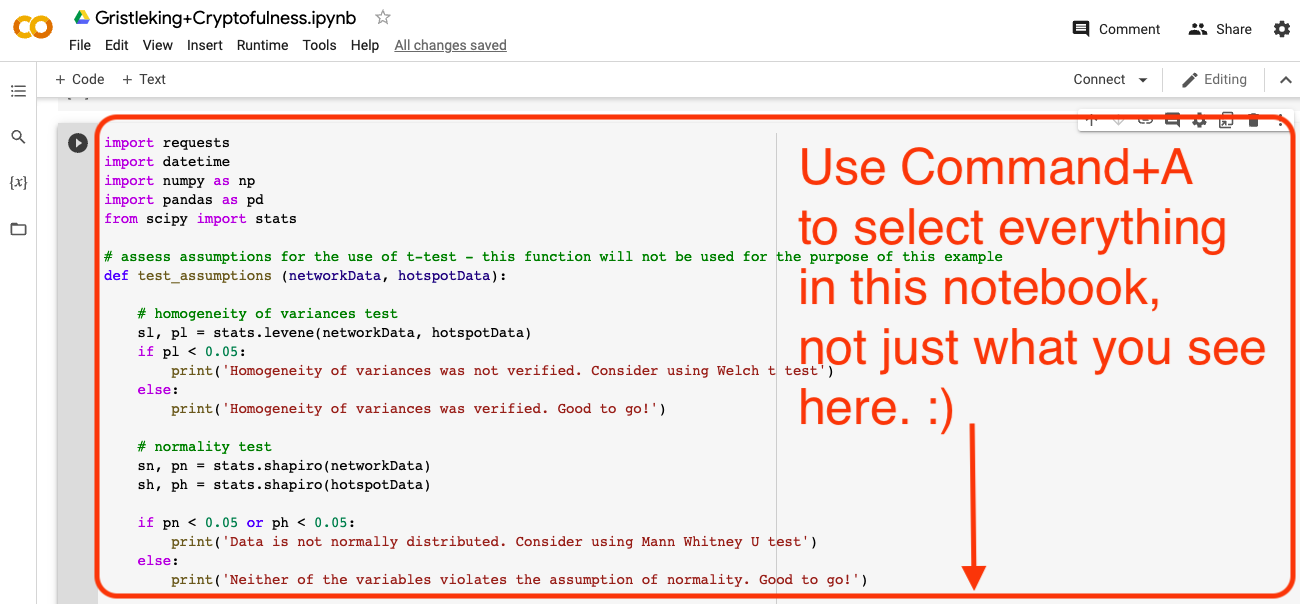
Now, open the Gristleking+Cryptofulness notebook in another tab, and copy ALL of the code in there from mine to yours. Be sure to get each of the different "cells", marked by the Play circle/triangle in the left grey column.

You're doing this in your own notebook so that you can look at your hotspot without the entire world seeing what you're doing (which is what will happen if you run the code in my notebook.)

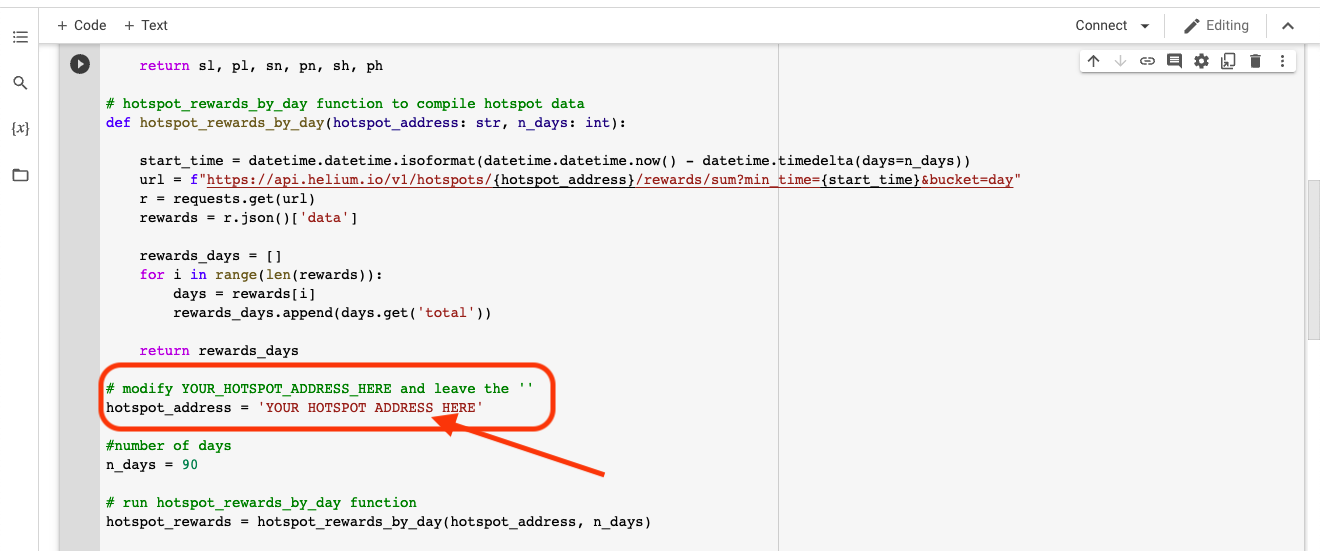
Ok, one more step to get to the results. With the code pasted in to your snazzy new notebook, scroll down until you see the green line saying
# modify YOUR HOTSPOT ADDRESS HERE and the leave the ' '

I'll use Amateur Jade Hare's address for the demo. AJH's address is: 112qN5DMoTdc4ThFGQHKyg4e3QfuEkkCUEfu5EgZA1QZLNdqb4Cf, which you can see below.

Once you've filled in your Hotspot address, hit the "play" button.

It'll spin and dance for a bit, then spit out your result. In this case:

A two sample t-test was performed to compare your hotspot rewards for the last 90 days and the network rewards for the same period. The difference between the two means is statistically significant and your hotspot was above the network average for: 612 %

Your hotspot daily average (HNT): 0.794

Helium network daily average (HNT): 0.112

Now, how do you know HOW statistically significant this is? Keep rolling down that file and hitting the little Play button on each one of the four cells. I'ma drop a video in here so you can see what that looks like.

https://vimeo.com/705416003/fe37042ed5

Ok, so what does each of those mean? Oh, in the video I should probably have called them "blocks", not "cells". My bad. :)

Block 1: The t-test. This compares your Hotspot's rewards against all active Hotspots on the Network rewards and tells you if the difference is real or just "noise".

Block 2: Shows the rewards by day for the Network and your Hotspot for the last 90 days. The orange line highlights the data pattern.

Block 3: A Pearson correlation, tests the association between your Hotspot and the Network. For example, if the Network sucks, is your Hotspot also sucking? That does NOT imply the Network sucking is the cause, just that they seem to follow the same pattern.

Block 4: A simple linear relationship between the Network and the Hotspots reward exploring "causality". This is sort of like block 3, expect where block 3 says "Yeah, these 2 things go in the same direction", block 4 says "When the Network goes down on average, it causes your Hotspot to also go down on average." In my case, the effect is amplified: For every increase in Network HNT of 1, AJH rewards go up 6.8.

So, that's it. Any mistakes in this or in the interpretation are mine, so I explained something incorrectly, lemme know! Also let me know what you find out about your Hotspot, and if you liked this, give @cryptofulness a follow on Twitter!

If you want to join a rad group exploring Helium and how to stay ahead of the curve, consider joining the Gristle Crüe. We Zoom every Tuesday at 10 AM Pacific and talk about the latest in how to crush it with Helium. Rock on!

The People Counter Project: Beginnings

· 10 min read
Nik
Site Owner

In less than 2 years, a group of strangers has managed to deploy 700,000+ Helium Hotspots worldwide. We've got the worlds largest contiguous wireless network built. So, uh, what do we do with it?

I got into Helium because I thought it could be useful to track paragliders back in September of 2020. Like many people, I got way into deploying Helium Hotspots, sometimes going slightly overboard in my enthusiasm to get the absolute best placements. Late 2020 through mid 2021 was an exceptionally joyous and engaging time running around deploying Hotspots in the high backcountry of San Diego.

So, with that 15 month side trip into getting radical with deployed Hotspots about finished up, I'm now returning to the beginning: Using the Helium Network.

I've spent a fair amount of time on (and off) trails here in San Diego.

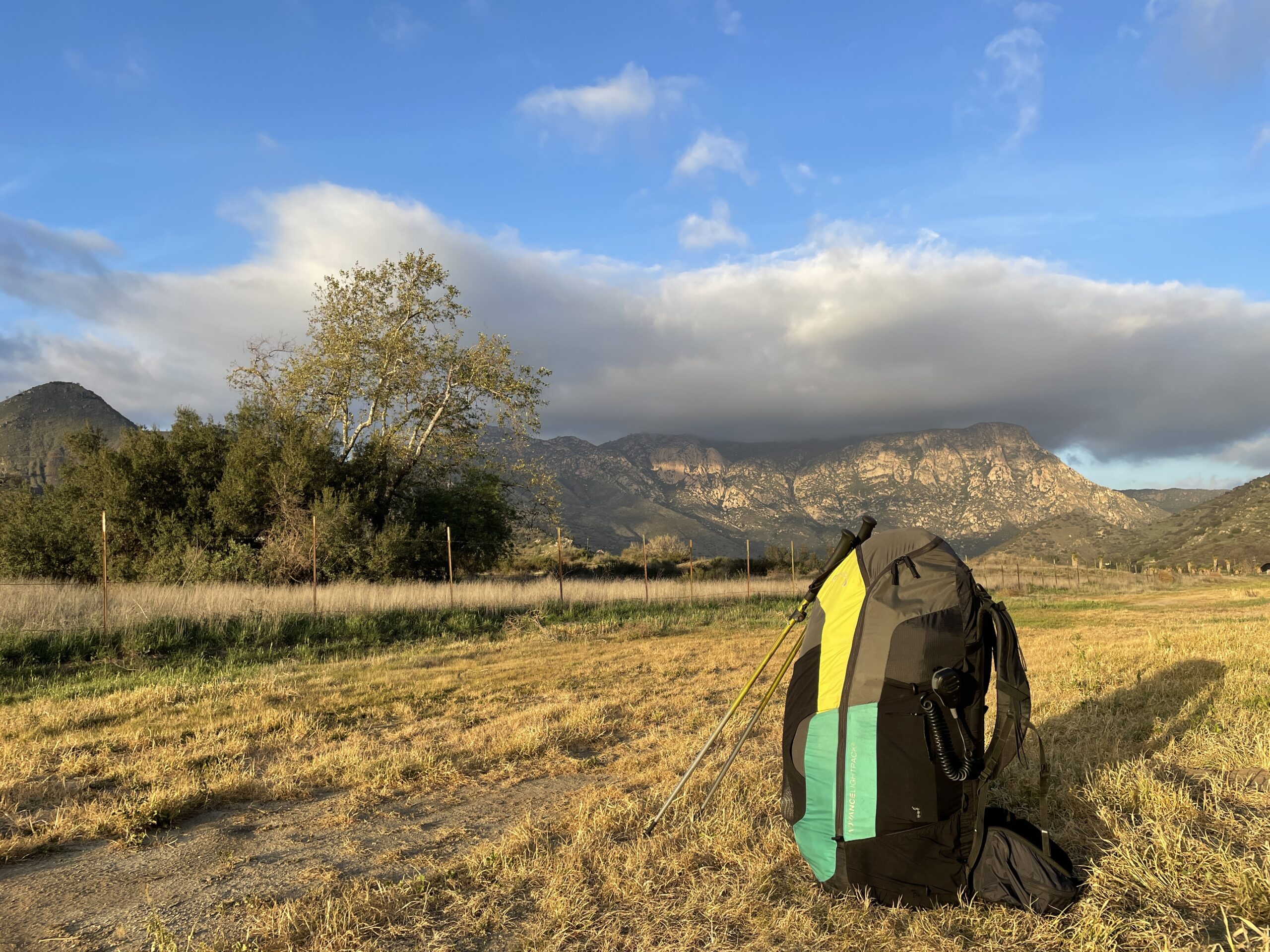
Between my former hobby of ultramarathon running, my current hobby of paragliding (the entire aircraft fits in that backpack), and all that time deploying Helium miners, I've probably got more hours on the trail than I've eaten burrito breakfasts, and I've eaten a lot of burritos.

One thing I've noticed is that there aren't a bunch of park rangers on those trails. Sure, you'll see 'em occasionally, but it made me wonder: How do they know what's going on out here? There are only so many rangers, and there's an awful lot of trail miles in San Diego. Do they use drones? Cameras? How do they keep track of what's going on?

It may seem like San Diego is a pretty benign place to hike, but we have our share of rescues, mostly centered around heat injuries (people getting overheated, dehydrated, etc). Typically with heat injuries, especially on remote trails, you don't know that anything's happened until the person has been missing for a while.

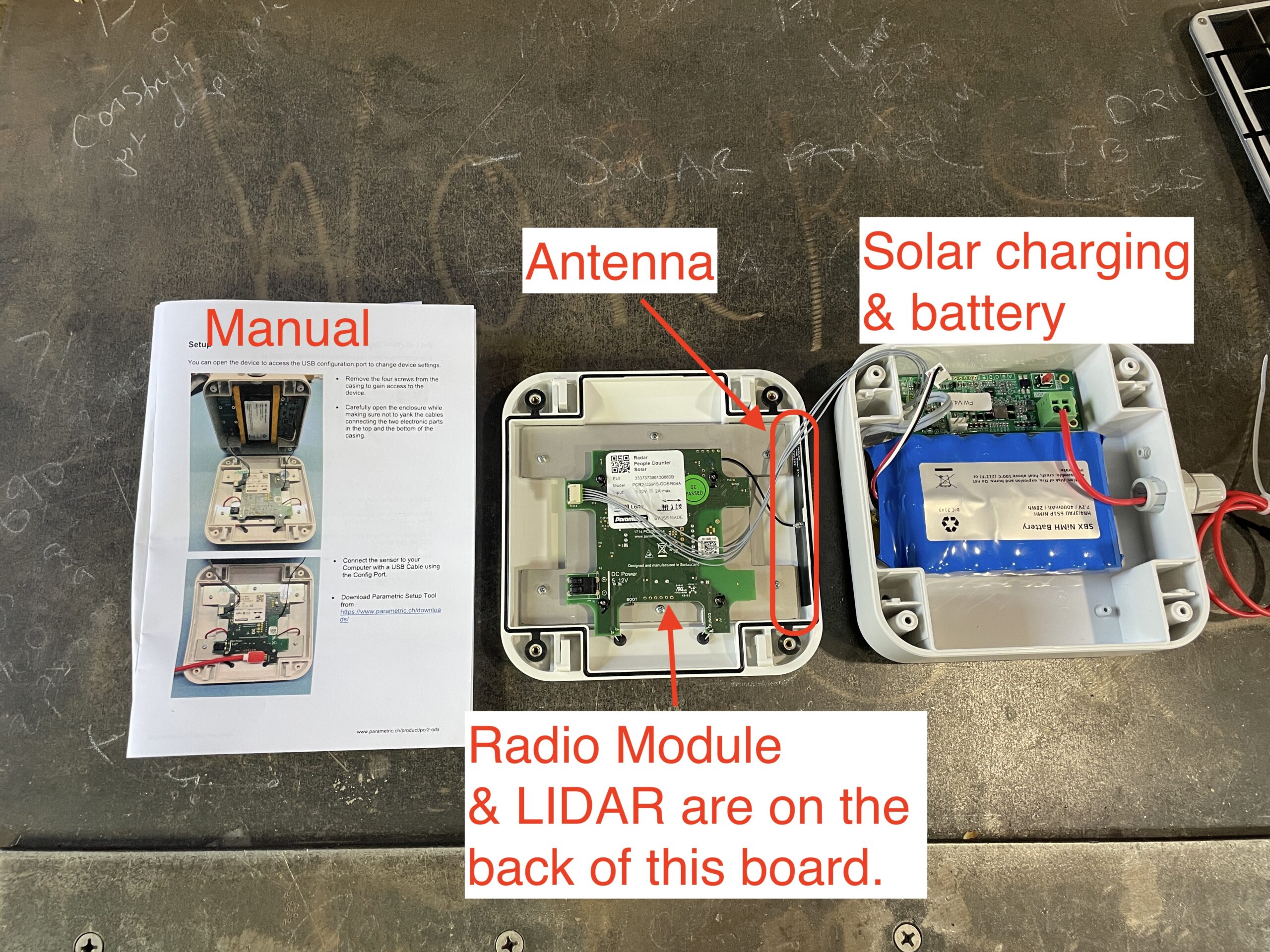
That got me thinking of how I could use Helium to help out. I mean, we've built the coverage, we might as well use it. I started poking around on the internet to see what sensors are out there and stumbled on "people counters". These are small devices that can use an infrared beam between two units, or LIDAR (which stands for LIght Detection And Ranging). Here's what one looks like:

I thought it might be useful for rangers to know is how many people had gone up the trail vs come back down. I also figured people counters would be useful to know which trails get the most use, so they can deploy assets effectively. Now, I'm not a land management dude, so those were just my initial ideas.

I ran them by a ranger I'd met on the trail, and he was enthusiastic about it. I started talking about a "people counter project" with my Helium homies. I thought maybe I'd just buy one or two devices on my own and deploy 'em just for fun. I talked to a local land owner where I've got a Hotspot deployed, and it turned out they had a trespassing problem, so I had at least one "use case", to count the number of people who trespassing.

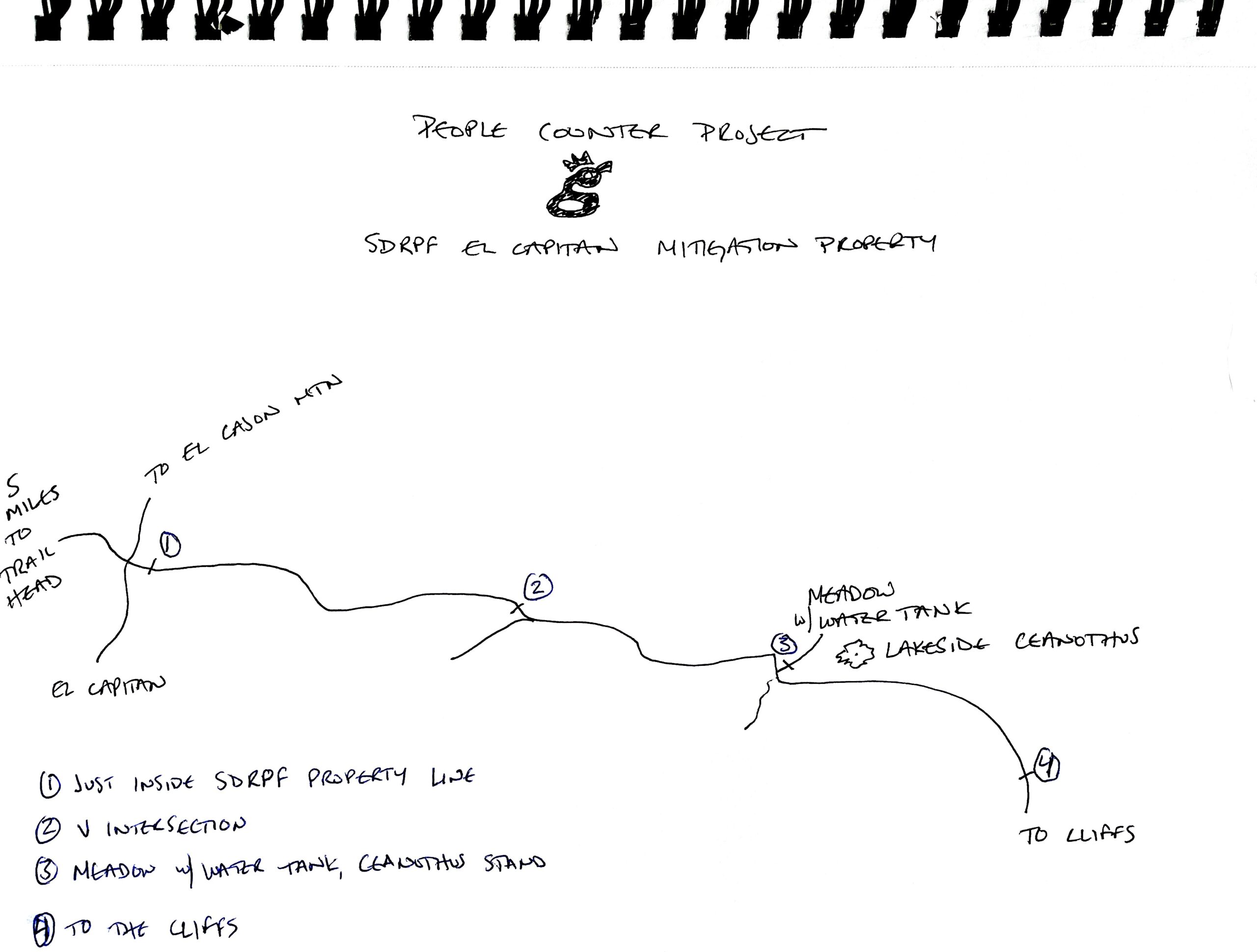
Prior to the deployment of people counters, the only thing we're sure of there is that people ARE trespassing. We don't know how many, or when, or how often. At the end of that particular trail is a plant called the Lakeside Ceanothus, and it's only found a few places in the world.

Knowing the amount of trespass will help determine whether or not that landowner needs to figure out a way to stop it, or if it's not enough to worry about.

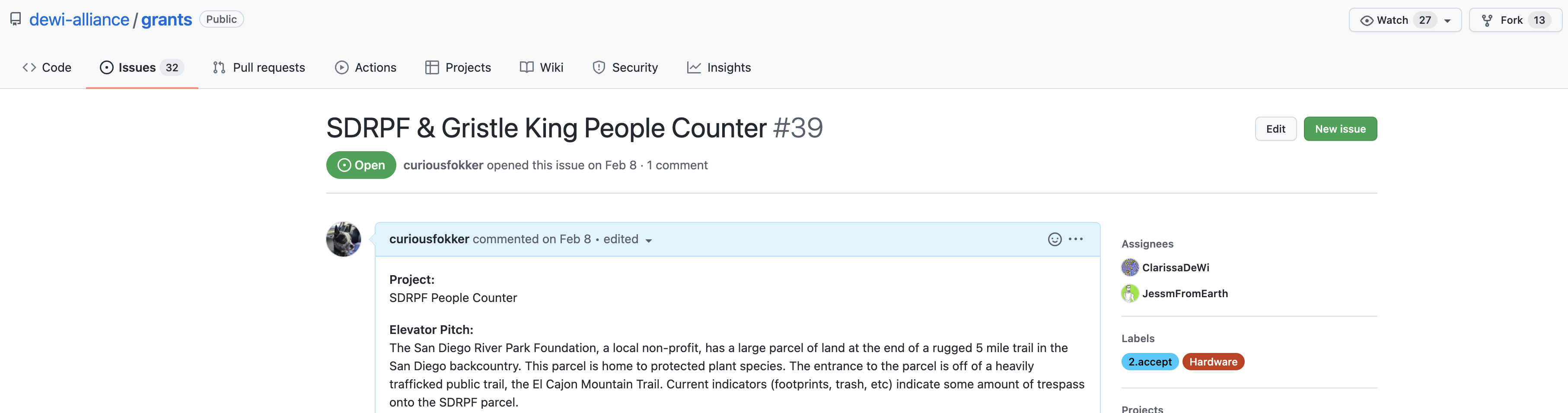
As I talked about the project with friends in the general Helium community, Joey Hiller, now Technical Director at the Helium Foundation, suggested I apply for a grant to be able to buy a bunch of people counters, write software to interpret and display the data, and deploy them as part of a project to show anyone how to use Helium.

We went back and forth about what a project that the Helium Foundation would support could look like, I connected with a few other folks at HF and with their help I ended up writing this grant, which was approved.

As you'll see, part of that grant is helping YOU figure out how to use this magnificent network we've built. Let's start with what's called the "architecture" of IoT.

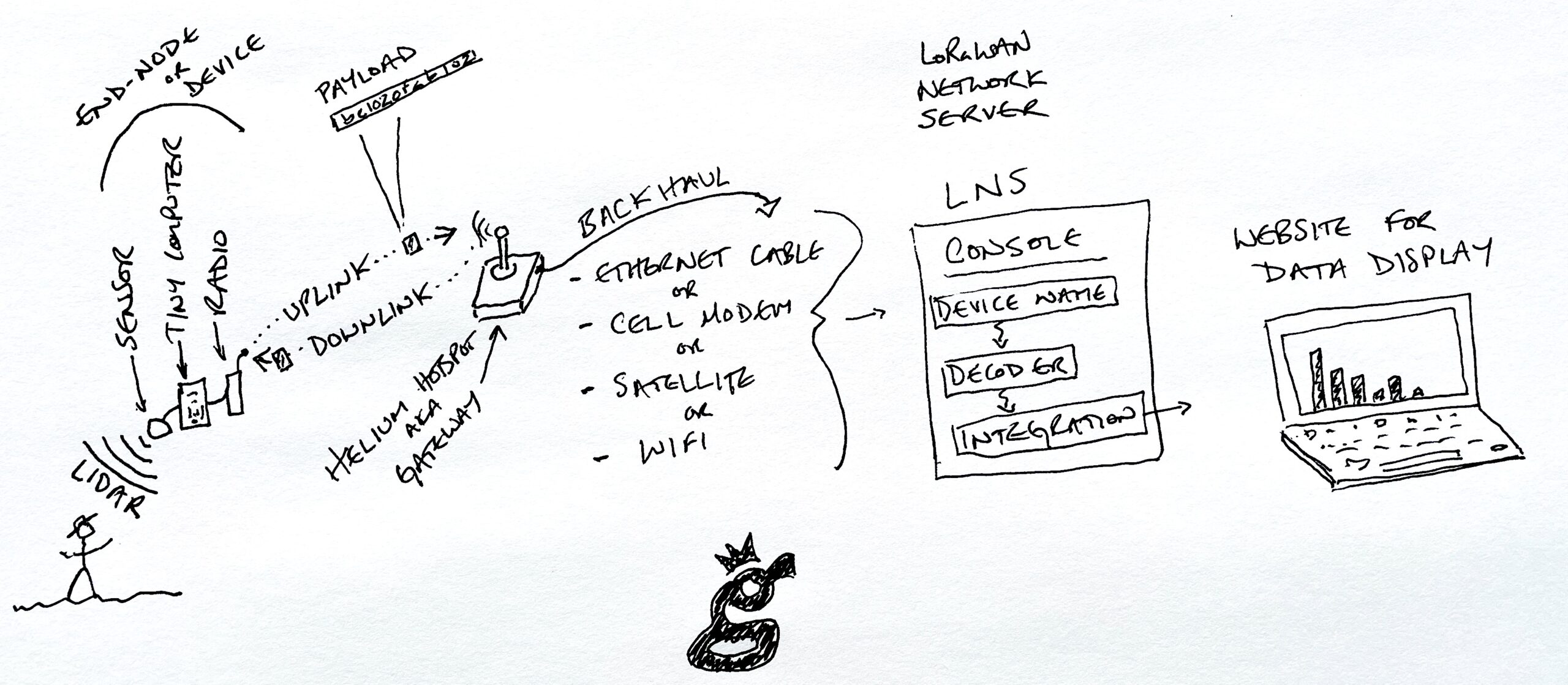
In general, the closer you get to technology the more specialized the language becomes and in general, the harder it is to understand without knowing some basic vocabulary. Conceptually the whole thing is straightforward; you deploy some kind of sensor in the field that produces data you can use. If you're going to get into the business of actually using the network, you'll need to deepen your understanding beyond the conceptual.

Hang on to your fucking hats here, these next few paragraphs are both complicated and at the crux of understanding this thing in order for you to use it. You may need to read them a few times. This took me days (maybe weeks?) to figure out, so if you only have to read it twice to understand it, consider that a gift of time from me to you.

Let's start at the beginning of the system, with the thing in the field. You or I might call it a sensor, but technically a sensor is only the actual thing sensing the data input. In this case, it's a LIDAR sensor. That sensor is connected to a tiny computer, which has a radio module on it. Together, the sensor, the tiny computer, and the radio are called an end-node or device.

Using LoRa, (the Long Range radio protocol) that device transmits a string of data called a payload. This transmission is called an uplink. The payload is received by a gateway, which is what we call a Helium Hotspot. A downlink, in contrast, would be a transmission going from the gateway to the device, usually to reconfigure it ("Send a transmission every 10 minutes, not every minute", or "Let's dial down that LIDAR sensitivity a little so we're counting just people, not moving branches." Of course, you can't speak English to a machine. In this case, you have to translate those commands from our human language to decimal and then to hexadecimal.

There are different types of payloads. Sometimes you'll be using Application payloads, which are ones that configure the data on the uplink, and sometimes they're Configuration payloads, which ride the downlink and tell the device how to re-configure itself (like the "1 minute to 10 minute" example above).

Riding the downlink, by the way, is completely non-technical. It's just how I think of it. :)

The gateway is connected to the internet by some form of backhaul, which can be anything from cellular to satellite to WiFi or an ethernet cable. The backhaul carries the payload to an LNS, or LoRaWAN Network Server. That LNS can be called "the console", or in the case of Helium, capitalized and made fancy, Console. On the LNS, the payload is run through a decoder and then sent to an integration.

The decoder takes the string of data from the device and, well, decodes it. The integration takes that decoded data and displays it somewhere, usually on a website where we humans can glance at it and say, "Oh, it looks like 3 people walked right past that NO TRESPASSING sign today."

As you can see, while it's conceptually straightforward, actually doing it ain't particularly simple. At each step of the way a level of technical ability is required to understand what's going on. It might be hardware expertise required to build or connect a sensor to a module. It could be software expertise, understanding that the payload string is written in hexadecimal and might need to be translated.

To complicate matters further, every manufacturer, including Parametric (the maker of the people counters I'm using) has their own decoder, which might not match up to a Helium specific integration. Those decoders are updated over time, and they can be written in different formats, for example Cayenne LPP, ELSYS, or Extended Payload.

Now, as I said, that took me days to figure out. It DOES make sense, it's just complicated. I ended up bookmarking the following resources as I went through setting up these People Counters with the help of both Travis Teague at Nova and Nick Hough at Lake Street Software. These are Parametric (the Swiss company that makes these devices) specific, but it should give you a good idea of what you might need in order to understand your own projects.

Ok, so that was MY list of useful resources. Unless you're also using the PCR2-ODS from Parametric, you'll have to build your own, but with that as a guideline you'll be way ahead of where I was when I started.

In the next post I'll walk through the process going from buying and importing them to the first test setups. For now, that's probably enough information. :)

Rock on!

Archived Comments

artdudeaz - 4/30/2022

I'm so stoked dude... I have about a million uses that I can think of for this technology and I can't wait to get my mind around the more granular bits.


Nik - 4/30/2022

Right on! Lemme know where we can help, psyched!


What devices can you use on Helium? - Gristle King - A Guide to DePIN - 1/10/2025

[…] Para­met­ric PCR2 — LIDAR Peo­ple Coun­ters — Sup­port is expert but these stymied me for a long time. […]


Government, Surveillance Technology & IoT

· 9 min read
Nik
Site Owner

What is the single biggest obstacle to the Helium project, and the decentralization of wireless networks, from LoRa to WiFi to cellular?

It's usage. It doesn't matter if you have an amazingly robust network. It doesn't matter if you have commercial grade antennas, or nodes, or locations. What matters is that people use it.

So, the question is, what can you use the Helium Network for? As it turns out, damn near anything. You can track packages, or pallets, or planes (useful if you're FedEx). You can monitor the temperature of the soil at seven different depths (useful if you're a farmer). You can see how many people use a public trail (useful if you're a park trying to understand what resources you'll need).

Except on that last one, there's a problem. You see, collecting ANY kind of data is starting to really scare local governments. They're worried about the use of what they call "surveillance technologies." Now, Surveillance Technology (ST) sounds creepy and scary, and when used inappropriately, it is. Of course, anything when used inappropriately is, well, inappropriate. In this case, let's think of "inappropriate" as something that pierces the privacy veil of citizens.

ST that is privacy-piercing can be traffic cameras that snap pictures of people running red lights. ST that is more beneficial and with little downside can be acoustic monitors that alert police of when and where gunshots are fired in a city.

Benign ST might be the use of people counters to monitor how much traffic a backcountry trail has. That's where I stumbled onto the idea of surveillance technology. I had written a grant to deploy people counters on trails in San Diego. Part of the project is on private land and is used for trespassing monitoring, and part of the project was to be on public land, to help public officials understand how much use their trails were getting.

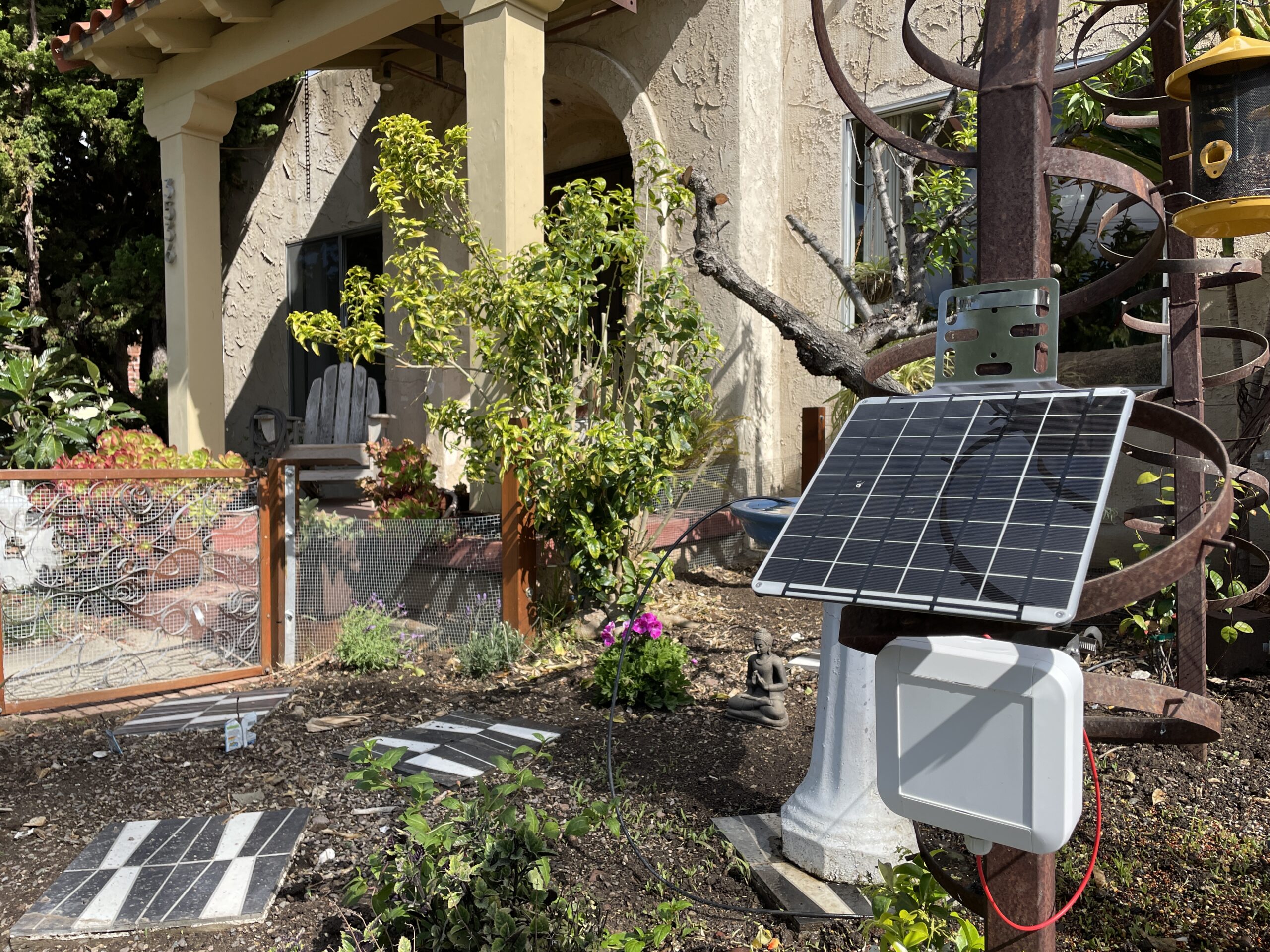
Let's start off with what a people counter is in this context. It's a small device, smaller than a toaster oven, that is mounted on the side of a trail. It sends out two very low powered radar beam signals, and when those signals bounce back off a person, the device counts it. It uses two beams so it can count which direction people are going; left to right, or right to left.

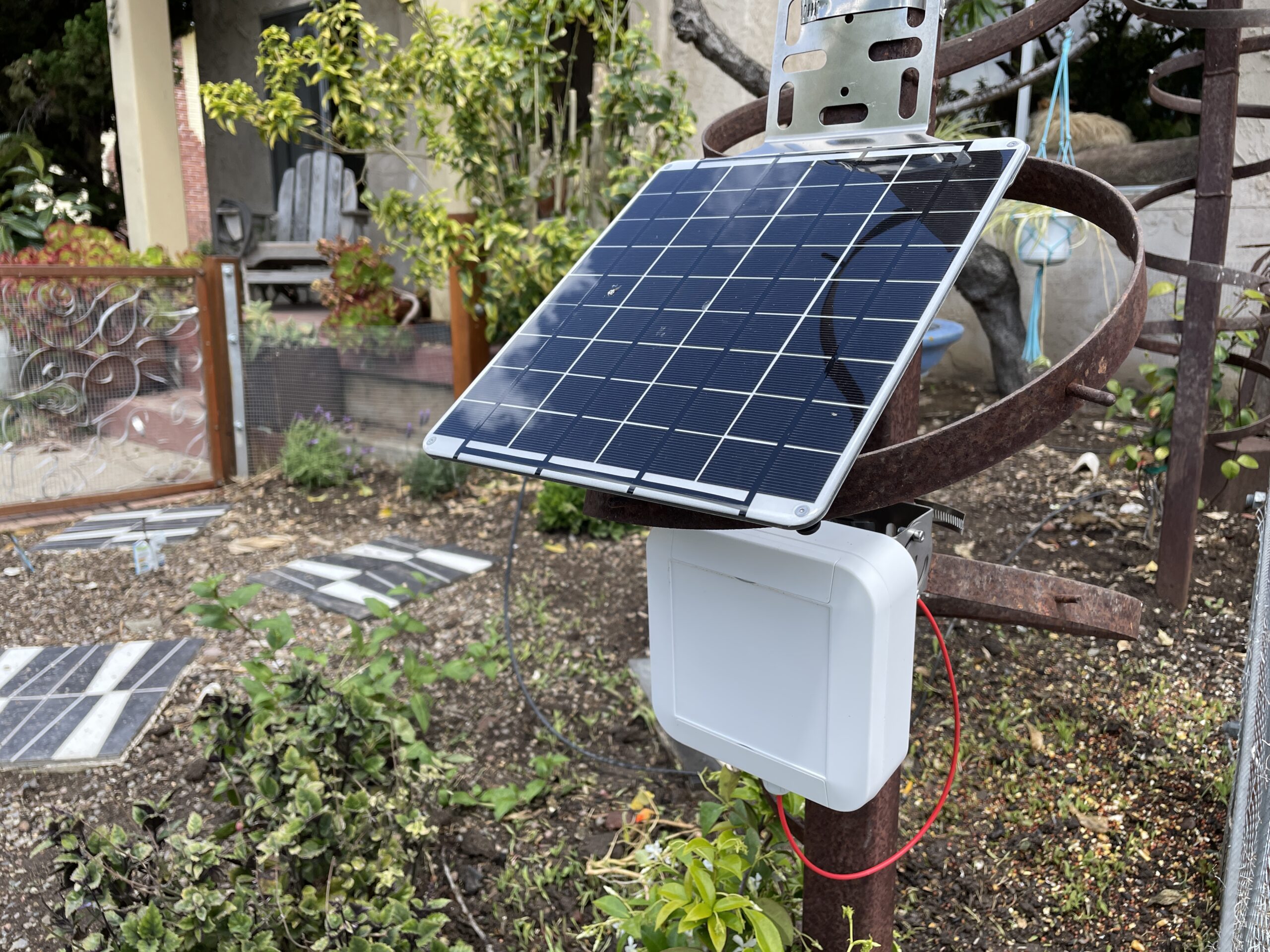
Here's one installed out in the yard:

What you're looking at is benign surveillance technology. What you're looking at freaked out the local government of San Diego, where I live. Why?

Here's the conversations so far (I'm paraphrasing).

GK: Hey, I'm a local trail user and tech geek. I think there's an opportunity to deploy some people counters on the trail and provide you solid data for how many folks use this trail. Explains what a people counter is. If I did all the work and provided the equipment for free, would you be open to that?
Park Ranger: Hmm, that sounds awesome. What's the catch?
GK: There's not really one. I'll write a grant to cover funding, I love being outside and working hard, and I think this is a cool network to use. I'll write about it on my blog. The only thing I really need is permission to put these on public land.
Park Ranger: Wow. That's cool, and we could use the data. Go ahead with it and keep me posted.

4 weeks later, with grant written, funds disbursed and spent, and technology in hand ready to deploy.

GK: Hey, the units came in and I'm getting 'em prepped for deployment, this is so exciting! Let's set a date to meet up and confirm where on the trail they'll go, and when I can put 'em in.
Park Ranger: Um, hey, I talked to my boss and we're doing our own project like this and are no longer interested in this.
GK: Hmm, that's odd. You're doing your own project? Why didn't you tell me about this before I did all the work?
Park Ranger: Umm, I didn't know. My boss is a hard No on this. I'm sorry.
GK: Ok. May I talk with your boss about this?
Park Ranger: I'll give him your number and he'll call you.

Boss never calls.

So, that was weird, but I figured it was miscommunication and really my fault; I should have gotten a written contract to deploy 'em before I started.

"No big deal", I thought. I'll just find another park where they're not running a people counting program and offer 'em the $12k worth of gear and my work for free. That seems like a good deal to me.

Calls up the largest city park in San Diego

GK: Hey, I'm a local trail user and tech geek. I think there's an opportunity to get some people counters on the trail and provide you solid data for how many folks use this trail. I just got a grant to do this and have all the equipment on hand. Would you be interested?
Local Park Service: Let me refer you to our head ranger.
Head Ranger: This sounds interesting, let me refer you to someone who can help, a Natural Resource Manager with the City of San Diego Parks & Rec department's Open Space Division.
Nat Res Mgr: (after hearing my spiel above) This sounds awesome. We've done stuff like this before but the equipment is expensive, so if you're providing that and the labor AND the data visualization for free, I think this would be great. Let me double check with my biologist.

1 day later

Nat Res Mgr: I checked with my biologist and we're both on board, we think this'll be a great project. I'll set up a meeting with my boss and our IT person to over it with you.
GK: Right on, looking forward to this. Accepts calendar invite.

4 hours later

Email from Nat Res Mgr:
I wanted to thank you for bringing this opportunity to our attention.  However after internal conversations with our City IT staff we are no longer interested in pursuing this opportunity.

Ok, so that hit my "Something's weird about this" button.

I mean, why would two different people in similar organizations (County and City Parks) have the same reaction after being so fired up at first? Then I found this article, which details that just a few days earlier (on Tuesday, April 5th of 20220)

The San Diego City Council Tuesday established a Privacy Advisory Board to protect resident and visitor privacy as the city purchases and uses surveillance equipment and other technology that collects or stores individual data.

-Elizabeth Ireland, Times of San Diego

Then I got this email in my response to "What happened?"

The City is undergoing changes and revisions of several ordinances that deal specifically with the City’s acquisition and use of surveillance or other technologies. At this time, Parks and Recreation will not be pursuing new technologies.

-City of San Diego Parks and Recreation Department

So, uh, where does that leave us?

Let's arm ourselves with a little knowledge. I cruised over to the American Civil Liberties Unions site (a bastion of protecting citizen's rights here in the US), and on their Surveillance Technology page they have the following categories:

  • Big Data
  • Domestic Drones
  • Police Body Cameras
  • Stingray Tracking Devices
  • Biometrics
  • Face Recognition Technology
  • RFID Chips
  • Video Surveillance

I went through all of those definitions, and none of 'em include people counting devices. Nope, not even "Big Data", which the ACLU defines as, "a term used to describe the collection and aggregation of enormous amounts of information that can be processed and analyzed only by powerful computers."

Let's think about classifications of surveillance technology as far as how "privacy-invasive" they are. A camera with a GPS and a clock is pretty privacy-invasive. It shows WHO was WHERE, and WHEN. The WHO is the problem there; having a camera takes away someone's privacy.

A soil moisture sensor is on the other end of the spectrum; it shows WHAT happened, WHERE, and WHEN. There's no WHO, so even if you decided to pee on a soil moisture sensor, no one would know who did it.

What about people counters? Why are they a problem? I had the same question. From my perspective, there's not a privacy issue. The sensor can't tell WHO passed by. It doesn't note a person's age, gender, color, race, weight, gait, or any other identifiable characteristic. It just says, "Yep, I'm pretty sure a human passed here. It wasn't a car. It wasn't a deer. It wasn't a jumping raccoon. It was a human."

Now, I'll make clear here: This isn't the fault of the Parks and Recreation Department of San Diego; they're just being cautious and following government rules. What this does is bring up a really interesting issue:

How can local governments understand the nuances of technology so they don't get left behind when it comes to useful data?

I mean, we Helium peeps are out on the bleeding edge of tech; we're co-creating the largest and fastest deployed wireless network the world has ever seen. To us, rapid deployment of new technology is useful and pretty normal. Within the last year and a half, many of us went from having never done more than change the channel on our television to deploying remote off grid solar powered IoT LoRaWAN devices with cell backhaul. That's quite a jump.

So, what can YOU do? The same thing I'm going to do: Offer to educate local officials, find other local governments who are willing to embrace technology, and help present a new and different view of technology to anyone curious about the coming tsunami of IoT devices.

If you have other ways to help, I'm wide open to hearing 'em. If you're a government official or employee who wants help understanding this whole IoT and surveillance technology issue, or you want to use the pro-privacy technology I'm deploying to improve your land management decisions, please reach out. Together we can learn to build a rad world that collects useful data and puts it into beneficial service for all of us.

Rock on!

Getting Healthy With Helium - Community Starts here

· 7 min read
Nik
Site Owner

Are you looking for a cool community project to contribute to that blends Helium with Health? I'm starting one right here, right now.

The idea is to build a Healthy Helium community where we share plans to DIY devices that monitor health. I'm thinking the following:
-weight
-heart rate
-activity tracker (maybe just a pedometer)
-blood sugar (CGM for you fancy types)

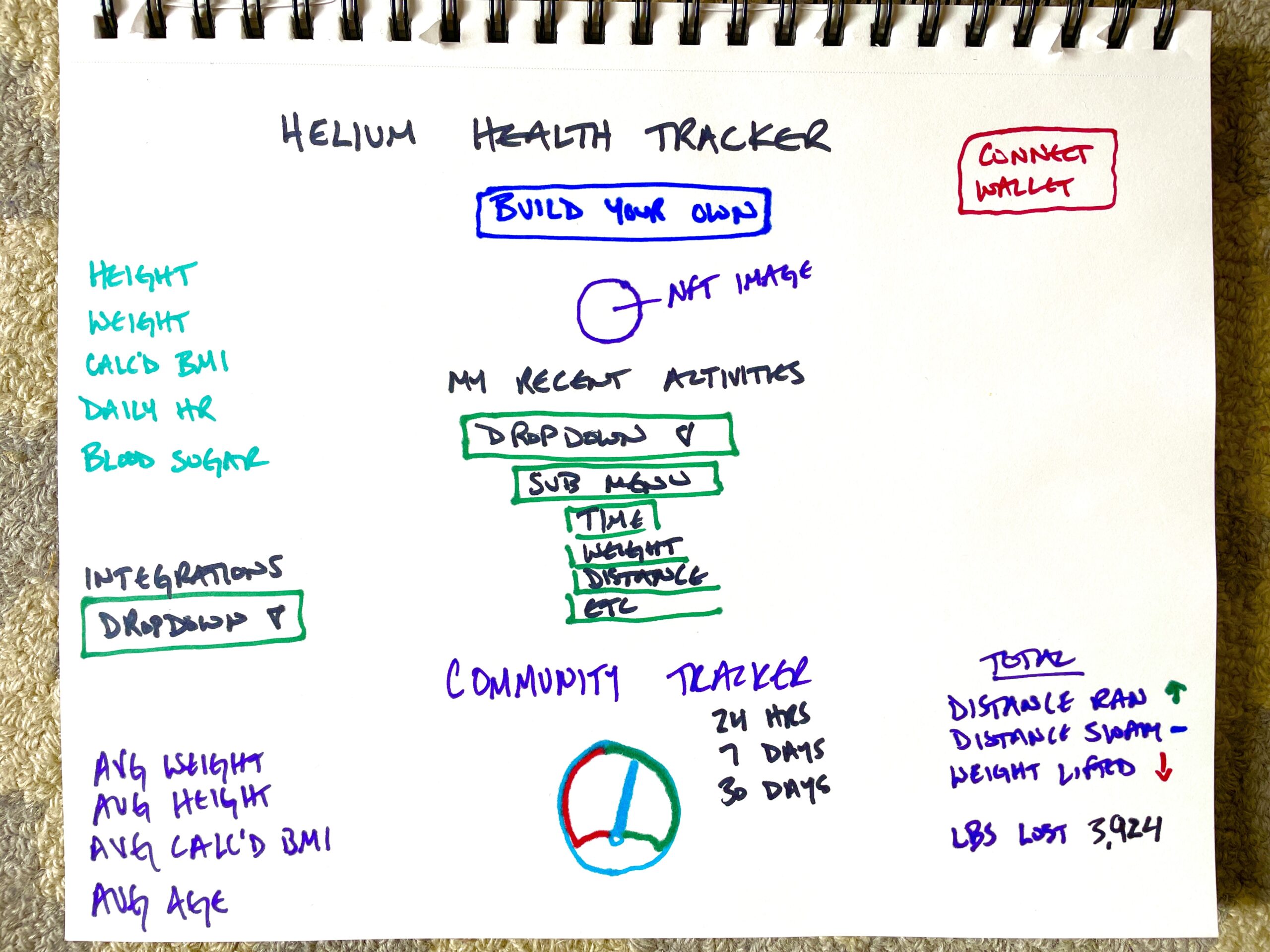
There is no limit to what we can build. Here is what that Dashboard *might* look like. Want to help me make it better?

I am wide open to being wrong on any or all of those. I'll need YOUR help to make this thing awesome.

"Hey Nik, you forgot the [insert your favorite health metric]!"

Keep reading, bubba. This is just the beginning.

I'll spread the word and organize the effort. I'll need help everywhere else.

Desired end state is a community of mutually very supportive people who have built or acquired a DIY Helium health tracker to track their stats and share them in order to improve their health.

In my perfect world, we all work together to help each other improve our knowledge of Helium, our use of the Network and our health. I *think* that works by connecting people who are experts and building the hardware and/software to create a scale, or a heart rate tracker, or a pedometer etc that integrates with the Helium Network.

The project will be in part a public place to gather all the information & materials that any person would need in order to build and use their own Helium Health Tracker.

I know how confusing Helium can be, and I also know how much it can change your life once you understand it. I'm super excited to develop a project that empowers YOU, whoever you are, to build on, use, and benefit from the Helium Network.

Who's in?

FAQ

Why Helium? Why don't I just use my Apple Watch?

The first reason is that Helium is a giant network begging to be used. It's as simple as that.

The second answer goes more into helping grow the Network by learning how the whole thing works. Most people have NO IDEA how to use a sensor. I get it. It's fucking complicated, at least as of April 2022. This project will help YOU learn how to use the Helium Network, while helping connect you to other people who are into the same things you are AND help track your health.

Third, use your Apple Watch, or Fitbit, or Garmin Swim 2, or whatever you want. They'll probably work better, at least at first. What they won't do is empower you to understand the Helium Network, or connect you to folks who are similarly interested in Helium, Health, and Community. Maybe (definitely) we can integrate them into this thing eventually. If we work together, We're All Going To Make It. (WAGMI)

Who's going to pay for all this?

Maybe the Helium Foundation. I'll write a grant for anything that needs money to get started, but mainly my goal is to find people whose primary motivation isn't money, but excellence and community.

I, uh, saw something in the diagram about an NFT? What's that all about?

NFTs at their heart are proof that something happened. They started off as linked to art, but that's not their primary function/capability. One thing I've noticed is that people who aren't in NFTs are really hesitant about getting in. This is an easy way to get into 'em where the utility is immediate (you get access to the Helium Health tracker), and I'll walk you through exactly how to do it.

Once you get your first NFT, you'll have made it past the first giant stepping stone and you'll be at the leading edge of a radical new way of interacting with the world.

Wait, why would we use an NFT for this?

Well, this NFT is designed to benefit the owners. You'd buy in, at let's say, $100. You'd get access to the Dashboard, and immediately get back $40 worth in useable tokens called $MINT. Those tokens could be used to vote on where the Dashboard should be improved next.

Let's say you're an artist, and you want to contribute to the project. You think up the idea of, "Hey, when someone runs 100 miles, their NFT should get a pair of golden shoes." I mean, you didn't think that up, LookingForOwls did over at the ShuffleDAO, but let's say you're the one who can draw it.

You draw a rad pair of golden shoes and submit them for the "100 miles ran" image. It gets accepted by the DAO, and then every time someone runs 100 miles, you get some small amount of the $MINT token.

Is this the same thing as the upcoming GK NFT?

Nope. I'm using ShuffleDAO for that, but it's a separate project.

Ok Nik, so what's the catch?

Well, I think of it more as a feature, but mainly the catch is that this'll take a lot of work by a lot of people who could, frankly, get paid a ton more somewhere else.

Hmm, who runs the DAO?

Well, at first it'll be me. As more people come on and contribute, I'll add them in. Look, I don't want to run this thing forever (or even for very long). I want to make sure it gets stood up, and works, and builds a really healthy community (in every way) and then go do that again somewhere else with something else. I like building awesome stuff. I want YOU to be involved, and I want YOU and the community to win as much as possible.

Hey, could I use a Hash Time Lock Contract where I had to hit a button or do something in a certain time frame, like go for a run?

Uh, hell yes you could. You'd have to credit Travis Teague with the idea, but that's your question...please would you come on board and help? :)

What about nutrition? We all know that paleo/keto/vegan/carnivore is the only correct way to eat, how can I impose my diet on everyone else?

Whoa, turbo. Diet is a weird thing. I would LOVE, like fucking LOVE to include diet in this, but obviously we're not going to force anything on anyone. If you write the code and it makes sense, then hell yes we'll add it.

Will I get ripped and hard in just 30 short days just by building a Helium Health Tracker?

No. This may not be the project for you.

Hey, I've got a really long list of reasons this can't work. Want to hear 'em?

No.

Nik, this sounds awesome. I have a skill in [XYZ] and I want to help. Where do I sign up?

I *think* the best way to do this is on the Gristle King Discord. If this thing goes batshit bananas crazy, we'll stand up a separate server for it, but for now, let's just use the #helium-health channel over on the GK server. Oh, and thank you for volunteering. I love people like you.

The Gristle King Clothing Empire Begins Here

· One min read
Nik
Site Owner

Ready to level up your Gristle Game? If you'd like to order a Gristle King t-shirt or hoodie and ride for the brand, I'd love to have ya on board! Fill out the order form below, and I'll usually ship the next business day. Shipping, by the way, is included.

Rock on!

[formidable id="29"]