How I Built An Awesome Lightweight Off Grid Helium Miner
How small can you build an off grid miner? Can everything fit in one backpack? How light can that pack be? Finally, why would you want a tiny off grid miner?
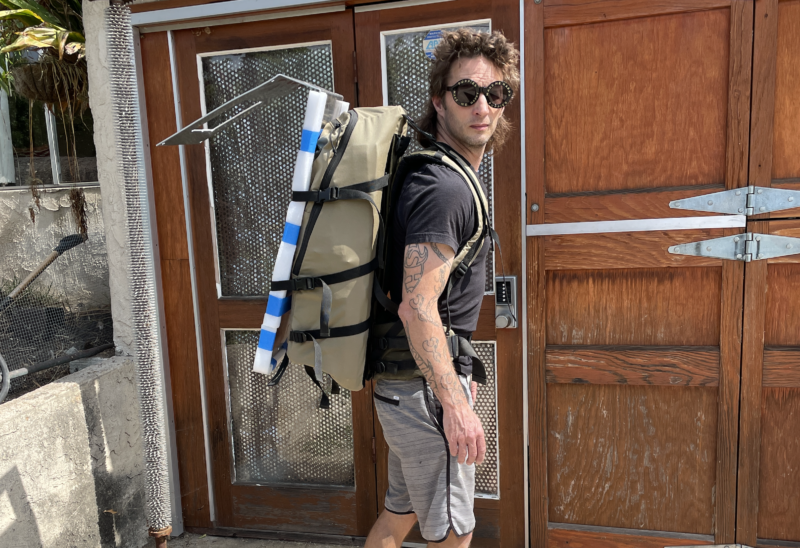
And yeah, those are Puppies Make Me Happy sunglasses.
I'll start with the last question. Why would you want a tiny off grid miner? The short answer is "weight". If, like me, you are super stoked on the idea of hiking in an off grid miner to a place deep in the wilds, you will eventually get over the idea of carrying in heavy equipment. I did that on my first off-grid, carrying in awkwardly loaded 60+ lb rucks over 6 miles of rugged terrain with 3k' of gain.
It was the hardest thing I've done since running a hundred miles back in 2015. Fun once, and rad to share with a friend (we EACH had huge, awkward loads to carry), but not something I was desperate to repeat.
Still, being generally unafraid of physical work, I did the same thing a few more times, just to be sure it wasn't just a one-time suckfest. One off-grid took 6 (SIX!) trips in to install.
By that time, I figured out that while I really like hiking heavy shit long distances out in the mountains, I'd probably enjoy hiking in a light ruck even more. So I set about building one. I also wanted to re-measure my initial power draws because I was seeing off grid setups that seemed smaller with a higher load..
After a conversation with @BFGNeil on Discord about using a Pi Zero and a RAK 2245 hat to put together just the packet forwarder (from a DIY Alpha code I received way back when they were still available), I decided to try it out. The enormous advantage of having just a packet forwarder (and not the full fat miner) is the lower data plan size I can use for the cell backhaul.
I cannnot overstate this advantage. Please do NOT think you'll be able to use a small data plan (100MB or less) on your production Helium compatible Hotspot. You'll need 50 GB MINIMUM, and will be much safer with 100 GB. I got lucky to find Helium right as they launched (and then quickly closed) the DIY program. This guide gives you an idea of what a Light Hotspot will be like.
One last note before we dig in. Off grids are hard, and complicated, and sometimes complex. If you just want to buy an off grid setup, I'd start with IoT Off Grid. If, however, you LOVE building your own stuff, keep reading!
Let's start with a gear list.
PLEASE NOTE: This is MY gear list. It will probably not fit exactly what YOU are trying to do. My goal is to have a tiny, lightweight, right-on-the-edge of power requirements for a Light hotspot in a high sun area. Make SURE you measure your power draws before just blindly ordering what I used and thinking it'll magically work for your area. Your challenges will be making sure you have enough power and making sure you have enough data.
[ninja_tables id="2104"]
The great news is that packet forwarders are what "light hotspots" will be, so it's likely that you'll be able to do this same thing and in a cleaner looking package by mid-2022.
The second advantage of a Light Hotspot is the lower power consumption. Compared to a regular miner, with a packet-forwarder-only setup you can shave off enough watts to really drop both battery size and solar panel size.
Here's the power it's pulling. Note the size of that "hotspot". It's MUCH smaller than current production hotspot, and pulls about ½ of the power.
https://youtube.com/shorts/muwblkr3J0U
Remember, volts x amps = watts, so this is right around 1.5 watts. It jumps around a bit, but in any event, that ain't much.
Add in a cell modem and the solar charge controller with the packet forwarder on a Pi Zero and you're looking at about 3.4 watts total. For comparison, a RAK V2 by itself pulls around 2.3 watts.
Want more data on power draws? Here ya go!
[ninja_tables id="2112"]
Of course, it also depends on the winter sun hours in your area. If, like me, you live in America's Finest City (San Diego), you have more winter sun hours than just about anyone in the US. That means you can use a much smaller solar panel (30 watts is what I chose) as well as a smaller battery (20 Ah in my case.)
I put those together in an enclosure with the packet forwarder, a smaller cell backhaul (IBR200 instead of the 650C I've used before, many off gridders are now using a Spitz), the same charge controller I've used, and had a tidy little package.
Still, you're left with mounting the thing, which can be a real bear. The solution I came up with was inspired by something I saw over at MP Antenna, plus the fact that I love to hand bend metal.
I started out with a sheet of 12" x 48" .0125 5052 aluminum. 5052 is a good mix of toughness and rigidity. 6061 will crack when you bend it, and 3003 will flex too easily. I marked out the holes for cutting and the lines for bending.

I wanted to be able to mount this bracket anywhere, easily. One of the challenges of an off grid setup is actually mounting the thing. Though you can't see 'em in the above pic, the latest version has slots for worm drive (hose) clamps as well as the screw/bolt hole mounts you see here. This will easily mount to a round object, like a pipe or a pole or a tree. It'll mount to a flat surface as well, like a rock wall or the side of a building.
Next up is drilling & cutting 'em out. Aluminum is pretty easy to work with, which makes this a nice project.
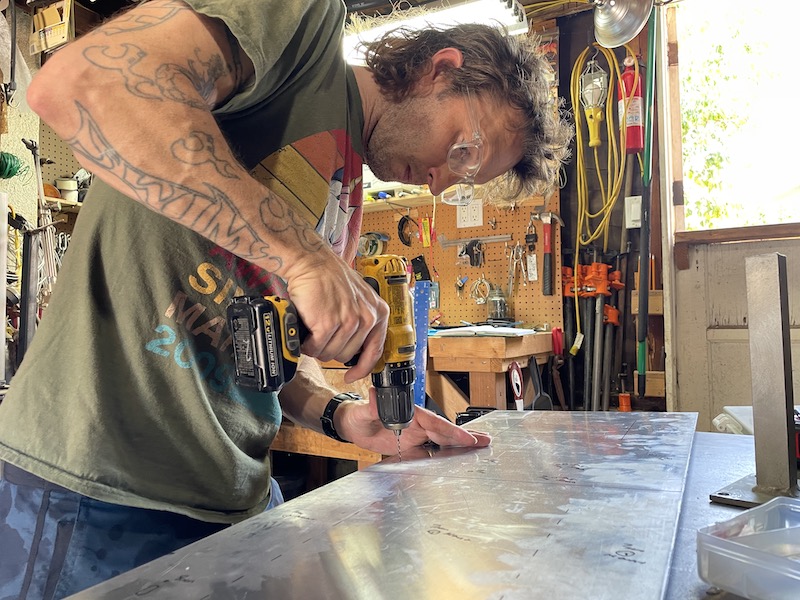
Next up was cutting the "window", which allows you to reach in with a drill and mount on the back holes before putting the solar panel on. Here's the plate drilled and cut, ready for bending.

When I go into production (that's a joke, by the way) I'll use a press brake and water jet, but for prototyping you can't beat a bar clamp (as long as you don't mind a little physical work). You put the plate in the bar clamp, make sure your bend line is straight, tighten everything up, and start hammering. Hand bending takes patience; you don't see a lot of progress at first, but over time you'll end up with a beautifully bent line.
As you can see, I set up a little cardboard angle measurement device which gives me an angle of 148, or a 32 degree bend. 32 is our latitude, and gives your solar panel the most sun rays during the shortest days of the year. Here's what it looks like with the first bend finished.
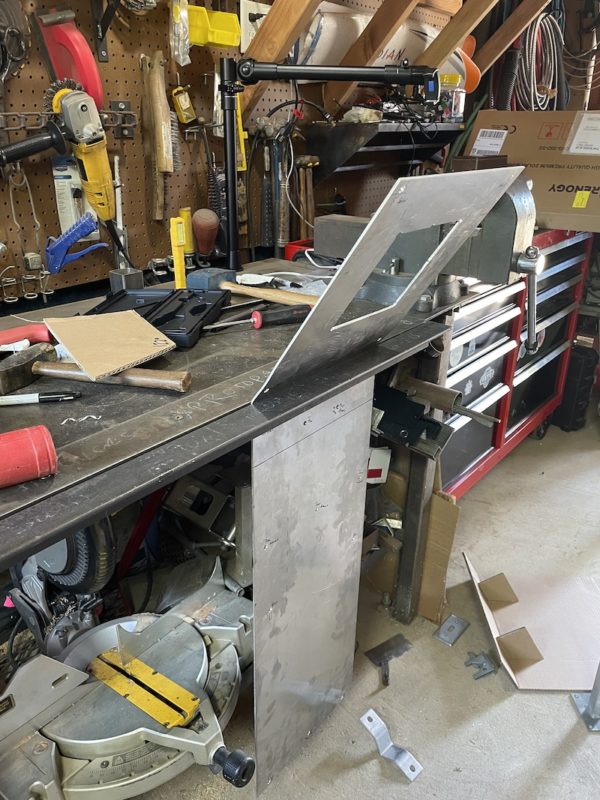
From there you just slide the plate up and hammer out a 90 degree angle. I'll usually go back and forth a few times with the bends. On a press brake you don't need to, but when hand bending I always find a little extra love makes for a cleaner job.
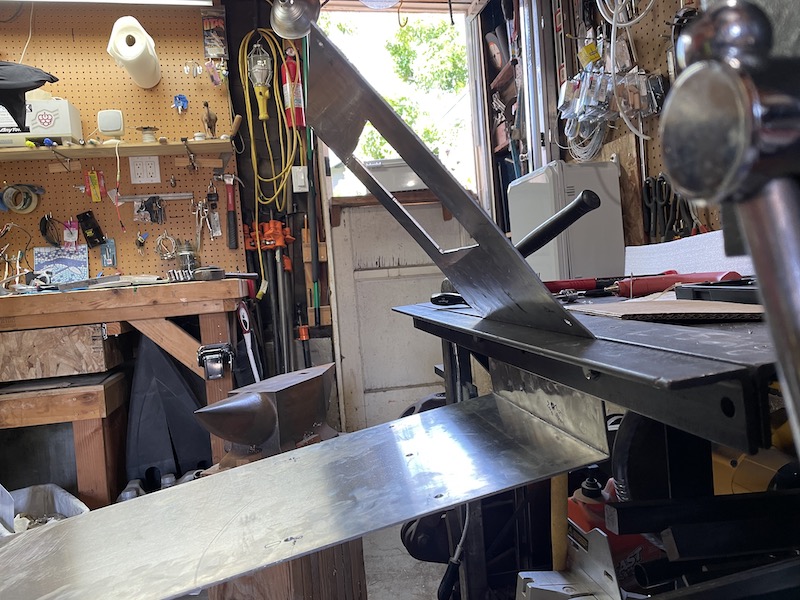
It's not uncommon to have "extra" bends in there, which you'll need to flatten out on an anvil. In this case the "roof" had a slight arc to it. I leap at any chance to use my Nimba Titan, here she is ready to assist in the flattening process. Man, the right tools make the job easier!
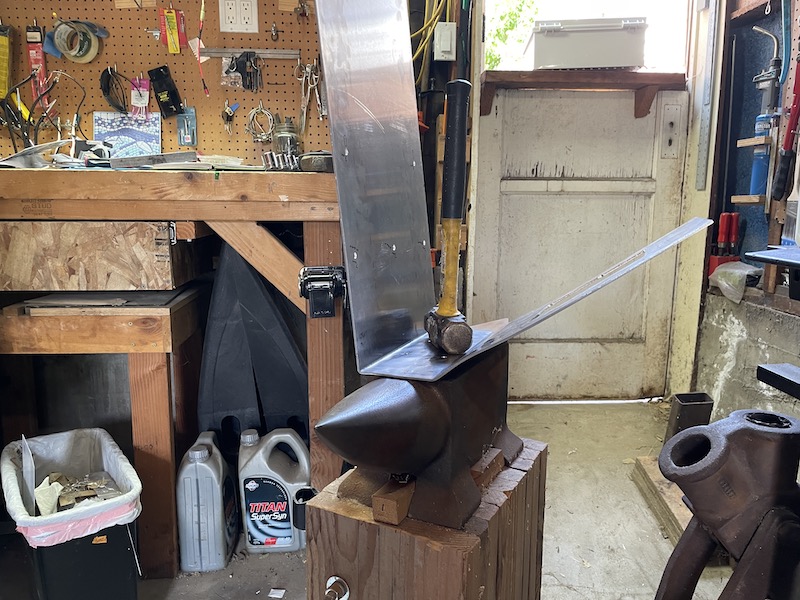
All that hammering attracted my wife's attention. She knew the best fuel for any endurance event is the cake from Paleo Treats, so she brought some out. Damn, that Key Lime is good!
Fueled with cake and ready for the next step, I assembled the box, the panel, and the antenna.
This next part may be confusing, as I'm using pictures from a few different builds here. The parts you see in this build on the inside of the enclosure are the RUT240 cell modem (NOT the IBR200), a Renogy Wanderer 10, and a Bioenno Power 20 Ah LiPoFe4 battery. The hotspot itself is a Pi Zero coupled to a 2287 concentrator and Pi hat from Parley Labs.
Here's just the RUT240 and the DIY Hotspot.
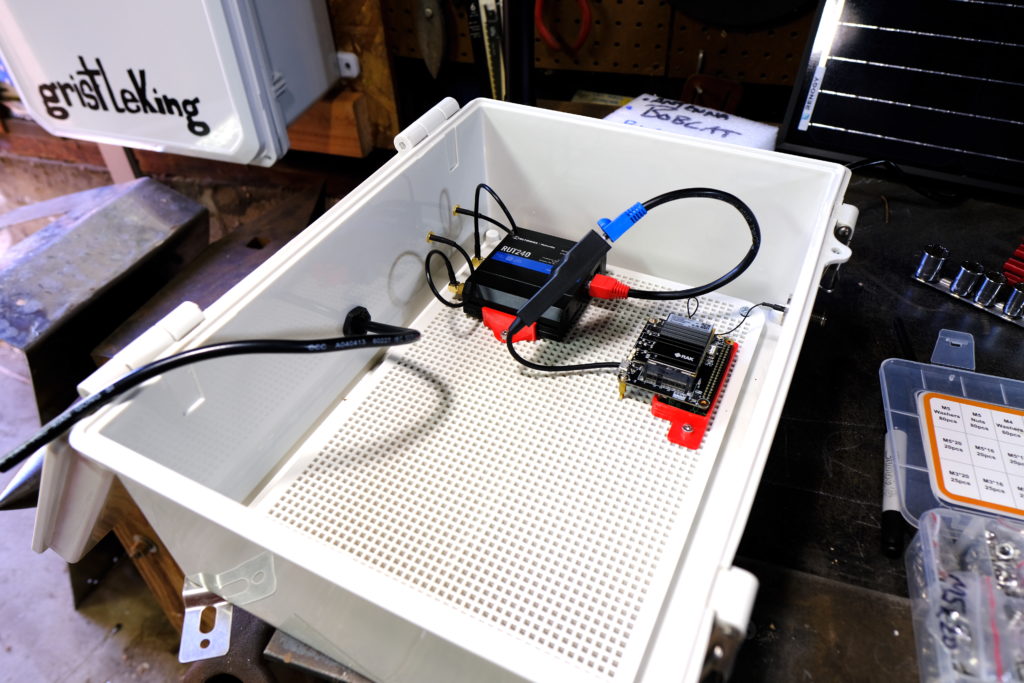
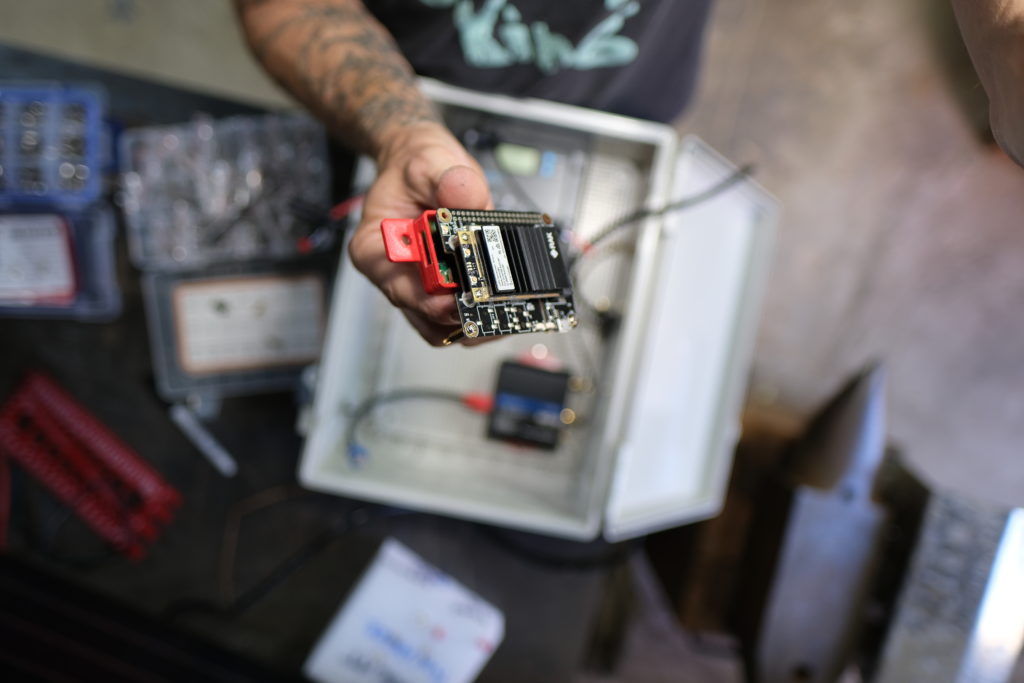
I printed up little red PETG brackets for the RUT240 and the Pi Zero on my Prusa 3D printer. At about $800 for a kit, they're a very useful thing to have if you get into this off-grid world.
If you don't have (or want) a 3D printer, go to the Prusa World map page and look for folks near you who are willing to print them up for you. That's how I did my first 3D prints. Here's the Pi Zero nestled into its bracket. Brackets make it very easy to attach components to the "perf board" that comes with most enclosures.
Wait, you want everything labeled for ya? No prob:
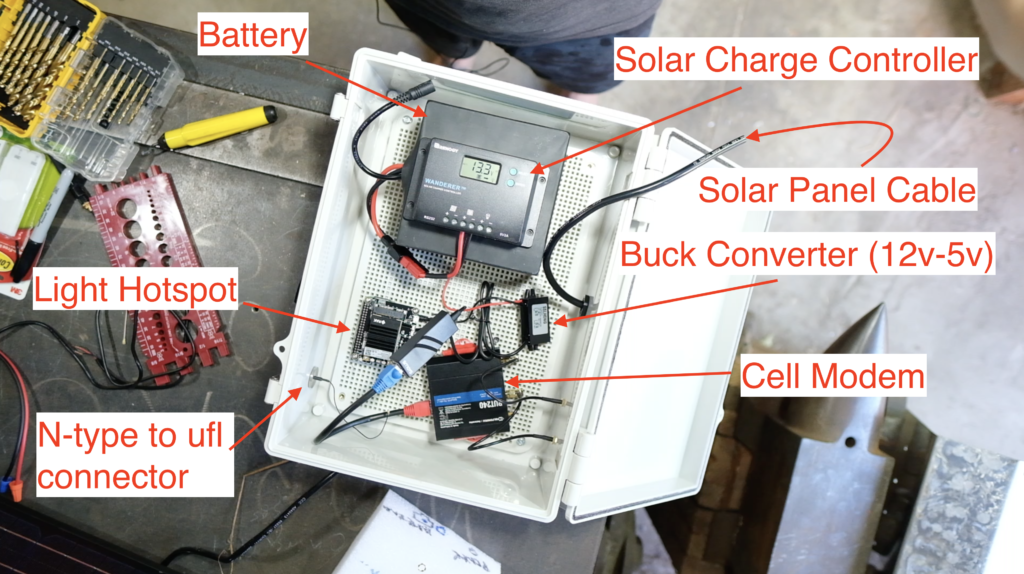
Here it is mounted on the nearest available space (my workbench) as a test run. Please note that you're not limited to mounting on workbenches. ;)
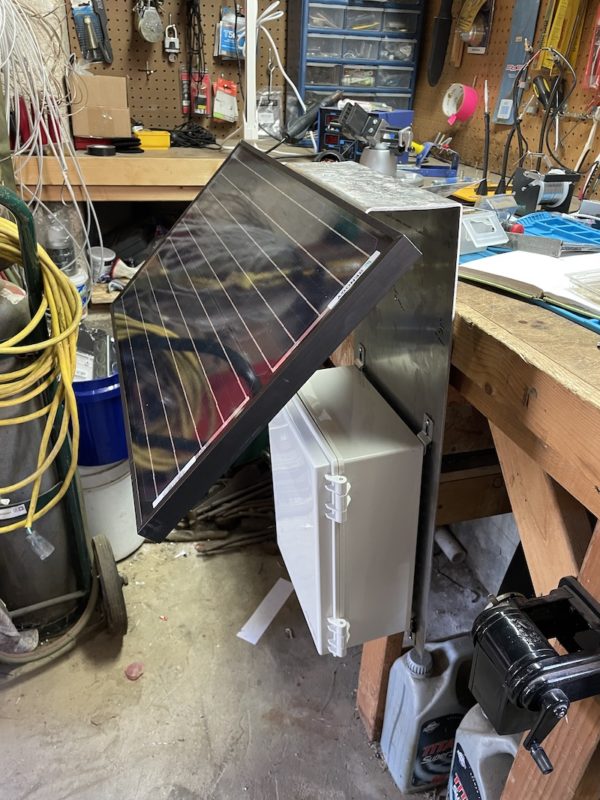
The box still needs vent holes cut and vents mounted along with the holes & glands for antenna cables, but this gives you an idea of how the thing works. It is WAY easier than any other off grid mount I've built. Here's a quick video of it with the HNTenna and a cell antenna mounted, though no cables run yet.
The next step is breaking it all down and seeing if I can fit it in my backpack. One of the real beauties of this setup is how small it is. Most backpacks on the market are way too small to fit a large enclosure. This backpack is built for elk hunters to carry out their meat, but I figured Stone Glacier wouldn't mind if I repurposed their EVO 3300 as a telecommunications pack. To be clear, this is not (by far) the cheapest pack you can buy to do this job. I just like nice things.
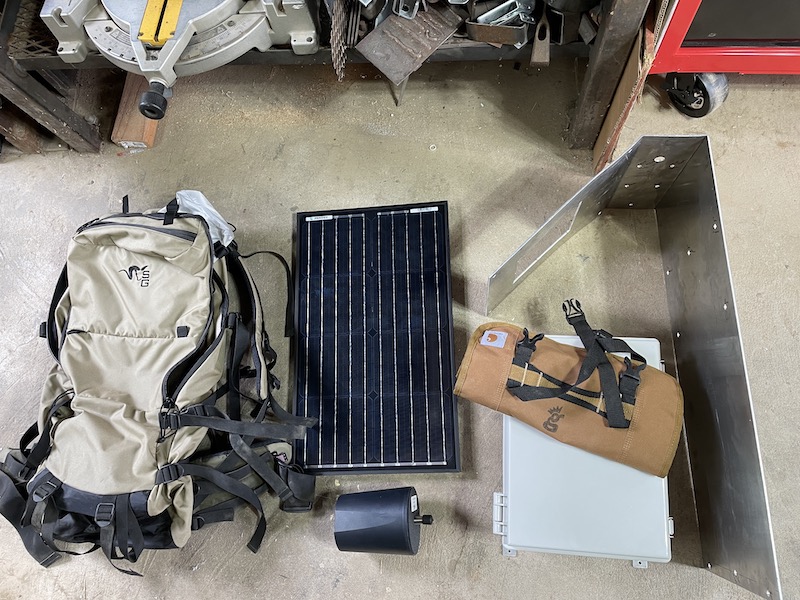
From left to right you've got the pack, the solar panel, below the panel is the HNTenna, then the enclosure with a GK tool roll on it, and finally, the bracket.
Now, that bracket has some sharp edges, so if you're going to strap it on a pack you'll want to cushion those. I had some leftover foam laying around the shop, so I taped it on with painters tape (comes up off easily) and set up the pack.
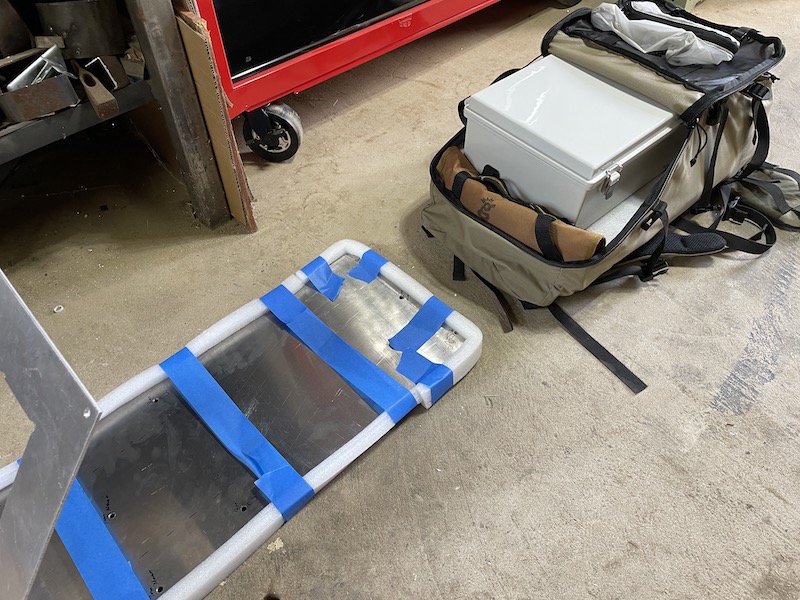
You can't see it in that pic, but I've also padded the solar panel, which is against my back in the pack. While the panels don't scratch super easily, they're not the toughest thing out there, and any scratch can decrease the efficiency. That's something you want to avoid when you've got such a small panel. Here's the pack with everything in it, all ready to go.
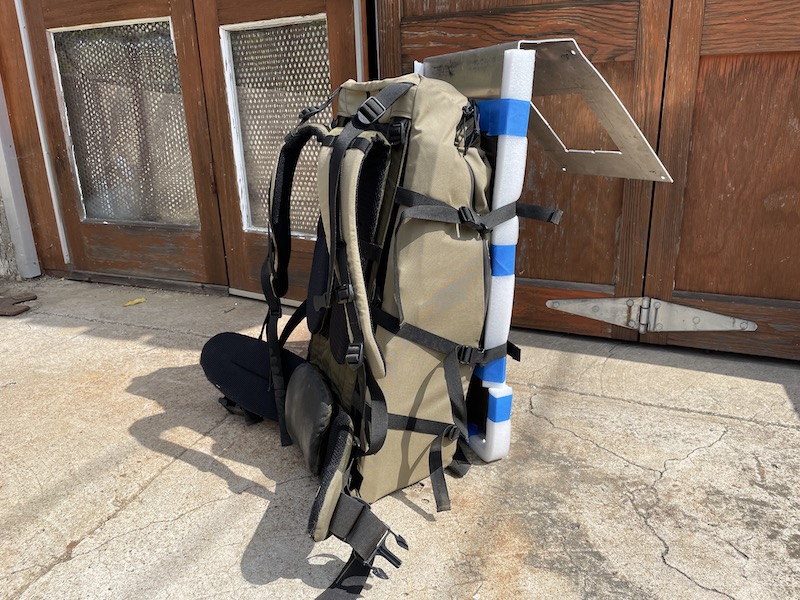
I'm guessing the whole thing weighs less than 35 lbs. If you've ever gotten into pack weight and how it can effect your ability to perform under pressure, you know that this is right at the limit of what saps courage over time. I'm not expecting to engage in any firefights while mounting this thing, so I feel pretty safe, even if I'm slightly over S.L.A Marshall's recommended weight.
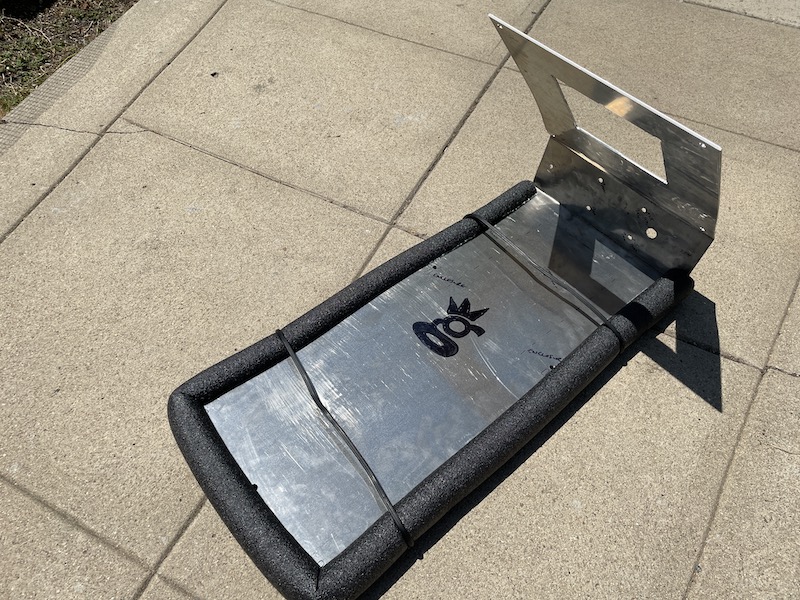
After loading the pack up I decided to re-wrap the bracket with a cleaner looking foam setup using pipe insulation. Here's what that looks like, just for reference.
The gear is pretty straightforward (aside from the bracket). This is a slightly different setup than the one I've shown you. Try to identify the components on your own, hit the comments if you need help.
IBR200 cell modem, Renogy Wanderer charge controller, 12-5v buck converter, and then whatever your hotspot is. Here's the interior layout with almost nothing hooked up. The two pink/orange cables go out to the cell modem antennas. You can see the vent up at the top right. There's also one at the bottom left. Because the PiZero doesn't have a native Ethernet connection I picked up a converter for it. Everything else is pretty straightforward.
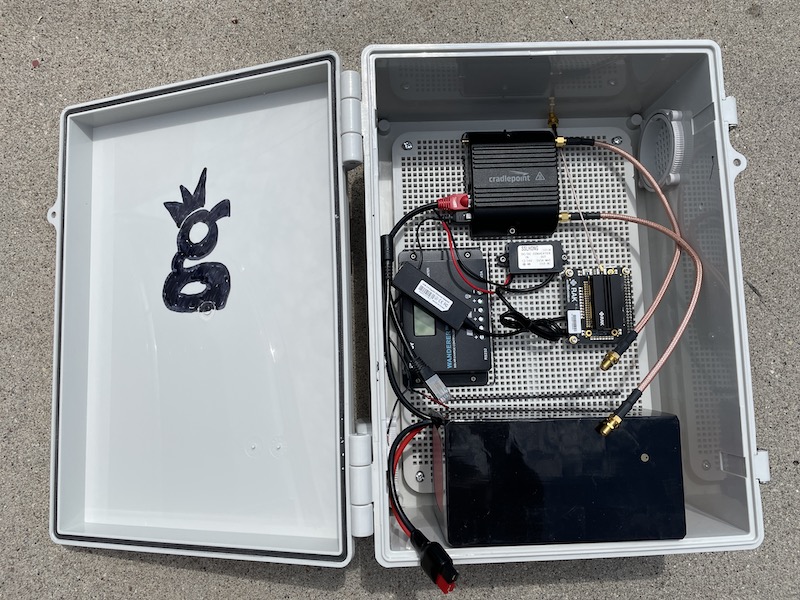
If you're looking to do this same thing, keep in mind that this enclosure may NOT fit your hotspot, at least as I currently have it laid out. RAK V2s will be fine, but other hotspots may need to be mounted on the door, or just require a reshuffling.
Ok, that wraps up most of the details on this project. If you'd like help getting your Helium Hotspot off grid, consider hiring me to walk you through the best ways to both build and place your hotspot. Rock on!
Archived Comments
Gary - 7/10/2021
Hey Nik that's pretty impressive! I wish I lived in an area where I could go off grid like that. I bet that will definitely be worth all the hard effort you put forth into this project. Rock on!
Nik - 7/10/2021
Thanks Gary!
Peter simon Batrony - 7/11/2021
so awesome!!
Paul - 7/12/2021
Hi Nik! That’s awesome what you achieved here! What about the network? How did you connect the hotspot to the network? Are you using 4G with a dedicated plan?
Michael I Slattery - 7/12/2021
Why no info about your antenna and the dbi?
Nik - 7/12/2021
Hi Michael, it's an HNTenna, should be a link in the article to it. Just in case, visit them here.
Nik - 7/12/2021
Yep, that's a Cradlepoint IBR200 in there, which is a cellular modem. Cell modems allow your hotspot to connect to the internet. Because this is just a packet forwarder I can use a much smaller plan than a "full fat" miner. Once Light Gateways start to be sold, you can do the same thing. In the meantime, you'll need on the order of 40-50GB/month, although that may not be enough. One off-grid I know is on track to use 90GB this month!
KBR - 7/13/2021
Still waiting on my hotspots to come in, but when I do I will be sure to give you a call1
Alan Halley - 7/15/2021
Hey, Nik, And why are you deploying this tech? Alan
Nik - 7/15/2021
Hi Alan, mostly because this is the most fun way for me to deploy a Helium miner. I like the mix of designing, building, assessing a placement, then getting it deployed. There are certainly easier ways to do this. For the first test run on this miner I've just got it deployed on a mountain top you can drive up to; easy to test that way, and great coverage.
Brandon Kling - 7/16/2021
Nik why only 3dbi? Is it because you are deploying this in a place with varying elevations? Also why HNtenna? I've seen RAK/CalChip antenna's also. thanks. -brandon
Nik - 7/16/2021
Hi Brandon, 3 dBi because most of the time a high gain isn't the right choice. HNTenna because I think it's the best antenna on the market. I'm seeing it routinely hit other gateways 170+ km out.
Paulo Bazzo - 7/24/2021
This looks great but I wondering, what will make it secure from vandals or from people coming around your set up and messing with it? Of course it will be locked but don't you think off grid miners can be somewhat risky?
Nik - 7/25/2021
Yep, that risk definitely exists. Aim to mitigate by putting it behind fences or some other "primary" form of protection.
Justin - 7/30/2021
Nik- great piece! On the security question, I know Helium Explorer will show that a miner is in a hexagon, but that is a pretty large area. Is there a way for someone to identify exactly where the setup is located if they wanted to go out and mess with it?
Nik - 7/30/2021
Yep, any of the current paid services (Helium.Vision, HotspotRF etc) will report your asserted location. That information is public, you just can't see it on Explorer. One way to hedge against being found is to assert in the middle of the nearest street intersection within about 150m of your location. Close enough that you're still accurate re. coverage stuff, far enough away to maintain privacy. If you're way off in the back of beyond with no miners (or street intersections) close by, it's just tougher to hide it, though you *probably* have some more wiggle room with distances.
Marie - 8/6/2021
This is epic!!! Quick question, how much data does a miner consume per month? 10gb? 20gb?
Nik - 8/6/2021
Hi Marie, plan on 90 GB/month and you should be fine. At the beginning it was 20-30GB/month but that has slowly crept up.
Manny - 8/10/2021
Love the enthusiasm about building fully off grid miners. I wanted to do this but couldn't figure out where to start until I read this article and your previous one. Can you tell me the process as to how you get permission to place the miners on top of a mountain or hillside? For instance, do you just find a piece of public land and post it where ever you please or do you have to call the City/County and request permission and pay any fees associated to it?
Nik - 8/10/2021
Hi Manny, I had a relationship with the land owners on the mountain; I'd placed a weather station on there the year before. If you can find private land owners they'll be far easier to deal with than the city/county.
Mike - 8/12/2021
Nice work! Do you know if a Multitech MultiConnect could be used instead of the RUT 240? If so, any drawbacks?
Anthony - 8/26/2021
This is super cool! What's the ROI look like for this miner? or how much do you make each month from it?
Nik - 8/26/2021
Depends on where you place it; location is everything when it comes to earnings.
ray - 8/30/2021
So you just bought a RAK2245 which is a light hotspot? How did you pair it to your phone/helium app?
Nik - 8/30/2021
Hi Ray, sort of. This is a bit confusing. For about a month and a half in late 2020, Helium opened up a DIY program, where you could buy your own hardware, receive an "alpha code" from Helium, and build your own Hotspot. They quickly turned it off as they learned how susceptible to gaming it was, but anyone who had received a code was able to build a working hotspot with it. I had a few friends do that, and funnily enough they abandoned the project and gave me their alpha codes. This is a hotspot I built that uses one of those alpha codes. It doesn't pair with a phone or app.
Dan - 9/2/2021
Genius. Pure Genius... and I actually LOL'd at the word Suckfest.
Nik - 9/2/2021
Right on Dan, glad it made ya laugh and helped you learn. Charge!
Glenn Stanford - 10/1/2021
Great! Exactly what do I need to deploy on towers without ISP service. Can get the miner just don’t know diddly about all the other equipment. I am versed in PV and associated equipment. How are you dumping your excess PV harvest? A dc light bulb etc? Thanks
Nik - 10/1/2021
Hi Glenn, if you have access to a tower you'll need both power & internet connection, the latter of which can come via cell modem; a RUT240 is a good option there. Not sure about excess PV harvest, am letting the charge controller handle that. :)
Helium Deployed: The Network In Action - Gristle King - A Guide to Helium - 10/7/2021
[…] It started with the usual last minute scramble to get everything ready for a big project. The night before I was out in the shop cutting masts and prepping enclosures to make sure I had everything ready for a big week! During the past year, I’ve learned a bunch about getting these things out in the wild. The latest improvement I learned from a client (thanks Dave H!) was using these little tripods for a “plant it anywhere” setup that’s easy to carry. […]
Mason - 10/21/2021
Hey Nik, I am actually really wanting to do an off-grid system because I live in Utah and a hotspot up on the side of the mountain would do incredibly well. But my only fear is having someone steal all the equipment because the location is all seen on the app. have you run into that yet?
Nik - 10/22/2021
Hi Mason, Yep, I've heard of hotspots getting stolen; one of those risks you run. Mitigate it with placing on private property, ideally behind a fence or otherwise difficult to get to (obvi you need to ask for permission.)
Reports From The Field: Tracking With Helium - Gristle King - A Guide to Helium - 11/2/2021
[…] Peak. For those of you way into building these things, this is a slightly older build mode (directions here). Notice the RP-SMA connector (not an N?type) for the bulkhead connection. N?types […]
Ivo - 11/3/2021
Hi Nick. I think the solar panel will vibrate in strong winds. It would be good to finish two struts between the panel and the main support plate on which there is a box with a hotspot. This prevents vibrations and possible breakage of the solar panel. Ivo - Czech republic ?
Nik - 11/3/2021
Hi Ivo, it might. I like the idea of struts, though it makes it harder to pack. I've got a new way of putting it all together with the solar panel & box mounted separately on a pole. The idea came from a client and I'm digging it, although I still have improvements to make regarding securing the box & panel to the pole so they don't slide around. Hose clamps are fine for "normal" weather, but heavy winds will rotate a panel.
Ivo - 11/3/2021
I'm afraid that the aluminum will crack when strong vibrating without support from below. I have one more question for you. I can use a cable with an impedance of 75 ohms instead of a 50 ohm cable ? cable : Televes T100 PE 215501 Cu / 100m / 6,6 mm (75ohm) - attenuation -16dB - 100m inner conductor, braid and foil - pure copper Will this cable work just like a 50 ohm cable?
Nik - 11/3/2021
Nope, you'll need a 50 ohm for that.
happy - 11/8/2021
where do you get that power injection come from does the modem give off power to power the miner, from what i understand a poe power injector is need to power up that poe splitter
Nik - 11/8/2021
The power on an off-grid comes from the battery. The battery will power both the modem and the hotspot. PoE is something different. More on PoE here.
Matthew Brown - 11/12/2021
Hey Nik, Is it still possible to create a DIY hotspot miner? Not especially for off grid, but for home or office use as well. I would love to explore this since there is such a shortage of device available. I also want to explore the off grid installations soon, but with no devices available It really isn't too feasible for me to do much exploring.
Nik - 11/12/2021
Hi Matt, you can create one, but it won't earn anything. The DIY program was closed very quickly after it opened up due to vulnerabilities to gaming that are still having repercussions today.
spencer - 11/14/2021
Hey Nik love the post. Was wondering if you had any recommendations on wireless connection (cell modem) since setting up your off grids. AKA would you recommend anything different now that you have set some up? Thanks!
Nik - 11/14/2021
Hi Spencer, Yeah, I think I'm going back to the Cradlepoint cell modems. The RUT240 just isn't as reliable in my experience.
Lessons Learned From A Year Of Helium Deployments - Gristle King - A Guide to Helium - 11/15/2021
[…] Hotspots both on grid and off grid on homes, commercial buildings, and (my favorite) in the mountains, I’ve learned a ton about what to do, what not to do, and how to make the most of the Helium […]
Jay McMurtrey - 11/27/2021
Nik, What's the best U.S. based data plan you've come across, or that you are using? Jay
Nik - 11/27/2021
Good question. I'm running the equivalent of a Light Hotspot, so my plan will not work for you. Right now (Nov 27, 2021), the off grid community is getting hit by a Helium anti-gaming measure and no one has a great way to fix it. Since that update, I've heard of many people using a bog-standard T-mobile card with 2GB data/month at 4G then unlimited at 3G and that works for them. No static IP, just a regular old SIM card. Still, that's not a guarantee. More over here.
Johny - 12/4/2021
Hi Nik, You drilled the holes yourself through the enclosure right? What was used to ensure that you still have the same weather protection, is it simply using rubber grommets? Or are they more specialist seals? Kind regards, Johny.
Nik - 12/4/2021
Hi Johny, I drilled the holes myself. Depends on what you're putting through, but the N-types & the RP-SMA connectors I used have a built in weather seal. You could more to that if you wanted, or you could just use a cable gland, which is what I did with the wires for the solar panel.
Emmanuel Abiona - 12/13/2021
Hi, I'm new are you able to sell me an outdoor encloser with solar and everything in it to make it functional, for a Bobcat?
Nik - 12/13/2021
Hi Emmanunuel, nope, I don't sell those, just show you how to make 'em. There are a couple other businesses out there who do sell 'em, although none yet where I'm stoked enough on their product to recommend them.
Kiryl - 1/18/2022
Hey Nik. How were you able to use cell router? Any port forwarding? My miner gets "relayed" when using cell router.
Nik - 1/19/2022
Hi Kiryl, there are lots of different ways to do it, with varying degrees of success. As of today, Jan 19th 2021, there doesn't appear to be a surefire way of NOT being relayed. You may find this post on setting up a RUT240 for an off grid useful.
Niko - 1/24/2022
Hi Nik- Wondering how you got access to this spot / permission? Isn't this public land?
Nik - 1/24/2022
Hi Niko, while it's right next to public land, this is on private land, and permission is a result of a multi year long relationship and having worked on previous projects together.
Graeme - 9/13/2022
No link for the antenna cable for cell antenna, exterior - Mouser. Can you update this.
Nik - 9/13/2022
Hi Graeme, that's because the connections will differ depending on your miner & antenna. I've used a ufl to N-type like this for mine to get from inside to outside, then put the HNTenna directly on that.
How to take your Helium Hotspot Off Grid - Gristle King - A Guide to DePIN - 8/16/2024
[…] is an updated version of my thinking on off-grid miners, that blog post is here. Much of the below information is outdated, but I’m leaving it up as a record. […]